
Server Starter Kit
БесплатноНе проверенA minimal Model Context Protocol server starter in TypeScript that enables building custom AI tools for assistants like Claude and Cursor, with a single example

Описание
A minimal Model Context Protocol server starter in TypeScript that enables building custom AI tools for assistants like Claude and Cursor, with a single example tool and easy setup.
README
A minimal Model Context Protocol server starter in TypeScript. Build custom AI tools in minutes.
MCP lets AI assistants like Claude and Cursor call your code — database queries, API calls, file operations, anything you can write a function for. This starter gives you a working server with everything wired up so you can skip the boilerplate and start building.
Quick Start
git clone https://github.com/tysoncung/mcp-server-starter.git
cd mcp-server-starter
npm install
Run in development mode (hot reload):
npm run dev
That's it. Your MCP server is running.
What's Inside
A single example tool (echo) that demonstrates the pattern for defining MCP tools:
server.tool(
  'echo',                                           // Tool name
  'Echo back the provided message',                 // Description for the AI
  { message: z.string().describe('Message text') }, // Input schema (Zod)
  async ({ message }) => {                          // Handler
    return { content: [{ type: 'text', text: `Echo: ${message}` }] };
  },
);
To add your own tools, follow the same pattern in src/server.ts. Define a name, describe what it does, declare the inputs with Zod, and write the handler.
Add to Claude Desktop
Build the project first:
npm run build
Edit your Claude Desktop config file:
- macOS:
~/Library/Application Support/Claude/claude_desktop_config.json - Windows:
%APPDATA%\Claude\claude_desktop_config.json
{
  "mcpServers": {
    "starter": {
      "command": "node",
      "args": ["/absolute/path/to/mcp-server-starter/dist/index.js"]
    }
  }
}
Restart Claude Desktop and your tools will be available.
Add to Cursor
Open Cursor Settings → MCP → Add Server, or edit .cursor/mcp.json in your project:
{
  "mcpServers": {
    "starter": {
      "command": "node",
      "args": ["/absolute/path/to/mcp-server-starter/dist/index.js"]
    }
  }
}
Scripts
| Command | Description |
|---|---|
npm run dev |
Start with hot reload (tsx watch) |
npm run build |
Compile TypeScript to dist/ |
npm start |
Run compiled output |
npm test |
Run tests |
Project Structure
src/
├── server.ts              # Server setup & tool definitions
├── index.ts               # Entry point (stdio transport)
└── __tests__/
    └── server.test.ts     # Tool tests
Requirements
- Node.js ≥ 20
- npm
Want More? 🚀
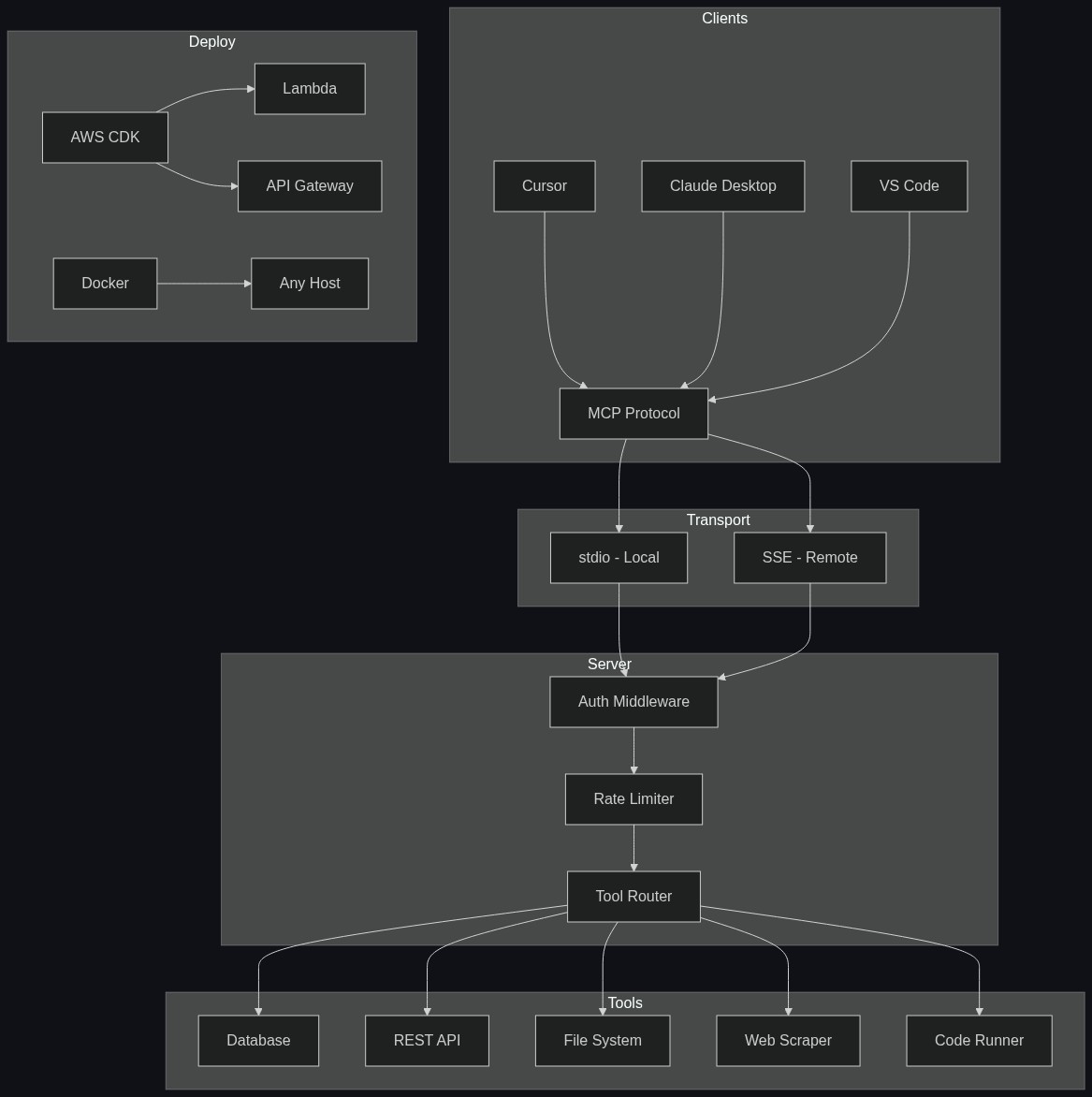
This free starter gets you up and running with one example tool and stdio transport. The Pro Starter Kit gives you everything you need to ship production MCP servers:
| Free | Pro | |
|---|---|---|
| Tools | 1 example | 5 production-ready templates |
| Tool templates | — | Database, REST API, filesystem, web scraper, code runner |
| Transport | stdio | stdio + SSE (remote clients) |
| Authentication | — | API key + JWT middleware |
| Rate limiting | — | ✅ Built-in |
| Logging | — | Structured logging middleware |
| Testing | Basic | Full test suite with Vitest |
| Docker | — | Dockerfile + docker-compose |
| Deployment | — | AWS CDK infrastructure |
| Error handling | Basic | Production-grade with retries |
| Linting | — | ESLint + Prettier configured |
What's in Pro?
- 5 tool templates you can copy and customize — not just echo, but real patterns for databases, REST APIs, file systems, web scraping, and code execution
- Dual transport — serve over stdio for local use and SSE for remote clients, both from the same codebase
- Auth middleware — API key and JWT authentication out of the box
- Rate limiting — protect your server from runaway AI requests
- Structured logging — know exactly what your server is doing in production
- Docker + AWS CDK — deploy anywhere with one command
- Full test suite — every tool tested, CI-ready
👉 Get the Pro Starter Kit — $49 →
Skip the hours of setup. Start building production MCP tools today.
License
MIT — see LICENSE
📖 Read the Full Story
I Built a Production MCP Server Kit — Here's What I Learned — the design decisions, architecture, and lessons from building production MCP servers.
Установка Server Starter Kit
У этого сервера нет опубликованного пакета — он собирается из исходников. Открой репозиторий и следуй инструкции в README.
▸ github.com/tysoncung/mcp-server-starterFAQ
Server Starter Kit MCP бесплатный?
Да, Server Starter Kit MCP бесплатный — установка в пару кликов через Unyly без оплаты.
Нужен ли API-ключ для Server Starter Kit?
Нет, Server Starter Kit работает без API-ключей и переменных окружения.
Server Starter Kit — hosted или self-hosted?
Self-hosted: сервер запускается локально на твоей машине командой из раздела установки.
Как установить Server Starter Kit в Claude Desktop, Claude Code или Cursor?
Открой Server Starter Kit на unyly.org, выбери вкладку своего клиента (Claude Desktop, Claude Code, Cursor) и нажми Install — конфиг сгенерируется автоматически, без правки JSON.
Похожие MCP
Fetch
Web content fetching and conversion for efficient LLM usage.
AWS KB Retrieval
Retrieval from AWS Knowledge Base using Bedrock Agent Runtime.
 автор: modelcontextprotocol
Spring AI MCP Server
Provides auto-configuration for setting up an MCP server in Spring Boot applications.
llm-analysis-assistant
A very streamlined mcp client that supports calling and monitoring stdio/sse/streamableHttp, and can also view request responses through the /logs page. It also
 автор: xuzexin-hz
Compare Server Starter Kit with
Не уверен что выбрать?
Найди свой стек за 60 секунд
Автор?
Embed-бейдж для README
Похожее
Все в категории ai