
Stdio To Streamable Http Adapter
БесплатноНе проверенBridges STDIO MCP clients to Streamable HTTP MCP servers, allowing any STDIO-supported client to use Streamable HTTP servers immediately.

Описание
Bridges STDIO MCP clients to Streamable HTTP MCP servers, allowing any STDIO-supported client to use Streamable HTTP servers immediately.
README
Integrate any MCP Client that has STDIO MCP Server Support (most do) with the Streamable HTTP MCP Servers
If you have a Streamable HTTP MCP Server, forking this, hardcoding the URI and publishing will give you a repo that you can point to, add to directories and let people use via STDIO.
Note: This has similarities to the mcp-remote package
Why?
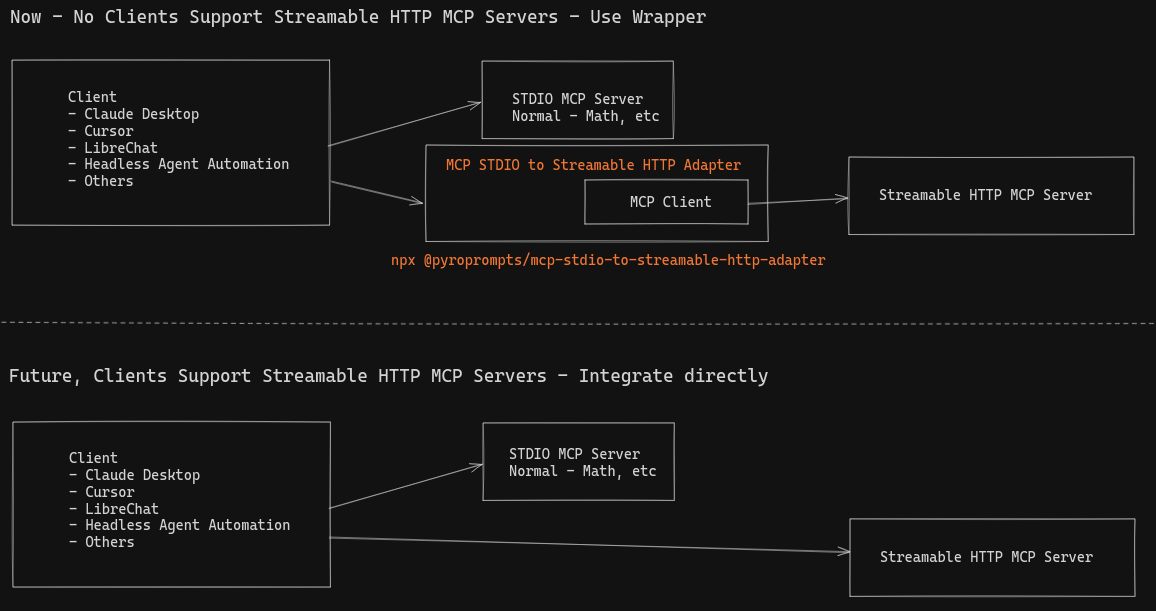
The MCP Spec to add a Streamable HTTP Transport landed end of March 2025 and as of the end of April, no clients have adopted support. The typescript-sdk has merged the code, but not released. The Python SDK is still in development to support it. The Inspector supports it, but that's it.
This leaves developers in an awkward position. Develop the MCP Server using STDIO or SSE (deprecated) so it works with clients or develop with Streamable HTTP transport, but nobody can use it.
I (ferrants) want to start integrating the Streamable HTTP MCP Servers beyond just the inspector, so I need a way to connect them to clients and LLMs right away!
This package aims to bridge the cap by being a STDIO MCP Server that relays to your Streamable HTTP MCP Server. This makes all MCP Clients support Streamable HTTP right away. And now developers can develop the Streamable HTTP MCP Servers and provide an installation method.
Installation
To add OpenAI to Claude Desktop, add the server config:
On MacOS: ~/Library/Application Support/Claude/claude_desktop_config.json
On Windows: %APPDATA%/Claude/claude_desktop_config.json
Env Vars
URI: The URL of the Streamable HTTP MCP Server. This is required.MCP_NAME: The name of the MCP Server. This is optional. If you configure multiple, this is required so they do not have the same names.BEARER_TOKEN: The Bearer token for the Streamable HTTP MCP Server. This is optional. If specified, this will be sent along in the Authorization header.
Configuration
You can use it via npx in your Claude Desktop configuration like this:
{
  "mcpServers": {
    "my-saas-app-development": {
      "command": "npx",
      "args": [
        "@pyroprompts/mcp-stdio-to-streamable-http-adapter"
      ],
      "env": {
        "URI": "http://localhost:3002/mcp",
        "MCP_NAME": "local-custom-streamable-http-adapter"
      }
    }
  }
}
Or, if you clone the repo, you can build and use in your Claude Desktop configuration like this:
{
  "mcpServers": {
    "my-saas-app-development": {
      "command": "node",
      "args": [
        "/path/to/mcp-stdio-to-streamable-http-adapter/build/index.js"
      ],
      "env": {
        "URI": "http://localhost:3002/mcp",
        "MCP_NAME": "local-custom-streamable-http-adapter"
      }
    }
  }
}
You can add multiple providers by referencing the same MCP server multiple times, but with different env arguments:
{
  "mcpServers": {
    "my-saas-app-development": {
      "command": "node",
      "args": [
        "/path/to/mcp-stdio-to-streamable-http-adapter/build/index.js"
      ],
      "env": {
        "URI": "http://localhost:3002/mcp",
        "MCP_NAME": "local-custom-streamable-http-adapter"
      }
    },
    "pyroprompts": {
      "command": "node",
      "args": [
        "/path/to/mcp-stdio-to-streamable-http-adapter/build/index.js"
      ],
      "env": {
        "URI": "https://api.pyroprompts.com/mcp",
        "MCP_NAME": "pyroprompts",
        "BEARER_TOKEN": "abcdefg"
      }
    }
  }
}
With these three, you'll see a tool for each in the Claude Desktop Home:

And then you can chat with other LLMs and it shows in chat like this:

Or, configure in LibreChat like:
  my-saas-app-development:
    type: stdio
    command: npx
    args:
      - -y
      - @pyroprompts/mcp-stdio-to-streamable-http-adapter
    env:
      URI: "http://localhost:3002/mcp",
      MCP_NAME: "my-custom-saas-app"
      PATH: '/usr/local/bin:/usr/bin:/bin'
And it shows in LibreChat:

Development
Install dependencies:
npm install
Build the server:
npm run build
For development with auto-rebuild:
npm run watch
Debugging
Since MCP servers communicate over stdio, debugging can be challenging. We recommend using the MCP Inspector, which is available as a package script:
npm run inspector
The Inspector will provide a URL to access debugging tools in your browser.
Acknowledgements
- Obviously the modelcontextprotocol and Anthropic teams for the MCP Specification and integration into Claude Desktop. https://modelcontextprotocol.io/introduction
- PyroPrompts for sponsoring this project. Use code
MCPSTREAMABLEADAPTERfor 20 free automation credits on Pyroprompts.
from github.com/pyroprompts/mcp-stdio-to-streamable-http-adapter
Установка Stdio To Streamable Http Adapter
У этого сервера нет опубликованного пакета — он собирается из исходников. Открой репозиторий и следуй инструкции в README.
▸ github.com/pyroprompts/mcp-stdio-to-streamable-http-adapterFAQ
Stdio To Streamable Http Adapter MCP бесплатный?
Да, Stdio To Streamable Http Adapter MCP бесплатный — установка в пару кликов через Unyly без оплаты.
Нужен ли API-ключ для Stdio To Streamable Http Adapter?
Нет, Stdio To Streamable Http Adapter работает без API-ключей и переменных окружения.
Stdio To Streamable Http Adapter — hosted или self-hosted?
Доступен hosted-вариант: Unyly запускает сервер в облаке, локальная установка не обязательна.
Как установить Stdio To Streamable Http Adapter в Claude Desktop, Claude Code или Cursor?
Открой Stdio To Streamable Http Adapter на unyly.org, выбери вкладку своего клиента (Claude Desktop, Claude Code, Cursor) и нажми Install — конфиг сгенерируется автоматически, без правки JSON.
Похожие MCP
GitHub
PRs, issues, code search, CI status
 автор: GitHub
Filesystem
Secure file operations with configurable access controls.
Memory
Knowledge graph-based persistent memory system.
Template MCP Server
A CLI tool to create a new Model Context Protocol server project with TypeScript support, dual transport options, and an extensible structure
 автор: mcpdotdirect
Compare Stdio To Streamable Http Adapter with
Не уверен что выбрать?
Найди свой стек за 60 секунд
Автор?
Embed-бейдж для README
Похожее
Все в категории development