loading…
/ru
Весь каталогOption 1: Install
Information Flow Control via
1. Define types and capability in
2. Implement the operations in
3. Wire it into
Tacit
БесплатноНе проверенTACIT (Tracked Agent Capabilities In Types) is a safety harness for AI agents. Instead of calling tools directly, agents write code in Scala 3 with capture chec

Описание
TACIT (Tracked Agent Capabilities In Types) is a safety harness for AI agents. Instead of calling tools directly, agents write code in Scala 3 with capture checking: a type system that statically tracks capabilities and enforces that agent code cannot forge access rights, cannot perform effects beyond its budget, and cannot leak information from pure sub-computations. It provides an MCP interface,
README
Paper: Securing Agents With Tracked Capabilities (ACM) · arXiv:2603.00991 · 🏆 Best Paper Award at CAIS 26
TACIT (Tracked Agent Capabilities In Types) is a safety harness for AI agents. Instead of calling tools directly, agents write code in Scala 3 with capture checking: a type system that statically tracks capabilities and enforces that agent code cannot forge access rights, cannot perform effects beyond its budget, and cannot leak information from pure sub-computations. It provides an MCP interface, so that it can be easily used by all MCP-compatible agents.
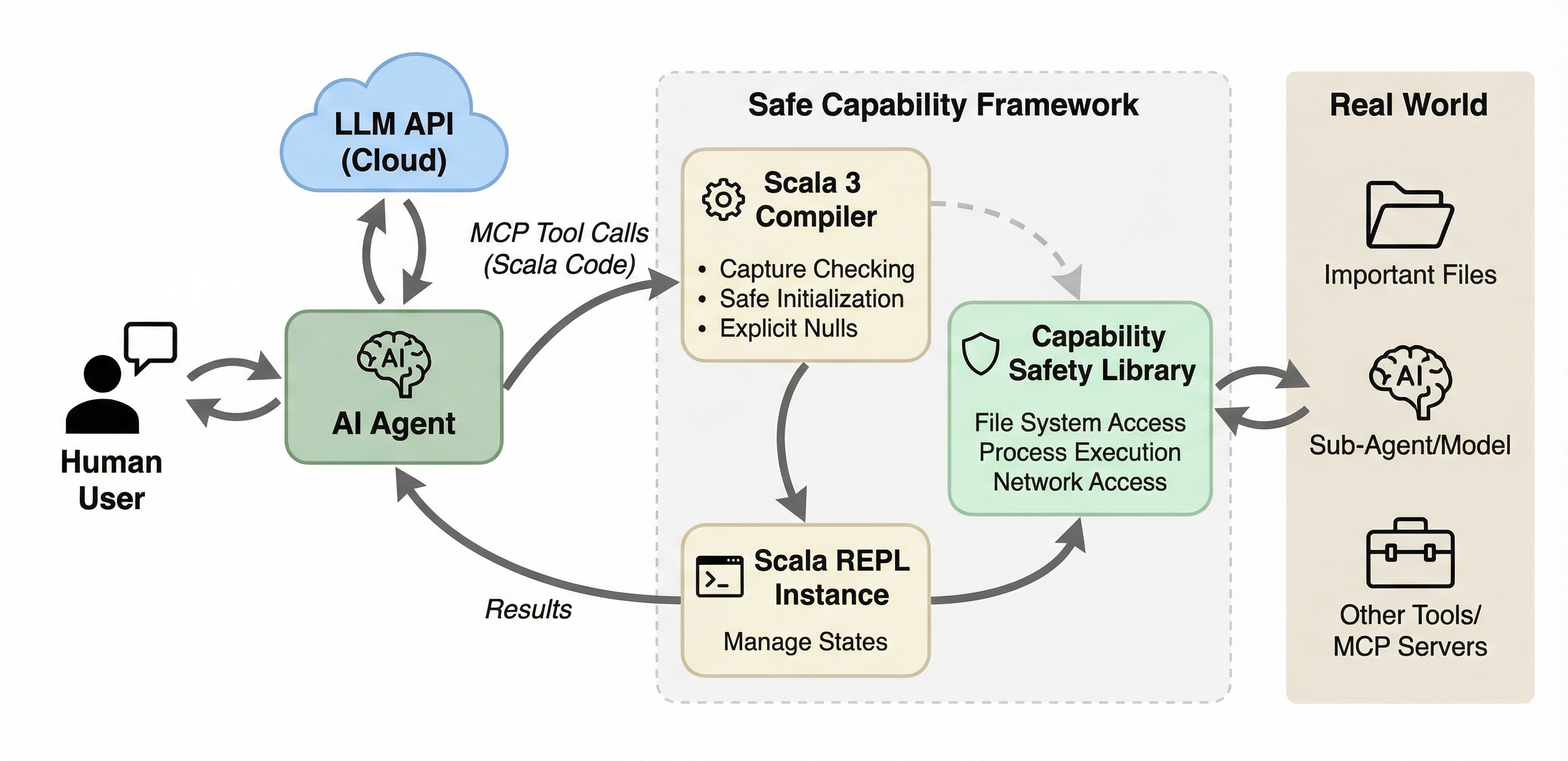
The framework has three main components:
- Scala 3 compiler. Agent-submitted code is validated and type-checked with capture checking enabled in safe mode, which enforces a capability-safe language subset.
- Scala REPL. A local REPL instance executes compiled code and manages state across interactions. Supports both stateless one-shot execution and stateful sessions.
- Capability safety library. A typed API that serves as the sole gateway through which agent code interacts with the real world: file system, process execution, network, and sub-agents. The library is extensible: add new capabilities by modifying only the library code, without changing the MCP server itself.
Quick Start
TACIT provides a standard MCP server that communicates via JSON-RPC over stdio. It works with any MCP-compatible agent, including Claude Code, OpenCode, GitHub Copilot, and others.
Requires JDK 17+.
Installing TACIT
Choose one of the installation approaches below. The tacit CLI wrapper is the recommended option.
Option 1: Install tacit (Recommended)
tacit is a small wrapper command for managing TACIT locally. Use tacit setup once to install the command and fetch the latest release, tacit update to update the JARs, tacit self update to refresh the wrapper itself, and tacit serve to launch the MCP server.
# Download the wrapper directly (no git clone required)
curl -fsSL https://raw.githubusercontent.com/lampepfl/tacit/refs/heads/main/tacit -o tacit
chmod +x tacit

# Install it and download the latest TACIT release
./tacit setup
This installs the tacit command into ~/.local/bin, ensures ~/.local/bin is on PATH, and downloads the latest release into ~/.cache/tacit/.
Common commands:
# Refresh the cached release if a new version exists
tacit update

# Refresh the tacit wrapper itself
tacit self update

# Start the MCP server
tacit serve

# Remove the wrapper and cached release
tacit self uninstall
By default, tacit uses:
| Asset | Default path |
|---|---|
| MCP Server | ~/.cache/tacit/TACIT.jar |
| Library | ~/.cache/tacit/TACIT-library.jar |
Option 2: Download Prebuilt Release JARs Directly
If you do not want the wrapper, use the release download script instead.
# Download the script directly (no git clone required)
curl -fsSL https://raw.githubusercontent.com/lampepfl/tacit/refs/heads/main/download_release.sh -o download_release.sh
chmod +x download_release.sh

./download_release.sh
Optional:
# Or use wget instead of curl
wget -q https://raw.githubusercontent.com/lampepfl/tacit/refs/heads/main/download_release.sh -O download_release.sh
chmod +x download_release.sh

# Download into a custom directory
./download_release.sh ./dist
./download_release.sh --pre-release ./dist
By default, this downloads:
| JAR | Default path |
|---|---|
| MCP Server | ./TACIT.jar |
| Library | ./TACIT-library.jar |
To build from the current source tree, see Option 3 below.
Option 3: Build from Source
Requires JDK 17+ and sbt 1.12+.
git clone https://github.com/lampepfl/tacit.git
cd tacit

./build.sh
Optional:
# Build and copy JARs into a custom directory
./build.sh ./dist

# Show full sbt output while building
./build.sh --verbose
This builds and copies two JARs:
| JAR | Path |
|---|---|
| MCP Server | ./TACIT.jar (or ./dist/TACIT.jar) |
| Library | ./TACIT-library.jar (or ./dist/TACIT-library.jar) |
Once TACIT is installed through any of the options above, configure your agent to launch the MCP server.
Configure Your Agent
Add TACIT as an MCP server in your agent's configuration. If you installed tacit CLI, just use tacit serve. If you installed TACIT manually, use the explicit java -jar ... --library-jar ... form instead.
Claude Code
Add to your project's .mcp.json (or ~/.claude.json for global).
With tacit:
{
  "mcpServers": {
    "tacit": {
      "command": "tacit",
      "args": ["serve"]
    }
  }
}
With manual JAR paths:
{
  "mcpServers": {
    "tacit": {
      "command": "java",
      "args": [
        "-jar", "/path/to/TACIT.jar",
        "--library-jar", "/path/to/TACIT-library.jar"
      ]
    }
  }
}
OpenCode
Add to your opencode.json.
With tacit:
{
  "$schema": "https://opencode.ai/config.json",
  "mcp": {
    "tacit": {
      "type": "local",
      "enabled": true,
      "command": ["tacit", "serve"]
    }
  }
}
With manual JAR paths:
{
  "$schema": "https://opencode.ai/config.json",
  "mcp": {
    "tacit": {
      "type": "local",
      "enabled": true,
      "command": [
        "java",
        "-jar", "/path/to/TACIT.jar",
        "--library-jar", "/path/to/TACIT-library.jar"
      ]
    }
  }
}
GitHub Copilot (VS Code)
Add to your .vscode/mcp.json.
With tacit:
{
  "servers": {
    "tacit": {
      "command": "tacit",
      "args": ["serve"]
    }
  }
}
With manual JAR paths:
{
  "servers": {
    "tacit": {
      "command": "java",
      "args": [
        "-jar", "/path/to/TACIT.jar",
        "--library-jar", "/path/to/TACIT-library.jar"
      ]
    }
  }
}
Your agent can now use TACIT's tools to execute sandboxed Scala code.
Recommended: Disable Built-in Tools
To fully benefit from TACIT's capability-based safety, disable the agent's built-in file, shell, and network tools so that all operations go through the sandboxed REPL.
Claude Code
Launch with --disallowedTools to block built-in tools:
claude --disallowedTools "Bash,Read,Write,Edit,WebFetch"
Or add to your project's .claude/settings.json:
{
  "permissions": {
    "disallowedTools": ["Bash", "Read", "Write", "Edit", "WebFetch"]
  }
}
OpenCode
Set built-in tool permissions to "deny" in opencode.json:
{
  "$schema": "https://opencode.ai/config.json",
  "permission": {
    "*": "ask",
    "bash": "deny",
    "read": "deny",
    "edit": "deny",
    "glob": "deny",
    "grep": "deny",
    "list": "deny",
    "tacit*": "allow"
  },
  "mcp": {
    "tacit": { "..." : "..." }
  }
}
GitHub Copilot (VS Code)
In your VS Code settings.json, restrict the tools available to Copilot:
{
  "github.copilot.chat.agent.tools": {
    "terminal": false,
    "fs_read": false,
    "fs_write": false
  }
}
Configuration
The server can be configured via CLI flags or a JSON config file. Pass flags directly in your agent's MCP args, or use --config to point to a JSON file.
Configuration is split into server config (transport, recording, sessions) and library config (sandbox behavior, capabilities). In the JSON config file, library settings live under the libraryConfig key and are passed directly to the library for processing.
CLI Flags
Server flags:
| Flag | Description |
|---|---|
--library-jar <path> |
Required. Path to the library JAR (TACIT-library.jar) |
-r/--record <dir> |
Log every execution to disk |
-q/--quiet |
Suppress startup banner and request/response logging |
--no-session |
Disable session-related tools |
--safe-mode / --no-safe-mode |
Enable/disable Scala 3's language.experimental.safe in the REPL for every execution (default: on; see Safe Mode) |
--exec-timeout-ms <ms> |
Wall-clock timeout for a single REPL evaluation (default: none; see Execution Timeout) |
-c/--config <path> |
JSON config file (flags after --config override file values) |
Library flags (shorthand for some libraryConfig fields):
| Flag | Description |
|---|---|
-s/--strict |
Block a built-in list of file-op commands (cat, ls, rm, ...) through exec. Convenient for quick experiments; for real deployments prefer --command-permissions. |
--command-permissions <patterns> |
Comma-separated glob patterns of exec-able commands (e.g. echo,py*,ls). Only * is interpreted as a wildcard. When set, --strict is ignored. |
--network-permissions <patterns> |
Comma-separated glob patterns of reachable hosts (e.g. *.example.com,api.github.com). Only * is interpreted as a wildcard. |
--allowed-roots <paths> |
Comma-separated outer bound on requestFileSystem roots (e.g. /home/me/project,/tmp). A requested root must resolve to a path within one of these. Defaults to the server's working directory when unset. |
--classified-paths <patterns> |
Comma-separated classified path patterns (gitignore-style, see below) |
--llm-base-url <url> |
LLM API base URL |
--llm-api-key <key> |
LLM API key |
--llm-model <name> |
LLM model name |
JSON Config File
{
  "recordPath": "/tmp/recordings",
  "quiet": true,
  "sessionEnabled": true,
  "safeMode": true,
  "executionTimeoutMs": 60000,
  "libraryJarPath": "/path/to/TACIT-library.jar",
  "libraryConfig": {
    "commandPermissions": ["sbt", "scala", "javac", "java", "make"],
    "networkPermissions": ["*.scala-lang.org", "github.com", "docs.oracle.com"],
    "allowedRoots": ["/home/user/project", "/tmp"],
    "classifiedPaths": [".ssh", ".env", ".env.*", "secrets"],
    "secureOutput": "/tmp/secure.log",
    "llm": {
      "baseUrl": "https://api.example.com",
      "apiKey": "sk-...",
      "model": "gpt-..."
    }
  }
}
commandPermissions (optional). The exec allowlist: a list
of glob patterns (only * is a wildcard) that every command passed to exec
must match. This sits on top of the per-scope set declared by
requestExecPermission(...); a command must be in both to actually run. When
set, strictMode is ignored. In real deployments you should always configure
this list explicitly.
strictMode (optional, default true). A quick-experiment default that
blocks a built-in list of file-op commands (cat, ls, rm, tar, chmod,
shells, ...) through exec. Convenient when you just want to try things out,
but too coarse for real use; prefer commandPermissions.
networkPermissions (optional). The network allowlist: a
list of glob patterns (only * is a wildcard) that every host reached via
httpGet/httpPost/httpRequest must match. Like commandPermissions, this
layers on top of the per-scope set declared by requestNetwork(...); a host
must be in both. When unset, only the per-scope requestNetwork allowlist
applies.
allowedRoots (optional). The file-system outer bound: a list of paths
that confine where requestFileSystem(root) may operate. A requested root must
resolve (symlinks included) to a path equal to or nested under one of these, or
access is denied. When unset, it defaults to the server's current working
directory, so the sandbox is confined to that subtree (fail closed). Set it
explicitly to widen or relocate the bound. Classified-path masking still applies
within whatever root is granted.
secureOutput (optional). Path to an append-only file that mirrors every
println/print/printf call from the isolation, but with Classified[_]
values unwrapped. The agent's main output still shows the masked form
(Classified(***)), so only whoever can read this file sees the real content.
Parent directories are created automatically. When unset, printing behaves
normally and nothing is written to disk.
Classified Path Patterns
Classified path patterns follow gitignore-style syntax. A path is classified if it matches a pattern or is a descendant of a match.
| Pattern | Matches | Example |
|---|---|---|
.ssh |
Any path component named .ssh |
/home/user/.ssh/id_rsa |
.env.* |
Any component matching the glob | /project/.env.local |
config/*/keys |
Relative to filesystem root, with wildcard | <root>/config/prod/keys/secret.pem |
**/secrets |
secrets at any depth |
<root>/a/b/secrets/key.txt |
/home/user/.ssh |
Absolute path (symlinks resolved) | /home/user/.ssh/id_rsa |
Rules:
- No
/in pattern: matches against any path component (basename matching) - Relative pattern with
/: anchored to the filesystem root; supports*,**,?,[…] - Absolute pattern: matched against full path; non-glob prefix is resolved through symlinks
- Trailing
/is stripped (no directory-only distinction)
Default classified patterns (when classifiedPaths is not configured): .ssh, .gnupg, .env, .env.*, .netrc, .npmrc, .pypirc, .docker, .kube, .aws, .azure, .gcloud.
Tools
| Tool | Parameters | Description |
|---|---|---|
execute_scala |
code |
Execute a Scala snippet in a fresh REPL (stateless) |
create_repl_session |
- | Create a persistent REPL session, returns session_id |
execute_in_session |
session_id, code |
Execute code in an existing session (stateful) |
list_sessions |
- | List active session IDs |
delete_repl_session |
session_id |
Delete a session |
show_interface |
- | Show the full capability API reference |
Example: Stateful Session
1. create_repl_session          → session_id: "abc-123"
2. execute_in_session(code: "val x = 42")   → x: Int = 42
3. execute_in_session(code: "x * 2")        → val res0: Int = 84
4. delete_repl_session(session_id: "abc-123")
Security Features
TACIT's type system provides three safety guarantees that hold regardless of whether the agent is misaligned, hallucinating, or under prompt injection attack:
| Property | What it means |
|---|---|
| Capability safety | Capabilities cannot be forged or forgotten. The agent can only access resources through capabilities explicitly granted to it. |
| Capability completeness | Capabilities regulate all safety-relevant effects. The agent interacts with the world only through its granted capabilities. |
| Local purity | Specific computations can be enforced as side-effect-free. This prevents information leakage when agents process classified data. |
Capability API
The library exposes three capability request methods, each scoping access to a block. Capabilities cannot escape their scoped block. This is enforced at compile time by the capture checker.
// File system: scoped to a root directory
requestFileSystem("/tmp/work") {
  val f = access("data.txt")
  f.write("hello")
  val lines = f.readLines()
  grep("data.txt", "hello")
  find(".", "*.txt")
}

// Process execution: scoped to an allowlist of commands
requestExecPermission(Set("ls", "cat")) {
  val result = exec("ls", List("-la"))
  println(result.stdout)
}

// Network: scoped to an allowlist of hosts
requestNetwork(Set("api.example.com")) {
  val body = httpGet("https://api.example.com/data")
  httpPost("https://api.example.com/submit", """{"key":"value"}""")
  // Arbitrary verbs with a status code:
  val resp = httpRequest("DELETE", "https://api.example.com/item/42")  // resp.status, resp.body
}
The network methods also take plain headers: Map[String, String] and
secretHeaders: Map[String, Classified[String]]. A secretHeaders value (e.g.
an Authorization token read via readClassified) is sent to the allowlisted
host but is never observable to agent code, which lets an agent authenticate
to an allowed API with a secret it cannot otherwise read. httpPostClassified
completes the picture: it POSTs a Classified[String] body and returns a
Classified[String] response, so sensitive data can round-trip through an
external service while staying under information-flow control (see below).
Information Flow Control via Classified
Consider a typical code agent working on a project directory. Some files are ordinary (source code, build configs, READMEs). Others are sensitive: API keys in .env, credentials in secrets/, internal documents. The agent is powered by a cloud-hosted LLM (a third-party service). We want the agent to use or process the sensitive data (summarize internal docs, rotate keys, process reports) but never leak it to the cloud provider.
TACIT solves this through the Classified[T] type. Files under designated classified paths (configured via --classified-paths with gitignore-style patterns, e.g. .ssh, .env.*, secrets, **/keys) return their content wrapped in Classified[String] instead of plain String. If not configured otherwise, common secret paths (.ssh, .gnupg, .env, .env.*, etc.) are classified by default. The type system enforces pure-only access: Classified.map accepts only pure functions (T -> U), meaning no effects and no captured capabilities. You can transform the data, but you cannot send it anywhere. Any attempt to exfiltrate classified data is rejected at compile time:
requestFileSystem("/project") {
  val secret = readClassified("secrets/api-key.txt")

  // Compile error: map captures the file capability, not a pure function
  secret.map: s =>
    access("exfil.txt").write(s) // error: capturing f is not allowed
    s

  // Compile error: print out the classified content to the cloud LLM
  secret.map: s =>
    println(s) // error: capturing IOCapability is not allowed
    s
}
So how can the agent do useful work with classified data? Through a dual LLM design: a separate trusted local LLM processes classified content. The framework provides a chat overload that accepts Classified[String] and returns Classified[String]. The trusted LLM sees the content, but the result stays wrapped and can never flow back to the untrusted cloud model.
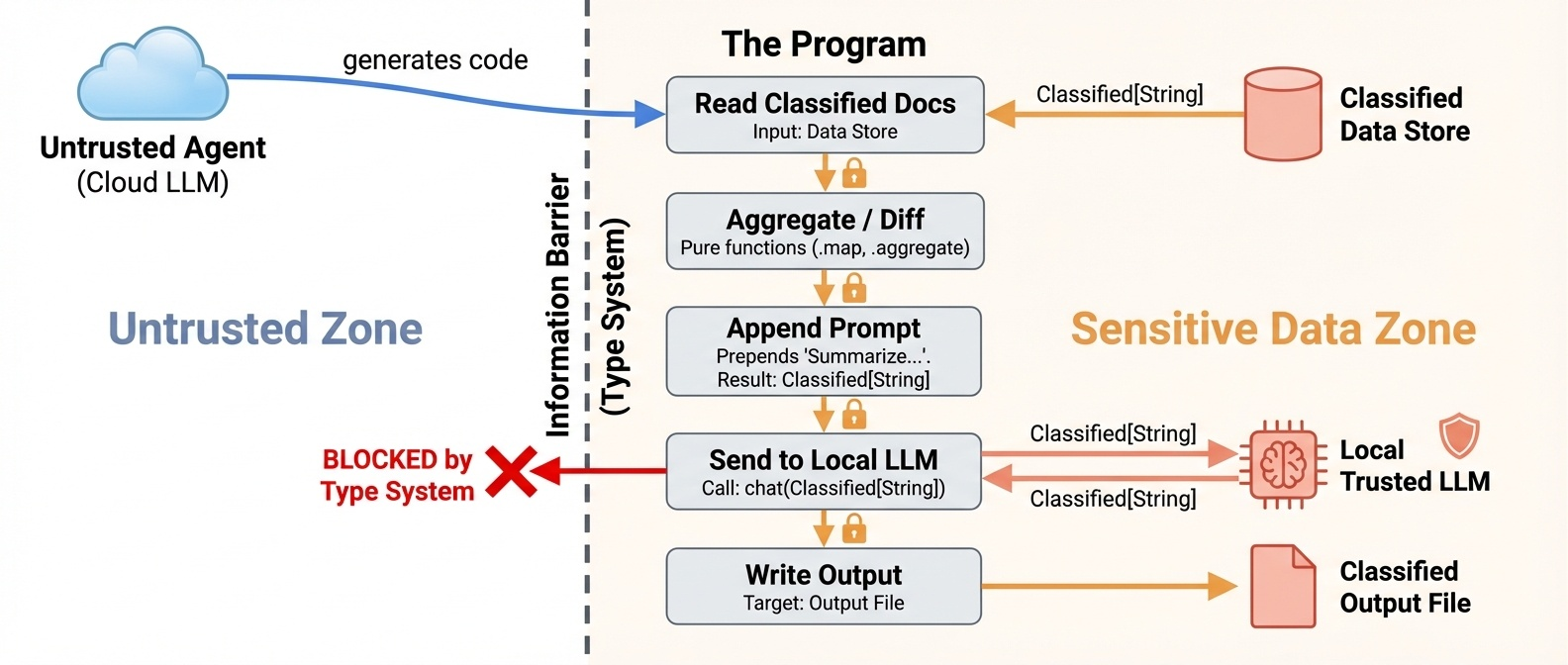
requestFileSystem("/project") {
  // OK: read classified content
  val doc = readClassified("secrets/contract-v2.txt")

  // OK: pure transformation
  val upper = doc.map(_.trim)

  // OK: send to trusted local LLM, result stays Classified
  val summary = chat(doc.map(s => s"Summarize the following document:\n$s"))
  // summary: Classified[String], content is still protected

  // OK: write back to a classified file
  writeClassified("secrets/summary.txt", summary)
}
Besides the trusted LLM and classified files, a Classified value may also flow
out to an allowlisted network host without being declassified, either as a
secret request header (e.g. authenticating to an allowed API) or as a classified
POST body whose response stays wrapped:
requestNetwork(Set("api.example.com")) {
  requestFileSystem("/project") {
    val key = readClassified("secrets/api.key")

    // OK: the token reaches the allowlisted host as a header, but is never
    // observable to agent code (the value cannot be printed or inspected).
    val me = httpGet("https://api.example.com/me",
                     secretHeaders = Map("Authorization" -> key.map("Bearer " + _)))

    // OK: secret body in, Classified response out.
    val payload = readClassified("secrets/report.json")
    val reply = httpPostClassified("https://api.example.com/process", payload)
    // reply: Classified[String]
  }
}
Safe Mode
Agent-generated code is compiled under Scala 3's safe mode (import language.experimental.safe), which enforces a capability-safe language subset:
- No unchecked type casts or pattern matches
- No features from the
caps.unsafemodule - No
@uncheckedannotations - No runtime reflection
- Compile with capture checking and explicit nulls enabled, tracking all mutation effects
- Global objects and functions accessible only if they are implemented safely
These restrictions prevent agents from "forgetting" capabilities through unsafe casts, reflection, or type system holes. Code that does not pass compilation is never executed.
Safe mode is an experimental feature still under active development. By default, TACIT uses a static code validator that checks for forbidden patterns to enforce the safe mode subset. The --safe-mode flag (or "safeMode": true in the JSON config) additionally imports language.experimental.safe into every REPL execution, opting into Scala 3's in-compiler enforcement.
Execution Timeout
--exec-timeout-ms <ms> (or "executionTimeoutMs" in the JSON config) bounds the
wall-clock time of a single REPL evaluation. On timeout the client receives a
prompt error instead of hanging, and for stateful sessions the session keeps
its prior state, so the abandoned statement has no observable effect.
The watchdog runs each evaluation on a worker thread and is best-effort: interrupt-responsive work (blocking I/O, sleeps, most library calls) is reliably bounded, but a pure CPU loop that never checks for interruption keeps running in the background and continues to hold the REPL's output lock. Hard preemption would require process-level isolation; this knob is a robustness guard, not a sandbox boundary. When unset (the default), evaluations run without a timeout.
LLM Integration
A secondary LLM is available through the chat method, no capability scope required. Safety comes from the Classified type system: chat(String): String for regular data, chat(Classified[String]): Classified[String] for sensitive data.
// Regular chat
val answer = chat("What is 2 + 2?")

// Classified chat: input and output stay wrapped
requestFileSystem("/secrets") {
  val secret = readClassified("/secrets/key.txt")
  val result = chat(secret.map(s => s"Summarize: $s"))
  // result is Classified[String], cannot be printed or leaked
}
Configure via CLI flags (--llm-base-url, --llm-api-key, --llm-model) or a JSON config file (--config). Any OpenAI-compatible API is supported.
Experimental Results
We evaluate TACIT on safety and expressiveness (see the paper Section 4 for full details).
Safety (RQ1). In classified mode (secrets wrapped in Classified[String]), both Claude Sonnet 4.6 and MiniMax M2.5 achieve 100% security across all 131 trials. Every injection and malicious task is blocked by the type system. Utility remains high (99.2% for Sonnet, 90.0% for MiniMax).
Expressiveness (RQ2). On τ2-bench and SWE-bench Lite, agents using TACIT's capability-safe harness match or slightly exceed standard tool-calling baselines across all tested models (gpt-oss-120b, MiniMax M2.5, DeepSeek V3.2), demonstrating that writing type-safe Scala does not degrade agentic performance.
Extending the Library: Adding Your Own API
The library (library/) defines the capability API that user code can call inside the REPL.
To implement custom permissions and fine-grained access control, you can add new capabilities (e.g., database access, message queues, server management) by modifying the library and rebuilding just the library JAR.
Library Structure
library/
├── Interface.scala          # Public API trait (what user code sees)
├── impl/
│   ├── InterfaceImpl.scala  # Wires everything together (exports Ops objects)
│   ├── BaseFileSystem.scala    # Shared path validation and gitignore-style classified-path matching
│   ├── FileOps.scala           # grep, grepRecursive, find
│   ├── ProcessOps.scala        # exec, execOutput
│   ├── WebOps.scala            # httpGet, httpPost, httpRequest, httpPostClassified
│   ├── LlmOps.scala            # chat
│   ├── RealFileSystem.scala    # FileSystem on real disk
│   ├── VirtualFileSystem.scala # In-memory FileSystem (for testing)
│   ├── ClassifiedImpl.scala    # Classified[T] wrapper implementation
│   ├── ProcessPermissionImpl.scala # Concrete ProcessPermission
│   ├── NetworkImpl.scala       # Concrete Network
│   ├── GlobMatcher.scala       # Shared `*`-glob to regex utility
│   ├── LibraryConfig.scala     # Library configuration with JSON parsing
│   └── LlmConfig.scala        # LLM configuration case class
└── test/                    # Library-level tests
Step-by-Step: Adding a New API
Here is an example of adding a hypothetical requestDatabase capability.
1. Define types and capability in Interface.scala
// Add a result type
case class QueryResult(columns: List[String], rows: List[List[String]])

// Add a capability class
class DatabasePermission(val connectionString: String) extends caps.SharedCapability

// Add methods to the Interface trait
trait Interface:
  // ... existing methods ...

  def requestDatabase[T](connectionString: String)(op: DatabasePermission^ ?=> T)(using IOCapability): T

  def query(sql: String)(using DatabasePermission): QueryResult
Key points:
- The capability class must extend
caps.SharedCapability. This is what enables Scala 3's capture checker to prevent the capability from escaping its scoped block. - The
request*method takes a blockopthat receives the capability as a context parameter (?=>). The^mark means the capability is tracked by the capture checker. - Operation methods (like
query) take the capability as ausingparameter, so they can only be called inside the correspondingrequest*block.
2. Implement the operations in impl/
Create library/impl/DatabaseOps.scala:
package tacit.library

import language.experimental.captureChecking

object DatabaseOps:
  def query(sql: String)(using perm: DatabasePermission): QueryResult =
    // Your implementation here
    // perm.connectionString has the connection info
    ???
3. Wire it into InterfaceImpl
In library/impl/InterfaceImpl.scala, export your new operations and implement the request* method:
abstract class InterfaceImpl(...) extends Interface:
  export FileOps.*
  export ProcessOps.*
  export WebOps.*
  export DatabaseOps.*   // ← add this

  // ... existing methods ...

  def requestDatabase[T](connectionString: String)(op: DatabasePermission^ ?=> T)(using IOCapability): T =
    val perm = new DatabasePermission(connectionString)
    op(using perm)
4. Block direct access in the validator (server side)
If your new API wraps a Java/Scala library that users should not call directly, add forbidden patterns to src/main/scala/executor/CodeValidator.scala:
ForbiddenPattern("db-jdbc", raw"java\.sql\b".r, "Direct JDBC access is forbidden; use requestDatabase"),
ForbiddenPattern("db-driver", raw"DriverManager".r, "DriverManager is forbidden; use requestDatabase"),
This ensures user code goes through the capability API instead of bypassing it.
5. Add dependencies (if needed)
If your new API requires external libraries, add them to the lib project in build.sbt:
lazy val lib = project
  .in(file("library"))
  .settings(
    // ... existing settings ...
    libraryDependencies ++= Seq(
      "com.openai" % "openai-java" % "4.38.0",
      "org.postgresql" % "postgresql" % "42.7.3",  // ← add your dep
    ),
  )
6. Rebuild the library JAR
sbt "lib/assembly"
You do not need to rebuild the server JAR unless you changed CodeValidator (step 4) or other server-side code. Just point the server at the new library JAR:
java -jar server.jar --library-jar new-library.jar
7. Try your new API in the dev REPL
For quick iteration without spinning up an agent, launch the dev REPL, an interactive Scala prompt preloaded with the capability API and the same CodeValidator the MCP server uses:
sbt devRepl                                  # default config
sbt "devRepl --strict --config my.json"      # with flags
Things to Keep in Mind
Capabilities must extend
caps.SharedCapability. This is what makes capture checking work. Without it, the compiler cannot track the capability's scope and users could leak it out of therequest*block.Capture checking is experimental. The project uses
-language:experimental.captureChecking. Compiler behavior may change across Scala 3 nightly versions. If you hit unexpected errors, check if the issue is with capture checking by temporarily removing the flag.The library uses Scala 3 nightly. The build automatically fetches the latest Scala 3 nightly. This means your code must be compatible with bleeding-edge Scala. Pin a specific version in
build.sbt(val scala3Version = "3.x.y") if you need stability.Interface.scalais bundled as a resource. The server copiesInterface.scalainto its resources at build time so theshow_interfacetool can display it. If you add new APIs, users will see them viashow_interfaceautomatically, no extra work needed.Forbidden patterns run on user code, not library code. The validator in
CodeValidator.scalaonly checks user-submitted code. The library itself can freely usejava.io,java.net,ProcessBuilder, etc. in its implementation. But if your new API wraps a Java API, you should add a corresponding forbidden pattern so users cannot bypass your capability wrapper.The library JAR is a fat JAR.
sbt "lib/assembly"produces a JAR that includes all of the library's dependencies (e.g.,openai-java). If you add a dependency, it will be bundled automatically.Server depends on library types at compile time. The server depends on the interface type to run the REPL. Make sure your change is compatible with the server's expected interface.
Test your API at the library level first. The
library/test/directory contains library-level tests using MUnit, run withscala-cli test library(they are not part ofsbt test). Test your new operations there before doing integration tests through the MCP server. SeeLibrarySuite.test.scalafor examples.
Development
Requirements:
- JDK 17+
- sbt 1.12+
sbt clean                      # Clean build artifacts
sbt compile                    # Compile
sbt test                       # Run the server test suites (src/test/scala)
sbt "testOnly *McpServerSuite" # Run a single server suite
scala-cli test library         # Run the library test suites (library/test)
sbt assembly                   # Build both JARs (server + library)
sbt "lib/assembly"             # Build library JAR only
sbt devRepl                    # Interactive REPL for testing the library
sbt testruns only the server suites. Thelibrary/test/suites are run separately withscala-cli test library.
Running the server directly (without an agent)
# Basic
java -jar target/scala-*/TACIT-assembly-*.jar \
  --library-jar library/target/scala-*/TACIT-library.jar

# With logging
java -jar server.jar --library-jar library.jar --record ./log

# With JSON config
java -jar server.jar --library-jar library.jar --config config.json
Citation
@inbook{10.1145/3786335.3813127,
author = {Odersky, Martin and Zhao, Yaoyu and Xu, Yichen and Bra\v{c}evac, Oliver and Pham, Cao Nguyen},
title = {Securing Agents With Tracked Capabilities},
year = {2026},
isbn = {9798400724152},
publisher = {Association for Computing Machinery},
address = {New York, NY, USA},
url = {https://doi.org/10.1145/3786335.3813127},
booktitle = {Proceedings of the ACM Conference on AI and Agentic Systems},
pages = {812–838},
numpages = {27}
}
License
Apache-2.0
Как установить
Выполни в терминале:
claude mcp add mcp-tacit -- npx Похожие MCP


Compare Tacit with
Не уверен что выбрать?
Найди свой стек за 60 секунд
Автор?
Embed-бейдж для README
Похожее
Все в категории development