
Units
БесплатноНе проверенAn MCP server that provides deterministic unit conversions backed by Pint, enabling exact unit conversions, compatibility checks, and parsing of quantities for

Описание
An MCP server that provides deterministic unit conversions backed by Pint, enabling exact unit conversions, compatibility checks, and parsing of quantities for LLMs.
README
An MCP server that provides deterministic unit conversions via Pint. LLMs guess at unit conversions — this server makes them exact.
What this does
Exposes 5 tools, 3 resources, and 2 prompts over the Model Context Protocol. Any MCP client (Claude Code, Claude Desktop, Cursor) can convert units, check dimensional compatibility, parse quantity strings, and simplify expressions — all backed by Pint's 400+ unit registry instead of LLM arithmetic.
How it works
A FastMCP server wraps Pint's UnitRegistry and exposes it through MCP primitives:
- Tools —
convert,check_compatibility,parse_quantity,list_compatible_units,simplify - Resources —
units://systems,units://systems/{system},units://dimensions - Prompts —
convert_document(extract and convert all quantities in text),check_calculations(verify dimensional consistency)
The server runs over stdio by default (for Claude Code / Claude Desktop) or Streamable HTTP via fastmcp run (for remote / containerized deployment).
Quickstart
Prerequisites
- Python 3.12+
- uv
Install and run
git clone https://github.com/quantumleeps/mcp-units.git
cd mcp-units
uv sync
Add to Claude Code
claude mcp add --transport stdio mcp-units -- \
  uv run --directory /path/to/mcp-units mcp-units
Add to Claude Desktop
Add to claude_desktop_config.json:
{
  "mcpServers": {
    "mcp-units": {
      "command": "uv",
      "args": ["run", "--directory", "/path/to/mcp-units", "mcp-units"]
    }
  }
}
Run over HTTP
uv run fastmcp run src/mcp_units/server.py --transport http --port 8000
Docker
docker build -t mcp-units .
docker run -p 8000:8000 mcp-units
Tests
uv sync --all-extras
uv run pytest
Evaluation
Does giving an LLM access to a unit conversion tool actually improve its accuracy on physics problems?
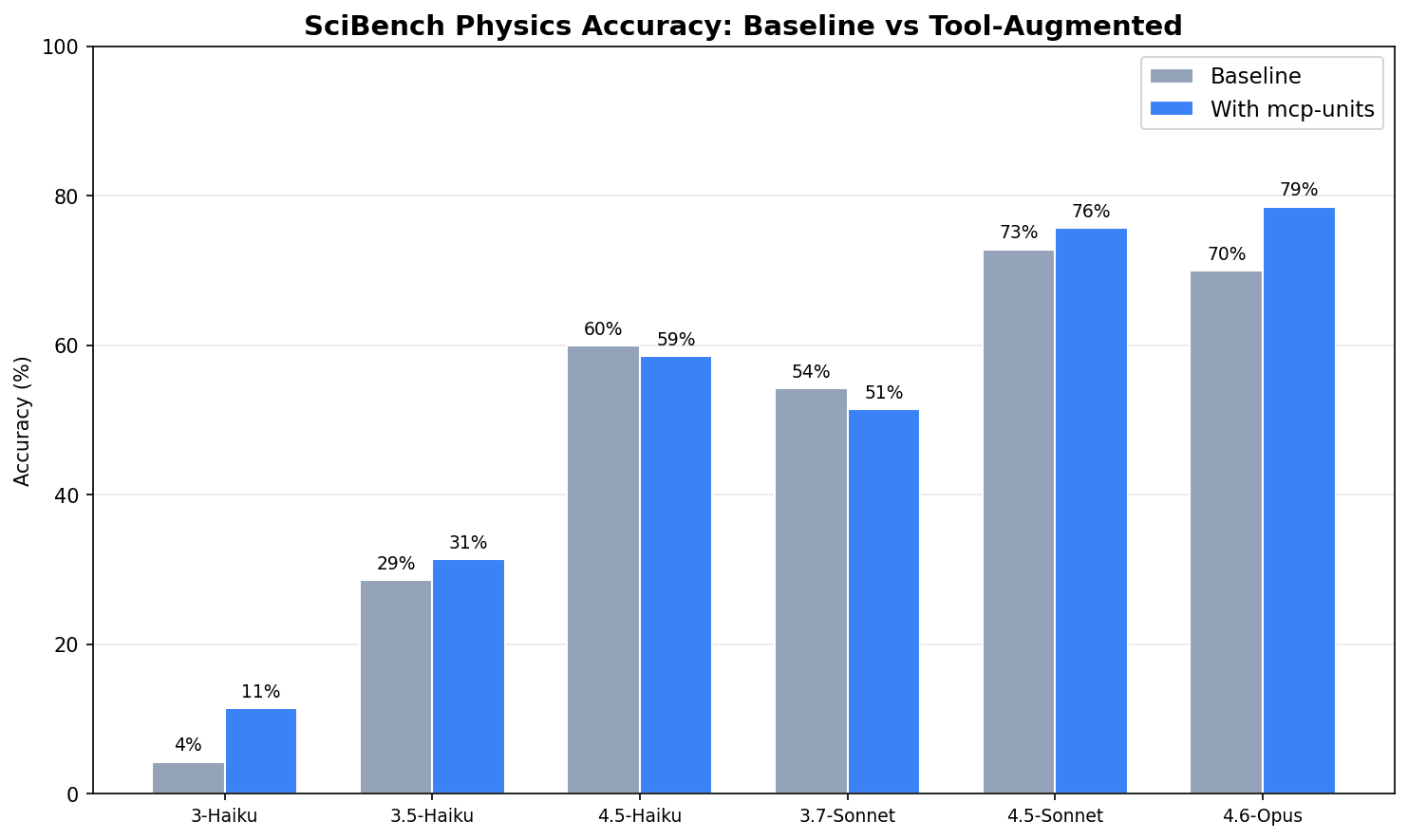
Evaluated on 70 SciBench college-level physics problems requiring 2+ unit types, across 6 Claude models (840 total runs). Opus 4.6 — the latest model — shows the largest gain (+8.6pp, 70.0% → 78.6%), suggesting that its combination of broad knowledge and refined tool-use lets it leverage unit conversion as a reliable augmentation. 4.5-Sonnet, a strong reasoner and tool user, also improves (+2.9pp). The older 3.7-Sonnet regresses (-2.9pp) — analysis shows it sometimes treats an intermediate conversion result as the final answer, or spins through repeated tool calls without converging, consistent with less mature tool-use capabilities. The surprise is 4.5-Haiku: same generation as 4.5-Sonnet with capable reasoning and tool use, yet it declines (-1.4pp). With a smaller model, the tool appears to be a distraction rather than an augmentation — the model has the sophistication to use it but not always the judgment to know when it helps. With only 70 problems and a single run per model, these per-model deltas carry real uncertainty — the 4.5-Haiku result in particular could reflect noise rather than a meaningful pattern.
Next steps
- Unit normalization — Models write
cm3but Pint needscm^3. A lightweightnormalize_unit()preprocessor plus better tool descriptions with formatting guidance would eliminate the 12 parsing failures observed in the eval. - Expression evaluation — Models sometimes pass math expressions (
-1.602e-19 * 1.33e-39 / ...) as the value parameter toconvert(). Pint rejects these since it expects a float. Accepting and evaluating simple arithmetic expressions would let the tool handle intermediate calculations. - Offset unit handling — Pint raises
OffsetUnitCalculusErrorfor °C and °F in compound expressions. Theparse_quantitytool needs special handling for temperature offsets. - Larger problem set — 70 problems demonstrates the evaluation framework but limits statistical confidence on per-model deltas. Run-to-run variance within a single model is also unknown. Expanding to 200+ problems with multiple runs per problem would quantify both effects.
Run the eval
uv sync --group eval
uv run python -m eval.runner          # run all 6 models × 2 conditions (requires ANTHROPIC_API_KEY)
uv run python -m eval.visualize       # generate charts from results
uv run python -m eval.analyze         # print detailed analysis
Project Structure
mcp-units/
  src/mcp_units/
    server.py       # FastMCP instance — tools, resources, prompts
    registry.py     # Pint UnitRegistry + compatible units workaround
    models.py       # Result dataclasses for structured tool output
  eval/
    runner.py       # Async eval runner — baseline vs tool-augmented
    problems.py     # SciBench problem loading (70 problems, 2+ unit types)
    scorer.py       # Answer extraction + 5% tolerance scoring
    mcp_tools.py    # FastMCP Client wrapper for tool execution
    results.py      # RunResult dataclass + JSON persistence
    visualize.py    # Grouped bar chart + error histograms
    analyze.py      # 16-section detailed analysis
  tests/
    test_tools.py   # 18 Pint logic tests
    test_server.py  # 17 MCP Client integration tests
  Dockerfile        # HTTP transport for containerized deployment
Contributing
PRs welcome. Run pre-commit install after cloning and ensure uv run pytest passes before submitting.
License
MIT
Установка Units
У этого сервера нет опубликованного пакета — он собирается из исходников. Открой репозиторий и следуй инструкции в README.
▸ github.com/quantumleeps/mcp-unitsFAQ
Units MCP бесплатный?
Да, Units MCP бесплатный — установка в пару кликов через Unyly без оплаты.
Нужен ли API-ключ для Units?
Нет, Units работает без API-ключей и переменных окружения.
Units — hosted или self-hosted?
Self-hosted: сервер запускается локально на твоей машине командой из раздела установки.
Как установить Units в Claude Desktop, Claude Code или Cursor?
Открой Units на unyly.org, выбери вкладку своего клиента (Claude Desktop, Claude Code, Cursor) и нажми Install — конфиг сгенерируется автоматически, без правки JSON.
Похожие MCP
GitHub
PRs, issues, code search, CI status
 автор: GitHub
Filesystem
Secure file operations with configurable access controls.
Memory
Knowledge graph-based persistent memory system.
Template MCP Server
A CLI tool to create a new Model Context Protocol server project with TypeScript support, dual transport options, and an extensible structure
 автор: mcpdotdirect
Compare Units with
Не уверен что выбрать?
Найди свой стек за 60 секунд
Автор?
Embed-бейдж для README
Похожее
Все в категории development