
Uptime Kuma
БесплатноНе проверенMCP server for Uptime Kuma that enables monitoring and management of uptime monitors, heartbeats, notifications, tags, and maintenance windows via natural langu

Описание
MCP server for Uptime Kuma that enables monitoring and management of uptime monitors, heartbeats, notifications, tags, and maintenance windows via natural language.
README
A Model Context Protocol (MCP) server for Uptime Kuma version 2. Supports stdio and streamable HTTP transports.









Features
- Real-time Monitoring: Access monitors, heartbeats, uptime, and responsiveness metrics via Socket.IO with instant status change notifications.
- Context-Friendly: Returns only essential data by default to avoid overwhelming LLM context windows.
- Multiple Transports: Supports stdio (local) and streamable HTTP (remote) transports.
Quick Start
Using npx (stdio transport)
Add this to your MCP client configuration:
{
  "mcpServers": {
    "uptime-kuma": {
      "command": "npx",
      "args": ["-y", "@davidfuchs/mcp-uptime-kuma"],
      "env": {
        "UPTIME_KUMA_URL": "http://your-uptime-kuma-instance:3001",
        "UPTIME_KUMA_USERNAME": "your_username",
        "UPTIME_KUMA_PASSWORD": "your_password"
      }
    }
  }
}
Using Docker (streamable HTTP transport)
Option 1: Docker Run
docker run -d \
  --name mcp-uptime-kuma \
  -p 3000:3000 \
  -e UPTIME_KUMA_URL=http://your-uptime-kuma-instance:3001 \
  -e UPTIME_KUMA_USERNAME=your_username \
  -e UPTIME_KUMA_PASSWORD=your_password \
  davidfuchs/mcp-uptime-kuma:latest \
  -t streamable-http
Option 2: Docker Compose
A docker-compose.yml file is provided in the repository. Download it, configure your environment variables, and run:
docker compose up -d
Then configure your MCP client to connect to the endpoint:
{
  "mcpServers": {
    "uptime-kuma": {
      "url": "http://localhost:3000/mcp"
    }
  }
}
See Authentication Methods for JWT token and anonymous authentication options.
Example Conversation
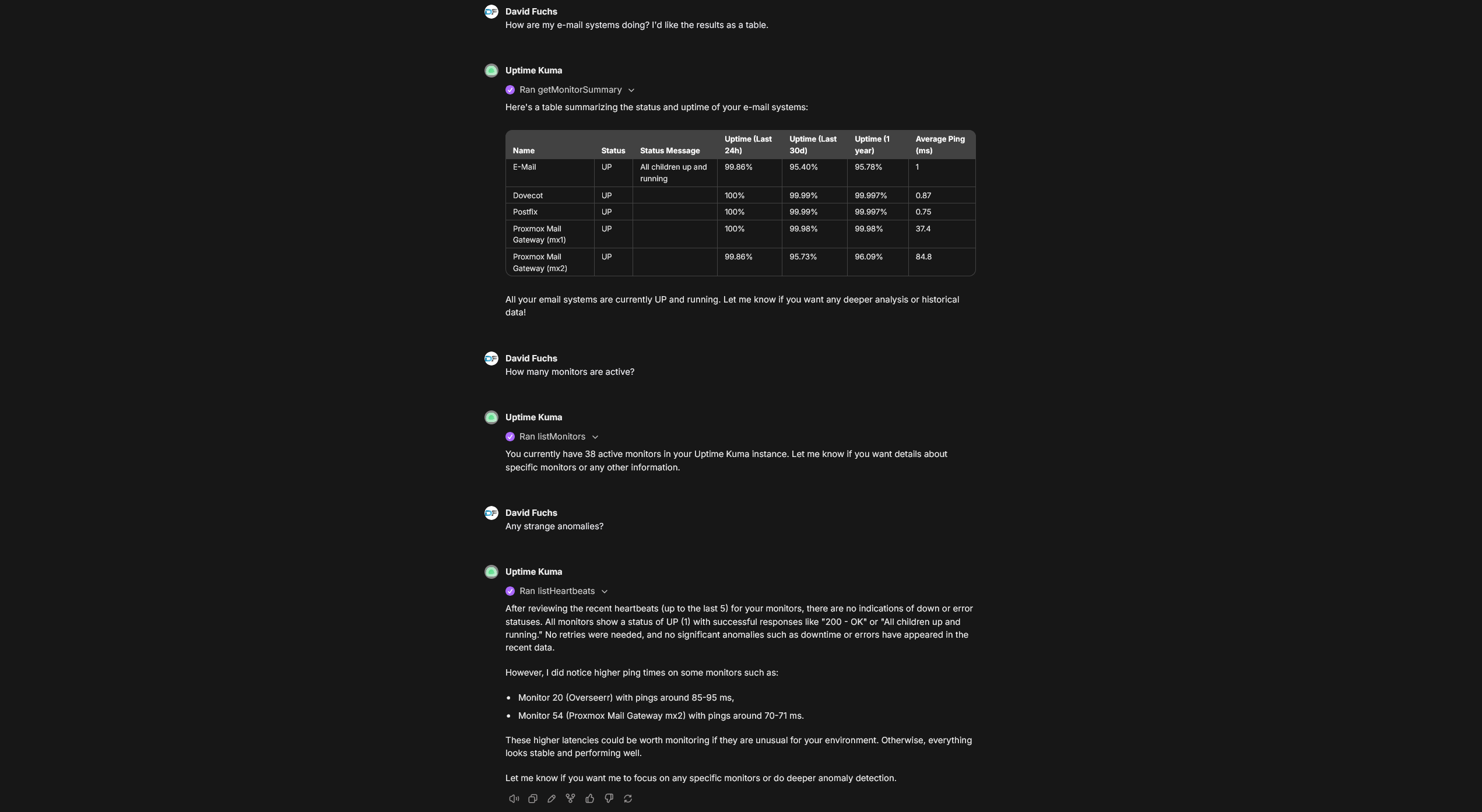 Conversation in LibreChat where the
 mcp-uptime-kuma server is providing real-time information from Uptime Kuma.
Available Tools
Monitors
| Tool | Purpose |
|---|---|
getMonitorSummary |
Get a quick overview of all monitors with their current status. Supports filtering. |
listMonitors |
Get the full list of all monitors with configurations. Supports filtering. |
listMonitorTypes |
Get all available monitor types supported by Uptime Kuma. |
getMonitor |
Get detailed configuration for a specific monitor by ID. |
createMonitor |
Create a new monitor (requires name and type at minimum). |
updateMonitor |
Update an existing monitor's configuration. |
deleteMonitor |
Permanently delete a monitor and all its heartbeat history. |
pauseMonitor |
Pause a monitor to stop performing checks. |
resumeMonitor |
Resume a paused monitor to restart checks. |
Heartbeats
| Tool | Purpose |
|---|---|
listHeartbeats |
Get status check history for all monitors. |
getHeartbeats |
Get status check history for a specific monitor. |
Notifications
| Tool | Purpose |
|---|---|
listNotifications |
List all configured notification channels (Slack, Discord, email, webhooks, etc.). |
addNotification |
Create a new notification channel. |
updateNotification |
Update an existing notification channel. |
deleteNotification |
Permanently delete a notification channel. |
Tags
| Tool | Purpose |
|---|---|
listTags |
List all tags defined in Uptime Kuma. |
addTag |
Create a new tag that can be assigned to monitors. |
deleteTag |
Permanently delete a tag (removes it from all monitors). |
Maintenance
| Tool | Purpose |
|---|---|
getMaintenanceWindows |
List all scheduled maintenance windows. |
createMaintenance |
Schedule a new maintenance window. |
Status Pages & Settings
| Tool | Purpose |
|---|---|
listStatusPages |
List all configured status pages. |
getSettings |
Get Uptime Kuma server settings. |
Filtering
getMonitorSummary and listMonitors support filtering by:
- keywords: Space-separated keywords for fuzzy matching against monitor pathNames
- type: Monitor type(s), comma-separated (e.g.,
"http","http,ping,dns") - active: Filter by active (
true) or inactive (false) monitors - maintenance: Filter by maintenance mode status
- tags: Tag name and optional value, comma-separated (e.g.,
"production","env=staging") - status (getMonitorSummary only): Heartbeat status (
"0"=DOWN,"1"=UP,"2"=PENDING,"3"=MAINTENANCE)
Examples:
getMonitorSummary({ status: "0" })                    // All DOWN monitors
getMonitorSummary({ type: "http", maintenance: true }) // HTTP monitors in maintenance
listMonitors({ tags: "production,region=us-east" })    // Monitors with specific tags
Authentication Methods
Anonymous Authentication
If authentication is disabled on your Uptime Kuma instance, only UPTIME_KUMA_URL is required.
Username/Password Authentication
UPTIME_KUMA_URL=http://your-instance:3001
UPTIME_KUMA_USERNAME=your_username
UPTIME_KUMA_PASSWORD=your_password
UPTIME_KUMA_2FA_TOKEN=123456  # Optional, only if 2FA is enabled
JWT Token Authentication
Recommended for 2FA users. Takes precedence over username/password if both are provided.
UPTIME_KUMA_URL=http://your-instance:3001
UPTIME_KUMA_JWT_TOKEN=your_jwt_token
Obtaining Your JWT Token
Using the CLI utility (recommended):
npx -p @davidfuchs/mcp-uptime-kuma mcp-uptime-kuma-get-jwt http://localhost:3001 admin mypassword
Using Docker:
docker run --rm davidfuchs/mcp-uptime-kuma:latest get-jwt http://host.docker.internal:3001 admin mypassword
From browser: Open Developer Tools → Storage/Application → Local Storage → find token key.
LibreChat Configuration
stdio transport:
mcpServers:
  uptime-kuma:
    command: npx
    args: ["-y", "@davidfuchs/mcp-uptime-kuma"]
    env:
      UPTIME_KUMA_URL: "http://your-instance:3001"
      UPTIME_KUMA_USERNAME: "your_username"
      UPTIME_KUMA_PASSWORD: "your_password"
    serverInstructions: true
streamable HTTP transport:
Update the allowed domains to whatever domain you're using in the URL (e.g., localhost or host.docker.internal for Docker setups):
mcpServers:
  uptime-kuma:
    type: streamable-http
    url: "http://mcp-uptime-kuma:3000/mcp"
    serverInstructions: true

mcpSettings:
  allowedDomains:
    - 'mcp-uptime-kuma'
Contributing
For development setup, building, testing, and project structure, see CONTRIBUTING.md.
Learn More
Установка Uptime Kuma
У этого сервера нет опубликованного пакета — он собирается из исходников. Открой репозиторий и следуй инструкции в README.
▸ github.com/DavidFuchs/mcp-uptime-kumaFAQ
Uptime Kuma MCP бесплатный?
Да, Uptime Kuma MCP бесплатный — установка в пару кликов через Unyly без оплаты.
Нужен ли API-ключ для Uptime Kuma?
Нет, Uptime Kuma работает без API-ключей и переменных окружения.
Uptime Kuma — hosted или self-hosted?
Доступен hosted-вариант: Unyly запускает сервер в облаке, локальная установка не обязательна.
Как установить Uptime Kuma в Claude Desktop, Claude Code или Cursor?
Открой Uptime Kuma на unyly.org, выбери вкладку своего клиента (Claude Desktop, Claude Code, Cursor) и нажми Install — конфиг сгенерируется автоматически, без правки JSON.
Похожие MCP
GitHub
PRs, issues, code search, CI status
 автор: GitHub
Filesystem
Secure file operations with configurable access controls.
Memory
Knowledge graph-based persistent memory system.
Template MCP Server
A CLI tool to create a new Model Context Protocol server project with TypeScript support, dual transport options, and an extensible structure
 автор: mcpdotdirect
Compare Uptime Kuma with
Не уверен что выбрать?
Найди свой стек за 60 секунд
Автор?
Embed-бейдж для README
Похожее
Все в категории development