
MCPBuilder
БесплатноНе проверенGenerate Model Context Protocol (MCP) servers from API specifications (OpenAPI/Postman) with web UI

Описание
Generate Model Context Protocol (MCP) servers from API specifications (OpenAPI/Postman) with web UI
README
Transform any API into a Model Context Protocol (MCP) server with an intuitive web portal.
Generate MCP servers from OpenAPI/Swagger specs, Postman collections, or API documentation. Make your APIs accessible to AI assistants through natural language interactions.
Node.js TypeScript React License: MIT MCP
Built With
- Backend: Node.js + TypeScript + Express.js
- Frontend: React 18 + Material-UI + Vite
- Database: better-sqlite3
- MCP SDK: @modelcontextprotocol/sdk v1.20+
- Template Engine: Handlebars
- Type Safety: TypeScript + Zod
⚠️ Important: Local Development Tool
UNITONE MCP Builder is designed for local development use only.
This is the open source version intended for single-user local development environments, while we welcome contributors!
If you require:
- Hosted/managed MCP server generation
- Public server deployment with authentication
- Extended security features
- Enterprise support
- Team collaboration features
Please contact the UNITONE team at https://unitone.ai for our enterprise solutions.
Table of Contents
- Features
- Quick Start
- Admin Portal Guide
- Usage
- Using Generated Servers
- Best Practices
- Project Structure
- API Endpoints
- Development
- Tech Stack
- Troubleshooting
- Contributing
- License
- Resources
- Support
Features
- 🚀 Multiple Input Formats - OpenAPI/Swagger (JSON/YAML), Postman collections, or plain text API docs
- 🎨 Admin Dashboard - Beautiful Material-UI interface for managing API configurations and MCP servers
- 🔧 STDIO Transport - Generate servers compatible with any MCP-compatible client
- 🔐 Authentication Support - Bearer tokens, API keys, and OAuth2 client credentials
- 🛠️ Auto-generate Tools - Automatically create MCP tools from API endpoints
- 📦 One-Click Deployment - Deploy and manage servers directly from the dashboard
- ✅ Type Safe - Full TypeScript support with auto-generated types
- 🔄 Path Parameters - Automatic path parameter substitution (e.g.,
/users/{id}) - 🧩 OpenAPI $ref Resolution - Resolves component references in specifications
- 📊 Large-Scale APIs - Tested with 200+ endpoint APIs (Microsoft Graph)
Quick Start
Prerequisites
- Node.js >= 20.0.0
- npm >= 9.0.0
Installation
# Clone the repository
git clone https://github.com/UnitOneAI/MCPBuilder.git
cd MCPBuilder

# Install dependencies
npm install

# Start the application
npm run dev
The dashboard will be available at http://localhost:5173 and the API server at http://localhost:3000.
Admin Portal Guide
Visual walkthrough of creating and deploying an MCP server using the admin portal.
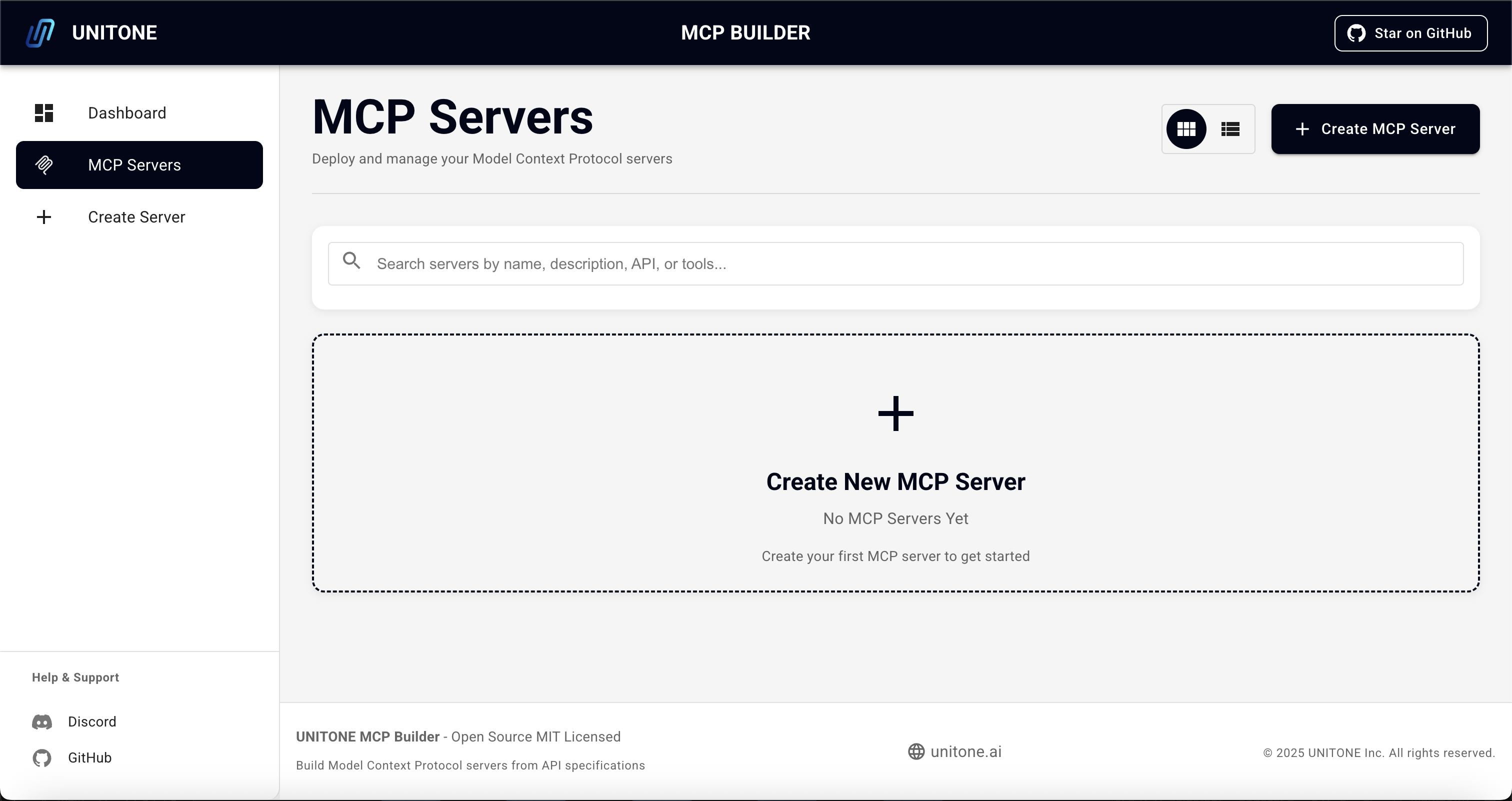
1. MCP Servers Dashboard
Start from the MCP Servers page where you can view all your servers and create new ones.
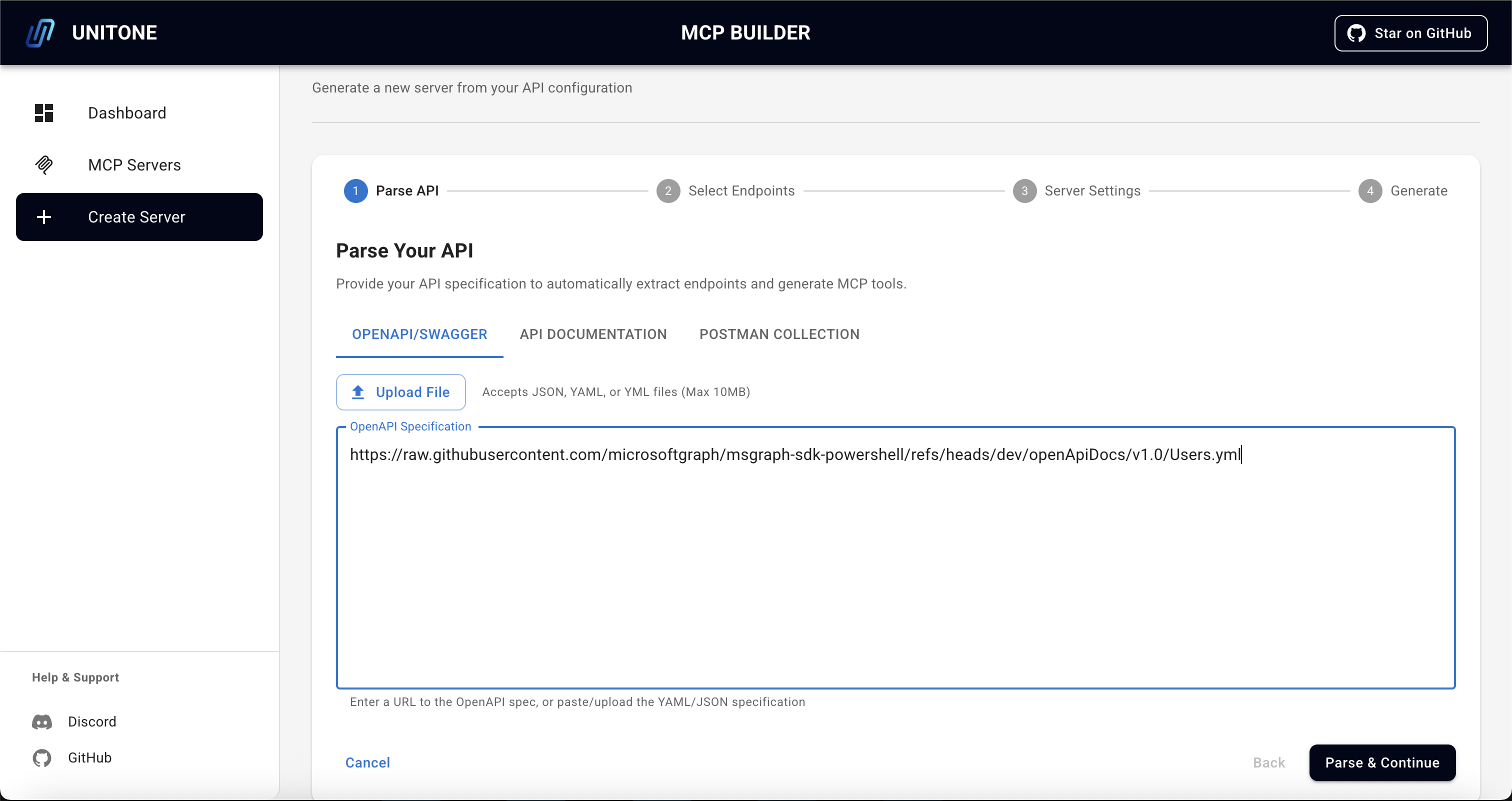
2. Parse Your API
Provide your API specification using OpenAPI/Swagger, API Documentation, or Postman Collection. The parser will automatically extract endpoints and generate MCP tools.
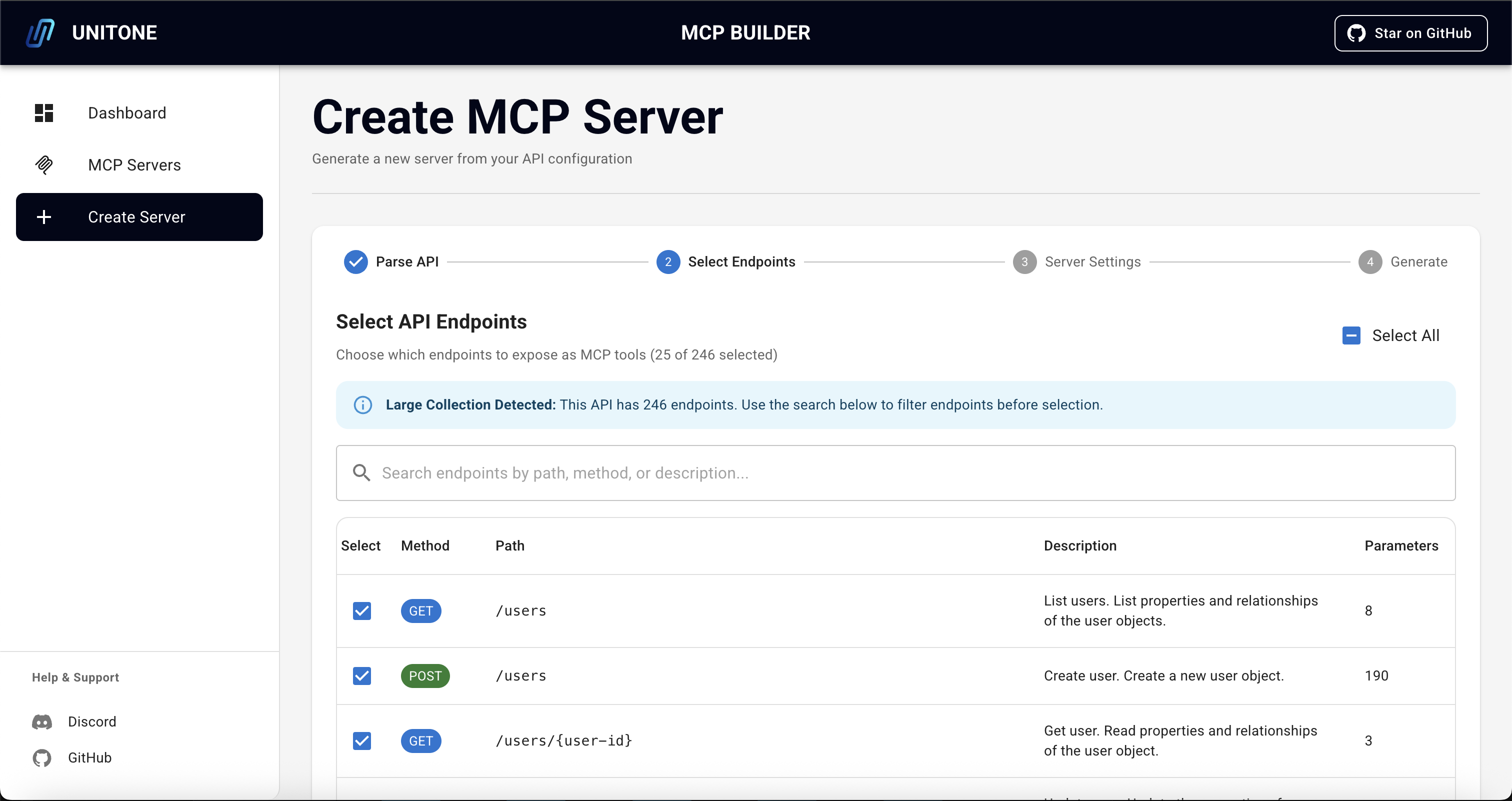
3. Select Endpoints
Choose which endpoints to expose as MCP tools. The portal shows endpoint details including method, path, description, and parameters. Use the search and filter features for large APIs.
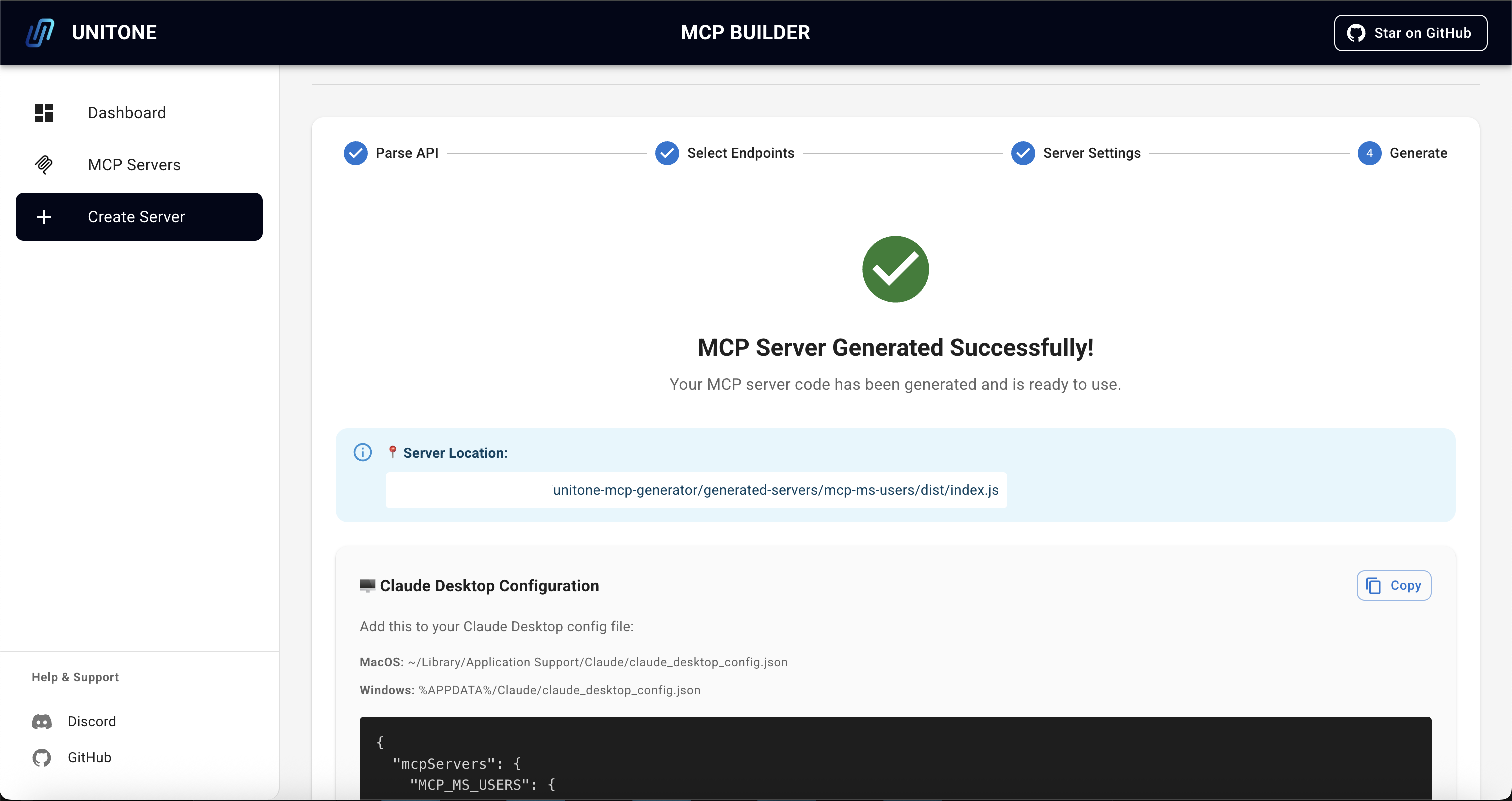
4. Server Generated
Once generation is complete, you'll see the server location and configuration details. The portal provides ready-to-use configuration for your MCP client.
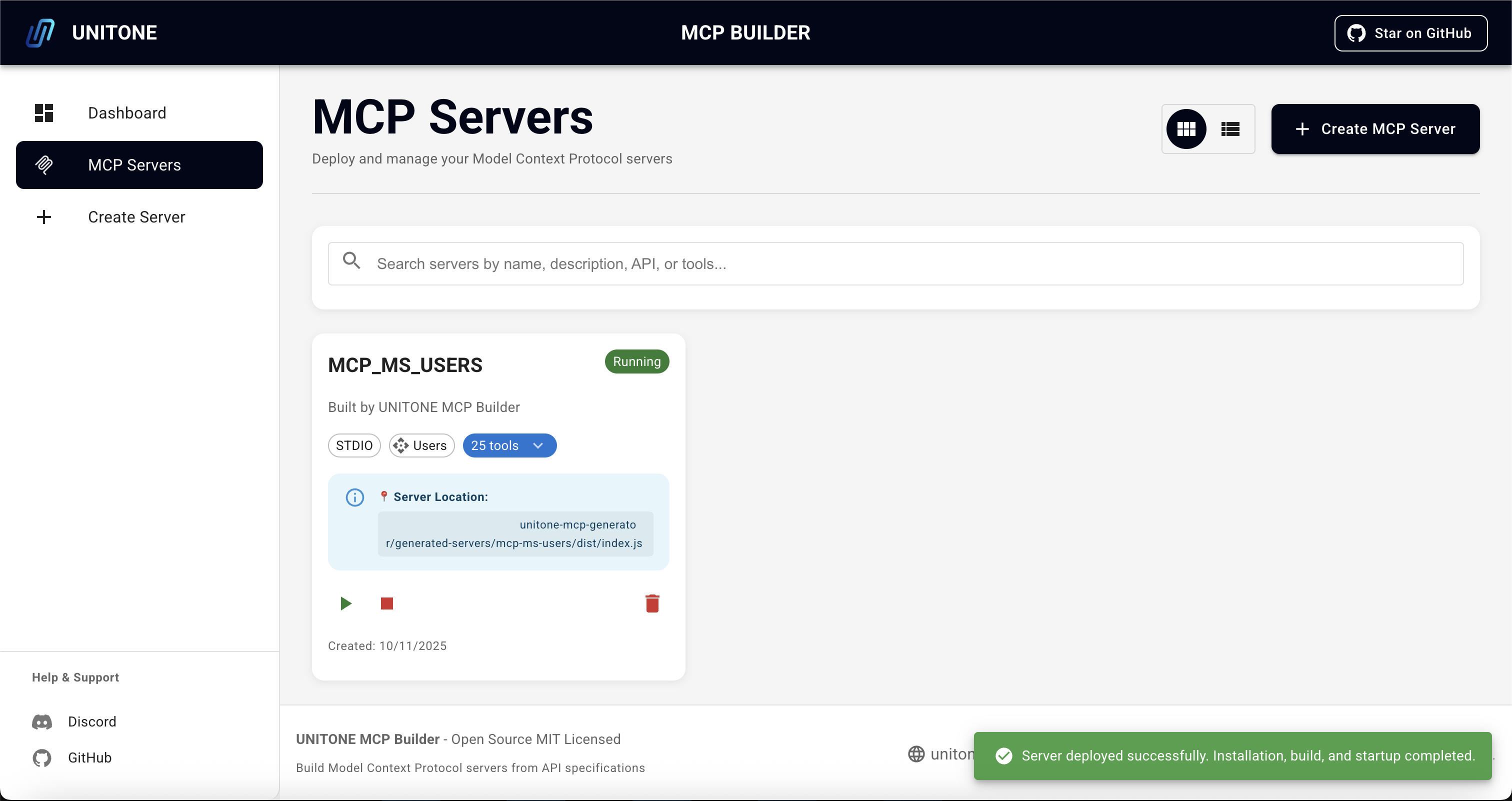
5. Deploy and Run
Deploy your server with one click. The portal handles installation, building, and startup automatically. Monitor server status and manage deployments from the dashboard.
Usage
Option 1: Quick Start with OpenAPI Spec
The fastest way to get started is with an OpenAPI/Swagger specification.
Example - Microsoft Graph Users API:
- Navigate to "Create Server" in the dashboard
- Click "OpenAPI/Swagger" tab
- Paste the spec URL or upload file:
https://raw.githubusercontent.com/microsoftgraph/msgraph-sdk-powershell/dev/openApiDocs/v1.0/Users.yml - Click "Parse & Create Configuration"
- Select the endpoints you want (e.g., GET /users, GET /users/{id})
- Configure server:
- Name:
msgraph-users - Description: Microsoft Graph Users API
- Auth: OAuth 2
- Name:
- Click "Generate"
Your MCP server will be generated in generated-servers/msgraph-users/.
Available Microsoft Graph APIs:
- Users:
https://raw.githubusercontent.com/microsoftgraph/msgraph-sdk-powershell/dev/openApiDocs/v1.0/Users.yml - Groups:
https://raw.githubusercontent.com/microsoftgraph/msgraph-sdk-powershell/dev/openApiDocs/v1.0/Groups.yml - Mail:
https://raw.githubusercontent.com/microsoftgraph/msgraph-sdk-powershell/dev/openApiDocs/v1.0/Mail.yml - Calendar:
https://raw.githubusercontent.com/microsoftgraph/msgraph-sdk-powershell/dev/openApiDocs/v1.0/Calendar.yml - View all specs
Option 2: Using Plain Text Documentation
If you don't have an OpenAPI spec, you can paste API documentation or upload file:
GET /users - Get all users
- page (number) - Page number (optional)
- limit (number) - Items per page (optional)

POST /users - Create a new user
- name (string) - User's name (required)
- email (string) - User's email (required)

GET /users/{id} - Get user by ID
- id (string) - User ID (required)
Option 3: Import Postman Collection
Simply paste your exported Postman collection JSON or upload file.
Build and Deploy Your MCP Server
After generation is complete:
- Navigate to the "MCP Servers" section in the admin portal
- Your server will now be shown with status "Ready"
- Click "Deploy" to start the server
- If deployment is successful, the status will change from "Ready" to "Running"
The server is now ready to use with any MCP client. Environment variables (API_BASE_URL, API_TOKEN, etc.) are automatically passed from your MCP client configuration - no manual export needed!
Using Generated Servers
All generated servers use STDIO transport, compatible with any MCP-enabled application.
MCP Client Configuration
Configure your MCP-compatible client to use the generated server. Most clients follow a similar configuration pattern:
Example configuration:
{
  "mcpServers": {
    "my-api-server": {
      "command": "node",
      "args": ["/absolute/path/to/generated-servers/my-api-server/dist/index.js"],
      "env": {
        "API_BASE_URL": "https://api.example.com",
        "API_TOKEN": "your_bearer_token_here"
      }
    }
  }
}
Key configuration elements:
- command:
node - args: Absolute path to
dist/index.jsin your generated server - env: Environment variables for API configuration
Refer to your MCP client's documentation for specific configuration file locations and format. Generated servers include a .vscode/mcp.json file as a reference.
Note: When using with an MCP client (like Claude Desktop), environment variables are automatically passed from the client configuration. Manual export is only needed for local testing.
Best Practices
Tool Count Recommendations
When creating MCP servers, the number of tools you expose significantly impacts performance and accuracy:
Optimal Range (Recommended): Under 40 tools
- Best performance and tool selection accuracy
- AI assistants can effectively navigate and choose the right tools
- Faster response times and lower resource usage
Warning Range: 40-100 tools
- Server will function but may experience reduced performance
- Tool selection accuracy may decrease as the AI has more options to evaluate
- Consider splitting into multiple focused servers if possible
Critical Range: 100+ tools
- Significant performance degradation likely
- Poor tool selection accuracy due to overwhelming number of options
- Strongly recommended to refactor into multiple servers
Creating Multiple Focused Servers
For large APIs (100+ endpoints), we recommend:
Group by functionality - Organize endpoints into logical domains
- Example:
msgraph-users,msgraph-mail,msgraph-calendar
- Example:
Split by use case - Create servers for specific workflows
- Example:
api-read-operations,api-write-operations
- Example:
Separate by resource type - Divide by primary entities
- Example:
api-customers,api-orders,api-inventory
- Example:
Benefits of multiple servers:
- Each server stays under the 40-tool optimal threshold
- Improved tool selection accuracy and performance
- Users can enable only the servers they need
- Easier to maintain and update individual servers
- Better error isolation and debugging
Large-Scale API Example
For the Microsoft Graph API (200+ endpoints), instead of one massive server:
# ❌ Avoid: Single server with 200+ tools
msgraph-all-api

# ✅ Recommended: Multiple focused servers
msgraph-users          # 15 tools - User management
msgraph-mail           # 22 tools - Email operations
msgraph-calendar       # 18 tools - Calendar operations
msgraph-groups         # 12 tools - Group management
msgraph-files          # 25 tools - OneDrive operations
The portal will automatically warn you when selecting more than 40 endpoints and provide guidance on creating multiple focused servers.
Project Structure
MCPBuilder/
├── src/
│   ├── server/                      # Express backend API
│   │   ├── routes/                  # API route handlers
│   │   │   ├── apiConfigs.ts        # API configuration endpoints
│   │   │   ├── mcpServers.ts        # MCP server management
│   │   │   ├── deployments.ts       # Server deployment/build
│   │   │   └── parser.ts            # OpenAPI/Postman parsers
│   │   ├── utils/                   # Server utilities
│   │   │   └── logger.ts            # File-based logging
│   │   ├── database.ts              # SQLite database operations
│   │   └── index.ts                 # Server entry point
│   ├── client/                      # React frontend
│   │   ├── components/              # Reusable UI components
│   │   ├── pages/                   # Page components
│   │   ├── services/                # API service layer
│   │   ├── assets/                  # Static assets (images, etc.)
│   │   ├── theme.ts                 # Material-UI theme config
│   │   └── App.tsx                  # Main app component
│   ├── generator/                   # MCP generator core
│   │   ├── McpGenerator.ts          # Code generator
│   │   ├── ApiParser.ts             # API specification parser
│   │   └── handlebars-helpers.ts    # Custom Handlebars helpers
│   ├── templates/                   # Handlebars templates for generated code
│   └── types/                       # Shared TypeScript type definitions
├── generated-servers/               # Generated MCP servers output
├── logs/                            # Server and deployment logs
└── data/                            # SQLite database files
API Endpoints
Core APIs
API Configurations
GET /api/configs- List all API configurationsGET /api/configs/:id- Get API configuration by IDPOST /api/configs- Create API configurationPUT /api/configs/:id- Update configurationDELETE /api/configs/:id- Delete configuration
MCP Servers
GET /api/servers- List all MCP serversGET /api/servers/:id- Get MCP server by IDPOST /api/servers- Create MCP serverPUT /api/servers/:id- Update MCP serverPOST /api/servers/:id/generate- Generate server codeDELETE /api/servers/:id- Delete server
Deployments (STDIO Build Only)
GET /api/deployments/server/:serverId- Get deployment statusPOST /api/deployments/:serverId/deploy- Build STDIO serverPOST /api/deployments/:serverId/stop- Stop deployment process
Parsers
POST /api/parser/openapi- Parse OpenAPI specification (URL or JSON)POST /api/parser/postman- Parse Postman collection
Development
# Run both backend and frontend
npm run dev

# Run backend only
npm run dev:server

# Run frontend only
npm run dev:client

# Build for production
npm run build

# Type checking
npm run type-check

# Lint code
npm run lint

# Format code
npm run format
Tech Stack
Backend
- Node.js + TypeScript
- Express.js (REST API server)
- better-sqlite3 (embedded database)
- Handlebars (template engine)
- Zod (schema validation)
- Axios (HTTP client)
Frontend
- React 18
- Material-UI (MUI) + Emotion (CSS-in-JS)
- TanStack Query (React Query)
- React Router (routing)
- React Hook Form (form handling & validation)
- Zustand (state management)
- Notistack (toast notifications)
- Vite + SWC (fast Rust-based build tool)
MCP Integration
- @modelcontextprotocol/sdk v1.20+
Troubleshooting
Server won't start
- Check that ports 3000 and 5173 are available
- Ensure Node.js >= 20.0.0 is installed
- Try
npm installagain
Generated server build fails
- Navigate to the generated server directory
- Run
npm installto ensure dependencies are installed - Check for TypeScript errors with
npm run type-check
MCP client can't find the server
- Verify the path in your MCP client config is absolute, not relative
- Ensure the server is built (
npm run buildin the generated server directory) - Check that environment variables are set correctly in the config
- Restart your MCP client after configuration changes
API authentication errors
- Verify your API token/key is valid and not expired
- Ensure
API_TOKENorAPI_KEYis properly set in environment variables - Check your API provider's authentication requirements
Contributing
We welcome contributions! Please see CONTRIBUTING.md for detailed guidelines.
License
MIT License - see LICENSE file for details.
Resources
- Model Context Protocol Docs
- OpenAPI Specification
- MCP Clients - List of compatible MCP clients
Support
- 🐛 Bug reports: GitHub Issues
- 💬 General questions: GitHub Discussions
- 💬 Community: UNITONE Discord
- 🔒 Security issues: [email protected]
- 📧 Contact: UnitOne AI
Built by UnitOne AI | Powered by the Model Context Protocol
Установка MCPBuilder
У этого сервера нет опубликованного пакета — он собирается из исходников. Открой репозиторий и следуй инструкции в README.
▸ github.com/UnitOneAI/MCPBuilderFAQ
MCPBuilder MCP бесплатный?
Да, MCPBuilder MCP бесплатный — установка в пару кликов через Unyly без оплаты.
Нужен ли API-ключ для MCPBuilder?
Нет, MCPBuilder работает без API-ключей и переменных окружения.
MCPBuilder — hosted или self-hosted?
Self-hosted: сервер запускается локально на твоей машине командой из раздела установки.
Как установить MCPBuilder в Claude Desktop, Claude Code или Cursor?
Открой MCPBuilder на unyly.org, выбери вкладку своего клиента (Claude Desktop, Claude Code, Cursor) и нажми Install — конфиг сгенерируется автоматически, без правки JSON.
Похожие MCP
LibreOffice Tools
Enables AI agents to read, write, and edit Office documents via LibreOffice with token-efficient design. Supports multiple formats including DOCX, XLSX, PPTX, a
 автор: passerbyflutter
dannote/figma-use
Full Figma control: create shapes, text, components, set styles, auto-layout, variables, export. 80+ tools.
 автор: dannote
Logo.dev
Search and retrieve company logos by brand or domain. Customize size, format, and theme to match your design needs. Accelerate design, prototyping, and content
 автор: NOVA-3951
Design Inspiration Server
Searches top design platforms like Dribbble and Behance to provide UI inspiration, color palettes, and layout patterns via the Serper API. It allows users to re
 автор: YonasValentin
Compare MCPBuilder with
Не уверен что выбрать?
Найди свой стек за 60 секунд
Автор?
Embed-бейдж для README
Похожее
Все в категории design