
MCPDock
БесплатноНе проверенLightweight desktop application for managing MCP servers that runs a local HTTP gateway aggregating multiple servers into group endpoints with a visual configur

Описание
Lightweight desktop application for managing MCP servers that runs a local HTTP gateway aggregating multiple servers into group endpoints with a visual configuration interface.
README
A lightweight, minimal desktop application for managing, monitoring, and exposing MCP (Model Context Protocol) servers. Built with Tauri 2 + Vue 3 + Rust — small footprint, fast startup, clean UI.
What is MCPDock?
MCP is an open protocol that standardizes how applications provide context to LLMs. MCPDock gives you a visual, desktop-native way to:
- Manage all your MCP servers in one place
- Run a local HTTP gateway that aggregates multiple servers into group endpoints
- Discover tools, prompts, and resources automatically
- Import, export, and organize server configurations
Instead of editing JSON files manually, you get a clean, clutter-free UI with system-tray integration, dark mode, and full bilingual support. Designed to stay out of your way.
Overview
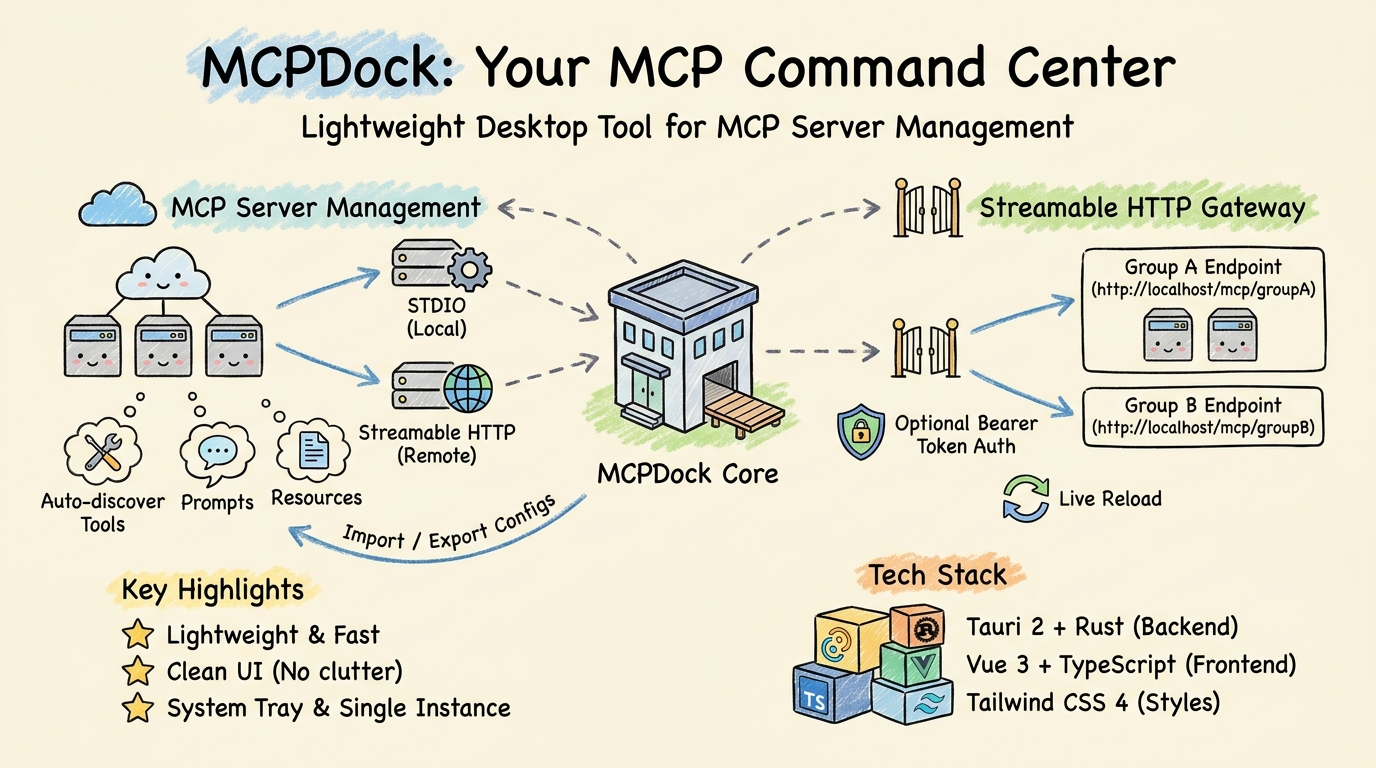
Screenshots
macOS
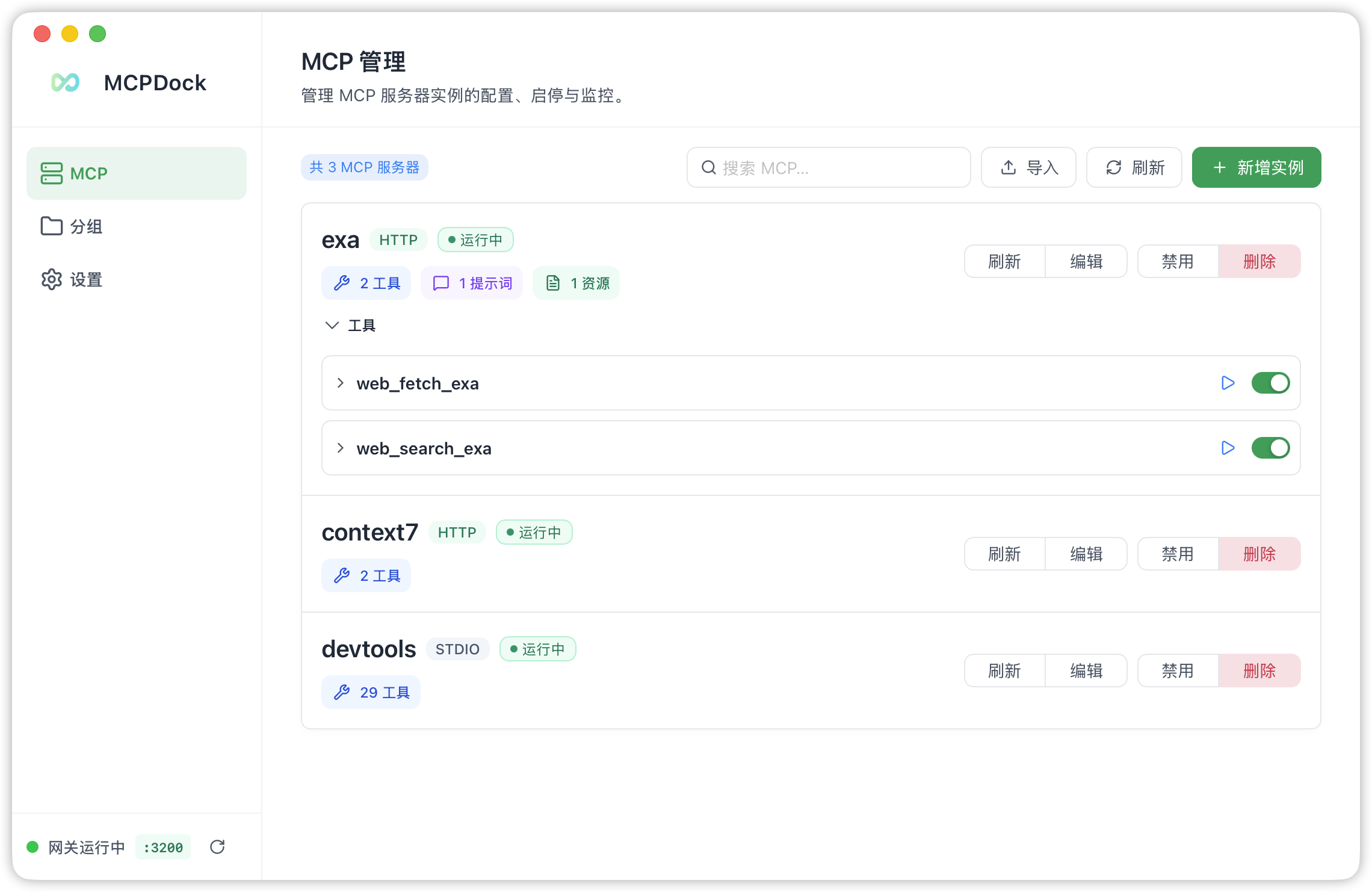
MCP Server Management
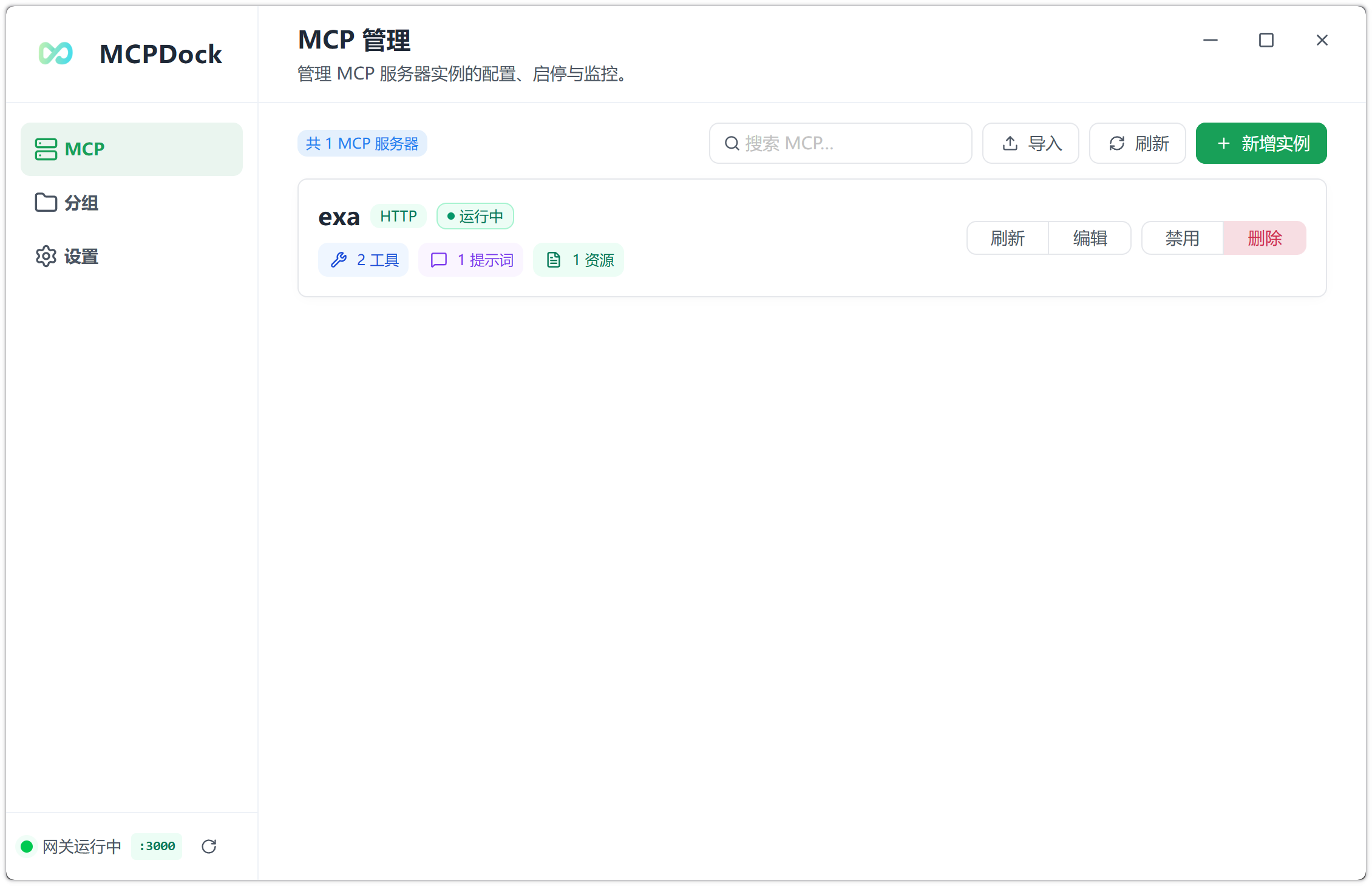
Register STDIO and Streamable HTTP servers, connect/disconnect individually, and monitor status in real time.
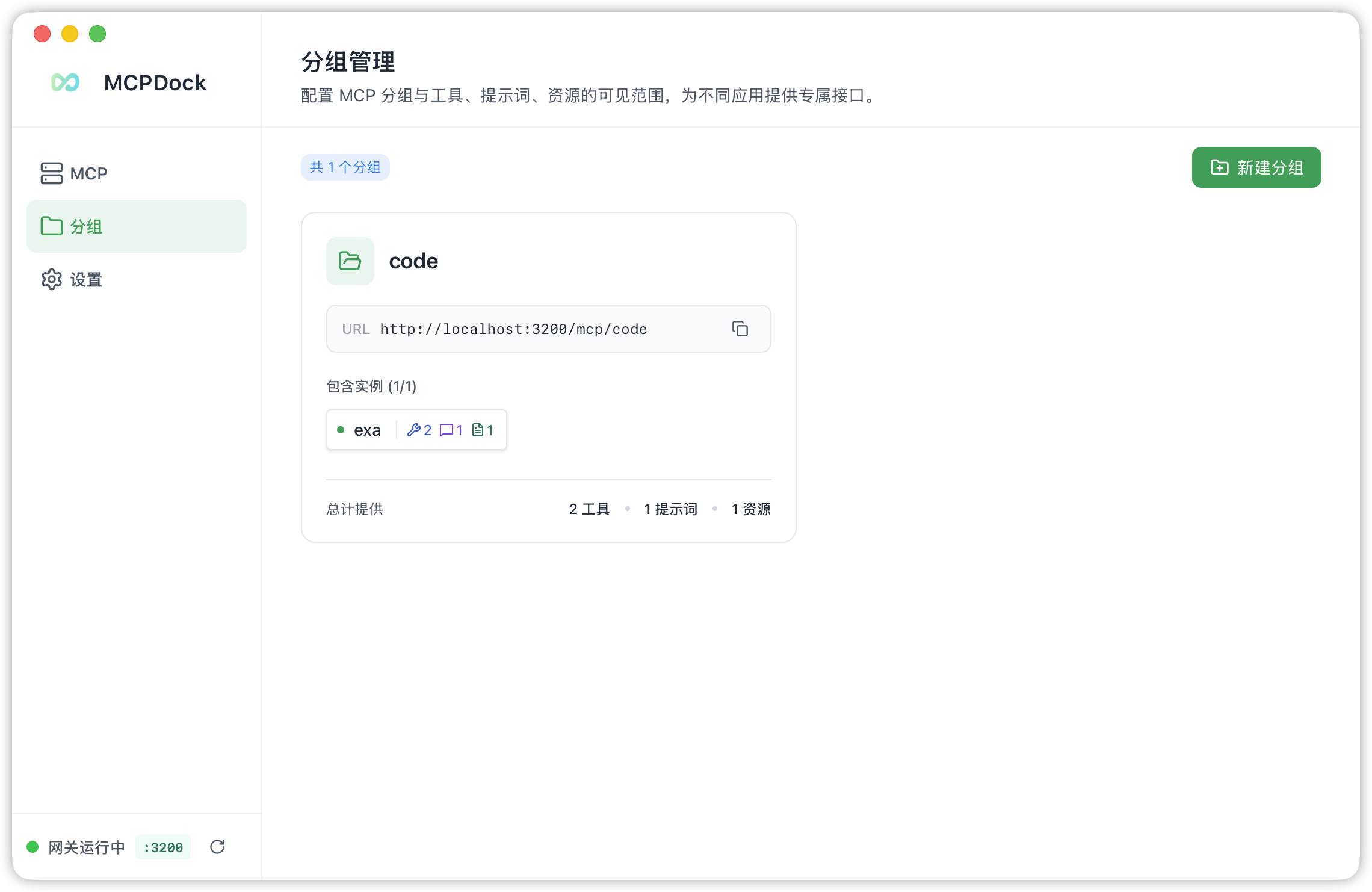
Group & Gateway Management
Create groups, assign servers, and expose them through dedicated Streamable HTTP endpoints with optional Bearer authentication.
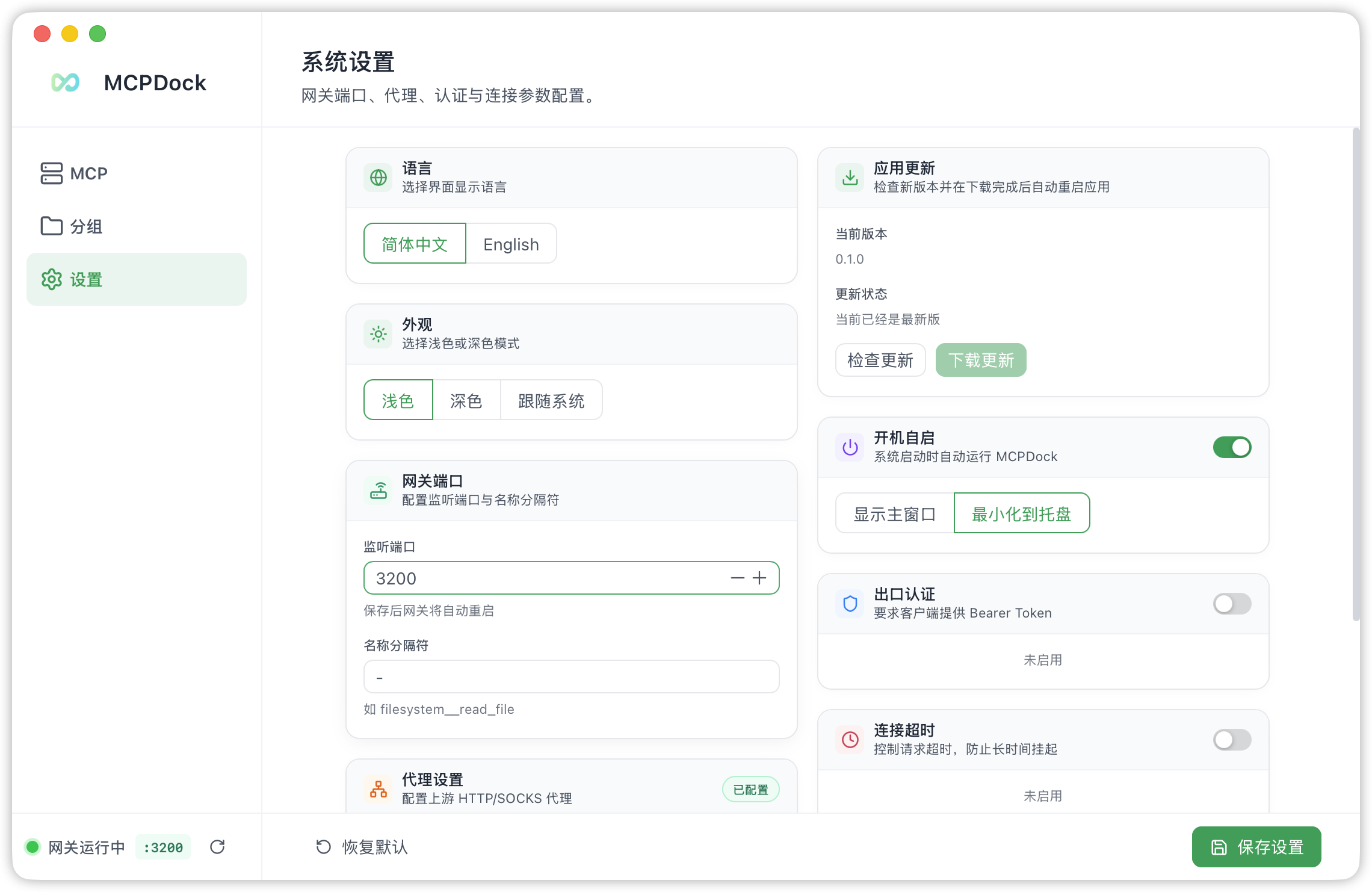
Settings
Configure the gateway port, language, tool-name separator, auth token, proxy, timeout, and keep-alive.
Windows
MCP Server Management on Windows
Highlights
- 🪶 Lightweight — Native desktop app with a tiny footprint thanks to Tauri 2 and Rust
- ⚡ Fast — Near-instant cold start and smooth real-time status updates
- 🧹 Clean UI — No distractions, no bloat. Everything is one click away
- 🌐 Bilingual — Full Chinese and English support with auto-detection
Features
MCP Server Management
- Add & Configure — Register MCP servers via two transport types:
- STDIO — Launch a local child process (e.g.,
npx,python,uvx). Supports command arguments and environment variables. - Streamable HTTP — Connect to a remote MCP server over HTTP. Supports custom request headers.
- STDIO — Launch a local child process (e.g.,
- Connect / Disconnect / Toggle — Start, stop, or enable/disable servers individually. Enabled servers auto-connect on application launch.
- Capability Discovery — After connecting, the app automatically discovers and stores each server's capabilities:
- Tools — invoke from the built-in tool runner
- Prompts — view and call with arguments
- Resources & Resource Templates — static URIs and parameterized URI templates
- Import / Export — Batch import servers from JSON, or export your server list for backup and sharing.
- Search & Filter — Search servers by name with real-time filtering.
- Direct Tool Invocation — Call any discovered tool directly inside the app with a structured input form.
Streamable HTTP Gateway
- Group-based endpoint routing — Each MCP group is exposed as a dedicated Streamable HTTP endpoint at
http://localhost:{port}/mcp/{group_name}. - Optional Bearer Token authentication — Protect all gateway endpoints with a configurable auth token.
- Tool name prefixing — Tools from different servers within a group are prefixed with the server name + configurable separator to avoid naming collisions (e.g.,
server__tool_name). - Configurable port — Choose any available port. Live reloads when settings change or groups are modified.
- CORS support — Built-in cross-origin headers for browser-based clients.
Group Management
- Multi-server aggregation — Create groups, assign member MCP servers, and all member tools/prompts/resources are available through the group endpoint.
- Live reload — Gateway automatically restarts when groups are created, updated, or deleted.
- Member toggle — Quickly add or remove servers from a group without re-creating it.
Settings
| Setting | Description | Default |
|---|---|---|
| Language | UI language (Chinese / English / System) | System |
| Theme | Light / Dark / System | System |
| Gateway Port | HTTP listen port for the gateway | 3100 |
| Separator | Prefix separator for group tool names | __ |
| Auth Token | Bearer token for gateway endpoints | — |
| Request Timeout | Connection / tool-call timeout | 60 s |
| Keep-alive Interval | Periodic ping to keep connections alive | Disabled |
| HTTP Proxy | Proxy for Streamable HTTP servers | — |
| Auto Start | Launch app on system boot | Off |
| Show Window on Start | Show or hide window after auto launch | Off |
System Tray
- Close the window to hide to the system tray rather than exiting.
- Left-click the tray icon or use the tray menu to restore the window.
- macOS: Dock icon hides when window is hidden (Accessory mode).
- Windows: Supports both light and dark tray menu themes.
Single Instance
- Only one application instance runs at a time. Launching again brings the existing window to the foreground.
Internationalization
- Full Chinese (zh-CN) and English (en) UI support via
vue-i18n. - Language auto-detects from the OS or can be switched manually.
Appearance
- Light / Dark / System theme support with Tailwind CSS 4.
- Native title bar on macOS; custom title-less frame on Windows for a cleaner look.
Tech Stack
| Layer | Technology |
|---|---|
| Desktop Framework | Tauri 2 |
| Backend | Rust, axum, tokio, rmcp |
| Database | SQLite (rusqlite, bundled) |
| Frontend | Vue 3, TypeScript |
| UI Components | naive-ui |
| Styling | Tailwind CSS 4 |
| State Management | Pinia |
| Linting / Formatting | Biome |
| Package Manager | pnpm |
Prerequisites
- Rust (latest stable)
- Node.js ≥ 18
- pnpm ≥ 8
- Platform-specific Tauri prerequisites:
- macOS — Xcode Command Line Tools
- Windows — Visual Studio Build Tools or C++ Build Tools
Quick Start
# Clone and enter the project
git clone <repo-url> && cd mcpdock

# Install dependencies
pnpm install

# Run in development mode (with hot-reload)
pnpm tauri dev

# Build for production
pnpm tauri build

# Format / lint
pnpm format
pnpm lint
Installation
macOS (Homebrew)
brew install --cask hsingjui/tap/mcpdock
macOS Note: MCPDock is not currently signed with an Apple Developer certificate. After downloading and moving
MCPDock.appto/Applications, run the following command in Terminal to remove the quarantine attribute:xattr -rd com.apple.quarantine /Applications/MCPDock.app
Architecture
mcpdock
├── src/                        # Vue 3 frontend
│   ├── components/             # Page & layout components
│   │   ├── AppSidebar.vue      # Navigation sidebar
│   │   ├── PageHeader.vue      # Page header with title & description
│   │   ├── GatewayStatus.vue   # Gateway status indicator
│   │   ├── McpManagement.vue   # Main MCP server list & management
│   │   ├── GroupManagement.vue # MCP group management
│   │   ├── SettingsPage.vue    # Application settings
│   │   ├── mcp/                # MCP-related sub-components
│   │   │   ├── McpServerList.vue    # Server list with status dots
│   │   │   ├── McpServerForm.vue    # Add/edit server form
│   │   │   ├── McpImportView.vue    # JSON import/export
│   │   │   └── McpToolRunner.vue    # Direct tool invocation UI
│   │   └── group/              # Group-related sub-components
│   ├── stores/                 # Pinia stores
│   │   ├── mcp.ts              # MCP server state & IPC calls
│   │   ├── group.ts            # Group state & IPC calls
│   │   └── settings.ts         # Settings state & IPC calls
│   ├── types/                  # TypeScript type definitions
│   ├── i18n/                   # i18n setup
│   └── locales/                # Language packs (zh-CN, en)
├── src-tauri/                  # Rust backend
│   ├── src/
│   │   ├── main.rs             # Entry point
│   │   ├── lib.rs              # Tauri builder: setup, tray, single-instance, gateway & MCP initialization
│   │   ├── state.rs            # Global application state (DB, runtimes, clients, settings, gateway)
│   │   ├── commands/           # Tauri IPC command handlers
│   │   │   ├── mcp.rs          # Server CRUD, connect/disconnect, tool call
│   │   │   ├── group.rs        # Group CRUD + gateway restart
│   │   │   ├── settings.rs     # Settings read/write + gateway restart
│   │   │   ├── gateway.rs      # Gateway status query & restart
│   │   │   └── capability.rs   # Capability listing
│   │   ├── mcp/                # MCP client management
│   │   │   ├── runtime.rs      # Runtime state & client holder types
│   │   │   └── manager/        # Connection lifecycle, discovery, transport
│   │   │       ├── mod.rs      # connect, disconnect, refresh, call_tool
│   │   │       ├── transport.rs # STDIO and Streamable HTTP client creation
│   │   │       ├── discovery.rs # Tool/prompt/resource discovery
│   │   │       └── runtime_state.rs # Runtime state helpers & event emission
│   │   ├── gateway/            # Streamable HTTP gateway
│   │   │   ├── server.rs       # Axum server: routes per group, auth middleware, CORS
│   │   │   └── handler/        # GroupHandler: tools, prompts, resources dispatch
│   │   └── db/                 # SQLite database layer
│   │       ├── mod.rs          # Schema initialization
│   │       ├── mcp_server.rs   # MCP server CRUD
│   │       ├── mcp_group.rs    # MCP group CRUD
│   │       ├── mcp_capability.rs # Discovered capabilities storage
│   │       └── app_settings.rs # Settings key-value store
│   ├── icons/                  # App icons (macOS, Windows, tray)
│   └── tauri.conf.json         # Tauri configuration
├── biome.json                  # Biome linter & formatter config
└── package.json                # Node.js project manifest
Data Flow
┌──────────────────────────────────────────────────────────┐
│                    Frontend (Vue 3)                       │
│  McpManagement ──→ Pinia stores ──→ Tauri IPC invoke()   │
└──────────────────────────┬───────────────────────────────┘
                           │ ipc
┌──────────────────────────▼───────────────────────────────┐
│                Backend (Rust / Tauri)                     │
│  commands/*.rs ──→ mcp/manager ──→ rmcp client          │
│                 ──→ gateway/server (axum)                 │
│                 ──→ db/* (rusqlite)                       │
└──────────────────────────────────────────────────────────┘
Gateway Request Flow
Client → POST http://localhost:3100/mcp/my-group (Streamable HTTP)
    → Axum router
    → Auth middleware (Bearer token check)
    → GroupHandler::call_tool
        → Parse prefixed tool name → resolve server
        → Get or connect upstream MCP client
        → Forward call → return result
Community
License
MIT
Установка MCPDock
У этого сервера нет опубликованного пакета — он собирается из исходников. Открой репозиторий и следуй инструкции в README.
▸ github.com/hsingjui/mcpdockFAQ
MCPDock MCP бесплатный?
Да, MCPDock MCP бесплатный — установка в пару кликов через Unyly без оплаты.
Нужен ли API-ключ для MCPDock?
Нет, MCPDock работает без API-ключей и переменных окружения.
MCPDock — hosted или self-hosted?
Self-hosted: сервер запускается локально на твоей машине командой из раздела установки.
Как установить MCPDock в Claude Desktop, Claude Code или Cursor?
Открой MCPDock на unyly.org, выбери вкладку своего клиента (Claude Desktop, Claude Code, Cursor) и нажми Install — конфиг сгенерируется автоматически, без правки JSON.
Похожие MCP
GitHub
PRs, issues, code search, CI status
 автор: GitHub
Filesystem
Secure file operations with configurable access controls.
Memory
Knowledge graph-based persistent memory system.
Template MCP Server
A CLI tool to create a new Model Context Protocol server project with TypeScript support, dual transport options, and an extensible structure
 автор: mcpdotdirect
Compare MCPDock with
Не уверен что выбрать?
Найди свой стек за 60 секунд
Автор?
Embed-бейдж для README
Похожее
Все в категории development