
MCPHelperSublimePlugin
БесплатноНе проверенSublime Text Plugin which connects to a local Model Context Protocol (MCP) server for AI-powered code generation, review, refactoring, and translation using Ope

Описание
Sublime Text Plugin which connects to a local Model Context Protocol (MCP) server for AI-powered code generation, review, refactoring, and translation using OpenAI or Gemini.
README
This is a Sublime Text plugin that connects your editor to a local Model Context Protocol (MCP) server, letting you use OpenAI or Gemini-powered tools directly on selected code.
🔗 Model Context Protocol Introduction
✨ Features
- Generate code from plain-text prompts
- Review code for bugs, security flaws, or improvements
- Refactor code to enhance readability, maintainability, and performance
- Translate code between languages like Python, JavaScript, Bash, etc.
- Configurable settings for MCP server URL, timeouts, and model parameters
- Menu integration for easy access to all commands
- Robust error handling with user-friendly error messages
- Debug mode for troubleshooting
🖼️ Demo
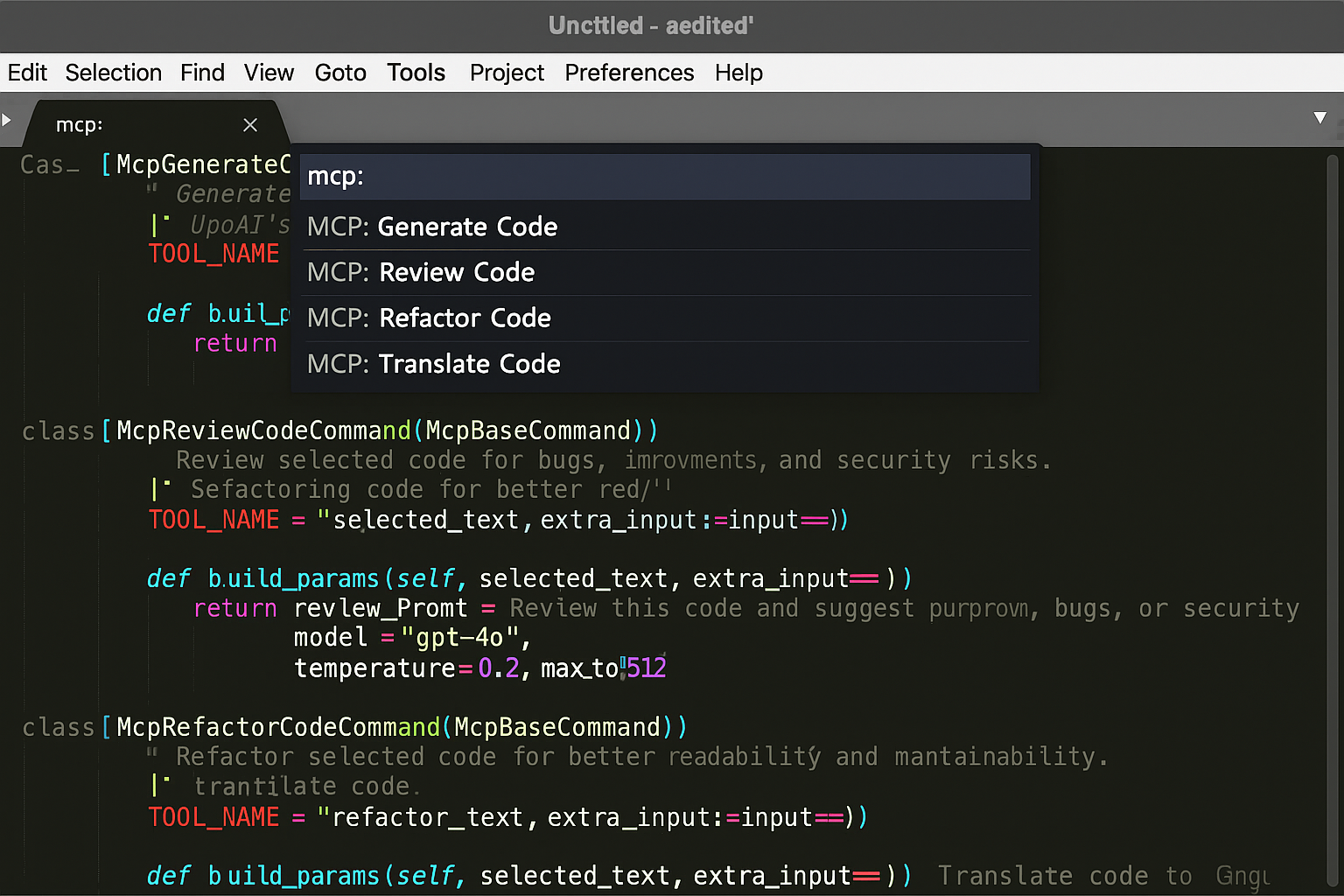
Here's what the plugin looks like in Sublime Text:
🚀 Installation
Quick Start
Download the plugin files from this repository
Copy to your Sublime Text User packages folder:
- Windows:
%APPDATA%\Sublime Text\Packages\User\ - macOS:
~/Library/Application Support/Sublime Text/Packages/User/ - Linux:
~/.config/sublime-text/Packages/User/
- Windows:
Restart Sublime Text
Configure your MCP server (see Configuration section below)
Detailed Installation
For complete installation instructions, see INSTALLATION.md.
⚙️ Configuration
1. MCP Server Setup
Ensure your local MCP server is running and accessible at the configured URL (default: http://localhost:8000/mcp.json/)
2. Plugin Settings
Open Sublime Text settings:
- Go to
Preferences > Package Settings > MCPHelper > Settings - Or edit the settings file directly
Default settings:
{
  "mcp_server_url": "http://localhost:8000/mcp.json/",
  "timeout_seconds": 120,
  "show_debug_output": false,
  "default_model": "gpt-4o",
  "default_temperature": 0.2,
  "default_max_tokens": 512
}
3. MCP Server Tools
Your MCP server should have tools configured like:
@mcp.tool(name="llm_generate_code_openai", description="Generate code using OpenAI")
async def generate_code_openai(params: dict) -> dict:
    # Your OpenAI integration here
    return {"results": [{"data": "generated_code"}]}
📖 Usage
Command Palette
Select code in any file
Press
Ctrl+Shift+PChoose one of:
MCP: Generate CodeMCP: Review CodeMCP: Refactor CodeMCP: Translate Code
Menu
- Select code in any file
- Go to
MCP Helpermenu - Choose your desired action
Keyboard Shortcuts (Optional)
Add to your keybindings file (Preferences > Key Bindings):
[
  {
    "keys": ["ctrl+shift+g"],
    "command": "mcp_generate_code"
  },
  {
    "keys": ["ctrl+shift+r"],
    "command": "mcp_review_code"
  },
  {
    "keys": ["ctrl+shift+f"],
    "command": "mcp_refactor_code"
  },
  {
    "keys": ["ctrl+shift+t"],
    "command": "mcp_translate_code"
  }
]
🔧 Troubleshooting
Common Issues
"Cannot connect to MCP server"
- Ensure your MCP server is running
- Check the URL in settings
- Verify the server is accessible at the configured endpoint
"MCP Tool Error"
- Check your MCP server logs
- Verify the tool names match your server configuration
- Ensure API keys are properly configured in your MCP server
"No text selected"
- Select some code before running commands
- Commands require text selection to work
Debug Mode
Enable debug output in settings:
{
  "show_debug_output": true
}
This will show detailed request/response information in the Sublime Text console.
Console Access
View debug output:
- Go to
View > Show Console - Look for messages starting with "MCP"
🧩 Extending
You can add new commands by subclassing McpBaseCommand and customizing build_params():
class McpCustomCommand(McpBaseCommand):
    TOOL_NAME = "your_custom_tool"

    def build_params(self, selected_text, extra_input=None):
        return {
            "prompt": f"Custom prompt: {selected_text}",
            "language": "python"
        }
📄 License
This project is licensed under the MIT License. See LICENSE for details.
👤 Author
David Donohue
Built to streamline LLM-assisted development with a local-first mindset.
⚠️ Important: This plugin requires a running MCP Server on your local machine. You must configure your own OpenAI or Gemini API keys in the MCP server. This plugin does not directly handle authentication or make API calls — it simply communicates with your local MCP server to trigger the tools you've defined.
Установка MCPHelperSublimePlugin
У этого сервера нет опубликованного пакета — он собирается из исходников. Открой репозиторий и следуй инструкции в README.
▸ github.com/sdirishguy/MCPHelperSublimePluginFAQ
MCPHelperSublimePlugin MCP бесплатный?
Да, MCPHelperSublimePlugin MCP бесплатный — установка в пару кликов через Unyly без оплаты.
Нужен ли API-ключ для MCPHelperSublimePlugin?
Нет, MCPHelperSublimePlugin работает без API-ключей и переменных окружения.
MCPHelperSublimePlugin — hosted или self-hosted?
Self-hosted: сервер запускается локально на твоей машине командой из раздела установки.
Как установить MCPHelperSublimePlugin в Claude Desktop, Claude Code или Cursor?
Открой MCPHelperSublimePlugin на unyly.org, выбери вкладку своего клиента (Claude Desktop, Claude Code, Cursor) и нажми Install — конфиг сгенерируется автоматически, без правки JSON.
Похожие MCP
GitHub
PRs, issues, code search, CI status
 автор: GitHub
Filesystem
Secure file operations with configurable access controls.
Memory
Knowledge graph-based persistent memory system.
Template MCP Server
A CLI tool to create a new Model Context Protocol server project with TypeScript support, dual transport options, and an extensible structure
 автор: mcpdotdirect
Compare MCPHelperSublimePlugin with
Не уверен что выбрать?
Найди свой стек за 60 секунд
Автор?
Embed-бейдж для README
Похожее
Все в категории development