
Mcpspan Mcp
БесплатноПоддерживаетсяAsk your AI agent about your MCP servers: which tools fail, how a release compares, what clients look for and do not find. Reads from mcpspan with a read token.

Описание
Ask your AI agent about your MCP servers: which tools fail, how a release compares, what clients look for and do not find. Reads from mcpspan with a read token.
README

mcpspan
Open-source, self-hosted analytics for MCP servers.
See which tools, resources and prompts get used, by which client,
how fast they answer, and why they fail.
Add one line to your MCP server, run the dashboard with docker compose up,
and nothing ever leaves your machine.
See the live demo, with sample data: nothing to install.
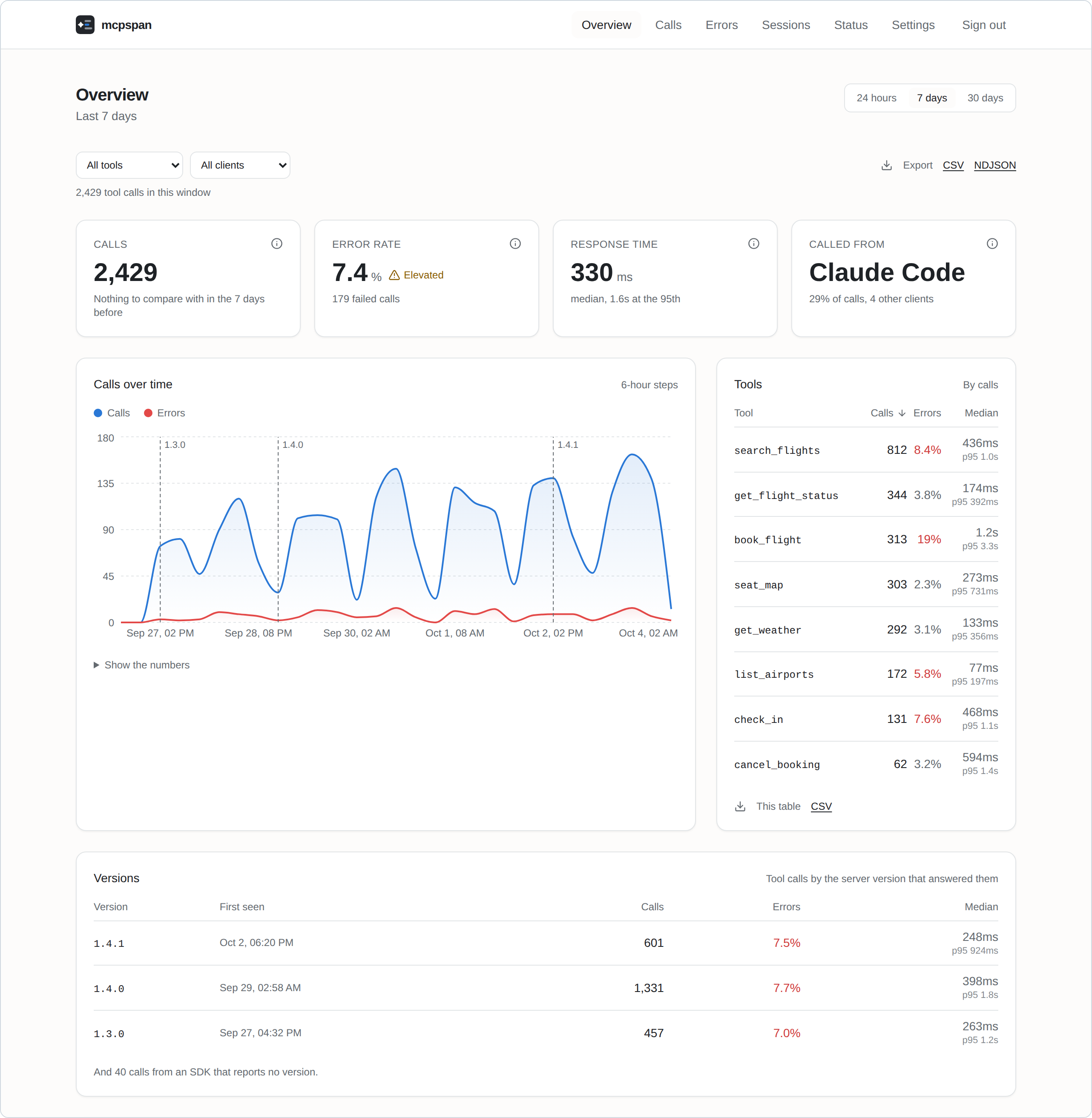
Features
- Every call, from every client. Tool calls, resource reads and prompt gets, with the client that made them: Claude, Claude Code, Cursor, VS Code, Codex, ChatGPT and the rest.
- Response times that mean something. Median and 95th percentile per tool, and the full distribution, so a cache hit and a slow path do not hide inside one average.
- Answer sizes. How large each tool's answers are, typical and largest: a tool that now and then returns megabytes fills the agent's context while looking fine on every latency chart.
- What agents are shown. Every session starts by reading the definitions of all your tools, called or not. See how many tokens that list costs, and which tools agents were shown in hundreds of sessions and never called.
- Failures, told apart. A handler that threw, a tool that answered with an error, arguments the server refused and which of them were wrong, and tools that agents asked for but your server does not have: which clients asked, the closest name you do have, and what the agent did next.
- Sessions. Each connection's calls, step by step, as the agent made them, with the calls an agent repeated with the same arguments marked: a loop that looks fine one call at a time. A tool's page says which call came right before it repeated or failed, by client.
- Where agents get lost. After every failure, what the agent did next: retried until the tool worked, tried something else, repeated the same call, or stopped there. Sessions by the worst that happened in them, the tools agents got stuck at, worst first, and on a tool's page the same by client.
- Releases. Every call carries the version of your server that answered it; the charts mark where each release began and compare it with the one before. A tool's own chart also marks where its description or input schema changed, since rewording a description can change how agents use a tool more than a change to its code.
- Alerts to Slack, Discord or any webhook, when errors climb or a server goes quiet, for a whole server or one tool.
- Your data, yours to take. CSV and NDJSON exports of anything you can see, and forwarding to OpenTelemetry for Grafana, Datadog, Honeycomb and the like.
- Private by design. Parameter values never leave your server's process, and nothing is sent anywhere you did not set up yourself. Error messages, which a tool that runs commands can fill with anything, can be turned off.
Every call, of every kind, filtered by outcome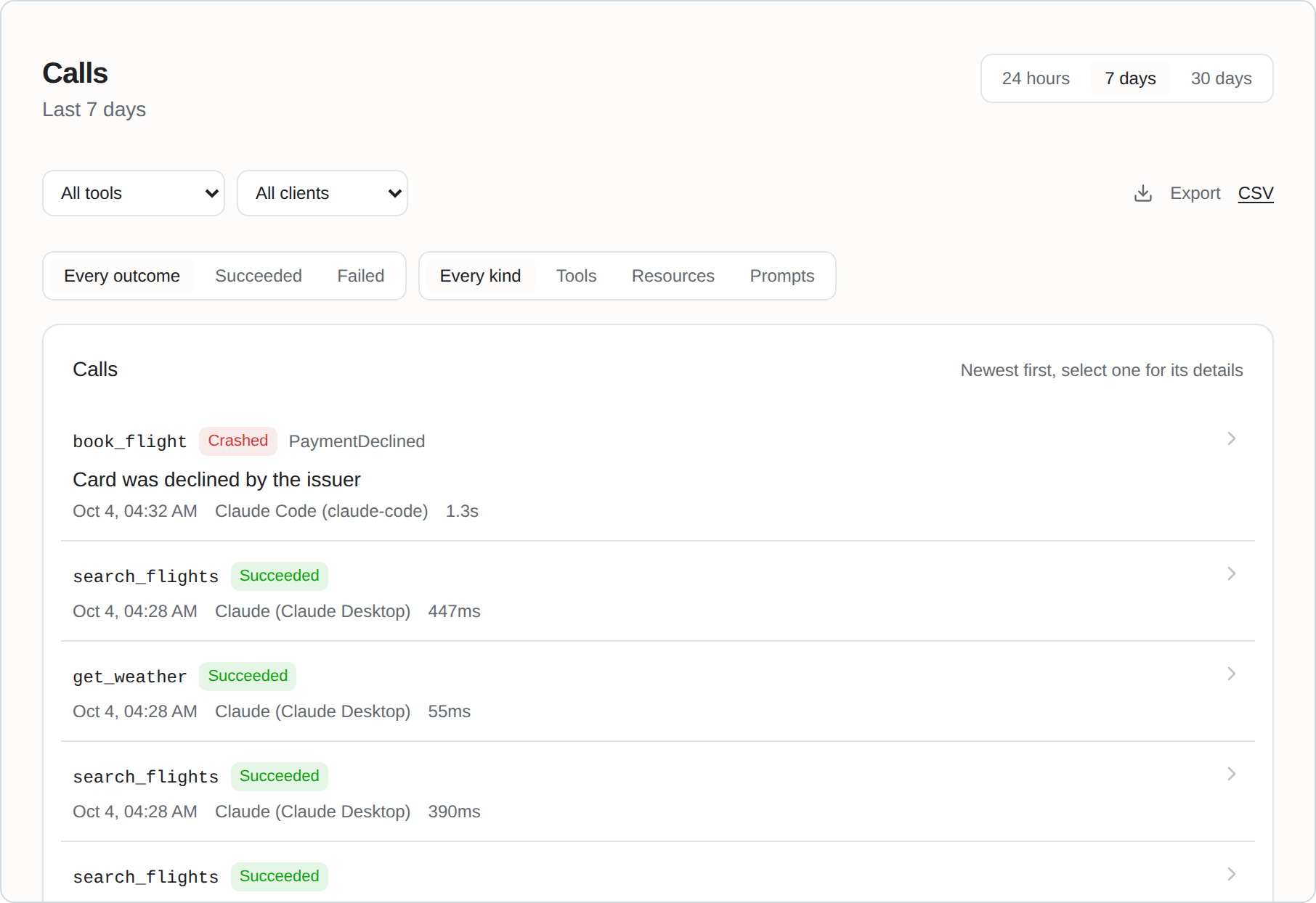 |
Failures, told apart, with what went wrong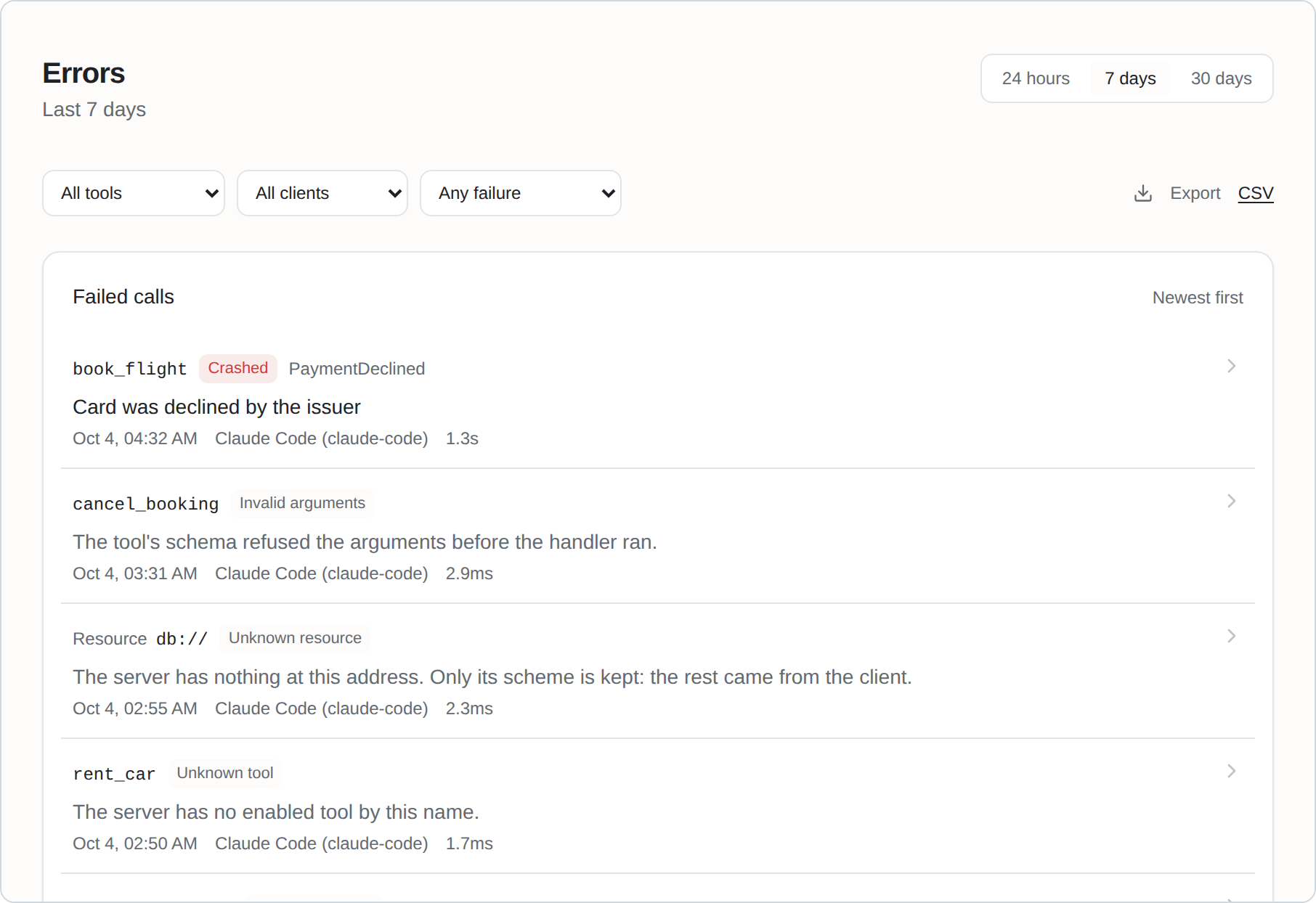 |
Sessions, step by step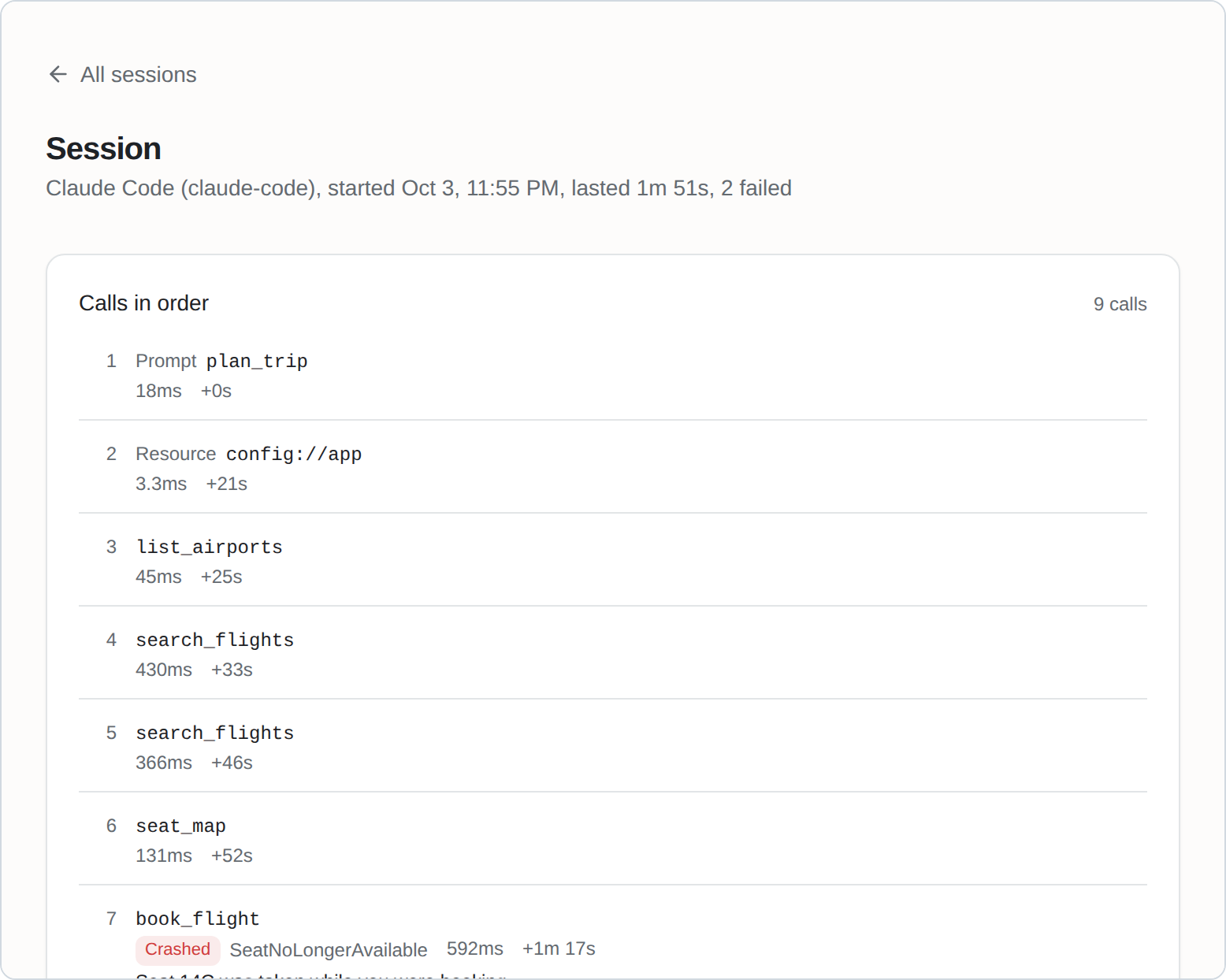 |
One call, and everything recorded about it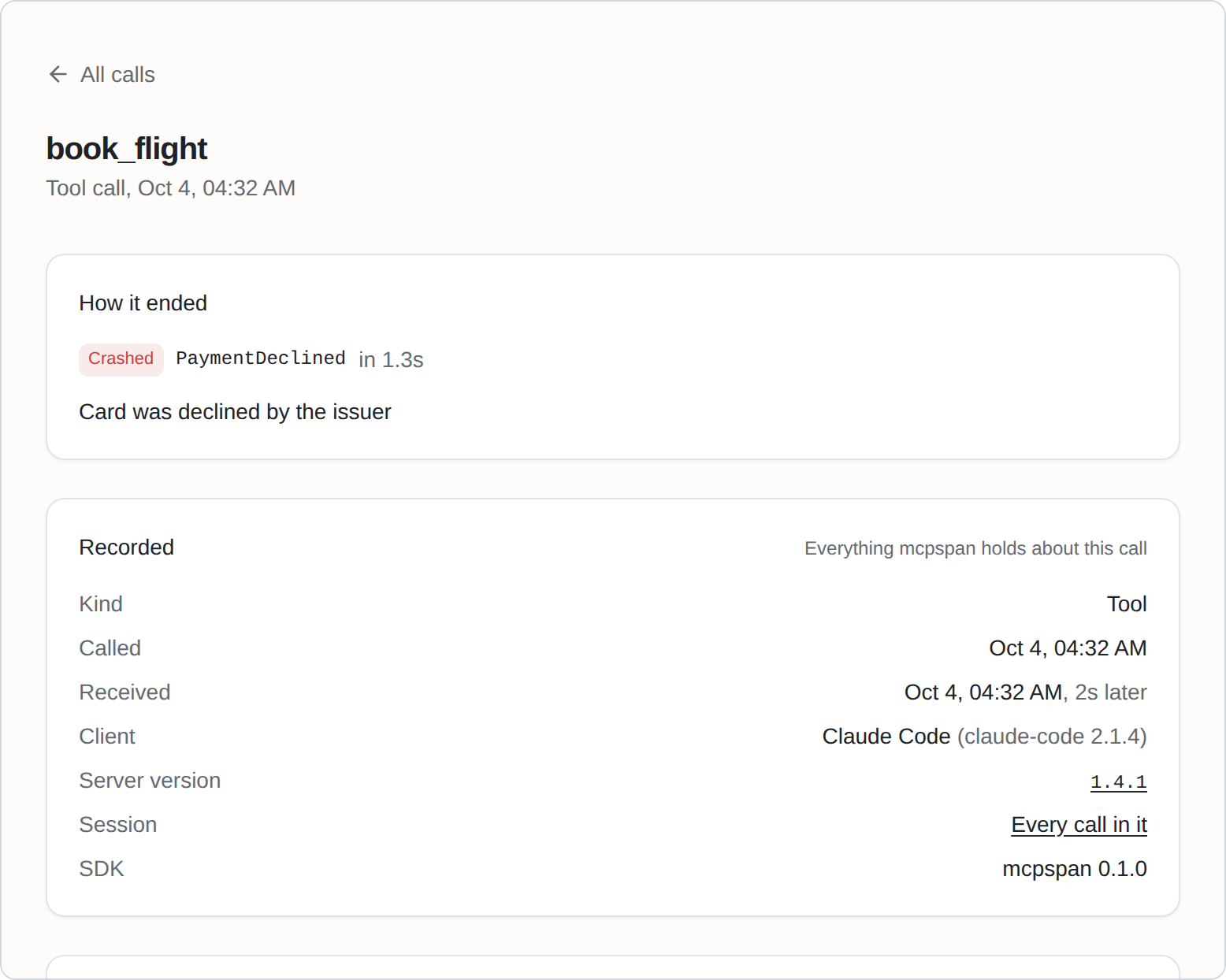 |
Ask your agent
Claude, Claude Code, Cursor, ChatGPT or any other MCP client can answer from
your mcpspan numbers: which tools failed most this week, and why?, how does
1.4.1 compare with 1.4.0? The API is an MCP server itself: add
http://localhost:6271/mcp to your agent, sign in when it asks, and allow it.
It only reads. Other ways in are on
the MCP server's page.
Badges
Show in your server's README how much it is used and how well it answers:



Calls, success rate and median response time over the last week, switched on per server in Settings. How they work.
Lint your tool definitions
Before you ship, check what makes a client refuse a tool or an agent pick the wrong one. No account needed:
npx mcpspan-lint -- node dist/server.js
Quick start
You need Docker.
git clone https://github.com/mcpspan/mcpspan.git
cd mcpspan
docker compose up -d
Open http://localhost:6270 and create your account. You get an API key for your first server, and the Settings page shows the line to add to it, in its language.
Connect your MCP server
TypeScript, on the official MCP SDK:
npm install mcpspan
import { instrument } from 'mcpspan';

instrument(server, {
  apiKey: process.env.MCPSPAN_API_KEY,
  endpoint: 'http://localhost:6271', // your mcpspan installation
});
Register your tools as you always have: every one is measured, and each returns and fails exactly as it did before.
Eight languages, the same features in each:
| Language | MCP SDKs | Install | Guide |
|---|---|---|---|
| TypeScript | official SDK, v1 and v2 | npm install mcpspan |
packages/mcpspan |
| Python | official SDK, FastMCP | pip install mcpspan |
packages/mcpspan-python |
| Go | official Go SDK, mcp-go | go get github.com/mcpspan/mcpspan/packages/mcpspan-go/mcpsdk |
packages/mcpspan-go |
| C# / .NET | official C# SDK | dotnet add package McpSpan |
packages/mcpspan-dotnet |
| Java / Kotlin | official Java SDK | com.mcpspan:mcpspan-java-sdk |
packages/mcpspan-jvm |
| Rust | rmcp | cargo add mcpspan |
packages/mcpspan-rust |
| Ruby | official Ruby SDK | gem install mcpspan |
packages/mcpspan-ruby |
| PHP | Laravel MCP, official PHP SDK | composer require mcpspan/mcpspan |
packages/mcpspan-php |
Every SDK behaves the same way, set out in one contract and checked by one test suite in every language.
Without changing your code
Any MCP server, in any language, can run behind the proxy instead. In your client's MCP settings, in front of the server's own command:
npx mcpspan-proxy -- node dist/server.js
Or in front of a server over HTTP, with clients pointed at the proxy:
docker run -p 6273:6273 -e MCPSPAN_API_KEY -e MCPSPAN_ENDPOINT ghcr.io/mcpspan/proxy http://flights:3000/mcp
It sees nearly all an SDK does; what it does not.
Running it
Settings are optional: copy .env.example to .env to change ports, how long
data is kept, or the address your MCP servers reach the API at.
docs/self-hosting.md covers the rest: the account and
password reset, several servers, settings, exports, OpenTelemetry, and
backups.
Contributing
See CONTRIBUTING.md.
Licence
MIT. See LICENSE.
Установить Mcpspan Mcp в Claude Desktop, Claude Code, Cursor
unyly install mcpspan-mcpСтавит в Claude Desktop, Claude Code, Cursor и VS Code — сам разбирается с npx, uvx и сборкой из исходников.
Впервые? Поставь CLI: curl -fsSL https://unyly.org/install | sh
Или настроить вручную
Выполни в терминале:
claude mcp add mcpspan-mcp --env MCPSPAN_READ_TOKEN="" --env MCPSPAN_URL="" -- npx -y mcpspan-mcpПошаговые гайды: как установить Mcpspan Mcp
FAQ
Mcpspan Mcp MCP бесплатный?
Да, Mcpspan Mcp MCP бесплатный — установка в пару кликов через Unyly без оплаты.
Нужен ли API-ключ для Mcpspan Mcp?
Да, требуются переменные окружения: MCPSPAN_READ_TOKEN, MCPSPAN_URL. Unyly подставит их в конфиг при установке.
Mcpspan Mcp — hosted или self-hosted?
Self-hosted: сервер запускается локально на твоей машине командой из раздела установки.
Как установить Mcpspan Mcp в Claude Desktop, Claude Code или Cursor?
Открой Mcpspan Mcp на unyly.org, выбери вкладку своего клиента (Claude Desktop, Claude Code, Cursor) и нажми Install — конфиг сгенерируется автоматически, без правки JSON.
Похожие MCP
Opencode Omniroute Plugin
OpenCode plugin for the OmniRoute AI Gateway. Drives dynamic model discovery, /connect auth flow, and multi-instance OmniRoute providers via the official @openc
 автор: GitHub Actions
Roblox Studio
Enables AI coding tools to control Roblox Studio for workspace exploration, instance manipulation, and script management. It provides tools for playtesting, sce
 автор: paralov
Antigravity Drawio
MCP server that enables AI assistants to create, parse, render, and validate Draw.io diagrams programmatically.
 автор: S-SUJAN-S
Fetch
Web content fetching and conversion for efficient LLM usage.
AWS KB Retrieval
Retrieval from AWS Knowledge Base using Bedrock Agent Runtime.
 автор: modelcontextprotocol
Spring AI MCP Server
Provides auto-configuration for setting up an MCP server in Spring Boot applications.
llm-analysis-assistant
A very streamlined mcp client that supports calling and monitoring stdio/sse/streamableHttp, and can also view request responses through the /logs page. It also
 автор: xuzexin-hz
MCP-Agent
A simple, composable framework to build agents using Model Context Protocol by [LastMile AI](https://www.lastmileai.dev)
 автор: lastmile-ai
Spring AI MCP Client
Provides auto-configuration for MCP client functionality in Spring Boot applications.
mcp.natoma.ai
A Hosted MCP Platform to discover, install, manage and deploy MCP servers by [Natoma Labs](https://www.natoma.ai)
Compare Mcpspan Mcp with
Не уверен что выбрать?
Найди свой стек за 60 секунд
Автор?
Embed-бейдж для README
Похожее
Все в категории ai