
Mdb Gateway
БесплатноНе проверенA smart MCP gateway that routes AI agents to the right tools using hybrid search (vector + full-text) on MongoDB Atlas, collapsing the retrieval infrastructure

Описание
A smart MCP gateway that routes AI agents to the right tools using hybrid search (vector + full-text) on MongoDB Atlas, collapsing the retrieval infrastructure into a single query.
README
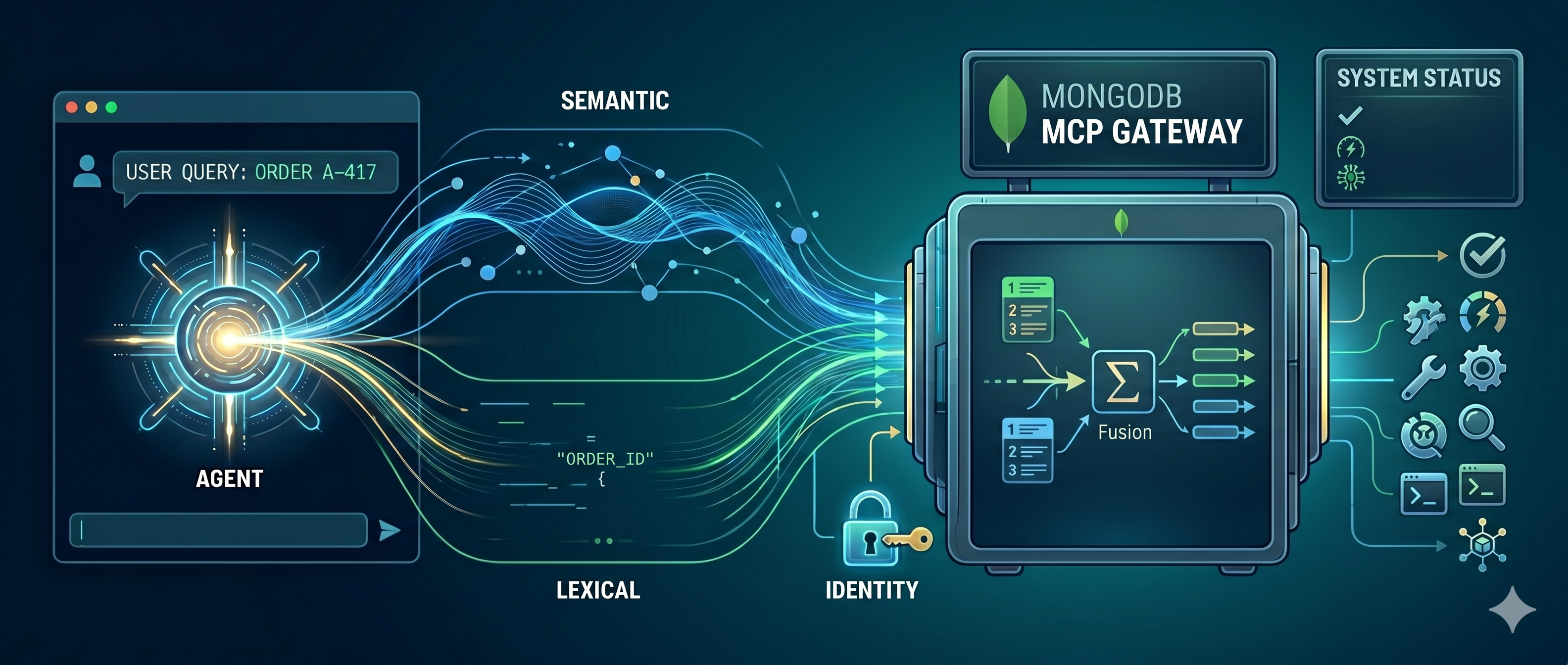
Go from no MCP to MCP-gateway magic in minutes: paste a Python function and the gateway turns it into a real, sandboxed MCP tool behind one endpoint — a hosted, effectively "serverless" virtual MCP. MCP is just JSON-RPC over the document model, so it all lives on MongoDB; hybrid search on MongoDB Atlas is the power-up that keeps routing sharp once your catalog grows.
MCP, demystified: it's just JSON-RPC over the document model
Strip away the launch-day acronyms and the Model Context Protocol is the oldest
pattern in computing: a client sends a request, a server returns a response.
Three verbs do the work — initialize (handshake), tools/list (the menu), and
tools/call (run one) — and every message is a tiny JSON-RPC 2.0 envelope:
{
  "jsonrpc": "2.0",
  "id": "call-1",
  "method": "tools/call",
  "params": { "server": "weather", "name": "get_current_weather",
              "arguments": { "city": "Montreal", "unit": "celsius" } }
}
That shape — nested, self-describing, free to differ from its neighbors — is a document. So the whole protocol (a tool call, a tool definition, an embedding, a scope, an audit record) stores natively in MongoDB with no ORM, no migration, and no impedance mismatch: the request on the wire is the document at rest. That is the quiet reason this gateway is one engine instead of four.
Build a tool in minutes: virtual MCPs via code_exec
The fastest way from "no MCP" to "MCP magic" isn't wiring up a server — it's writing a function. In the admin console you paste a Python function; the gateway lints it, encrypts it at rest, runs it sandboxed in WebAssembly, and exposes it as a real MCP tool behind one endpoint. No Dockerfile, no deploy, no infra to babysit — a "virtual" MCP server that is hosted and effectively serverless.
def word_count(text: str) -> dict:
    """Count the words and characters in the given text."""
    words = [w for w in text.split() if w]
    return {"words": len(words), "characters": len(text)}
Save it and an agent can immediately discover and call word_count. The runtime
(services/code_tools.py + the wasm sandbox) gives
authored functions a small, safe context with everything a useful tool needs —
and nothing else:
context.db— tenant-scoped MongoDB, host-relayed (no credentials in the sandbox), gated by the tool'saction_type(read/write/destructive).context.env— per-server encrypted secrets, injected at runtime.context.tools— call sibling tools in your tenant to compose workflows.context.http— opt-in, SSRF-screened outbound HTTPS (the jail has no sockets).- Pinned pip — declare
package==x.y.zrequirements and they install wheels-only under a deny-by-default, per-tenant allowlist.
The sandbox is network-isolated and fuel/memory/wall-clock bounded, and every tool you author can be exported as a runnable FastMCP project — so nothing you build here is locked in. See CONTEXT.md for the full author guide.
One gateway endpoint
Whatever you build or connect, agents reach it through a single front door:
JSON-RPC at POST /rpc and a mounted MCP app at /mcp. Discovery is
identity-scoped and routes by meaning; invocation is authorized, quota-metered,
and audited. Point Cursor, Claude Desktop, or VS Code at the one URL and every
tool — virtual or connected — shows up.
Advanced: connect existing MCP servers (GitHub, MongoDB, …)
When you already run an MCP server — or want to front an official one such as the
GitHub or MongoDB MCP — register it as a network/stdio downstream
(streamable_http, sse, or stdio) and the gateway proxies it with the same
auth, egress allowlisting, resiliency, and audit as everything else. This is the
"advanced" path; most tools start life as a code_exec virtual MCP above.
Advanced power-up: hybrid search routing, in one place
Once your catalog grows past a handful of tools, handing the agent the whole menu every turn burns tokens and degrades tool choice. The upgrade is to treat tool selection as retrieval — and the retrieval that holds up is hybrid:
Semantic (vector) routing — embed the catalog, hand back the tools a task needs — is the well-trodden first step, and it works: it slashes the per-turn token bill. But vector-only retrieval has a blind spot: it fumbles the exact tokens agents constantly use (a tool name, an error code, an order ID), because cosine similarity rewards meaning, not spelling.
The fix is hybrid search — fusing semantic
(vector) and lexical (full-text/BM25) retrieval into one ranked result with
Reciprocal Rank Fusion, so an agent finds the right tool whether it asks in
keywords or in intent. The interesting part isn't that we do hybrid search;
it's how little infrastructure it takes, because MongoDB Atlas does all of it
in one $rankFusion query over one collection — no separate vector DB, search
engine, or sync pipeline to keep in lockstep.
Why hybrid search is genuinely hard to operate
Neither retrieval method is sufficient alone:
- Lexical (BM25) nails exact tokens — tool names, error codes, SKUs — but is
blind to intent. Ask it for "dangerous storm warnings" and it happily ranks
an unrelated
list_customer_ordersfirst because of common words like "for" and "my". (That's a real result from this repo — see below.) - Vector (semantic) understands intent but can miss the exact identifier a user typed verbatim.
The fix the industry settled on is Reciprocal Rank Fusion (RRF): run both
retrievers, then merge by rank position (1 / (60 + rank)) so you never have
to normalize an unbounded BM25 score against a 0–1 cosine score. The pattern is
simple. Operating it is not — at least not the traditional way:
flowchart LR
    A[Agent / Gateway] -->|keyword query| ES[(Search engine<br/>Elasticsearch / Solr)]
    A -->|embed + vector query| VDB[(Vector DB<br/>Pinecone / Milvus)]
    ES -->|ranked list A| F[Fusion + merge service<br/>client-side RRF]
    VDB -->|ranked list B| F
    F --> A
    SYNC[[CDC / sync pipeline]] -. keep docs + _id consistent .-> ES
    SYNC -. keep docs + _id consistent .-> VDB
    classDef pain fill:#fde,stroke:#c33;
    class ES,VDB,F,SYNC pain;
That's four moving parts to support one feature: a search engine, a vector
DB, a fusion/merge service, and a sync pipeline keeping the two stores
consistent by shared _id. Each has its own scaling, backup, and access model —
and they drift out of sync the moment one write lands in one store but not the
other. This is the "architectural sprawl" trap.
How MongoDB Atlas collapses it to one query
The same documents carry both a $search (Atlas Search / BM25) index and a
$vectorSearch index. A single $rankFusion aggregation stage runs both arms
and fuses them with RRF — natively, server-side, in one round trip:
flowchart LR
    A[Agent / Gateway] -->|"one $rankFusion aggregate"| DB
    subgraph DB [MongoDB Atlas · tool_catalog · one collection]
        VEC[Vector Search index]
        TXT[Atlas Search index]
    end
    DB -->|RRF-fused, ranked result| A
    classDef good fill:#dfe,stroke:#393;
    class VEC,TXT good;
No second store. No client-side merge. No sync pipeline. No _id reconciliation.
The catalog, both indexes, and the fusion math live on one engine. That is
the entire pitch of this project distilled to one stage.
The pipeline this repo actually runs (services/hybrid_search.py):
db.tool_catalog.aggregate([
  { $rankFusion: {
      input: { pipelines: {
        vectorPipeline:   [ { $vectorSearch: { index: "hybrid-vector-search", path: "embedding",
                                                queryVector: embed(query), numCandidates: 100, limit: 20 } } ],
        fullTextPipeline: [ { $search: { index: "hybrid-full-text-search",
                                         text: { query: query, path: ["name","description","server"] } } },
                            { $limit: 20 } ]
      } },
      combination: { weights: { vectorPipeline: 0.5, fullTextPipeline: 0.5 } },
      scoreDetails: true
  } },
  { $project: { name: 1, description: 1, score: { $meta: "score" },
                scoreDetails: { $meta: "scoreDetails" } } },
  { $sort: { score: -1 } }, { $limit: 5 }
])
See it for yourself: one query, three modes
The gateway exposes a mode so you can run the same query as vector,
text, or hybrid and watch the arms disagree. Real output from this repo for
"look up a purchase by its id":
| mode | top 3 results |
|---|---|
vector |
find_order, update_order_status, list_customer_orders |
text |
find_order, severe_weather_alerts ← lexical noise, list_customer_orders |
hybrid |
find_order, list_customer_orders, severe_weather_alerts |
Lexical-only drags an irrelevant weather tool into the order results on common
words; the semantic arm corrects it, so hybrid keeps both real order tools above
the noise. The scoreDetails are the receipts that both arms ran and how the
fusion was computed:
{
  "value": 0.01639,
  "description": "value output by reciprocal rank fusion algorithm, computed as sum of (weight * (1 / (60 + rank))) across input pipelines from which this document is output, from:",
  "details": [
    { "inputPipelineName": "fullTextPipeline", "rank": 1, "weight": 0.5, "value": "..." },
    { "inputPipelineName": "vectorPipeline",   "rank": 2, "weight": 0.5, "value": "..." }
  ]
}
Versions / notes.
$rankFusionis native to MongoDB 8.1+. This repo runsmongodb/mongodb-atlas-local:8.3.2-20260618T112243Z(a pinned patch-level build, not the floating:8.3tag) in Compose — with a matchingcrypt_shared8.3.2 in the image — and in the integration tier. If you need score-based (not rank-based) fusion with normalization, MongoDB also offers$scoreFusion. The gateway degrades to the semantic arm if the fusion stage is unavailable, so search never hard-fails.
Quick Start (Implemented)
In a hurry? QUICKSTART.md is the 5-minute path:
docker compose up, generate a token in the admin console, and connect Cursor — security on by default.
Deploying for real? See ARCHITECTURE.md for a complete as-built system map, then DEPLOYMENT.md for Docker Compose, single-container, Kubernetes, and Helm paths, plus an embeddings setup and production hardening checklist. For going live, also read PRODUCTION.md (operations & hardening), SECURITY.md (security model & vulnerability reporting), and NETWORK-SECURITY.md (trust boundaries & what's handled at the perimeter), TROUBLESHOOTING.md (failure-mode runbook), docs/API.md (REST + JSON-RPC reference), READONLY.md (safely showcase: read-only tenants, viewers & tool curation), and docs/QUERYABLE-ENCRYPTION.md (QE setup and operations). For function-author ergonomics and runtime capabilities, see CONTEXT.md.
Demo in 60s -> production in 5 steps
- Start the stack
docker compose up --build - Verify gateway health
curl http://localhost:8000/health - Open the Admin Studio
http://localhost:8000/ui([email protected]/demo)
- Call seeded tools
- Code servers:
weather,orders,utilities,analytics - Public server:
deepwiki(requires outbound HTTPS tomcp.deepwiki.com)
- Code servers:
- Graduate to production posture
- Use the hardening path in this README, then follow DEPLOYMENT.md, PRODUCTION.md, SECURITY.md, and NETWORK-SECURITY.md.
Important first-run note:
- Bootstrap now performs an embedding preflight and fails loudly if your embedding provider is unreachable.
- With default Compose settings this means Ollama must be running on your host
and
nomic-embed-textmust be pulled before bootstrap:ollama pull nomic-embed-text
This repository now includes a working end-to-end MCP Gateway with:
- FastAPI + FastMCP gateway mounted at
http://localhost:8000/mcp - MongoDB Atlas Local (
mongod+mongot) via Docker Compose - Semantic
tools/listdiscovery: a task query (X-MCP-Queryheader) returns a curated, ranked shortlist instead of the full catalog — the "route by meaning" front door - Identity-bound scope on both discovery and invocation: scope filtering in search/list and explicit authorization checks in
tools/call, including requiredserver:<name>scopes - Hybrid tool search (
$rankFusion: vector + full-text) overtool_catalog - GA-safe hybrid fallback: application-side RRF keeps hybrid retrieval working when
$rankFusionpreview features are unavailable - Always-included tools: flag a tool
metadata.always_includedin Admin Studio to pin it to the top of every search result regardless of relevance — still scope-filtered, and counted against the caller'slimit(toggle withHYBRID_PIN_ALWAYS_INCLUDED) - Resiliency: a hard downstream deadline (
DOWNSTREAM_TIMEOUT_MS, default 2000ms) with protocol-safe JSON-RPC error frames - Active-active-safe registry watching: each gateway replica persists its own change-stream resume token (
routing_registry::<instance_id>) so pods do not overwrite each other's stream position - Downstream auth, kept minimal: per-server
metadata.auth.schemeis gateway-minted workload JWT (default) ornone(the downstream/tenant owns its own auth); credentials rotate/reconnect through the existing warm-client cache path - Inbound MCP-client auth: username/password via
POST /auth/token(OAuth2 password grant) plus optional HTTP Basic on the MCP surface; full OAuth is bring-your-own-IdP viaAUTH_MODE=jwkswith RFC 9728 resource-metadata discovery - Queryable Encryption for downstream secrets:
routing_registry.env/command/args/metadatacan be encrypted at rest with DEKs inencryption.__keyVault, backed by LocalStack AWS KMS (default Compose) or a local 96-byte master key - Embedding resiliency: retries + circuit breaker + lexical fallback when embedding providers are unavailable
- Pluggable, admin-configurable embeddings: Ollama, OpenAI, Azure OpenAI, Voyage AI, and Google Gemini — switchable at runtime from the admin panel, with vector width auto-detected per provider (see Embeddings)
- Layered guardrails: regex floor + optional semantic injection classifier over a versioned
guardrail_signaturesvector corpus, plus optional Presidio NER redaction - Semantic cache model provenance: cache entries are stamped with
embedding_model/embedding_dim/embedding_version, with version-aware lookups and migration tooling - Default Ollama embeddings (
nomic-embed-text) throughhttp://host.docker.internal:11434 - Demo defaults: code-powered
weather,orders,utilities, andanalyticsservers (wasm sandbox execution) plus a prewired publicdeepwikiserver - Tenant-scoped virtual DB bridge for code tools:
context.db[...]queries relay through the host process (no sandbox network access or DB credentials), gated by each tool'saction_type(read/write/destructive) - Opt-in outbound HTTP bridge for code tools:
context.http.get(url, auth="ENV_KEY")relays through the host (the wasm jail has no sockets), screened by a deny-by-default, SSRF-proof, IP-pinned egress allowlist (tenant ∩ EGRESS_GLOBAL_ALLOWLIST), with secrets injected host-side. Off by default (SANDBOX_HTTP_BRIDGE_ENABLED) - Per-server encrypted runtime env: code tools read
context.env["KEY"]; values are managed from Admin Studio Secrets and never returned after write - Explore Database authoring assistant in Admin Studio: browse tenant
collections, sample documents, run read-only queries, and insert/copy
generated
context.db[...]snippets directly into function source - Tenant soft-delete + retention:
DELETE /admin/tenants/{id}is a reversible soft-delete by default (POST /admin/tenants/{id}/restoreundoes it within the retention window); a background reaper drops the physical DB before removing the control doc, and?hard=truekeeps the immediate hard delete - Streaming usage/billing export:
GET /admin/tenants/{id}/usage/export(CSV) andGET /admin/telemetry/export(JSONL) stream over a cursor withfrom/torange filters — no load-all ceiling - Self-service beta registration: opt-in public sign-up (
POST /auth/register+/ui/register) provisions an isolated tenant per registrant, capped to anunconfirmed, code-tools-only tier (1 server / 1 tool, small quota, no external transports) with per-IP throttling and a global beta cap; a platform-admin confirms accounts to lift the caps — see AUTH.md - Admin analytics dashboard: scalable
$groupaggregation endpoints (/admin/analytics/*) power scope-aware Dashboard/Telemetry charts (usage trend, top tools/servers, success-vs-error + latency, quota utilization) over a self-hosted Chart.js — no full-collection scans - Sandbox quota preflight: code tools whose worst-case sandbox cost can't fit the remaining
sandbox_secondsquota are rejected before execution (one shared check enforced identically on/rpcand/mcp), with agateway_quota_preflight_blocks_totalmetric - Sandbox pool max-age + health sweep: idle warm workers are proactively retired by age and ping-health, complementing the reactive
max_jobsrecycle - Observability: request IDs, JSON logs, Prometheus
/metrics, prebuilt Prometheus alert rules, a provisioned Grafana dashboard (http://localhost:3000), OpenTelemetry tracing (ENABLE_TRACING=true) with spans around RPC handling and downstream hops, and health split (/health/live,/health/ready) - Delivery artifacts: k8s manifests, Helm chart, CI workflow (lint + format + types + 82% coverage gate), pre-commit, Ruff, and MyPy configuration
Prerequisites
- Docker / Docker Compose
- Ollama running on your host machine
- Pulled embedding model:
ollama pull nomic-embed-text
Optional for ML NER redaction (GUARDRAIL_PII_NER_ENABLED=true):
pip install -e ".[guardrails-ml]"
python -m spacy download en_core_web_sm
Run
docker compose up --build
By default, Compose now starts localstack + kms-init and runs the gateway
with Queryable Encryption enabled for routing_registry secret-bearing fields.
The KMS key ARN is written to a shared volume and loaded through
AWS_KMS_KEY_ARN_FILE=/kms-config/kms_key_id.
Compose also runs secrets-init once and writes stable file-backed secrets for
EMBEDDING_SECRET_FILE and ADMIN_SESSION_SECRET_FILE into the
gateway_secrets volume (instead of relying on fallback secrets).
The demo stack enables CODE_TOOL_EXECUTION_ENABLED=true and
SANDBOX_DB_BRIDGE_ENABLED=true, so seeded code tools (including the click-tracker
analytics demo) run immediately inside the wasm sandbox with context.db.
Queryable Encryption is still demonstrated through encrypted routing fields and
authored function source/secrets at rest — without the old non-functional
secure-stdio fixture server.
To use a local master key instead of LocalStack KMS:
# Generate a 96-byte QE local key (base64) and save it as a file.
python - <<'PY'
import base64, os
print(base64.b64encode(os.urandom(96)).decode())
PY
Set KMS_PROVIDER=local and QE_LOCAL_MASTER_KEY_FILE=/kms-config/local-master-key.b64
for bootstrap and gateway (see docker-compose.yml comments).
Docker Compose hardening map (the "near-perfect" path)
Use this progression to move from demo convenience toward production posture:
- Keep file-backed secrets enabled (default):
EMBEDDING_SECRET_FILEandADMIN_SESSION_SECRET_FILEcome fromgateway_secrets. - Use cloud embedding providers over HTTPS for real workloads:
- set
EMBEDDING_PROVIDER=openai|azure_openai|voyage|gemini - mount
EMBEDDING_API_KEY_FILE(never hardcode the key in compose).
- set
- Harden auth for production: auth is always on (
AUTH_MODE=hs256by default); for production move tojwks, set issuer/audience, and disable wildcard CORS. - Pin explicit origins and proxy trust:
CORS_ALLOW_ORIGINS=https://your-app.example.comFORWARDED_ALLOW_IPS=<your-ingress-cidr>
- Graduate to production deployment docs: DEPLOYMENT.md + PRODUCTION.md + SECURITY.md for full hardening, key rotation, and network policy.
The bootstrap service will:
- Wait for MongoDB
- Create Search + Vector Search indexes
- Seed
routing_registry,session_context, and a ready-to-use demo user ([email protected], role Demo/tool:invoke) — skipped whenENVIRONMENT=production - Sync downstream tools into
tool_catalogwith embeddings
Verify
Auth is always on. Health/observability endpoints are open, but the data plane (
/rpc,/mcp) requires aAuthorization: Bearer <token>. The fastest way to get one: open the admin console Users tab and click Generate token on[email protected]— it hands you a ready-to-paste token plus Cursormcp.json/ curl snippets. Add-H "Authorization: Bearer $TOKEN"to the/rpcexamples below.
- Health:
curl http://localhost:8000/health
- Dashboards and alerts:
open http://localhost:3000   # Grafana (admin/admin)
open http://localhost:9090   # Prometheus + alert rules
- JSON-RPC hybrid search (default
modeishybrid):
curl -X POST http://localhost:8000/rpc \
  -H "Content-Type: application/json" \
  -d '{
    "jsonrpc":"2.0",
    "id":"search-1",
    "method":"tools/search",
    "params":{"query":"weather in montreal","limit":5}
  }'
- Compare retrieval modes on the same query (
mode:hybrid|vector|text). Run all three to see the vector and lexical arms disagree, then watch$rankFusionreconcile them:
for MODE in vector text hybrid; do
  echo "== $MODE =="
  curl -s -X POST http://localhost:8000/rpc \
    -H "Content-Type: application/json" \
    -d "{\"jsonrpc\":\"2.0\",\"id\":\"m\",\"method\":\"tools/search\",
         \"params\":{\"query\":\"look up a purchase by its id\",\"limit\":3,\"mode\":\"$MODE\"}}"
done
- Semantic
tools/list(route by meaning). With no query you get the full catalog; with anX-MCP-Queryheader you get a curated shortlist:
curl -X POST http://localhost:8000/rpc \
  -H "Content-Type: application/json" \
  -H "X-MCP-Query: I need to check the weather forecast" \
  -d '{"jsonrpc":"2.0","id":"list-1","method":"tools/list","params":{}}'
- Initialize handshake + capabilities:
curl -X POST http://localhost:8000/rpc \
  -H "Content-Type: application/json" \
  -d '{"jsonrpc":"2.0","id":"init-1","method":"initialize","params":{}}'
- Paginated
tools/list:
curl -X POST http://localhost:8000/rpc \
  -H "Content-Type: application/json" \
  -d '{"jsonrpc":"2.0","id":"list-paged","method":"tools/list","params":{"limit":2,"cursor":"0"}}'
- Identity-bound scope. Caller groups/scopes come from the verified token claims
(
groups/scopes); the catalog returned is filtered to what that identity is allowed to see. Mint a token whose scopes excludeorders:writeandupdate_order_statusis filtered out:
# token scoped to orders,readonly: update_order_status (orders:write) is filtered out
curl -X POST http://localhost:8000/rpc \
  -H "Content-Type: application/json" \
  -H "Authorization: Bearer $TOKEN" \
  -d '{"jsonrpc":"2.0","id":"list-2","method":"tools/list","params":{}}'
- JSON-RPC tool call through gateway proxy:
curl -X POST http://localhost:8000/rpc \
  -H "Content-Type: application/json" \
  -d '{
    "jsonrpc":"2.0",
    "id":"call-1",
    "method":"tools/call",
    "params":{
      "server":"weather",
      "name":"get_current_weather",
      "arguments":{"city":"Montreal","unit":"celsius"}
    }
  }'
- Cache migration status (admin route):
curl -X POST http://localhost:8000/admin/cache/migrate \
  -H "Content-Type: application/json" \
  -d '{"mode":"status"}'
- Cache migration via CLI (status / purge / reembed):
python -m scripts.migrate_cache --mode status
python -m scripts.migrate_cache --mode purge
python -m scripts.migrate_cache --mode reembed --batch-size 200
Web admin console
The gateway serves a branded, dark-mode admin UI at http://localhost:8000/ui —
sign in, mint tokens, wire up servers, and connect an MCP client without ever
touching a terminal.
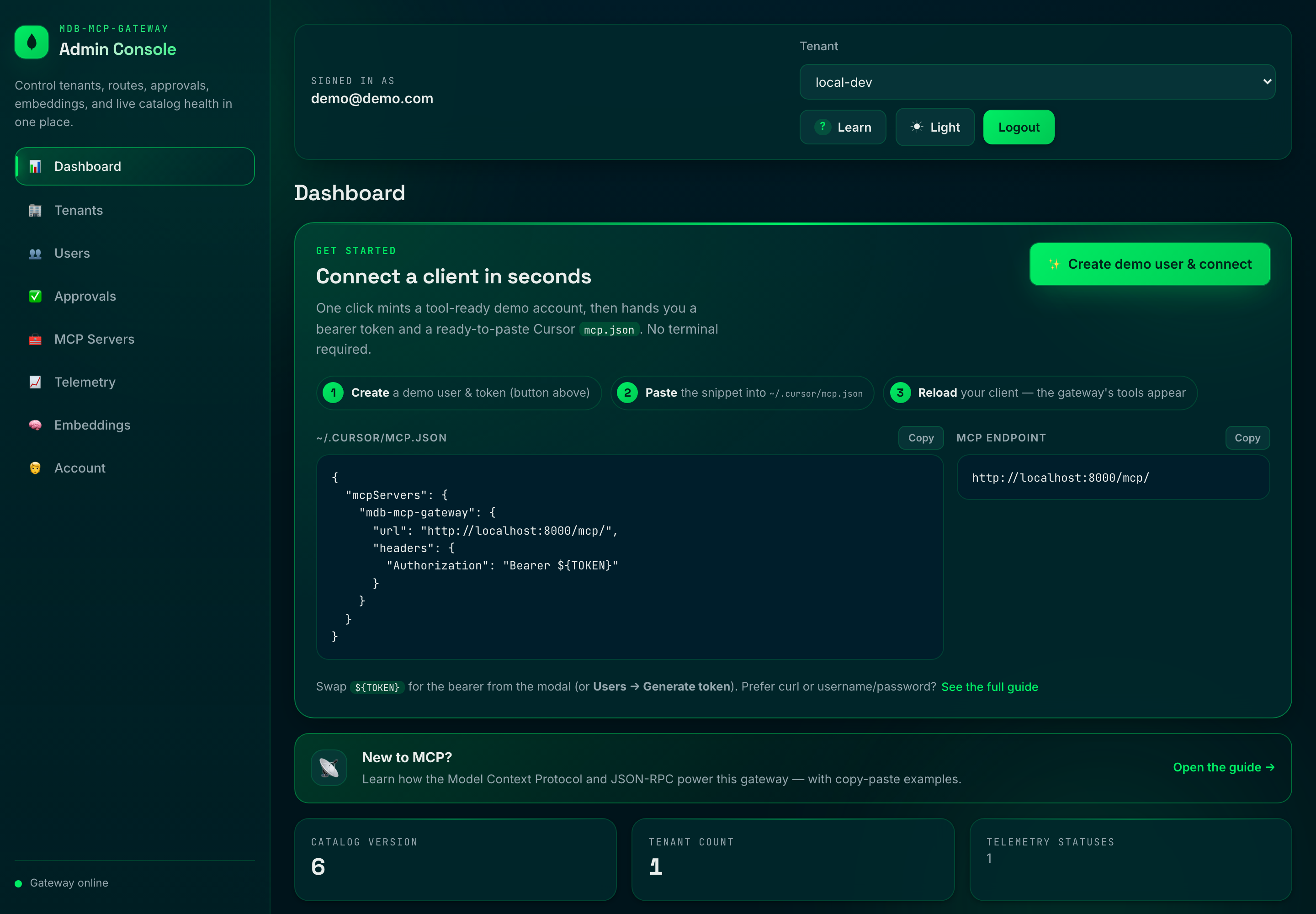
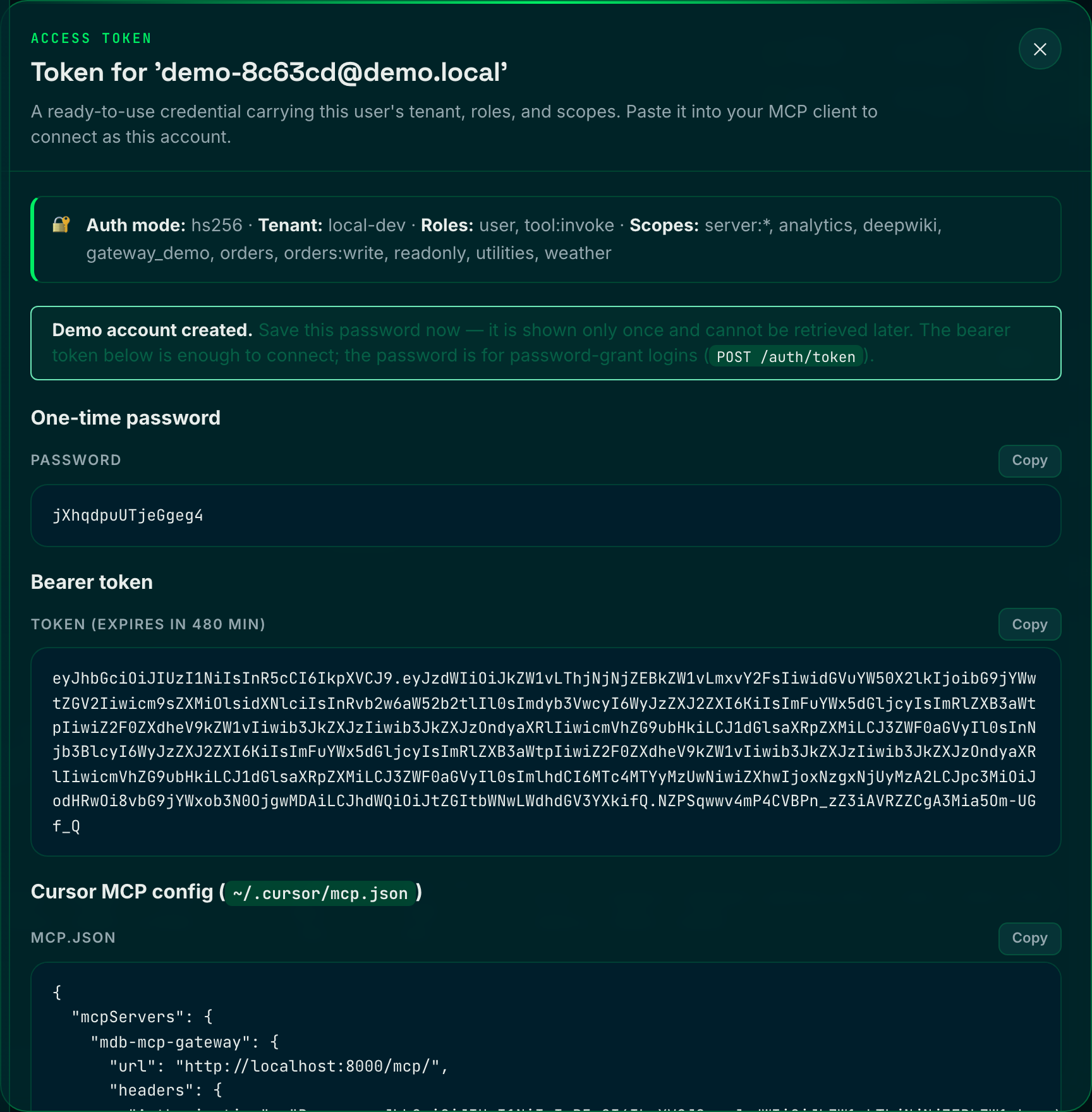
The Connect Now hero is the zero-to-connected fast path: one click mints a
tool-ready demo account and hands back a bearer token plus a ready-to-paste Cursor
mcp.json (the one-time password is shown once):
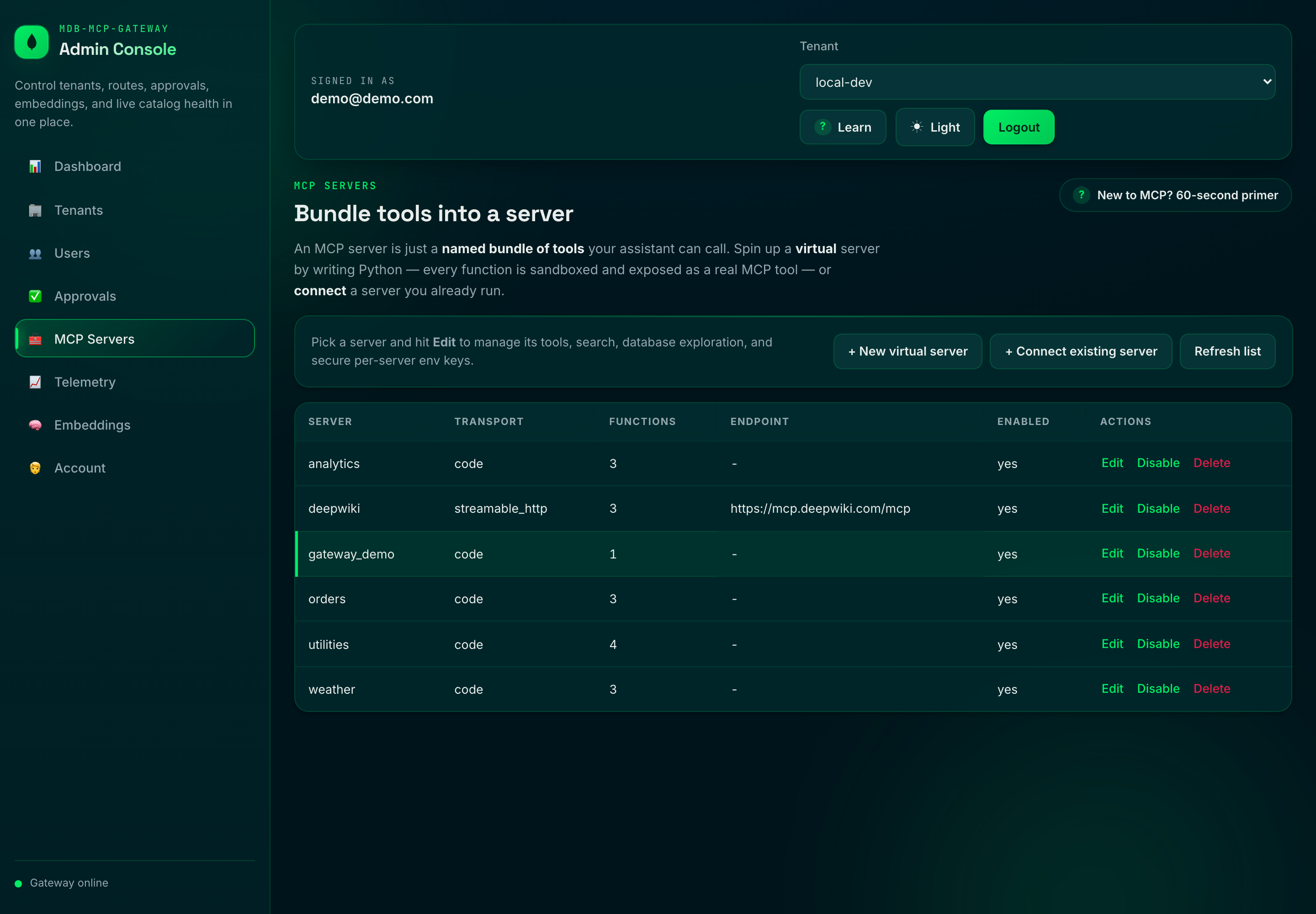
Author Python functions that run sandboxed in WebAssembly and surface as real MCP tools, or connect servers you already run — all from the MCP Servers studio:
- The Dashboard and Telemetry tabs render live analytics from scalable
$groupaggregation endpoints (/admin/analytics/*) with a self-hosted Chart.js: usage trends, top tools/servers, request-vs-error + latency lines, and quota-utilization bars. Scope follows your role — platform-admins see cross-tenant rollups (and can filter to one tenant), tenant-admins see their own. - The Usage & Quota tab shows current usage against quota with utilization meters, a platform-admin quota editor, and a recent-events table with CSV export.
- Tabs are deep-linkable via the URL hash (e.g.
…/ui#telemetry). - In
docker-compose.yml, demo credentials are preconfigured:[email protected]ADMIN_PASSWORD=demo
- Login is required for the admin surface (
/uiand/admin/*) in allAUTH_MODEs. - Browser sessions are cookie-based (HttpOnly); mutating admin API calls require a CSRF header.
Self-service beta sign-up & confirmation tiers. With
SELF_REGISTRATION_ENABLED=true, the login screen gains a Create an account
link to a public sign-up page at /ui/register. New accounts start
unconfirmed — a tightly-capped, code-tools-only tier (1 server / 1 tool,
small quota, no external transports) that's safe to open to the public — and a
platform-admin promotes them to confirmed from the Tenants tab
(confirmation pill + Confirm/Unconfirm buttons + an "Unconfirmed queue" filter).
See AUTH.md §2.3 and §3.3 for the full security model.
You can still use the admin CLI under strict admin auth:
[email protected] ADMIN_PASSWORD=demo \
python -m scripts.admin --base-url http://localhost:8000 server list --tenant-id local-dev
Disable the UI with:
ADMIN_UI_ENABLED=false
Embeddings
Embeddings power vector and hybrid search, the semantic cache, and the semantic guardrail classifier. The provider is pluggable and can be configured two ways, with the control DB taking precedence over the environment:
- Environment (boot-time default).
- Admin panel at
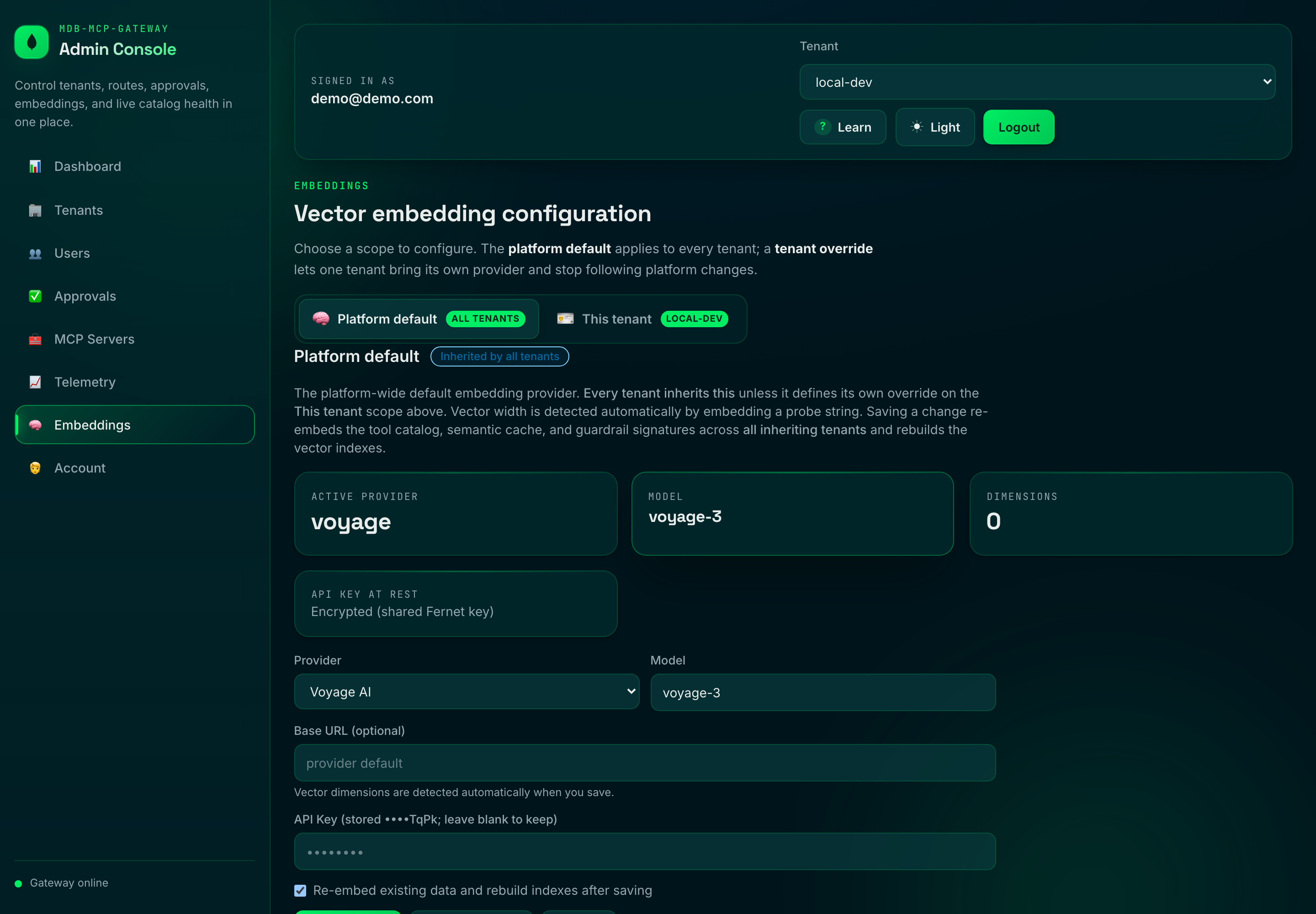
/ui→ Embeddings (runtime, persisted, recommended).
Provider, model, and key are editable at runtime (control DB wins over env). The screenshot below shows the panel running on Voyage AI — MongoDB's first-party embedding stack, the recommended drop-in (see VOYAGE-AI.md):
Supported providers:
| Provider | EMBEDDING_PROVIDER |
Auth | Default model |
|---|---|---|---|
| Ollama (local) | ollama |
none | nomic-embed-text |
| OpenAI | openai |
EMBEDDING_API_KEY |
text-embedding-3-small |
| Azure OpenAI | azure_openai |
EMBEDDING_API_KEY + endpoint/deployment |
(deployment) |
| Voyage AI | voyage |
EMBEDDING_API_KEY |
voyage-3 |
| Google Gemini | gemini |
EMBEDDING_API_KEY |
text-embedding-004 |
Key behaviors:
- Dimensions are auto-detected by embedding a short probe string when a config is applied — you never hand-configure vector widths, and the stored width is always exactly what the provider returns (so Atlas vector indexes can't drift out of sync with the data).
- API keys are encrypted at rest in the control DB (Fernet, keyed by
EMBEDDING_SECRET, falling back toADMIN_SESSION_SECRET/JWT_SECRET) and are always masked in API responses. Prefer a file mount viaEMBEDDING_API_KEY_FILE/EMBEDDING_SECRET_FILEin production. - Changing the provider/model/dimensions auto-reprovisions everything that
depends on the embedding space: it re-embeds every tenant's
tool_catalog, drops and recreates thehybrid-vector-searchindexes with the newnumDimensions, refreshes the semantic cache, and re-embeds the control-plane guardrail signature corpus. Progress is tracked incontrol_db.embedding_statusand surfaced live in the panel. - Configuration is global (gateway-wide), so all tenants stay on a single, consistent embedding space.
Admin endpoints (platform-admin only):
GET    /admin/embedding          # current config (key masked) + reprovision status
PUT    /admin/embedding          # validate, persist, reload, and reprovision
POST   /admin/embedding/test     # dry-run: reachability + detected dimensions
GET    /admin/embedding/status   # reprovision progress
Example: switch to OpenAI from the CLI-style API (the gateway detects the width):
curl -X PUT http://localhost:8000/admin/embedding \
  -H "Authorization: Bearer $TOKEN" -H "Content-Type: application/json" \
  -d '{"provider":"openai","model":"text-embedding-3-small","api_key":"sk-..."}'
Switching providers is a heavy operation (re-embedding + index rebuilds). It runs in the background and search degrades gracefully (lexical fallback) while indexes rebuild.
Standalone gateway container
For single-container deployment, point the gateway at MongoDB and enable startup bootstrap:
docker build -t mdb-mcp-gateway .
docker run --rm -p 8000:8000 \
  -e MONGODB_URI="mongodb://<host>:27017/?replicaSet=rs0" \
  -e MONGODB_DB_NAME="mcp_gateway" \
  -e AUTO_BOOTSTRAP=true \
  -e ADMIN_UI_ENABLED=true \
  -e ADMIN_EMAIL="[email protected]" \
  -e ADMIN_PASSWORD="change-me-now" \
  -e ADMIN_SESSION_SECRET="a-very-long-session-secret" \
  mdb-mcp-gateway
Important: the gateway requires an Atlas-capable MongoDB deployment (Atlas Local or Atlas
cluster) with Search + Vector Search support and replica-set semantics (for the registry watcher's
change streams). A plain standalone mongod is not sufficient.
Run tests
The suite has two tiers.
Unit tier (fully offline) — an in-memory async MongoDB fake and a
deterministic embedding stub (tests/fakes.py) stand in for Atlas and Ollama,
and downstream HTTP is mocked with respx. No external services required:
pip install -r requirements-dev.txt
pytest -q -m "not integration and not load"
To reproduce the CI quality gate locally:
ruff check . && ruff format --check . && mypy .
pytest -q -m "not integration and not load" --cov --cov-report=term-missing --cov-fail-under=82
Integration tier (18 tests, real stack) — runs the actual $rankFusion /
$vectorSearch / $search pipelines, the semantic cache, catalog sync, index
DDL, and a concurrency benchmark against a real MongoDB Atlas Local engine and a
real embedding provider.
The tier owns its own engine: it starts a pinned
mongodb/mongodb-atlas-local container via testcontainers,
verifies it is genuinely search-capable (not a plain mongod), bootstraps an
isolated throwaway database, and tears everything down afterwards — so it
never touches a shared cluster or leaves residue. All you need is Docker running
and the embedding model pulled:
ollama pull nomic-embed-text          # embedding model (host Ollama)
pytest -q -m "integration or load"    # testcontainers starts Atlas Local for you
To run against an existing Atlas Local instead of provisioning one (e.g. a CI
service container or docker compose up -d mongodb), point the tier at it — it
still verifies the engine and uses an isolated DB:
INTEGRATION_MONGODB_URI=mongodb://localhost:27017/?directConnection=true \
    pytest -q -m "integration or load"
The pinned image tag is overridable via INTEGRATION_ATLAS_IMAGE, and Ollama
via OLLAMA_BASE_URL. If Docker is unavailable and no URI override is given, the
whole tier skips cleanly — a no-op on a bare laptop, a hard gate in CI.
Local JWKS token flow (offline)
This is the AUTH_MODE=jwks path, for exercising asymmetric RS256 verification
offline. (The default setup is hs256 — there, mint tokens from the admin console's
Credentials → Get config button or POST /auth/token, not the script below.)
This repo ships a local dev RSA keypair + JWKS so the jwks path needs no external IdP:
python -m scripts.mint_token --groups orders readonly --roles tool:invoke
Then set:
AUTH_MODE=jwks
JWKS_LOCAL_PATH=./config/dev-jwks.json
JWT_ISSUER=http://localhost:8000
JWT_AUDIENCE=mdb-mcp-gateway
Key rotation. The JWKS is cached for JWKS_CACHE_TTL_SECONDS, but a token whose
kid is not in the cached set triggers an immediate out-of-band refresh rather than
waiting out the TTL — so a rotated-in signing key is honored on the next request. To
keep a flood of bogus kids from hammering the IdP, that refresh is throttled to once
per JWKS_MIN_REFRESH_SECONDS.
Tenancy: provisioning and isolation
A tenant's data lives in its own physical database (tenant_db_name() derives a
collision-safe name from the verified tenant_id claim). Tenant-scoped RPC methods
(tools/call, tools/list, tools/search) call ensure_tenant_ready() before
touching any tenant collection:
- Unknown tenant +
AUTO_PROVISION_TENANTS=true(default): the tenant's database and indexes are created on first use (cached per process; provisioning is idempotent and does not block on Atlas index build). - Unknown tenant +
AUTO_PROVISION_TENANTS=false: the request returns a clear JSON-RPC error (INVALID_REQUEST,data.reason = "tenant_not_provisioned") instead of silently running against a missing database and returning empty results. Use this mode where tenant ids originate from untrusted callers and provisioning should be an explicit operator step (POST /admin/tenantsorscripts/admin.py).
Rate limiting
The per-(tenant, client-ip) limiter counts requests per fixed sub-window but
estimates the rate over a rolling window by weighting the previous window by how much
of it still overlaps "now". This removes the fixed-window failure mode where a caller
spends a full quota at the end of one window and again at the start of the next (a 2x
boundary burst). Tune it with RATE_LIMIT_WINDOW_SECONDS and RATE_LIMIT_MAX_REQUESTS.
Active-active watcher resume state
services/registry_watcher.py stores resume tokens per gateway instance in
control_db.watcher_state using _id = routing_registry::<instance_id> where
instance_id comes from GATEWAY_INSTANCE_ID (or host name fallback). This keeps
replicas from clobbering each other's stream position. Resume-token docs are TTL'd by
WATCHER_RESUME_TTL_SECONDS, so stale pod IDs self-clean.
Downstream auth brokering
The gateway brokers only a workload identity to third-party downstream servers,
selected per server via metadata.auth.scheme:
jwt(default): gateway-minted short-lived RS256 workload identity (iss,aud,sub=tenant:<id>:gateway,tenant_id,iat,exp,jti)none: no injected transport credential — the downstream service or the tenant presents its own authentication (vendor API key, basic auth, OAuth, mTLS, ...)
Third-party credentials (API keys, passwords, OAuth client secrets) are intentionally
not brokered per-server by the gateway; they belong to the downstream/tenant. When a
downstream needs its own credential, set scheme=none and terminate that auth downstream
(or in front of it). For a code (transport=code) server's own logic, per-server secrets
remain available via context.env (PUT /admin/servers/{server}/env).
The broker (services/credential_broker.py) caches credentials per (tenant, server),
and the warm client pool reconnects only when a cached credential is near expiry. jwt
keeps TTL + refresh-skew rotation; none uses a long-lived cache entry.
Security defaults:
- Credential material is never logged.
- The
jwtbearer is refused on plaintexthttp://downstream endpoints unlessDOWNSTREAM_ALLOW_INSECURE_CREDENTIALS=true. - In production, the bundled dev JWT signing key remains rejected; configure your own
DOWNSTREAM_JWT_PRIVATE_KEY(_FILE).
Quick metadata snippets:
- Gateway workload identity (default)
{ "auth": { "scheme": "jwt", "audience": "downstream-service" } } - Downstream owns its own auth
{ "auth": { "scheme": "none" } }
Inbound MCP-client auth (username/password + OAuth)
MCP clients connecting to the gateway's own surface (/rpc, /mcp) can authenticate with
a username/password in addition to the bearer/JWT flows (AUTH_MODE=hs256|jwks):
POST /auth/token— OAuth2 password grant. Exchanges username + password (the same managed users + bootstrap admin used by the console login) for a short-lived bearer:curl -X POST http://localhost:8000/auth/token \ -H "Content-Type: application/x-www-form-urlencoded" \ -d 'grant_type=password&username=$EMAIL&password=$PASSWORD' # -> {"access_token":"...","token_type":"bearer","expires_in":28800} # then call /rpc or /mcp with: Authorization: Bearer <access_token>- Optional HTTP Basic directly on
/rpc//mcpviaMCP_BASIC_AUTH_ENABLED=true. - OAuth is bring-your-own-IdP: run the gateway as a resource server with
AUTH_MODE=jwks; spec-compliant MCP clients discover the issuer viaGET /.well-known/oauth-protected-resource(RFC 9728), advertised whenAUTH_MODE=jwksorOAUTH_METADATA_ENABLED=true.
Authorization: reaching /rpc requires admin, tool:invoke, or tool:read;
calling a tool additionally requires admin or tool:invoke (tool:read is
discover-only).
See AUTH.md for the complete authentication & authorization reference (inbound pipeline, RBAC, downstream credential brokering, settings, and recipes).
Safely showcase: read-only tenants, viewers, and curated tools
For demos, audits, or sharing the platform without risk, the gateway adds admin-controlled, least-privilege guardrails. READONLY.md is the full walkthrough with screenshots; the auth model lives in AUTH.md §3.2:
- Read-only tenant — freeze a tenant (
POST /admin/tenants/{id}/read-only): it staysactiveand discoverable, buttools/calland tenant config edits return403(tenant_read_only). Platform-admin always bypasses. viewerrole — a read-only console login: browse the UI + tool source, every mutation403. Mint via Credentials → Access level 🔍 Explore → Create credential.tool:readrole — a discover-only MCP token:tools/list/tools/searchwork,tools/callis refused (invoke_not_permitted). Minted by the same Explore access level.- Per-tenant tool curation — an
allowlist(server/name/server/*) and amax_toolscap (GET/PUT /admin/tenants/{id}/tool-policy), plus per-server enable/disable and a per-tool kill-switch (disabled_tools) that blocks a tool for everyone, including admins (tool_disabled). Curation filters both discovery and invocation, so a showcase only ever surfaces the curated set. - Per-tenant code-package (pip) policy — what a tenant's code tools may install
is the global operator ceiling (
SANDBOX_ALLOWED_REQUIREMENTS) intersected with a tenant allowlist (GET/PUT /admin/tenants/{id}/code-requirements, or Code packages in the console). Empty tenant allowlist ⇒ stdlib-only. The intersection is enforced consistently while authoring, on save, in the test-run, and at runtime, and the Functions Studio shows an allow/deny chip per requirement.
Net effect: hand teammates a viewer login on a frozen, curated tenant and they can explore everything and run nothing, while platform-admins retain full control.
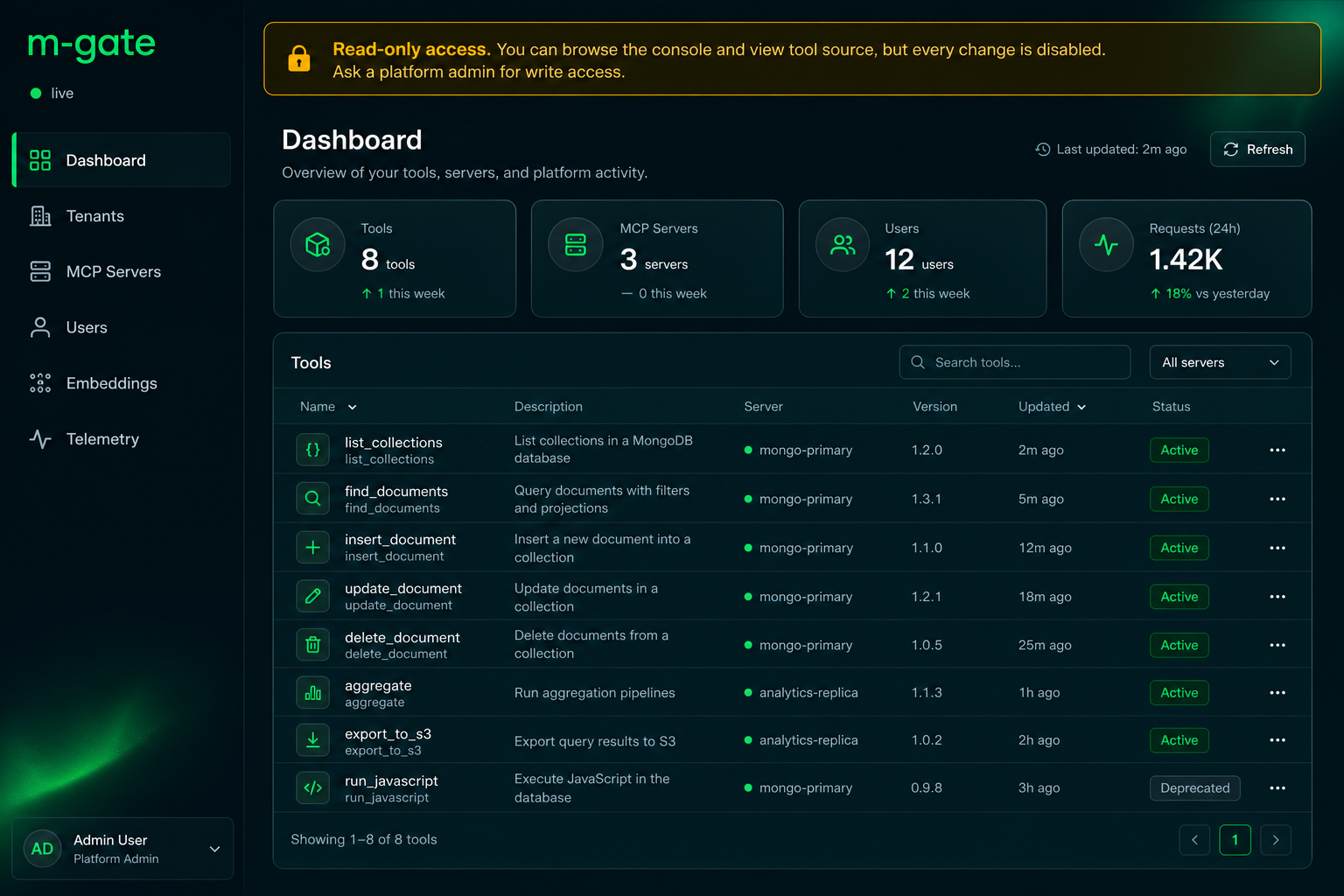
Step-by-step with screenshots: READONLY.md.
From the blog post to this repo
blog.md is the narrative; this table maps each idea to where it actually lives
in the code, so the post and the implementation stay honest with each other.
| Blog concept | Where it lives in this repo |
|---|---|
Route by meaning (curated tools/list) |
tools/list + X-MCP-Query in gateway/routers/rpc.py → HybridSearchService.search_tools |
Identity-bound scope (scopes + server namespace filters on $vectorSearch) |
build_rank_fusion_pipeline(allowed_scopes=...) in services/hybrid_search.py; scopes + server filter fields in database/indexes.py |
| Verified claim → search filter | gateway/middleware/auth.py (verified token claims groups/scopes) threaded into the RPC router |
| Hybrid search (lexical + vector fusion) | $rankFusion (RRF) is the core retrieval in services/hybrid_search.py; mode=hybrid|vector|text lets you compare the arms |
| One control plane on MongoDB | tool_catalog, routing_registry, semantic_cache, audit_telemetry on one engine |
| Resiliency: deadline + protocol-safe failure | DOWNSTREAM_TIMEOUT_MS + DownstreamTimeout/DownstreamError → UPSTREAM_TIMEOUT/INTERNAL_ERROR frames |
| Catalog freshness off the hot path | scripts/bootstrap.py + services/registry_watcher.py (Change Streams), embeddings computed on sync |
| Close the loop with the audit trail | services/telemetry_logger.py → time-series audit_telemetry |
Okta JWT verification (Section 2 of the post) is documented as the production wiring; locally the gateway verifies HS256 JWT claims (
AUTH_MODE=hs256, the default) — mint one from the admin console's Credentials → Get config button — so the scope-to-retrieval mapping is fully exercisable without an external IdP.
Architectural Blueprint: Building a High-Throughput, Reactive MCP Gateway with FastAPI and MongoDB Async
Most Model Context Protocol (MCP) implementations look great in a weekend demo but crumble under real enterprise demands. When you have hundreds of LLM agents running concurrent tasks, spinning up individual, static connections to a dozen isolated MCP servers creates a chaotic web of infrastructure.
To solve this, we need an intelligent, enterprise-grade MCP Gateway.
By pairing FastAPI (the king of async Python web frameworks) with FastMCP and the native PyMongo Async API, we can build a gateway that acts as a single, hardened entry point. It treats MongoDB not just as a cold storage database, but as the live, reactive brain of the entire orchestration layer.
Here is the comprehensive production architecture, design layout, and execution roadmap to build it.
The High-Level Architecture
The gateway sits as an asynchronous reverse proxy between your upstream LLM orchestrators (like LangChain, LlamaIndex, or custom UIs) and your downstream, internal MCP tools.
Core Architectural Pillars
- Asynchronous Edge to Core: The entire stack relies on non-blocking I/O. FastAPI runs the ASGI event loop, FastMCP manages the asynchronous JSON-RPC protocol states, and PyMongo Async talks directly to MongoDB over native async sockets without thread-pool overhead.
- Reactive Configuration: Zero restarts for tool discovery. We use MongoDB Change Streams to live-update the gateway's memory space the millisecond an internal microservice or tool mapping updates in the database.
- Decoupled Security & Observation: Authentication, Role-Based Access Control (RBAC), PII scrubbing, and cost metrics are treated as global middleware layers rather than hardcoded logic inside the tool executions.
Project Directory Layout
An enterprise-grade Python application needs strict separation of concerns. This layout isolates database management, network routing, and business logic to remain highly maintainable as your system grows.
mcp-gateway/
├── config/                 # Deployment, env vars, and Pydantic global settings
├── database/               # Native PyMongo Async initialization and pool managers
├── gateway/                # FastAPI routing layers, SSE endpoints, WebSocket protocols
│   ├── middleware/         # Security, Rate-limiter, Guardrails, Tenant-isolation
│   └── routers/            # Dynamic JSON-RPC handlers mapping clients to downstream servers
├── services/               # Core business orchestration
│   ├── cache_manager.py    # MongoDB Vector Search semantic cache interface
│   ├── registry_watcher.py # MongoDB Change Stream listener for live tool mounting
│   └── telemetry_logger.py # High-throughput writing to Mongo Time-Series collection
├── models/                 # Pydantic schemas validating MCP and JSON-RPC 2.0 specs
├── tests/                  # Integration and stress testing matrix
├── Dockerfile
└── README.md
Architectural Breakdown & Core Logic
1. The Reactive Storage Layer (MongoDB Blueprint)
To optimize database read/write profiles, we partition our data models into highly specific MongoDB collection architectures:
| Collection Name | MongoDB Feature Used | Purpose |
|---|---|---|
routing_registry |
Change Streams & Partitions | Holds metadata and URLs of active downstream MCP servers. |
session_context |
TTL Indexes | Keeps ephemeral token states and session contexts alive, auto-purging them after inactivity. |
semantic_cache |
MongoDB Vector Search | Caches expensive LLM responses based on embedding similarity of tool arguments. |
audit_telemetry |
Time-Series Collections | Highly compressed, high-frequency logging of every single tool execution token cost and response latency. |
2. High-Level Gateway Logic (Pseudocode)
Here is the high-level logic running inside the gateway's pipeline, illustrating how a request transitions from an incoming API call to an optimized, audited execution.
A. The Middleware Pipeline Loop
Every incoming request must pass through a strict validation chain before a tool is ever evaluated or invoked.
# Conceptual pseudocode for the FastAPI global request pipeline

ASYNC FUNCTION mcp_request_pipeline(client_request):
    # 1. Tenant & Authenticity Check
    tenant_id = extract_and_verify_jwt(client_request.headers)
    IF NOT tenant_id:
        RETURN ErrorResponse(STATUS=401, MESSAGE="Unauthorized Access")

    # 2. Rate Limiting via Context Verification
    allowed = CHECK_RATE_LIMIT_IN_MONGO(tenant_id, client_request.client_ip)
    IF NOT allowed:
        RETURN ErrorResponse(STATUS=429, MESSAGE="Rate Limit Exceeded")

    # 3. RBAC Filtering
    user_roles = FETCH_ROLES_FROM_SESSION_CONTEXT(tenant_id, client_request.user_id)
    has_permission = EVALUATE_ABAC_MATRIX(user_roles, client_request.target_tool)
    IF NOT has_permission:
        RETURN ErrorResponse(STATUS=403, MESSAGE="Insufficient Permissions for Tool")

    # 4. Content Guardrails (Inbound)
    sanitized_args = RUN_PII_AND_PROMPT_INJECTION_SHIELD(client_request.arguments)
    client_request.arguments = sanitized_args

    # Proceed to Execution Router
    RETURN AWAIT execute_mcp_routing_layer(client_request, tenant_id)
B. The Smart Routing & Caching Layer
Once validated, the gateway uses semantic optimization to determine if it can bypass downstream compute entirely before running the tool through the FastMCP engine.
# Conceptual pseudocode for semantic caching and routing execution

ASYNC FUNCTION execute_mcp_routing_layer(request, tenant_id):
    # 1. Look for a semantic shortcut using MongoDB Vector Search
    cached_payload = AWAIT check_vector_index_for_similar_execution(
        tool_name=request.target_tool,
        args=request.arguments,
        threshold=0.95
    )
    IF cached_payload IS NOT NONE:
        # Async log hit to telemetry and return immediately
        START_BACKGROUND_TASK(log_telemetry, request, status="CACHE_HIT")
        RETURN cached_payload

    # 2. Fetch live client connection from memory-mapped FastMCP Registry
    mcp_client = InMemoryFastMCPRegistry.get_client(request.target_server)
    IF mcp_client IS NONE:
        RETURN ErrorResponse(STATUS=503, MESSAGE="Target MCP Server Offline")

    # 3. Execute downstream network call asynchronously
    TRY:
        raw_response = AWAIT mcp_client.call_tool(request.target_tool, request.arguments)

        # 4. Outbound Content Guardrails
        validated_response = AUDIT_OUTPUT_FOR_DATA_EXFILTRATION(raw_response)

        # 5. Populate cache and telemetry concurrently
        START_BACKGROUND_TASK(save_to_semantic_cache, request.target_tool, request.arguments, validated_response)
        START_BACKGROUND_TASK(log_telemetry, request, status="LIVE_EXECUTION_SUCCESS")

        RETURN validated_response

    EXCEPT DownstreamTimeoutException:
        START_BACKGROUND_TASK(log_telemetry, request, status="TIMEOUT_FAILURE")
        # Protocol-safe JSON-RPC error frame (HTTP 200), not a transport-level 5xx,
        # so MCP clients can parse the failure instead of choking on it.
        RETURN JsonRpcErrorFrame(CODE=-32004, MESSAGE="UPSTREAM_TIMEOUT")
C. The Dynamic Self-Healing Engine
To achieve zero-downtime reconfiguration, the gateway runs a background loop listening for operational events directly out of MongoDB's replication log.
# Conceptual pseudocode for live cluster hot-reloading

ASYNC FUNCTION watch_mongodb_cluster_changes():
    # Connect directly to the change stream of the configuration collection
    ASYNC WITH db.routing_registry.watch() AS change_stream:
        ASYNC FOR change IN change_stream:
            server_id = change.document_key._id

            IF change.operation_type IN ["insert", "update", "replace"]:
                server_doc = AWAIT db.routing_registry.find_one({"_id": server_id})

                IF server_doc.is_enabled:
                    # Dynamically construct a new FastMCP client connection string
                    # and hot-swap it inside the active gateway pool
                    AWAIT InMemoryFastMCPRegistry.mount_or_update(
                        name=server_doc.name,
                        url=server_doc.connection_url
                    )
                ELSE:
                    AWAIT InMemoryFastMCPRegistry.unmount(server_doc.name)

            ELIF change.operation_type == "delete":
                AWAIT InMemoryFastMCPRegistry.unmount_by_id(server_id)
Full Execution & Rollout Roadmap
Building this requires an organized, multi-phased implementation strategy to move securely from foundational scaffolding to an optimized, production-hardened platform.
Phase 1: Core Scaffolding & Async Foundation
- Objective: Establish the asynchronous backbone of the web framework and connection pooling.
- Tasks:
- Initialize the FastAPI shell, integrating Pydantic settings for system-wide configuration.
- Set up the global
AsyncMongoClientlayer to manage connection pools without blocking. - Build the standard JSON-RPC 2.0 base request/response schemas to align with core MCP specifications.
Phase 2: Reactive Routing & Dynamic Service Discovery
- Objective: Connect external clients to multiple downstream endpoints through runtime lookups.
- Tasks:
- Implement the background execution loop utilizing PyMongo Change Streams to track additions or removals in
routing_registry. - Build the FastMCP client instantiation wrapper that accepts incoming payloads and maps them to dynamic server pools.
- Create the core FastAPI SSE (Server-Sent Events) and WebSocket transport hooks to handle bidirectional streaming safely.
Phase 3: Enterprise Security, Guardrails & Tenancy
- Objective: Secure the perimeter against data leaks, unauthorized access, and request failures.
- Tasks:
- Embed authentication hooks into FastAPI dependencies to read incoming bearer tokens against user session tables.
- Implement standard circuit breakers and backoff loops so a failure in an isolated internal microservice doesn't bring down the main gateway.
- Write data validation interceptors inside the request loop to scrub outputs for sensitive records (e.g., matching PII regex structural patterns) before return delivery.
Phase 4: Intelligence, Optimization & Scale
- Objective: Maximize performance, drive down token costs, and establish deep system observation.
- Tasks:
- Configure a MongoDB Atlas Vector Search index over the
semantic_cachecollection. - Wire up a local embedding workflow to analyze incoming argument patterns and intercept repetitive downstream calls.
- Turn on the native MongoDB Time-Series collection engine for
audit_telemetryto capture structural logs cleanly. - Package the entire architecture into multi-stage Docker builds optimized for Kubernetes or cloud auto-scaling deployment.
Установка Mdb Gateway
У этого сервера нет опубликованного пакета — он собирается из исходников. Открой репозиторий и следуй инструкции в README.
▸ github.com/ranfysvalle02/m-gateFAQ
Mdb Gateway MCP бесплатный?
Да, Mdb Gateway MCP бесплатный — установка в пару кликов через Unyly без оплаты.
Нужен ли API-ключ для Mdb Gateway?
Нет, Mdb Gateway работает без API-ключей и переменных окружения.
Mdb Gateway — hosted или self-hosted?
Self-hosted: сервер запускается локально на твоей машине командой из раздела установки.
Как установить Mdb Gateway в Claude Desktop, Claude Code или Cursor?
Открой Mdb Gateway на unyly.org, выбери вкладку своего клиента (Claude Desktop, Claude Code, Cursor) и нажми Install — конфиг сгенерируется автоматически, без правки JSON.
Похожие MCP
Fetch
Web content fetching and conversion for efficient LLM usage.
AWS KB Retrieval
Retrieval from AWS Knowledge Base using Bedrock Agent Runtime.
 автор: modelcontextprotocol
Spring AI MCP Server
Provides auto-configuration for setting up an MCP server in Spring Boot applications.
llm-analysis-assistant
A very streamlined mcp client that supports calling and monitoring stdio/sse/streamableHttp, and can also view request responses through the /logs page. It also
 автор: xuzexin-hz
Compare Mdb Gateway with
Не уверен что выбрать?
Найди свой стек за 60 секунд
Автор?
Embed-бейдж для README
Похожее
Все в категории ai