
Meal Planner
БесплатноНе проверенPlans a week of meals from a local recipe library, optimizing for shared ingredients and avoiding repeats, then generates a consolidated shopping list and Markd

Описание
Plans a week of meals from a local recipe library, optimizing for shared ingredients and avoiding repeats, then generates a consolidated shopping list and Markdown plan.
README
A self-contained MCP server that plans a week of meals from a local recipe library — optimizing for shared ingredients, reusing leftovers, and avoiding recent repeats — then generates a consolidated shopping list and a Markdown plan you can stick on the fridge.
No cloud, no API keys, no database. Clone it and it runs.
python3 -m venv .venv && source .venv/bin/activate    # isolate deps
pip install -e ".[test]" && pytest -q                 # 76 tests
python -m mealplanner.cli plan --days 7               # try the planner
python -m mealplanner.cli shopping                    # and the shopping list
Example
It ships with a seed library, so it plans the moment you clone it — no data entry. The planner optimizes for ingredient overlap across the week, then consolidates everything into one deduplicated shopping list:
$ python -m mealplanner.cli plan --days 5

Plan for 5 days (household 4):

  2026-06-05   Veggie Fried Rice  (serves 4)
  2026-06-06   Chicken Stir-Fry  (serves 4)
  2026-06-07   Sheet-Pan Chicken & Peppers  (serves 4)
  2026-06-08   Poached Eggs in Tomato Sauce  (serves 4)
  2026-06-09   Chickpea & Spinach Stew  (serves 4)

$ python -m mealplanner.cli shopping

Shopping list:

  [ ] 5  bell pepper
  [ ] 2 can  canned tomato
  [ ] 2 pound  chicken breast
  [ ] 11 clove  garlic
  [ ] 6 tablespoon  soy sauce
  …
The MCP tools run the same logic — plan_week then generate_shopping_list —
so in Claude Desktop you just ask for it in plain language.
In Claude Desktop
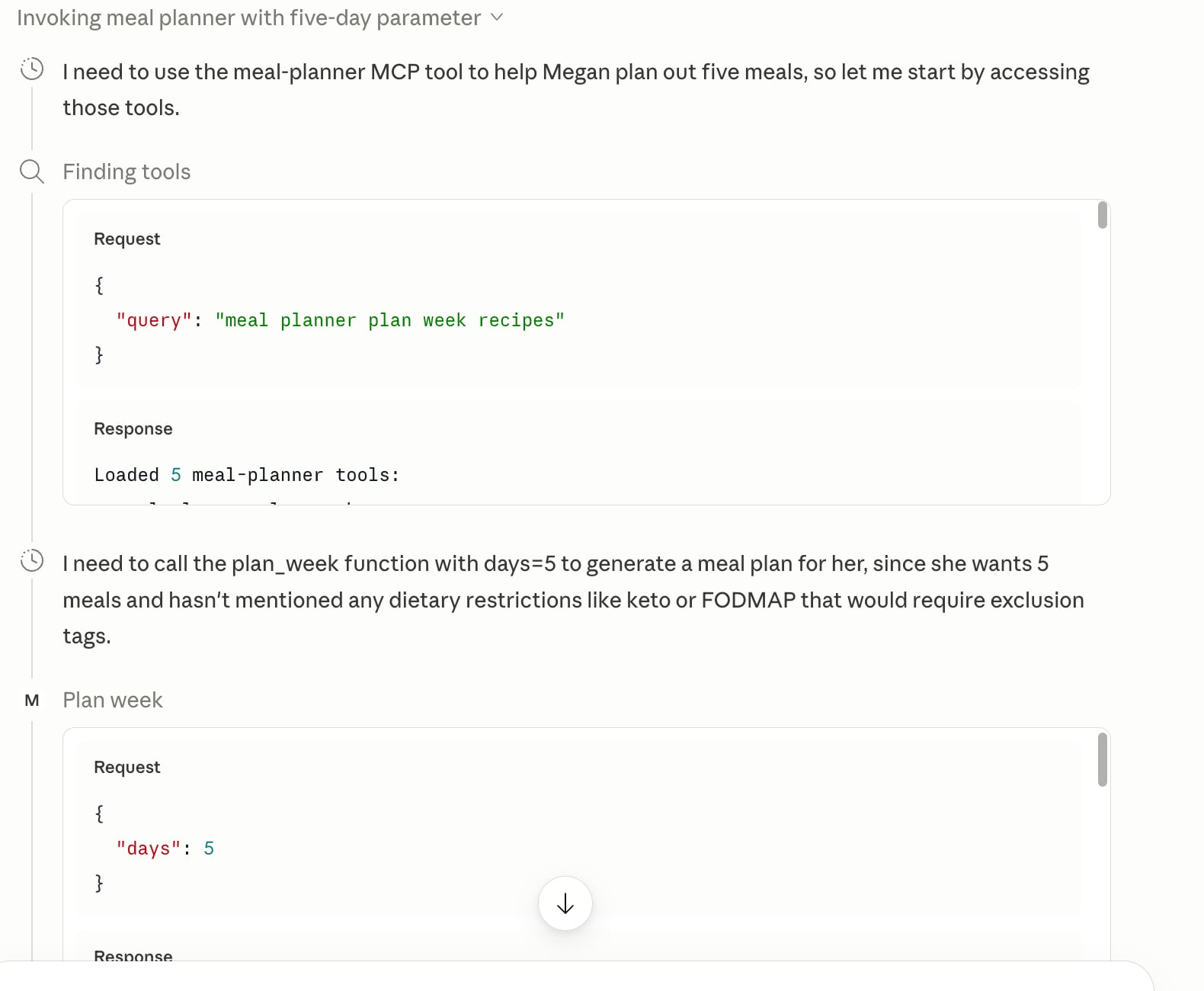
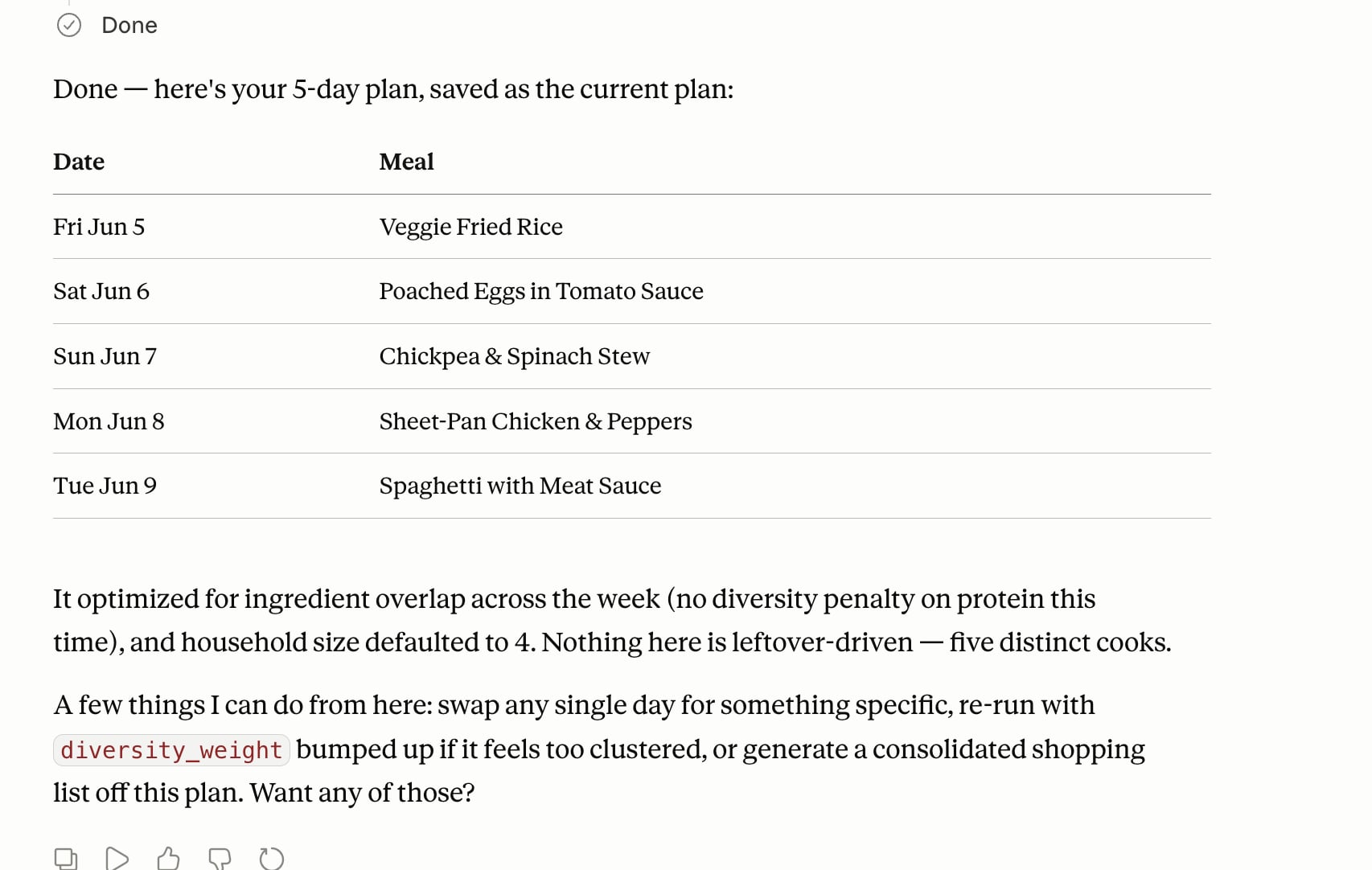
Wired in as a local MCP server, Claude discovers the tools and drives them from a
plain-language ask — here it picks up plan_week, calls it with days: 5, then
explains the result and offers next steps:
Why an MCP (and not just asking Claude)?
A tool only earns its place if it does something the model can't. This one clears that bar on four counts — which is the whole reason it exists:
| Ask | Plain Claude | This server |
|---|---|---|
| "Suggest a sci-fi… er, a pasta dish" | ✅ fine on its own | (a tool adds nothing) |
| "Plan around my recipes" | ❌ doesn't know them | ✅ grounded in your local library |
| "Don't repeat what we ate last week" | ❌ no memory across chats | ✅ persistent history file |
| "Give me a plan + list I can keep" | ❌ can't write files | ✅ Markdown export |
| "Merge 1 + 2 + ½ onion across 4 recipes, scaled to 6" | ❌ hand-waves the math | ✅ exact, deterministic |
The model does the creative part (which week feels good); the server supplies the private data, the memory, the persisted artifact, and the exact arithmetic.
What it does
plan_week— greedy optimizer: picks recipes that share the most ingredients with what's already chosen, skips anything cooked recently, and fills extra nights from serving-surplus leftovers (a batch of chili that serves 8 covers two dinners for a family of four). The overlap objective rewards similar recipes, so it clusters same-protein nights by design;diversity_weight(off by default) dials in variety vs. waste.swap_meal/remove_meal— iterate per day: "put tacos on Tuesday," "skip Thursday." The plan, shopping list, and export all update with you. ("Make Friday quicker" needs no new tool — Claude callssuggest_recipesthenswap_meal.)generate_shopping_list— merges and scales ingredients across the plan's cook days, deduped, with no silent unit conversion.export_plan— writes the week + shopping list and returns it inline (so a remote caller who can't read the server's disk still gets it).format="markdown"(table + checklist, renders in Claude and note apps) or"text"(plain text for pasting into Notes / Reminders). With no path it writes to a known location under the data dir (not the process cwd, which is unpredictable when Claude Desktop launches the server).set_course— recategorize a recipe (mark a stray import as aSauceso it stops landing in dinner slots). Curation; the planner relies on this normalized field, never on title guessing.suggest_recipes/list_recipes/get_recipe— query the library.record_cooked— log what you actually made; this is the memory that powers avoid-repeats.add_recipe— save one recipe from free text. The everyday way to build your library — no file or format needed.add_recipes— bulk-add a whole batch in one call: the fast way to build a starter library with no Plan to Eat export. Generate a batch from your tastes, review it, and save them all at once (Claude generates; the tool just persists).import_recipes— optional bulk shortcut for an existing Plan to Eat export: bycsv_path(a file on the server — local use) orcsv_content(pasted CSV text — works for a remote caller with no server-disk access). Offline, no scraping.
Seeding your library
Four ways, none requiring any particular app or format:
- Just start — 16 recipes ship in
data/recipes.seed.json, so it plans a week the moment you clone it. - Add as you go (the normal path) — paste or describe a recipe in chat;
Claude structures it and calls
add_recipe. "Save my chili: 2 lb ground beef, an onion, 2 cans tomatoes, kidney beans, chili powder — serves 8." No CSV, no schema. - Generate a starter set (no export needed) — don't want to add them one by
one? Ask Claude to generate a batch from your tastes — "25 quick weeknight
dinners I'd like, mostly vegetarian" — review it, and it saves them all in one
add_recipescall. The planner optimizes over recipes you'll actually cook, so keep the batch to food you'd really make rather than generic filler. - Bulk migrate (optional) — already have a Plan to Eat export?
import_recipesloads it in one offline pass. It's a convenience, not a requirement — and adding other formats (Paprika, Mealie, plain JSON) is a documented seam.
Architecture
Pure core + thin adapters. All the logic is I/O-free and unit-tested without a runtime; the MCP server and the CLI are two adapters over the same functions, and one module does all the file I/O.
src/mealplanner/
  models.py       Recipe · Ingredient · HistoryEntry · PlanDay
  ingredients.py  parse free text → {qty,unit,item} · canonicalize · aggregate   (pure)
  core.py         library search · overlap scoring · avoid-repeats               (pure)
  planner.py      greedy week optimizer (overlap + leftovers + avoid-repeats)    (pure)
  exports.py      shopping-list build · Markdown render                          (pure)
  store.py        JSON persistence · Plan to Eat CSV import          (the only I/O)
  server.py       MCP adapter (FastMCP)
  cli.py          CLI adapter
data/recipes.seed.json   bundled starter library (clones-and-runs)
The bundled seed ships in the repo; your mutable state (history, plans,
imported recipes) lives in a gitignored state.json under
~/.meal-planner/ — so your real recipes never land in a commit.
Use it from Claude
The server runs over two transports from one codebase — stdio for a local Claude Desktop subprocess, or streamable-HTTP so it can be added as a remote custom connector by URL.
Local (stdio) — Claude Desktop. Clone, make a virtualenv, and install — the
install puts a meal-planner console script inside .venv/bin:
git clone https://github.com/illinigirl/meal-planner-mcp
cd meal-planner-mcp
python3 -m venv .venv && source .venv/bin/activate
pip install -e .
Then point your claude_desktop_config.json at that script (absolute path), and
restart Claude Desktop — the meal-planner tools will appear:
{
  "mcpServers": {
    "meal-planner": {
      "command": "/absolute/path/to/meal-planner-mcp/.venv/bin/meal-planner"
    }
  }
}
As a custom connector (HTTP). Run it as an HTTP server and point a connector at the URL:
meal-planner --http --port 8765          # or MEAL_PLANNER_HTTP=1
# then add http://localhost:8765/mcp as a custom connector
(For a remote connector — claude.ai / mobile — host it behind a public HTTPS URL with auth, the same way a production MCP deployment would.)
Then just talk: "Plan us 7 dinners this week, nothing we had recently, keep weeknights under 30 minutes — then give me the shopping list." — and iterate: "swap Tuesday for something vegetarian," "skip Thursday."
For reviewers — drive it with Claude Code
It's built to be worked in by an agent. Good first tasks, easiest first:
- Run the tests —
pip install -e ".[test]" && python -m pytest -q(75; the pure-core subset runs on stdlib alone, the tool-layer tests use the MCP SDK). - Improve the ingredient parser to handle
1 (14 oz) can tomatoes— seeingredients.parse_ingredientand add a test. - Add leftover mode B (cook-once-eat-twice): give recipes
produces/usestags so roast chicken → chicken soup chains. The seed already has both recipes waiting. - Add an explicit unit-conversion table (3 tsp → 1 tbsp) — but only convert when asked, never silently.
CLAUDE.md is the orientation file: architecture, conventions, design
rationale, and every deliberate simplification (each one a place to extend).
License
MIT.
Установка Meal Planner
У этого сервера нет опубликованного пакета — он собирается из исходников. Открой репозиторий и следуй инструкции в README.
▸ github.com/illinigirl/meal-planner-mcpFAQ
Meal Planner MCP бесплатный?
Да, Meal Planner MCP бесплатный — установка в пару кликов через Unyly без оплаты.
Нужен ли API-ключ для Meal Planner?
Нет, Meal Planner работает без API-ключей и переменных окружения.
Meal Planner — hosted или self-hosted?
Self-hosted: сервер запускается локально на твоей машине командой из раздела установки.
Как установить Meal Planner в Claude Desktop, Claude Code или Cursor?
Открой Meal Planner на unyly.org, выбери вкладку своего клиента (Claude Desktop, Claude Code, Cursor) и нажми Install — конфиг сгенерируется автоматически, без правки JSON.
Похожие MCP
GitHub
PRs, issues, code search, CI status
 автор: GitHub
Filesystem
Secure file operations with configurable access controls.
Memory
Knowledge graph-based persistent memory system.
Template MCP Server
A CLI tool to create a new Model Context Protocol server project with TypeScript support, dual transport options, and an extensible structure
 автор: mcpdotdirect
Compare Meal Planner with
Не уверен что выбрать?
Найди свой стек за 60 секунд
Автор?
Embed-бейдж для README
Похожее
Все в категории development