
Media Context
БесплатноНе проверенGive your AI assistant eyes and ears — analyze any video, audio, or image, entirely on your machine.

Описание
Give your AI assistant eyes and ears — analyze any video, audio, or image, entirely on your machine.
README




Give your AI assistant eyes and ears.
Analyze any video, audio, or image — locally, right inside your editor.
Install · Capabilities · Modes · Examples · Tools · Options · Docs
LLMs read text and glance at a single image — but they can't watch a video or listen to audio. media-context-mcp closes that gap. Hand it a file or a link and it returns clean, model-ready context — keyframes, a transcript, or the text on screen — entirely on your machine. Nothing is uploaded.
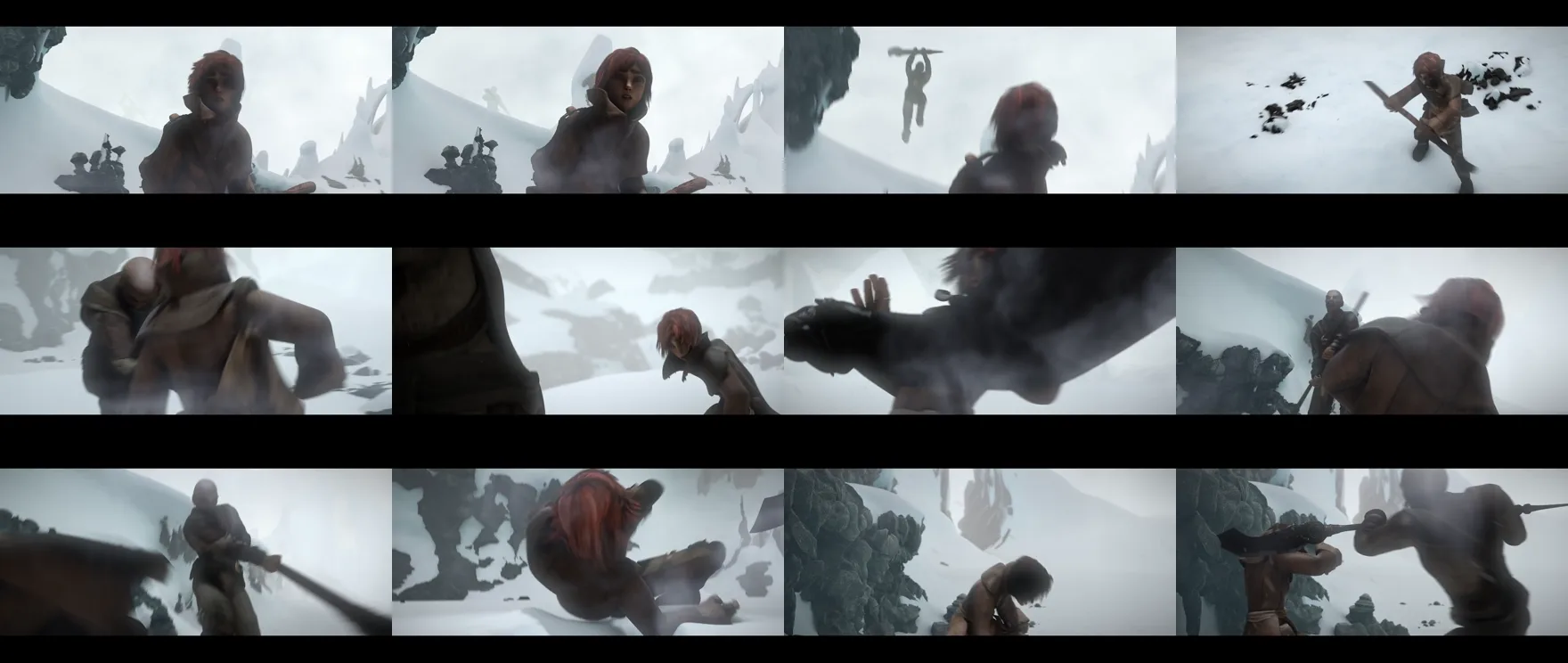
A 10-second clip becomes one tidy contact sheet your model reads in order — not hundreds of stills.
🚀 Install
Two steps — add the server, then install the local helpers it uses.
1 · Add the server to your client
# Claude Code
claude mcp add media-context -- npx -y media-context-mcp
The launch command is always npx -y media-context-mcp. Pick your client:
Claude Desktop
Settings → Developer → Edit Config (claude_desktop_config.json):
{
  "mcpServers": {
    "media-context": { "command": "npx", "args": ["-y", "media-context-mcp"] }
  }
}
Cursor
~/.cursor/mcp.json (global) or .cursor/mcp.json (per-project):
{
  "mcpServers": {
    "media-context": { "command": "npx", "args": ["-y", "media-context-mcp"] }
  }
}
VS Code (GitHub Copilot, agent mode)
.vscode/mcp.json — VS Code uses the servers key:
{
  "servers": {
    "media-context": { "command": "npx", "args": ["-y", "media-context-mcp"] }
  }
}
Windsurf
~/.codeium/windsurf/mcp_config.json:
{
  "mcpServers": {
    "media-context": { "command": "npx", "args": ["-y", "media-context-mcp"] }
  }
}
Cline / Roo Code
cline_mcp_settings.json (the extension's MCP settings):
{
  "mcpServers": {
    "media-context": { "command": "npx", "args": ["-y", "media-context-mcp"] }
  }
}
Kiro
.kiro/settings/mcp.json (project) or ~/.kiro/settings/mcp.json (user):
{
  "mcpServers": {
    "media-context": { "command": "npx", "args": ["-y", "media-context-mcp"] }
  }
}
Gemini CLI
~/.gemini/settings.json:
{
  "mcpServers": {
    "media-context": { "command": "npx", "args": ["-y", "media-context-mcp"] }
  }
}
Zed
settings.json — Zed uses context_servers:
{
  "context_servers": {
    "media-context": { "command": { "path": "npx", "args": ["-y", "media-context-mcp"] } }
  }
}
Codex CLI
~/.codex/config.toml:
[mcp_servers.media-context]
command = "npx"
args = ["-y", "media-context-mcp"]
JetBrains AI Assistant
Settings → Tools → AI Assistant → Model Context Protocol → Add, then use command npx with args -y media-context-mcp.
Tip: in Claude Code you can install it as a plugin instead — run
/plugin marketplace add vishalguptax/media-context-mcp, then/plugin install media-context. To share with a team, install per-project:--scope project(writes.mcp.json) or commit a.cursor/mcp.jsonin the repo.
2 · Install the local helpers
One command sets up everything the server uses, via your OS package manager:
npx media-context-mcp setup          # core: keyframes, links, on-screen text
npx media-context-mcp setup --audio  # also enable transcription
The server finds the helpers automatically afterward — no extra configuration. Run check_media_deps to see what's ready, and setup --uninstall to remove them. (Install by hand →)
3 · Ask
“Summarize
demo.mp4.”
✨ Capabilities
| Video | Keyframe overview, full-size stills, scene detection, or a dense filmstrip that catches split-second glitches |
| Audio | Speech turned into text — clips, voice notes, meetings, podcasts |
| Images | The picture, plus the exact text shown on screen |
| Anywhere | Local files or links — YouTube, Vimeo, and 1000+ sites |
| Private | Runs on your machine. No API keys, no uploads |
| Efficient | A long clip becomes a couple of images, not hundreds |
🎞️ Modes
analyze_media auto-detects audio and images. For video, choose how frames are sampled:
| Mode | Best for |
|---|---|
sheet (default) |
A cheap overview — frames tiled into one or two contact sheets |
frames |
Detail on specific moments — individual full-size stills |
scenes |
Slide decks & static screencasts — only scene-change frames |
filmstrip |
Catching a sub-second UI glitch — a dense, near-native-rate strip |
💬 Examples
Just ask in plain language — the assistant picks the right options.
| You ask | What you get |
|---|---|
“Summarize demo.mp4.” |
A quick overview from sampled keyframes |
“What error does bug.mp4 show at the end?” |
The exact on-screen text, read back |
“Walk me through the UI flow in onboarding.mov.” |
Step-by-step from scene-change frames |
“Transcribe standup.m4a and list action items.” |
A local transcript |
“Summarize https://youtu.be/… with the transcript.” |
Fetched and transcribed |
“Read the error in this screenshot crash.png.” |
The picture plus its exact text |
“Find where the slider in ui.mp4 flickers ~0:06.” |
The exact frame of a sub-second glitch |
🧰 Tools
| Tool | What it does |
|---|---|
analyze_media |
Turn a video, audio, or image — file or URL — into model-readable context. Auto-detects the type and supports cropping, time windows, language, and sampling rate. |
check_media_deps |
Report which capabilities are ready on this machine. |
Every call runs locally and cleans up after itself.
⚙️ Options
Your assistant fills these in for you, but you can steer it (“use filmstrip mode”, “crop to the toolbar”).
Full analyze_media parameters
| Param | Default | Description |
|---|---|---|
source |
— | Local file path (video/audio/image) or http(s) URL |
context |
— | A note framing the analysis; echoed atop the summary |
detail |
— | high = readable stills for screen recordings; low = cheap overview |
mode |
sheet |
sheet · frames · scenes · filmstrip |
format |
webp |
webp (smallest) · jpeg · png (crisp text) |
maxFrames |
30 |
Upper bound on sampled frames |
grid |
5 |
Tiles per row/column for contact-sheet modes |
scale |
320 |
Per-frame width in px — lower = fewer tokens |
sceneThreshold |
0.4 |
Scene-change sensitivity (scenes mode) |
fps |
auto | Explicit sampling rate; pair high with filmstrip |
crop |
— | {x,y,width,height} (pixels, or 0–1 fractions) to zoom a region |
stripRows |
18 |
Tiles per image in filmstrip mode |
startSec / endSec |
— | Restrict to a time window |
transcript |
false |
Also produce a transcript (video) |
whisperModel |
small |
tiny · base · small · medium · large |
ocr |
false |
Extract on-screen text |
ocrLang |
eng |
Language code(s), e.g. eng+deu |
ocrPsm |
3 |
Page-segmentation: 3 auto · 6 block · 11 sparse |
detectJumps |
false |
Track an on-screen number and report jump-back glitches with timestamps |
maxDurationSec |
3600 |
Reject URL downloads longer than this |
maxFileSizeMb |
500 |
Abort a URL download past this size |
Worked recipes for each are in the usage guide.
❓ FAQ
Can an LLM watch a video? Not directly — models take images and text, not video. This server turns the video into frames and a transcript it can read.
Does anything get uploaded? No. Everything runs on your machine; no keys, no cloud.
Which clients work? Any MCP client — Claude Code, Claude Desktop, Cursor, VS Code, Windsurf, Cline, Kiro, Gemini CLI, JetBrains, Zed, Codex.
Does it handle YouTube and other links? Yes.
How much does it cost? It's free and open source.
📋 Requirements
Node.js 18+, on Windows, macOS, or Linux. The one-time npx media-context-mcp setup installs everything else.
🛠️ Development
npm install
npm run build
npm test
Issues and PRs welcome — see the usage guide for the architecture.
📄 License
Apache-2.0 © Vishal Gupta
Установка Media Context
У этого сервера нет опубликованного пакета — он собирается из исходников. Открой репозиторий и следуй инструкции в README.
▸ github.com/vishalguptax/media-context-mcpFAQ
Media Context MCP бесплатный?
Да, Media Context MCP бесплатный — установка в пару кликов через Unyly без оплаты.
Нужен ли API-ключ для Media Context?
Нет, Media Context работает без API-ключей и переменных окружения.
Media Context — hosted или self-hosted?
Self-hosted: сервер запускается локально на твоей машине командой из раздела установки.
Как установить Media Context в Claude Desktop, Claude Code или Cursor?
Открой Media Context на unyly.org, выбери вкладку своего клиента (Claude Desktop, Claude Code, Cursor) и нажми Install — конфиг сгенерируется автоматически, без правки JSON.
Похожие MCP
Omni Video
An MCP server that transforms LLM-enabled IDEs into professional video editors by pre-processing footage into text proxies, generating motion graphics via HTML/
 автор: buildwithtaza
ARA
Generate images, video and audio from any AI agent — one connector.
 автор: ARA
YouTube
Transcripts, channel stats, search
 автор: YouTube
EverArt
AI image generation using various models.
 автор: modelcontextprotocol
Compare Media Context with
Не уверен что выбрать?
Найди свой стек за 60 секунд
Автор?
Embed-бейдж для README
Похожее
Все в категории media