
Memgrep
БесплатноНе проверенEnables agents to search and retrieve past chat transcripts from a local memory store, allowing cross-project, cross-tool recall of previously solved problems.

Описание
Enables agents to search and retrieve past chat transcripts from a local memory store, allowing cross-project, cross-tool recall of previously solved problems.
README
Local agent memory - Cursor from your phone - scheduled playbooks.
memgrep started as searchable memory for coding agents. It still is that: every chat across Cursor, Claude Code, and Kiro, fully local, recallable via CLI or MCP. It also grew into a thin remote coding path: an allowlisted Telegram bot that drives a real Cursor agent in a real project folder, with memgrep memory attached mid-task. And jobs: attach a remembered playbook to a cron schedule so Cursor runs it on a timer (outreach, inbox scan, whatever you stored).
The point: lock the workflows you already figured out. remember a playbook once; later the agent recalls it (from Cursor, Claude, Kiro, or Telegram) instead of vibing the same steps from scratch and burning tokens every time. Schedule it if it should run on a clock.
- Playbooks you reuse. Store the procedure (steps, constraints, script paths). Pull it into the next run with
recall/get_chat- or fire it on a cron withmemgrep jobs. - Memory that outlives sessions. Ingest transcripts from Cursor, Claude Code, and Kiro into one local store. Any MCP-capable agent can
recall/get_chat/remembermid-task. - Cursor from your phone.
memgrep telegramlong-polls Telegram's cloud, runs@cursor/sdkagainst a cwd on your machine, and streams replies back. Multi-profile bots, workspace switching, macOS LaunchAgent for always-on while the Mac is awake. - Fully local memory plane. Embeddings on-device via Transformers.js. SQLite + hnswlib HNSW. No cloud for your chat archive - your history contains your code.
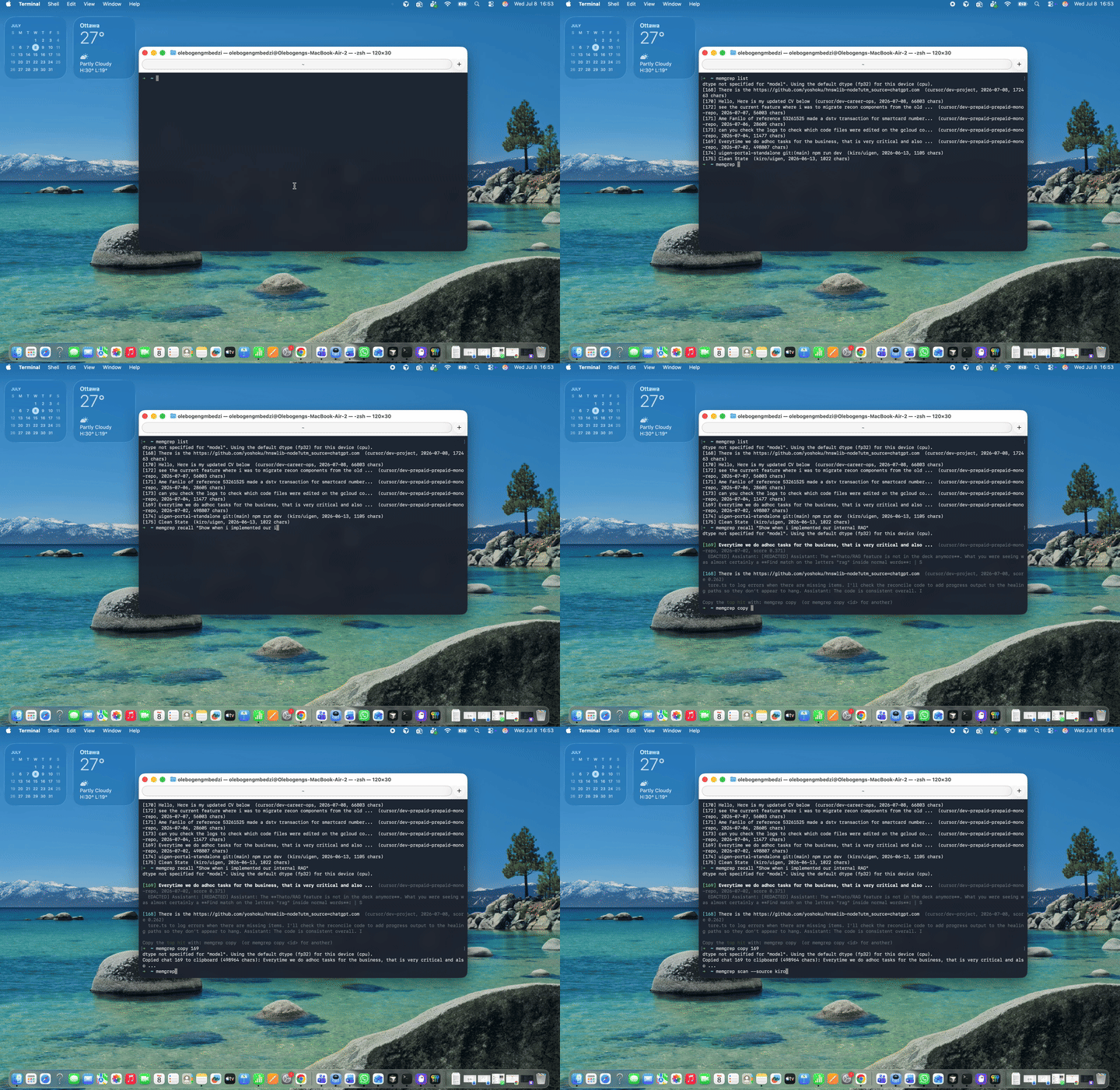
Demo
Why
I used a full agent gateway (OpenClaw). It worked. It also wasted tokens re-deriving the same workflows every session - outreach steps, deploy checks, inbox scans - things that should have been locked in.
Two problems, one tool:
- Workflows that should be durable. You should not reinvent a playbook every chat. Store it once (
remember/ ingest), attach it mid-task via MCP, optionally cron it. - Siloed agent history. You fixed an auth bug three weeks ago in another editor. Today's agent has no idea. Transcripts exist on disk but aren't searchable across tools.
- Remote coding without a second platform. Text an agent from your phone and get real work done in a repo. Telegram is the channel; Cursor is the brain; memgrep is the memory (and the scheduler).
memgrep turns the transcript pile into one queryable memory, puts that memory behind MCP (and optionally Telegram), and lets you schedule the playbooks you already trust.
Quickstart
1. Memory
npm install -g memgrep
memgrep ingest                                  # index chat history (incremental after first run)
memgrep recall "how did we fix the auth race?"  # search memory
memgrep copy                                    # top hit -> clipboard
2. Cursor from your phone
memgrep telegram           # first run: BotFather token + Cursor API key + project cwd
# Text your bot. Then keep it always-on on macOS:
memgrep telegram install   # or: memgrep telegram install --all  (every profile)
memgrep telegram service   # Loaded: yes?
3. Scheduled playbooks (needs Telegram set up if you want notify mode)
memgrep remember "Smoke: reply with one line ok + time. Do not edit files." --title smoke-playbook
memgrep jobs add --name smoke-5m --cron "*/5 * * * *" \
  --playbook-query "smoke playbook" --cwd ~/dev/project \
  --prompt "Reply with one line: smoke ok and the current time. Do not edit files." \
  --mode notify --profile default
memgrep jobs install
memgrep jobs run smoke-5m    # fire once now; you should get a Telegram message
memgrep jobs list
memgrep jobs service         # Loaded: yes?
Requires Node.js 18+. Native addons (hnswlib, better-sqlite3) build on install. The embedding model (~25 MB) downloads once on first run; memory search is offline after that. Telegram + Cursor + jobs need network and a CURSOR_API_KEY. Full command list below.
Always-on on macOS
Two LaunchAgents, not one:
| Service | Install | Status | Logs |
|---|---|---|---|
| Telegram bots + MCP | memgrep telegram install / --all |
memgrep telegram service |
~/.memgrep/logs/telegram-launchd.log |
| Jobs scheduler | memgrep jobs install |
memgrep jobs service |
~/.memgrep/logs/jobs-launchd.log |
Checklist after install (or after upgrading memgrep):
- Stop any foreground
memgrep telegram/memgrep jobs daemon(Ctrl-C). Only one poller per bot token. memgrep telegram install(add--allif you have multiple profiles).memgrep jobs install- Confirm both:
memgrep telegram serviceandmemgrep jobs serviceshow Loaded: yes. - Text the bot; ask it to
jobs_list(MCP must be live). - Optional smoke:
memgrep jobs run <name>thenmemgrep jobs logs <name>.
Restart a loaded agent:
launchctl kickstart -k gui/$(id -u)/com.memgrep.telegram
launchctl kickstart -k gui/$(id -u)/com.memgrep.jobs
After npm update -g memgrep (or a local npm run build), run telegram install / jobs install again so the plist points at the new binary. Both pause while the Mac sleeps; missed job ticks beyond a 6h grace window are skipped.
Agent memory
Two ways to get things in: ingest pulls chats from your tools (Cursor, Claude Code, Kiro). remember stores a note you write yourself (a decision, a postmortem, context no transcript captured).
Search and browse: recall finds chats by meaning. list shows what's stored. show / copy read one chat back out.
memgrep scan [--source kiro] [--new] [--last <n>]   # list on-disk chats (* = not ingested)
memgrep ingest [--source cursor,claude,kiro]        # ingest from supported tools
memgrep ingest --pick 2,5                           # ingest by number from last scan
memgrep ingest --last [n]                           # most recent n chat(s)
memgrep ingest <file...>                            # one file (format auto-detected)
memgrep remember "we chose X over Y because Z"      # manual note (no transcript needed)
memgrep list [--project <p>]
memgrep recall "<query>" [-k <n>] [--mode hybrid|vector|keyword]
memgrep show <id>
memgrep copy [id]
memgrep delete <id>
memgrep delete --all [--yes]
memgrep serve [--http] [--host 127.0.0.1] [--port 3921]
memgrep cursor setup|status                         # local Cursor agent for MCP (cursor_run)
memgrep telegram                                    # Cursor agent from your phone (+ memgrep MCP)
memgrep jobs ...                                    # schedule playbooks (add/list/run/daemon/install)
Remote Cursor agent via ngrok (MCP)
Cloud Cursor agents already call MCP tools. Expose the Mac-side agent as MCP:
One-shot (recommended):
node dist/cli.js cursor setup   # once: CURSOR_API_KEY + workspace allowlist
# once: reserved ngrok domain (also reads project .env / ~/.memgrep/mcp-public-url)
export MEMGREP_NGROK_DOMAIN=your-subdomain.ngrok-free.app
npm start                       # build, Telegram (--all), jobs, ngrok tunnel
npm stop
npm start (scripts/start-all.sh) will:
- Build if
dist/is stale - Ensure
~/.memgrep/mcp-token - Reinstall Telegram LaunchAgent (
telegram --all) with that token in the plist - Reinstall jobs LaunchAgent
- Start ngrok on your domain (
MEMGREP_NGROK_DOMAIN, or~/.memgrep/mcp-public-url) - Print status + client MCP snippet
Set the domain via env / .env (gitignored) or write https://YOUR-subdomain.ngrok-free.app/mcp to ~/.memgrep/mcp-public-url. There is no hardcoded personal domain in the repo.
Logs: ~/.memgrep/logs/telegram-launchd.log, jobs-launchd.log, ~/.memgrep/tunnel/ngrok.log.
Requires the Mac to be awake. Prefer a strong MEMGREP_MCP_TOKEN; do not expose without auth.
Memory lives in ~/.memgrep (MEMGREP_HOME to override). Re-running ingest is idempotent: unchanged chats are skipped, grown chats are replaced. scan then --pick lets you see what's available before embedding anything.
Supported history sources:
| Tool | Source | Notes |
|---|---|---|
| Cursor | ~/.cursor/projects/*/agent-transcripts/ |
Full user + assistant turns |
| Claude Code | ~/.claude/projects/*/*.jsonl |
Full user + assistant turns |
| Kiro IDE | Kiro globalStorage workspace sessions |
User turns and titles (assistant output lives in opaque execution records) |
| Antigravity | Not yet | Conversations are encrypted protobuf (.pb); agents can still query memory via MCP |
| Anything else | memgrep remember "<text>" |
Manual notes, decisions, postmortems |
New sources are pluggable: implement the two-method TranscriptSource interface and pass it to ingestTranscripts.
Give your agents access (MCP)
Memory is exposed through MCP, so it works in any MCP-capable agent: Cursor, Claude Code, Kiro, Antigravity, Windsurf, Codex, and whatever ships next. Ingest with the CLI, recall from anywhere. Register the server once per tool.
No global install needed (recommended - always picks up the latest published version):
{
  "mcpServers": {
    "memgrep": {
      "command": "npx",
      "args": ["-y", "memgrep", "serve"]
    }
  }
}
Already installed globally (npm install -g memgrep):
{
  "mcpServers": {
    "memgrep": {
      "command": "memgrep",
      "args": ["serve"]
    }
  }
}
Config locations: Cursor ~/.cursor/mcp.json, Claude Code claude mcp add memgrep -- npx -y memgrep serve (or claude mcp add memgrep -- memgrep serve if global), Kiro ~/.kiro/settings/mcp.json, Antigravity via its MCP settings UI.
The agent gets memory tools (recall, get_chat, list_chats, remember) plus job tools (jobs_list, jobs_add, jobs_update, jobs_remove, jobs_run, jobs_logs). Retrieval finds which chat matters; the agent pulls the full transcript into context, stores a durable note, or schedules a playbook. An agent in Kiro can recall a fix from a Cursor chat last month - or create a weekday job from Telegram.
Scheduled playbooks (jobs)
A job is a cron schedule plus a pointer to a remembered playbook. The daemon fires Cursor in the job’s cwd with memgrep MCP attached; the agent get_chats the playbook and runs your prompt.
# Playbook lives in memory (remember / ingest)
memgrep remember "Inbox scan: …" --title "email-scan"

memgrep jobs add \
  --name email-scan-am \
  --cron "30 8 * * 1-5" \
  --playbook-query "email scan" \
  --cwd ~/dev/career-ops \
  --prompt "Scan unread mail and summarize; do not send replies" \
  --mode auto

memgrep jobs list
memgrep jobs run email-scan-am    # fire once now
memgrep jobs logs email-scan-am
memgrep jobs daemon               # foreground scheduler
memgrep jobs install              # macOS LaunchAgent (com.memgrep.jobs)
memgrep jobs service
Jobs are stored under ~/.memgrep/jobs/ (jobs.json + runs.db). Default mode is notify (Telegram summary; agent prefers preview for side effects). Use --mode auto for safe read-only jobs. Missed ticks while the Mac slept are skipped after a 6h grace window. Manage the same jobs from Cursor or Telegram via MCP (ask the bot to call jobs_add / jobs_list) - no separate control plane. notify needs a working Telegram profile (--profile, default default).
Cursor from your phone (Telegram)
Chat with a local Cursor agent from Telegram. You do not need to be on the same Wi-Fi - Telegram's cloud reaches a long-polling process on your Mac. Usage is billed against your Cursor plan (same token pool as the IDE; tagged SDK in the dashboard). You need a CURSOR_API_KEY.
Compared to a full agent gateway (e.g. OpenClaw): memgrep keeps the stack thin - Telegram is the channel, Cursor is the runtime, memgrep is the memory. The gateway can vibe a workflow every time; memgrep is for locking the ones you already trust and reusing them (and scheduling them) without paying to rediscover the steps.
memgrep telegram
First run walks you through:
- Linking a @BotFather token and capturing your user id via
/start - Pasting your Cursor API key and choosing a project directory
Credentials are saved under ~/.memgrep/telegram/<profile>.json (mode 0600; legacy telegram.json migrates to telegram/default.json). The bot starts an embedded loopback HTTP MCP so Cursor can call memgrep (recall, get_chat, list_chats, remember, jobs_*) mid-task.
memgrep telegram setup              # default profile
memgrep telegram setup career       # second BotFather bot + cwd/model
memgrep telegram --profile career
memgrep telegram --all              # run every profile in one process
memgrep telegram list
memgrep telegram status             # all profiles, or: status career
memgrep telegram install            # LaunchAgent (one profile / sole profile)
memgrep telegram install --all      # LaunchAgent for every profile
memgrep telegram service            # Loaded: yes?
memgrep telegram uninstall
Always-on (macOS): see Always-on on macOS above. memgrep telegram install writes ~/Library/LaunchAgents/com.memgrep.telegram.plist. With multiple profiles you must pass --all or --profile <name> (plain install will refuse to guess). Logs: ~/.memgrep/logs/telegram-launchd.log.
Leave memgrep telegram (or --all) running, or use install instead. On your phone:
- free text /
/ask …→ Cursor agent (edits/runs in the configured cwd) /ws→ list saved workspaces (*= current)/ws 2or/ws myapp→ switch workspace (starts a fresh Cursor conversation)/ws add <name> <path>→ save another project folder/ws rm <name>→ remove a saved workspace/cwd [path]→ show list or switch by full filesystem path/new→ fresh Cursor conversation (same workspace)/status→ cwd, model, agent id, workspaces/recall <query>//list//show <id>→ memory shortcuts (without going through Cursor)/help→ commands
Only allowlisted Telegram user ids get answers; everyone else is ignored.
Optional env overrides: TELEGRAM_BOT_TOKEN, TELEGRAM_ALLOWED_USER_IDS (default profile only), CURSOR_API_KEY, MEMGREP_TELEGRAM_CWD, MEMGREP_TELEGRAM_MODEL, MEMGREP_TELEGRAM_PROFILE. If Telegram bot credentials are set in env and no profile exists yet, memgrep migrates them into telegram/default.json once.
Two processes instead of one: run memgrep serve --http in one terminal and memgrep telegram --no-server in another (bot + Cursor MCP URL default to http://127.0.0.1:3921/mcp, override with MEMGREP_MCP_URL).
HTTP MCP for other clients: memgrep serve --http binds 127.0.0.1:3921 by default. Non-loopback hosts require MEMGREP_MCP_TOKEN / --token.
File search
Semantic grep over any folder, fully offline:
npx memgrep index ./docs
npx memgrep search "how do I configure auth?"
docs/authentication.md (score 0.712)
  Configure auth by setting AUTH_SECRET in your environment and...
Options: --out / --index to choose the index directory (default .memgrep), --model to pick any Transformers.js-compatible embedding model, -k for the number of results.
Library usage
The same engine is available as an embeddable library. Think SQLite for semantic search: not a database server, not an API, not a subscription.
import { VectorIndex } from 'memgrep';

// Downloads the model on first use, cached afterwards.
const index = await VectorIndex.create({ model: 'Xenova/all-MiniLM-L6-v2' });

await index.add([
  { id: 'doc1', text: 'To reset your password, click the forgot password link.' },
  { id: 'doc2', text: 'Our refund policy allows returns within 30 days.', metadata: { url: '/refunds' } },
]);

const hits = await index.search('I forgot my login', { k: 5 });
// [{ id: 'doc1', score: 0.62, chunk: 'To reset your password...', chunkIndex: 0 }]

await index.save('./my-index'); // persist
const loaded = await VectorIndex.load('./my-index'); // reload later
Long documents are automatically split into overlapping chunks (configurable via chunkSize / chunkOverlap); search returns the best-matching chunk per document. remove(id) deletes a document, and re-adding an existing id replaces it.
| Method | Description |
|---|---|
VectorIndex.create(options?) |
New empty index. Options: model, chunkSize, chunkOverlap, initialCapacity. |
VectorIndex.load(dir) |
Load a saved index. |
index.add(doc | docs) |
Add or replace documents ({ id, text, metadata? }). |
index.search(query, { k? }) |
Top-k documents by cosine similarity. |
index.remove(id) |
Remove a document. |
index.save(dir) |
Persist to a directory. |
index.size |
Number of documents. |
The memory layer is exported too: MemoryStore, ingestTranscripts, and the per-tool parsers.
Bring your own database
If you already have a vector database (pgvector, Supabase, LanceDB, Qdrant), you can use memgrep purely as a local embedding pipeline and skip the built-in index. Embedder and chunkText are exported for exactly this: chunk your text, embed it on-device, and store the vectors wherever you like.
import { Embedder, chunkText } from 'memgrep';
import pg from 'pg';

const embedder = await Embedder.create('Xenova/all-MiniLM-L6-v2');
const db = new pg.Pool();

// Index: chunk, embed locally, insert into pgvector.
const chunks = chunkText(article.body);
const vectors = await embedder.embed(chunks);
for (let i = 0; i < chunks.length; i++) {
  await db.query(
    'INSERT INTO chunks (article_id, chunk_index, text, embedding) VALUES ($1, $2, $3, $4)',
    [article.id, i, chunks[i], JSON.stringify(vectors[i])],
  );
}

// Search: embed the query the same way, let the database rank.
const queryVector = await embedder.embedOne('how do refunds work?');
const { rows } = await db.query(
  'SELECT text, 1 - (embedding <=> $1) AS score FROM chunks ORDER BY embedding <=> $1 LIMIT 5',
  [JSON.stringify(queryVector)],
);
Vectors are L2-normalized, so cosine distance (pgvector's <=>) is the right operator. embedder.dimensions tells you the column size for your schema (384 for the default model). The one rule: always embed queries with the same model you indexed with.
How it works
The mental model: chunks are what's searched, chats are what's returned.
- Transcripts are parsed into clean
User:/Assistant:dialogue. Tool output, diffs, and system context are stripped; only the conversation is kept. - That text is chunked at paragraph/sentence boundaries (~1000 chars, 200 overlap), and each chunk is embedded locally into a 384-dim vector (Transformers.js, mean pooling, L2-normalized). Titles, projects, and dates are stored as plain columns, not embedded.
- Vectors go into an HNSW index (cosine space); chat records and chunk text live in SQLite. Chunk text is also indexed in an FTS5 table (BM25) kept in sync via triggers.
- A query runs two backends in parallel: HNSW semantic neighbors and FTS5 keyword/BM25. Each side over-fetches and dedupes to the best chunk per chat, then reciprocal rank fusion (RRF) merges the lists. Exact ids and error strings ride the keyword path; meaning-based queries still ride vectors.
- Ingestion is idempotent by content hash;
rememberandingestboth land in the same searchable memory.
Reliability: SQLite is the source of truth and the vector index is a rebuildable cache. If a process dies mid-ingest (Ctrl-C, crash, power loss), no chats are lost: the next command that needs vectors (recall, ingest, serve) detects the divergence, re-embeds whatever is missing, and repairs the index, printing progress while it does. Commands that never touch vectors (list, show, copy, delete, scan) skip the repair and stay fast no matter what state the index is in. Deleting index.bin entirely just triggers a full rebuild from the database.
Limitations, honestly
- Hybrid search helps exact ids, but is not magic. FTS5/BM25 boosts literal tokens (ticket ids,
ECONNREFUSED, merchant numbers). Very short or heavily punctuated strings can still miss if they never appear in chunk text. - Kiro ingestion is partial (user turns and titles; assistant output lives in opaque execution records). Antigravity can't be ingested (encrypted protobuf), though its agents can still query memory via MCP. Escape hatch for both: export or paste into a file and
memgrep ingest <file>. deleteis not permanent against re-ingest. If the source transcript still exists on disk, the next scan re-adds it. Wipe the transcript too, or don't re-scan that source.- One writer at a time. Concurrent memgrep processes can race on the index file; the self-heal repairs any loss on next open, but there is no cross-process lock yet.
- Recall quality tracks what was said. Sessions where the signal lived in tool output (which is stripped) search poorly. A one-line
memgrep rememberin your own words is often the highest-value thing you can store. - Telegram still needs a host that stays up. LaunchAgent survives logout/reboot on macOS, but the bot pauses while the Mac sleeps or is offline. True 24/7 means a desktop/VPS that stays powered. Cursor usage is billed to your Cursor plan.
- Jobs share that host constraint. The jobs LaunchAgent also pauses while the Mac sleeps; missed ticks beyond a 6h grace window are skipped. Side-effectful playbooks default to
notifymode - treatautocarefully.
Roadmap
- Tombstones so
deletesurvives re-ingest - More sources (Antigravity if its format opens up, Codex CLI, Windsurf)
- Watch mode / background daemon for continuous ingest
- Linux systemd unit alongside the macOS LaunchAgent (telegram + jobs)
- Telegram
/jobsslash shortcuts (MCP already covers manage-from-chat) - Browser support for the library via a WASM HNSW index
Development
npm install
npm run build # compile TypeScript
npm test # unit + integration tests (first run downloads the model)
License
Установка Memgrep
У этого сервера нет опубликованного пакета — он собирается из исходников. Открой репозиторий и следуй инструкции в README.
▸ github.com/darula-hpp/memgrepFAQ
Memgrep MCP бесплатный?
Да, Memgrep MCP бесплатный — установка в пару кликов через Unyly без оплаты.
Нужен ли API-ключ для Memgrep?
Нет, Memgrep работает без API-ключей и переменных окружения.
Memgrep — hosted или self-hosted?
Self-hosted: сервер запускается локально на твоей машине командой из раздела установки.
Как установить Memgrep в Claude Desktop, Claude Code или Cursor?
Открой Memgrep на unyly.org, выбери вкладку своего клиента (Claude Desktop, Claude Code, Cursor) и нажми Install — конфиг сгенерируется автоматически, без правки JSON.
Похожие MCP
Gmail
Read, send and search emails from Claude
 автор: Google
Slack
Send, search and summarize Slack messages
 автор: Slack
Runbear
No-code MCP client for team chat platforms, such as Slack, Microsoft Teams, and Discord.
Discord Server
A community discord server dedicated to MCP by [Frank Fiegel](https://github.com/punkpeye)
Compare Memgrep with
Не уверен что выбрать?
Найди свой стек за 60 секунд
Автор?
Embed-бейдж для README
Похожее
Все в категории communication