
Mensa TUD Server
БесплатноНе проверенAn MCP server for accessing the TU Dresden canteen API. It provides tools to query canteen information, available days, and daily meal menus.

Описание
An MCP server for accessing the TU Dresden canteen API. It provides tools to query canteen information, available days, and daily meal menus.
README
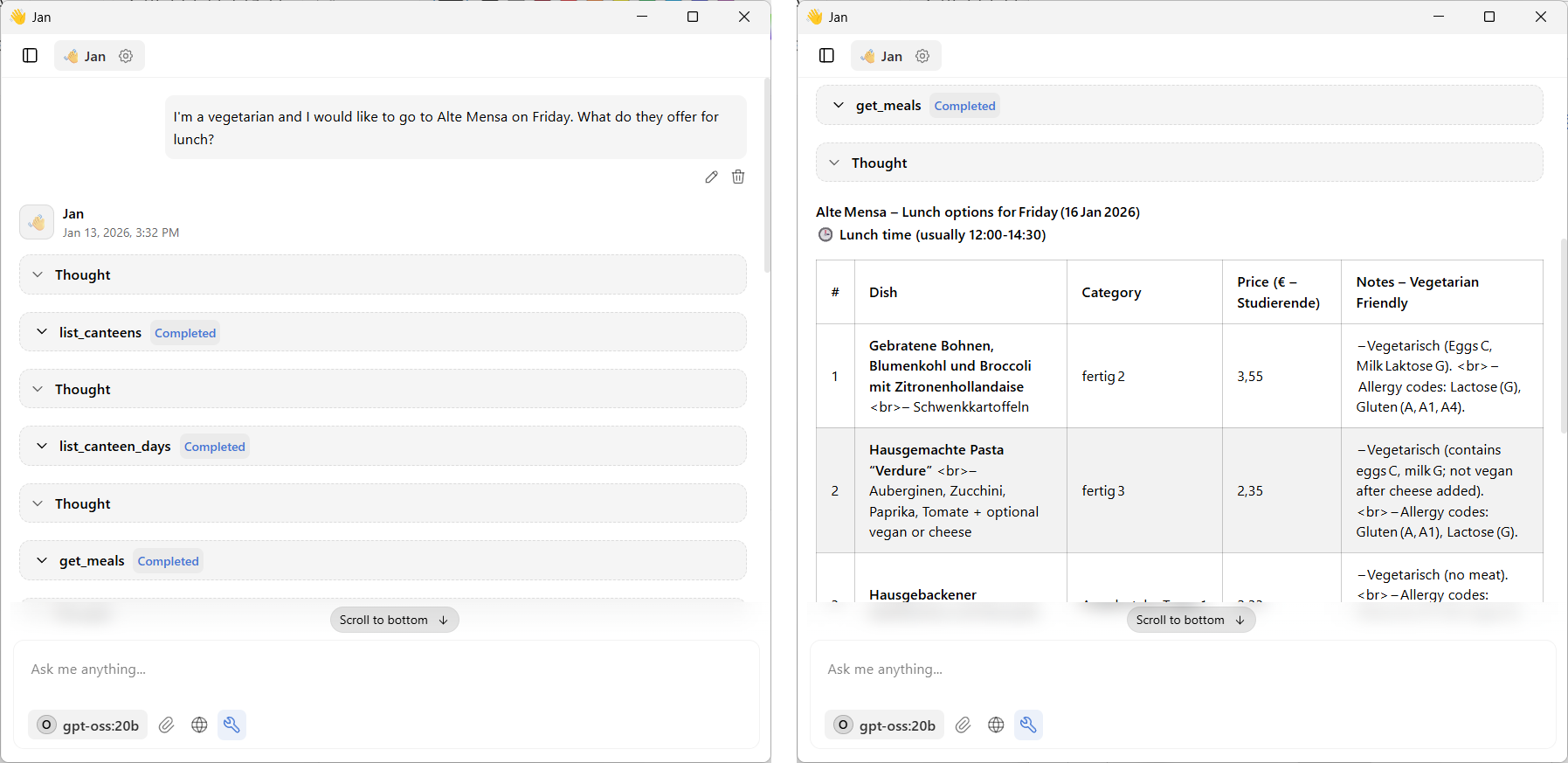
An MCP (Model Context Protocol) server for accessing the TU Dresden canteen API (Studentenwerk Dresden). This server provides tools to query canteen information, available days, and daily meal menus through the OpenMensa v2 API.
You can access it, e.g. via the jan.ai GUI or using Claude Desktop.
Features
This MCP server provides three tools:
- list_canteens - List all available canteens with their IDs, names, addresses, and coordinates
- list_canteen_days - List all days for which a specific canteen has meal data available
- get_meals - Get all meals available at a specific canteen on a specific date (defaults to today)
Installation
Install uv (fast Python package manager)
The dependencies will be automatically installed by uv when running the server
Integrating with GUIs
To use this MCP server e.g. with Claude Desktop, add it to your Claude Desktop configuration file:
On Windows: %APPDATA%\Claude\claude_desktop_config.json
Add the following to your configuration:
{
  "mcpServers": {
    "mensa-tud": {
        "command": "uv",
        "args": [
        "--directory",
        "path\\to\\mensa-tud-mcp",
        "run",
        "server.py"
        ]
    }
  }
}
Make sure to adjust the path to match your installation location. In jan.ai you can enter this information under Settings > MCP Servers.
Under the hood
This server uses the OpenMensa v2 API provided by Studentenwerk Dresden:
- Base URL:
https://api.studentenwerk-dresden.de/openmensa/v2 - Documentation: OpenMensa API
License
This is a simple MCP server implementation for educational and personal use provided unter MIT License.
Установить Mensa TUD Server в Claude Desktop, Claude Code, Cursor
unyly install mensa-tud-mcp-serverСтавит в Claude Desktop, Claude Code, Cursor и VS Code — сам разбирается с npx, uvx и сборкой из исходников.
Впервые? Поставь CLI: curl -fsSL https://unyly.org/install | sh
Или настроить вручную
Выполни в терминале:
claude mcp add mensa-tud-mcp-server -- uvx --from git+https://github.com/ScaDS/mensa-tud-mcp mensa-tud-mcpFAQ
Mensa TUD Server MCP бесплатный?
Да, Mensa TUD Server MCP бесплатный — установка в пару кликов через Unyly без оплаты.
Нужен ли API-ключ для Mensa TUD Server?
Нет, Mensa TUD Server работает без API-ключей и переменных окружения.
Mensa TUD Server — hosted или self-hosted?
Доступен hosted-вариант: Unyly запускает сервер в облаке, локальная установка не обязательна.
Как установить Mensa TUD Server в Claude Desktop, Claude Code или Cursor?
Открой Mensa TUD Server на unyly.org, выбери вкладку своего клиента (Claude Desktop, Claude Code, Cursor) и нажми Install — конфиг сгенерируется автоматически, без правки JSON.
Похожие MCP
GitHub
PRs, issues, code search, CI status
 автор: GitHub
Filesystem
Secure file operations with configurable access controls.
Memory
Knowledge graph-based persistent memory system.
Template MCP Server
A CLI tool to create a new Model Context Protocol server project with TypeScript support, dual transport options, and an extensible structure
 автор: mcpdotdirect
Compare Mensa TUD Server with
Не уверен что выбрать?
Найди свой стек за 60 секунд
Автор?
Embed-бейдж для README
Похожее
Все в категории development