
Mobile Automator Server
БесплатноНе проверенAn MCP server that gives AI agents the power to record, replay, and mock mobile app interactions — combining Maestro UI automation with Proxyman network capture

Описание
An MCP server that gives AI agents the power to record, replay, and mock mobile app interactions — combining Maestro UI automation with Proxyman network capture to generate complete, self-contained test scripts.
README
An MCP server that gives AI agents the power to record, replay, and mock mobile app interactions — combining Maestro UI automation with Proxyman network capture to generate complete, self-contained test scripts.
Architecture
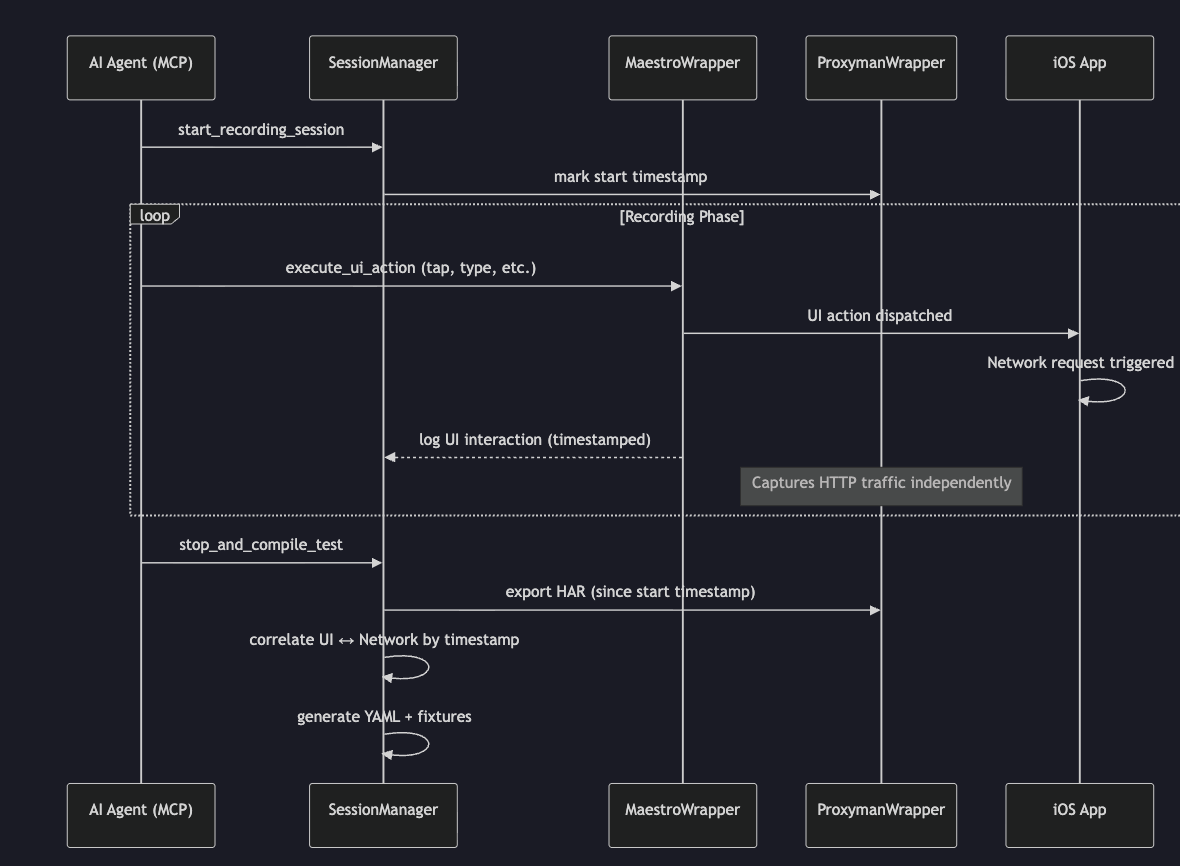
The system orchestrates two async data streams — UI interactions (via Maestro) and HTTP traffic (via Proxyman) — then correlates them by timestamp to produce Maestro YAML + WireMock stubs for full experience replay.
Capabilities
| Capability | Description |
|---|---|
| UI Recording | Dispatch taps, types, scrolls, swipes on iOS/Android simulators via Maestro |
| Network Capture | Intercept HTTP/HTTPS traffic through Proxyman with scoped, session-aware exports |
| Correlation | Automatically match UI actions to the network requests they trigger (sliding time window) |
| YAML Synthesis | Generate Maestro test scripts with inline network context comments |
| WireMock Stubs | Produce WireMock-compatible mappings/ + __files/ for network replay |
| Selective Mocking | Mock all, some, or all-except-some APIs — unmocked routes proxy to the real server |
| SDUI Validation | Deep-compare server-driven UI payloads against expected JSON shapes |
| Named Flows | Invoke hand-authored Maestro flows by name (list_flows, run_flow) to navigate to the area of an incremental change |
| Build & Deploy | Compile, install, uninstall, and boot simulators via build_app / install_app / uninstall_app / boot_simulator — iOS (xcodebuild + simctl) and Android (gradlew + adb) |
| Visual Verification | Capture PNG screenshots via take_screenshot (iOS simctl io screenshot, Android adb exec-out screencap -p) so the agent can inspect the rendered UI directly |
| Unit Tests | Run XCTest / Gradle unit tests via run_unit_tests and get structured pass/fail counts plus first-line failure messages — no log dumps |
Tools
| Tool | Purpose |
|---|---|
start_recording_session |
Begin recording — snapshots Proxyman baseline, initializes session state |
execute_ui_action |
Dispatch a UI action and log it to the session |
get_ui_hierarchy |
Capture the current accessibility tree from the simulator |
get_network_logs |
Fetch intercepted HTTP traffic (with domain/path filtering) |
verify_sdui_payload |
Validate a network response against expected fields |
stop_and_compile_test |
Finalize session → export scoped HAR → correlate → generate YAML + WireMock stubs |
list_flows |
Discover named Maestro flows under ./flows/ (or a custom flowsDir) |
run_flow |
Execute a named flow by name, merging manifest defaults with caller-supplied params |
build_app |
Compile an iOS app (xcodebuild) or Android app (./gradlew assemble…); returns the built .app / .apk path |
install_app |
Install a built .app (iOS simctl) or .apk (Android adb install -r) on a target device |
uninstall_app |
Remove an installed app from a device to guarantee clean-state launches |
boot_simulator |
Boot an iOS simulator by UDID and wait for it to be ready (Android emulator: start manually) |
take_screenshot |
Capture a PNG of the current simulator/emulator screen; returns an absolute path Claude can read back |
run_unit_tests |
Run the unit-test target and return structured results (passed/failed counts, failing test names, first-line failure messages) |
start_build |
Async entry point for build_app — returns a taskId immediately so agents can poll without hitting the MCP transport timeout |
poll_task_status |
Read current status, duration, and recent streamed output for a task (read-only, never throws) |
get_task_result |
Read the final structured result for a completed task (idempotent, does not consume) |
cancel_task |
Abort a running task — SIGTERMs children, runs cleanups, marks cancelled |
list_tasks |
Inventory of in-process tasks filtered by kind / status / since |
Quick Start
Prerequisites
- Node.js v20+
- Maestro CLI 2.5.0+ —
curl -Ls "https://get.maestro.mobile.dev" | bash(older versions log a warning at startup; 2.3.x in particular exhibits XCTest driver flakiness on iOS port 22087) - Proxyman macOS 5.20+ with CLI — see Proxyman Setup
- A booted iOS Simulator or Android Emulator
Install
git clone <repository>
cd mobile-automator-mcp
npm install
npm run build
Option A — HTTP Bridge (use this if the MCP client is blocked at your org)
npm run dev:http
Verify it's running:
curl http://localhost:3000/health
# {"ok":true,"tools":34}
Then call any tool via JSON-RPC:
curl -X POST http://localhost:3000/message \
  -H "Content-Type: application/json" \
  -d '{"jsonrpc":"2.0","id":1,"method":"tools/call","params":{"name":"list_devices","arguments":{"platform":"ios"}}}'
For a full tool reference, session lifecycle patterns, and common workflows see .github/skills/generate_mcp_curls/SKILL.md.
To regenerate boilerplate curl commands for all 34 tools: npx tsx .github/skills/generate_mcp_curls/generate.ts
Phase-1 admin tools
When something looks stuck, five admin tools provide visibility and recovery without restarting the server:
audit_state— single-shot snapshot of sessions, drivers, pollers, and Proxyman rules with an orphans reportlist_active_sessions— read-only inventory with driver/poller liveness and mock countslist_active_mocks— Proxyman rules taggedmca:plus drift between Proxyman and the local ledgerforce_cleanup_session— destructive: stop poller/driver, delete tagged Proxyman rules, mark session aborted (never throws)force_cleanup_mocks— destructive bulk delete ofmca:-tagged Proxyman rules by scope (all,session,standalone)
Option B — Register with an MCP Client (once org-approved)
Add to your MCP client config (e.g., Claude Desktop, Gemini Code Assist):
{
  "mcpServers": {
    "mobile-automator": {
      "command": "node",
      "args": ["/absolute/path/to/mobile-automator-mcp/dist/index.js"]
    }
  }
}
Selective Mocking
The stop_and_compile_test tool accepts a mockingConfig to control which APIs are mocked vs. proxied to a real backend:
full      → Mock all captured APIs (default, no real server needed)
include   → Mock only listed routes, proxy everything else
exclude   → Mock everything EXCEPT listed routes
Example — mock only login, proxy everything else:
{
  "mockingConfig": {
    "mode": "include",
    "routes": ["/api/login"],
    "proxyBaseUrl": "http://localhost:3030"
  }
}
Output Structure
session-<id>/
├── wiremock/
│   ├── mappings/           ← WireMock stub JSON files
│   │   ├── post_api_login.json
│   │   ├── get_api_lore_doom.json
│   │   └── _proxy_fallback.json   ← (include/exclude modes only)
│   └── __files/            ← Response body fixtures
│       ├── post_api_login_response.json
│       └── get_api_lore_doom_response.json
└── manifest.json           ← Session metadata + route manifest
Project Structure
src/
├── index.ts              ← MCP server entry point
├── handlers.ts           ← Tool handler implementations
├── schemas.ts            ← Zod schemas (single source of truth for I/O)
├── types.ts              ← Domain models
├── session/              ← Session lifecycle + SQLite persistence
├── maestro/              ← Maestro CLI wrapper + hierarchy parser
├── proxyman/             ← Proxyman CLI wrapper + payload validator
├── flows/                ← Named, hand-authored flow registry
├── build/                ← iOS (xcodebuild/simctl) + Android (gradlew/adb) build & deploy
├── screenshot/           ← PNG capture for visual self-verification
├── testing/              ← XCTest / JUnit unit-test runner + result parsers
└── synthesis/            ← Correlator + YAML generator + WireMock stub writer
Named Flows
Hand-authored Maestro flows let an agent navigate to a specific app screen before verifying an incremental change. Flows live as .yaml files in a flows directory (default: ./flows/) and are invoked by name.
flows/
├── _manifest.json              ← optional: descriptions, tags, param specs
├── login.yaml                  ← flow name is "login"
└── navigate-to-checkout.yaml   ← flow name is "navigate-to-checkout"
An optional _manifest.json declares parameters and metadata:
{
  "flows": {
    "login": {
      "description": "Launch the app and reach the logged-in home screen",
      "tags": ["auth", "setup"],
      "params": {
        "USERNAME": { "default": "admin", "description": "Login username" },
        "PASSWORD": { "default": "admin" }
      }
    }
  }
}
Params are forwarded to Maestro as -e KEY=VALUE and referenced inside the YAML as ${KEY}. Call list_flows to discover flows, then run_flow with { name, params? } to execute one.
Build & Deploy Loop
Closes the edit → rebuild → reinstall → navigate cycle so an agent can verify changes against a fresh build.
build_app     → compile with xcodebuild / ./gradlew, return built .app or .apk path
uninstall_app → wipe the prior install + its data from the target device
install_app   → push the new binary to the simulator / emulator
boot_simulator→ boot an iOS simulator (idempotent; alreadyBooted=true if already running)
iOS — shells xcodebuild build -scheme <scheme> -destination 'generic/platform=iOS Simulator' -derivedDataPath <path> and locates the .app under <derivedDataPath>/Build/Products/<Configuration>-iphonesimulator/. Bundle id is extracted via plutil from the built Info.plist.
Android — shells ./gradlew :<module>:assemble<Variant> from the project root and locates the APK at <project>/<module>/build/outputs/apk/<variant>/. Booting the emulator is not yet automated — start it manually (e.g., emulator -avd <name>) before calling install/run tools.
Build output is truncated (head + tail) to keep MCP responses small while preserving both the lead-up and the final error context.
Visual Verification & Unit Tests
take_screenshot writes a PNG to disk and returns its path — Claude reads the image back directly, which catches visual regressions (wrong color, clipped text, broken image) that structural hierarchy checks miss. Pair it with get_ui_hierarchy for structural assertions.
run_unit_tests runs the normal unit-test target for the project:
- iOS —
xcodebuild test -resultBundlePath <path>with optional-only-testing:<Target>/<Class>[/<Method>]filters. The stdout is parsed for per-test pass/fail so totals stay accurate across Xcode versions. - Android —
./gradlew :<module>:test<Variant>UnitTestwith an optional--tests <filter>. JUnit XML under<module>/build/test-results/<task>/is parsed for failure details.
Both return structured results: { passed, totalTests, passedTests, failedTests, skippedTests, failures[] }. failures[] carries the failing test name and (where available) the first-line error message plus source file/line — enough for the agent to jump straight to the offending code without grepping the full log.
The full agent workflow (build → install → navigate → screenshot → unit test → iterate) is documented in .agents/skills/agent-loop.md.
Development
npm test            # Run tests
npm run test:watch  # Watch mode
npm run build       # Compile TypeScript
npm start           # Start server (stdio)
npm run lint        # ESLint
License
MIT
Установка Mobile Automator Server
У этого сервера нет опубликованного пакета — он собирается из исходников. Открой репозиторий и следуй инструкции в README.
▸ github.com/jegriffi91/mobile-automator-mcpFAQ
Mobile Automator Server MCP бесплатный?
Да, Mobile Automator Server MCP бесплатный — установка в пару кликов через Unyly без оплаты.
Нужен ли API-ключ для Mobile Automator Server?
Нет, Mobile Automator Server работает без API-ключей и переменных окружения.
Mobile Automator Server — hosted или self-hosted?
Self-hosted: сервер запускается локально на твоей машине командой из раздела установки.
Как установить Mobile Automator Server в Claude Desktop, Claude Code или Cursor?
Открой Mobile Automator Server на unyly.org, выбери вкладку своего клиента (Claude Desktop, Claude Code, Cursor) и нажми Install — конфиг сгенерируется автоматически, без правки JSON.
Похожие MCP
LibreOffice Tools
Enables AI agents to read, write, and edit Office documents via LibreOffice with token-efficient design. Supports multiple formats including DOCX, XLSX, PPTX, a
 автор: passerbyflutter
dannote/figma-use
Full Figma control: create shapes, text, components, set styles, auto-layout, variables, export. 80+ tools.
 автор: dannote
Logo.dev
Search and retrieve company logos by brand or domain. Customize size, format, and theme to match your design needs. Accelerate design, prototyping, and content
 автор: NOVA-3951
PIX4Dmatic
Enables GUI automation for controlling PIX4Dmatic on Windows through MCP. Supports launching, focusing, capturing screenshots, sending hotkeys, clicking UI elem
 автор: jangjo123
Compare Mobile Automator Server with
Не уверен что выбрать?
Найди свой стек за 60 секунд
Автор?
Embed-бейдж для README
Похожее
Все в категории design