
Mobile
БесплатноНе проверенMCP server for cross-platform mobile automation (iOS/Android) using accessibility trees and screenshots, enabling agents to interact with apps on simulators, em

Описание
MCP server for cross-platform mobile automation (iOS/Android) using accessibility trees and screenshots, enabling agents to interact with apps on simulators, emulators, and physical devices.
README
This is a Model Context Protocol (MCP) server that enables scalable mobile automation, development through a platform-agnostic interface, eliminating the need for distinct iOS or Android knowledge. You can run it on emulators, simulators, and physical devices (iOS and Android). This server allows Agents and LLMs to interact with native iOS/Android applications and devices through structured accessibility snapshots or coordinate-based taps based on screenshots.
https://github.com/user-attachments/assets/c4e89c4f-cc71-4424-8184-bdbc8c638fa1


🚀 Mobile MCP Roadmap: Building the Future of Mobile
Join us on our journey as we continuously enhance Mobile MCP! Check out our detailed roadmap to see upcoming features, improvements, and milestones. Your feedback is invaluable in shaping the future of mobile automation.
Main use cases
How we help to scale mobile automation:
- 📲 Native app automation (iOS and Android) for testing or data-entry scenarios.
- 📝 Scripted flows and form interactions without manually controlling simulators/emulators or physical devices (iPhone, Samsung, Google Pixel etc)
- 🧭 Automating multi-step user journeys driven by an LLM
- 👆 General-purpose mobile application interaction for agent-based frameworks
- 🤖 Enables agent-to-agent communication for mobile automation usecases, data extraction
Main Features
- 🚀 Fast and lightweight: Uses native accessibility trees for most interactions, or screenshot based coordinates where a11y labels are not available.
- 🤖 LLM-friendly: No computer vision model required in Accessibility (Snapshot).
- 🧿 Visual Sense: Evaluates and analyses what’s actually rendered on screen to decide the next action. If accessibility data or view-hierarchy coordinates are unavailable, it falls back to screenshot-based analysis.
- 📊 Deterministic tool application: Reduces ambiguity found in purely screenshot-based approaches by relying on structured data whenever possible.
- 📺 Extract structured data: Enables you to extract structred data from anything visible on screen.
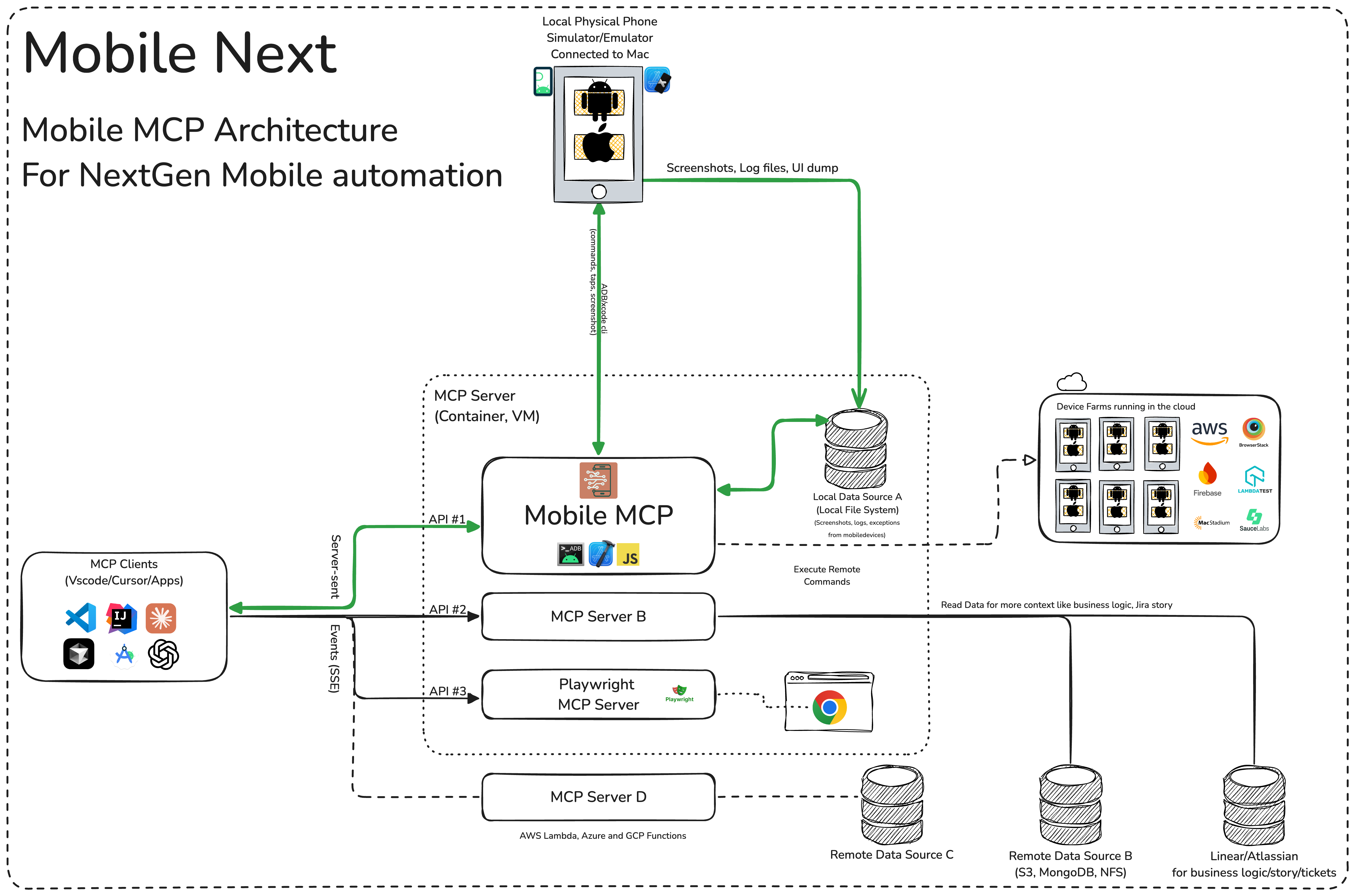
🏗️ Mobile MCP Architecture
📚 Wiki page
More details in our wiki page for setup, configuration and debugging related questions.
Installation and configuration
Setup our MCP with Cline, Cursor, Claude, VS Code, Github Copilot:
{
  "mcpServers": {
    "mobile-mcp": {
      "command": "npx",
      "args": ["-y", "@mobilenext/mobile-mcp@latest"]
    }
  }
}
Cline: To setup Cline, just add the json above to your MCP settings file. More in our wiki
claude mcp add mobile -- npx -y @mobilenext/mobile-mcp@latest
claude mcp add mobile -- npx -y @mobilenext/mobile-mcp@latest
🛠️ How to Use 📝
After adding the MCP server to your IDE/Client, you can instruct your AI assistant to use the available tools. For example, in Cursor's agent mode, you could use the prompts below to quickly validate, test and iterate on UI intereactions, read information from screen, go through complex workflows. Be descriptive, straight to the point.
✨ Example Prompts
Workflows
You can specifiy detailed workflows in a single prompt, verify business logic, setup automations. You can go crazy:
Search for a video, comment, like and share it.
Find the video called " Beginner Recipe for Tonkotsu Ramen" by Way of Ramen, click on like video, after liking write a comment " this was delicious, will make it next Friday", share the video with the first contact in your whatsapp list.
Download a successful step counter app, register, setup workout and 5 start the app
Find and Download a free "Pomodoro" app that has more thank 1k stars.
Launch the app, register with my email, after registration find how to start a pomodoro timer.
When the pomodoro timer started, go back to the app store and rate the app 5 stars,
and leave a comment how useful the app is.
Search in Substack, read, highlight, comment and save an article
Open Substack website, search for "Latest trends in AI automation 2025", open the first article,
highlight the section titled "Emerging AI trends", and save article to reading list for later review,
comment a random paragraph summary.
Reserve a workout class, set timer
Open ClassPass, search for yoga classes tomorrow morning within 2 miles,
book the highest-rated class at 7 AM, confirm reservation,
 setup a timer for the booked slot in the phone
Find a local event, setup calendar event
Open Eventbrite, search for AI startup meetup events happening this weekend in "Austin, TX",
select the most popular one, register and RSVP yes to the even, setup a calendar event as a reminder.
Check weather forecast and send a Whatsapp/Telegram/Slack message
Open Weather app, check tomorrow's weather forecast for "Berlin", and send the summary
via Whatsapp/Telegram/Slack to contact "Lauren Trown", thumbs up their response.
- Schedule a meeting in Zoom and share invite via email
Open Zoom app, schedule a meeting titled "AI Hackathon" for tomorrow at 10 AM with a duration of 1 hour,
copy the invitation link, and send it via Gmail to contacts "[email protected]".
More prompt examples can be found here.
Prerequisites
What you will need to connect MCP with your agent and mobile devices:
- Xcode command line tools
- Android Platform Tools
- node.js
- MCP supported foundational models or agents, like Claude MCP, OpenAI Agent SDK, Copilot Studio
Python dependencies
If you plan to run the Python version of Mobile MCP locally, make sure to install the required packages first:
pip install -r requirements.txt
You can also install in editable mode with pip install -e .. See README_python.md for more details.
Simulators, Emulators, and Physical Devices
When launched, Mobile MCP can connect to:
- iOS Simulators on macOS/Linux
- Android Emulators on Linux/Windows/macOS
- Physical iOS or Android devices (requires proper platform tools and drivers)
Make sure you have your mobile platform SDKs (Xcode, Android SDK) installed and configured properly before running Mobile Next Mobile MCP.
Running in "headless" mode on Simulators/Emulators
When you do not have a physical phone connected to your machine, you can run Mobile MCP with an emulator or simulator in the background.
For example, on Android:
- Start an emulator (avdmanager / emulator command).
- Run Mobile MCP with the desired flags
On iOS, you'll need Xcode and to run the Simulator before using Mobile MCP with that simulator instance.
xcrun simctl listxcrun simctl boot "iPhone 16"
Hangul keyboard not showing?
If you see only the English keyboard when typing, add the Korean keyboard in the device settings.
- Android:
Settings→System→Languages & input→Virtual keyboard→Gboard→Languages→Add keyboardand choose Korean. - iOS:
Settings→General→Keyboard→Keyboards→Add New Keyboardand select Korean.
Troubleshooting
If your client or editor shows the message:
The model returned an error. Try disabling MCP servers, or switch models.
the MCP server might not be running or reachable. Launch mobile-mcp manually
using python -m src.main (or mobile-mcp if installed). If you want to stop
using MCP, remove the server entry from your MCP settings so the client no
longer attempts to connect.
Thanks to all contributors ❤️
We appreciate everyone who has helped improve this project.
Установка Mobile
У этого сервера нет опубликованного пакета — он собирается из исходников. Открой репозиторий и следуй инструкции в README.
▸ github.com/kimkitae/appium-mcpFAQ
Mobile MCP бесплатный?
Да, Mobile MCP бесплатный — установка в пару кликов через Unyly без оплаты.
Нужен ли API-ключ для Mobile?
Нет, Mobile работает без API-ключей и переменных окружения.
Mobile — hosted или self-hosted?
Self-hosted: сервер запускается локально на твоей машине командой из раздела установки.
Как установить Mobile в Claude Desktop, Claude Code или Cursor?
Открой Mobile на unyly.org, выбери вкладку своего клиента (Claude Desktop, Claude Code, Cursor) и нажми Install — конфиг сгенерируется автоматически, без правки JSON.
Похожие MCP
GitHub
PRs, issues, code search, CI status
 автор: GitHub
Filesystem
Secure file operations with configurable access controls.
Memory
Knowledge graph-based persistent memory system.
Template MCP Server
A CLI tool to create a new Model Context Protocol server project with TypeScript support, dual transport options, and an extensible structure
 автор: mcpdotdirect
Compare Mobile with
Не уверен что выбрать?
Найди свой стек за 60 секунд
Автор?
Embed-бейдж для README
Похожее
Все в категории development