
Model Context Protocol Template
БесплатноНе проверенA production-ready MCP server template that connects LLMs and AI agents to external data, tools, and services with built-in OAuth 2.1 authentication, Redis-back

Описание
A production-ready MCP server template that connects LLMs and AI agents to external data, tools, and services with built-in OAuth 2.1 authentication, Redis-backed session management, and a modular tools engine.
README
Model Context Protocol Template
A production-ready template for building Model Context Protocol (MCP) pipelines that connect LLMs and AI agents to external data, tools, and services.
Table of Contents
- Why MCP?
- Architecture Overview
- Key Components
- Tech Stack
- Project Structure
- Getting Started
- Client Integration
- Available Tools
- Configuration Reference
- Session & Auth Deep Dive
- Contributing
- License
Why MCP?
Large Language Models are powerful but isolated — they can't natively access live databases, trigger workflows, or call APIs. The Model Context Protocol (MCP) solves this by providing a standardized bridge between AI and the real world.
| Problem | MCP Solution |
|---|---|
| LLMs can't access live data | Connects to databases, APIs, and services in real-time |
| Every integration requires custom code | One universal protocol for all tool integrations |
| No session awareness across requests | Redis-backed stateful sessions over stateless HTTP/SSE |
| Security is an afterthought | Built-in OAuth 2.1 + PKCE, encrypted credentials, JWT tokens |
| Hard to scale AI tool servers | Stateless server design, horizontal scaling via externalized state |
This template gives you a batteries-included starting point — fork it, add your tools, and deploy.
Architecture Overview
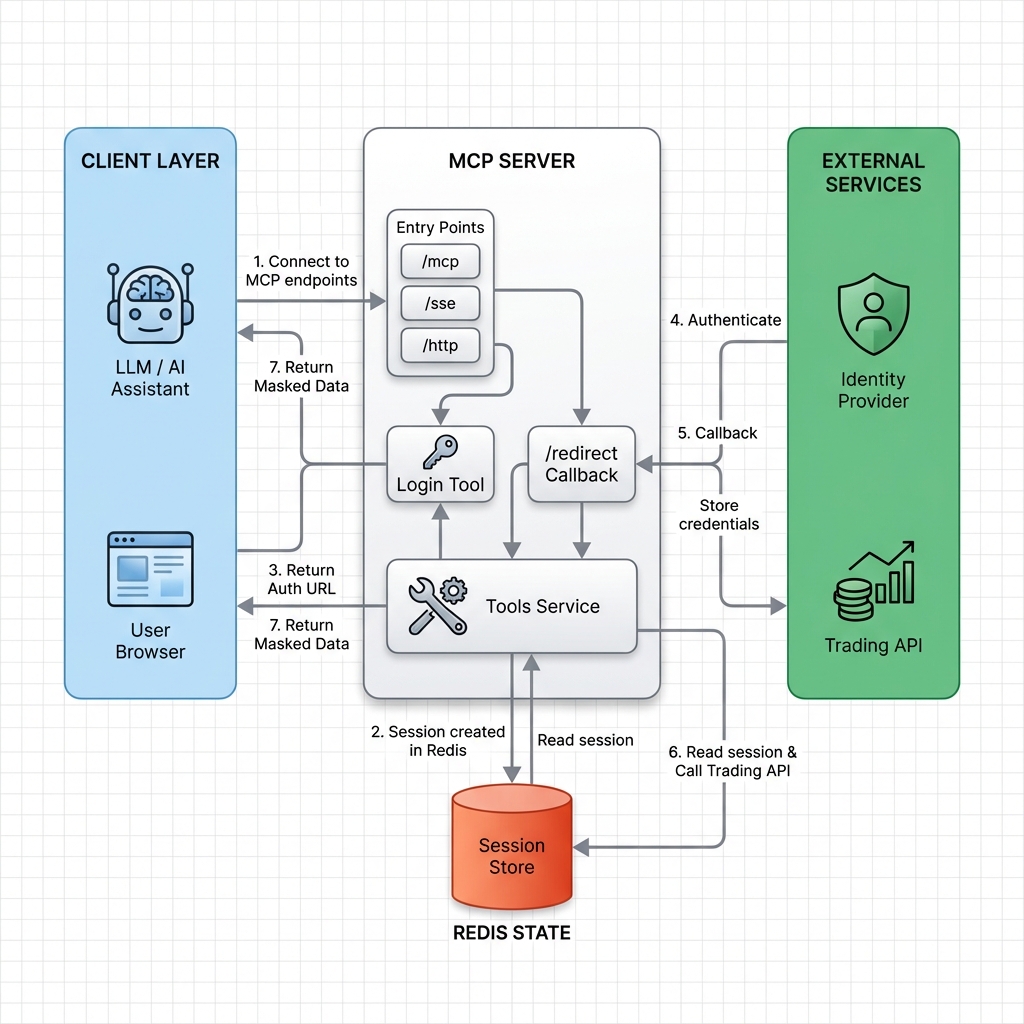
High-Level Pipeline Flow
The MCP server acts as a middleware pipeline that translates between AI clients and external services. Below is the end-to-end data flow:
flowchart LR
    subgraph CLIENTS["👤 Client Layer"]
        LLM["🤖 LLM / AI Agent"]
        Browser["🌐 User Browser"]
    end

    subgraph MCP_SERVER["⚙️ MCP Server Pipeline"]
        direction TB
        Transport["Transport Layer<br/>/mcp · /sse · /http"]
        Middleware["Custom Middleware<br/>Session Injection · SSE Streams"]
        Core["FastMCP Core<br/>Protocol Handler · Tool Registry"]
        Tools["Tools Engine<br/>Modular Tool Execution"]
    end

    subgraph STATE["💾 State Layer"]
        Redis[("Redis<br/>Sessions · Auth · Tokens")]
    end

    subgraph EXTERNAL["🌍 External Services"]
        IDP["Identity Provider"]
        API["Upstream APIs"]
    end

    LLM -->|"MCP Request"| Transport
    Transport --> Middleware
    Middleware -->|"Read / Write"| Redis
    Middleware --> Core
    Core --> Tools
    Tools -->|"API Call"| API
    API -->|"Response"| Tools
    Tools -->|"Masked Data"| LLM
    Browser -->|"OAuth Login"| IDP
    IDP -->|"Callback + Token"| Middleware
    Middleware -->|"Store Credentials"| Redis

    style CLIENTS fill:#0d1b2a,stroke:#00b4d8,color:#e0e0e0
    style MCP_SERVER fill:#1a1a2e,stroke:#7b2ff7,color:#e0e0e0
    style STATE fill:#0d1b2a,stroke:#00c853,color:#e0e0e0
    style EXTERNAL fill:#0d1b2a,stroke:#ff6d00,color:#e0e0e0
[!TIP] The server is fully stateless — all session data lives in Redis, making horizontal scaling trivial.
Detailed Component Architecture
This diagram zooms into the internal layering of the MCP server, showing how each module connects:
flowchart TB
    subgraph ENTRY["🚪 Entry Points"]
        MCP_EP["/mcp<br/>Standard MCP Protocol"]
        SSE_EP["/sse<br/>Server-Sent Events"]
        HTTP_EP["/http<br/>Direct HTTP"]
    end

    subgraph MIDDLEWARE_LAYER["🛡️ Custom Middleware"]
        direction TB
        SessionInject["Session Context Injector<br/>Injects mcp_session_id into headers"]
        StreamTransport["StreamableHTTPServerTransport<br/>HTTP ↔ MCP message bridge"]
        SSEHandler["SSE Handler<br/>anyio memory streams for<br/>non-blocking read/write channels"]
    end

    subgraph CORE_LAYER["⚙️ FastMCP Core"]
        direction TB
        ProtocolHandler["Protocol Handler<br/>MCP message parsing & routing"]
        ToolRegistry["Tool Registry<br/>Dynamic tool discovery & dispatch"]
        TaskGroups["anyio Task Groups<br/>Bidirectional stream management"]
    end

    subgraph AUTH_LAYER["🔐 Security Layer"]
        direction TB
        OAuth["OAuth 2.1 Provider<br/>Authorization & Token endpoints"]
        PKCE["PKCE Enforcer<br/>S256 code challenge verification"]
        JWT["JWT Manager<br/>HS256 signed Bearer tokens"]
        Encryption["AES-CBC Encryption<br/>Sensitive config protection"]
    end

    subgraph TOOLS_LAYER["🧰 Tools Engine"]
        direction TB
        ServiceTool["Service Tool<br/>Generic modular tool"]
        Helpers["Helpers<br/>Context validation & utilities"]
    end

    subgraph STATE_LAYER["💾 Redis State"]
        direction TB
        SessionStore[("Session Store<br/>JSON objects via RedisJSON<br/>1-hour TTL")]
        AuthCodes[("Auth Codes<br/>Short-lived, 10-min TTL")]
        TokenMeta[("Token Metadata<br/>JTI for revocation checks")]
    end

    MCP_EP & SSE_EP & HTTP_EP --> SessionInject
    SessionInject --> StreamTransport
    StreamTransport --> SSEHandler
    SSEHandler --> ProtocolHandler
    ProtocolHandler --> ToolRegistry
    ToolRegistry --> TaskGroups
    TaskGroups --> ServiceTool
    ServiceTool --> Helpers

    SessionInject -.->|"Read/Write"| SessionStore
    OAuth -.->|"Store"| AuthCodes
    JWT -.->|"Store JTI"| TokenMeta
    StreamTransport -.-> OAuth
    OAuth --> PKCE
    PKCE --> JWT

    style ENTRY fill:#112240,stroke:#64ffda,color:#ccd6f6
    style MIDDLEWARE_LAYER fill:#112240,stroke:#7b2ff7,color:#ccd6f6
    style CORE_LAYER fill:#112240,stroke:#00b4d8,color:#ccd6f6
    style AUTH_LAYER fill:#112240,stroke:#f44336,color:#ccd6f6
    style TOOLS_LAYER fill:#112240,stroke:#ff9800,color:#ccd6f6
    style STATE_LAYER fill:#112240,stroke:#00c853,color:#ccd6f6
Authentication & Session Sequence
The following sequence diagram illustrates the complete lifecycle — from initial connection to authenticated tool execution:
sequenceDiagram
    participant LLM as 🤖 LLM / AI Agent
    participant MCP as ⚙️ MCP Server
    participant Redis as 💾 Redis
    participant Browser as 🌐 User Browser
    participant IDP as 🔑 Identity Provider
    participant API as 🌍 Upstream API

    Note over LLM,API: Phase 1 — Session Establishment
    LLM->>MCP: Connect via /mcp, /sse, or /http
    MCP->>Redis: Create session (JSON, 1hr TTL)
    Redis-->>MCP: session_id
    MCP-->>LLM: Connection established

    Note over LLM,API: Phase 2 — Authentication
    LLM->>MCP: Call "login" tool
    MCP-->>LLM: Return Auth URL
    LLM-->>Browser: Display Auth URL to user
    Browser->>IDP: User authenticates
    IDP->>MCP: Redirect callback with token
    MCP->>Redis: Store credentials → session_id
    Redis-->>MCP: OK
    MCP-->>Browser: "Login successful" page

    Note over LLM,API: Phase 3 — Authenticated Tool Execution
    LLM->>MCP: Call tool (e.g., "service")
    MCP->>Redis: Validate session + load credentials
    Redis-->>MCP: Session data + credentials
    MCP->>API: Authenticated API request
    API-->>MCP: Response data
    MCP-->>LLM: Masked / formatted result
Key Components
| Component | Description |
|---|---|
| FastMCP Core | High-level MCP protocol implementation — tool registration, message routing, context management |
| Starlette (ASGI) | Underlying async web framework — handles HTTP routing, middleware stack, and request lifecycle |
| Custom Middleware | Session-aware request handler — injects mcp_session_id, manages SSE streams via anyio memory channels, bridges HTTP ↔ MCP |
| OAuth 2.1 + PKCE | Lightweight built-in authorization server — issues JWT Bearer tokens, enforces S256 PKCE for public clients |
| Redis State Store | Externalized session & auth storage — RedisJSON objects with TTL, auth codes, and token metadata |
| AES-CBC Encryption | Protects sensitive configuration values (e.g., Redis passwords) using the cryptography library |
| Tools Engine | Modular tool definitions — validates context via Helpers and SessionManager before executing business logic |
| Structured Logging | Uses structlog for JSON-formatted structured logs with configurable log levels |
Tech Stack
| Layer | Technology | Purpose |
|---|---|---|
| Runtime | Python 3.13 | Core language |
| MCP Protocol | FastMCP | Protocol implementation & tool registry |
| Web Framework | Starlette (ASGI) | HTTP/SSE routing & middleware |
| ASGI Server | Uvicorn | High-performance async server |
| State Store | Redis (RedisJSON) | Sessions, auth codes, token metadata |
| Authentication | Custom OAuth 2.1 | PKCE, JWT, Bearer tokens |
| Encryption | cryptography (AES-CBC) |
Config & credential protection |
| Logging | structlog |
Structured JSON logging |
| Containerization | Docker (Alpine) | Lightweight deployment |
| Async | anyio |
Task groups & memory streams |
📁 Project Structure
model-context-protocol/
├── src/
│   ├── main.py                 # Application entry point & tool registration
│   ├── config.py               # Environment loading & configuration constants
│   ├── auth/
│   │   ├── oauth.py            # OAuth 2.1 authorization server (PKCE)
│   │   └── token.py            # JWT token issuance & validation
│   ├── conn/
│   │   └── redis_config.py     # Redis client initialization
│   ├── encryptdecrypt/
│   │   └── encrypt.py          # AES-CBC encryption / decryption utilities
│   ├── exception/
│   │   └── handler.py          # Global exception handling
│   ├── log/
│   │   └── logger.py           # Structured logging configuration
│   ├── middleware/
│   │   └── middleware.py        # Custom middleware (session injection, SSE, transport)
│   ├── server/
│   │   └── server.py           # Starlette app factory & route definitions
│   ├── session/
│   │   ├── manager.py          # Session lifecycle management (Redis)
│   │   └── session.py          # Session model & validation
│   ├── tools/
│   │   └── service.py          # Modular tool definitions
│   └── utils/
│       └── helpers.py          # Context validation & utility functions
├── docs/
│   └── architecture_diagram.png
├── test/                       # Unit & integration tests
├── .env                        # Environment variables (not committed)
├── Dockerfile                  # Container image definition
├── pyproject.toml              # Pytest & coverage configuration
├── requirements.txt            # Python dependencies
└── LICENSE                     # MIT License
Getting Started
Prerequisites
| Requirement | Version |
|---|---|
| Python | ≥ 3.13 |
| Redis | ≥ 7.0 (with RedisJSON module) |
| Docker | ≥ 20.10 (optional, for containerized deployment) |
Local Setup
1. Clone the repository
git clone https://github.com/shubhamauti9/model-context-protocol.git
cd model-context-protocol
2. Create a virtual environment
python -m venv .venv
source .venv/bin/activate        # macOS / Linux
.venv\Scripts\activate           # Windows
3. Install dependencies
pip install -r requirements.txt
4. Configure environment variables
Create a .env file in the project root:
# ── App ──────────────────────────────────
MASK_MCP_HOST=0.0.0.0
MASK_MCP_PORT=6901
APP_VERSION=1.0.0

# ── Redis ────────────────────────────────
REDIS_HOST=localhost
REDIS_PORT=6379
REDIS_P=                         # Redis password (leave blank for local)
REDIS_DB=0

# ── Encryption ───────────────────────────
ENCRYPTION_KEY=your-32-byte-key
ENCRYPTION_IV=your-16-byte-iv

# ── Logging ──────────────────────────────
LOG_FILE=logs/mcp.log
5. Start Redis
# Using Docker
docker run -d --name redis -p 6379:6379 redis:7-alpine

# Or install natively
visit https://redis.io/docs/getting-started/
6. Run the server
python src/main.py
The server will start at http://0.0.0.0:6901. You can verify it's running:
curl http://localhost:6901/mcp
Docker Deployment
Build the image
docker build -t mcp:1.0.0 .
Run the container
docker run -d \
  --name mcp-server \
  -p 6901:6901 \
  --env-file .env \
  mcp:1.0.0
Docker Compose (recommended for production)
version: "3.9"
services:
  redis:
    image: redis:7-alpine
    ports:
      - "6379:6379"
  mcp:
    build: .
    ports:
      - "6901:6901"
    depends_on:
      - redis
    env_file:
      - .env
🔗 Client Integration
Claude Desktop
Add the following to your Claude Desktop configuration file:
| OS | Config Path |
|---|---|
| macOS | ~/.config/Claude/claude_desktop_config.json |
| Windows | %APPDATA%\Claude\claude_desktop_config.json |
{
  "mcpServers": {
    "mcp": {
      "command": "python",
      "args": ["/path/to/model-context-protocol/src/main.py"]
    }
  }
}
Direct HTTP
# Connect over HTTP
curl -X POST http://localhost:6901/http \
  -H "Content-Type: application/json" \
  -d '{"method": "tools/call", "params": {"name": "service"}}'
SSE (Server-Sent Events)
# Open an SSE stream
curl -N http://localhost:6901/sse?session_id=<your-session-id>
Available Tools
| Tool | Description |
|---|---|
service |
Generic, modular service tool — designed to be extended for your specific use case. Validates session context before execution. |
[!NOTE] To add custom tools, create a new module in
src/tools/, define your tool function, and register it insrc/main.pyusing the@mcp.tool()decorator. Seesrc/tools/service.pyfor a reference implementation.
⚙️ Configuration Reference
| Variable | Required | Default | Description |
|---|---|---|---|
MASK_MCP_HOST |
Yes | — | Server bind address |
MASK_MCP_PORT |
No | 6901 |
Server port |
APP_VERSION |
No | — | Application version string |
REDIS_HOST |
Yes | 127.0.0.1 |
Redis server hostname |
REDIS_PORT |
No | 6379 |
Redis server port |
REDIS_P |
No | "" |
Redis password |
REDIS_DB |
No | 0 |
Redis database index |
ENCRYPTION_KEY |
Yes | — | 32-byte AES encryption key |
ENCRYPTION_IV |
Yes | — | 16-byte AES initialization vector |
LOG_FILE |
No | — | Log file output path |
🔐 Session & Auth Deep Dive
Session Lifecycle
┌─────────────┐     ┌──────────────┐      ┌──────────────┐     ┌─────────────┐
│   CONNECT   │────▶│   ANONYMOUS  │────▶│ AUTHENTICATED│────▶│   EXPIRED   │
│             │     │  Session in  │      │ Credentials  │     │  TTL reached│
│  /mcp /sse  │     │  Redis (1hr) │      │ stored in    │     │  or manual  │
│  /http      │     │              │      │  Redis       │     │  logout     │
└─────────────┘     └──────────────┘      └──────────────┘     └─────────────┘
OAuth 2.1 + PKCE Flow (for /http & /sse)
- Authorization — Client sends
code_challenge+redirect_urito/authorize. Server creates a temporaryauth_codein Redis (10-min TTL). - Token Exchange — Client presents
auth_code+code_verifierto/token. Server validatesSHA256(verifier) == challenge, then issues a signed JWT containing thesession_id. - Authenticated Requests:
- HTTP:
Authorization: Bearer <jwt>→ Middleware decodes JWT, extractssession_id, validates against Redis. - SSE:
/sse?session_id=...→ Session validated, async message pipeline established.
- HTTP:
Transport Protocols
| Protocol | Endpoint | Use Case | Session |
|---|---|---|---|
| MCP | /mcp |
Standard MCP clients (Claude, etc.) | Auto-managed |
| SSE | /sse |
Real-time streaming responses | Query param |
| HTTP | /http |
REST-style direct calls | Bearer JWT |
🤝 Contributing
Contributions are welcome! Here's how to get started:
- Fork the repository
- Create a feature branch:
git checkout -b feature/my-tool - Commit your changes:
git commit -m "feat: add my-tool integration" - Push to the branch:
git push origin feature/my-tool - Open a Pull Request
[!IMPORTANT] Please ensure your code passes the existing test suite before submitting a PR:
pytest --cov=src --cov-report=term-missing
📄 License
This project is licensed under the MIT License — see the LICENSE file for details.
Установка Model Context Protocol Template
У этого сервера нет опубликованного пакета — он собирается из исходников. Открой репозиторий и следуй инструкции в README.
▸ github.com/shubhamauti9/model-context-protocolFAQ
Model Context Protocol Template MCP бесплатный?
Да, Model Context Protocol Template MCP бесплатный — установка в пару кликов через Unyly без оплаты.
Нужен ли API-ключ для Model Context Protocol Template?
Нет, Model Context Protocol Template работает без API-ключей и переменных окружения.
Model Context Protocol Template — hosted или self-hosted?
Доступен hosted-вариант: Unyly запускает сервер в облаке, локальная установка не обязательна.
Как установить Model Context Protocol Template в Claude Desktop, Claude Code или Cursor?
Открой Model Context Protocol Template на unyly.org, выбери вкладку своего клиента (Claude Desktop, Claude Code, Cursor) и нажми Install — конфиг сгенерируется автоматически, без правки JSON.
Похожие MCP
wenb1n-dev/SmartDB_MCP
A universal database MCP server supporting simultaneous connections to multiple databases. It provides tools for database operations, health analysis, SQL optim
 автор: wenb1n-dev
Postgres Server
This server enables interaction with PostgreSQL databases through the Model Context Protocol, optimized for the AWS Bedrock AgentCore Runtime. It provides tools
 автор: madhurprash
Postgres
Query your database in natural language
 автор: Anthropic
PostgreSQL
Read-only database access with schema inspection.
автор: modelcontextprotocolCompare Model Context Protocol Template with
Не уверен что выбрать?
Найди свой стек за 60 секунд
Автор?
Embed-бейдж для README
Похожее
Все в категории data