

Описание
moleditpy-mcp_server
README
Expose MoleditPy to AI assistants via the Model Context Protocol (MCP).
Once running, any MCP-compatible client — Claude Desktop, Claude Code, Cursor, Windsurf, Zed, VS Code (Copilot), OpenAI Codex CLI, Google Antigravity, or any HTTP client — can query and control the molecular editor in real time.
Tests

Repo: https://github.com/HiroYokoyama/moleditpy-mcp_server/
What you can do with this
Molecule editing and analysis
Ask an AI to load, modify, and analyze molecules entirely through conversation:
- Load by name — "Load caffeine" → PubChem lookup → molecule appears in the editor
- Query the current molecule — get SMILES, formula, MW, atom/bond tables, 3D coordinates
- Edit atoms and bonds — run arbitrary RDKit code via
run_pythonwith full access to the molecule - 3D visualization — trigger 2D→3D conversion, switch to 3D viewer, highlight specific atoms or bonds in color, fit/reset the camera
- Undo-safe editing — every change can push an undo checkpoint; the user can always revert
DFT / QM input file generation
Use the AI as a smart input file generator:
- Generate ORCA, Gaussian, NWChem, … inputs from the current geometry
- Write files directly to disk — the AI calls
write_file_with_xyz_block(coordinates come straight from the live molecule) orwrite_text_fileinto a sandboxed directory you configure - Read files back — verify what was written, or load a computed result (
.xyz,.log, …) - Organize jobs —
list_directory, create subdirectories, delete obsolete files
Example prompt: "Generate an ORCA input for B3LYP/def2-TZVP geometry optimization of the current molecule and save it to opt.inp."
Plugin authoring
The AI can read the MoleditPy source and write new plugins for you:
get_plugin_dev_manual— fetch the full Plugin Development Manual V4 from the weblist_app_source_tree— get a file map of the installed moleditpy packageget_app_source— read any source file (e.g.plugins/plugin_interface.py) to understand the exact APIwrite_text_file(pointed at the plugin directory) — write the plugin codereload_plugins— activate the new plugin without restarting MoleditPy
Example prompt: "Write a MoleditPy plugin that adds a menu item to export the current molecule as a TURBOMOLE coord file."
Scripting and automation
run_python lets the AI execute any Python on MoleditPy's Qt main thread with full PluginContext access. Use it for one-off operations too complex for the built-in tools — RDKit workflows, batch atom edits, custom property calculations — and get stdout, stderr, and a return value back.
Installation
Copy (or symlink) the
mcp_server/folder into your MoleditPy plugin directory:Platform Path Windows C:\Users\<You>\.moleditpy\plugins\mcp_server\Linux / macOS ~/.moleditpy/plugins/mcp_server/Restart MoleditPy (or choose Plugins → Reload All Plugins).
Choose Plugins → MCP Server → Status & Settings… to start the server.
Usage
Starting the server
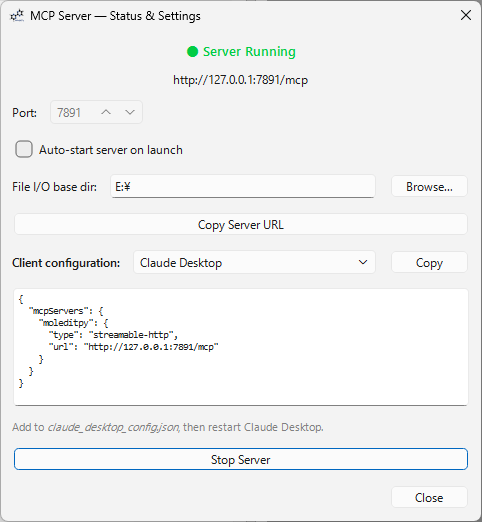
Open Plugins → MCP Server → Status & Settings…, set the port (default 7891), and click Start Server.
The dialog shows the live server URL and a ready-to-paste configuration snippet.
Protocol version
The MCP protocol selector in the same dialog chooses which revision of the protocol the server speaks:
| Setting | Meaning |
|---|---|
| Auto (default) | Serves both eras on one port — an initialize handshake gets the classic session protocol, per-request metadata gets stateless 2026-07-28 |
| Legacy only | 2024-11-05 … 2025-11-25 handshake protocol; modern requests are refused with an UnsupportedProtocolVersion error |
| 2026-07-28 only | Stateless protocol exclusively: no session id, mirrored MCP-Protocol-Version / Mcp-Method / Mcp-Name headers are required and validated, initialize is refused |
Restart the server after changing it. In the 2026-07-28 era the server implements server/discover (supported versions, capabilities, and natural-language usage instructions), returns ttlMs / cacheScope cache hints on tools/list, and reports header or version problems as 400 with JSON-RPC error codes -32020 / -32022.
Connecting MCP clients
The server implements MCP Streamable HTTP (POST /mcp) for both protocol eras: 2026-07-28 (stateless) and 2024-11-05 … 2025-11-25 (handshake).
Claude Desktop
Add the following to claude_desktop_config.json (replace the port if you changed it):
{
  "mcpServers": {
    "moleditpy": {
      "type": "streamable-http",
      "url": "http://127.0.0.1:7891/mcp"
    }
  }
}
Restart Claude Desktop. MoleditPy now appears as a connected tool server.
Claude Code (CLI)
Add the server to your Claude Code MCP configuration:
{
  "mcpServers": {
    "moleditpy": {
      "type": "http",
      "url": "http://127.0.0.1:7891/mcp"
    }
  }
}
Or set it per-project in .claude/settings.json inside your project folder.
Cursor
Add to ~/.cursor/mcp.json (global) or .cursor/mcp.json (project):
{
  "mcpServers": {
    "moleditpy": {
      "url": "http://127.0.0.1:7891/mcp"
    }
  }
}
Windsurf
Add to ~/.codeium/windsurf/mcp_config.json (Windows: %USERPROFILE%\.codeium\windsurf\mcp_config.json):
{
  "mcpServers": {
    "moleditpy": {
      "serverUrl": "http://127.0.0.1:7891/mcp"
    }
  }
}
Zed
Add to ~/.config/zed/settings.json (macOS: Zed → Settings…):
{
  "context_servers": {
    "moleditpy": {
      "url": "http://127.0.0.1:7891/mcp"
    }
  }
}
VS Code (GitHub Copilot)
Add to .vscode/mcp.json in your workspace (VS Code 1.101+):
{
  "servers": {
    "moleditpy": {
      "type": "http",
      "url": "http://127.0.0.1:7891/mcp"
    }
  }
}
OpenAI Codex CLI
Add to ~/.codex/config.toml (global) or .codex/config.toml (project):
[mcp_servers.moleditpy]
url = "http://127.0.0.1:7891/mcp"
Google Antigravity
Add to ~/.gemini/antigravity/mcp_config.json (Windows: %USERPROFILE%\.gemini\antigravity\mcp_config.json):
{
  "mcpServers": {
    "moleditpy": {
      "serverUrl": "http://127.0.0.1:7891/mcp"
    }
  }
}
curl / raw HTTP
You can call the server from any HTTP client. Example — list available tools:
curl -s -X POST http://127.0.0.1:7891/mcp \
  -H "Content-Type: application/json" \
  -d '{"jsonrpc":"2.0","id":1,"method":"tools/list","params":{}}' | python -m json.tool
Call a tool:
curl -s -X POST http://127.0.0.1:7891/mcp \
  -H "Content-Type: application/json" \
  -d '{"jsonrpc":"2.0","id":2,"method":"tools/call","params":{"name":"get_current_molecule","arguments":{}}}' | python -m json.tool
Health check:
curl http://127.0.0.1:7891/health
GUI tester
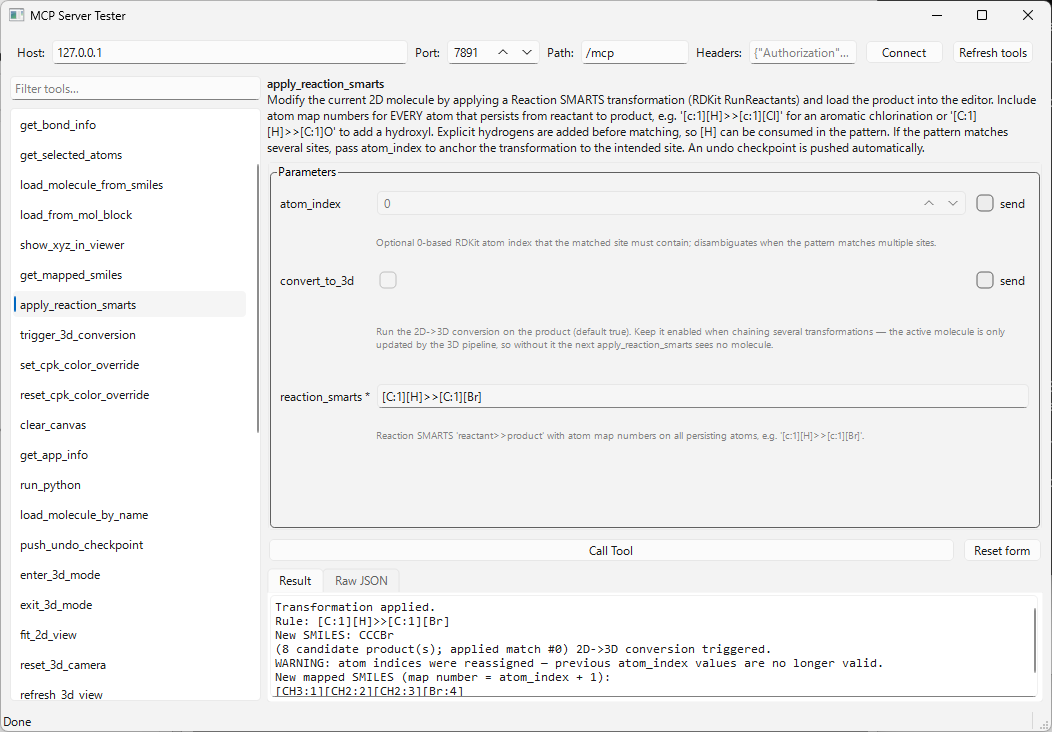
A standalone PyQt6 test client, mcp-gui-tester, is included as a separate installable package for interactive debugging. It connects to any MCP server speaking the Streamable HTTP transport, lists the available tools, generates a parameter input form from each tool's inputSchema (with required/optional handling, JSON editors for array/object parameters, and enum dropdowns), and shows both the formatted result and the raw JSON-RPC response:
pip install mcp-gui-tester        # or: pip install -e mcp_gui_tester/ from this repo
mcp-gui-tester                    # defaults to http://127.0.0.1:7891/mcp
mcp-gui-tester --url http://localhost:9000/mcp
Host, port, endpoint path, and the protocol era (auto-detect / 2026-07-28 / legacy handshake) are editable in the GUI, so it can be pointed at other MCP HTTP servers too. It also shows each tool's behaviour annotations (read-only / destructive / network), asks for confirmation before calling a destructive tool, and has a Server tab with the negotiated version, capabilities, and the server's usage instructions. See mcp_gui_tester/README.md for details.
Auto-start
To start the server automatically every time MoleditPy launches, open Plugins → MCP Server → Status & Settings and check Auto-start server on launch.
AI Skill (SKILL.md) — optional
This repo ships a SKILL.md that teaches AI agents how to use these tools well: always taking coordinates from the live molecule (never retyping them), checkpointing the undo stack after edits, configuring the file sandbox before writing, ready-made recipes for QM input generation and plugin authoring, and discovering/suggesting installable plugins.
To install it for Claude Code, copy the file into a skill directory:
# Personal (all projects)
mkdir -p ~/.claude/skills/moleditpy-mcp
cp SKILL.md ~/.claude/skills/moleditpy-mcp/SKILL.md

# Or per-project
mkdir -p .claude/skills/moleditpy-mcp
cp SKILL.md .claude/skills/moleditpy-mcp/SKILL.md
Claude loads it automatically whenever a task involves the MoleditPy MCP tools. Other agent frameworks that support Anthropic-style skills (a SKILL.md with YAML frontmatter) can consume the same file.
Available MCP Tools
Molecule tools
| Tool | Description |
|---|---|
get_current_molecule |
SMILES, formula, MW, atom/bond counts, 3D availability |
get_molecule_xyz |
3D XYZ coordinate block (Element X Y Z per line) |
get_atom_properties |
Per-atom: symbol, Z, charge, hybridization, Hs, radical electrons |
get_bond_info |
Full bond table: endpoints and bond type (SINGLE/DOUBLE/TRIPLE/AROMATIC) |
get_selected_atoms |
Indices and symbols of user-selected atoms |
load_molecule_from_smiles |
Draw a molecule from a SMILES string |
load_from_mol_block |
Load a molecule from a MOL/SDF block |
load_molecule_by_name |
Look up by common/IUPAC name on PubChem and load (e.g. "aspirin") |
show_xyz_in_viewer |
Display an XYZ block in the 3D viewer |
get_mapped_smiles |
SMILES with atom indices embedded as map numbers + legend (find atom_index targets) |
apply_reaction_smarts |
Modify the 2D molecule with a Reaction SMARTS transformation (optional anchor atom) |
trigger_3d_conversion |
Run MoleditPy's built-in 2D→3D optimizer (ETKDG/MMFF) |
set_cpk_color_override |
Override atom CPK colors in the 3D viewer (hex per atom index); persists across redraws (formerly highlight_atoms, still accepted) |
reset_cpk_color_override |
Clear atom/bond color overrides (scope: atoms / bonds / all) and restore default colors |
set_bond_color_override |
Override bond colors in the 3D viewer by bond index or "atom1-atom2" pairs; persists across redraws (formerly highlight_bonds, still accepted) |
push_undo_checkpoint |
Push the current state onto MoleditPy's undo stack |
enter_3d_mode |
Switch the UI to 3D viewer mode |
exit_3d_mode |
Switch the UI back to 2D editing mode |
fit_2d_view |
Fit all visible items in the 2D editor canvas into the viewport |
reset_3d_camera |
Reset and re-center the 3D camera |
refresh_3d_view |
Force a redraw of the 3D scene |
check_chemistry |
Trigger MoleditPy's valence-violation validation pass |
refresh_ui |
Sync info panel, undo/redo state, and title bar |
clear_canvas |
Clear the 2D editor (undo-safe) |
get_app_info |
MoleditPy version and MCP plugin version |
run_python |
Execute arbitrary Python on the Qt main thread with ctx access — see below |
Plugin authoring tools
| Tool | Description |
|---|---|
get_plugin_dev_manual |
Fetch the Plugin Development Manual V4 from the web |
list_app_source_tree |
Recursive file tree of the installed moleditpy package (with sizes) |
get_app_source |
Read a source file (optionally a start_line–end_line slice) or list a directory within the package |
grep_files |
Regex search across the app source, the plugin directory, or the file sandbox — returns path:line: text, with glob, ignore_case, fixed_string, and context options |
find_files |
List files matching a name glob in any of those trees |
get_plugin_dir |
Return the absolute path to the plugin directory |
reload_plugins |
Re-scan and reload all plugins (activates freshly written plugins) |
list_available_plugins |
Fetch the official plugin registry and list installable plugins (optional search filter) |
open_plugin_installer |
Open the in-app Plugin Installer window to install a suggested plugin; if the installer plugin is absent, directs the user to the Plugin Explorer for a manual download |
File I/O tools (sandboxed)
| Tool | Description |
|---|---|
write_file_with_xyz_block |
Preferred for QM input generation — write a file composed as header + live XYZ coordinate block + footer, with element_style, atom_order, precision, and standard-XYZ-header options |
write_text_file |
Write text to a file; auto-creates parent dirs; overwrite=false by default |
read_text_file |
Read a file's UTF-8 text content (≤ 4 MB); optional start_line / end_line slice |
list_directory |
List files and subdirectories with sizes |
delete_file |
Delete a file; requires explicit confirm=true |
get_file_io_config |
Show current base directory and allowed extension list |
set_file_io_config |
Set the sandbox directory and/or update the extension allowlist |
run_python — execute arbitrary Python
run_python lets an AI run any Python code on the Qt main thread with full access to MoleditPy's PluginContext as ctx. Use it for complex RDKit operations, custom manipulations, or reading/pushing molecules back into the editor:
# Example: add an isotope label to atom 0 and reload
from rdkit import Chem
mol = ctx.current_molecule
mol.GetAtomWithIdx(0).SetIsotope(13)
ctx.current_molecule = mol
ctx.push_undo_checkpoint()
ctx.refresh_ui()
result = mol.GetNumAtoms()
stdout, stderr, and the value of result are returned to the AI. There are no extra sandbox restrictions beyond running inside MoleditPy's process — treat it as a trusted power tool.
Security model
All file operations are restricted to a base directory you configure. Set it in Plugins → MCP Server → Status & Settings (File I/O base dir field), or let the LLM set it via set_file_io_config:
Set the file I/O base directory to /home/you/dft_jobs
Security guarantees:
- Path traversal blocked —
../../etc/passwdand absolute paths are rejected; every path is resolved and must stay within the base directory. - Extension allowlist — only extensions on the allowed list can be written/read/deleted. Defaults cover common DFT/QM formats (
.inp,.xyz,.gjf,.mol,.pdb,.txt,.json, …). Useset_file_io_configto customise. - Overwrite protection —
write_text_filerefuses to replace existing files unlessoverwrite=trueis passed explicitly. - Deletion requires confirmation —
delete_filerequiresconfirm=truein the same call. - Size limit — reads and writes are capped at 4 MB.
Typical DFT workflow example
"Generate an ORCA input file for the current molecule using B3LYP/def2-TZVP and save it to
ethanol_opt.inp."
The LLM will:
- Call
get_current_molecule(andtrigger_3d_conversionif there is no 3D geometry yet). - Call
write_file_with_xyz_blockwithpath="ethanol_opt.inp",header=["! B3LYP def2-TZVP Opt", "* xyz 0 1"], andfooter=["*"]— the coordinate block is inserted directly from the live molecule, so nothing is retyped. - Optionally call
read_text_fileto confirm what was written.
Typical plugin authoring workflow
"Write a MoleditPy plugin that adds a menu item to copy the current SMILES to the clipboard."
The LLM will:
- Call
get_plugin_dev_manualto read the full API. - Call
list_app_source_treeto map the source, thenget_app_source "plugins/plugin_interface.py"for the exact contract. - Call
get_plugin_dirto find the plugin directory. - Call
set_file_io_configto point the sandbox at the plugin directory. - Call
write_text_filewithpath="smiles_copy/__init__.py"and the generated plugin code. - Call
reload_pluginsto activate it — the new menu item appears immediately.
Architecture
mcp_server/
├── __init__.py   — Plugin entry point (initialize, MCPServerPlugin)
├── bridge.py     — Thread-safe Qt signal bridge (server thread → Qt main thread)
├── server.py     — HTTP server implementing MCP Streamable HTTP transport
└── ui.py         — Status & Settings dialog
Thread safety — All PluginContext calls must occur on the Qt main thread. MCPBridge achieves this by emitting a QueuedConnection signal from the server thread; the main thread executes the operation and signals completion via a threading.Event.
No extra dependencies — Uses only Python's built-in http.server and threading.
Development
# Install test dependencies
pip install pytest pytest-cov

# Run tests
pytest tests/ -v

# Run with coverage
pytest tests/ --cov=mcp_server --cov-report=term-missing
Tests run fully headlessly — no GUI, no RDKit, no MoleditPy installation required.
Compatibility
| Requirement | Version |
|---|---|
| MoleditPy | ≥ 4.0.0, < 5.0.0 |
| Python | 3.11+ |
| MCP protocol | 2026-07-28 and 2024-11-05 … 2025-11-25 (Streamable HTTP, selectable) |
No extra pip dependencies — uses Python's built-in http.server and threading.
Установка Moleditpy
У этого сервера нет опубликованного пакета — он собирается из исходников. Открой репозиторий и следуй инструкции в README.
▸ github.com/HiroYokoyama/moleditpy-mcp_serverFAQ
Moleditpy MCP бесплатный?
Да, Moleditpy MCP бесплатный — установка в пару кликов через Unyly без оплаты.
Нужен ли API-ключ для Moleditpy?
Нет, Moleditpy работает без API-ключей и переменных окружения.
Moleditpy — hosted или self-hosted?
Self-hosted: сервер запускается локально на твоей машине командой из раздела установки.
Как установить Moleditpy в Claude Desktop, Claude Code или Cursor?
Открой Moleditpy на unyly.org, выбери вкладку своего клиента (Claude Desktop, Claude Code, Cursor) и нажми Install — конфиг сгенерируется автоматически, без правки JSON.
Похожие MCP
GitHub
PRs, issues, code search, CI status
 автор: GitHub
Filesystem
Secure file operations with configurable access controls.
Memory
Knowledge graph-based persistent memory system.
Template MCP Server
A CLI tool to create a new Model Context Protocol server project with TypeScript support, dual transport options, and an extensible structure
 автор: mcpdotdirect
Amap Maps Mcp Server
MCP server for using the AMap Maps API
 автор: duxiaohui
Supabase
Database, auth and storage
 автор: Supabase
Everything
Reference / test server with prompts, resources, and tools.
Git
Tools to read, search, and manipulate Git repositories.
Sequential Thinking
Dynamic and reflective problem-solving through thought sequences.
Time
Time and timezone conversion capabilities.
Compare Moleditpy with
Не уверен что выбрать?
Найди свой стек за 60 секунд
Автор?
Embed-бейдж для README
Похожее
Все в категории development