loading…
/ru
Весь каталог
MonkeyPlanner
БесплатноНе проверенLocal-first kanban and approval-gate issue tracker with a native MCP server (13 tools). Humans approve; agents claim, QA, and complete issues. Single Go binary

Описание
Local-first kanban and approval-gate issue tracker with a native MCP server (13 tools). Humans approve; agents claim, QA, and complete issues. Single Go binary + SQLite.
README




MonkeyPlanner
Local-first task memory for your AI coding agents. Approve with a click; your agents do the rest. No cloud. No telemetry. Forever free, forever MIT.
Works with Claude Code · Claude Desktop · Cursor · Continue · any MCP-compatible client.
Quickstart
# Docker (recommended)
docker run -p 8080:8080 -v $(pwd)/data:/data ghcr.io/kjm99d/monkeyplanner:latest

# then wire up your agent
monkey-planner mcp install --for claude-code     # or --for cursor / --for claude-desktop
Open http://localhost:8080 — the built-in Welcome board walks you through the rest.
Features
Issue & Board Management
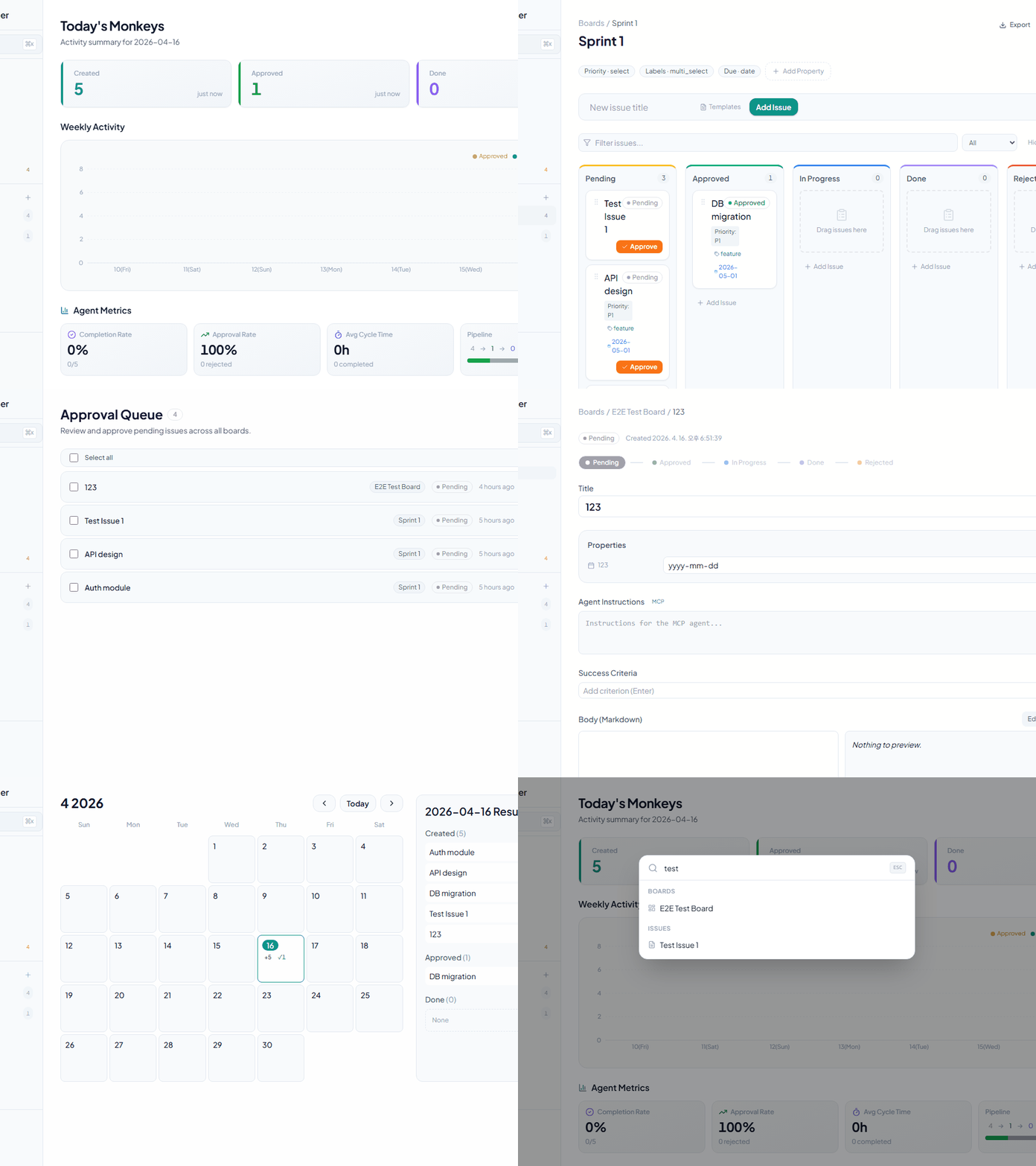
- Kanban Board — Drag and drop, horizontal scroll, filtering, sorting, and table view toggle
- Issue Creation — Title, markdown body, and custom properties
- Custom Properties — Six supported types:
- Text
- Number
- Select
- Multi-select
- Date
- Checkbox
Approval Gate
- Pending → Approved via a dedicated approval endpoint (cannot be done via generic PATCH)
- Approval Queue — Bulk-approve all Pending issues across boards
- Approved → InProgress → Done — Flexible status transitions
- Rejected status — Record a rejection reason
Agent Features
- Agent Instructions field — Provide detailed instructions for MCP agents to follow
- Success Criteria — Manage completion conditions as a checklist
- Comments — Log progress and communicate per issue
- Dependencies — Express blocking relationships between issues
Data Visualization
- Calendar — Monthly grid + daily activity (created, approved, completed counts)
- Dashboard — Stats cards + weekly activity chart
- Sidebar — Board list, issue counts, and recent items
User Experience
- Global Search — Quick search with Cmd+K
- Keyboard Shortcuts
h— Go to dashboarda— Go to approval queue?— Show shortcut helpCmd+S— SaveEscape— Close modal/dialog
- Collapsible Sidebar — Maximize screen space
- Dark Mode — Theme toggle
- Internationalization — Korean, English, Japanese, and Chinese
Automation & Integrations
- Webhooks — Discord, Slack, and Telegram support
- Events:
issue.created,issue.approved,issue.status_changed,issue.updated,issue.deleted,comment.created
- Events:
- Real-time UI sync (SSE) — Changes via MCP/CLI automatically reflect in open browser tabs, no refresh needed
- JSON Export — Export all issue data
- Right-click Context Menu — Quick actions
- Issue Templates — Per-board localStorage persistence
MCP Server (AI Agent Integration)
Thirteen tools for AI agent automation:
list_boards— List all boardslist_issues— Query issues (filter by boardId, status)get_issue— Issue detail including instructions, criteria, and commentscreate_issue— Create a new issueapprove_issue— Approve: Pending → Approvedclaim_issue— Claim: Approved → InProgresssubmit_qa— Submit for QA: InProgress → QAcomplete_issue— Complete: QA → Done (optional comment)reject_issue— Reject: QA → InProgress with required reasonadd_comment— Add a comment to an issueupdate_criteria— Check or uncheck a success criterionsearch_issues— Search issues by titleget_version— Get the MCP server version (for diagnostics)
Tech Stack
Backend
- Language: Go 1.26
- Router: chi/v5
- Database: SQLite / PostgreSQL (configurable)
- Migrations: goose/v3
- Embedded files: embed.FS (single-binary deployment)
Frontend
- Framework: React 18
- Language: TypeScript
- Bundler: Vite 6
- CSS: Tailwind CSS
- State management: React Query (TanStack)
- Drag and drop: @dnd-kit/core, @dnd-kit/sortable
- Icons: lucide-react
- Charts: recharts
- i18n: react-i18next
- Markdown: react-markdown + rehype-sanitize
MCP
- Protocol: JSON-RPC 2.0 over stdio
- Targets: Claude Code, Claude Desktop
Getting Started
Requirements
- Go 1.26 or later
- Node.js 18 or later
- npm or yarn
Installation & Running
1. Clone and initialize
git clone https://github.com/kjm99d/MonkeyPlanner.git
cd monkey-planner
make init
2. Production build (single binary)
make build
./bin/monkey-planner
The server runs at http://localhost:8080 with the frontend embedded.
3. Development mode (separate processes)
Terminal 1 — backend:
make run-backend
Terminal 2 — frontend (Vite dev server, :5173):
make run-frontend
The frontend automatically proxies /api requests to :8080.
Environment Variables
# Server address (default: :8080)
export MP_ADDR=":8080"

# Database connection string
# SQLite (default: sqlite://./data/monkey.db)
export MP_DSN="sqlite://./data/monkey.db"

# PostgreSQL example
export MP_DSN="postgres://user:password@localhost:5432/monkey_planner"
MCP Server Setup
Recommended: auto-configure via CLI
# Claude Code (writes .mcp.json in the current directory)
monkey-planner mcp install --for claude-code

# Claude Desktop (writes the OS-native config file)
monkey-planner mcp install --for claude-desktop

# Cursor (writes .cursor/mcp.json)
monkey-planner mcp install --for cursor
Flags: --dry-run to preview, --scope user for a global entry (~/.mcp.json), --force to overwrite, --base-url <url> to point at a non-default server.
Restart the client afterwards so it re-reads the config.
Manual configuration
Works identically for Claude Code (.mcp.json), Claude Desktop (OS-native config), and Cursor (.cursor/mcp.json):
{
  "mcpServers": {
    "monkey-planner": {
      "command": "/path/to/monkey-planner",
      "args": ["mcp"],
      "env": {
        "MP_BASE_URL": "http://localhost:8080"
      }
    }
  }
}
The binary must be able to reach the HTTP server (set with MP_BASE_URL). Leave it at the default when running both on the same machine.
MCP Tool Usage Examples
AI: List all boards
→ list_boards()

AI: Find issues related to "authentication"
→ search_issues(query="authentication")

AI: Approve the first pending issue, claim it, work on it, and submit for QA
→ approve_issue() → claim_issue() → submit_qa()
Workflow — Real Usage Scenario
Below is a real workflow from fixing a language switcher bug, showing how a human and AI agent collaborate through MonkeyPlanner.
Status Flow
Pending → Approved → InProgress → QA → Done
                         ↑              │ (reject with reason)
                         └──────────────┘
Step-by-Step
1. Create Issue — Human finds a bug, asks AI to register it
Human: "The language selector dropdown doesn't appear when clicking the button. Create an issue."
AI:    create_issue(boardId, title, body, instructions)  →  status: Pending
2. Approve — Human reviews and approves
Human: (clicks Approve on the board or tells AI)
AI:    approve_issue(issueId)  →  status: Approved
3. Start Work — AI claims the issue and begins coding
AI:    claim_issue(issueId)  →  status: InProgress
       - Reads code, identifies root cause
       - Implements fix, runs tests
       - Commits changes
4. Submit for QA — AI finishes and submits for review
AI:    submit_qa(issueId, comment: "commit abc1234 — fixed click handler")
       →  status: QA
       add_comment(issueId, "Commit info: ...")
5. Review — Human tests the fix
Human: Tests in browser, finds the dropdown is clipped by sidebar
       →  reject_issue(issueId, reason: "Dropdown is hidden behind sidebar")
       →  status: InProgress  (back to step 3)

Human: Tests again after fix, everything works
       →  complete_issue(issueId)  →  status: Done
6. Feedback Loop — Communication via comments throughout
Human: add_comment("Dropdown is clipped on the left side, fix it")
AI:    get_issue() → reads comment → fixes → commit → submit_qa()
Human: Tests → complete_issue()  →  Done ✓
Key Takeaways
- Human controls the gates: Approve, QA pass/reject, Complete
- AI does the work: Code analysis, implementation, testing, commits
- Comments are the communication channel: Both sides use
add_commentto exchange feedback - QA loop prevents premature completion: Issues must pass human review before Done
API Reference
OpenAPI 3.0 spec: backend/docs/swagger.yaml
Key Endpoints
Boards
GET    /api/boards                  # List boards
POST   /api/boards                  # Create board
PATCH  /api/boards/{id}             # Update board
DELETE /api/boards/{id}             # Delete board
Issues
GET    /api/issues                  # List issues (filter: boardId, status, parentId)
POST   /api/issues                  # Create issue
GET    /api/issues/{id}             # Issue detail + child issues
PATCH  /api/issues/{id}             # Update issue (status, properties, title, etc.)
DELETE /api/issues/{id}             # Delete issue
POST   /api/issues/{id}/approve     # Approve issue (Pending → Approved)
Comments
GET    /api/issues/{issueId}/comments    # List comments
POST   /api/issues/{issueId}/comments    # Add comment
DELETE /api/comments/{commentId}         # Delete comment
Properties (Custom Attributes)
GET    /api/boards/{boardId}/properties      # List property definitions
POST   /api/boards/{boardId}/properties      # Create property
PATCH  /api/boards/{boardId}/properties/{propId}  # Update property
DELETE /api/boards/{boardId}/properties/{propId}  # Delete property
Webhooks
GET    /api/boards/{boardId}/webhooks           # List webhooks
POST   /api/boards/{boardId}/webhooks           # Create webhook
PATCH  /api/boards/{boardId}/webhooks/{whId}    # Update webhook
DELETE /api/boards/{boardId}/webhooks/{whId}    # Delete webhook
Calendar
GET /api/calendar           # Monthly stats (year, month required)
GET /api/calendar/day       # Daily issue list (date required)
For full schema details, see backend/docs/swagger.yaml.
Project Structure
monkey-planner/
├── backend/
│   ├── cmd/monkey-planner/
│   │   ├── main.go              # Entry point (HTTP server)
│   │   └── mcp.go               # MCP server (JSON-RPC stdio)
│   ├── internal/
│   │   ├── domain/              # Domain models (Issue, Board, etc.)
│   │   ├── service/             # Business logic
│   │   ├── storage/             # Database layer (SQLite/PostgreSQL)
│   │   ├── http/                # HTTP handlers & router
│   │   └── migrations/          # goose migration files
│   ├── web/                     # Embedded frontend (embed.FS)
│   ├── docs/
│   │   └── swagger.yaml         # OpenAPI 3.0 spec
│   ├── go.mod
│   └── go.sum
│
├── frontend/
│   ├── src/
│   │   ├── components/          # Reusable components
│   │   ├── features/            # Page & feature components
│   │   │   ├── home/           # Dashboard
│   │   │   ├── board/          # Board & Kanban
│   │   │   ├── issue/          # Issue detail
│   │   │   ├── calendar/       # Calendar
│   │   │   └── approval/       # Approval queue
│   │   ├── api/                 # API hooks & client
│   │   ├── design/              # Tailwind tokens
│   │   ├── i18n/                # Translations (en.json, ko.json, ja.json, zh.json)
│   │   ├── App.tsx              # Router
│   │   ├── index.css            # Global styles
│   │   └── main.tsx
│   ├── package.json
│   ├── vite.config.ts
│   ├── tsconfig.json
│   └── tailwind.config.js
│
├── .mcp.json                    # Claude Code MCP config
├── Makefile                     # Build & dev commands
├── .githooks/                   # Git hooks
└── data/                        # SQLite database (default)
Testing
Backend tests
make test-backend
Frontend tests
make test-frontend
Accessibility tests
make test-a11y
All tests
make test
Common Commands
# Initial setup after cloning
make init

# Production build
make build

# Run production server
./bin/monkey-planner

# Development mode
make run-backend        # Terminal 1
make run-frontend       # Terminal 2

# Clean build artifacts
make clean
Status Transition Rules
Pending
  ↓ (approve endpoint)
Approved
  ↓ (PATCH status)
InProgress
  ↓ (PATCH status)
Done

Pending → Approved: POST /api/issues/{id}/approve (dedicated endpoint only)
Approved ↔ InProgress ↔ Done: Free transitions via PATCH
Pending: Cannot be re-entered from other statuses
Rejected: Separate rejection state with reason tracking
License
MIT
Contributing
Issues and pull requests are welcome.
Contact
For questions or feedback about the project, please open a GitHub Issue.
Как установить
Выполни в терминале:
claude mcp add monkeyplanner -- npx 
