
Mtg Export
БесплатноНе проверенEnables generating Magic: The Gathering proxy PDF sheets from Archidekt decks or text card lists, with configurable image size and caching.

Описание
Enables generating Magic: The Gathering proxy PDF sheets from Archidekt decks or text card lists, with configurable image size and caching.
README
A CLI that turns a Magic: The Gathering deck into a printable PDF proxy sheet — a 3×3 grid of card images at true card size (2.5″×3.5″) on US-Letter pages, with faint cut guides. Point it at an Archidekt deck, a text card list, or your clipboard.
Card images come from Scryfall, respecting their usage policy (descriptive User-Agent, request throttling, and on-disk image caching so files are never re-downloaded).
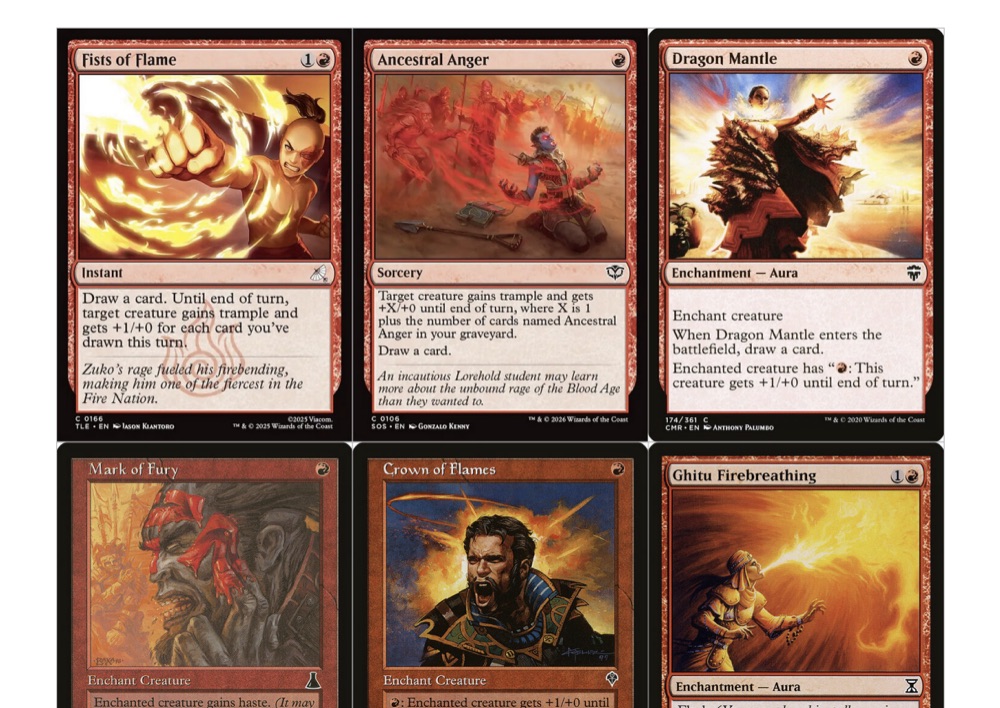
A page from a generated proxy sheet — 3×3 cards at true size with cut guides.
Install
npm install # pdf-lib + @modelcontextprotocol/sdk
Requires Node 18+ (developed on Node 24). No Python, no native modules.
Optionally link it as a global command:
npm link # then run `mtg-export ...` anywhere
Usage
# Archidekt deck by id or URL (public/unlisted work with no login)
node index.js 2087352
node index.js https://archidekt.com/decks/2087352/the-public-library

# From a text export file
node index.js --file mydeck.txt

# From the clipboard (macOS pbpaste) — e.g. after "Copy" on Archidekt/Moxfield
node index.js --clipboard
Options
| Flag | Description |
|---|---|
-o, --output <file> |
Output PDF path (default: derived from the deck/file name) |
--size <size> |
Scryfall image size: small | normal | large | png (default normal) |
--include-basics |
Include basic lands (they are excluded by default) |
--single |
One copy of each card, ignoring deck quantities |
--cache-dir <dir> |
Where to cache images/metadata (default ~/.cache/mtg-export) |
-c, --clipboard |
Read the card list from the clipboard |
-h, --help |
Show help |
Text list format
One card per line, in the common Archidekt/Moxfield/MTGA export shape. The set code and collector number are honored when present, so you get the exact printing:
1x Sol Ring (mh1) 213
1 Delver of Secrets (isd) 51        # double-faced: both faces are printed
2 Lightning Bolt (2x2) 117 *F*      # *F* (foil) is accepted and ignored for art
3 Forest                            # basic land — excluded unless --include-basics
Counterspell                        # bare name resolves to a default printing
# ... / // comment lines and section labels (Deck, Sideboard,
Commander, …) are ignored. If a collector number doesn't match the named card,
it falls back to a name lookup rather than printing the wrong card.
File size (for GitHub)
normal and large are JPEG, which keeps a full ~100-card EDH deck small enough
to commit to a repo:
--size |
Format | ≈ per card | ≈ 100-card PDF |
|---|---|---|---|
normal (default) |
JPEG 488×680 | ~90 KB | ~9 MB |
large |
JPEG 672×936 | ~180 KB | ~18 MB |
png |
PNG 745×1040 | ~1 MB | ~100 MB (too big — local printing only) |
Use normal for anything you'll upload; use large for the nicest home prints.
Private Archidekt decks
Public and unlisted decks need no login. For a private deck, provide your
Archidekt credentials via environment variables or a .env file (copy
.env.example):
ARCHIDEKT_USERNAME=your-username
ARCHIDEKT_PASSWORD=your-password
The tool tries anonymously first and only logs in (JWT) if the deck isn't publicly accessible.
MCP server
The same functionality is exposed as an MCP tool so an agent (Claude Desktop, Claude Code, etc.) can generate proxy sheets.
Run it over stdio:
node mcp.js # or: npm run mcp (also installed as the `mtg-export-mcp` bin)
Register it with an MCP client, e.g. Claude Desktop claude_desktop_config.json:
{
  "mcpServers": {
    "mtg-export": {
      "command": "node",
      "args": ["/absolute/path/to/mtg-export/mcp.js"],
      "env": {
        "ARCHIDEKT_USERNAME": "your-username",
        "ARCHIDEKT_PASSWORD": "your-password"
      }
    }
  }
}
(env is only needed for private decks.)
It provides one tool, create_proxy_pdf:
| Argument | Type | Notes |
|---|---|---|
deck |
string | Archidekt deck id or URL. Provide this or cards. |
cards |
string | Text card list (one per line). Provide this or deck. |
output |
string | Absolute path for the PDF (recommended). |
size |
enum | small | normal | large | png (default normal). |
include_basics |
boolean | Include basic lands (default false). |
single |
boolean | One copy of each card (default false). |
It writes the PDF to disk and returns the path plus a summary (cards resolved, basics excluded, pages, size, any unresolved names).
Test with the MCP Inspector
Copy .env.example to .env and fill in your credentials (only needed for
private decks):
cp .env.example .env
Run the inspector against the server:
npm run inspect
# equivalently:
npx @modelcontextprotocol/inspector node mcp.js
This opens a local web UI where you can list the tool and call create_proxy_pdf
interactively.
How it works
- Input → a list of
{name, quantity, printing}entries (Archidekt deck, text file, or clipboard). - Resolve → Scryfall. Archidekt entries carry the exact printing's Scryfall id, so images are batch-resolved directly; text entries resolve by set+collector / name+set / name.
- Cache → every downloaded image is stored under the cache dir and reused.
- Render →
pdf-liblays out a 3×3 grid at true card size with cut guides; double-faced cards contribute a front and a back slot.
Notes
- Basic lands are excluded by default
- Deck quantities are printed by default; use
--singlefor one of each. - Foil is cosmetic for proxies — the printing is respected but the same art is used.
Установить Mtg Export в Claude Desktop, Claude Code, Cursor
unyly install mtg-exportСтавит в Claude Desktop, Claude Code, Cursor и VS Code — сам разбирается с npx, uvx и сборкой из исходников.
Впервые? Поставь CLI: curl -fsSL https://unyly.org/install | sh
Или настроить вручную
Выполни в терминале:
claude mcp add mtg-export -- npx -y github:domainellipticlanguage/mtg-exportFAQ
Mtg Export MCP бесплатный?
Да, Mtg Export MCP бесплатный — установка в пару кликов через Unyly без оплаты.
Нужен ли API-ключ для Mtg Export?
Нет, Mtg Export работает без API-ключей и переменных окружения.
Mtg Export — hosted или self-hosted?
Доступен hosted-вариант: Unyly запускает сервер в облаке, локальная установка не обязательна.
Как установить Mtg Export в Claude Desktop, Claude Code или Cursor?
Открой Mtg Export на unyly.org, выбери вкладку своего клиента (Claude Desktop, Claude Code, Cursor) и нажми Install — конфиг сгенерируется автоматически, без правки JSON.
Похожие MCP
Omni Video
An MCP server that transforms LLM-enabled IDEs into professional video editors by pre-processing footage into text proxies, generating motion graphics via HTML/
 автор: buildwithtaza
ARA
Generate images, video and audio from any AI agent — one connector.
 автор: ARA
YouTube
Transcripts, channel stats, search
 автор: YouTube
EverArt
AI image generation using various models.
 автор: modelcontextprotocol
Compare Mtg Export with
Не уверен что выбрать?
Найди свой стек за 60 секунд
Автор?
Embed-бейдж для README
Похожее
Все в категории media