
Multi Gmail
БесплатноПоддерживаетсяLets Claude Desktop manage multiple Gmail accounts simultaneously, supporting search, read, send, reply, and label organization via MCP tools.

Описание
Lets Claude Desktop manage multiple Gmail accounts simultaneously, supporting search, read, send, reply, and label organization via MCP tools.
README
A Model Context Protocol (MCP) server that lets Claude Desktop manage multiple Gmail accounts simultaneously. Listed on the official Anthropic MCP registry and published on npm.
Features
- Connect unlimited Gmail accounts — personal, work, side projects
- Search any inbox using full Gmail search syntax
- Read complete emails with MIME parsing
- Send, reply in thread, and create drafts
- Organize with labels: add, remove, list, archive
- Mark as read / unread
- Tokens stored locally in
~/.gmail-mcp-tokens.db— never committed to git - Auto-refreshes OAuth tokens silently
Requirements
- Node.js >= 22.5.0
- A Google Cloud project with the Gmail API enabled
- Claude Desktop
Installation
npm install -g multi-gmail-mcp
This registers two global commands: gmail-mcp (the MCP server) and gmail-mcp-cli (account manager).
Google Cloud Setup
You only need to do this once.
- Go to console.cloud.google.com → create a project
- Enable the Gmail API (APIs & Services → Library)
- Configure the OAuth consent screen — External, add your Gmail addresses as test users
- Add scopes:
gmail.readonly,gmail.send,gmail.modify,gmail.labels - Create a Desktop app OAuth credential → download the JSON
- Save it to
~/.gmail-mcp-oauth.json
Alternatively, set environment variables in the Claude Desktop config (see below).
Authenticating Gmail Accounts
# Add accounts (opens browser for Google sign-in)
gmail-mcp-cli add [email protected]
gmail-mcp-cli add [email protected]

# List authenticated accounts
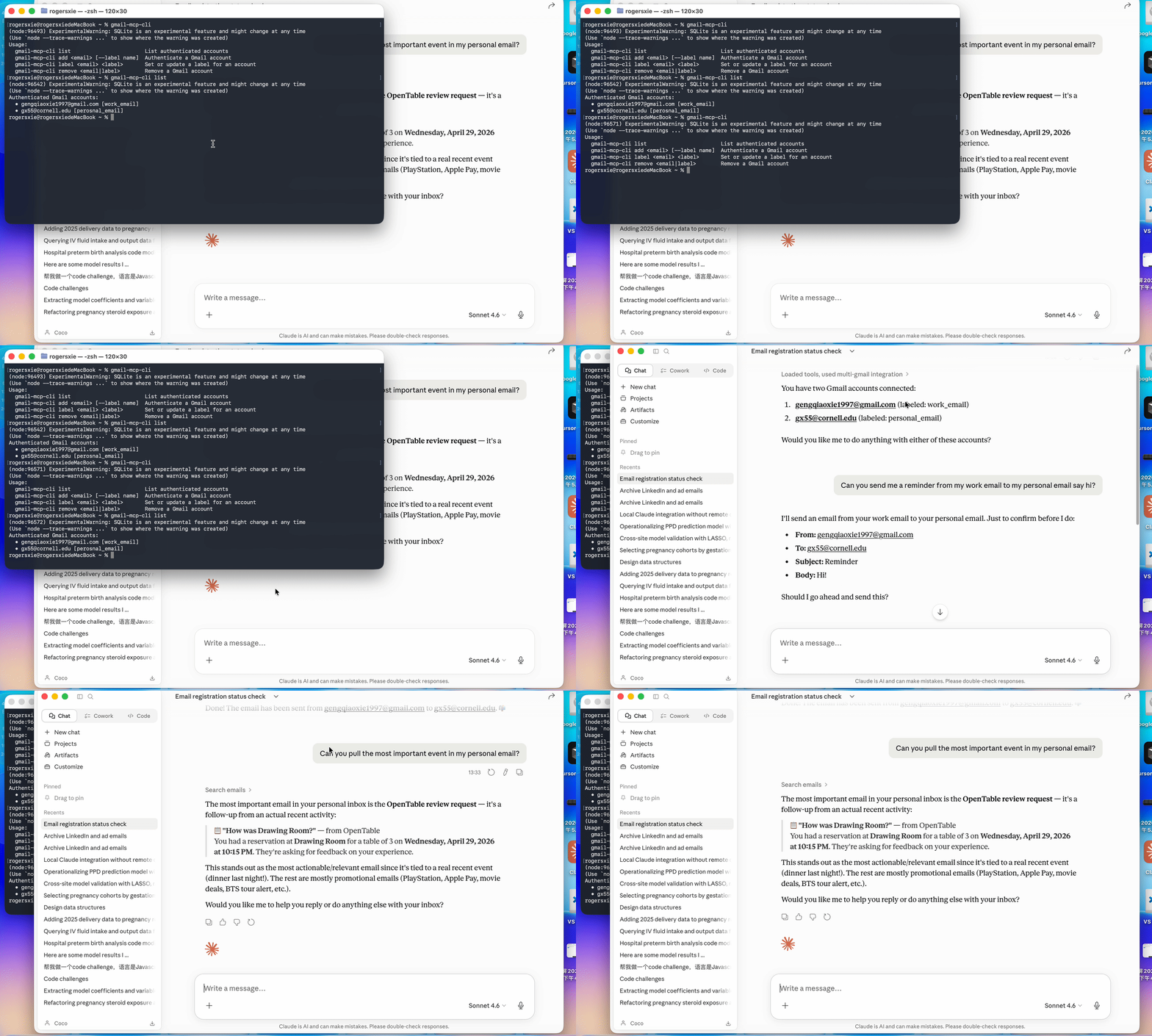
gmail-mcp-cli list

# Remove an account
gmail-mcp-cli remove [email protected]
Tokens are saved to ~/.gmail-mcp-tokens.db and refreshed automatically.
Claude Desktop Configuration
Edit ~/Library/Application Support/Claude/claude_desktop_config.json:
{
  "mcpServers": {
    "multi-gmail": {
      "command": "gmail-mcp"
    }
  }
}
If you prefer environment variables over ~/.gmail-mcp-oauth.json:
{
  "mcpServers": {
    "multi-gmail": {
      "command": "gmail-mcp",
      "env": {
        "GOOGLE_CLIENT_ID": "your-client-id.apps.googleusercontent.com",
        "GOOGLE_CLIENT_SECRET": "your-client-secret"
      }
    }
  }
}
Restart Claude Desktop after saving. Click the hammer icon to confirm 19 tools are loaded.
Available Tools
Account Management
| Tool | Description |
|---|---|
list_accounts |
List all authenticated Gmail accounts |
initiate_auth |
Start OAuth flow — returns a URL to open in browser |
complete_auth |
Finalize auth after completing Google sign-in |
remove_account |
Remove an account and its stored credentials |
Reading Email
| Tool | Description |
|---|---|
search_emails |
Search with Gmail syntax (is:unread, from:, after:, etc.) |
get_email |
Fetch full email content by message ID |
Writing Email
| Tool | Description |
|---|---|
send_email |
Send an email (supports To, CC, BCC) |
reply_to_email |
Reply in thread, preserving References headers |
create_draft |
Save an email as a draft |
Organization
| Tool | Description |
|---|---|
list_labels |
List all Gmail labels for an account |
add_label |
Add one or more labels to a message |
remove_label |
Remove one or more labels from a message |
archive_email |
Remove from Inbox |
mark_as_read |
Remove the UNREAD label |
mark_as_unread |
Add the UNREAD label |
Example Prompts
List all my authenticated Gmail accounts.
Search my [email protected] inbox for unread emails from this week.
Reply to that email from my personal account saying I'll be there Saturday.
Send an email from [email protected] to [email protected]
with subject "Dinner plans" and body "Are you free Saturday?"
Archive everything older than a week in my side-project inbox that's already read.
Check both my accounts for emails from GitHub and summarize them.
Security
~/.gmail-mcp-oauth.jsonand~/.gmail-mcp-tokens.dblive in your home directory — outside the project, never committed.gitignoreexcludes*.db,.gmail-mcp-oauth.json, and.env- The server runs over stdio only — no network port is opened
- OAuth scopes are limited to the minimum required
See SECURITY.md for full details: token storage, network behavior, scope rationale, revocation steps, and how to report a vulnerability.
Registry
Listed on the official Anthropic MCP registry:
io.github.gx-55/multi-gmail-mcp
curl "https://registry.modelcontextprotocol.io/v0.1/servers?search=io.github.gx-55"
Project Structure
multi-gmail-mcp/
├── bin/
│   ├── gmail-mcp.js        # Entry point for the MCP server command
│   └── gmail-mcp-cli.js    # Entry point for the CLI command
├── src/
│   ├── server.js           # MCP server — all 19 tools
│   ├── gmail-client.js     # Gmail API wrapper
│   ├── auth.js             # OAuth2 flow with auto-refresh
│   ├── db.js               # SQLite token storage (node:sqlite)
│   └── cli.js              # Account management CLI
└── package.json
Troubleshooting
"No OAuth credentials found"
Make sure ~/.gmail-mcp-oauth.json exists or set GOOGLE_CLIENT_ID / GOOGLE_CLIENT_SECRET in the Claude Desktop config.
"Account not found. Authenticate it first"
Run gmail-mcp-cli add [email protected] before using that account in Claude.
Tools not appearing in Claude Desktop
Confirm gmail-mcp is in your PATH (which gmail-mcp) and restart Claude Desktop.
Token expired errors
Tokens auto-refresh if a valid refresh token is stored. If refresh fails, remove the account and re-authenticate: gmail-mcp-cli remove [email protected] && gmail-mcp-cli add [email protected].
Установить Multi Gmail в Claude Desktop, Claude Code, Cursor
unyly install multi-gmail-mcpСтавит в Claude Desktop, Claude Code, Cursor и VS Code — сам разбирается с npx, uvx и сборкой из исходников.
Впервые? Поставь CLI: curl -fsSL https://unyly.org/install | sh
Или настроить вручную
Выполни в терминале:
claude mcp add multi-gmail-mcp --env GOOGLE_CLIENT_ID="" --env GOOGLE_CLIENT_SECRET="" -- npx -y multi-gmail-mcpПошаговые гайды: как установить Multi Gmail
FAQ
Multi Gmail MCP бесплатный?
Да, Multi Gmail MCP бесплатный — установка в пару кликов через Unyly без оплаты.
Нужен ли API-ключ для Multi Gmail?
Да, требуются переменные окружения: GOOGLE_CLIENT_ID, GOOGLE_CLIENT_SECRET. Unyly подставит их в конфиг при установке.
Multi Gmail — hosted или self-hosted?
Self-hosted: сервер запускается локально на твоей машине командой из раздела установки.
Как установить Multi Gmail в Claude Desktop, Claude Code или Cursor?
Открой Multi Gmail на unyly.org, выбери вкладку своего клиента (Claude Desktop, Claude Code, Cursor) и нажми Install — конфиг сгенерируется автоматически, без правки JSON.
Изменения
Версии и запрашиваемые доступы со временем.
- Новая версия опубликована
- Новая версия опубликована
- Новая версия опубликована
- Новая версия опубликована
- Новая версия опубликована
- Новая версия опубликована
Похожие MCP
Gmail
Read, send and search emails from Claude
 автор: Google
Slack
Send, search and summarize Slack messages
 автор: Slack
Runbear
No-code MCP client for team chat platforms, such as Slack, Microsoft Teams, and Discord.
Discord Server
A community discord server dedicated to MCP by [Frank Fiegel](https://github.com/punkpeye)
Klavis AI
Open Source MCP Infra. Hosted MCP servers and MCP clients on Slack and Discord.
Work90210/APIFold
Turn any REST API into a hosted MCP server. 18 free public servers (GitHub, Stripe, Slack, OpenAI, Notion, and more) — no setup required, bring your own API key
 автор: Work90210
arikusi/deepseek-mcp-server
MCP server for DeepSeek AI with chat, reasoning, multi-turn sessions, function calling, thinking mode, and cost tracking.
 автор: arikusi
hashgraph-online/hashnet-mcp-js
MCP server for the Registry Broker. Discover, register, and chat with AI agents on the Hashgraph network.
 автор: hashgraph-online
profullstack/mcp-server
A comprehensive MCP server aggregating 20+ tools including SEO optimization, document conversion, domain lookup, email validation, QR generation, weather data,
 автор: profullstack
WayStation-ai/mcp
Seamlessly and securely connect Claude Desktop and other MCP hosts to your favorite apps (Notion, Slack, Monday, Airtable, etc.). Takes less than 90 secs.
 автор: waystation-ai
Compare Multi Gmail with
Не уверен что выбрать?
Найди свой стек за 60 секунд
Автор?
Embed-бейдж для README
Похожее
Все в категории communication