
My Minimax
БесплатноНе проверенWraps MiniMax AI as an autonomous code executor for Claude Code, offloading coding tasks to save Claude subscription tokens.

Описание
Wraps MiniMax AI as an autonomous code executor for Claude Code, offloading coding tasks to save Claude subscription tokens.
README
npm version npm downloads license CI
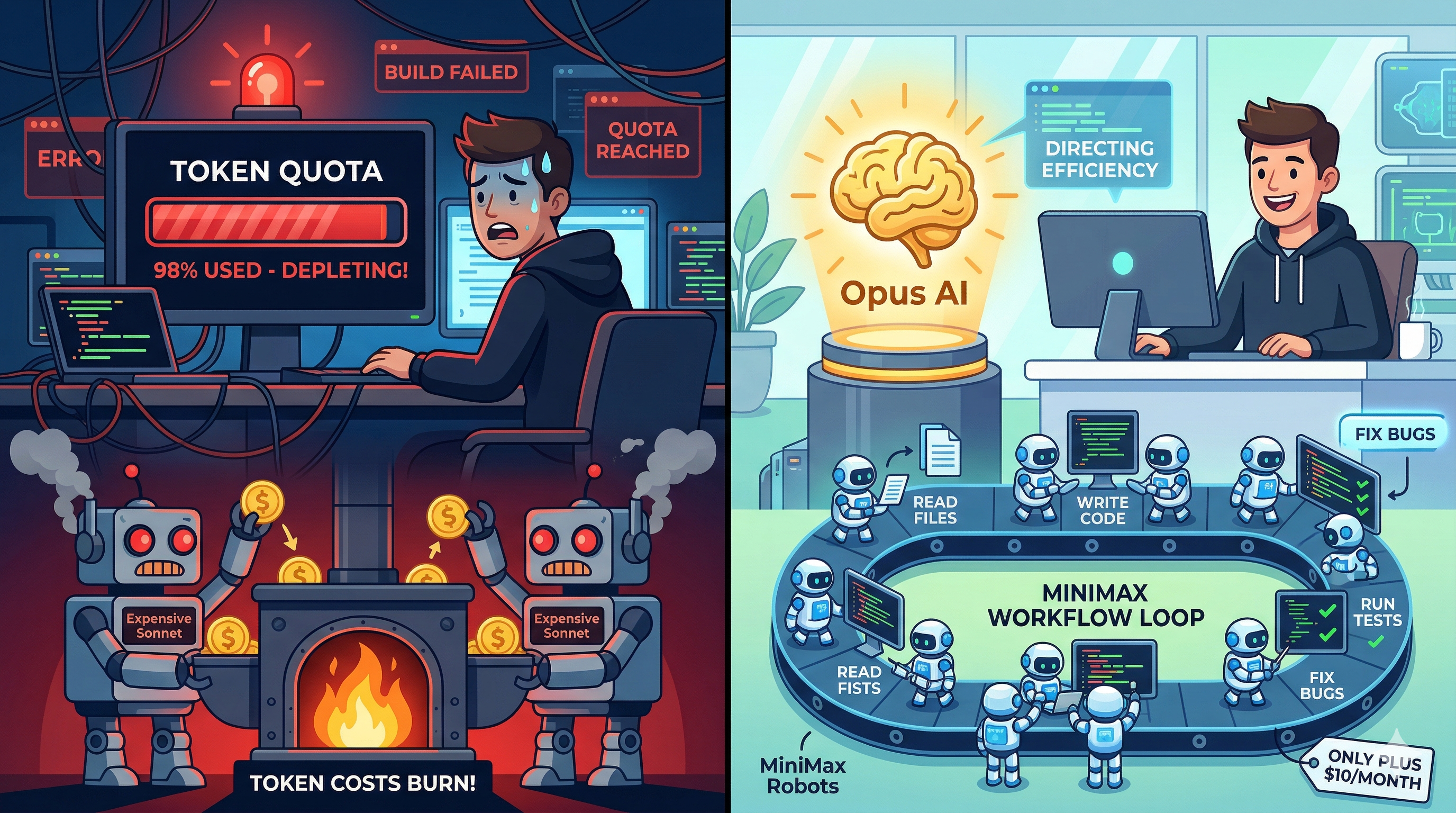
MCP server that wraps MiniMax AI as an autonomous code executor for Claude Code.
Purpose: Coding tasks consume the bulk of your Claude subscription quota on execution (writing, testing, debugging). This MCP server offloads that work to MiniMax API (~$0.04/task), so your Claude subscription handles significantly more tasks per day. Built-in savings tracking proves it with real data.
Architecture
Claude Code (Opus) ─── orchestrator
    │
    ├── minimax_generate_code    → simple code generation
    ├── minimax_agent_task       → autonomous agent loop (read → write → test → debug)
    ├── minimax_chat             → multi-turn conversation
    ├── minimax_plan             → structured JSON implementation plan
    ├── minimax_cost_report      → session cost tracking
    ├── minimax_session_tracker  → cross-session usage tracking (auto-persist on shutdown)
    ├── minimax_web_search       → web search via MiniMax Coding Plan API
    └── minimax_understand_image → image analysis via MiniMax VLM
The key feature is the agent loop: MiniMax uses function calling to autonomously read files, write code, run tests, and debug — equivalent to a Sonnet sub-agent, but without consuming Claude subscription tokens.
Tools
| Tool | Description | Default Model |
|---|---|---|
minimax_agent_task |
Autonomous coding: read files, write code, run tests, debug loop. Supports tools: read_file, write_file, edit_file, edit_file_batch, run_bash, list_files, search_content, web_search |
MINIMAX_DEFAULT_MODEL |
minimax_generate_code |
Generate code, optionally write to file | MINIMAX_DEFAULT_MODEL |
minimax_chat |
Multi-turn conversation with context preservation | MINIMAX_DEFAULT_MODEL |
minimax_plan |
Structured implementation plan as JSON | MINIMAX_DEFAULT_MODEL |
minimax_cost_report |
Session token usage and cost breakdown | — |
minimax_session_tracker |
Cross-session usage tracking with self-improvement modes | — |
minimax_web_search |
Search the web using MiniMax AI | — |
minimax_understand_image |
Analyze images using MiniMax VLM (JPEG/PNG/WebP, max 20MB) | — |
minimax_tts |
Text-to-speech (MiniMax Speech 2.8 T2A v2). Converts text to audio with configurable voice and speed. | — |
minimax_generate_music |
Music generation (MiniMax Music 2.6). Vocal songs from lyrics, or instrumental from prompt. Synchronous. |
— |
minimax_generate_video |
Video generation (MiniMax Hailuo 2.3). Async: submit → poll → retrieve download URL. Up to 5 min. | — |
Installation
npm install my-minimax-mcp
Setup
1. Get a MiniMax API Key
Sign up at platform.minimax.io and create an API key.
2. Install & Configure
Option A: Via npm (recommended)
npm install my-minimax-mcp
Option B: From source
git clone https://github.com/wongo/my-minimax-mcp.git
cd my-minimax-mcp
npm install
npm run build
3. Create .env
MINIMAX_API_KEY=your_api_key_here
4. Register in Claude Code
claude mcp add --transport stdio --scope user minimax -- bash /path/to/my-minimax-mcp/run-mcp.sh
Or manually edit ~/.claude/settings.json:
{
  "mcpServers": {
    "minimax": {
      "command": "npx",
      "args": ["my-minimax-mcp"],
      "env": {
        "MINIMAX_API_KEY": "your-api-key",
        "MINIMAX_DEFAULT_MODEL": "MiniMax-M2.7"
      }
    }
  }
}
Note: Use
claude mcp addfor the simplest setup, or edit~/.claude/settings.jsondirectly.
Restart Claude Code. The 8 tools will appear automatically. Verify with claude mcp list.
5. Enable Self-Improvement Loop (Optional)
npx my-minimax-mcp --init
This displays the CLAUDE.md template and creates the usage log. Copy the template to ~/.claude/CLAUDE.md to enable executor routing rules. Session tracking is automatic — the MCP server persists usage data on shutdown. See templates/setup-guide.md for details.
CLI (for debugging)
# Code generation
npx tsx src/cli.ts --task "fibonacci in Python" --language python

# Chat
npx tsx src/cli.ts --mode chat --task "explain async/await"

# Autonomous agent
npx tsx src/cli.ts --mode agent --task "fix the failing tests" --dir ./my-project
CLI runs also append to MINIMAX_COST_LOG, so --end-session and --savings-report include normal CLI usage in addition to MCP usage.
Configuration
All settings via environment variables:
| Variable | Description | Default |
|---|---|---|
MINIMAX_API_KEY |
API key (required) | — |
MINIMAX_DEFAULT_MODEL |
Default model used by all MiniMax chat/plan/code/agent tools unless a per-call override is supplied | MiniMax-M2.7 |
MINIMAX_MAX_ITERATIONS |
Agent loop max iterations | 25 |
MINIMAX_MAX_INPUT_TOKENS |
Maximum input tokens per agent task (override for large tasks) | 500000 |
MINIMAX_MAX_WEB_SEARCHES |
Maximum web searches per agent task | 10 |
MINIMAX_TIMEOUT_MS |
Per-task timeout | 300000 (5min) |
MINIMAX_BASH_WHITELIST |
Additional allowed bash commands (comma-separated) | — |
MINIMAX_WORKING_DIR |
Base working directory for file operations; minimax_agent_task may only use this directory or a nested subdirectory |
process.cwd() |
MINIMAX_COST_LOG |
Cost log file path | ~/.claude/minimax-costs.log |
MINIMAX_USAGE_LOG |
Session usage log path | ~/.claude/minimax-usage.jsonl |
MINIMAX_SESSION_TARGET |
Min MiniMax calls per session | 5 |
Self-Improvement Loop
Usage tracking is automatic — the MCP server persists session data to ~/.claude/minimax-usage.jsonl on shutdown (SIGTERM/SIGINT). No manual start/end calls required.
Optional commands via minimax_session_tracker:
"start"— check current mode and recent trends"status"— mid-session progress with trend analytics and streak info"end"— explicit close with root cause notes if target was missed
Modes:
- Normal: Default. Target is
MINIMAX_SESSION_TARGETcalls (default: 5) - Warning: Last session missed target — prioritize MiniMax
- Forced: 2 consecutive misses — all code changes must use MiniMax
Trend analytics: The status command returns trend direction (improving/declining/stable), streak length, and actionable insights.
SessionEnd hook (optional, for fully automatic tracking):
npx my-minimax-mcp --end-session
Add to ~/.claude/settings.json hooks:
{
  "hooks": {
    "SessionEnd": [{
      "hooks": [{
        "type": "command",
        "command": "npx my-minimax-mcp --end-session",
        "timeout": 10
      }]
    }]
  }
}
Set MINIMAX_DEFAULT_MODEL to the highest model your Token Plan supports. All MiniMax tools inherit this value by default, and the API will reject models not available on your plan.
Failure Logging & Telemetry
Every tool call outcome (success, failure, retry) is automatically recorded to the logs/ directory — no configuration needed.
Log Files
| File | Contents |
|---|---|
logs/failures-YYYY-MM.jsonl |
Failure records (error category, fingerprint, caller project) |
logs/success-YYYY-MM.jsonl |
Success records (tool, duration, model, iterations) |
logs/retries-YYYY-MM.jsonl |
Retry records (attempt count, final outcome) |
Files rotate monthly. The logs/ directory is gitignored.
Error Categories (8 types)
path_invalid · sandbox_violation · edit_file_no_match · iteration_limit · api_5xx · network_timeout · auth_error · unknown
Digest Analysis
# This month's digest (7 sections)
node scripts/analyze-failures.mjs

# Specific month
node scripts/analyze-failures.mjs --month 2026-05

# Custom date range
node scripts/analyze-failures.mjs --from 2026-05-01 --to 2026-05-15

# JSON output (for machine processing)
node scripts/analyze-failures.mjs --json
Output sections: Summary (total calls / success rate), Top categories, Top fingerprints (deduplicated bugs), Per-tool, Per-caller (which project called), Retry effectiveness, Quick wins (high-frequency issues with success rate < 80%).
Environment Variable Override
| Variable | Description |
|---|---|
MINIMAX_FAILURE_LOG_DIR |
Custom log directory (default: <project-root>/logs) |
Token Savings Tracking
Every MiniMax call is tracked, and the savings are computed automatically. This includes normal CLI runs as well as MCP server usage. Use minimax_cost_report to see real-time savings per session, or run the CLI for cumulative reports.
Real-time (per session)
minimax_cost_report now includes a savings section:
- tokensOffloaded: Exact count of tokens MiniMax handled instead of Claude
- equivalentSonnetCalls: How many Sonnet sub-agent calls that represents
- avgTokensPerCall: Self-adaptive metric (auto-improves with more data)
Cumulative (historical)
npx my-minimax-mcp --savings-report
Shows all-time, monthly, and daily breakdowns with tool-level analysis:
=== MiniMax Token Savings Report ===

Tokens offloaded to MiniMax: 426,040 in + 161,496 out = 587,536 total
Equivalent Sonnet calls saved: ~68 (avg 8,635 tokens/call)
MiniMax API cost: $0.2468 (billed separately, not your subscription)

--- By Tool ---
  agent_task           400,254 tokens (68.1%) | 8 calls
  generate_code        144,290 tokens (24.6%) | 37 calls
  chat                  28,142 tokens (4.8%)  | 20 calls
Self-Adaptive Accuracy
The avgTokensPerCall metric adapts to your usage patterns:
- < 10 data points: Uses conservative default (8,000 tokens/call)
- 10-100 data points: Computes from all your metered calls
- 100+ data points: Uses rolling window of last 100 calls
Confidence level (LOW/MEDIUM/HIGH) is reported so you know how reliable the estimate is. The more you use MiniMax, the more accurate the savings report becomes.
Web Search & Image Understanding
These tools use MiniMax's Coding Plan API (separate from the chat completions endpoint). They are included in your Token Plan subscription at no additional per-call cost.
Web Search
minimax_web_search { query: "TypeScript MCP server tutorial" }
Returns organic results (title, link, snippet, date) and related search suggestions.
Why keep a second web search source? Most web tools (firecrawl, tavily) are credit- or plan-capped — when the quota runs out, research stops.
minimax_web_searchis billed independently on your MiniMax monthly Token Plan, so it keeps working when your other tools hit their limit. It returns snippets (not full-page extraction), so think of it as a resilient second source rather than a 1:1 firecrawl replacement.
Image Understanding
minimax_understand_image {
  prompt: "Extract the business hours from this image",
  imageSource: "https://example.com/schedule.png"
}
Accepts three input types:
- HTTP/HTTPS URL: Fetched and converted to base64 automatically
- Local file path: Read from disk (supports
@prefix) - Base64 data URL: Passed through directly
Supported formats: JPEG, PNG, WebP (max 20MB).
Features
- Max output: 65,536 tokens per response (~10,000 Chinese characters / ~50K English words)
- Think tag stripping: MiniMax
<think>...</think>reasoning tags are automatically removed from all responses
Security
The agent loop runs with strict sandboxing:
- Bash whitelist: Only
npm test,npx,node,tsc,eslint,pytest,go test,cargo test, etc. - Command chaining blocked:
&&,;,|operators are rejected - Path isolation: All file operations restricted to the working directory
- Agent working-directory boundary:
minimax_agent_taskcan only operate insideMINIMAX_WORKING_DIRor one of its subdirectories - Iteration cap: 25 iterations max per task (configurable via
MINIMAX_MAX_ITERATIONS) - Timeout: 5 minutes per task (configurable via
MINIMAX_TIMEOUT_MS) - Token budget: 500K input tokens max per task (configurable via
MINIMAX_MAX_INPUT_TOKENS) - Web search budget: 10 searches max per task (configurable via
MINIMAX_MAX_WEB_SEARCHES)
Cost
MiniMax API pricing (per 1M tokens):
| Model | Input | Output | Best for |
|---|---|---|---|
| M2.5 | $0.118 | $0.99 | Routine code generation |
| M2.7 | $0.30 | $1.20 | Complex reasoning |
Typical task cost: ~$0.04 (agent loop with 10 iterations).
Verified Test Results
Full integration test (14 MCP calls, 13 tests):
Total cost:   $0.012 (1.2 cents)
Input tokens: 38,913
Output tokens: 7,228
| Test | Result |
|---|---|
| API connectivity | PASS |
| Code generation | PASS |
| Agent loop (autonomous bug fix) | PASS |
| Structured planning (JSON) | PASS |
| Multi-turn conversation | PASS |
| Cost tracking | PASS |
| Multi-file task (todo module) | PASS |
| Security (dangerous cmd blocked) | PASS |
| Routing (Opus → MiniMax, not Sonnet) | PASS |
| Graceful failure (max iterations) | PASS |
| Web search (Japanese query) | PASS |
| Image understanding (URL) | PASS |
| Image understanding (local file) | PASS |
Testing
# Run all tests (148 tests)
npm test

# Run with coverage report
npm run coverage
Unit tests cover safety validation, cost tracking, file writing, server initialization, session tracking, image utilities, the Coding Plan client, the savings calculator, and the failure logging system (error classification, secrets scrubbing, telemetry, retry tracking). Coverage report uses Node.js built-in test coverage (--experimental-test-coverage).
Project Structure
src/
├── mcp-server.ts           # MCP server entry (stdio transport)
├── cli.ts                  # CLI for debugging
├── client/
│   ├── minimax-client.ts   # OpenAI SDK wrapper for MiniMax chat API
│   ├── coding-plan-client.ts # Native fetch client for Coding Plan API (web search, VLM)
│   └── types.ts            # Shared types and pricing
├── agent/
│   ├── loop.ts             # Agent loop core logic
│   ├── functions.ts        # Function definitions for MiniMax
│   ├── executor.ts         # Function call executor
│   └── safety.ts           # Whitelist, path validation, limits
├── tools/
│   ├── agent-task.ts       # minimax_agent_task
│   ├── generate-code.ts    # minimax_generate_code
│   ├── chat.ts             # minimax_chat
│   ├── plan.ts             # minimax_plan
│   ├── web-search.ts       # minimax_web_search
│   ├── understand-image.ts # minimax_understand_image
│   └── index.ts            # Tool registry
├── conversation/
│   └── store.ts            # In-memory conversation store
└── utils/
    ├── cost-tracker.ts     # Token usage and cost tracking (with session ID)
    ├── session-tracker.ts  # Cross-session usage tracking and trend analytics
    ├── file-writer.ts      # Safe file writing
    ├── image.ts            # Image to base64 data URL conversion
    ├── savings-calculator.ts # Token savings computation (self-adaptive)
    ├── failure-logger.ts   # Failure JSONL logging (scrubbing, fingerprints, monthly rotation)
    ├── telemetry.ts        # Success / retry telemetry recording
    ├── error-classifier.ts # Error classification (8 categories)
    ├── secrets-scrubber.ts # Sensitive data redaction
    └── retry.ts            # Exponential backoff retry (with onAttempt callback)
scripts/
└── analyze-failures.mjs    # Monthly failure & telemetry digest analyzer
logs/                       # Runtime JSONL files (gitignored)
Changelog
v1.8.0 (2026-07-09)
Cost accuracy, network deadlines, and agent tool robustness
minimax_cost_report was overcharging M3 by 2×. MODEL_PRICING used M3's list price ($0.60/$2.40 per 1M tokens). MiniMax applies a permanent 50% discount up to 512k input tokens — not the expiring introductory discount an out-of-date comment claimed. Since maxInputTokens defaults to 500k, every request we make bills at $0.30/$1.20. Corrected, so cost and savings reports no longer double-count M3 usage.
Every network call now has a deadline. A bare fetch() never gives up, so a stalled socket hung the MCP tool forever. Timeouts are sized per call type rather than one blunt value — synchronous music/TTS generation legitimately runs for minutes, while a status poll should not:
| Call type | Timeout |
|---|---|
| Music / TTS generation | 300 s |
| Video submit, poll, retrieve; web search; image understanding | 30–60 s |
| Media download | 300 s |
Agent tools.
list_filesno longer walksnode_modules,.git,dist,build,.next,coverage,.venv,__pycache__,.cache. On a real project it previously enumerated every dependency file — a latency and token sink.search_contentno longer reports every failure as "No matches found." A bad regex, an unreadable path, or a timeout now raise a real error. Whengreperrors on one file but matched others, the partial matches are returned rather than failing the whole search.write_fileandedit_filenow write atomically (temp file + rename), matchingedit_file_batch. A crash mid-write can no longer truncate the file being edited.
Consistency. MiniMaxClient's constructor defaulted to MiniMax-M2.5 while the env default, CodingPlanClient, and every registered tool schema used MiniMax-M2.7. All callers passed a model explicitly so nothing broke, but the mismatch was a landmine. Now M2.7 throughout.
Media output. outputFile now creates missing parent directories. It remains an unrestricted absolute path by design — these tools are invoked by the MCP client, not the sandboxed agent, and the documented contract is an absolute path. This is stated explicitly in media-shared.ts so it reads as a decision rather than an oversight.
Tests. 203 → 211.
v1.7.0 (2026-07-09)
Sandbox hardening, clearer agent diagnostics, and media tool tests
Security — run_bash sandbox escapes closed. The bash whitelist was bypassable three ways, all of which could write or execute outside the working directory:
- Redirection escape:
echo pwned > /home/user/.bashrcpassed, becauseechois whitelisted and only> /devwas blocked. Redirection to any absolute, home (~), or parent (..) path is now blocked. - Inline code execution:
node -e "..."/node -p "..."passed via the^nodewhitelist entry, making the whole whitelist moot.nodewith-e/--eval/-p/--printis now blocked; running a script file still works. findside effects:find / -deleteand-execpassed via the^findentry. Both are now blocked; plainfindstill works.
Agent loop diagnostics.
- Token-budget exhaustion now reports
reason: "token_budget"with its own diagnostics suggesting a highermaxInputTokens(or task decomposition). It previously reportedreason: "iteration_limit"and advised raisingmaxIterations— useless advice when the loop ran out of tokens, not turns. timeout,no_tool_calls, andtask_failedexits now report the files the agent had already modified. They previously returned an emptyfilesChanged, hiding exactly the information needed to clean up after a failure.
Media tools.
minimax_generate_video: a poll returningSuccesswith nofile_idnow raises a malformed-response error instead of silently polling to exhaustion and reporting a misleading timeout.- New
MINIMAX_MEDIA_POLL_MSenv var overrides the video poll interval (default 10000 ms).
Tests. 171 → 203. Added coverage for tts, generate_music, generate_video, and media-shared (32 new tests), including the three sandbox escape vectors above. The test/coverage scripts now glob test/*.test.ts instead of a hand-maintained file list, so new test files can no longer be silently skipped.
v1.6.1 (2026-07-09)
Release hygiene fix — removes stray files from the published package
- Removed
dist/app/sitemap.js(a non-source artifact accidentally shipped in 1.6.0) and its committed source, plus an unrelated script that belonged to a different project. - Added
cleanandprepublishOnlyscripts: every publish now runs a clean build + full test suite, so staledist/output can never ship again. - No functional changes to any tool.
v1.6.0 (2026-07-10)
Three new media tools: TTS, Music, and Video
minimax_tts: Text-to-speech using MiniMax Speech 2.8 T2A v2. Acceptstext(required),voiceId(defaultmale-qn-qingse),speed(0.5–2.0, default 1.0), and optionaloutputFile(absolute path, saves as mp3). Returns{ success, outputFile?, audioSizeBytes, message }.minimax_generate_music: Music generation using MiniMax Music 2.6 (/music_generation, synchronous). Providelyricsfor a vocal song (lines separated by\n, supports[Verse]/[Chorus]tags), orpromptalone for instrumental (instrumental: true). OptionaloutputFile. Audio returned hex-encoded and decoded to mp3. Returns{ success, audioSizeBytes, outputFile?, message }.minimax_generate_video: Video generation using MiniMax Hailuo 2.3. Acceptsprompt(required),duration(6 or 10 s, default 6),resolution(768P|1080P, default1080P),model(defaultMiniMax-Hailuo-2.3), and optionaloutputFile. Async three-step flow: submit → pollquery/video_generationforstatus: "Success"→files/retrieveto get the download URL (polls every 10 s, up to 5 minutes). Returns{ success, taskId, fileId, videoUrl, outputFile?, message }.- Plan requirement: API video generation needs a Token Plan Max tier or available Credits. On Plus and lower tiers the API returns error
2056(Token Plan usage limit reached) for any video model/resolution — TTS and music are included on Plus, but video is not. The tool surfaces this error directly rather than hanging.
- Plan requirement: API video generation needs a Token Plan Max tier or available Credits. On Plus and lower tiers the API returns error
v1.5.4 (2026-06-22)
minimax_agent_task — web_search tool + maxInputTokens override
- Added
web_searchtool to agent loop, enabling autonomous web research during coding tasks. Agent can now search the web when it needs up-to-date external info (docs, fact-checks). Budget limited toMINIMAX_MAX_WEB_SEARCHES(default: 10 searches per task). - Added
maxInputTokensconfigurable option viaMINIMAX_MAX_INPUT_TOKENSenv var (default: 500,000) and per-callmaxInputTokensparameter override. Allows handling large tasks that exceed default token budget. - Bug fix: Corrected web search budget exhausted error message — was showing
(max/max)instead of(count/max), misleading users about actual search usage. - Updated documentation: README.md now documents
web_searchin agent loop tool list, plusMINIMAX_MAX_INPUT_TOKENSandMINIMAX_MAX_WEB_SEARCHESenv vars.
Code review: 1 bug fixed, 4 altitude issues logged as tech debt (non-blocking):
- Reactive budget check (medium priority — saves tokens by checking before API call)
- Tool registration boilerplate (low priority — reduce duplication)
- Tool-wrapping closure pattern (low priority — 3 cases exist)
- Web search diagnostics (low priority — improve UX)
v1.5.3 (2026-06-17)
session_tracker — fix project attribution on shutdown and manual end
auto-persist on shutdown(SIGTERM/SIGINT) always wroteproject: MINIMAX_WORKING_DIRregardless of which project the Claude session was in, causing all usage data to be misattributed to the server base directory.- Manual
minimax_session_tracker endhad the same bug. - Fix:
CostTrackernow tracks a per-session project frequency counter vianotifyProject(). Both the auto-persist and the manualendpaths usegetTopProject()to resolve the most-called project, falling back to the server base dir only when noworkingDirectorywas passed (e.g. sessions that only calledweb_search/chat). notifyProject()is called fromgenerate_codeandagent_taskhandlers immediately after resolvingworkingDirectory.
v1.5.2 (2026-06-09)
minimax_generate_code — workingDirectory parameter
- Added optional
workingDirectoryparameter. Previously the tool always resolvedfilePathrelative to the MCP server's base directory (MINIMAX_WORKING_DIR), causing files to land in the wrong location when called from project sub-directories (e.g.taiwan-in-japan-portal). Callers can now pass an absolute project path; falls back to the server base if omitted.
analyze-savings.mjs — fix MiniMax token double-count
- MiniMax sub-agent tokens (model names containing
minimax) were being bucketed as "other" Claude tokens and priced at Sonnet rates, inflating the estimated Claude spend by ~$1,765 / month. Fixed:modelBucket()now returnsnullfor MiniMax models and the aggregation loop skipsnullbuckets entirely.
v1.5.1 (2026-06-03)
Model selection
MiniMax-M3is now a selectable model on every tool that accepts amodeloverride (agent_task,chat,generate_code,plan,understand_image). Predefined M2.7 / M2.5 / *-highspeed variants unchanged. Default remains M2.7.MODEL_PRICINGadds an M3 entry at the standard PAYG rate of $0.60 / $2.40 per 1M tokens (introductory 50% discount of $0.30 / $1.20 runs through 2026-06-07).
understand_image per-call model override
- The
minimax_understand_imageMCP tool now accepts an optionalmodelparameter (same enum as the other tools), so callers can choose M3 for native multimodal analysis instead of inheriting the client default. CodingPlanClientconstructor now takes adefaultModelargument and exposesgetDefaultModel();mcp-server.tsthreadsMINIMAX_DEFAULT_MODELinto it. Previously the env var had no effect on image calls (latent bug, now fixed).
Tests
- 162 tests (up from 161): 1 new test in
tool-default-models.test.tscovering default + override model selection forunderstand_image.
v1.5.0 (2026-05-24)
Observability improvements
analyze-failures.mjsre-classifies stored records at read time using current rules — historical logs update automatically when classifier patterns improve- New Section 8 "Re-classification Deltas" in digest output shows how many records were corrected vs. stored category
network_timeoutpattern extended to match"Request timed out."and"read timeout"variants (previously fell through tounknown)- Retry telemetry now actually fires — all 5 tools (
web-search,chat,generate-code,understand-image,plan) passonAttempttowithRetry()and log failed attempts viatelemetry.recordRetry();retries-YYYY-MM.jsonlwill now have data
iteration_limit diagnostics
AgentTaskResultnow includesdiagnosticswhenreason === "iteration_limit": last 3 actions, unique files modified,stillProgressingheuristic, and a human-readable suggestion ("Retry with maxIterations=N" vs "decompose the task")filesChangedin iteration_limit returns is now populated from tracked writes instead of always being[]mcp-server.tswarns to stderr when caller setsmaxIterations < 10- Iteration_limit failure log entries now include diagnostics payload for future analysis
Tests
- 161 tests (up from 152): 8 new
agent-looptests for diagnostic helpers, 1 safety regression test for cross-projectresolveWorkingDirectory
v1.4.0 (2026-05-17)
Failure Logging & Telemetry
- Every tool call (success, failure, retry) is now recorded to monthly JSONL logs in
logs/ - 8 error categories:
path_invalid,sandbox_violation,edit_file_no_match,iteration_limit,api_5xx,network_timeout,auth_error,unknown - Secrets scrubbing — API keys, Bearer tokens, JWTs never reach logs
- Deduplication fingerprints — identical bugs collapse into one entry
- Per-caller attribution — failures attributed to the calling project by working directory
- New
scripts/analyze-failures.mjsdigest with 7 sections: summary, categories, fingerprints, per-tool, per-caller, retry effectiveness, quick wins
Bug Fixes
- Fixed
sandbox_violationnot being captured by failure logger (validation now inside try block) - Fixed
callerProjectshowing as(unknown)for sandbox violations — falls back to raw input path - Fixed
MINIMAX_WORKING_DIRdefaulting to minimax project dir, blocking all cross-projectagent_taskcalls;run-mcp.shnow sets it to~/Projects
Internals
retry.ts: addedonAttemptcallback for retry telemetryagent/loop.ts: addedreasonfield toAgentTaskResult(iteration_limit,timeout,task_complete,task_failed,no_tool_calls)- 148 tests (up from 96)
v1.3.8
- Guaranteed
tokensOffloadedin every session cost report - Added savings analyzer (
scripts/analyze-savings.mjs) with--diagnoseand date range flags - Hardened launcher script; failure logging foundation
v1.3.6 – v1.3.7
edit_filefuzzy match (CRLF / trailing-space tolerant) with closest-3-lines hints on failureedit_file_batchfor atomic multi-point edits in a single iteration- Routing calibration: raised Sonnet threshold from 5-file to cross-cutting refactor only
minimax_session_trackerauto-persists on shutdown (no manualendrequired)
License
MIT
Установить My Minimax в Claude Desktop, Claude Code, Cursor
unyly install my-minimax-mcpСтавит в Claude Desktop, Claude Code, Cursor и VS Code — сам разбирается с npx, uvx и сборкой из исходников.
Впервые? Поставь CLI: curl -fsSL https://unyly.org/install | sh
Или настроить вручную
Выполни в терминале:
claude mcp add my-minimax-mcp -- npx -y my-minimax-mcpFAQ
My Minimax MCP бесплатный?
Да, My Minimax MCP бесплатный — установка в пару кликов через Unyly без оплаты.
Нужен ли API-ключ для My Minimax?
Нет, My Minimax работает без API-ключей и переменных окружения.
My Minimax — hosted или self-hosted?
Self-hosted: сервер запускается локально на твоей машине командой из раздела установки.
Как установить My Minimax в Claude Desktop, Claude Code или Cursor?
Открой My Minimax на unyly.org, выбери вкладку своего клиента (Claude Desktop, Claude Code, Cursor) и нажми Install — конфиг сгенерируется автоматически, без правки JSON.
Похожие MCP
GitHub
PRs, issues, code search, CI status
 автор: GitHub
Filesystem
Secure file operations with configurable access controls.
Memory
Knowledge graph-based persistent memory system.
Template MCP Server
A CLI tool to create a new Model Context Protocol server project with TypeScript support, dual transport options, and an extensible structure
 автор: mcpdotdirect
Compare My Minimax with
Не уверен что выбрать?
Найди свой стек за 60 секунд
Автор?
Embed-бейдж для README
Похожее
Все в категории development