
Mycobot
БесплатноНе проверенEnables sending pick-and-place instructions to myCobot using object detection via image feedback.

Описание
Enables sending pick-and-place instructions to myCobot using object detection via image feedback.
README
Overview
This project is a MCP server for myCobot.
This MCP can send simple pick-and-place instructions to myCobot.
[!NOTE] This MCP server requires image feedback. Please connect an MCP client that can handle image feedback.
Chat example
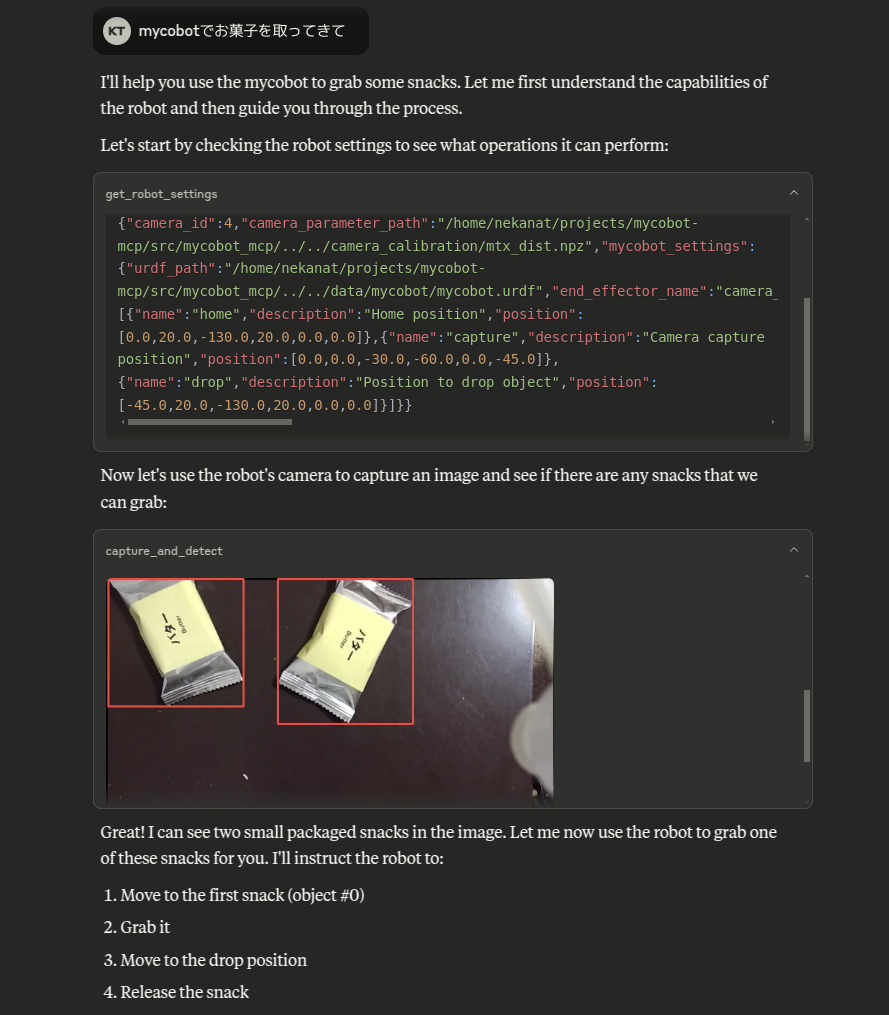
https://github.com/user-attachments/assets/e2c222b8-1ce2-4fb1-8b59-11ec5e973432
Setup
DDS API Token
This project uses the DDS API for object detection. Please register and issue an API key for DDS.
https://cloud.deepdataspace.com/
Claude-Desktop
If you want to run this project on Ubuntu, you can install Claude-Desktop from the following instructions.
https://github.com/aaddrick/claude-desktop-debian
Edit the claude_desktop_config.json file to add the following:
{
  "mcpServers": {
    "mycobot": {
      "command": "uvx",
      "args": [
        "mycobot-mcp",
        "--settings-path",
        "/path/to/settings.json"
      ],
      "env": {
        "DDS_API_TOKEN": "your-api-token"
      }
    }
  }
}
Or you can clone this repository and run the following command.
git clone https://github.com/neka-nat/mycobot-mcp.git
{
  "mcpServers": {
    "mycobot": {
      "command": "uv",
      "args": [
        "--directory",
        "/path/to/mycobot-mcp/",
        "run",
        "mycobot-mcp",
        "--settings-path",
        "/path/to/settings.json"
      ],
      "env": {
        "DDS_API_TOKEN": "your-api-token"
      }
    }
  }
}
Hardware
This software assumes the following hardware configuration.
Parameters
Create a settings.json file to configure the myCobot hardware and the camera.
The sample is here.
{
    "camera_id": 0,
    "camera_parameter_path": "/path/to/camera_calibration/mtx_dist.npy",
    "mycobot_settings": {
        "urdf_path": "/path/to/mycobot.urdf",
        "end_effector_name": "camera_flange",
        "port": "/dev/ttyACM0",
        "baud": 115200,
        "default_speed": 40,
        "default_z_speed": 20,
        "suction_pin": 5,
        "command_timeout": 5,
        "use_gravity_compensation": false,
        "end_effector_height": 0.065,
        "object_height": 0.01,
        "release_height": 0.05,
        "places": [
            {
                "name": "home",
                "description": "Home position",
                "position": [0, 20, -130, 20, 0, 0]
            },
            {
                "name": "capture",
                "description": "Camera capture position",
                "position": [0, 0, -30, -60, 0, -45]
            },
            {
                "name": "drop",
                "description": "Position to drop object",
                "position": [-45, 20, -130, 20, 0, 0]
            }
        ]
    }
}
Change port permission
When you connect mycobot, you need to change the permission.
sudo chmod 666 /dev/ttyACM0
Установка Mycobot
У этого сервера нет опубликованного пакета — он собирается из исходников. Открой репозиторий и следуй инструкции в README.
▸ github.com/neka-nat/mycobot-mcpFAQ
Mycobot MCP бесплатный?
Да, Mycobot MCP бесплатный — установка в пару кликов через Unyly без оплаты.
Нужен ли API-ключ для Mycobot?
Нет, Mycobot работает без API-ключей и переменных окружения.
Mycobot — hosted или self-hosted?
Self-hosted: сервер запускается локально на твоей машине командой из раздела установки.
Как установить Mycobot в Claude Desktop, Claude Code или Cursor?
Открой Mycobot на unyly.org, выбери вкладку своего клиента (Claude Desktop, Claude Code, Cursor) и нажми Install — конфиг сгенерируется автоматически, без правки JSON.
Похожие MCP
Omni Video
An MCP server that transforms LLM-enabled IDEs into professional video editors by pre-processing footage into text proxies, generating motion graphics via HTML/
 автор: buildwithtaza
ARA
Generate images, video and audio from any AI agent — one connector.
 автор: ARA
YouTube
Transcripts, channel stats, search
 автор: YouTube
EverArt
AI image generation using various models.
 автор: modelcontextprotocol
Compare Mycobot with
Не уверен что выбрать?
Найди свой стек за 60 секунд
Автор?
Embed-бейдж для README
Похожее
Все в категории media