
MyMCP
БесплатноНе проверенA local, no-code builder for MCP servers that lets you create AI tools by describing them in plain language, without writing code. Connect your tools to any MCP

Описание
A local, no-code builder for MCP servers that lets you create AI tools by describing them in plain language, without writing code. Connect your tools to any MCP-compatible assistant like Claude, Cursor, or VS Code Copilot.
README
MyMCP
Build your own MCP servers — no code required.
A local, no-code builder for Model Context Protocol (MCP) servers. Assemble your own AI tools and connect them to Claude, Cursor, VS Code Copilot, and any other MCP-compatible assistant — without writing a single line of code.
Node.js TypeScript React MCP SDK License: MIT
Quick Start · Features · How it works · Connect your AI · Architecture · Contributing
What is MyMCP?
The Model Context Protocol (MCP) is the open standard that lets AI assistants such as Claude securely call external tools and APIs. Building an MCP server normally means writing TypeScript or Python, defining JSON schemas, and wiring up a runtime.
MyMCP removes the code. It is a local web app where you:
- Describe a tool in plain language.
- Add the input fields your tool needs.
- Point it at an API, an integration, or a script.
- Click Connect — and your AI assistant can use it.
It is built for people who know what they want their AI to do, but would rather not become backend engineers to make it happen: manual testers, product and project managers, business analysts, team leads, and AI power users.
Everything runs locally. No accounts, no cloud, no SaaS — your tools and secrets never leave your machine.
Features
- No-code Tool Wizard. Create AI tools step by step: name, AI-facing description, input fields, action. The JSON Schema is generated for you.
- Three ways to power a tool. Call any REST API, reuse a saved integration, or run a JavaScript / Python script for advanced cases.
- Built-in integrations. Jira, GitHub, Slack, Notion, Google Sheets, Google Calendar, Gmail, Linear, Confluence, Microsoft Teams, Airtable, Discord, Stripe, HubSpot, Zendesk, and generic REST — with stored credentials and connection testing.
- One-click connect. MyMCP detects installed clients (Claude Desktop, Cursor, VS Code / Copilot) and writes the config for you. Existing servers are preserved and the previous config is backed up first.
- Manual export. Copy ready-to-paste config snippets for any MCP client.
- Git-friendly projects. Your entire setup is a single
project.jsonfile you can version, share, and import. - Local and private by design. No sign-up, no telemetry, no cloud. Secrets stay on your machine.
- One command to launch.
start.bat/start.shinstalls everything, boots the server and UI, and opens your browser.
Presentation
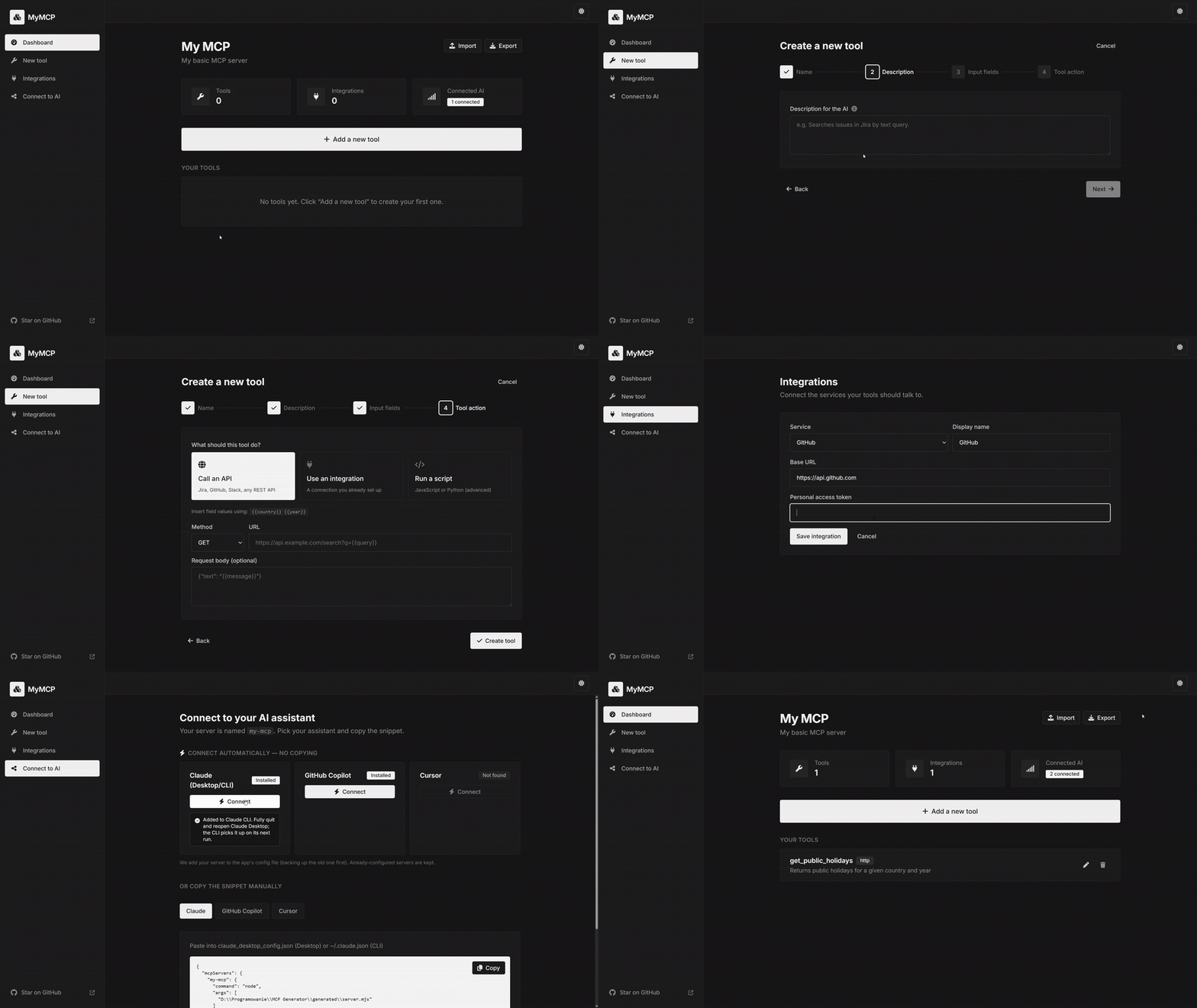
Quick Start
Prerequisite: Node.js 18+ (tested on Node 22).
1. Clone the repository
git clone https://github.com/damiankaniewski/MyMCP.git
cd MyMCP
2. Run the launcher
Windows
start.bat
macOS / Linux
./start.sh
On first run the launcher will:
- Install all dependencies (root, backend, frontend).
- Start the backend on
http://localhost:3001. - Start the web UI on
http://localhost:5173. - Open your browser automatically.
How it works
MyMCP provides a small set of focused screens:
| Screen | Purpose |
|---|---|
| Dashboard | See your project, tools, and MCP status. Import / export project.json. |
| New tool | A step-by-step wizard: name, AI description, input fields, action. |
| Integrations | Connect Jira, GitHub, Slack, Notion, Google Sheets, Calendar, Gmail, Linear, Confluence, Microsoft Teams, Airtable, Discord, Stripe, HubSpot, Zendesk, or any REST API. One click imports a ready-made starter tool pack for each service. |
| Connect to AI | Copy ready-made config, or auto-connect to Claude Desktop, Cursor, VS Code. |
Tool actions
When you create a tool, you choose what it does:
- Call an API — make an HTTP request. Insert field values with
{{fieldName}}and secrets with{{secrets.KEY}}. - Use an integration — reuse a saved connection; auth headers are added for you.
- Run a script — JavaScript or Python (advanced). Your code receives a
paramsobject and returns the result.
Example tool
A "Get Public Holidays" tool, built entirely in the UI, compiles down to this in your project.json:
{
  "name": "get_public_holidays",
  "description": "Returns public holidays for a given country and year.",
  "inputSchema": [
    { "name": "country", "type": "text",   "required": true, "description": "Two-letter code, e.g. PL" },
    { "name": "year",    "type": "number", "required": true, "description": "Year, e.g. 2026" }
  ],
  "executionType": "http",
  "executionConfig": {
    "method": "GET",
    "url": "https://date.nager.at/api/v3/PublicHolidays/{{year}}/{{country}}"
  }
}
Your AI assistant now has a get_public_holidays tool it can call on its own.
Connect your AI assistant
Open the Connect to AI screen. There are two ways to connect.
Automatic (recommended)
MyMCP detects which apps are installed and shows a Connect button. One click writes the server straight into that app's MCP config — your existing servers are kept and the previous file is backed up first. Then restart the app (for VS Code, open Copilot Chat in Agent mode).
Manual
Pick the app's tab, click Copy, and paste the snippet into its MCP config file:
{
  "mcpServers": {
    "my-mcp": {
      "command": "node",
      "args": ["generated/server.mjs"]
    }
  }
}
Supported clients: Claude Desktop, Cursor, VS Code / Copilot, and any client that speaks MCP over stdio.
Architecture
mymcp/
├── frontend/        React + TypeScript + Vite + TailwindCSS web UI
├── backend/         Node + TypeScript + Express + official MCP SDK
│   └── src/
│       ├── generator/   turns project.json into a standalone MCP server
│       ├── routes/      project · tools · integrations · server · export
│       └── storage/     project persistence
├── projects/        your project.json lives here (Git-friendly)
├── templates/       starter tool packs per service (Jira, GitHub, Slack, Notion, Google Sheets, Calendar, Gmail, Linear, Confluence, MS Teams, Airtable, Discord, Stripe, HubSpot, Zendesk)
├── generated/       the compiled MCP server artifact (generated/server.mjs)
├── start.bat        one-click launcher (Windows)
└── start.sh         one-click launcher (macOS / Linux)
Tech stack
| Layer | Technologies |
|---|---|
| Frontend | React 18 · TypeScript · Vite · TailwindCSS · React Router · lucide-react |
| Backend | Node.js · TypeScript · Express · @modelcontextprotocol/sdk · Zod |
| Generator | Compiles project.json into a self-contained server.mjs (stdio) |
Data storage
Everything lives in a single, Git-friendly file:
projects/example-project/project.json
Export it from the Dashboard to back it up or share it. Local secrets are kept in a separate secrets.json that is git-ignored by default.
Developer commands
npm run install:all   # install everything (root + backend + frontend)
npm run dev           # run backend + frontend together with live reload
npm run build         # type-check and build both
- Backend —
backend/(Node + TypeScript + Express + official MCP SDK). - Frontend —
frontend/(React + TypeScript + Vite + TailwindCSS). - Generator — turns
project.jsoninto a self-contained MCP server atgenerated/server.mjs.
The generated server links to the installed dependencies, so a connected client can launch it directly. To run it on another machine, run npm install inside generated/ first.
Roadmap
Shipped
- No-code Tool Wizard (HTTP, integration, JavaScript / Python script)
- One-click connect for Claude Desktop, Cursor, VS Code (Copilot)
- Project import / export (
project.json) - Connection presets with built-in auth (Jira, GitHub, Slack, Notion, REST)
- Single-command launcher (backend + web app in one window)
- Starter tool packs per service — Jira (search / create / comment), GitHub (list / create issues, search repos), Slack (post / list channels / history), Notion (search / get / create page)
- Google integrations: Sheets (read / append / update), Calendar (list / create / get events), Gmail (search / get messages / list labels)
- Extended integrations: Linear (list / search / create issues), Confluence (search / get / create pages), Microsoft Teams (list teams / channels / send message), Airtable (list / create / update records), Discord (send message / list channels / get history), Stripe (list customers / charges / retrieve customer), HubSpot (search contacts / create contact / list deals), Zendesk (list / get / create tickets)
- "Add starter tools" UX: pre-checked checkbox when adding an integration; tools are pre-wired to your credentials automatically
Next — two pillars
1. Integration polish
- Friendly per-field guidance (where to get the token, scopes needed)
2. HTTP transport with auth (self-hosting) Run the generated server on a shared/corporate host instead of only locally over stdio.
- Streamable-HTTP / SSE transport option in the generator (alongside stdio)
- Auth on the HTTP endpoint (bearer / API key), configurable per server
- Remote-URL connect snippets for Claude, Cursor, VS Code
- Deploy notes (port, reverse proxy, secrets) for a corp server
3. Python scripting out of the box Make Python tools reliable on any machine — no "install Python first".
- Managed / detected Python runtime so scripts run with zero setup
- Per-tool dependencies (pip) resolved automatically
- Hardened execution wrapper (clean params in, structured result out)
Not planned: a public marketplace of community templates. The focus is curated, first-party presets that work out of the box.
Have an idea? Open an issue.
Contributing
Contributions, bug reports, and feature requests are welcome.
- Fork the repository and create your branch:
git checkout -b feature/my-feature - Make your changes and run
npm run buildto type-check. - Commit, push, and open a pull request.
The codebase favors modular, well-typed, feature-based code and a plugin-style architecture, so new integrations require minimal changes elsewhere.
Contributors
- Damian Kaniewski — @damiankaniewski
License
Distributed under the MIT License. See LICENSE for details.
Установка MyMCP
У этого сервера нет опубликованного пакета — он собирается из исходников. Открой репозиторий и следуй инструкции в README.
▸ github.com/damiankaniewski/MyMCPFAQ
MyMCP MCP бесплатный?
Да, MyMCP MCP бесплатный — установка в пару кликов через Unyly без оплаты.
Нужен ли API-ключ для MyMCP?
Нет, MyMCP работает без API-ключей и переменных окружения.
MyMCP — hosted или self-hosted?
Self-hosted: сервер запускается локально на твоей машине командой из раздела установки.
Как установить MyMCP в Claude Desktop, Claude Code или Cursor?
Открой MyMCP на unyly.org, выбери вкладку своего клиента (Claude Desktop, Claude Code, Cursor) и нажми Install — конфиг сгенерируется автоматически, без правки JSON.
Похожие MCP
GitHub
PRs, issues, code search, CI status
 автор: GitHub
Filesystem
Secure file operations with configurable access controls.
Memory
Knowledge graph-based persistent memory system.
Template MCP Server
A CLI tool to create a new Model Context Protocol server project with TypeScript support, dual transport options, and an extensible structure
 автор: mcpdotdirect
Compare MyMCP with
Не уверен что выбрать?
Найди свой стек за 60 секунд
Автор?
Embed-бейдж для README
Похожее
Все в категории development