
N8n Server (Custom)
БесплатноНе проверенCustom MCP server for n8n automation, providing 27 tools to manage workflows, executions, credentials, variables, and more via the n8n REST API. Designed to fix

Описание
Custom MCP server for n8n automation, providing 27 tools to manage workflows, executions, credentials, variables, and more via the n8n REST API. Designed to fix compatibility issues with Antigravity AI assistant.
README
Custom Model Context Protocol server for n8n automation - Built specifically for Antigravity AI assistant
License: MIT Node.js TypeScript
🇪🇸 Versión en Español | 📚 Documentación
📖 English Version
⚠️ Important Note
This MCP server is specifically designed for Antigravity.
Why a custom server?
The official @modelcontextprotocol/server-n8n package has compatibility issues with Antigravity, causing persistent EOF (End of File) errors during initialization:
Error calling 'initialize': EOF
Our Solution:
We built this implementation from scratch, replicating the functionality of the official server by implementing 27 essential tools based on the n8n REST API. This guarantees full compatibility with Antigravity while preserving feature parity with the official server.
If you encounter the same EOF error with Antigravity, this server is the fix.
✨ Features
- 🔧 27 MCP Tools - Complete control over your n8n instance
- 🎯 Antigravity Optimized - Built and tested specifically for Antigravity AI assistant
- 🔒 Secure - API key-based authentication, no credentials in code
- 📦 TypeScript - Type-safe and maintainable codebase
- 🚀 Easy Setup - Clone, configure, and run in minutes
- 🔗 Feature Parity - Implements essential functionality from the official server
📸 Result in Action
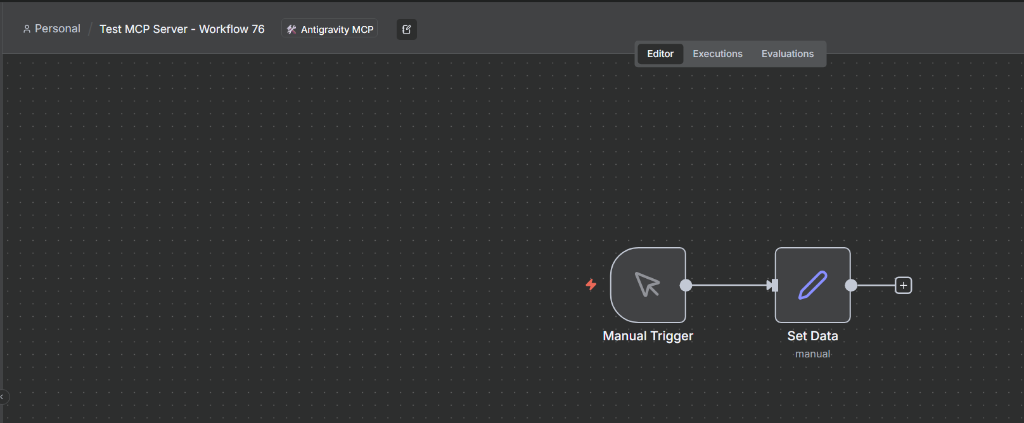 Test workflow visible in n8n editor showing Manual Trigger and Set Data nodes.
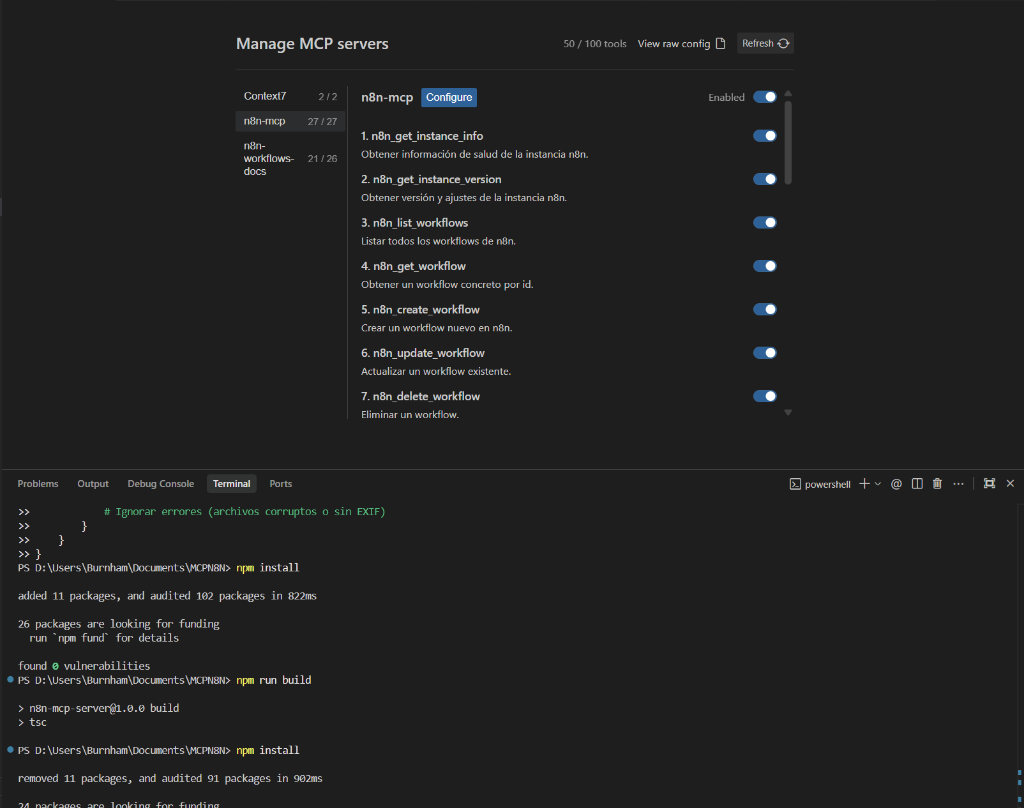 All 27 MCP tools available in Antigravity's MCP server management panel.
🚀 Quick Start
# Clone the repository
git clone https://github.com/burnham/n8n-mcp-server-custom.git
cd n8n-mcp-server-custom

# Install dependencies
npm install

# Configure environment
cp .env.example .env
# Edit .env with your N8N_API_URL and N8N_API_KEY

# Build
npm run build

# Test connection (lists workflows)
npm test
🛠️ Available Tools (27 total)
Workflows (8 tools)
- List, create, update, delete workflows
- Execute workflows with custom data
- Activate / deactivate workflows
Executions (3 tools)
- List workflow executions with filters
- Get execution details
- Stop running executions
Variables (5 tools)
- Full CRUD operations on environment variables
Credentials (6 tools)
- Manage credentials (metadata only, secrets protected)
Node Types (2 tools)
- List and query available node types
Tags (1 tool)
- List workflow tags
System (2 tools)
- Instance health and version info
- Connectivity self-test
🔧 Configuration for Antigravity
Edit your Antigravity config file:
Windows: C:\Users\[YOUR_USER]\.gemini\antigravity\mcp_config.json
Mac/Linux: ~/.gemini/antigravity/mcp_config.json
{
  "mcpServers": {
    "n8n-mcp": {
      "command": "node",
      "args": ["/absolute/path/to/n8n-mcp-server-custom/dist/index.js"],
      "env": {
        "N8N_API_URL": "https://your-instance.n8n.cloud",
        "N8N_API_KEY": "your_api_key_here"
      }
    }
  }
}
Important:
- Use absolute paths
- Replace
[YOUR_USER]with your actual username - Get your API key from n8n Settings → API
📚 Documentation
- Complete Installation Guide - Step-by-step tutorial
- Usage Guide - How to use the server
- n8n API Documentation
- Model Context Protocol
- Official MCP Server
🔒 Security
- ✅
.envfile is gitignored - ✅ No credentials in source code
- ✅ API keys never exposed in commits
- ✅ Secure environment variable handling
🤝 Contributing
Contributions are welcome! Please feel free to submit a Pull Request.
📄 License
MIT License - see LICENSE file for details
👤 Author
Georgios Burnham H.
- GitHub: @burnham
- LinkedIn: Georgios Burnham H.
🇪🇸 Versión en Español
⚠️ Nota Importante
Este servidor MCP está diseñado específicamente para Antigravity.
¿Por qué un servidor personalizado?
El paquete oficial @modelcontextprotocol/server-n8n tiene problemas de compatibilidad con Antigravity, causando errores EOF (End of File) persistentes durante la inicialización:
Error calling 'initialize': EOF
Nuestra Solución:
Esta implementación personalizada fue construida desde cero, replicando la funcionalidad del servidor oficial mediante la implementación de 27 herramientas esenciales basadas en la API REST de n8n. Esto asegura compatibilidad total con Antigravity manteniendo paridad de funciones con el servidor oficial.
Si estás experimentando el mismo error EOF con Antigravity, este servidor es la solución.
✨ Características
- 🔧 27 Herramientas MCP - Control completo de tu instancia n8n
- 🎯 Optimizado para Antigravity - Construido y probado específicamente para el asistente IA Antigravity
- 🔒 Seguro - Autenticación por API key, sin credenciales en el código
- 📦 TypeScript - Base de código type-safe y mantenible
- 🚀 Configuración Fácil - Clona, configura y ejecuta en minutos
- 🔗 Paridad de Funciones - Implementa funcionalidad esencial del servidor oficial
📸 Resultado en Acción
Workflow de prueba visible en el editor de n8n mostrando los nodos Manual Trigger y Set Data.
Las 27 herramientas MCP disponibles en el panel de gestión de servidores MCP de Antigravity.
🚀 Inicio Rápido
# Clonar el repositorio
git clone https://github.com/burnham/n8n-mcp-server-custom.git
cd n8n-mcp-server-custom

# Instalar dependencias
npm install

# Configurar variables de entorno
cp .env.example .env
# Edita .env con tu URL de n8n y API key

# Compilar
npm run build

# Probar conexión
npm test
🛠️ Herramientas Disponibles (27 en total)
Workflows (8 herramientas)
- Listar, crear, actualizar, eliminar workflows
- Ejecutar workflows con datos personalizados
- Activar/desactivar workflows
Ejecuciones (3 herramientas)
- Listar ejecuciones de workflows con filtros
- Ver detalles de ejecuciones
- Detener ejecuciones en curso
Variables (5 herramientas)
- Operaciones CRUD completas en variables de entorno
Credenciales (6 herramientas)
- Gestionar credenciales (solo metadatos, secretos protegidos)
Tipos de Nodo (2 herramientas)
- Listar y consultar tipos de nodos disponibles
Tags (1 herramienta)
- Listar tags de workflows
Sistema (2 herramientas)
- Información de salud y versión de la instancia
- Auto-test de conectividad
🔧 Configuración para Antigravity
Edita tu archivo de configuración de Antigravity:
Windows: C:\Users\[TU_USUARIO]\.gemini\antigravity\mcp_config.json
Mac/Linux: ~/.gemini/antigravity/mcp_config.json
{
  "mcpServers": {
    "n8n-mcp": {
      "command": "node",
      "args": ["/ruta/absoluta/a/n8n-mcp-server-custom/dist/index.js"],
      "env": {
        "N8N_API_URL": "https://tu-instancia.n8n.cloud",
        "N8N_API_KEY": "tu_api_key_aqui"
      }
    }
  }
}
Importante:
- Usa rutas absolutas
- Reemplaza
[TU_USUARIO]con tu usuario real - Obtén tu API key desde n8n Settings → API
📚 Documentación
- Guía de Instalación Completa - Tutorial paso a paso
- Guía de Uso - Cómo usar el servidor
- Documentación API de n8n
- Model Context Protocol
- Servidor MCP Oficial
🔒 Seguridad
- ✅ Archivo
.enven gitignore - ✅ Sin credenciales en el código fuente
- ✅ API keys nunca expuestas en commits
- ✅ Manejo seguro de variables de entorno
🤝 Contribuir
¡Las contribuciones son bienvenidas! No dudes en enviar un Pull Request.
📄 Licencia
Licencia MIT - ver archivo LICENSE para más detalles
👤 Autor
Georgios Burnham H.
- GitHub: @burnham
- LinkedIn: Georgios Burnham H.
⭐ Si este proyecto te resulta útil, dale una estrella en GitHub!
⭐ If you find this project useful, give it a star on GitHub!
Установка N8n Server (Custom)
У этого сервера нет опубликованного пакета — он собирается из исходников. Открой репозиторий и следуй инструкции в README.
▸ github.com/burnham/n8n-mcp-server-customFAQ
N8n Server (Custom) MCP бесплатный?
Да, N8n Server (Custom) MCP бесплатный — установка в пару кликов через Unyly без оплаты.
Нужен ли API-ключ для N8n Server (Custom)?
Нет, N8n Server (Custom) работает без API-ключей и переменных окружения.
N8n Server (Custom) — hosted или self-hosted?
Доступен hosted-вариант: Unyly запускает сервер в облаке, локальная установка не обязательна.
Как установить N8n Server (Custom) в Claude Desktop, Claude Code или Cursor?
Открой N8n Server (Custom) на unyly.org, выбери вкладку своего клиента (Claude Desktop, Claude Code, Cursor) и нажми Install — конфиг сгенерируется автоматически, без правки JSON.
Похожие MCP
Fetch
Web content fetching and conversion for efficient LLM usage.
AWS KB Retrieval
Retrieval from AWS Knowledge Base using Bedrock Agent Runtime.
 автор: modelcontextprotocol
Spring AI MCP Server
Provides auto-configuration for setting up an MCP server in Spring Boot applications.
llm-analysis-assistant
A very streamlined mcp client that supports calling and monitoring stdio/sse/streamableHttp, and can also view request responses through the /logs page. It also
 автор: xuzexin-hz
Compare N8n Server (Custom) with
Не уверен что выбрать?
Найди свой стек за 60 секунд
Автор?
Embed-бейдж для README
Похожее
Все в категории ai