
N8N2MCP
БесплатноНе проверенConvert N8N agent / workflow into MCP servers, you can use it in Claude / Cursor / Super Chain

Описание
Convert N8N agent / workflow into MCP servers, you can use it in Claude / Cursor / Super Chain
README

Transform your N8N workflows into MCP servers instantly
A comprehensive platform that converts N8N workflows into Model Context Protocol (MCP) servers, enabling seamless integration with AI assistants like Claude, Cursor, and other MCP-compatible platforms. Build powerful automation tools using N8N's visual workflow editor and deploy them as callable AI functions.
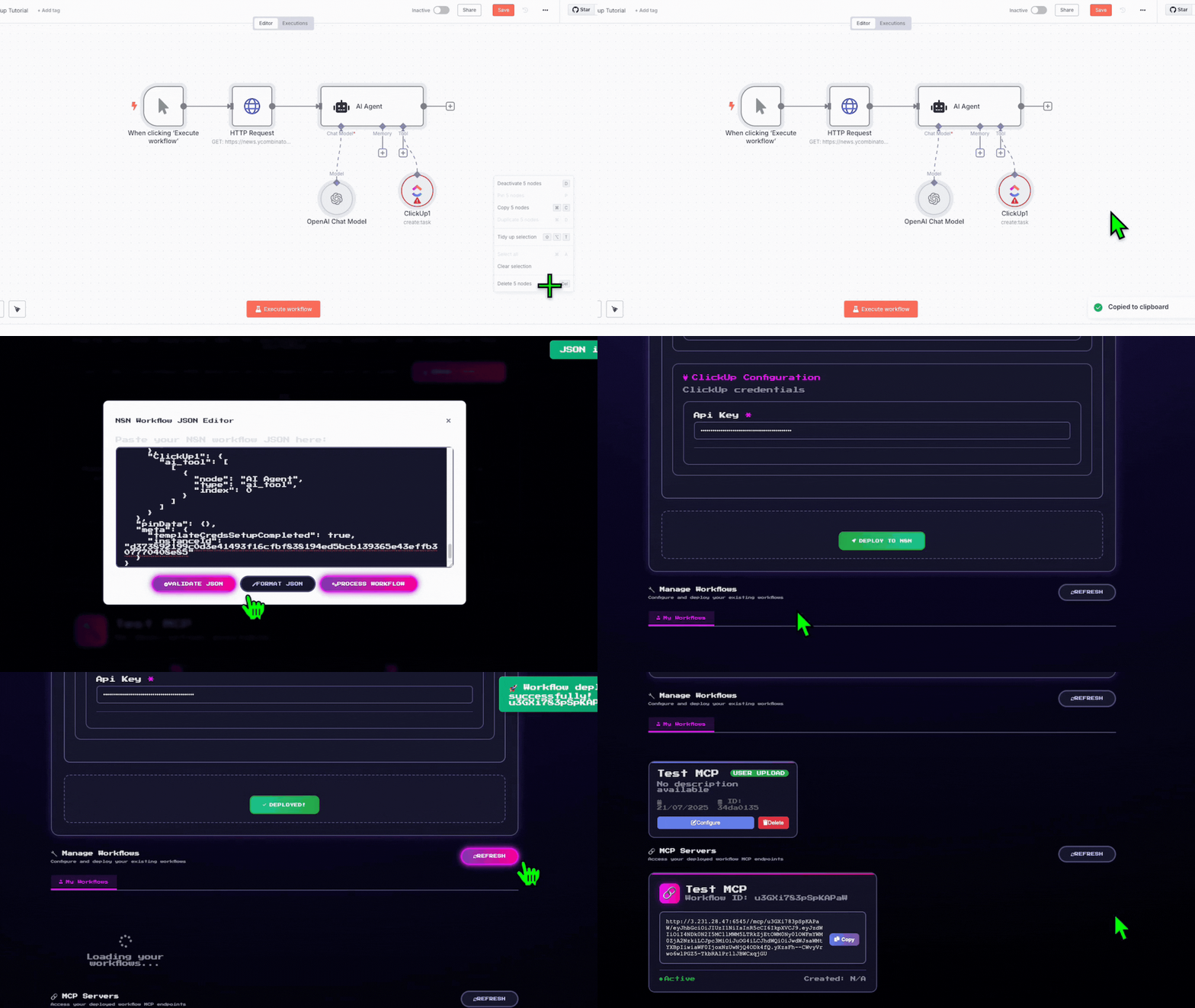
✨ How to use
Copy the N8N template link/JSON from any workflow
Map your credentials through our intuitive interface
Deploy with one click!
Your N8N workflow gets deployed and creates a local hosted MCP server. Just paste the server URL into Claude, Cursor, Super Chain, or any MCP-compatible platform!
🎯 Key Features
🤖 MCP Server Creation
Convert your N8N workflows into MCP servers that AI assistants can use as custom tools
🔄 Dual Architecture
- Agent Marketplace: Web-based workflow management and deployment platform
- MCP Router: High-performance MCP server creation and routing system
🛠️ Comprehensive Workflow Management
- Browse and deploy pre-built workflow templates
- Upload and manage your custom N8N workflows
- Real-time credential configuration and testing
- One-click deployment to your N8N instance
🏗️ Architecture
graph TB
    subgraph "AI Assistant Layer"
        A[Claude/Cursor/Super Chain]
    end

    subgraph "N8N 2 MCP"
        B[Agent Marketplace<br/>Flask Web App]
        C[MCP Router<br/>FastAPI Service]
        D[Workflow Parser<br/>Analysis Engine]
    end

    subgraph "Infrastructure"
        E[Supabase Database]
        F[N8N Instance]
        G[Credential Manager]
    end

    A -->|MCP Protocol| C
    C -->|Dynamic MCP| F
    B -->|Workflow Management| E
    B -->|Deploy & Configure| F
    C -->|User Config| E
    B -->|Parse & Analyze| D
    D -->|Extract Requirements| G
    G -->|Secure Handling| F
📦 Installation
Prerequisites
- Python 3.11+
- N8N Instance (cloud.n8n.io or self-hosted)
- Supabase Account (for data storage)
- Playwright (required for N8N authentication)
- Docker (optional, for containerized deployment)
⚠️ Important: Playwright installation is required for N8N workflow execution. The system will use dummy credentials if Playwright is not properly installed, limiting functionality.
Quick Start
Option 1: Docker Compose (Recommended)
Clone the repository
git clone https://github.com/Super-Chain/N8N2MCP.git
cd N8N2MCP
Configure environment
cp env.example .env
# Edit .env with your actual configuration values
Start with Docker Compose
docker-compose up -dThis starts:
- Flask App (Agent Marketplace) at: http://localhost:5000
- MCP Router at: http://localhost:6545
View logs
docker-compose logs -f
Option 2: Manual Installation
Clone the repository
git clone https://github.com/Super-Chain/N8N2MCP.git
cd N8N2MCP
Install dependencies
pip install -r requirements.txtInstall Playwright browsers (Required)
playwright install
# This downloads the necessary browser binaries for N8N authentication
Configure environment
# Copy and edit the .env file (see Environment Configuration section)
cp .env.example .env
# Supabase Configuration SUPABASE_URL=https://your-project-id.supabase.co SUPABASE_KEY=your_supabase_anon_key SUPABASE_SERVICE_KEY=your_supabase_service_role_key # N8N Configuration X_N8N_API_KEY=your_n8n_api_key N8N_BASE_URL=https://your-n8n-instance.com N8N_USERNAME=your_n8n_username N8N_PASSWORD=your_n8n_password # MCP Router Configuration N8N_BUILDER_URL=http://localhost:6545 # Server Configuration FLASK_HOST=0.0.0.0 FLASK_PORT=5000 MCP_HOST=0.0.0.0 MCP_PORT=6545 # Optional: Authentication credentials (auto-populated) N8N_AUTH= N8N_BROWSER_ID=Start both servers
python main.pyThis starts:
- Flask App (Agent Marketplace) at: http://localhost:5000
- MCP Router at: http://localhost:6545
Access to UI Front end : http://localhost:5000
Configuration Notes:
- SUPABASE_URL: Your Supabase project URL
- SUPABASE_KEY: Anon key for client-side operations
- SUPABASE_SERVICE_KEY: Service role key for admin operations
- N8N_BASE_URL: Your N8N instance URL (must include https://)
- N8N_BUILDER_URL: Must include http:// protocol
🔧 Usage
Creating MCP Servers from N8N Workflows
Method 1: Import N8N Templates
- Browse Templates: Visit the N8N template
- Import Template: Enter an N8N template URL from n8n.io
- Configure Credentials: Fill in required API keys and service credentials
- Deploy Workflow: Click deploy to create the workflow in your N8N instance
- MCP Server Created: Automatically generates an MCP server endpoint
Method 2: Upload Custom Workflows
- Upload JSON: Upload your N8N workflow JSON file / Copy and paste your JSON workflow
- Review Analysis: Check detected nodes and required credentials
- Configure & Deploy: Fill credentials and deploy to N8N
- Access MCP Server: Use the generated MCP endpoint in AI tools
Using MCP Servers
# Example MCP server URL format:
http://localhost:6545/mcp/{workflow_id}/{api_key}

# Test MCP server:
curl http://localhost:6545/list  # List all registered MCP servers
🎨 Use Cases
🔍 Data Processing & Analysis
- Transform CSV/Excel files using N8N's data manipulation nodes
- Connect to databases and APIs for real-time data analysis
- Generate reports and visualizations from AI conversations
🌐 API Integration Hub
- Connect AI assistants to external services (Slack, Google, etc.)
- Create custom API endpoints for proprietary systems
- Build unified interfaces for multiple SaaS platforms
📧 Communication & Notifications
- Send emails, Slack messages, or Discord notifications
- Create automated reporting systems
- Build alert systems triggered by AI interactions
🔄 Workflow Automation
- Trigger complex business processes from AI conversations
- Create approval workflows and task management systems
- Build custom integrations with enterprise systems
🛠️ Development
Project Structure
N8N2MCP/
├── main.py                        # Unified server startup script
├── requirements.txt               # Consolidated Python dependencies
├── .env                          # Environment configuration (shared)
│
├── agent_marketplace/             # Flask web application
│   ├── app.py                    # Main Flask app with API endpoints
│   ├── database.py               # Supabase integration & data models
│   ├── n8n_workflow_parser.py    # Workflow analysis engine
│   ├── setup_supabase.py         # Database setup utilities
│   ├── templates/                # HTML templates
│   │   ├── workflows.html        # Main marketplace interface
│   │   └── static/               # CSS, JS assets
│   └── __init__.py               # Python package marker
│
├── mcp_router/                   # FastAPI MCP service
│   ├── mcp_router.py             # Main FastAPI application
│   ├── n8n_credential_extractor.py # N8N authentication
│   ├── credential_helper.py       # Credential management utilities
│   └── __init__.py               # Python package marker
│
└── README.md                     # This documentation
Database Setup
The system uses 2 main tables in Supabase:
Setup
- Create Supabase Project: Set up a new project at supabase.com
- Run SQL in Supabase SQL Editor:
-- Main workflow storage table
CREATE TABLE IF NOT EXISTS public.user_workflows (
    id UUID DEFAULT gen_random_uuid() PRIMARY KEY,
    user_id TEXT NOT NULL,
    template_id TEXT NOT NULL,
    template_url TEXT NOT NULL,
    workflow_name TEXT NOT NULL,
    workflow_json JSONB NOT NULL,
    workflow_description TEXT,
    n8n_workflow_id TEXT,
    source TEXT DEFAULT 'user_upload',
    credentials_required JSONB DEFAULT '[]'::jsonb,
    mcp_link TEXT,
    status TEXT DEFAULT 'pending',
    created_at TIMESTAMP WITH TIME ZONE DEFAULT NOW(),
    updated_at TIMESTAMP WITH TIME ZONE DEFAULT NOW()
);

-- MCP server configurations
CREATE TABLE IF NOT EXISTS public.mcp_configs (
    id UUID DEFAULT gen_random_uuid() PRIMARY KEY,
    workflow_id TEXT NOT NULL,
    user_apikey TEXT NOT NULL,
    code TEXT NOT NULL,
    created_at TIMESTAMP WITH TIME ZONE DEFAULT NOW(),
    updated_at TIMESTAMP WITH TIME ZONE DEFAULT NOW(),
    UNIQUE(workflow_id, user_apikey)
);

-- Enable Row Level Security (recommended)
ALTER TABLE user_workflows ENABLE ROW LEVEL SECURITY;
ALTER TABLE mcp_configs ENABLE ROW LEVEL SECURITY;
🚀 Running the System
Unified Startup (Recommended)
python main.py
This automatically starts both services with:
- ✅ Environment validation
- ✅ Database setup verification
- ✅ Graceful shutdown handling
- ✅ Centralized logging
Individual Services
Agent Marketplace (Port 5000)
cd agent_marketplace
python app.py
MCP Router (Port 6545)
cd mcp_router
python mcp_router.py
Verification
# Test Agent Marketplace
curl http://localhost:5000/api/health

# Test MCP Router
curl http://localhost:6545/list

# View all endpoints
curl http://localhost:5000/api/health | grep endpoints
🔧 Troubleshooting
Common Issues
Port Already in Use
# Kill processes on ports 5000 and 6545
fuser -k 5000/tcp 6545/tcp
# Or restart with main.py which handles this automatically
python main.py
Database Connection Issues
# Verify Supabase configuration
python -c "from agent_marketplace.database import db_manager; print('✅ Database OK' if db_manager.supabase else '❌ Database connection failed')"

# Reset database tables
python agent_marketplace/setup_supabase.py
MCP Router Not Responding
# Check if MCP Router is running
curl http://localhost:6545/list

# View MCP Router logs
# Logs appear in terminal where main.py was started
N8N Workflow Creation Fails
- Verify
N8N_BASE_URLincludeshttps:// - Check
X_N8N_API_KEYis valid and has workflow creation permissions - Ensure N8N instance is accessible from your server
Missing Dependencies
# Install missing packages
pip install playwright
playwright install  # For N8N authentication (required)

# Or install all dependencies
pip install -r requirements.txt
Playwright Browser Issues
# If playwright browsers fail to download
playwright install --force

# For headless environments (servers)
playwright install chromium

# Check if playwright is working
python -c "from playwright.async_api import async_playwright; print('✅ Playwright OK')"
Development Tips
# Enable debug mode for Flask
export FLASK_DEBUG=1

# View detailed MCP Router logs
cd mcp_router && python mcp_router.py --log-level debug

# Test individual components
python -m agent_marketplace.n8n_workflow_parser  # Test parser
python -m mcp_router.mcp_router                  # Test MCP Router
🔐 Security Best Practices
- Credential Management: Never store user credentials server-side
- API Key Rotation: Regularly rotate N8N API keys and Supabase keys
- Network Security: Use HTTPS in production with proper SSL certificates
- Access Control: Implement proper authentication and authorization
- Data Isolation: Ensure proper user data segregation with RLS policies
🤝 Contributing
- Fork the repository
- Create a feature branch:
git checkout -b feature/amazing-feature - Commit your changes:
git commit -m 'Add amazing feature' - Push to the branch:
git push origin feature/amazing-feature - Open a Pull Request
📄 License
This project is licensed under the MIT License - see the LICENSE file for details.
📋 Quick Reference
API Endpoints
Agent Marketplace (Port 5000)
GET /- Main marketplace interfaceGET /api/health- Health check and available endpointsPOST /api/import-n8n-template-enhanced- Import N8N templatePOST /api/deploy-workflow-to-n8n- Deploy workflow with credentialsGET /api/user/uploaded-workflows- List user workflowsGET /api/user/mcp-servers- List active MCP servers
MCP Router (Port 6545)
GET /list- List all registered MCP serversPOST /n8n/build- Create MCP server from N8N workflowGET /n8n/credentials/status- Check N8N credential status/mcp/{workflow_id}/{api_key}- MCP server endpoint
Key File Locations
- Configuration:
.env(root directory) - Main Startup:
main.py - Flask App:
agent_marketplace/app.py - MCP Router:
mcp_router/mcp_router.py
🆘 Support
- Issues: GitHub Issues
- Documentation: Check this README and inline code documentation
- Community: Join our community discussions for help and feature requests
🙏 Acknowledgments
- N8N for the amazing workflow automation platform
- Model Context Protocol for enabling AI tool integration
- Supabase for the robust database infrastructure
- FastAPI and Flask for the web frameworks
Star History
Built with ❤️ by the SUPERCHAIN team for the AI automation community
Установка N8N2MCP
У этого сервера нет опубликованного пакета — он собирается из исходников. Открой репозиторий и следуй инструкции в README.
▸ github.com/Super-Chain/N8N2MCPFAQ
N8N2MCP MCP бесплатный?
Да, N8N2MCP MCP бесплатный — установка в пару кликов через Unyly без оплаты.
Нужен ли API-ключ для N8N2MCP?
Нет, N8N2MCP работает без API-ключей и переменных окружения.
N8N2MCP — hosted или self-hosted?
Self-hosted: сервер запускается локально на твоей машине командой из раздела установки.
Как установить N8N2MCP в Claude Desktop, Claude Code или Cursor?
Открой N8N2MCP на unyly.org, выбери вкладку своего клиента (Claude Desktop, Claude Code, Cursor) и нажми Install — конфиг сгенерируется автоматически, без правки JSON.
Похожие MCP
Fetch
Web content fetching and conversion for efficient LLM usage.
AWS KB Retrieval
Retrieval from AWS Knowledge Base using Bedrock Agent Runtime.
 автор: modelcontextprotocol
Spring AI MCP Server
Provides auto-configuration for setting up an MCP server in Spring Boot applications.
llm-analysis-assistant
A very streamlined mcp client that supports calling and monitoring stdio/sse/streamableHttp, and can also view request responses through the /logs page. It also
 автор: xuzexin-hz
Compare N8N2MCP with
Не уверен что выбрать?
Найди свой стек за 60 секунд
Автор?
Embed-бейдж для README
Похожее
Все в категории ai