
Nautobot
БесплатноНе проверенA Model Context Protocol (MCP) server for interacting with Nautobot APIs using semantic search and dynamic API requests.

Описание
A Model Context Protocol (MCP) server for interacting with Nautobot APIs using semantic search and dynamic API requests.
README
CI Documentation GitHub release (latest by date) GitHub Python Version Code style: ruff
A Model Context Protocol (MCP) server for interacting with Nautobot APIs using semantic search and dynamic API requests. This server provides intelligent access to Nautobot instances and a comprehensive knowledge base of Nautobot-related repositories.
📖 Documentation
🚀 Features
Core Capabilities
- Dynamic API Access: Perform CRUD operations on any Nautobot API endpoint
- Semantic Endpoint Discovery: Find relevant API endpoints using natural language queries
- Knowledge Base Search: Access indexed content from official Nautobot repositories
- Multi-Environment Support: Connect to different Nautobot instances (dev, staging, prod)
- Smart Caching: Efficient ChromaDB-powered vector storage with Git-based updates
API Tools
nautobot_dynamic_api_request: Execute any HTTP method against Nautobot APIsnautobot_openapi_api_request_schema: Discover API endpoints through semantic searchnautobot_kb_semantic_search: Search through indexed Nautobot documentation and code- Repository management tools for maintaining the knowledge base
📋 Prerequisites
- Python 3.11+ (< 3.12)
- Access to a Nautobot instance
- Git (for repository cloning and updates)
- GitHub token (for accessing repositories)
Design Overview
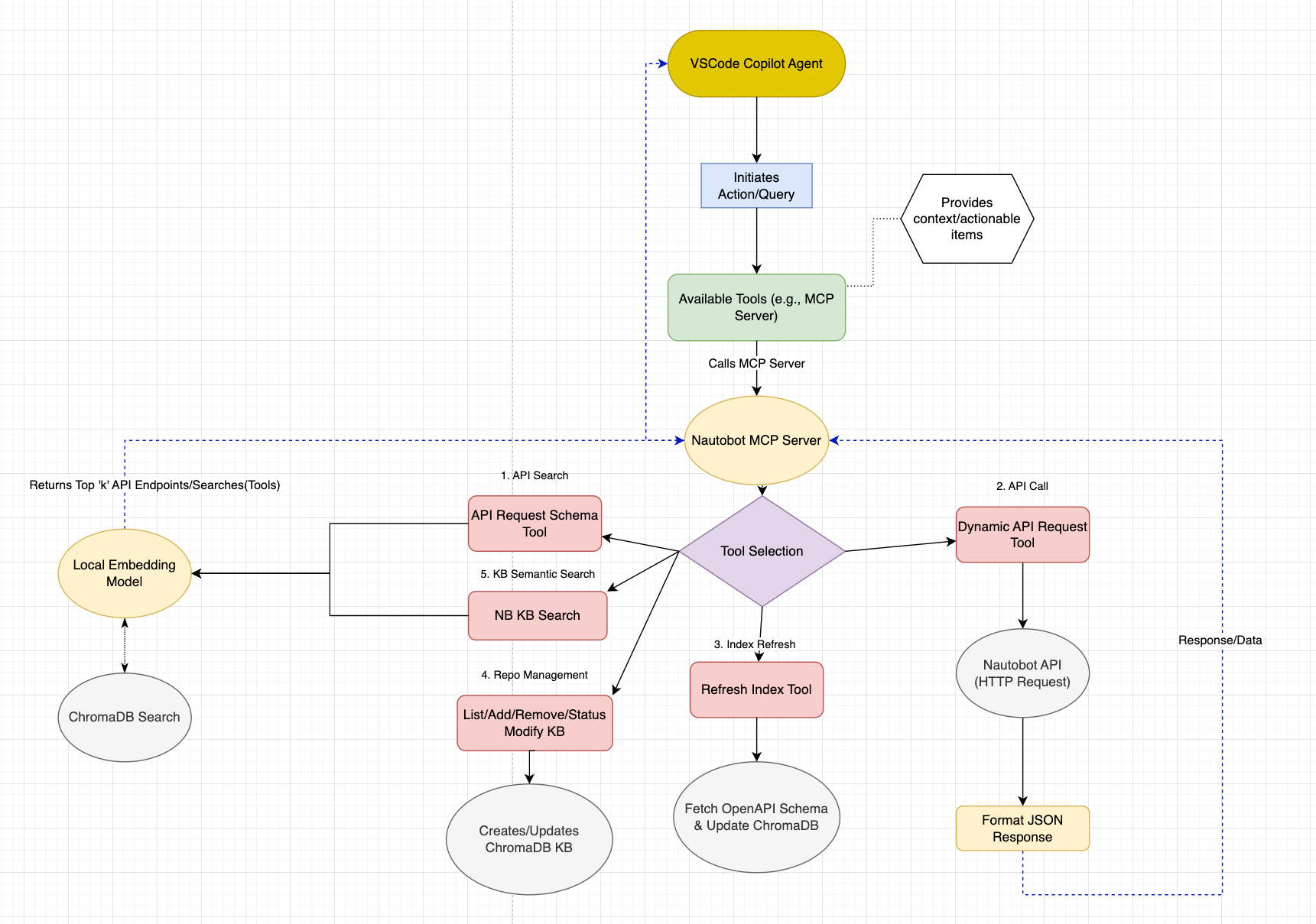
🛠️ Installation
Option 1: Docker Installation (Recommended)
The easiest way to run the Nautobot MCP server is using Docker:
Clone the repository:
git clone <repository-url>
cd nautobot_mcp
Configure environment variables:
cp .env.example .env
# Edit .env with your configuration
Run with Docker Compose:
# For stdio mode (default)
docker compose up -d

# For HTTP mode
MCP_TRANSPORT=http MCP_PORT=8000 docker compose up -d
Option 2: Local Python Installation
Clone the repository:
git clone <repository-url>
cd nautobot_mcp
Install dependencies:
# Using uv (recommended)
uv sync

# Or using pip
pip install -e .
Configure environment variables:
cp .env.example .env
# Edit .env with your configuration
⚙️ Configuration
Environment Variables
Create a .env file with the following variables:
# Nautobot API Configuration
NAUTOBOT_TOKEN=your_nautobot_api_token
NAUTOBOT_ENV=local  # Options: local, nonprod, prod

# Environment-specific URLs and tokens
NAUTOBOT_NONPROD_BASE_URL=https://nautobot-nonprod.example.com/
NAUTOBOT_NONPROD_TOKEN=your_nonprod_token
NAUTOBOT_PROD_BASE_URL=https://nautobot.example.com/
NAUTOBOT_PROD_TOKEN=your_prod_token

# GitHub Configuration (for knowledge base)
GITHUB_TOKEN=your_github_token

# Optional Configuration
SSL_VERIFY=False  # Set to True for production
POSTHOG_API_KEY=disable  # Analytics (optional)
Repository Configuration
The knowledge base automatically indexes official Nautobot repositories. You can customize this by editing:
config/repositories.json- Official and community repositoriesconfig/user_repositories.json- Your custom repositories
Example repository configuration:
{
  "name": "nautobot/nautobot",
  "description": "Core Nautobot application",
  "priority": 1,
  "enabled": true,
  "branch": "develop",
  "file_patterns": [".py", ".md", ".txt", ".rst", ".yaml", ".yml"]
}
Configuration Options Reference
| Environment Variable | Default | Description |
|---|---|---|
NAUTOBOT_TOKEN |
`` | API token for authentication |
NAUTOBOT_ENV |
local |
Environment selection (local/nonprod/prod) |
GITHUB_TOKEN |
"" |
GitHub token for repository access |
API_PREFIX |
nautobot_openapi |
MCP tool prefix |
SERVER_NAME |
any_openapi |
MCP server name |
SERVER_VERSION |
0.2.0 |
Server version |
LOG_LEVEL |
INFO |
Logging level |
EMBEDDING_MODEL |
all-MiniLM-L6-v2 |
Sentence transformer model |
DEFAULT_SEARCH_RESULTS |
5 |
Default number of search results |
POSTHOG_API_KEY |
disable |
PostHog analytics API key |
API_TIMEOUT |
10 |
Request timeout in seconds |
SSL_VERIFY |
True |
SSL certificate verification |
🚀 Usage
Starting the MCP Server
Docker Usage
stdio mode (for MCP clients like Claude Desktop, VS Code, etc.):
# Using docker compose
docker compose up -d

# Or using docker run
docker run -d \
  --name nautobot-mcp \
  --env-file .env \
  -v nautobot-mcp-chroma:/app/backend/chroma_db \
  -v nautobot-mcp-models:/app/backend/models \
  nautobot-mcp:latest --mode stdio
HTTP mode (for web-based integrations):
# Using docker compose
MCP_TRANSPORT=http MCP_PORT=8000 docker compose up -d

# Or using docker run
docker run -d \
  --name nautobot-mcp \
  --env-file .env \
  -e MCP_TRANSPORT=http \
  -e MCP_PORT=8000 \
  -p 8000:8000 \
  -v nautobot-mcp-chroma:/app/backend/chroma_db \
  -v nautobot-mcp-models:/app/backend/models \
  nautobot-mcp:latest --mode http --port 8000
View logs:
# Follow logs
docker compose logs -f

# View last 100 lines
docker compose logs --tail=100
Stop the server:
docker compose down

# To also remove volumes (warning: deletes ChromaDB data)
docker compose down -v
Local Python Usage
stdio mode:
python main.py
# or
python main.py --mode stdio
HTTP mode:
python main.py --mode http
# or with custom port
python main.py --mode http --port 9000
Legacy server files (still supported):
# stdio mode
python server.py

# HTTP mode
python server_http.py
The server will automatically:
- Initialize the ChromaDB collections
- Refresh the API endpoint index
- Update the knowledge base from configured repositories
- Start serving MCP requests
Integration with VS Code Copilot
Add to your VS Code MCP settings to use with GitHub Copilot:
- VS Code: Command Palete:
- '>MCP: Open User Configuration'
Local Installation:
{
	"servers": {
		"nautobot_mcp": {
			"type": "stdio",
			"command": "uv",
			"args": [
				"run",
				"--directory",
				"/path/to/nautobot_mcp",
				"python",
				"main.py",
				"--mode",
				"stdio"
			]
		}
	},
	"inputs": []
}
Docker Installation:
{
	"servers": {
		"nautobot_mcp": {
			"type": "stdio",
			"command": "docker",
			"args": [
				"run",
				"-i",
				"--rm",
				"--env-file",
				"/path/to/nautobot_mcp/.env",
				"-v",
				"nautobot-mcp-chroma:/app/backend/chroma_db",
				"-v",
				"nautobot-mcp-models:/app/backend/models",
				"nautobot-mcp:latest",
				"--mode",
				"stdio"
			]
		}
	},
	"inputs": []
}
Docker Configuration Notes
Data Persistence:
- ChromaDB data is stored in the
nautobot-mcp-chromavolume - Sentence transformer models are cached in the
nautobot-mcp-modelsvolume - Volumes persist across container restarts and rebuilds
- To reset the knowledge base, remove the volumes:
docker compose down -v
Environment Variables:
- All configuration is done through the
.envfile - The
.envfile is loaded automatically when usingdocker compose - For
docker run, use--env-file .envor-e VAR=valuefor individual variables
Transport Modes:
- stdio mode: For integration with MCP clients (Claude Desktop, VS Code, etc.)
- HTTP mode: For web-based integrations or REST API access
- Switch modes by setting
MCP_TRANSPORT=httporMCP_TRANSPORT=stdio
Resource Management:
- Default limits: 2 CPU cores, 4GB RAM
- Adjust in
docker compose.ymlunderdeploy.resources - Monitor usage:
docker stats nautobot-mcp-server
Logs:
- View logs:
docker compose logs -f - Logs are rotated (max 10MB per file, 3 files retained)
- Adjust in
docker compose.ymlunderlogging
### Example API Requests

#### Search for API Endpoints
```python
# Find endpoints related to devices
query = "get device information"
# Returns relevant endpoints like /dcim/devices/
Execute API Requests
# Get all locations
method = "GET"
path = "/dcim/locations/"
params = {"limit": 100}
Search Knowledge Base
# Find documentation about custom fields
query = "how to create custom fields in Nautobot"
# Returns relevant documentation and code examples
📁 Project Structure
nautobot_mcp/
├── server.py                 # Main MCP server
├── pyproject.toml            # Project configuration
├── .env                      # Environment variables
│
├── config/                   # Configuration files
│   ├── repositories.json     # Official repository definitions
│   └── user_repositories.json # User-defined repositories
│
├── helpers/                  # Core modules
│   ├── nb_kb_v2.py          # Enhanced knowledge base
│   ├── endpoint_searcher_chroma.py # API endpoint search
│   ├── content_processor.py  # Document processing
│   └── manage_repos.py       # Repository management
│
├── utils/                    # Utility modules
│   ├── config.py            # Configuration management
│   ├── embedding.py         # Vector embedding utilities
│   ├── git_manager.py       # Git operations
│   └── repo_config.py       # Repository configuration
│
├── examples/                 # Usage examples
│   ├── example_kb_search.py  # Knowledge base search demo
│   ├── config_demo.py       # Configuration examples
│   └── pynautobot_kb_example/ # PyNautobot integration
│
├── tests/                    # Test suite
│   ├── test_nb_kb_v2.py     # Knowledge base tests
│   ├── test_endpoint_searcher_chroma.py # API search tests
│   └── test_manage_repos.py  # Repository management tests
│
└── backend/                  # Data storage
    └── models/               # Cached embedding models
🔧 Development
Running Tests
# Run all tests
pytest

# Run specific test categories
pytest -m "unit"
pytest -m "integration"
pytest -m "not slow"

# Run with coverage
pytest --cov=helpers --cov=utils
Code Quality
The project uses several tools for code quality:
# Format code
ruff format .

# Lint code
ruff check .

# Pre-commit hooks (install once)
pre-commit install
Adding New Repositories
To add repositories to the knowledge base:
Add to configuration:
from helpers.manage_repos import RepositoryManager

manager = RepositoryManager()
manager.add_repository("owner/repo", category="custom", description="My custom repo")
Initialize the repository:
manager.initialize_repositories(force=True)
📖 Examples
Basic Knowledge Base Search
from helpers.nb_kb_v2 import EnhancedNautobotKnowledge

kb = EnhancedNautobotKnowledge()
results = kb.search("custom field validation", n_results=5)

for result in results:
    print(f"Repository: {result['metadata']['repository']}")
    print(f"File: {result['metadata']['file_path']}")
    print(f"Content: {result['document'][:200]}...")
API Endpoint Discovery
from helpers.endpoint_searcher_chroma import EndpointSearcherChroma

searcher = EndpointSearcherChroma()
endpoints = searcher.search("create new device", n_results=3)

for endpoint in endpoints:
    print(f"Method: {endpoint['method']}")
    print(f"Path: {endpoint['path']}")
    print(f"Description: {endpoint['description']}")
Dynamic API Requests
import requests
from utils.config import config

# Example: Get device count
response = requests.get(
    f"{config.NAUTOBOT_BASE_URL}/api/dcim/devices/",
    headers={"Authorization": f"Token {config.NAUTOBOT_TOKEN}"},
    params={"limit": 1},
    verify=config.SSL_VERIFY
)

total_count = response.json()["count"]
print(f"Total devices: {total_count}")
🤝 Contributing
- Fork the repository
- Create a feature branch (
git checkout -b feature/amazing-feature) - Commit your changes (
git commit -m 'Add amazing feature') - Push to the branch (
git push origin feature/amazing-feature) - Open a Pull Request
Development Guidelines
- Follow PEP 8 style guidelines
- Add tests for new functionality
- Update documentation for API changes
- Use type hints where appropriate
- Run the full test suite before submitting
🧪 Testing & Validation
Available Examples
The examples/ directory contains several demonstration scripts:
example_kb_search.py- Basic knowledge base search functionalityexample_job.py- Example Nautobot job integrationdemo_hybrid_processing.py- Demonstrates hybrid content processingexample_detailed_search_analysis.py- Advanced search analysisfetch_schema.py- OpenAPI schema fetching utilitypynautobot_kb_example/- PyNautobot integration examples
Running Tests
The project includes comprehensive tests in the tests/ directory:
# Run all tests
uv run python -m pytest tests/

# Run specific test files
uv run python tests/test_nb_kb_v2.py
uv run python tests/test_endpoint_searcher_chroma.py
uv run python tests/test_manage_repos.py
Validation
Test your configuration and server setup:
# Test configuration
uv run python -c "from utils.config import config; print('Config OK:', config.SERVER_NAME)"

# Test server initialization
uv run python -c "from server import main; print('Server imports OK')"
🛠️ MCP Tools Available
API Tools
nautobot_openapi_api_request_schema: Search for API endpoints by intentnautobot_dynamic_api_request: Execute API requests with any HTTP methodrefresh_endpoint_index: Manually refresh the endpoint search index
Knowledge Base Tools
nautobot_kb_semantic_search: Semantic search over Nautobot knowledge base repositoriesnautobot_kb_list_repos: List repositories configured in Nautobot knowledge basenautobot_kb_add_repo: Add a new repository to the Nautobot knowledge basenautobot_kb_remove_repo: Remove an existing repository from the Nautobot knowledge basenautobot_kb_update_repos: Update repositories in the Nautobot knowledge basenautobot_kb_init_repos: Initialize repositories in the Nautobot knowledge basenautobot_kb_repo_status: Show nautobot knowledge base repository status including document counts and indexing status
🐛 Troubleshooting
Common Issues
SSL Certificate Errors:
# Set SSL_VERIFY=False in .env for development
SSL_VERIFY=False
ChromaDB Permission Issues:
# Ensure proper permissions on the backend directory
chmod -R 755 backend/
GitHub API Rate Limits:
# Ensure you have a valid GitHub token
GITHUB_TOKEN=your_github_token
Repository Initialization Fails:
# Force reinitialize repositories
kb = EnhancedNautobotKnowledge()
kb.initialize_all_repositories(force=True)
Docker-Specific Issues
Container Won't Start:
# Check logs for errors
docker compose logs

# Verify environment variables
docker compose config

# Rebuild the image
docker compose build --no-cache
Volume Permission Issues:
# Check volume permissions
docker compose exec nautobot-mcp ls -la /app/backend/

# If needed, recreate volumes
docker compose down -v
docker compose up -d
Port Already in Use (HTTP mode):
# Check what's using the port
lsof -i :8000

# Use a different port
MCP_PORT=9000 docker compose up -d
Out of Memory Errors:
# Increase memory limits in docker compose.yml
# Under deploy.resources.limits.memory

# Check current usage
docker stats nautobot-mcp-server
ChromaDB Data Not Persisting:
# Verify volumes are created
docker volume ls | grep nautobot-mcp

# Inspect volume
docker volume inspect nautobot-mcp-chroma
Building Behind Corporate Proxy:
# Add proxy settings to docker compose.yml build args
docker compose build \
  --build-arg HTTP_PROXY=http://proxy.example.com:8080 \
  --build-arg HTTPS_PROXY=http://proxy.example.com:8080
Debug Mode
Enable debug logging by setting:
LOG_LEVEL=DEBUG
📞 Support
- 📖 Documentation - Comprehensive guides and references
- 🐛 Issue Tracker - Bug reports and feature requests
- 💬 Discussions - Questions and community support
- 📂 Examples - Check the
examples/directory for usage patterns - 🧪 Tests - Review the test suite for implementation details
🙏 Acknowledgments
- Nautobot - Network automation platform
- Model Context Protocol - MCP Python SDK
- ChromaDB - Vector database
- Sentence Transformers - Embedding models
📝 License
This project is licensed under the MIT License - see the LICENSE file for details.
Установить Nautobot в Claude Desktop, Claude Code, Cursor
unyly install nautobot-mcpСтавит в Claude Desktop, Claude Code, Cursor и VS Code — сам разбирается с npx, uvx и сборкой из исходников.
Впервые? Поставь CLI: curl -fsSL https://unyly.org/install | sh
Или настроить вручную
Выполни в терминале:
claude mcp add nautobot-mcp -- uvx nautobot-mcpFAQ
Nautobot MCP бесплатный?
Да, Nautobot MCP бесплатный — установка в пару кликов через Unyly без оплаты.
Нужен ли API-ключ для Nautobot?
Нет, Nautobot работает без API-ключей и переменных окружения.
Nautobot — hosted или self-hosted?
Доступен hosted-вариант: Unyly запускает сервер в облаке, локальная установка не обязательна.
Как установить Nautobot в Claude Desktop, Claude Code или Cursor?
Открой Nautobot на unyly.org, выбери вкладку своего клиента (Claude Desktop, Claude Code, Cursor) и нажми Install — конфиг сгенерируется автоматически, без правки JSON.
Похожие MCP
GitHub
PRs, issues, code search, CI status
 автор: GitHub
Filesystem
Secure file operations with configurable access controls.
Memory
Knowledge graph-based persistent memory system.
Template MCP Server
A CLI tool to create a new Model Context Protocol server project with TypeScript support, dual transport options, and an extensible structure
 автор: mcpdotdirect
Compare Nautobot with
Не уверен что выбрать?
Найди свой стек за 60 секунд
Автор?
Embed-бейдж для README
Похожее
Все в категории development