
Nav2 Server
БесплатноНе проверенEnables control and monitoring of Nav2 navigation operations, including navigation, waypoints, costmap management, and lifecycle control, through the MCP protoc

Описание
Enables control and monitoring of Nav2 navigation operations, including navigation, waypoints, costmap management, and lifecycle control, through the MCP protocol.
README




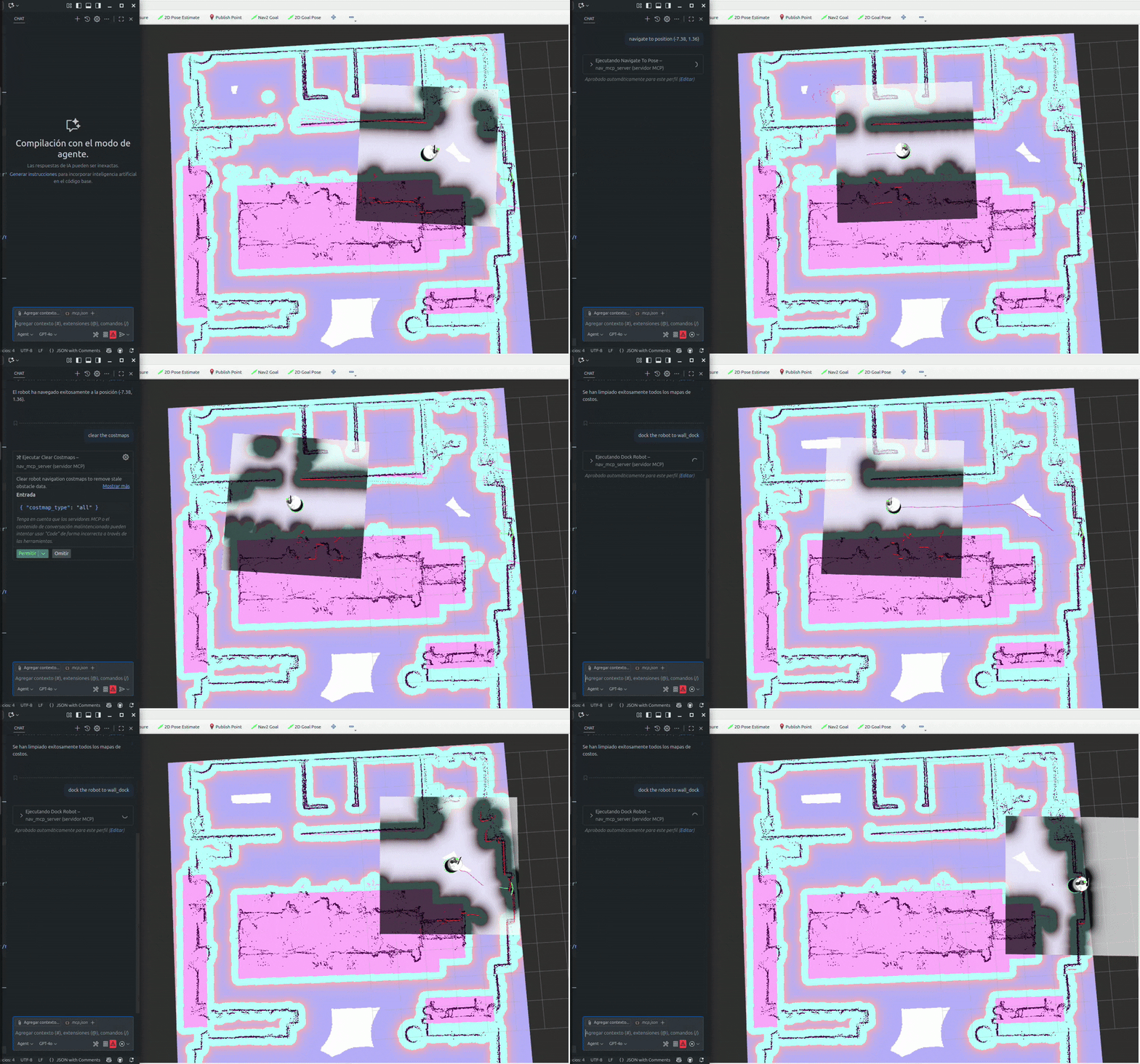
An MCP (Model Context Protocol) server that provides tools and resources to control and monitor Nav2 navigation operations, allowing seamless integration with Nav2-enabled robots through the MCP protocol.
Features
- Navigation control: Navigate to specific poses, follow waypoint sequences, and execute precise robot movements
- Real-time status: Monitor navigation progress, robot pose, and system status with comprehensive feedback
- Costmap management: Clear stale obstacle data and manage navigation costmaps for optimal path planning
- Lifecycle management: Control Nav2 system startup and shutdown for complete system control
- ROS 2 integration: Full compatibility with Nav2 navigation stack and ROS 2 ecosystem
- Async operations: Non-blocking navigation commands with progress monitoring and cancellation support
Tools
| Tool | Description | Parameters |
|---|---|---|
| navigate_to_pose | Navigate the robot to a specific pose (position and orientation) in the map frame | x: float, y: float, yaw: float |
| follow_waypoints | Navigate the robot through a sequence of waypoints in order | waypoints: str (JSON array) |
| spin_robot | Rotate the robot in place by a specified angle | angle: float |
| backup_robot | Move the robot backward by a specified distance | distance: float, speed: float |
| dock_robot | Dock the robot to a charging station or dock | x: float, y: float, yaw: float, dock_id: str, dock_type: str, nav_to_dock: bool |
| undock_robot | Undock the robot from a charging station or dock | dock_type: str |
| clear_costmaps | Clear robot navigation costmaps to remove stale obstacle data | costmap_type: str |
| get_robot_pose | Get the current position and orientation of the robot | — |
| cancel_navigation | Cancel the currently active navigation task | — |
| nav2_lifecycle | Control Nav2 lifecycle (startup or shutdown) | action: str |
| get_path | Compute a navigation path between two poses | start_x: float, start_y: float, start_yaw: float, goal_x: float, goal_y: float, goal_yaw: float, planner_id: str |
| get_path_from_robot | Compute a navigation path from the robot's current pose to a goal pose | goal_x: float, goal_y: float, goal_yaw: float, planner_id: str |
Environment Variables
| Variable | Default | Description |
|---|---|---|
ROS_DOMAIN_ID |
— | ROS 2 domain ID for network isolation (recommended to set) |
ROS_LOCALHOST_ONLY |
— | Set to '1' to restrict ROS 2 communication to localhost only |
Configuration
Environment Variables
| Variable | Default | Description |
|---|---|---|
TRANSPORT_MODE |
stdio |
Transport mode: stdio (local integration) or http (network) |
HTTP_HOST |
0.0.0.0 |
HTTP host binding (only used when TRANSPORT_MODE=http) |
HTTP_PORT |
3001 |
HTTP port (only used when TRANSPORT_MODE=http) |
LOG_LEVEL |
INFO |
Logging level: DEBUG, INFO, WARNING, ERROR, CRITICAL |
ROS_DOMAIN_ID |
— | ROS 2 domain ID for network isolation (recommended) |
ROS_LOCALHOST_ONLY |
— | Set to '1' to restrict ROS 2 communication to localhost only |
Setup
- Copy the environment configuration template:
cp .env.example .env
- Edit
.envto customize settings:
# Transport mode: 'stdio' for local, 'http' for containerized/network
TRANSPORT_MODE=stdio

# HTTP settings (only needed if using http transport)
HTTP_HOST=0.0.0.0
HTTP_PORT=3001

# Logging
LOG_LEVEL=INFO
Installation
Dependencies
- Robot Operating System (ROS) 2: Middleware for robotics (Jazzy)
- fastmcp: MCP server framework
- python: Python programming language
- uv: Python package manager (optional)
Install with uv
Clone the repository and install with uv:
git clone https://github.com/ajtudela/nav2_mcp_server.git
cd nav2_mcp_server
# Set up ROS 2 environment variables if needed
export ROS_DOMAIN_ID=0
uv sync
Or install directly from the repository:
uv add git+https://github.com/ajtudela/nav2_mcp_server.git
Docker
Build the image
Build the image:
docker build -t nav2-mcp-server:latest .
Pull the image
Pull the latest image from the Docker registry:
docker pull ghcr.io/ajtudela/nav2_mcp_server:latest
Usage
Running with uv
uv run nav2_mcp_server
Configuration example for Claude Desktop/Cursor/VSCode
Add this configuration to your application's settings (mcp.json):
Using uv (stdio transport)
{
  "nav2 mcp server": {
    "type": "stdio",
    "command": "uv",
    "args": [
      "run",
      "--directory",
      "/path/to/nav2_mcp_server",
      "nav2-mcp-server"
    ],
    "env": {
      "ROS_DOMAIN_ID": "0",
      "ROS_LOCALHOST_ONLY": "1"
    }
  }
}
Using Docker (stdio transport)
"nav2 mcp server": {
    "type": "stdio",
    "command": "docker",
    "args": [
        "run",
        "-i",
        "--rm",
        "ghcr.io/ajtudela/nav2_mcp_server"
    ],
    "env": {
      "ROS_DOMAIN_ID": "0",
      "ROS_LOCALHOST_ONLY": "1"
    }
}
Using HTTP transport
"nav2 mcp server": {
  "type": "http",
  "url": "http://localhost:3001/mcp",
  "env": {
    "TRANSPORT_MODE": "http",
    "LOG_LEVEL": "INFO"
  }
}
Установка Nav2 Server
У этого сервера нет опубликованного пакета — он собирается из исходников. Открой репозиторий и следуй инструкции в README.
▸ github.com/ajtudela/nav2_mcp_serverFAQ
Nav2 Server MCP бесплатный?
Да, Nav2 Server MCP бесплатный — установка в пару кликов через Unyly без оплаты.
Нужен ли API-ключ для Nav2 Server?
Нет, Nav2 Server работает без API-ключей и переменных окружения.
Nav2 Server — hosted или self-hosted?
Self-hosted: сервер запускается локально на твоей машине командой из раздела установки.
Как установить Nav2 Server в Claude Desktop, Claude Code или Cursor?
Открой Nav2 Server на unyly.org, выбери вкладку своего клиента (Claude Desktop, Claude Code, Cursor) и нажми Install — конфиг сгенерируется автоматически, без правки JSON.
Похожие MCP
GitHub
PRs, issues, code search, CI status
 автор: GitHub
Filesystem
Secure file operations with configurable access controls.
Memory
Knowledge graph-based persistent memory system.
Template MCP Server
A CLI tool to create a new Model Context Protocol server project with TypeScript support, dual transport options, and an extensible structure
 автор: mcpdotdirect
Compare Nav2 Server with
Не уверен что выбрать?
Найди свой стек за 60 секунд
Автор?
Embed-бейдж для README
Похожее
Все в категории development