
Nexus Core
БесплатноНе проверенA self-hostable, multi-MCP personal-assistant framework with multi-provider LLM orchestration, a real safety model, and a production-grade test suite. Nexus Cor

Описание
A self-hostable, multi-MCP personal-assistant framework with multi-provider LLM orchestration, a real safety model, and a production-grade test suite. Nexus Core is the engine behind a Telegram-based personal assistant: it takes a message (text or voice), routes it through an LLM, lets the model call tools exposed by a fleet of Model Context Protocol servers, gates anything destructive behind exp
README
A self-hostable, multi-MCP personal-assistant framework with multi-provider LLM orchestration, a real safety model, and a production-grade test suite.
Nexus Core is the engine behind a Telegram-based personal assistant: it takes a message (text or voice), routes it through an LLM, lets the model call tools exposed by a fleet of Model Context Protocol servers, gates anything destructive behind explicit human approval, and replies. It is designed to run on your own machine against your own accounts — no third-party assistant cloud in the middle.
This is a clean, reference extraction: all personal data, credentials, and proprietary business logic have been removed. Bring your own keys and accounts.
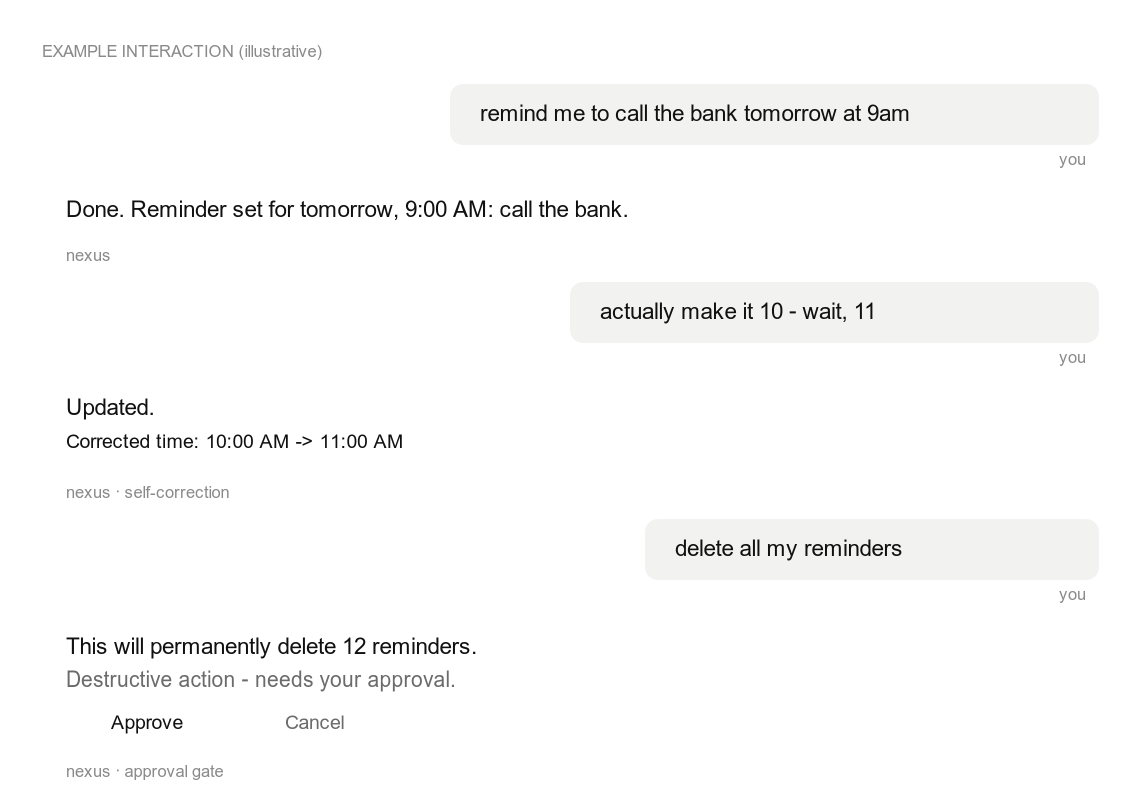
Illustrative interaction — showing in-message self-correction and the approval gate that holds destructive actions.
What's interesting here
- Multi-provider LLM orchestration (
services/brain_router.py) — a single entry point that routes a turn to a local Claude/Codex CLI subprocess (with the MCP servers loaded) or a local Ollama model, with circuit breakers, retries, and graceful fallback to a deterministic responder when every provider is down. - An agentic tool loop (
pipeline/tool_dispatcher.py) — the model proposes tool calls, the dispatcher executes them, feeds results back, and iterates to a final reply, with dedup, thread binding, and a hard iteration cap. - A real safety model — a destructive-intent classifier plus an approval-gate flow: anything that deletes, sends, or overwrites is held until the user approves it in-chat. Cross-user access is rejected; tool inputs are validated.
- Conversational recovery + self-correction — interprets messy follow-ups ("actually make it Tuesday", "June 2 no June 4") and echoes the correction so a revision is never silently applied.
- A fleet of MCP servers (
mcp_servers/) — reminders & tasks, a knowledge store, filesystem access behind a security boundary, PDF tools, Google Calendar / Gmail / Contacts, a browser agent, and a capability-introspection server. - Production hardening built in — user-scoped data access, pre-commit secret scanning + pre-push test hooks, structured logging with secret redaction, and a documented data map.
Architecture
Telegram ─► pipeline/unified.py ─► auth gate ─► tool_dispatcher ─┐
                                                                 │  proposes tool calls
                                  brain_router (Claude / Ollama) ◄┘
                                       │
            ┌──────────────────────────┼───────────────────────────┐
            ▼                          ▼                            ▼
     MCP servers (mcp_servers/)   services/ (domain logic)   repositories/ (SQLAlchemy)
     reminders, knowledge,        reminder, task, memory,    users, reminders, tasks,
     filesystem, pdf, calendar,   approval, recovery,        memories, approvals,
     email, contacts, web, self   self-correction, voice     conversation, audit, cron
See docs/ARCHITECTURE.md for the full tour.
MCP servers
| Server | Purpose |
|---|---|
nexus_reminders_tasks |
Reminders + tasks over the shared SQLite store |
nexus_knowledge |
Long-term key/value memory, decisions log, journal |
nexus_utils |
Time, math, units, cron management, and small utilities |
nexus_filesystem |
Read/search/write files behind an allow-list + denylist |
nexus_pdf_docs |
Generate, manipulate, and fill PDF forms |
nexus_calendar |
Google Calendar (OAuth, optional) |
nexus_email |
Gmail read/search/draft/send (OAuth, optional) |
nexus_contacts |
Google Contacts / People API (OAuth, optional) |
nexus_web |
Headless browser agent (Playwright, optional) |
nexus_self |
Capability introspection ("what can you access?") |
Quick start
git clone https://github.com/Noumenon-ai/nexus-core.git
cd nexus-core
python -m venv .venv && source .venv/bin/activate
pip install -r requirements.txt
# optional: local Whisper voice transcription (heavy — pulls torch);
# only needed for VOICE_INPUT_BACKEND=whisper_local
pip install -r requirements-voice.txt

cp .env.example .env          # fill in TELEGRAM_BOT_TOKEN + ALLOWED_TELEGRAM_IDS
./scripts/install-git-hooks.sh # optional: secret-scan + test gates

python -m pytest -q            # run the suite
python main.py                 # start the assistant
The Google, voice, and browser integrations are optional and key-gated — the core (reminders, tasks, knowledge, filesystem) runs with no third-party keys.
Configuration
All configuration is via environment variables — see .env.example
for the full annotated list. Nothing is hardcoded; secrets live only in .env
(gitignored) and never in the codebase.
Security
- Data isolation: every query on a user-scoped table filters by a
server-derived
user_id; cross-user access is rejected. - Approval gate: destructive tool calls require explicit in-chat approval.
- Secrets:
.gitignoreblocks every secret shape; a pre-commit hook scans staged diffs; logs are redacted. - Data map: docs/DATA_MAP.md lists what is stored, where, who can access it, and retention.
Testing
python -m pytest -q # 1500+ tests, synthetic fixtures, no network or keys required
License
MIT — see LICENSE.
Установка Nexus Core
У этого сервера нет опубликованного пакета — он собирается из исходников. Открой репозиторий и следуй инструкции в README.
▸ github.com/Noumenon-ai/nexus-coreFAQ
Nexus Core MCP бесплатный?
Да, Nexus Core MCP бесплатный — установка в пару кликов через Unyly без оплаты.
Нужен ли API-ключ для Nexus Core?
Нет, Nexus Core работает без API-ключей и переменных окружения.
Nexus Core — hosted или self-hosted?
Self-hosted: сервер запускается локально на твоей машине командой из раздела установки.
Как установить Nexus Core в Claude Desktop, Claude Code или Cursor?
Открой Nexus Core на unyly.org, выбери вкладку своего клиента (Claude Desktop, Claude Code, Cursor) и нажми Install — конфиг сгенерируется автоматически, без правки JSON.
Похожие MCP
Gmail
Read, send and search emails from Claude
 автор: Google
Slack
Send, search and summarize Slack messages
 автор: Slack
Runbear
No-code MCP client for team chat platforms, such as Slack, Microsoft Teams, and Discord.
Discord Server
A community discord server dedicated to MCP by [Frank Fiegel](https://github.com/punkpeye)
Compare Nexus Core with
Не уверен что выбрать?
Найди свой стек за 60 секунд
Автор?
Embed-бейдж для README
Похожее
Все в категории communication