

Описание
NiFi — Model Context Protocol server
README
Model Context Protocol server providing selectable read and write access to Apache NiFi via Apache Knox.
Works with both NiFi 1.x and 2.x - automatic version detection and adaptation.
Features
- Automatic version detection - Detects NiFi 1.x vs 2.x and adapts behavior
- Knox authentication - Supports Bearer tokens, cookies, and passcode tokens for CDP deployments
- Read-only by default - Safe exploration of NiFi flows and configuration
- Intelligent flow building - Pattern recognition and requirements gathering for complex flows
- 24 read-only MCP tools for exploring NiFi:
get_nifi_version()- Version and build informationget_root_process_group()- Root process group detailslist_processors(process_group_id)- List processors in a process grouplist_connections(process_group_id)- List connections in a process groupget_bulletins(after_ms?)- Recent bulletins and alertslist_parameter_contexts()- Parameter contextsget_controller_services(process_group_id?)- Controller servicesget_processor_types()- Available processor types for flow buildingsearch_flow(query)- Search for components in the flowget_connection_details(connection_id)- Detailed connection informationget_processor_details(processor_id)- Detailed processor configurationlist_input_ports(process_group_id)- Input ports for a process grouplist_output_ports(process_group_id)- Output ports for a process groupget_processor_state(processor_id)- Quick processor state checkcheck_connection_queue(connection_id)- Queue size (flowfiles + bytes)get_flow_summary(process_group_id)- Flow statistics and health overviewanalyze_flow_build_request(user_request)- Intelligent pattern recognition and requirements gatheringget_parameter_context_details(context_id)- Get parameter context with all parametersget_flow_health_status(process_group_id)- Comprehensive flow health check (processors, services, connections, errors)find_controller_services_by_type(process_group_id, service_type)- Search for existing controller services by type (prevents 409 conflicts)check_configuration()- Validate current environment configurationget_setup_instructions()- Interactive setup guidance for NiFi MCP Serverget_best_practices_guide()- Best practices for building NiFi flowsget_recommended_workflow(flow_type)- Step-by-step guidance for common flow patterns
- 42 write operations (when
NIFI_READONLY=false):start_processor(processor_id, version)- Start a processorstop_processor(processor_id, version)- Stop a processorcreate_processor(...)- Create a new processorupdate_processor_config(...)- Update processor configurationdelete_processor(processor_id, version)- Delete a processorcreate_connection(...)- Connect componentsdelete_connection(connection_id, version)- Delete a connectionempty_connection_queue(connection_id)- Empty flowfiles from queue (⚠️ data loss)create_controller_service(pg_id, service_type, name)- Create controller services (DBCPConnectionPool, RecordWriters, etc.)update_controller_service_properties(service_id, version, properties)- Configure service propertiesget_controller_service_details(service_id)- Get service configuration (read-only but listed here for context)delete_controller_service(service_id, version)- Remove controller servicesenable_controller_service(service_id, version)- Enable a controller servicedisable_controller_service(service_id, version)- Disable a controller servicecreate_process_group(parent_id, name, x, y)- Create process groups (folders) for organizing flowsupdate_process_group_name(pg_id, version, name)- Rename process groupsdelete_process_group(pg_id, version)- Remove empty process groupscreate_input_port(pg_id, name, x, y)- Create input ports for inter-process-group communicationcreate_output_port(pg_id, name, x, y)- Create output ports for inter-process-group communicationupdate_input_port(port_id, version, name)- Rename input portsupdate_output_port(port_id, version, name)- Rename output portsdelete_input_port(port_id, version)- Remove input portsdelete_output_port(port_id, version)- Remove output portscreate_parameter_context(name, description, parameters)- Create parameter contexts for environment-specific configupdate_parameter_context(context_id, version, ...)- Update parameter contextsdelete_parameter_context(context_id, version)- Remove parameter contextsstart_input_port(port_id, version)- Start input port to enable data flowstop_input_port(port_id, version)- Stop input portstart_output_port(port_id, version)- Start output port to enable data flowstop_output_port(port_id, version)- Stop output portapply_parameter_context_to_process_group(pg_id, pg_version, context_id)- Apply parameter context to enable #{param} usagestart_all_processors_in_group(pg_id)- Bulk start all processors at once (10-15x faster!)stop_all_processors_in_group(pg_id)- Bulk stop all processors at onceenable_all_controller_services_in_group(pg_id)- Bulk enable all services at onceterminate_processor(processor_id, version)- Force-terminate stuck processor (last resort)start_new_flow(flow_name, flow_description)- Smart flow builder that automatically creates process groups and enforces best practices
Quick Start
For CDP NiFi deployments
Your NiFi API base URL will typically be:
https://<your-nifi-host>/nifi-2-dh/cdp-proxy/nifi-app/nifi-api
Get your Knox JWT token from the CDP UI and use it with the configurations below.
Setup
Option 1: Claude Desktop (Local)
Clone and install:
git clone https://github.com/cloudera/nifi-mcp-server.git
cd nifi-mcp-server
python3 -m venv .venv
source .venv/bin/activate
pip install -e .
Configure Claude Desktop - Edit
~/Library/Application Support/Claude/claude_desktop_config.json:{ "mcpServers": { "nifi-mcp-server": { "command": "/FULL/PATH/TO/NiFi-MCP-Server/.venv/bin/python", "args": [ "-m", "nifi_mcp_server.server" ], "env": { "MCP_TRANSPORT": "stdio", "NIFI_API_BASE": "https://nifi-2-dh-management0.yourshere.cloudera.site/nifi-2-dh/cdp-proxy/nifi-app/nifi-api", "KNOX_TOKEN": "<your_knox_bearer_token>", "NIFI_READONLY": "true" } } } }Restart Claude Desktop and start asking questions about your NiFi flows!
Option 2: Direct Installation (Cloudera Agent Studio)
For use with Cloudera Agent Studio, use the uvx command:
{
  "mcpServers": {
    "nifi-mcp-server": {
      "command": "uvx",
      "args": [
        "--from",
        "git+https://github.com/cloudera/nifi-mcp-server@main",
        "run-server"
      ],
      "env": {
        "MCP_TRANSPORT": "stdio",
        "NIFI_API_BASE": "https://nifi-2-dh-management0.yourshere.cloudera.site/nifi-2-dh/cdp-proxy/nifi-app/nifi-api",
        "KNOX_TOKEN": "<your_knox_bearer_token>",
        "NIFI_READONLY": "true"
      }
    }
  }
}
Configuration Options
All configuration is done via environment variables:
| Variable | Required | Description |
|---|---|---|
NIFI_API_BASE |
Yes* | Full NiFi API URL (e.g., https://host/nifi-2-dh/cdp-proxy/nifi-app/nifi-api) |
KNOX_TOKEN |
Yes* | Knox JWT token for authentication |
KNOX_GATEWAY_URL |
No | Knox gateway URL (alternative to NIFI_API_BASE) |
KNOX_COOKIE |
No | Alternative: provide full cookie string instead of token |
KNOX_PASSCODE_TOKEN |
No | Alternative: Knox passcode token (auto-exchanged for JWT) |
NIFI_READONLY |
No | Read-only mode (default: true) |
KNOX_VERIFY_SSL |
No | Verify SSL certificates (default: true) |
KNOX_CA_BUNDLE |
No | Path to CA certificate bundle |
* Either NIFI_API_BASE or KNOX_GATEWAY_URL is required
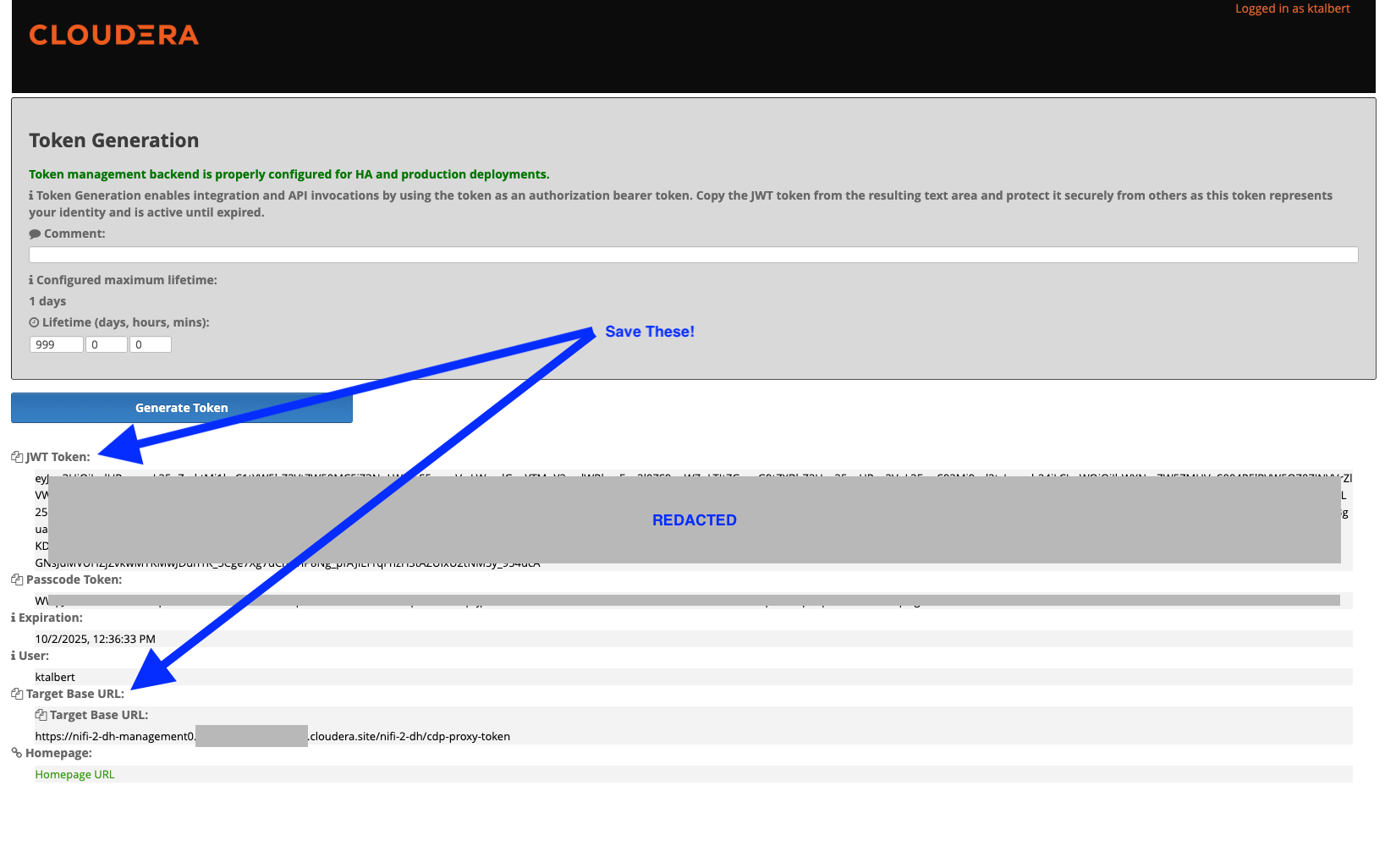
For the NIFI_API_BASE, form using the url from Knox (less -token), and add the postfix /nifi-app/nifi-api
So, https://nifi-2-dh-management0.yourdomain.cloudera.site/nifi-2-dh/cdp-proxy-token becomes https://nifi-2-dh-management0.yourdomain.cloudera.site/nifi-2-dh/cdp-proxy/nifi-app/nifi-api
Get Knox Token from the Flow Management Datahub Knox instance:
Example Usage
Read-Only Operations (Default)
Once configured, you can ask Claude questions like:
- "What version of NiFi am I running?"
- "List all processors in the root process group"
- "Show me recent bulletins"
- "What parameter contexts are configured?"
- "Tell me about the controller services"
- "What processor types are available for building flows?"
- "Search for processors containing 'kafka'"
- "Show me the details of connection abc-123"
Write Operations (when NIFI_READONLY=false)
⚠️ WARNING: Write operations modify your NiFi flows. Use with caution!
To enable write operations, set NIFI_READONLY=false in your configuration. Then you can:
- Build flows: "Create a LogAttribute processor named 'MyLogger' in the root process group"
- Manage processors: "Start processor with ID abc-123", "Stop all processors in group xyz"
- Connect components: "Create a connection from processor A to processor B for the 'success' relationship"
- Configure: "Update the scheduling period of processor abc-123 to 30 seconds"
- Control services: "Enable the DBCPConnectionPool controller service"
Examples:
"Create a GenerateFlowFile processor in process group abc-123"
"Connect processor source-123 to processor dest-456 for success relationship"
"Start processor xyz-789"
"Check the queue status for connection conn-456"
"Empty the queue for connection conn-456 before deletion"  (⚠️ deletes flowfiles permanently)
"Delete connection conn-456"
Important Notes:
- Version Tracking: NiFi uses optimistic locking. Always fetch current versions before updates:
processor = get_processor_details(processor_id) current_version = processor['revision']['version'] stop_processor(processor_id, current_version) - Queue Management: Connections with flowfiles cannot be deleted. Use
get_connection_details()to check queue status, thenempty_connection_queue()if needed before deletion.
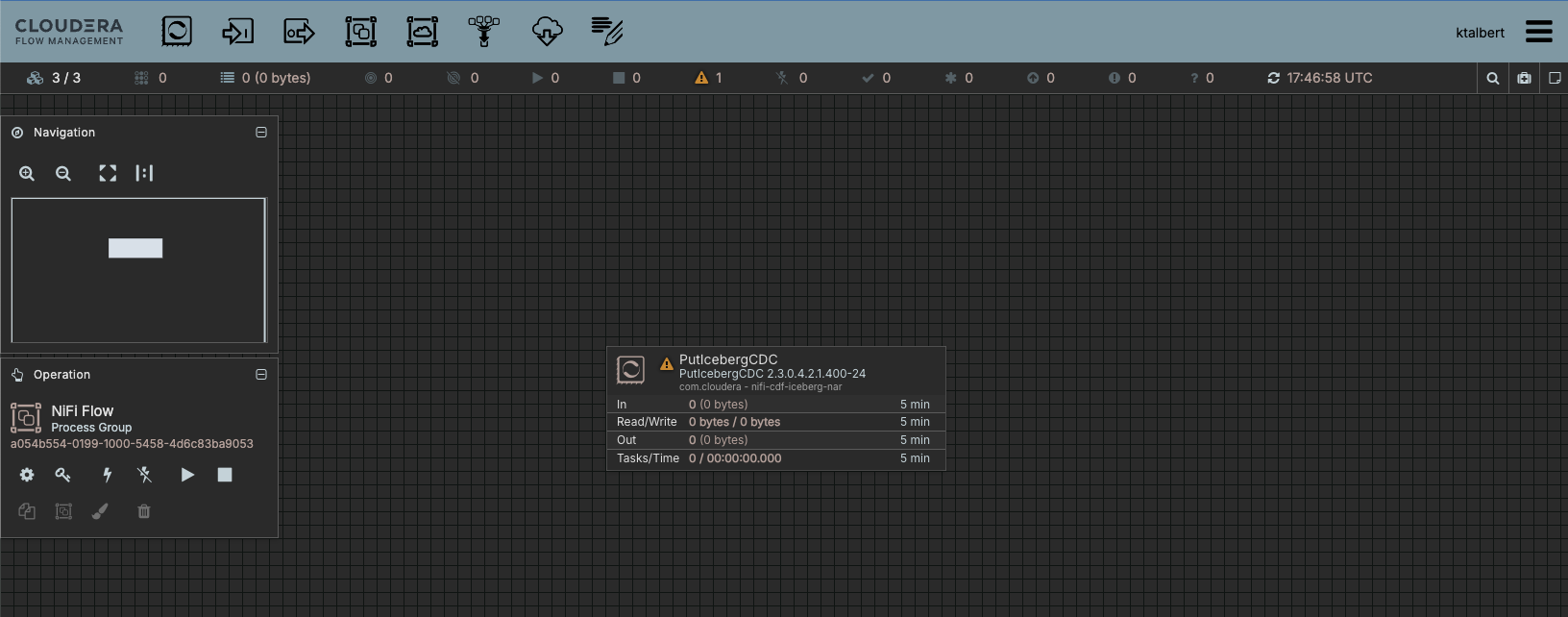
Using the example "List all processors in the root process group", we see the following for the example NiFi Canvas:
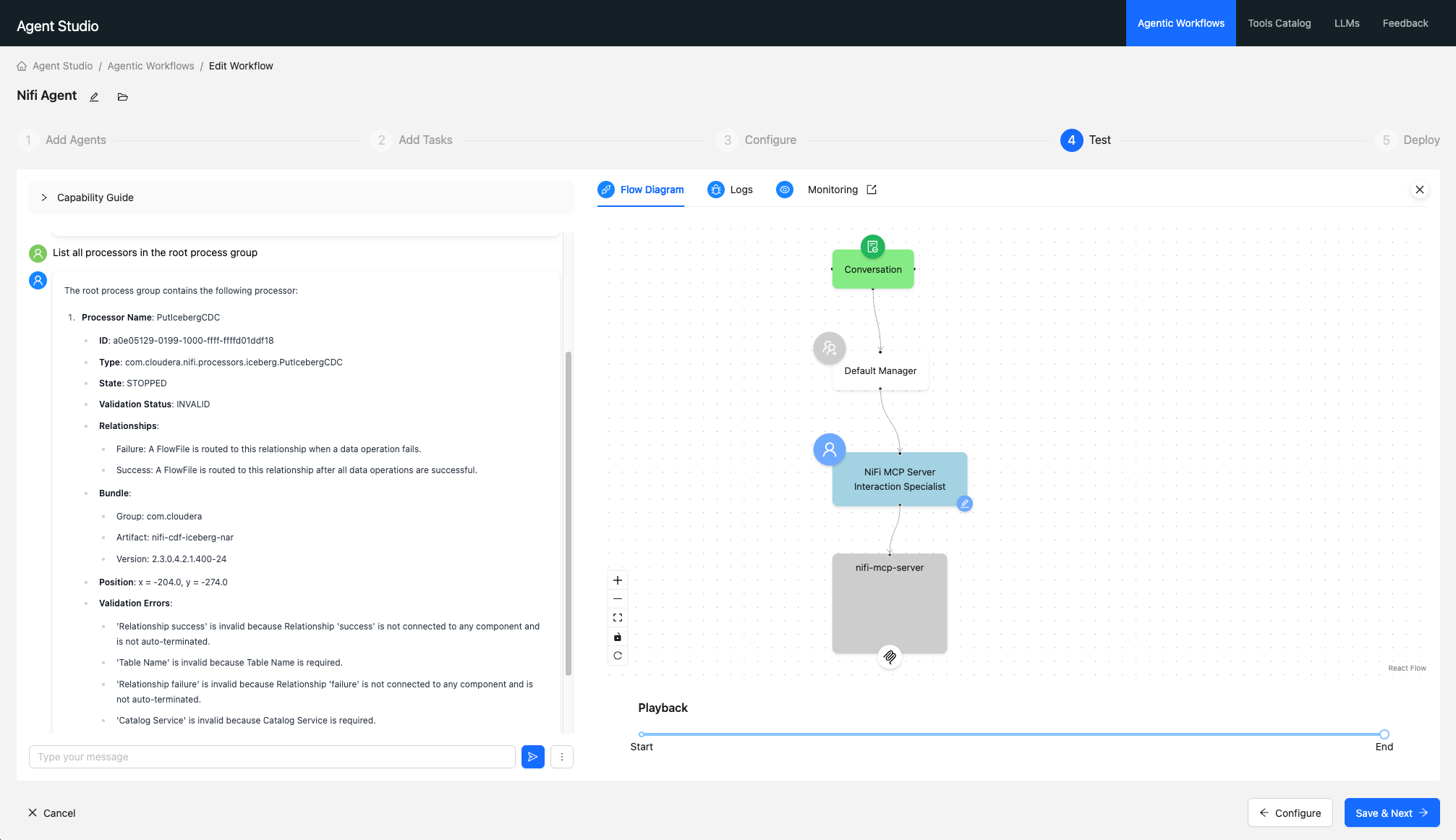
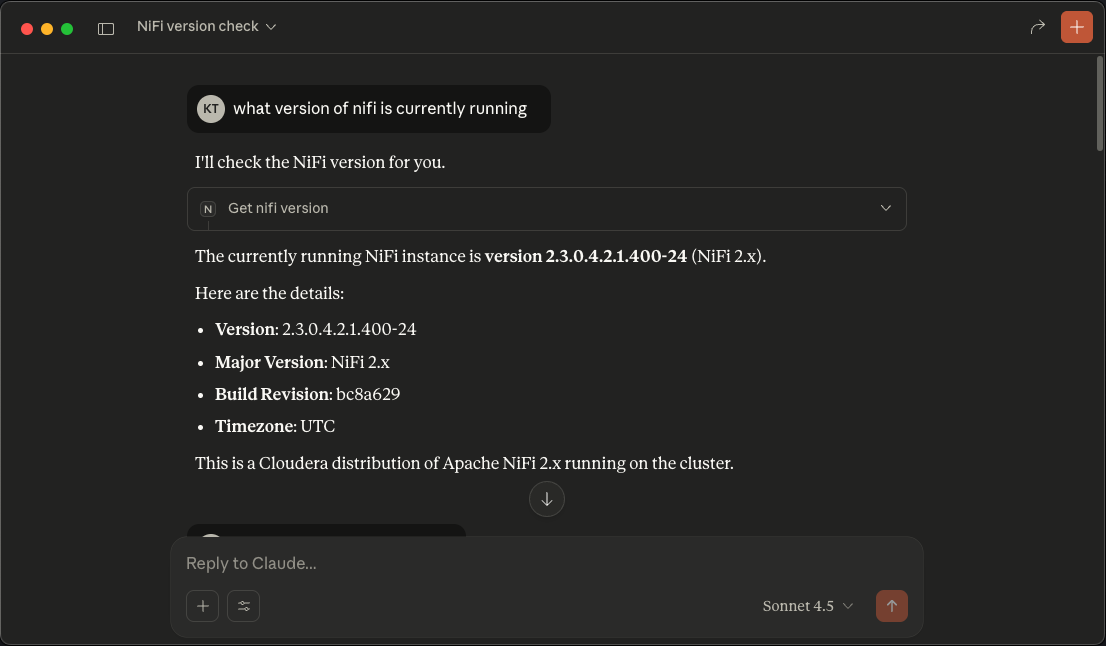
Using the example, "What version of NiFi am I running?", we see the following:
License
Apache License 2.0
Установка NiFi
У этого сервера нет опубликованного пакета — он собирается из исходников. Открой репозиторий и следуй инструкции в README.
▸ github.com/cloudera/NiFi-MCP-ServerFAQ
NiFi MCP бесплатный?
Да, NiFi MCP бесплатный — установка в пару кликов через Unyly без оплаты.
Нужен ли API-ключ для NiFi?
Нет, NiFi работает без API-ключей и переменных окружения.
NiFi — hosted или self-hosted?
Self-hosted: сервер запускается локально на твоей машине командой из раздела установки.
Как установить NiFi в Claude Desktop, Claude Code или Cursor?
Открой NiFi на unyly.org, выбери вкладку своего клиента (Claude Desktop, Claude Code, Cursor) и нажми Install — конфиг сгенерируется автоматически, без правки JSON.
Похожие MCP
GitHub
PRs, issues, code search, CI status
 автор: GitHub
Filesystem
Secure file operations with configurable access controls.
Memory
Knowledge graph-based persistent memory system.
Template MCP Server
A CLI tool to create a new Model Context Protocol server project with TypeScript support, dual transport options, and an extensible structure
 автор: mcpdotdirect
Amap Maps Mcp Server
MCP server for using the AMap Maps API
 автор: duxiaohui
Supabase
Database, auth and storage
 автор: Supabase
Everything
Reference / test server with prompts, resources, and tools.
Git
Tools to read, search, and manipulate Git repositories.
Sequential Thinking
Dynamic and reflective problem-solving through thought sequences.
Time
Time and timezone conversion capabilities.
Compare NiFi with
Не уверен что выбрать?
Найди свой стек за 60 секунд
Автор?
Embed-бейдж для README
Похожее
Все в категории development