
Nodriver Server
БесплатноНе проверенAn undetected browser automation MCP server powered by nodriver, enabling AI agents to browse, scrape, and automate Chrome while evading anti-bot detection like

Описание
An undetected browser automation MCP server powered by nodriver, enabling AI agents to browse, scrape, and automate Chrome while evading anti-bot detection like Cloudflare. It offers 57 tools for navigation, snapshots, screenshots, session management, and more, with one-command setup for major MCP clients.
README

nodriver-mcp-server
An undetected, anti-bot-resistant browser automation MCP server — a drop-in, stealth alternative to chrome-devtools-mcp for AI agents like Claude, Claude Code, Cursor, Windsurf, and any Model Context Protocol client. Powered by nodriver so your agent can browse, scrape, and automate real Chrome without tripping Cloudflare, hCaptcha, or WebDriver fingerprint detection.





Keywords: MCP server · browser automation · undetected chromedriver · anti-bot · Cloudflare bypass · web scraping · Claude · Cursor · nodriver · chrome-devtools-mcp alternative · Playwright/Puppeteer alternative · AI agent tools.
Is this the problem you have?
If you drive a browser from an AI agent, you have probably run into one of these:
- The page sits on "Just a moment…" or "Checking your browser before accessing" and never loads
- A "Verify you are human" checkbox that reappears every single time you click it
- "Unusual Activity Detected", "Access Denied", or a plain HTTP 403 — from a site that opens perfectly in your normal browser
navigator.webdriverreturnstrue, and the site quietly serves you different content because of it- The login works when you do it by hand, and fails the moment automation does the same steps
- It all worked for weeks, then the site started returning an empty page or a captcha wall
None of that is your script being wrong. It is anti-bot detection — Cloudflare, DataDome, PerimeterX, Akamai, hCaptcha — recognising the automation stack itself. It shows up with chrome-devtools-mcp, playwright-mcp, Puppeteer, Selenium and browser-use alike, because they all drive Chrome in ways that leave a detectable signature: a ChromeDriver binary, WebDriver markers, CDP artifacts.
Why this fixes it
nodriver is the successor of undetected-chromedriver. It speaks the CDP protocol directly — no ChromeDriver binary, no Selenium/WebDriver markers — so navigator.webdriver reads false rather than true, and a session looks like a person using Chrome.
This server exposes that through the same tool surface as chrome-devtools-mcp (59 tools), so your agent keeps a familiar API and simply stops getting blocked. Swapping is a config change, not a rewrite.
What it will not do, so you can judge before installing: it does not solve image or text captchas for you, it cannot defeat every protection on every site, and it will not rescue a scraper that hammers a server. If a site blocks you for what you do rather than what you are, no driver fixes that. cf_verify handles the common Cloudflare checkbox challenge; it is not a captcha-solving service.
Does it actually pass? Here is the evidence
Claiming "undetected" is easy, so here is what the standard fingerprint suite reports when this server drives the page itself. Reproduce it in one line: point your agent at https://bot.sannysoft.com and take a snapshot.
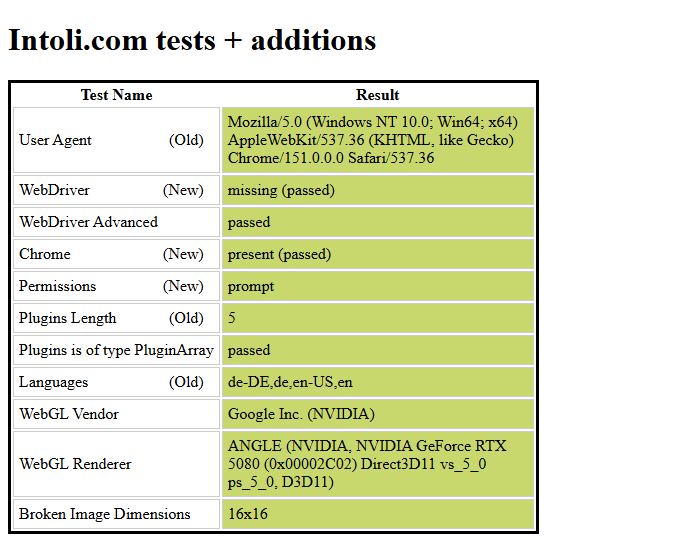
| Check | Result |
|---|---|
bot.sannysoft.com — Intoli + fingerprint suite |
58 checks, 0 failed |
navigator.webdriver |
false — a boolean on Navigator.prototype, not an own property, exactly as in a normal browser |
window.chrome |
present |
navigator.plugins |
5 |
navigator.languages |
4 entries |
| User agent | no Headless token |
What this does and does not prove. It shows the browser presents no automation artifacts to client-side fingerprinting, which is what these suites test and what most blocks key off. It does not prove any particular site will let you in: server-side signals such as IP reputation and request rate are outside what any driver controls, and captchas are not solved (see above). Measured on Chrome 150 / Windows 11, headful, with the default profile.
Features
- 🕵️ Undetected by design —
navigator.webdriverreadsfalse, exactly as in a browser a person is using, and there are no CDP or WebDriver artifacts to find. - ☁️ Built-in Cloudflare challenge solver (
cf_verify). - 🧩 59 tools covering navigation, input, snapshots, screenshots, content/PDF export, network + console inspection, device emulation, cookies/storage, sessions, profiles, and performance tracing.
- 🧠 Schemas written for the agent, not just the compiler — every parameter carries a description, fixed-value options are real enums, and each tool declares read-only/destructive hints. See why this matters.
- 📄 Compact accessibility-tree snapshots (
take_snapshot) — searchable page text with a uid per element. Measured on the Hacker News front page: 34 KB against 106 KB unfiltered, 68% smaller, with every link, URL and text preserved. That saving lands on every single agent step. - 🔗 Attach to a browser you are already signed into (
use_running_browser) — drive your real Chrome profile over its debugging port instead of rebuilding logins in a fresh one. - 📱 Device emulation (Pixel 7, iPad) with correct UA / client hints.
- 💾 Session save/restore — persist logins across runs.
- 🧬 Ephemeral by default, run many at once — each session gets its own temp Chrome profile (auto-deleted), so Claude Desktop, Claude Code and VS Code can all drive nodriver simultaneously without colliding. Named persistent profiles are available on demand for reusable logins.
- ⚡ One-command setup for 15+ MCP clients.
Installation
# Recommended: isolated install, won't touch your global Python environment
uv tool install nodriver-mcp

# or with pip
pip install nodriver-mcp

# or run it without installing anything
uvx nodriver-mcp
Requires uv for the first and third form. To track the development branch instead of a release:
uv tool install "nodriver-mcp @ git+https://github.com/andresolbach/nodriver-mcp-server.git@main"
Also listed in the official MCP Registry as io.github.andresolbach/nodriver-mcp-server, so clients and marketplaces that read the registry can find and install it directly.
Uses upstream nodriver
>=0.50.3, which contains the Chrome 146+ CDP fixes (samePartyremoved fromCookie,privateNetworkRequestPolicy→localNetworkAccessRequestPolicy) — verified working against Chrome 150.pip installalso works, butuv tool installkeeps it isolated.
You'll also need a local installation of Google Chrome (auto-detected).
Upgrade
uv tool upgrade nodriver-mcp
Requirements & tested versions
Every tool in this server was tested end-to-end against Google Chrome 150 with nodriver 0.50.3 on Python 3.12.11 / Windows 11 (macOS and Linux are supported too). Because nodriver talks to Chrome directly over CDP and tracks upstream Chrome changes, it keeps working as Chrome auto-updates.
| Component | Requirement | Verified version |
|---|---|---|
| Python | 3.12+ | 3.12.11 |
| Google Chrome | any recent stable | 150.0.7871.101 |
| Operating system | Windows / macOS / Linux | Windows 11 |
nodriver |
>= 0.50.3 | 0.50.3 |
mcp (MCP SDK) |
>= 1.26.0, < 2 | 1.26.0 |
pillow |
>= 12.1.1 | 12.1.1 |
tomli-w |
>= 1.0.0 | 1.2.0 |
The pip packages/versions are also listed in requirements.txt (pip install -r requirements.txt), though uv tool install is recommended for a fully pinned, reproducible install.
One-command MCP client setup
# Interactive client selector (terminal TUI)
nodriver-mcp install

# Install to specific clients
nodriver-mcp install claude,cursor,kiro

# Uninstall
nodriver-mcp uninstall claude

# List all supported clients
nodriver-mcp --list-clients

# Print MCP config JSON (for manual setup)
nodriver-mcp --config

# Project-level config (writes to .cursor/mcp.json, .mcp.json, etc.)
nodriver-mcp install --scope project
Supported clients: Claude Desktop, Claude Code, Cursor, Windsurf, Codex, Gemini CLI, Copilot CLI, Kiro, VS Code, Cline, Roo Code, Amazon Q, Warp, Opencode, Trae.
The Claude Code VS Code extension shares Claude Code's config (
~/.claude.json), so installing toclaude-codecovers both the CLI and the extension.
Manual config
If you'd rather paste it yourself, this works in any MCP client (claude_desktop_config.json, ~/.claude.json, .cursor/mcp.json, .mcp.json, …):
{
  "mcpServers": {
    "nodriver": {
      "command": "uvx",
      "args": ["nodriver-mcp"]
    }
  }
}
Environment Variables
| Variable | Description | Default |
|---|---|---|
NODRIVER_HEADLESS |
Headless mode (true/false) |
false |
NODRIVER_USER_DATA_DIR |
Explicit persistent Chrome profile dir (overrides the default) | Ephemeral temp profile, auto-deleted per session |
NODRIVER_BROWSER_PATH |
Chrome executable path | Auto-detected |
NODRIVER_PROXY |
Proxy server address | None |
NODRIVER_BROWSER_URL |
Attach to a Chrome already running at this address (e.g. http://127.0.0.1:9222) instead of launching one |
Launch our own |
NODRIVER_ENABLE_TRANSLATE |
Set true to re-enable Chrome's Google Translate popup |
Disabled |
NODRIVER_ENABLE_EXTENSIONS |
Set true to allow externally-installed Chrome extensions (and their prompts) |
Disabled |
By default the browser starts clean for automation: the Google Translate popup is suppressed and externally-installed Chrome extensions are blocked (so you don't get "an extension requires your attention" prompts). Re-enable either via the env vars above or at runtime with the set_browser_flags tool — which can also set any other Chrome launch flags (e.g. --lang=de-DE, --window-size=1280,800) via its extra_args parameter. The browser also auto-recovers if Chrome is closed or crashes between calls — tools relaunch it instead of failing.
Chrome also starts on about:blank rather than the New Tab page, so the NTP's own Google requests never show up in list_network_requests, and new_page reuses that empty startup tab instead of leaving a stray blank page behind.
Extensions
manage_extensions handles extensions at runtime:
manage_extensions("list")— extensions installed in the active profile (name, version, id) plus the current statemanage_extensions("on")/("off")— the master switch (--disable-extensions); restarts Chrome. It covers unpacked extensions too, so"off"really means offmanage_extensions("load", path)/("unload", path)— unpacked extensions from a folder
To use an extension permanently, switch to a persistent profile, install it once from the Chrome Web Store in that browser, and turn extensions on — it then loads on every launch.
Unpacked extensions need Chromium or Chrome for Testing. Official Chrome builds dropped
--load-extensionin v137, and as of Chrome 151 neither--enable-unsafe-extension-debuggingnor disablingDisableLoadExtensionCommandLineSwitchbrings it back — the flag is accepted and the extension is silently never registered.manage_extensionsdetects a branded build and says so instead of pretending it worked. PointNODRIVER_BROWSER_PATHat Chromium / Chrome for Testing if you need unpacked loading.
Profiles & running multiple instances at once
By default every server instance launches Chrome with a fresh temporary profile that nodriver creates and deletes automatically. That means you can run nodriver from Claude Desktop, Claude Code and the VS Code extension at the same time — each gets its own isolated Chrome, and they never fight over a shared profile. No configuration, no detection logic, nothing to clean up.
When you want to reuse a login across sessions, create a named persistent profile and switch to it:
list_profiles— list persistent profiles and show the active onecreate_profile(name, activate=false)— create a reusable profileuse_profile(name)— switch to a persistent profile (""/"temp"returns to ephemeral)use_temp_profile— switch back to a fresh ephemeral profiledelete_profile(name)— remove a persistent profile
Persistent profiles live under ~/.nodriver-mcp/profiles/<name>. You can still force a fixed profile globally with the NODRIVER_USER_DATA_DIR env var.
Drive a browser you are already signed into
Chrome locks its user-data-dir, so the profile holding your real logins cannot be opened a second time. The way in is to attach to the browser that already has it open — then you skip rebuilding every login through automation.
Start Chrome yourself, once:
# Windows
chrome.exe --remote-debugging-port=9222 --user-data-dir="%LOCALAPPDATA%\agent-profile"
# macOS / Linux
google-chrome --remote-debugging-port=9222 --user-data-dir=~/.config/agent-profile
Then attach, either at runtime with use_running_browser(port=9222), or up front by setting NODRIVER_BROWSER_URL=http://127.0.0.1:9222. Every tool then acts on that browser and its real tabs.
While attached, this server never closes a browser it did not start: close_browser and profile switches only detach. Go back to a self-launched browser with use_temp_profile or use_profile.
⚠️ That profile becomes part of the agent's reach. Whatever it is signed into — mail, bank, company systems — is reachable from here, because a cookie jar is all or nothing. Point this at a profile you are willing to expose, not your everyday one.
Tools (59)
Network collection is enabled automatically on each tab. Console collection is opt-in: call enable_console_collection when you want list_console_messages / get_console_message to start collecting events. This keeps Runtime.enable() disabled by default for sites that detect attached debuggers.
For mobile-only sites, pass device directly to new_page(...) or navigate_page(...) so the first real request already carries mobile signals.
click sends real CDP input events, so the page sees isTrusted=true. Because those are delivered by coordinate, it scrolls the element into view and then hit-tests several points inside it, since a sticky header or cookie banner can own the centre pixel — on docs.pypi.org that affects 43 of 54 visible links. If no point reaches the element, if_covered decides: "report" (default) refuses and names the blocker, leaving the page untouched and the session undetectable; "synthetic_click" clicks the element directly, which works through anything but makes the page see isTrusted=false. Either way the response says which path was taken, so a detectable click is never silent.
| Category | Tools |
|---|---|
| Input automation (10) | click · click_at · hover · fill · fill_form · type_text · press_key · drag · upload_file · handle_dialog |
| Navigation (10) | navigate_page · new_page · close_page · close_browser · list_pages · select_page · wait_for · wait_for_selector · scroll_page · scroll_to_selector |
| Snapshots & debugging (11) | take_screenshot · take_snapshot · get_page_content · query_selector · evaluate_script · get_computed_styles · save_pdf · enable_console_collection · disable_console_collection · list_console_messages · get_console_message |
| Network monitoring (3) | list_network_requests · get_network_request · block_resources |
| Device emulation (4) | emulate · emulate_device · reset_emulation · resize_page |
| Performance (3) | performance_start_trace · performance_stop_trace · take_memory_snapshot |
| Cookies & storage (5) | get_cookies · set_cookie · clear_cookies · get_local_storage · set_local_storage |
| Session management (3) | save_session · load_session · list_sessions |
| Profiles & browser (8) | list_profiles · create_profile · use_profile · use_temp_profile · use_running_browser · delete_profile · set_browser_flags · manage_extensions |
| Anti-detection helpers (2) | cf_verify · bypass_insecure_warning |
📖 Full tool reference → — every tool with its exact parameters, types, defaults and enum values, generated straight from the live schemas.
Built for the agent that calls it
An MCP tool is only as good as what the model can see of it. Most servers hand over a name, a sentence, and untyped parameters — leaving the agent to guess whether it's type="url" or type="goto", and burning a failed call to find out.
Here, the schema does that work:
- Every parameter has a description in the schema itself — not buried in a prose blob the client may never show. All 57 tools, all parameters, no exceptions (there's a test for it).
- Fixed-value parameters are real enums.
navigate_page(type=…)advertises exactlyurl,back,forward,reload. A wrong value is rejected by validation before it ever reaches Chrome, instead of returning an error the agent has to interpret. - Numeric and array bounds are declared —
qualityis 0–100,wait_for(text=…)requires at least one entry. - Structured parameters are typed.
fill_formpublishes{uid, value}rather than an opaquelist[dict]. - Every tool declares behaviour hints (
readOnlyHint,destructiveHint,idempotentHint). Clients use these to group permissions — so a client can auto-approvetake_snapshotwhile still prompting fordelete_profile. - Descriptions say when not to use a tool, and point at the better one.
take_screenshottells the model to prefertake_snapshot;click_atpoints back toclick.
Comparison with chrome-devtools-mcp
| Feature | chrome-devtools-mcp | nodriver-mcp-server |
|---|---|---|
| Browser backend | Puppeteer (ChromeDriver) | nodriver (direct CDP) |
| WebDriver fingerprint | ❌ Exposed | ✅ None |
navigator.webdriver |
❌ true |
✅ false, as in a normal browser |
| Cloudflare bypass | ❌ | ✅ Built-in cf_verify |
| Install method | npx | uvx / pip |
| Language | TypeScript / Node.js | Python |
| Tool coverage | 29 tools | 59 tools |
| Per-parameter schema docs | partial | ✅ all 59 tools |
| Tool behaviour hints | ❌ | ✅ read-only / destructive |
Tools not implemented: performance_analyze_insight (needs the DevTools frontend trace parser), lighthouse_audit (needs the Lighthouse Node API), screencast_start/stop (needs ffmpeg + Puppeteer), extension management (experimental).
Use cases
- Scrape sites behind Cloudflare / anti-bot (DataDome, PerimeterX, hCaptcha challenges) without being fingerprinted or blocked.
- Let an AI agent browse the real web — Claude, Cursor, Windsurf and other LLM agents can log in, fill forms, click, read pages, and screenshot.
- Automate authenticated workflows and reuse the login across sessions with persistent profiles.
- LLM-driven web research & data extraction using compact accessibility-tree snapshots instead of brittle screenshots.
- End-to-end / QA testing with device emulation, network + console inspection, and performance traces.
- An undetected alternative to Playwright, Puppeteer and Selenium for agentic browsing.
FAQ
Is this an undetected alternative to chrome-devtools-mcp?
Yes. It exposes the same tool surface but drives Chrome through nodriver (direct CDP), so navigator.webdriver reads false — the same value a browser a person is using reports — and there are no WebDriver/CDP fingerprints for anti-bot systems to detect.
Can it bypass Cloudflare?
It ships a cf_verify tool that solves the Cloudflare "verify you are human" challenge, and its undetected profile avoids most bot checks. (No tool can guarantee bypassing every protection.)
I already use chrome-devtools-mcp or playwright-mcp and keep getting blocked. How do I switch?
Replace the server entry in your MCP config with the one under Manual config — that is the whole migration. The tool names and arguments match chrome-devtools-mcp, so existing prompts, scripts and agent instructions keep working unchanged. You can also run both side by side and point the agent at whichever suits the site.
The site works in my normal browser but not under automation. Why?
Because anti-bot systems fingerprint the driver, not your behaviour: a ChromeDriver binary in the process tree, navigator.webdriver === true, CDP artifacts in the page. Your manual browser has none of those, so it is served the real page. nodriver drives Chrome without leaving them.
Does it help with captchas?
Only the Cloudflare "verify you are human" checkbox, via cf_verify. Image grids, text captchas and hCaptcha puzzles are not solved — this is a stealth driver, not a captcha service. In practice, staying undetected means far fewer captchas are shown in the first place.
Which clients are supported? One command installs it into 15+ MCP clients: Claude Desktop, Claude Code, Cursor, Windsurf, Codex, Gemini CLI, Copilot CLI, Kiro, VS Code, Cline, Roo Code, Amazon Q, Warp, Opencode, Trae.
Can I run it in several clients at the same time? Yes. Each instance uses its own ephemeral Chrome profile by default, so Claude Desktop, Claude Code and the VS Code extension can all use nodriver simultaneously without colliding.
Headless or visible browser?
A real Chrome window by default; set NODRIVER_HEADLESS=true for headless.
How do I keep a login between sessions?
Create a persistent profile with create_profile and switch to it with use_profile, or use save_session / load_session.
Does it work on Windows / macOS / Linux? Yes, all three. Tested on Windows 11 with Chrome 150 and Python 3.12.
Changelog
See CHANGES.md. Highlights: ephemeral-by-default Chrome profiles so multiple instances run at once (+ named persistent profiles), migrated to upstream nodriver 0.50.3 (Chrome 150 verified), and fixed several previously-broken tools — fill/fill_form, evaluate_script with element args, select_page tab switching, press_key modifier chords (Ctrl+A/C/V), network/console lookup indexing, and Windows installer crashes.
Credits
Based on nodriver-mcp by Saber-CC (MIT). Browser backend by nodriver (ultrafunkamsterdam). Tool surface mirrors chrome-devtools-mcp.
License
Установка Nodriver Server
У этого сервера нет опубликованного пакета — он собирается из исходников. Открой репозиторий и следуй инструкции в README.
▸ github.com/andresolbach/nodriver-mcp-serverFAQ
Nodriver Server MCP бесплатный?
Да, Nodriver Server MCP бесплатный — установка в пару кликов через Unyly без оплаты.
Нужен ли API-ключ для Nodriver Server?
Нет, Nodriver Server работает без API-ключей и переменных окружения.
Nodriver Server — hosted или self-hosted?
Self-hosted: сервер запускается локально на твоей машине командой из раздела установки.
Как установить Nodriver Server в Claude Desktop, Claude Code или Cursor?
Открой Nodriver Server на unyly.org, выбери вкладку своего клиента (Claude Desktop, Claude Code, Cursor) и нажми Install — конфиг сгенерируется автоматически, без правки JSON.
Похожие MCP
Playwright
Browser automation, scraping, screenshots
 автор: Microsoft
Puppeteer
Browser automation and web scraping.
 автор: modelcontextprotocol
opentabs-dev/opentabs
Plugin-based MCP server + Chrome extension that gives AI agents access to web applications through the user's authenticated browser session. 100+ plugins with a
 автор: opentabs-dev
robhunter/agentdeals
1,500+ developer infrastructure deals, free tiers, and startup programs across 54 categories. Search deals, compare vendors, plan stacks, and track pricing chan
 автор: robhunter
Compare Nodriver Server with
Не уверен что выбрать?
Найди свой стек за 60 секунд
Автор?
Embed-бейдж для README
Похожее
Все в категории browse