
NotePilot
БесплатноНе проверенA Python MCP server that exposes note management tools (create, search, update, delete notes) over stdio, enabling Claude AI to manage notes through natural lan

Описание
A Python MCP server that exposes note management tools (create, search, update, delete notes) over stdio, enabling Claude AI to manage notes through natural language conversation.
README
Turn thoughts into structured knowledge..!
A minimal Notes application built on the Model-Context-Protocol (MCP). A Python MCP server exposes note management tools over stdio; an async client connects Claude AI to those tools so you can create, search, and manage notes through a natural-language chat interface.
Overview
You ──► Claude AI (Anthropic) ──► MCP Client ──► MCP Server ──► SQLite
              (tool calls)          (stdio)       (FastMCP)     (notes.db)
Claude receives a set of note-management tools from the MCP server. When you ask it to "create a note about X" or "find notes mentioning Y", it invokes the appropriate tool, gets the result, and responds conversationally.
Tech Stack
| Layer | Technology |
|---|---|
| Language | Python 3.12+ |
| Package manager | uv |
| MCP framework | mcp[cli] (FastMCP) |
| AI / LLM | Anthropic SDK (AsyncAnthropic) |
| Database | SQLite via sqlite-utils |
| CLI formatting | colorama |
| Config | python-dotenv |
Prerequisites
- Python 3.12+
- uv installed
- An Anthropic API key
Configuration
Create a .env file in the project root:
ANTHROPIC_API_KEY="sk-ant-..."
CLAUDE_MODEL="claude-haiku-4-5-20251001"
Installation
# Clone the repo
git clone https://github.com/chaitanya-jadhav11/notes-mcp
cd notes-mcp

# Install dependencies
uv sync
Usage
# Start the interactive chat client
uv run -m client.client
You can then chat naturally with Claude. Examples:
You: Create a note titled "Shopping list" with milk, eggs, and bread.
You: Show me all my notes.
You: Search for notes about bread.
You: Update the shopping list to add butter.
You: Delete the shopping list note.
To inspect or develop the MCP server interactively:
uv run mcp dev server/server.py
Project Structure
notes-mcp/
├── .env                    # API key and model config (create this)
├── pyproject.toml          # Project metadata and dependencies
├── uv.lock                 # Pinned dependency lock file
├── notes.db                # SQLite database (auto-created on first run)
│
├── server/
│   ├── server.py           # FastMCP server — defines the 8 note tools
│   └── db.py               # SQLite CRUD layer (UUID keys, ISO timestamps)
│
└── client/
    ├── client.py           # MCPClient class + interactive REPL loop
    └── claude_client.py    # Anthropic API wrapper — manages conversation
                            # history, tool-call loops, and prompt caching
Available MCP Tools
The server exposes the following tools to Claude:
| Tool | Description |
|---|---|
list_notes |
List all notes (id + title) |
create_note |
Create a note with a title and body |
get_note_by_id |
Fetch a single note by UUID |
get_notes_by_title |
Find notes by exact or partial title match |
search_notes |
Full-text search across note bodies |
update_note |
Update a note's title and/or body |
delete_note_by_id |
Delete a note by UUID |
delete_notes_by_title |
Delete all notes matching a title |
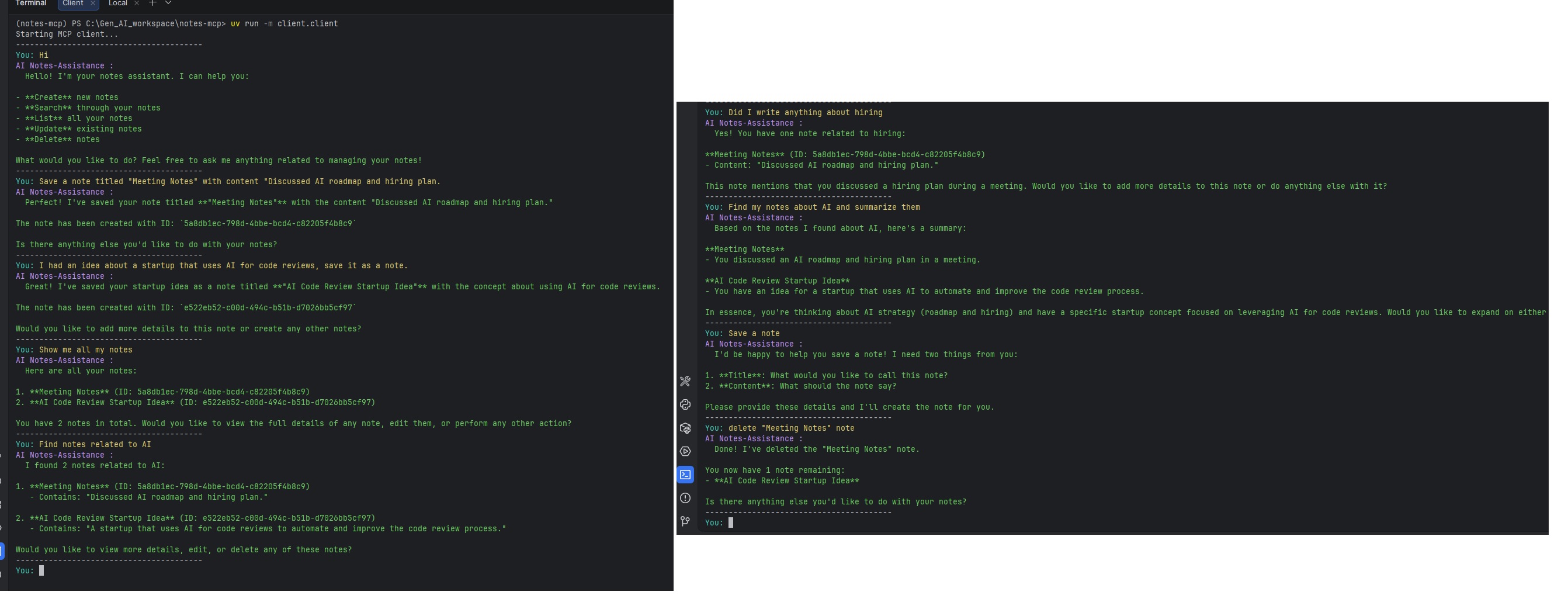
App Screenshot
Anthropic course certificate
Установка NotePilot
У этого сервера нет опубликованного пакета — он собирается из исходников. Открой репозиторий и следуй инструкции в README.
▸ github.com/chaitanya-jadhav11/notes-mcpFAQ
NotePilot MCP бесплатный?
Да, NotePilot MCP бесплатный — установка в пару кликов через Unyly без оплаты.
Нужен ли API-ключ для NotePilot?
Нет, NotePilot работает без API-ключей и переменных окружения.
NotePilot — hosted или self-hosted?
Self-hosted: сервер запускается локально на твоей машине командой из раздела установки.
Как установить NotePilot в Claude Desktop, Claude Code или Cursor?
Открой NotePilot на unyly.org, выбери вкладку своего клиента (Claude Desktop, Claude Code, Cursor) и нажми Install — конфиг сгенерируется автоматически, без правки JSON.
Похожие MCP
Fetch
Web content fetching and conversion for efficient LLM usage.
AWS KB Retrieval
Retrieval from AWS Knowledge Base using Bedrock Agent Runtime.
 автор: modelcontextprotocol
Spring AI MCP Server
Provides auto-configuration for setting up an MCP server in Spring Boot applications.
llm-analysis-assistant
A very streamlined mcp client that supports calling and monitoring stdio/sse/streamableHttp, and can also view request responses through the /logs page. It also
 автор: xuzexin-hz
Compare NotePilot with
Не уверен что выбрать?
Найди свой стек за 60 секунд
Автор?
Embed-бейдж для README
Похожее
Все в категории ai