
Notion Local Ops
БесплатноНе проверенEnables Notion AI to interact with local files, execute shell commands, and delegate complex tasks to local AI agents. Provides file operations, command executi

Описание
Enables Notion AI to interact with local files, execute shell commands, and delegate complex tasks to local AI agents. Provides file operations, command execution, and task delegation capabilities for local workspace management.
README
Turn a Notion MCP Agent into a local coding agent for local files, shell, git, and delegated tasks.
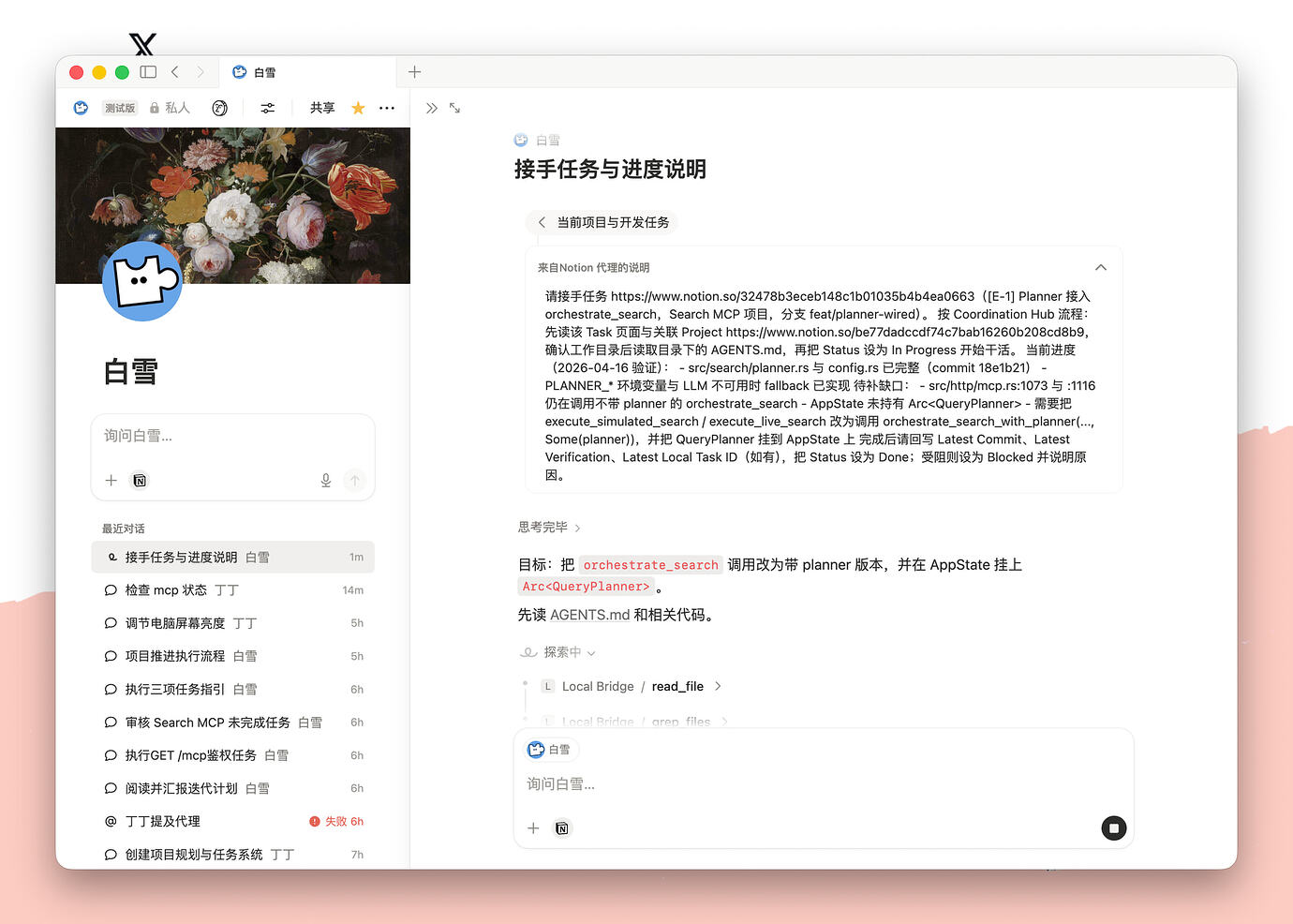
What This Project Does
- exposes local files, shell, git, and patch-style editing through MCP
- lets an MCP Agent work on a real local repo instead of only editing Notion pages
- supports delegated long-running tasks through local
codexorclaude
Quick Start
git clone https://github.com/<your-account>/notion-local-ops-mcp.git
cd notion-local-ops-mcp
cp .env.example .env
./scripts/dev-tunnel.sh
Set at least:
NOTION_LOCAL_OPS_WORKSPACE_ROOT="/absolute/path/to/workspace"
NOTION_LOCAL_OPS_AUTH_TOKEN="replace-me"
Important MCP Agent Configuration
Use this in your MCP Agent configuration inside Notion:
- URL:
https://<your-domain-or-tunnel>/mcp - Auth type:
Bearer - Token:
NOTION_LOCAL_OPS_AUTH_TOKEN
ChatGPT Web OAuth
ChatGPT web developer mode expects an HTTPS MCP endpoint and can connect with OAuth. This project implements a minimal OAuth compatibility mode for local use: dynamic client registration, PKCE authorization code flow, protected resource metadata, and bearer access tokens. It does not implement a full user account system or ChatGPT iframe UI widgets.
Enable OAuth mode in .env:
NOTION_LOCAL_OPS_AUTH_MODE=oauth
NOTION_LOCAL_OPS_PUBLIC_BASE_URL="https://<your-domain-or-tunnel>"
NOTION_LOCAL_OPS_AUTH_TOKEN="replace-me"
# Optional: use a separate login token for the OAuth authorization page.
# NOTION_LOCAL_OPS_OAUTH_LOGIN_TOKEN="replace-me"
Then restart the service. For launchd-managed installs, reinstall or restart so the generated plist receives the new env values:
./scripts/install-launchd.sh
Create the ChatGPT app/connector with:
- MCP server URL:
https://<your-domain-or-tunnel>/mcp - Authentication:
OAuth - Client registration: dynamic registration, if ChatGPT offers the choice
When ChatGPT opens the authorization page, enter NOTION_LOCAL_OPS_AUTH_TOKEN
unless NOTION_LOCAL_OPS_OAUTH_LOGIN_TOKEN is set.
Smoke-test the public OAuth surface before adding it to ChatGPT:
curl -sS https://<your-domain-or-tunnel>/.well-known/oauth-protected-resource/mcp
curl -sS https://<your-domain-or-tunnel>/.well-known/oauth-authorization-server
curl -i https://<your-domain-or-tunnel>/mcp
The first two commands should return JSON metadata. The /mcp request without
credentials should return 401 with a WWW-Authenticate header containing
resource_metadata.
OAuth security notes
- Always set
NOTION_LOCAL_OPS_PUBLIC_BASE_URLin OAuth mode. Without it the issuer URL falls back to the requestHostheader, which a tunnel attacker can spoof to steer OAuth metadata at a phishing host. The server prints a startup warning when this happens. - Prefer a dedicated
NOTION_LOCAL_OPS_OAUTH_LOGIN_TOKEN. If it falls back toAUTH_TOKEN, anyone who briefly seesAUTH_TOKENcan mint a long-TTL OAuth access token (default 24h) that survives a token rotation. After rotatingAUTH_TOKEN, also clear thetokensmap in<STATE_DIR>/oauth.jsonto invalidate any minted access tokens. oauth.jsonand theSTATE_DIRtask tree are written with0o600/0o700permissions so other local users cannot read minted tokens or task logs. Existing files created before this change should bechmod'd manually (chmod 600 ~/.notion-local-ops-mcp/oauth.json).
Use the prompt below for the MCP Agent. It is not for the Notion AI instruction page.
Recommended MCP Agent prompt
You are a pragmatic local operations agent connected to my computer through MCP.

Goals:
- Complete file, code, shell, and task workflows end-to-end with minimal interruption.
- Act more like a coding agent than a chat assistant.
- Stay concise, direct, and outcome-focused.

Disambiguation rules:
- If the context contains local repo paths, filenames, code extensions, README, AGENTS.md, CLAUDE.md, or .cursorrules, treat "document", "file", "notes", "instructions", and "docs" as local files unless the user explicitly says Notion page, wiki, or workspace page.
- If the user asks to edit AGENTS.md, CLAUDE.md, README, or project instructions inside the repo, edit the local file. Do not switch into self-configuration or setup behavior unless the user explicitly says to change the agent itself.
- For local file edits, do not use <edit_reference>. That is for Notion page editing, not MCP file changes.
- When answering code questions, prefer file paths, line references, function names, command output, or git diff over Notion-style citation footnotes.

Working style:
- First restate the goal in one sentence.
- Default to the current workspace root unless the target path is genuinely ambiguous.
- For non-trivial tasks, give a short plan and keep progress updated.
- Prefer direct tools first. Use delegate_task only when direct tools are not enough.
- Keep moving forward instead of asking for information that can be discovered via tools.
- If the user says fix, change, implement, deploy, update, or similar imperative requests, execute directly instead of stopping after analysis.
- If information is missing, probe with tools first. Use ask-survey only when tool probing still cannot resolve a decision and the next step is destructive or high-risk.

Tool strategy:
- list_skills: use when the user asks what skills are available in this repo or globally.
- server_info: call first when troubleshooting connection/runtime mismatches.
- set_default_cwd / get_default_cwd: set once for repeated repo operations instead of passing cwd every time.
- In coding tasks, search the local repo first. Do not default to searching the Notion workspace.
- apply_patch: use this as the default edit tool for existing files, including small edits, multi-hunk edits, moves, deletes, or adds in one patch. Each @@ hunk must include at least one '+' or '-' line and must match exactly one location in the file. Use dry_run=true, validate_only=true, or return_diff=true when you want validation or a preview before writing.
- write_file: create new files or rewrite short files when that is simpler than patching; use dry_run=true for no-write preview.
- run_command_stream: start long-running shell jobs with immediate task_id return for polling progress. Prefer it for tests, installs, builds, compile steps, and other jobs that may take a while.
- get_task / wait_task: check delegated task or background command status; prefer wait_task when blocking is useful.
- run_command: proactively use for short non-destructive commands such as pwd, ls, rg, or small smoke checks.
- search: canonical query tool. mode='glob' for path discovery, mode='regex' for regex/code search, mode='text' for literal substring search. Hidden entries and .gitignore'd paths are excluded by default; regex/text search can target a single file path directly.
- list_files: inspect directory structure only when structure matters; paginate with limit and offset when needed.
- read_text: canonical single/batch file reader with line-based pagination; set include_line_numbers=true when the result will be cited or reviewed line-by-line.
- git_status / git_diff / git_commit / git_log / git_show / git_blame: use these as the default repository workflow and traceability tools only when the current cwd is actually inside a git repo.
- delegate_task: use only for complex multi-file reasoning, long-running fallback execution, or repeated failed attempts with direct tools by local codex or claude-code. For non-trivial work, pass goal, acceptance_criteria, verification_commands, and commit_mode.
- cancel_task: stop a delegated task if needed.
- purge_tasks: garbage-collect stale task artifacts under STATE_DIR/tasks (dry_run first).

Execution rules:
- When exploring a codebase, prefer search(mode='glob' or 'regex') over broad list_files calls.
- Follow the loop: probe, edit, verify, summarize.
- Do the minimum necessary read/explore work before editing.
- After each edit, re-read the changed section or run a minimal verification command when useful.
- Prefer apply_patch for edits to existing files; reserve write_file for new files or full rewrites.
- Do not issue parallel writes to the same file.
- After a logically meaningful change, inspect git_status and git_diff, then create a small focused commit instead of waiting until the end.
- Use focused commits. Do not mix unrelated changes in one commit.
- Use clear commit messages, preferably conventional commit style such as fix, feat, docs, test, refactor, or chore.
- For destructive actions such as deleting files, resetting changes, or dangerous shell commands, ask first.
- If a command or delegated task fails, summarize the root cause and adjust the approach instead of retrying blindly.

Verification rules:
- After code changes, prefer this minimum verification ladder when applicable:
- 1. Syntax or compile check such as cargo check, tsc --noEmit, python -m py_compile, or equivalent.
- 2. Focused tests for the changed area, or the nearest relevant test target.
- 3. Smoke test for the changed behavior, such as starting a service or running curl against the affected endpoint.
- Do not skip verification unless the user explicitly says not to run it.

Output style:
- Before tool use, briefly say what you are about to do.
- During longer tasks, send short progress updates.
- At the end, summarize result, verification, and any remaining risk or next step.
Relay Bridge (mirror tool calls to a dashboard)
When paired with workspace-agent-relay-mcp, every tool call an agent makes here can be auto-mirrored to that relay's live dashboard — so a local operator watches the agent work without it manually reporting anything.
How it works:
- The agent calls
bind_relay_runhere with therequest_id+callback_tokenfrom a relay trigger (no relay URL needed — it's configured locally). - Every
@tracedtool call thereafter fires a fire-and-forgetPOST /internal/tool-traceto the relay. - The relay stores it and pushes it to the dashboard over SSE.
It's a generic instrumentation layer (@traced decorator + pluggable sinks), so the relay is just one sink — not hardcoded. The relay being unreachable never blocks tool execution; traces are best-effort.
Env knobs:
NOTION_LOCAL_OPS_RELAY_BRIDGE_ENABLED=true     # default true; set false to disable entirely
NOTION_LOCAL_OPS_RELAY_URL=http://127.0.0.1:8799  # default relay endpoint used by bind_relay_run
NOTION_LOCAL_OPS_RELAY_BRIDGE_TIMEOUT=1.5       # seconds, caps the trace POST
NOTION_LOCAL_OPS_RELAY_BINDING_TTL_SECONDS=3600 # seconds, clears old bindings before posting traces
bind_relay_run / clear_relay_run are the agent-facing controls; server_info exposes relay_bridge state (enabled, bound, dropped_traces, …). Disabled or unbound => zero behavior change.
Optional Use Case
If you also want the Notion AI instruction page + project-management workflow, see:
Requirements
- Python 3.11+
- FastMCP 3.x (
fastmcp>=3.2.4,<4, installed frompyproject.toml) cloudflared- A Notion workspace where you can configure an MCP Agent with custom MCP support
- Optional:
codexCLI - Optional:
claudeCLI
Detailed Setup
If you prefer the full step-by-step setup, follow this path:
git clone https://github.com/<your-account>/notion-local-ops-mcp.git
cd notion-local-ops-mcp

cp .env.example .env
Edit .env and set at least:
NOTION_LOCAL_OPS_WORKSPACE_ROOT="/absolute/path/to/workspace"
NOTION_LOCAL_OPS_AUTH_TOKEN="replace-me"
Then run:
./scripts/dev-tunnel.sh
What you should expect:
- the script creates or reuses
.venv - the script installs missing or incompatible Python dependencies automatically
- the script starts the local MCP server on
http://127.0.0.1:8766/mcpthrough a rolling-reload supervisor - the script prints a
./scripts/dev-tunnel.sh reloadcommand so you can restart the local server without dropping the tunnel - the script prefers
cloudflared.local.ymlfor a named tunnel - otherwise it falls back to a
cloudflaredquick tunnel and prints a public HTTPS URL
Use the printed tunnel URL with /mcp appended in Notion, and use NOTION_LOCAL_OPS_AUTH_TOKEN as the Bearer token.
Manual Install
git clone https://github.com/<your-account>/notion-local-ops-mcp.git
cd notion-local-ops-mcp

python3.11 -m venv .venv
source .venv/bin/activate
pip install -e ".[dev]"
Configure
If you are not using the one-command flow, copy .env.example to .env and set at least:
cp .env.example .env
NOTION_LOCAL_OPS_WORKSPACE_ROOT="/absolute/path/to/workspace"
NOTION_LOCAL_OPS_AUTH_TOKEN="replace-me"
Optional:
NOTION_LOCAL_OPS_CODEX_COMMAND="codex"
NOTION_LOCAL_OPS_CLAUDE_COMMAND="claude"
NOTION_LOCAL_OPS_COMMAND_TIMEOUT="120"
NOTION_LOCAL_OPS_DELEGATE_TIMEOUT="1800"
NOTION_LOCAL_OPS_GRACEFUL_SHUTDOWN_SECONDS="30"
NOTION_LOCAL_OPS_LAUNCHD_LABEL_PREFIX="com.notion-local-ops"
Manual Start
source .venv/bin/activate
notion-local-ops-mcp
Local endpoint:
http://127.0.0.1:8766/mcp
One-Command Local Dev Tunnel
Recommended local workflow:
./scripts/dev-tunnel.sh
What it does:
- reuses or creates
.venv - installs missing runtime dependencies
- loads
.envfrom the repo root if present - starts
notion-local-ops-mcpbehind a rolling-reload supervisor - keeps the public tunnel stable while
./scripts/dev-tunnel.sh reloadswaps in a fresh server process - prefers
cloudflared.local.ymlorcloudflared.local.yamlif present - otherwise opens a
cloudflaredquick tunnel to your local server
Notes:
.envis gitignored, so your local token and workspace path stay out of gitcloudflared.local.ymlis gitignored, so your local named tunnel config stays out of git- if
NOTION_LOCAL_OPS_WORKSPACE_ROOTis unset, the script defaults it to the repo root - if
NOTION_LOCAL_OPS_AUTH_TOKENis unset, the script exits with an error instead of guessing ./scripts/dev-tunnel.sh reloadsendsSIGHUPto the supervisor and rolls the server process without dropping the public/mcpendpoint- for a fresh clone, you do not need to run
pip installmanually before using this script
Rolling Reload Without Dropping The Tunnel
Once ./scripts/dev-tunnel.sh is already running in one terminal or tmux pane, use this from another shell:
./scripts/dev-tunnel.sh reload
This keeps cloudflared attached to the same local port while the supervisor starts a fresh MCP server process, waits for readiness, and then drains the old one. It is the recommended way to pick up code changes without causing transient 502 responses to Notion.
Persistent macOS launchd install
Use this when the MCP server should stay up even if your shell or tmux pane dies:
./scripts/install-launchd.sh
What gets installed:
- one LaunchAgent for the local MCP supervisor
- one LaunchAgent for
cloudflared tunnel run - one timer-style LaunchAgent that runs
launchd-doctor.sh --fixeveryNOTION_LOCAL_OPS_WATCHDOG_INTERVAL_SECONDSseconds - automatic restart via
launchdKeepAlivewhen either process exits - health-based restart when local
/mcpor public/mcpstays unreachable forNOTION_LOCAL_OPS_DOCTOR_FAILURE_THRESHOLDchecks - exponential restart backoff starting at
NOTION_LOCAL_OPS_DOCTOR_BASE_BACKOFF_SECONDSand capped byNOTION_LOCAL_OPS_DOCTOR_MAX_BACKOFF_SECONDS
Useful commands after install:
./scripts/launchd-status.sh
./scripts/launchd-doctor.sh          # diagnose local vs public /mcp
./scripts/launchd-doctor.sh --fix    # restart only the failed layer
./scripts/launchd-reload.sh           # code-only rolling reload via HUP
./scripts/launchd-restart.sh mcp      # full MCP restart after dependency/env changes
./scripts/launchd-restart.sh all      # restart MCP + cloudflared
./scripts/uninstall-launchd.sh
Update workflow:
- Python/code-only changes:
./scripts/launchd-reload.sh - dependency /
.venv/ env changes: rerun./scripts/install-launchd.shwhen the rendered plist or dependency constraints may be stale, otherwise use./scripts/launchd-restart.sh mcp - tunnel config changes:
./scripts/launchd-restart.sh cloudflared - watchdog interval changes: set
NOTION_LOCAL_OPS_WATCHDOG_INTERVAL_SECONDSand rerun./scripts/install-launchd.sh - doctor/backoff changes: set
NOTION_LOCAL_OPS_DOCTOR_FAILURE_THRESHOLD,NOTION_LOCAL_OPS_DOCTOR_BASE_BACKOFF_SECONDS, orNOTION_LOCAL_OPS_DOCTOR_MAX_BACKOFF_SECONDS, then rerun./scripts/install-launchd.sh
Expose With cloudflared
Quick tunnel
cloudflared tunnel --url http://127.0.0.1:8766
Use the generated HTTPS URL with /mcp.
Named tunnel
Copy cloudflared-example.yml to cloudflared.local.yml, fill in your real values, then run:
cp cloudflared-example.yml cloudflared.local.yml
./scripts/dev-tunnel.sh
Or run cloudflared manually:
cloudflared tunnel --config ./cloudflared-example.yml run <your-tunnel-name>
Environment Variables
| Variable | Required | Default |
|---|---|---|
NOTION_LOCAL_OPS_HOST |
no | 127.0.0.1 |
NOTION_LOCAL_OPS_PORT |
no | 8766 |
NOTION_LOCAL_OPS_WORKSPACE_ROOT |
yes | home directory |
NOTION_LOCAL_OPS_STATE_DIR |
no | ~/.notion-local-ops-mcp |
NOTION_LOCAL_OPS_AUTH_TOKEN |
no | empty |
NOTION_LOCAL_OPS_AUTH_MODE |
no | shared_token when AUTH_TOKEN is set, otherwise none |
NOTION_LOCAL_OPS_PUBLIC_BASE_URL |
required for OAuth | empty |
NOTION_LOCAL_OPS_OAUTH_LOGIN_TOKEN |
no | falls back to AUTH_TOKEN |
NOTION_LOCAL_OPS_OAUTH_SCOPES |
no | local-ops |
NOTION_LOCAL_OPS_OAUTH_TOKEN_TTL_SECONDS |
no | 86400 |
NOTION_LOCAL_OPS_CLOUDFLARED_CONFIG |
no | empty |
NOTION_LOCAL_OPS_TUNNEL_NAME |
no | empty |
NOTION_LOCAL_OPS_CODEX_COMMAND |
no | codex |
NOTION_LOCAL_OPS_CLAUDE_COMMAND |
no | claude |
NOTION_LOCAL_OPS_COMMAND_TIMEOUT |
no | 120 |
NOTION_LOCAL_OPS_DELEGATE_TIMEOUT |
no | 1800 |
NOTION_LOCAL_OPS_DEBUG_MCP_LOGGING |
no | 0 |
NOTION_LOCAL_OPS_GRACEFUL_SHUTDOWN_SECONDS |
no | 30 |
NOTION_LOCAL_OPS_LAUNCHD_LABEL_PREFIX |
no | com.notion-local-ops |
MCP Tools
list_files: list files and directories with pagination; excludes hidden/junk dirs and respects.gitignoreby defaultlist_skills: discover project and global skills with name and description summariessearch: canonical query tool that unifies glob path search, regex grep, and literal substring search; excludes hidden and.gitignored paths by default and supports regex/text search against a single file pathread_text: canonical single/batch reader with line-based pagination (start_line/line_limit), optionalinclude_line_numbers, andlanguagehintwrite_file: write full file content, supportsdry_runapply_patch: default edit tool for existing files; uses*** Begin Patch/*** Update Filesyntax, rejects pure-context hunks, requires unique context matches, and returns per-file change stats/warningsserver_info: inspect runtime config and the registered MCP tool listset_default_cwd: set session default working directory for subsequent callsget_default_cwd: inspect current session/effective working directorygit_status: structured repository status (use when cwd is inside a git repo)git_diff: structured diff output grouped by file with per-file truncationgit_commit: stage selected paths or all changes and create a commit (amend/allow_empty/author/sign_off/dry_run)git_log: recent commit historygit_show: inspect metadata and per-file diff for a commit/refgit_blame: line-level blame metadata for a file/rangerun_command: run local shell commands, optionally in backgroundrun_command_stream: start a background shell job and poll output by task id; this is the preferred route for long tests/builds/installsdelegate_task: send a task to localcodexorclaude-code, with optionalgoal,acceptance_criteria,verification_commands, andcommit_modeget_task: read task status and output tailwait_task: block until a delegated or background shell task completes or times outcancel_task: stop a delegated or background shell taskpurge_tasks: clean old task artifacts fromSTATE_DIR/taskswith dry-run support
Relay bridge controls (see Relay Bridge):
bind_relay_run: bind the current process to a relay run so subsequent tool calls are mirroredclear_relay_run: unbind; equivalent tobind_relay_runwith a nullrequest_id
Debugging Notion / MCP handshake issues
If a client appears connected but hangs during initialize, tools/list, or tool calls, enable verbose MCP request logging:
NOTION_LOCAL_OPS_DEBUG_MCP_LOGGING=1 ./scripts/dev-tunnel.sh
When enabled, the server log includes MCP_DEBUG lines with:
- HTTP method and path
- session id hint
- JSON-RPC method
- tool name for
tools/call - truncated
argumentssummary fortools/call - response status and duration
Verify
source .venv/bin/activate
pytest -q
python -m compileall src tests
Local MCP call simulation tests
Use these to simulate real MCP client/server flows locally (initialize + call_tool + wait_task):
source .venv/bin/activate
pytest -q tests/test_server_transport.py tests/test_concurrent_clients.py tests/test_mcp_local_simulation.py
Troubleshooting
Notion says it cannot connect
- Check the URL ends with
/mcp - Check the auth type is
Bearer - Check the token matches
NOTION_LOCAL_OPS_AUTH_TOKEN - Check
cloudflaredis still running - If you installed the macOS LaunchAgents, start with
./scripts/launchd-status.sh - If you are updating the server while users are connected, prefer
./scripts/dev-tunnel.sh reloador./scripts/launchd-reload.shover killing the whole tunnel session
MCP endpoint works locally but not over tunnel
- Retry with a named tunnel instead of a quick tunnel
- Confirm a real MCP client can list tools from
/mcp, for example:
source .venv/bin/activate
fastmcp list http://127.0.0.1:8766/mcp
Notion saw a temporary 502 while you were restarting
- A Cloudflare 502 during restart usually means the origin was briefly unavailable, not that Cloudflare blocked the request
- If this happened while you manually killed the tmux pane, switch to
./scripts/dev-tunnel.sh reloadso the supervisor overlaps the new server with the old one - Check the newest
notion-local-ops-mcp-server.*.logfile to confirm the replacement process reached readiness before the old one drained
Logs show repeated 404s
- If the 404 is for
GET /, the configured URL likely missed the/mcpsuffix - If the 404/405 happens while using
/mcp, upgrade to a build that serves streamable HTTP on/mcp
delegate_task fails
- Check
codex --help - Check
claude --help - Set
NOTION_LOCAL_OPS_CODEX_COMMANDorNOTION_LOCAL_OPS_CLAUDE_COMMANDif needed
Установить Notion Local Ops в Claude Desktop, Claude Code, Cursor
unyly install notion-local-ops-mcpСтавит в Claude Desktop, Claude Code, Cursor и VS Code — сам разбирается с npx, uvx и сборкой из исходников.
Впервые? Поставь CLI: curl -fsSL https://unyly.org/install | sh
Или настроить вручную
Выполни в терминале:
claude mcp add notion-local-ops-mcp -- uvx --from git+https://github.com/catoncat/notion-local-ops-mcp notion-local-ops-mcpПошаговые гайды: как установить Notion Local Ops
FAQ
Notion Local Ops MCP бесплатный?
Да, Notion Local Ops MCP бесплатный — установка в пару кликов через Unyly без оплаты.
Нужен ли API-ключ для Notion Local Ops?
Нет, Notion Local Ops работает без API-ключей и переменных окружения.
Notion Local Ops — hosted или self-hosted?
Self-hosted: сервер запускается локально на твоей машине командой из раздела установки.
Как установить Notion Local Ops в Claude Desktop, Claude Code или Cursor?
Открой Notion Local Ops на unyly.org, выбери вкладку своего клиента (Claude Desktop, Claude Code, Cursor) и нажми Install — конфиг сгенерируется автоматически, без правки JSON.
Похожие MCP
Notion
Read and write pages in your workspace
 автор: Notion
Linear
Issues, cycles, triage — from Claude
 автор: Linear
Google Drive
Search and read your Drive files
 автор: Google
mindsdb/mindsdb
Connect and unify data across various platforms and databases with [MindsDB as a single MCP server](https://docs.mindsdb.com/mcp/overview).
 автор: mindsdb
fulcradynamics/fulcra-context-mcp
MCP server for accessing personal health and biometric data including sleep stages, heart rate, HRV, glucose, workouts, calendar, and location via the Fulcra Li
 автор: fulcradynamics
aymericzip/intlayer
A MCP Server that enhance your IDE with AI-powered assistance for Intlayer i18n / CMS tool: smart CLI access, access to the docs.
 автор: aymericzip
rinadelph/Agent-MCP
A framework for creating multi-agent systems using MCP for coordinated AI collaboration, featuring task management, shared context, and RAG capabilities.
 автор: rinadelph
WhenLabs-org/when
Developer toolkit: auto-detect stack for AI context files, catch port conflicts, validate .env schemas, spot docs drift, audit dependency licenses, and time cod
 автор: WhenLabs-org
Beltran12138/wecom-docs-mcp-server
WeCom (Enterprise WeChat) document operations via MCP: create, read, and edit Docs and Smartsheets (9 tools). Fills the doc-CRUD gap — existing WeCom MCP server
 автор: Beltran12138
madbonez/caldav-mcp
Universal MCP server for CalDAV protocol integration. Works with any CalDAV-compatible calendar server including Yandex Calendar, Google Calendar (via CalDAV),
 автор: madbonez
Compare Notion Local Ops with
Не уверен что выбрать?
Найди свой стек за 60 секунд
Автор?
Embed-бейдж для README
Похожее
Все в категории productivity