
Nouva Server
БесплатноНе проверенCentralized repository for modular, portable skills and memory, enabling AI agents and IDEs to access personalized tools and memory via stdio or SSE transport.

Описание
Centralized repository for modular, portable skills and memory, enabling AI agents and IDEs to access personalized tools and memory via stdio or SSE transport.
README
Nouva MCP (Model Context Protocol) Server is a centralized repository for modular, portable, and detachable Personalized Skills and Memory. It is written in Python (FastMCP) and runs on Gading's agent-host. You can run it locally or in a containerized environment.
The server supports dual transport:
- Stdio Transport: Used natively by OpenClaw on the local machine.
- SSE (Server-Sent Events) Transport: Runs an HTTP server on port
8000to be accessed by external clients like Cursor, Windsurf, or Hermes.
Architecture Overview
[AI Agent / IDE Client]
  (OpenClaw, Cursor, Zed, Claude Code)
        │
        ▼ (via stdio / SSE)
┌────────────────────────────────────────────────────────┐
│                    Nouva MCP Server                    │
│  ┌──────────────────────────────────────────────────┐  │
│  │                  Skills Engine                   │  │ (dynamic loader under src/skills/)
│  │  ┌────────────────────────────────────────────┐  │  │
│  │  │               Memory Engine                │  │  │ (pgvector recall + SQL analytics)
│  │  └────────────────────────────────────────────┘  │  │
│  │  ┌────────────────────────────────────────────┐  │  │
│  │  │              Persona Engine                │  │  │ (startup persona bootstrap from markdown folders)
│  │  └────────────────────────────────────────────┘  │  │
│  │  ┌────────────────────────────────────────────┐  │  │
│  │  │              MCP Management                │  │  │ (scaffolding & creating new skills)
│  │  └────────────────────────────────────────────┘  │  │
│  │  ┌────────────────────────────────────────────┐  │  │
│  │  │               Other Skills                 │  │  │ (custom tools, morning-report, etc.)
│  │  └────────────────────────────────────────────┘  │  │
│  └──────────────────────────────────────────────────┘  │
└────────────────────────────────────────────────────────┘
Skill migration rules (portable by design)
- Python-based: tools should be implemented as native Python inside this repository.
- Self-contained: avoid wrappers that call scripts outside the repo.
- Secrets: keep secrets out of git and out of the repo by default. Prefer environment variables or host-mounted secret files.
Directory Structure
nouva-mcp-server/
├── src/
│   ├── main.py                # Entrypoint & Dynamic Skill Loader
│   ├── skills/                # Modular skill directories (native Python)
│   │   ├── memory_engine/
│   │   │   ├── README.md      # Setup and operational notes for memory_engine
│   │   │   ├── SKILL.md       # Agent routing guidance for memory tools
│   │   │   ├── memory_config.example.json # Template config for memory variables
│   │   │   ├── memory_scripts/
│   │   │   │   ├── memory_auto_sync.py         # Memory auto-sync cron script
│   │   │   │   ├── memory_query_context.py      # Hybrid search query engine
│   │   │   │   ├── memory_query_analyze.py     # Deterministic structured analytics executor
│   │   │   │   ├── memory_db/                  # DB helpers and init scripts
│   │   │   │   │   ├── memory_init_db.py
│   │   │   │   │   ├── memory_db_helper.py
│   │   │   │   │   └── memory_analytics_repo.py
│   │   │   │   └── memory_sync/
│   │   │   │       ├── memory_summary_sync.py
│   │   │   │       ├── memory_sync.py
│   │   │   │       └── memory_analytics_sync.py
│   │   │   └── tools/
│   │   │       ├── memory_query.py     # Tool: memory_query
│   │   │       ├── memory_analyze.py   # Tool: memory_analyze
│   │   │       ├── memory_grep.py      # Tool: memory_grep
│   │   │       ├── memory_read_file.py # Tool: memory_read_file
│   │   │       └── session_write.py    # Tool: session_write (batch transcript writer)
│   │   ├── persona_engine/
│   │   │   ├── README.md      # Persona setup and startup prompt integration
│   │   │   ├── SKILL.md       # Agent guidance for persona loading
│   │   │   ├── scripts/
│   │   │   │   └── util/
│   │   │   │       └── persona_loader.py # Persona validation and prompt assembly
│   │   │   └── tools/
│   │   │       ├── persona_list.py     # Tool: persona_list
│   │   │       └── persona_get_prompt.py # Tool: persona_get_prompt
│   │   ├── mcp_management/
│   │   │   ├── SKILL.md       # Scaffolding guidelines (Resource)
│   │   │   └── tools/
│   │   │       └── skill_create.py     # Tool: skill_create
│   └── utils/
├── personas/                  # Private persona folders + public example template
├── requirements.txt           # Python dependencies
└── ROADMAP_PLAN.md            # Long-term development plan
Deployment & Running Options
You can run Nouva MCP Server either natively using Python or containerized via Docker.
Option A: Native Setup (Python)
1. Prerequisites (System Dependencies)
Install minimal system dependencies required for python packages compilation (e.g. psycopg2 for PostgreSQL):
apt update && apt install -y git build-essential libpq-dev python3-dev
2. Installation
Clone the repository and install the dependencies:
git clone https://github.com/nouverse-tech/nouva-mcp-server.git
cd nouva-mcp-server
pip install -r requirements.txt --break-system-packages
3. Configure Memory
Copy the memory configuration file:
# Setup memory config (includes database credentials)
cp src/skills/memory_engine/memory_config.example.json src/skills/memory_engine/memory_config.json
# Edit src/skills/memory_engine/memory_config.json with your local details:
# - database.host/port/name/user/password (or database.url for full connection string)
# - embedding.url and embedding.model
# - llm.url and llm.model
# - memory_paths.active_memory_dir
4. Running the Server (Stdio Mode)
python3 src/main.py --transport stdio
To enable one persona automatically for every new chat session:
python3 src/main.py --transport stdio --default-persona=nouva-example
If --default-persona is omitted, persona mode remains off and no startup persona prompt is injected by default.
Option B: Docker Setup
We provide a lightweight setup to build and run the MCP server in a Docker container.
1. Build the Docker Image
docker build -t nouverse/nouva-mcp-server:latest .
2. Run with Docker Compose (Production/Standard)
Ensure you have mapped your config files inside docker-compose.yml:
docker compose up -d
3. Run with Docker Compose for Development (Development Setup)
We provide a development configuration that spins up both the PostgreSQL (with pgvector extension) database and the MCP Server inside a single docker network.
Copy the configuration file:
cp src/skills/memory_engine/memory_config.example.json src/skills/memory_engine/memory_config.json(Note: The default credentials in
memory_config.example.jsonare pre-configured to match the local PostgreSQL container indocker-compose.dev.yml)Run the development docker compose:
docker compose -f docker-compose.dev.yml up -dInitialize the development database: Run the initialization script inside the container (or locally if you have python dependencies installed):
docker exec -it nouva-mcp-server-dev python3 src/skills/memory_engine/memory_scripts/memory_db/memory_init_db.py
Client Integration
1. OpenClaw (Local Stdio Transport)
Add the following configuration to your OpenClaw MCP config (path depends on your installation):
{
  "mcpServers": {
    "nouva-mcp": {
      "command": "python3",
      "args": [
        "/absolute/path/to/nouva-mcp-server/src/main.py",
        "--transport",
        "stdio"
      ]
    }
  }
}
2. Cursor
Cursor reads MCP server configs from:
- Project-scoped:
.cursor/mcp.json - User-scoped:
~/.cursor/mcp.json
Option A — Connect via SSE (recommended if the server runs separately, e.g. Docker):
- Start the server in SSE mode on the host:
python3 src/main.py --transport sse --port 8000
- Add this to
.cursor/mcp.json:
{
  "mcpServers": {
    "nouva-mcp": {
      "url": "http://<host>:8000/sse"
    }
  }
}
Option B — Run via stdio (Cursor spawns the process locally):
{
  "mcpServers": {
    "nouva-mcp": {
      "command": "python3",
      "args": [
        "/absolute/path/to/nouva-mcp-server/src/main.py",
        "--transport",
        "stdio"
      ]
    }
  }
}
Cursor MCP docs: https://cursor.com/docs/mcp
3. Zed
Zed stores MCP server configs in its settings file under context_servers. You can add this via UI ("Add Context Server") or edit settings manually.
Manual configuration example (~/.config/zed/settings.json), using stdio:
{
  "context_servers": {
    "nouva-mcp": {
      "command": "python3",
      "args": [
        "/absolute/path/to/nouva-mcp-server/src/main.py",
        "--transport",
        "stdio"
      ],
      "env": {}
    }
  }
}
Zed MCP docs: https://zed.dev/docs/ai/mcp.html
4. Other clients (Windsurf, Hermes, etc.)
Start the server in SSE mode:
python3 src/main.py --transport sse --port 8000
Then connect using:
- URL:
http://<host>:8000/sse - Transport: SSE
Do you need additional editor guidelines?
Connecting to the MCP server is enough for tool discovery. For best results, add a short routing rule in your agent instructions:
- Use
memory_analyzefor aggregation/time-series questions, but call it with structured arguments only after the agent parses the user's natural-language request. The analytics contract supports date lists, top values, weekday distributions, distinct-date counts, counts by period, grouped top values, and average importance. - Use
memory_queryfor detailed recall and context. - Use
persona_get_promptonly at new-session bootstrap time when a persona is explicitly selected or a default persona is configured.
License
This project is licensed under the GNU Affero General Public License v3 (AGPL-3.0). See the LICENSE file for the full license text.
Memory Engine Integration
For detailed setup instructions regarding the 2-lane memory architecture, pgvector recall, SQL analytics, embedding settings, database initialization, and memory sync operations, please refer to the Memory Engine README.
Persona Engine Integration
For startup persona packs, markdown folder structure, required files (IDENTITY.md, SOUL.md, USER.md), fail-fast validation, and --default-persona setup, please refer to the Persona Engine README.
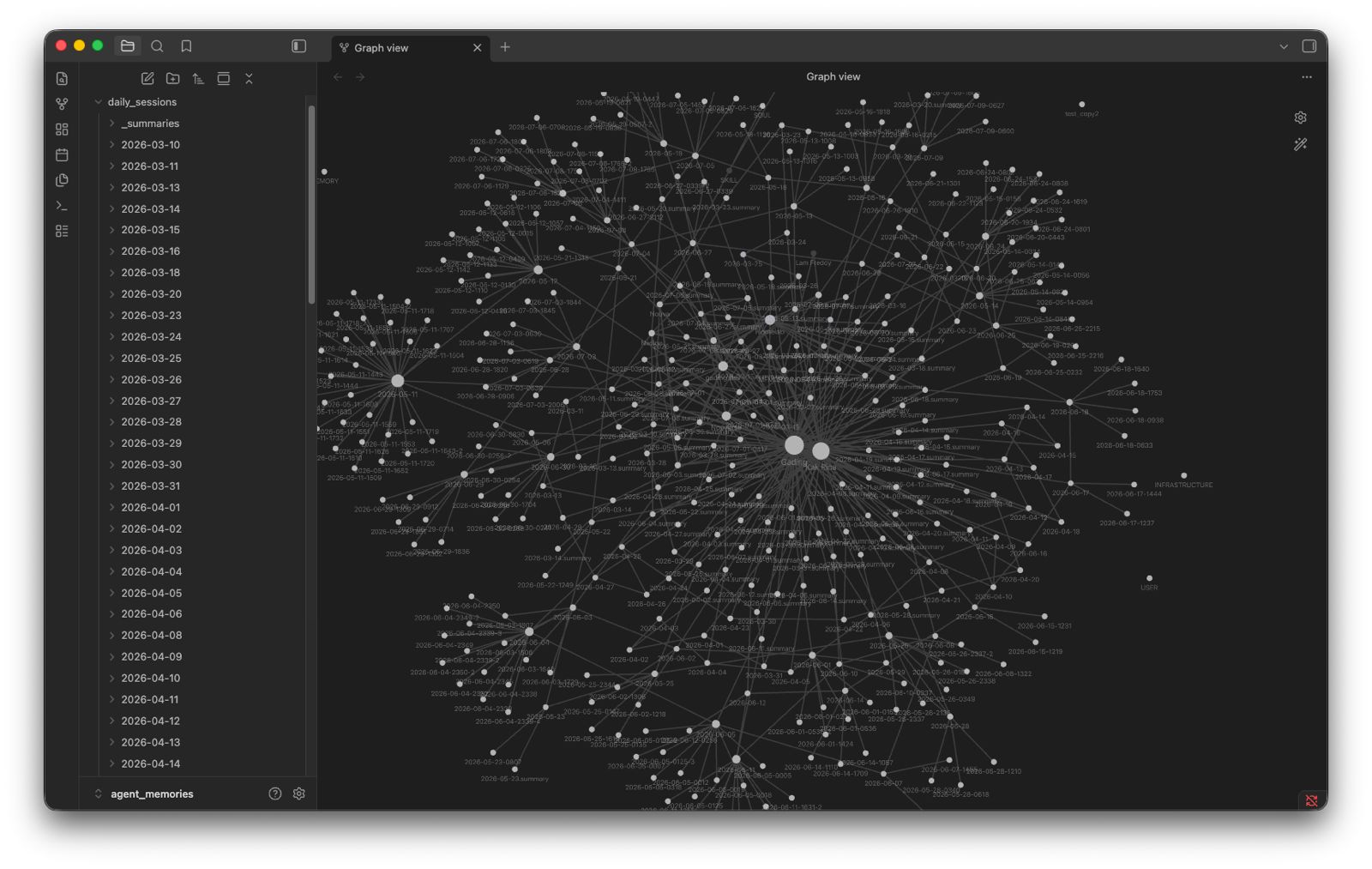
Visual Graph with Obsidian
Since all daily logs and summaries are stored in a clean Markdown format (YYYY-MM-DD.md and _summaries/YYYY-MM-DD.summary.md), you can easily open the active/archived memory directories in Obsidian to explore your memories visually as an interconnected knowledge graph.
Установка Nouva Server
У этого сервера нет опубликованного пакета — он собирается из исходников. Открой репозиторий и следуй инструкции в README.
▸ github.com/nouverse-tech/nouva-mcp-serverFAQ
Nouva Server MCP бесплатный?
Да, Nouva Server MCP бесплатный — установка в пару кликов через Unyly без оплаты.
Нужен ли API-ключ для Nouva Server?
Нет, Nouva Server работает без API-ключей и переменных окружения.
Nouva Server — hosted или self-hosted?
Self-hosted: сервер запускается локально на твоей машине командой из раздела установки.
Как установить Nouva Server в Claude Desktop, Claude Code или Cursor?
Открой Nouva Server на unyly.org, выбери вкладку своего клиента (Claude Desktop, Claude Code, Cursor) и нажми Install — конфиг сгенерируется автоматически, без правки JSON.
Похожие MCP
Fetch
Web content fetching and conversion for efficient LLM usage.
AWS KB Retrieval
Retrieval from AWS Knowledge Base using Bedrock Agent Runtime.
 автор: modelcontextprotocol
Spring AI MCP Server
Provides auto-configuration for setting up an MCP server in Spring Boot applications.
llm-analysis-assistant
A very streamlined mcp client that supports calling and monitoring stdio/sse/streamableHttp, and can also view request responses through the /logs page. It also
 автор: xuzexin-hz
Compare Nouva Server with
Не уверен что выбрать?
Найди свой стек за 60 секунд
Автор?
Embed-бейдж для README
Похожее
Все в категории ai