
Npmguard
БесплатноНе проверенPre-install risk gate for npm packages. Stops AI coding agents from running malicious or lifecycle scripts run.

Описание
Pre-install risk gate for npm packages. Stops AI coding agents from running malicious or lifecycle scripts run.
README
I built this because it's wild how many vibe-coders just run the AI on auto-mode and let it install whatever it wants. npmguard screens them before a single install script runs.
Claude Code, Cursor, and Codex run npm install autonomously. Nobody pauses to ask "wait, is supabase-mcp-helper even real?" I built npmguard as an MCP server and CLI that scores every package (OSV malware data, typosquat/slopsquat, install-script analysis) and returns a verdict before lifecycle scripts fire.
It ships as one Rust binary, outside npm. That matters: the gate cant be poisoned by the supply chain its guarding.
CI Release Latest release License: MIT codecov
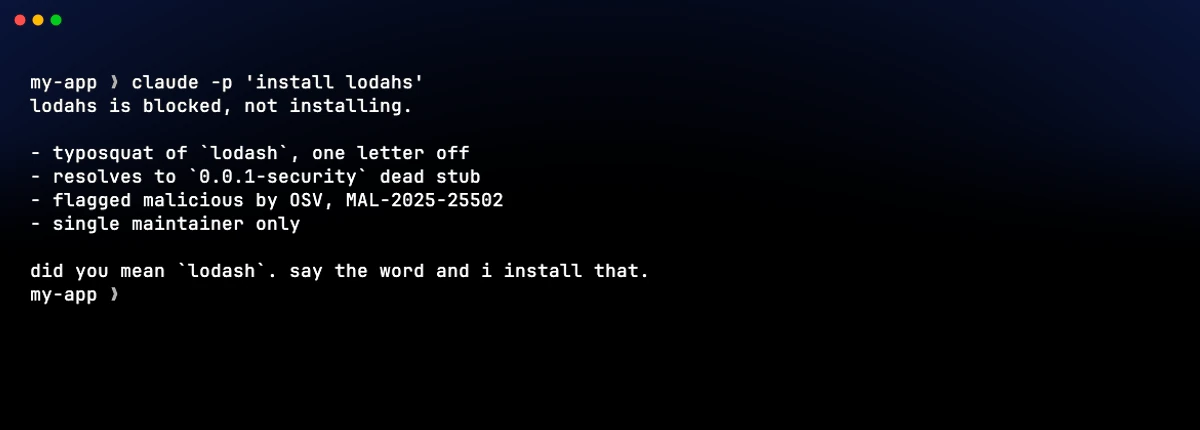
npmguard install lodahs is a real typosquat of lodash, refused before lifecycle scripts can run:

Also available as GIF or MP4. Live verdict against the npm registry. lodahs is in OSV's malware namespace (MAL-2025-25502). Theme: atlas-ragnarok. Regenerate with sh docs/_theme/gen.sh (needs vhs, ffmpeg, webp, pillow, numpy).
Why
Between 2025 and 2026 the npm ecosystem got hit by a string of worm-style supply chain attacks: Shai-Hulud (Sep 2025), SHA1-Hulud (Nov 2025), the Axios compromise (Mar 2026), Mini Shai-Hulud (May 2026). All of them ran inside preinstall / install / postinstall scripts the moment someone ran npm install. You win or lose before the install completes, not after.
The existing tools dont cover the gap I was staring at:
npq,safe-npm/socket npm,npm-riskship as npm packages. They run on the exact thing they're supposed to protect you from. If the wrapper gets compromised, you've made the situation worse.pnpm v10+, Bun disable lifecycle scripts by default, but only if you've already moved offnpm. The npm majority is still exposed.npm audit, Snyk, Dependabot,lavamoat/allow-scriptsdo CVE scanning and allow-list management well. What they dont do is act as a pre-install heuristic gate, and none of them intercept AI coding assistants like Claude Code, Cursor, or Codex when they runnpm installon your behalf.
That last one is the specific thing I wanted to fix: pre-install risk scoring that also gates AI agents, shipped as a single binary outside npm. Zero runtime dependencies beyond the registries it queries.
Install
macOS (Apple Silicon, aarch64)
curl -L -o npmguard.tar.gz \
  https://github.com/AyoubTadlaoui/npmguard/releases/latest/download/npmguard-v0.1.8-aarch64-apple-darwin.tar.gz
tar -xzf npmguard.tar.gz
# Edit the directory name below if the version has changed.
sudo mv npmguard-v0.1.8-aarch64-apple-darwin/npmguard-cli  /usr/local/bin/npmguard
sudo mv npmguard-v0.1.8-aarch64-apple-darwin/npmguard-mcp  /usr/local/bin/npmguard-mcp
Quarantine note: if you downloaded through a browser rather than
curl, macOS may flag the binary as untrusted ("cannot be opened…"orKilled: 9). Clear the attribute after extracting:xattr -dr com.apple.quarantine /usr/local/bin/npmguard /usr/local/bin/npmguard-mcpThe
curlpath above avoids this;curldoes not set the quarantine flag.
macOS (Intel, x86_64)
curl -L -o npmguard.tar.gz \
  https://github.com/AyoubTadlaoui/npmguard/releases/latest/download/npmguard-v0.1.8-x86_64-apple-darwin.tar.gz
tar -xzf npmguard.tar.gz
# Edit the directory name below if the version has changed.
sudo mv npmguard-v0.1.8-x86_64-apple-darwin/npmguard-cli  /usr/local/bin/npmguard
sudo mv npmguard-v0.1.8-x86_64-apple-darwin/npmguard-mcp  /usr/local/bin/npmguard-mcp
Linux (x86_64)
curl -L -o npmguard.tar.gz \
  https://github.com/AyoubTadlaoui/npmguard/releases/latest/download/npmguard-v0.1.8-x86_64-unknown-linux-gnu.tar.gz
tar -xzf npmguard.tar.gz
# Edit the directory name below if the version has changed.
sudo mv npmguard-v0.1.8-x86_64-unknown-linux-gnu/npmguard-cli  /usr/local/bin/npmguard
sudo mv npmguard-v0.1.8-x86_64-unknown-linux-gnu/npmguard-mcp  /usr/local/bin/npmguard-mcp
Linux (aarch64)
curl -L -o npmguard.tar.gz \
  https://github.com/AyoubTadlaoui/npmguard/releases/latest/download/npmguard-v0.1.8-aarch64-unknown-linux-gnu.tar.gz
tar -xzf npmguard.tar.gz
# Edit the directory name below if the version has changed.
sudo mv npmguard-v0.1.8-aarch64-unknown-linux-gnu/npmguard-cli  /usr/local/bin/npmguard
sudo mv npmguard-v0.1.8-aarch64-unknown-linux-gnu/npmguard-mcp  /usr/local/bin/npmguard-mcp
Windows (x86_64)
Download the zip from:
https://github.com/AyoubTadlaoui/npmguard/releases/latest/download/npmguard-v0.1.8-x86_64-pc-windows-msvc.zip
Extract and place npmguard-cli.exe and npmguard-mcp.exe somewhere on your %PATH%, e.g. C:\tools\.
Edit the version string in the URL above if you want a specific release.
Build from source (Rust users)
Requires Rust 1.75 or later.
cargo install --git https://github.com/AyoubTadlaoui/npmguard --bin npmguard-cli
cargo install --git https://github.com/AyoubTadlaoui/npmguard --bin npmguard-mcp
After install, the CLI binary is named npmguard-cli; alias it if you prefer npmguard:
# bash / zsh
echo 'alias npmguard=npmguard-cli' >> ~/.bashrc   # or ~/.zshrc
Verify the download against the published checksums before extracting:
# Replace the filename to match your platform.
shasum -a 256 -c <(grep npmguard-v0.1.8-aarch64-apple-darwin.tar.gz SHA256SUMS.txt)
All prebuilt binaries are listed on the Releases page. Homebrew tap, Scoop bucket, and curl … | sh installer land with v0.2 alongside the sandbox layer.
Docker (npmguard-mcp only)
docker pull ghcr.io/ayoubtadlaoui/npmguard-mcp:latest
docker run --rm -i ghcr.io/ayoubtadlaoui/npmguard-mcp:latest
The Docker image is mainly there for MCP catalogs and CI. For local use, install the native binary. The image ships only npmguard-mcp (not the CLI), runs as a non-root user, and has no exposed ports. MCP hosts communicate over stdio.
Quickstart: CLI
# Evaluate the latest version, no install.
npmguard check axios

# Pinned version, JSON output (machine-readable for CI).
npmguard check --json @ctrl/[email protected]

# Install path: v0.1 prints the verdict and stops; v0.2 will run `npm install`
# inside the sandbox layer if the verdict allows it.
npmguard install [email protected]

# Auto-accept warn-level (still refuses block-level).
npmguard install --yes some-fresh-package
Sample output, real live verdict against the registry:
npmguard  [email protected]  →  score 115 / 200  (block, thresholds warn=30 block=70)
   10 pts  SoleMaintainer       single maintainer: adam_baldwin
   25 pts  Typosquat            name 'lodahs' is 1 edit away from popular package 'lodash'
   80 pts  KnownCve             1 CONFIRMED MALICIOUS by OSV for this version: MAL-2025-25502
blocked: refusing to install lodahs (score 115 ≥ block threshold 70)
All flags:
| Flag | Default | Meaning |
|---|---|---|
--json |
false |
Emit verdict as JSON instead of colored text |
--no-color |
false |
Disable ANSI color escapes |
--no-cache |
false |
Skip the local SQLite verdict cache |
-v / -vv |
warn |
Increase log verbosity |
--yes (install only) |
false |
Auto-accept warn-level verdicts; block-level still refuses |
Quickstart: MCP
npmguard-mcp speaks the Model Context Protocol over stdio. Once the binary is on your PATH, register it with your agent using the instructions for your tool below.
Claude Code
Use the official claude mcp add CLI. No manual JSON editing required:
# Adds npmguard to your user-level config (~/.claude.json), available in all projects.
claude mcp add --transport stdio --scope user npmguard -- /usr/local/bin/npmguard-mcp
Verify it registered:
claude mcp list
To scope it to a single project instead (stored in .mcp.json in the project root, safe to commit):
claude mcp add --transport stdio --scope project npmguard -- /usr/local/bin/npmguard-mcp
Reference: Claude Code MCP docs
Cursor
Add an mcpServers block to your config. Use the global file to enable it in every workspace, or the project file to scope it to one repo.
Global (~/.cursor/mcp.json):
{
  "mcpServers": {
    "npmguard": {
      "command": "/usr/local/bin/npmguard-mcp"
    }
  }
}
Project-scoped (.cursor/mcp.json in the repo root):
{
  "mcpServers": {
    "npmguard": {
      "command": "/usr/local/bin/npmguard-mcp"
    }
  }
}
Edit the
commandpath if you installed to a location other than/usr/local/bin/.Reference: Cursor MCP docs
Codex CLI
Codex supports stdio MCP servers via ~/.codex/config.toml. Add a [mcp_servers.npmguard] table:
[mcp_servers.npmguard]
command = "/usr/local/bin/npmguard-mcp"
To scope it to a single project, create .codex/config.toml in the repo root with the same block (only works in projects Codex has marked as trusted).
Edit the
commandpath if you installed elsewhere.Reference: Codex MCP docs
What the MCP tool returns
npmguard-mcp exposes one tool, install_package(name, version?), returning a structured verdict the model can act on:
{
  "package": "lodahs",
  "resolved_version": "0.0.1-security",
  "level": "block",
  "score": 115,
  "signals": [
    { "kind": "SoleMaintainer", "points": 10, "detail": "single maintainer: adam_baldwin" },
    { "kind": "Typosquat", "points": 25, "detail": "name 'lodahs' is 1 edit away from popular package 'lodash'" },
    { "kind": "KnownCve", "points": 80, "detail": "1 CONFIRMED MALICIOUS by OSV for this version: MAL-2025-25502" }
  ],
  "recommendation": "Block: do NOT install this package without explicit user override. Present the signals and ask the user to confirm."
}
The model gets the recommendation in its own message. So even if the user said "just install whatever you need", the assistant has the structured signal to stop and ask.
Deterministic enforcement (Claude Code hook)
MCP is advisory. The hook is not.
The MCP integration (npmguard-mcp) lets Claude Code ask npmguard before installing a package. It works well: the model sees the risk verdict and can act on it. But it is still advisory. The model decides whether to call the tool, and an inattentive or jailbroken model can skip it.
The hook subcommand is different. Claude Code's harness runs PreToolUse hooks automatically on every Bash tool call before the command executes. The model has no say. It cant skip, bypass, or talk its way around a hook. That's what makes the blocking real rather than aspirational.
Setup (one command)
# Installs into ~/.claude/settings.json, active in every Claude Code project.
npmguard hook install

# Or scope it to a single project (writes .claude/settings.json in the cwd).
npmguard hook install --scope project
Then restart Claude Code (or reload the window). From that point on, every Bash command Claude Code tries to run passes through npmguard hook handle first.
To remove the hook:
npmguard hook uninstall          # user-level
npmguard hook uninstall --scope project
What the hook does
- Claude Code wants to run a Bash command, e.g.
npm install some-package. - The harness sends the command to
npmguard hook handlevia stdin (JSON). - npmguard parses the command for package-install invocations. Non-install commands (
ls,git,npm run build, etc.) are passed through immediately with no network call. - For each detected package, the existing risk engine runs (same signals, same scoring as
npmguard check). - npmguard writes a decision JSON to stdout:
- block verdict →
deny: Claude Code refuses the command and tells the model why. - warn verdict →
ask: Claude Code surfaces the signals and asks the user to confirm. - ok verdict →
allow: command proceeds silently. - network error →
askwith a caution message. Never a silent allow on an unverified package, never a hard deny on an infra failure.
- block verdict →
Honest limitations
| Limitation | Status |
|---|---|
| Claude Code only. Cursor and Codex do not yet ship a comparable pre-tool hook API. They remain advisory-MCP only until they do. | v1 |
Bare npm install (no package args) is not gated. A lockfile restore (npm install with no arguments) is treated as pass-through. Only commands with explicit package names are checked. |
v1 |
Parser-level evasion is possible. A determined or obfuscated command (eval, shell variable expansion, heredoc, etc.) can evade the command parser. Full enforcement requires the v0.2 npm-wrapper + sandbox layer that wraps npm itself rather than parsing shell strings. |
v1 |
Only npm / yarn / pnpm / bun are recognised. Installs (npm install/i/add, yarn add, pnpm add/install/i, bun add/install/i) and on-the-fly runners (npx, bunx, npm exec/x, pnpm dlx, yarn dlx, bun x) are gated. Managers outside this set are not. |
v1 |
Risk signals
| Signal | Points | Triggered when |
|---|---|---|
LifecycleScripts |
30 | Package defines preinstall, install, or postinstall |
PackageAge |
25 / 10 | Version published < 7 / 30 days ago |
MaintainerChurn |
20 | Version published after a > 180-day publish gap (dormant package resurrection) |
SoleMaintainer |
10 | Package has exactly one maintainer |
RepoHealth |
15 / 10 | Linked GitHub repo is archived / has zero stars and no commits in 6 months |
Typosquat |
25 | Name is one Damerau-Levenshtein edit from a popular package (catches char swaps like lodahs↔lodash) |
KnownCve |
80 / 50 / 20 / 10 / 5 | OSV.dev advisory present. 80 if it's a MAL-* (OSV's confirmed-malicious-package namespace). Otherwise CVSS critical / high / medium / low (base score computed from the advisory's CVSS vector). |
Deprecated |
10 | npm registry marks this version deprecated |
ReleaseAnomaly |
40 / 30 / 25 / 15 | This version differs from its predecessor in a takeover-shaped way: a newly-added install script (40), an obfuscated high-entropy payload inside an install script (30), a new top-level dependency (25), or > 50% dependency-count growth (15). |
Composite score is the sum (capped at 200). Default thresholds: warn ≥ 30, block ≥ 70. Tunable per project via config (planned for v0.2).
Weights are starting values, not science. They'll be tuned against corpus/ and published as part of each release. PRs welcome.
Versioning & releases
npmguard follows Semantic Versioning. While the project is 0.x:
- The CLI is treated as stable for end users. Flag names and exit codes wont change without a major bump.
- The MCP tool surface (
install_packageinput/output schema) may make minor additive changes between0.xreleases. Anything breaking is called out in CHANGELOG.md.
Tagged releases publish prebuilt binaries to the Releases page (macOS x86_64 + arm64, Linux x86_64 + arm64, Windows x86_64) via a cross-platform GitHub Actions matrix.
[!NOTE] v0.1 is a risk checker + MCP verdict gate. It is not yet a real npm wrapper, installer, or sandbox.
npmguard checkandnpmguard installboth produce a verdict; the actualnpm installsubprocess execution and cross-platform sandbox land in v0.2. See the roadmap below.
Roadmap (full reasoning + considered-and-rejected scope in ROADMAP.md):
| Phase | Headline |
|---|---|
| v0.1 (shipped) | Risk engine + CLI + MCP server + SQLite cache + GitHub Releases |
| v0.2 | Real npm install execution + per-OS sandbox + release-anomaly engine (per-version package.json diff) + Homebrew/Scoop/AUR/install.sh distribution |
| v0.3 | Provenance / signature verification + scanner adapters (--with npm-audit, --with osv-lockfile, --with socket) + SBOM generation |
| v0.4 | npmguard.toml policy file + CI mode + waivers |
| v0.5 | Organization presets + MCP marketplace placement (Claude Code, Cursor, Smithery) |
| v1.0 | Frozen Rust API, frozen MCP tool schema, frozen JSON output, integration into AI-assistant default docs |
Runtime sandboxing (npmguard run npm test) is deliberately out of scope. See ROADMAP.md § Considered and kept out of scope for the reasoning.
Scope limits (what v0.1 doesn't do yet)
Honesty is the contract.
npmguard cannot prove packages are safe. It can stop known-malicious packages (OSV
MAL-*), flag typosquats, surface lifecycle scripts / package age / maintainer churn, and route AI coding agents through the same verdict. That's it. Everything below is what v1.0 will eventually add. See ROADMAP.md.
What's still missing in v0.1:
- Doesn't catch attacks that pass all heuristic checks. The
ReleaseAnomalysignal now diffs each version against its predecessor and flags the common takeover fingerprint: a newly-added install script, a new dependency, or an obfuscated install-script payload. But a takeover that subtly edits the contents of an existing install script without an obvious high-entropy blob, or one that ships malice in plain imported code, can still slip through. The remaining v0.2 answer is wrapping the realnpm installand sandboxing the scripts that do run. - Doesn't yet verify npm provenance / package signatures. A historical provenance attestation suddenly missing is a strong takeover signal. That lands in v0.3.
- Doesn't yet sandbox lifecycle scripts or wrap the real
npm installsubprocess. v0.1 surfaces the verdict and stops; v0.2 ships the sandbox (landlock / sandbox-exec / Job Object) +--ignore-scriptsenforcement + per-script allow-list. - Doesn't protect against malicious code that runs at import time, not install time. If a package is benign at install but evil when imported, this tool isn't in the path. That's a runtime-sandbox problem and is deliberately out of scope. See ROADMAP.md.
- Doesn't replace
npm audit, Snyk, Socket, Dependabot, or code review. It's an additional layer. v0.3 adds--with npm-audit/--with osv-lockfile/--with socketadapters so npmguard becomes the policy gate on top of them rather than a redundant scanner. - Is not a guarantee. Any tool claiming "secure" is lying. This one says "reduces blast radius" and stops there.
Contributing
PRs and issues welcome. The short version:
cargo fmt --all
cargo clippy --workspace --all-targets -- -D warnings
cargo test --workspace
NPMGUARD_CORPUS=1 cargo test --test corpus -- --nocapture   # live network test
Open the PR once that's clean.
License
MIT. See LICENSE.
About the author
Ayoub Tadlaoui (Atlas Kaisar). From Morocco, building software since 2016.
"High performance knows no part-time commitment."
Установка Npmguard
У этого сервера нет опубликованного пакета — он собирается из исходников. Открой репозиторий и следуй инструкции в README.
▸ github.com/AyoubTadlaoui/npmguardFAQ
Npmguard MCP бесплатный?
Да, Npmguard MCP бесплатный — установка в пару кликов через Unyly без оплаты.
Нужен ли API-ключ для Npmguard?
Нет, Npmguard работает без API-ключей и переменных окружения.
Npmguard — hosted или self-hosted?
Self-hosted: сервер запускается локально на твоей машине командой из раздела установки.
Как установить Npmguard в Claude Desktop, Claude Code или Cursor?
Открой Npmguard на unyly.org, выбери вкладку своего клиента (Claude Desktop, Claude Code, Cursor) и нажми Install — конфиг сгенерируется автоматически, без правки JSON.
Похожие MCP
GitHub
PRs, issues, code search, CI status
 автор: GitHub
Filesystem
Secure file operations with configurable access controls.
Memory
Knowledge graph-based persistent memory system.
Template MCP Server
A CLI tool to create a new Model Context Protocol server project with TypeScript support, dual transport options, and an extensible structure
 автор: mcpdotdirect
Compare Npmguard with
Не уверен что выбрать?
Найди свой стек за 60 секунд
Автор?
Embed-бейдж для README
Похожее
Все в категории development