
Npu Vision Fallback
БесплатноНе проверенProvides an MCP server for local low-power screen vision, enabling AI agents to perform OCR and UI detection on inaccessible screens (games, remote desktops) us

Описание
Provides an MCP server for local low-power screen vision, enabling AI agents to perform OCR and UI detection on inaccessible screens (games, remote desktops) using NPU acceleration and system OCR.
README
🔋 npu-vision-fallback
Local low-power vision for desktop AI agents
When accessibility APIs fail — NPU-first, zero GPU wake-up, 100% local
English
What is this?
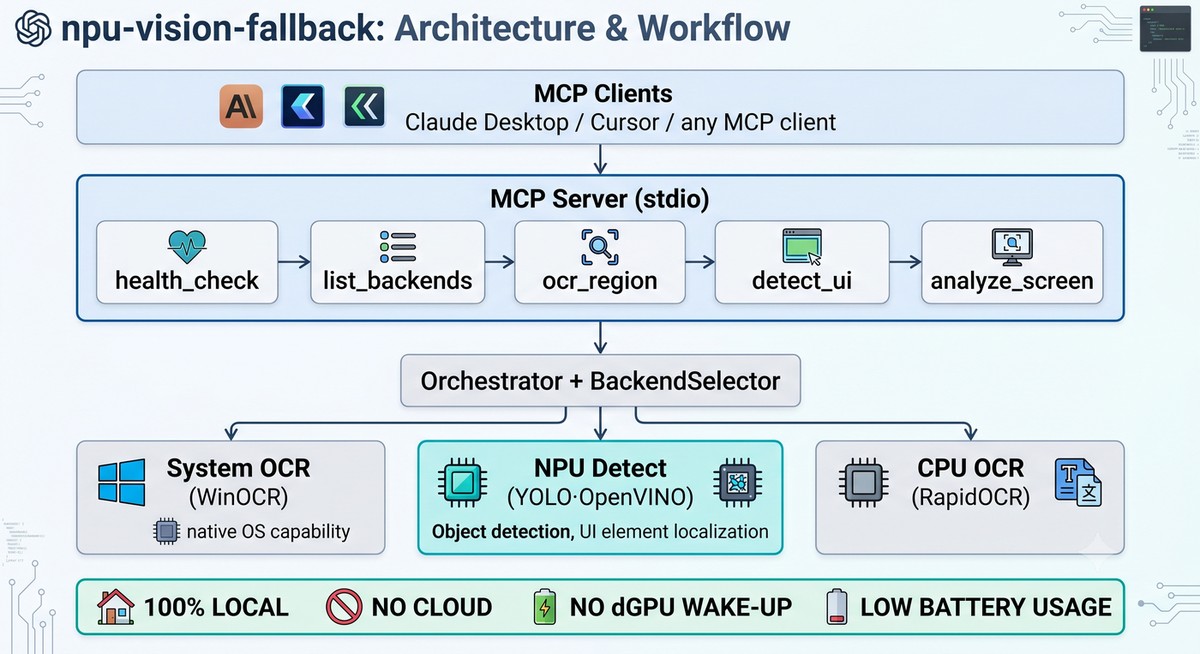
A lightweight, local-first vision service for desktop agents that need to see and interact with screens where traditional accessibility APIs fall short—games, remote desktops, canvas apps, and more.
Built for efficiency: Native OS OCR · Intel NPU acceleration · Zero cloud calls · Battery-friendly by design
✨ Why Use This?
Desktop agents face a challenge: how to perceive UI when the accessibility tree is empty?
| Common Approach | The Problem |
|---|---|
| 🤖 Multimodal LLM screenshots | Expensive tokens, slow round-trips, coordinate hallucination |
| 🌳 OS Accessibility APIs only | Blind to games, canvas apps, remote desktops, emulators |
| 🔥 Heavy GPU OCR (PaddleOCR) | Big dependencies, high power draw, wakes discrete GPU |
npu-vision-fallback is your fallback layer — when the accessibility tree comes back empty, this gives your agent a small, fast, local vision service that doesn't touch the cloud or spin up the dGPU.
Perfect for:
- 🎮 Game UIs and emulators
- 🖥️ Remote desktop / VNC clients (no remote accessibility tree)
- 🎨 Canvas / WASM web apps rendering outside the DOM
- 💻 Local SLMs that can't afford multimodal screenshot tokens
🚀 Quick Start
1. Install (Windows + Intel NPU recommended)
pip install "npu-vision-fallback[ocr-win,detect]"
python scripts/download_ui_model.py  # One-time setup
2. Configure Claude Desktop
Add to your claude_desktop_config.json:
{
  "mcpServers": {
    "npu-vision-fallback": {
      "command": "npu-vision-fallback"
    }
  }
}
3. Use it
Restart Claude Desktop and try:
You: The accessibility tree for this game is empty. Can you read the screen at coordinates [0,0,1280,800] and find the "Start Game" button?
Claude: (calls
analyze_screen) I found a button labeled "Start Game" at [520, 580, 720, 640]. Want me to click its center at (620, 610)?
📦 Installation Options
Windows (Recommended)
Native OCR + NPU UI detection (~85 MB total):
pip install "npu-vision-fallback[ocr-win,detect]"
python scripts/download_ui_model.py
Linux / macOS
Cross-platform OCR + CPU detection (~130 MB):
pip install "npu-vision-fallback[ocr-rapid,detect]"
python scripts/download_ui_model.py
Full (All Backends)
For development or testing all backends:
pip install "npu-vision-fallback[all]"
python scripts/download_ui_model.py
Minimal Core
Just the MCP server (no OCR/detection, ~20 MB):
pip install npu-vision-fallback
💡 Note: The
detectextra uses OpenVINO (~80 MB) for runtime, not PyTorch. Model conversion requires thedev-convertextra (~2 GB), but that's a one-time setup most users skip.
🎯 Key Features
- 🔋 NPU-first architecture — UI detection runs on Intel AI Boost at ~80ms per call (~0.3J energy)
- ⚡ Zero dGPU wake-up — Default paths use NPU, system OCR, or CPU—laptop battery stays happy
- 🌐 Native OS OCR — Uses Windows OCR engine (macOS Vision planned) for quality
- 🧩 MCP protocol — Works with Claude Desktop, Cursor, or any MCP client out of the box
- 🪶 Lightweight — No PyTorch/TensorFlow at runtime; all heavy deps are optional
- 🛡️ Privacy-first — 100% local processing, no telemetry, no cloud
⚡ Performance
Measured on Intel Core Ultra 9 275HX (2560×1600 screen, on battery):
| Task | Backend | Latency | Energy | Notes |
|---|---|---|---|---|
| OCR | WinOCR | ~1100ms | 2.5J | Native Windows API (full screen) |
| OCR | RapidOCR | ~6300ms | 14.5J | Cross-platform ONNX CPU |
| UI Detection | OpenVINO NPU | ~80ms | 0.3J | YOLOv8n on Intel AI Boost |
| UI Detection | OpenVINO CPU | ~120ms | — | Fallback when no NPU |
Full benchmark details and reproduction steps: outputs/power_report.md
🛠️ MCP Tools
| Tool | Purpose | Key Arguments |
|---|---|---|
health_check |
Server status | — |
list_backends |
Available backends | — |
ocr_region |
Extract text from region | region=[x1,y1,x2,y2] |
detect_ui |
Find UI elements | region=[x1,y1,x2,y2] |
analyze_screen |
🌟 Combined OCR + detection | region=[x1,y1,x2,y2] |
analyze_screen is the primary tool — it fuses detection + OCR, returns spatially-sorted elements with text annotations. Perfect for agent navigation.
📚 Documentation
- Architecture Guide — System design and data flow
- Backend Reference — Per-backend capabilities and priorities
- FAQ — Common questions and troubleshooting
- Contributing — How to contribute
- Code Guide — Project constitution for contributors
🧪 Examples
| Example | Description |
|---|---|
| basic_ocr.py | Simple OCR call to screen region |
| agent_ui_navigation.py | Find and click UI elements |
| desktop_remote_vnc.py | Vision fallback in remote desktop |
uv run python examples/basic_ocr.py --region 0 0 1280 800
🗺️ Roadmap
- v1.1 — Multi-monitor support, DPI scaling awareness
- v2.0 — Custom model training interface, bring your own detector
- v2.1 — UI-TARS integration, macOS Vision backend, PP-OCR v4 on NPU
🤝 Contributing
Contributions welcome! See CONTRIBUTING.md for guidelines. Please read CLAUDE.md—it's the project constitution that ensures code quality and architectural consistency.
📋 Supported Backends
| Backend | Type | Device | Platform | Status |
|---|---|---|---|---|
winocr |
System OCR | CPU/NPU | Windows | ✅ Primary |
openvino_npu |
UI Detection | NPU | Win/Linux + Intel NPU | ✅ Primary |
openvino_cpu |
UI Detection | CPU | Win/Linux/macOS | ✅ Fallback |
rapid_ocr |
OCR | CPU | All | ✅ Cross-platform |
pytesseract |
OCR | CPU | All | ✅ Last-resort |
vision |
System OCR | ANE | macOS | 🚧 Planned |
📄 License
MIT © npu-vision-fallback contributors
🙏 Acknowledgments
Built with:
- Model Context Protocol (Anthropic) — Agent integration layer
- OpenVINO — NPU/CPU inference runtime
- Ultralytics YOLO — UI detection models
- RapidOCR — Cross-platform OCR engine
- Tesseract — OCR fallback
- python-mss — Screen capture library
Development assisted by Claude Code (Anthropic). Architecture design and code review powered by AI collaboration.
Установить Npu Vision Fallback в Claude Desktop, Claude Code, Cursor
unyly install npu-vision-fallbackСтавит в Claude Desktop, Claude Code, Cursor и VS Code — сам разбирается с npx, uvx и сборкой из исходников.
Впервые? Поставь CLI: curl -fsSL https://unyly.org/install | sh
Или настроить вручную
Выполни в терминале:
claude mcp add npu-vision-fallback -- uvx npu-vision-fallbackFAQ
Npu Vision Fallback MCP бесплатный?
Да, Npu Vision Fallback MCP бесплатный — установка в пару кликов через Unyly без оплаты.
Нужен ли API-ключ для Npu Vision Fallback?
Нет, Npu Vision Fallback работает без API-ключей и переменных окружения.
Npu Vision Fallback — hosted или self-hosted?
Self-hosted: сервер запускается локально на твоей машине командой из раздела установки.
Как установить Npu Vision Fallback в Claude Desktop, Claude Code или Cursor?
Открой Npu Vision Fallback на unyly.org, выбери вкладку своего клиента (Claude Desktop, Claude Code, Cursor) и нажми Install — конфиг сгенерируется автоматически, без правки JSON.
Похожие MCP
LibreOffice Tools
Enables AI agents to read, write, and edit Office documents via LibreOffice with token-efficient design. Supports multiple formats including DOCX, XLSX, PPTX, a
 автор: passerbyflutter
dannote/figma-use
Full Figma control: create shapes, text, components, set styles, auto-layout, variables, export. 80+ tools.
 автор: dannote
Logo.dev
Search and retrieve company logos by brand or domain. Customize size, format, and theme to match your design needs. Accelerate design, prototyping, and content
 автор: NOVA-3951
PIX4Dmatic
Enables GUI automation for controlling PIX4Dmatic on Windows through MCP. Supports launching, focusing, capturing screenshots, sending hotkeys, clicking UI elem
 автор: jangjo123
Compare Npu Vision Fallback with
Не уверен что выбрать?
Найди свой стек за 60 секунд
Автор?
Embed-бейдж для README
Похожее
Все в категории design