
Obsidian HTTP
БесплатноНе проверенFirst HTTP-native MCP server for Obsidian that solves stdio transport bugs, enabling AI assistants to manage Obsidian notes without crashes.

Описание
First HTTP-native MCP server for Obsidian that solves stdio transport bugs, enabling AI assistants to manage Obsidian notes without crashes.
README
Finally use Claude Code to manage your Obsidian notes - no more crashes or broken pipes
The first HTTP-native MCP server for Obsidian that solves stdio transport bugs affecting Claude Code CLI (#3071, #9176, #9662)
Also compatible with: Claude Desktop, Codex, Gemini, and other MCP clients
npm version npm License: MIT Sponsor
Why This Exists
First HTTP-native MCP server for Obsidian. Solves stdio transport failures (BrokenPipeError) affecting Claude Code CLI. HTTP bypasses these issues entirely.
Fast & efficient: <200ms response, 70% fewer API calls, MCP-optimized for minimal token usage
🎬 See It In Action
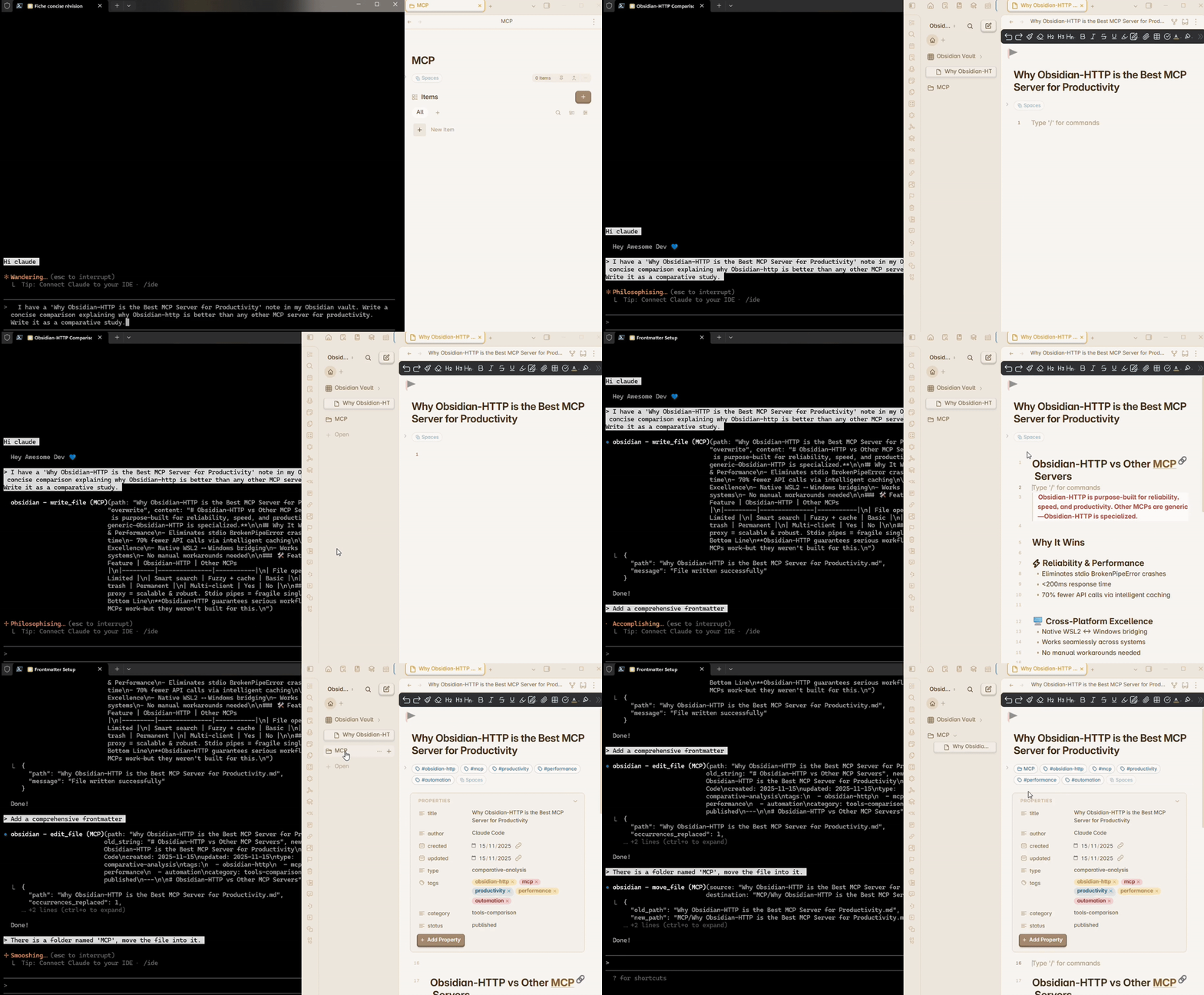
Claude Code controlling an Obsidian vault via HTTP-native MCP - no stdio bugs, just seamless AI-powered note management
Table of Contents
- What Makes This Different?
- Quick Start
- Your Obsidian, Powered by AI
- Updating
- Command Line Options
- Troubleshooting
🎯 What Makes This Different?
✅ HTTP that works - No stdio crashes, no BrokenPipeError, no frustration
⏱️ Lightning fast - Create, find, edit, and move notes instantly - even with typos
🛡️ Never lose data - Built-in protection against accidental deletions
⚙️ Set up in 1 minute - No complex configuration, works out of the box
💪 Built for real use - Handles thousands of notes without slowdowns
💸 Token-conscious - Intelligent design minimizes AI usage costs
⚡ Quick Start (1 min)
💡 New to the codebase? Ask an AI assistant to guide you: "Based on README.md and TECHNICAL.md, walk me through how the HTTP-native MCP server works"
Prerequisites
- Obsidian with Local REST API plugin
- Node.js 18+ - Download here
- MCP-compatible AI (e.g., Claude Code CLI, Claude Desktop, Codex, etc.)
STEP 1: Configure Obsidian Plugin
- Settings → Community Plugins → Search "Local REST API" → Enable
- Enable "Non encrypted (HTTP) API"
- Copy the API key (you'll need it next)
STEP 2: Install & Setup
Install where Obsidian is installed:
npm install -g obsidian-http-mcp
obsidian-http-mcp --setup
# Enter your Obsidian API key when prompted
# Press Enter to accept defaults for URL and port
Config saved to ~/.obsidian-mcp/config.json - you won't need to type this again.
Cross-platform users: If your AI runs on WSL2 but Obsidian on Windows, install the server on Windows.
STEP 3: Start Server
Where you installed (same system as Obsidian):
obsidian-http-mcp
⚠️ Keep this terminal running. After reboot, run obsidian-http-mcp again.
STEP 4: Connect Your AI
If your AI runs where the server is installed:
claude mcp add -s user --transport http obsidian-http http://localhost:3000/mcp # Adapt command to your AI
If your AI runs elsewhere (e.g., Claude on WSL2, server on Windows):
- Find server's IP address on the system where the server runs:
# Windows PowerShell
ipconfig | findstr "vEthernet"

# Linux
ip addr show | grep inet
- Connect from where your AI runs:
claude mcp add -s user --transport http obsidian-http http://SERVER_IP:3000/mcp # Adapt command to your AI
STEP 5: Use with Your AI
Run where your AI is installed (Windows, Linux, or WSL2):
claude  # Or your AI CLI command
# Try: "List all folders in my Obsidian vault"
That's it! Your AI will automatically connect to the server every time you start a conversation (as long as the server is running).
🔄 Updating
To update to the latest version:
npm install -g obsidian-http-mcp@latest
After updating, restart the server:
obsidian-http-mcp
✨ Your Obsidian, Powered by AI
No more switching between AI and Obsidian - Control your vault directly from your AI assistant
Never lose data - Soft delete protects against accidental AI operations (files moved to .trash-http-mcp/ by default)
Work at AI speed - Fuzzy search finds files even with typos, intelligent cache reduces API calls by 70%
Scale confidently - Handles 1000+ notes without breaking a sweat (<200ms response time)
What You Can Do:
- Read, write, and edit notes seamlessly without leaving your AI conversation
- Find any file instantly with fuzzy matching ("meeting notes" finds "Meeting-Notes-2024.md")
- Search across thousands of notes in seconds with full regex support
- Move, rename, or delete files with built-in safety features
See TECHNICAL.md for complete tool specifications and architecture details.
📖 Command Line Options
obsidian-http-mcp --help

Options:
  --setup              Interactive setup (saves to ~/.obsidian-mcp/config.json)
  --api-key <key>      Obsidian REST API key (overrides config)
  --base-url <url>     Obsidian REST API URL (default: http://127.0.0.1:27123)
  --port <port>        Server port (default: 3000)
  --help, -h           Show help
  --version, -v        Show version

Config Priority:
  1. CLI arguments (--api-key, --base-url, --port)
  2. Environment variables (OBSIDIAN_API_KEY, OBSIDIAN_BASE_URL, PORT)
  3. Config file (~/.obsidian-mcp/config.json)
  4. .env file
Alternative: Using .env file (on same system as Obsidian):
- Create
.envwithOBSIDIAN_API_KEY=your_key - Run:
obsidian-http-mcp(Windows PowerShell or Linux terminal)
🔧 Troubleshooting
WSL2: Connection refused
Find your Windows bridge IP:
On Windows PowerShell (not WSL2):
ipconfig | findstr "IPv4"
# Look for "vEthernet (WSL)" interface
# Example output: IPv4 Address. . . . . . . . . . . : 172.19.32.1
Then reconnect from WSL2 terminal:
claude mcp add -s user --transport http obsidian-http http://YOUR_IP:3000/mcp
# Replace YOUR_IP with the IP from above
Why not
127.0.0.1:27123directly? Port 27123 is Obsidian's REST API (custom HTTP protocol). Port 3000 is the MCP Server that translates between MCP protocol (used by your AI) and Obsidian's REST API. They are different protocols - the MCP server acts as a translator/proxy.
Windows Firewall blocks WSL2
Run on Windows PowerShell as Administrator:
New-NetFirewallRule -DisplayName "MCP Server" -Direction Inbound -LocalPort 3000 -Protocol TCP -Action Allow
Port already in use
Run on the same system as Obsidian (Windows PowerShell or Linux terminal):
obsidian-http-mcp --api-key YOUR_KEY --port 3001
Need more help? See TROUBLESHOOTING.md for detailed troubleshooting and TECHNICAL.md for network architecture.
⚠️ Security Notice
Designed for trusted networks (localhost, LAN, VPN). For production deployment:
- Use reverse proxy (nginx/caddy) with authentication
- Enable HTTPS/TLS
- Configure rate limiting
- See SECURITY.md for full checklist
Current state: Binds to 0.0.0.0 for cross-platform compatibility (WSL2 ↔ Windows). Do NOT expose directly to the Internet.
🤝 Contributing
See CONTRIBUTING.md for development setup and guidelines.
📝 License
MIT - See LICENSE
🌟 Support
If this project helps you, please star it on GitHub!
🔗 Related
Built with ❤️ for the Obsidian + AI community
Установить Obsidian HTTP в Claude Desktop, Claude Code, Cursor
unyly install obsidian-http-mcpСтавит в Claude Desktop, Claude Code, Cursor и VS Code — сам разбирается с npx, uvx и сборкой из исходников.
Впервые? Поставь CLI: curl -fsSL https://unyly.org/install | sh
Или настроить вручную
Выполни в терминале:
claude mcp add obsidian-http-mcp -- npx -y obsidian-http-mcpFAQ
Obsidian HTTP MCP бесплатный?
Да, Obsidian HTTP MCP бесплатный — установка в пару кликов через Unyly без оплаты.
Нужен ли API-ключ для Obsidian HTTP?
Нет, Obsidian HTTP работает без API-ключей и переменных окружения.
Obsidian HTTP — hosted или self-hosted?
Self-hosted: сервер запускается локально на твоей машине командой из раздела установки.
Как установить Obsidian HTTP в Claude Desktop, Claude Code или Cursor?
Открой Obsidian HTTP на unyly.org, выбери вкладку своего клиента (Claude Desktop, Claude Code, Cursor) и нажми Install — конфиг сгенерируется автоматически, без правки JSON.
Похожие MCP
Fetch
Web content fetching and conversion for efficient LLM usage.
AWS KB Retrieval
Retrieval from AWS Knowledge Base using Bedrock Agent Runtime.
 автор: modelcontextprotocol
Spring AI MCP Server
Provides auto-configuration for setting up an MCP server in Spring Boot applications.
llm-analysis-assistant
A very streamlined mcp client that supports calling and monitoring stdio/sse/streamableHttp, and can also view request responses through the /logs page. It also
 автор: xuzexin-hz
Compare Obsidian HTTP with
Не уверен что выбрать?
Найди свой стек за 60 секунд
Автор?
Embed-бейдж для README
Похожее
Все в категории ai