
omni-mcp/isaac-sim-mcp
БесплатноНе проверенA MCP Server and an extension enables natural language control of NVIDIA Isaac Sim, Lab, OpenUSD and etc.

Описание
A MCP Server and an extension enables natural language control of NVIDIA Isaac Sim, Lab, OpenUSD and etc.
README
The MCP Server and its extension leverage the Model Context Protocol (MCP) framework to enable natural language control of NVIDIA Isaac Sim, transforming conversational AI inputs into precise simulation manipulation. This expansion bridges the MCP ecosystem with embodied intelligence applications.
Features
- Natural language control of Isaac Sim
- Dynamic robot positioning and movement
- Custom lighting and scene creation
- Advanced robot simulations with obstacle navigation
- Interactive code preview before execution
Requirements
- NVIDIA Isaac Sim 4.2.0 or higher
- Python 3.9+
- Cursor AI editor for MCP integration
Mandatory Pre-requisite
- Install uv/uvx: https://github.com/astral-sh/uv
- Install mcp[cli] to base env: uv pip install "mcp[cli]"
Installation
cd ~/Documents
git clone https://github.com/omni-mcp/isaac-sim-mcp
Install and Enable Extension
Isaac Sim extension folder should point to your project folder:
- Extension location:
~/Documents/isaac-sim-mcp - Extension ID:
isaac.sim.mcp_extension
# Enable extension in Isaac Simulation
# cd to your Isaac Sim installation directory
# You can change assets root to local with --/persistent/isaac/asset_root/default="<your asset location>"
# By default it is an AWS bucket, e.g. --/persistent/isaac/asset_root/default="/share/Assets/Isaac/4.2"
# Setup API KEY for Beaver3d and NVIDIA
export BEAVER3D_MODEL=<your beaver3d model name>
export export ARK_API_KEY=<Your Bearver3D API Key>
export NVIDIA_API_KEY="<your nvidia api key  and apply it from https://ngc.nvidia.com/signout>"

cd ~/.local/share/ov/pkg/isaac-sim-4.2.0
./isaac-sim.sh --ext-folder /home/ubuntu/Documents/isaac-sim-mcp/ --enable isaac.sim.mcp_extension
Verify the extension starts successfully. The output should look like:
[7.160s] [ext: isaac.sim.mcp_extension-0.1.0] startup
trigger  on_startup for:  isaac.sim.mcp_extension-0.1.0
settings:  {'envPath': '/home/ubuntu/.local/share/ov/data/Kit/Isaac-Sim/4.2/pip3-envs/default', 'archiveDirs': {}, 'installCheckIgnoreVersion': False, 'allowOnlineIndex': True, 'tryUpgradePipOnFirstUse': False}
Server thread startedIsaac Sim MCP server started on localhost:8766
The extension should be listening at localhost:8766 by default.
Install MCP Server
- Go to terminal and run, make sure mcp server could start sucessfully at terminal with base venv.
uv pip install "mcp[cli]" uv run /home/ubuntu/Documents/isaac-sim-mcp/isaac_mcp/server.py - Start Cursor and open the folder
~/Documents/isaac-sim-mcp - Go to Cursor preferences, choose MCP and add a global MCP server:
{
    "mcpServers": {
        "isaac-sim": {
            "command": "uv run /home/ubuntu/Documents/isaac-sim-mcp/isaac_mcp/server.py"
        }
    }
}
Development Mode
To develop the MCP Server, start the MCP inspector:
uv run mcp dev ~/Documents/isaac-sim-mcp/isaac_mcp/server.py
You can visit the debug page through http://localhost:5173
Example Prompts for Simulation
Notice: Switch to Agent mode in top left of Chat dialog before you type prompt and choose sonnet 3.7 for better coding.
Robot Party
# Create robots and improve lighting
create  3x3 frankas robots in these current stage across location [3, 0, 0] and [6, 3, 0]
always check connection with get_scene_info before execute code.
add more light in the stage


# Add specific robots at positions
create a g1 robot at [3, 9, 0]
add Go1 robot at location [2, 1, 0]
move go1 robot to [1, 1, 0]
Factory Setup
# Create multiple robots in a row
acreate  3x3 frankas robots in these current stage across location [3, 0, 0] and [6, 3, 0]
always check connection with get_scene_info before execute code.
add more light in the stage
Vibe Coding from scratch
reference to g1.py to create an new g1 robot simulation and allow robot g1 walk straight  from [0, 0, 0] to [3, 0, 0] and [3, 3, 0]
create more obstacles in the stage
Gen3D with beaver3d model support
Use following images to generate beaver 3d objects and place them into a grid area across [0, 0, 0] to [40, 40, 0] with scale [3, 3, 3]

<your image url here, could be multiple images urls>
USD search
search a rusty desk and place it at [0, 5, 0] with scale [3, 3, 3]
MCP Tools
The Isaac Sim MCP Extension provides several specialized tools that can be accessed through natural language in Cursor AI. These tools enable you to control and manipulate NVIDIA Isaac Sim with simple commands:
Connection and Scene Management
- get_scene_info - Pings the Isaac Sim Extension Server to verify connection status and retrieve basic scene information. Always use this first to ensure the connection is active.
Physics and Environment Creation
- create_physics_scene - Creates a physics scene with configurable parameters:
objects: List of objects to create (each with type and position)floor: Whether to create a ground plane (default: true)gravity: Vector defining gravity direction and magnitude (default: [0, -0.981, 0])scene_name: Name for the scene (default: "physics_scene")
Robot Creation and Control
- create_robot - Creates a robot in the scene at a specified position:
robot_type: Type of robot to create (options: "franka", "jetbot", "carter", "g1", "go1")position: [x, y, z] position coordinates
Omniverse Kit and Scripting
omni_kit_command - Executes an Omni Kit command:
command: The Omni Kit command to execute (e.g., "CreatePrim")prim_type: The primitive type for the command (e.g., "Sphere")
execute_script - Executes arbitrary Python code in Isaac Sim:
code: Python code to execute
Usage Best Practices
- Always check connection with
get_scene_infobefore executing any commands - Initialize a physics scene with
create_physics_scenebefore adding robots - Use
create_robotfor standard robot placement before trying custom scripts - For complex simulations, use
execute_scriptwith proper async patterns - Preview code in chat before execution for verification
Contributing
Contributions are welcome! Please feel free to submit a Pull Request.
License
This project is licensed under the MIT License - see the LICENSE file for details.
Video Demonstrations
Below are demonstrations of the Isaac Sim MCP Extension in action:
Robot Party Demo
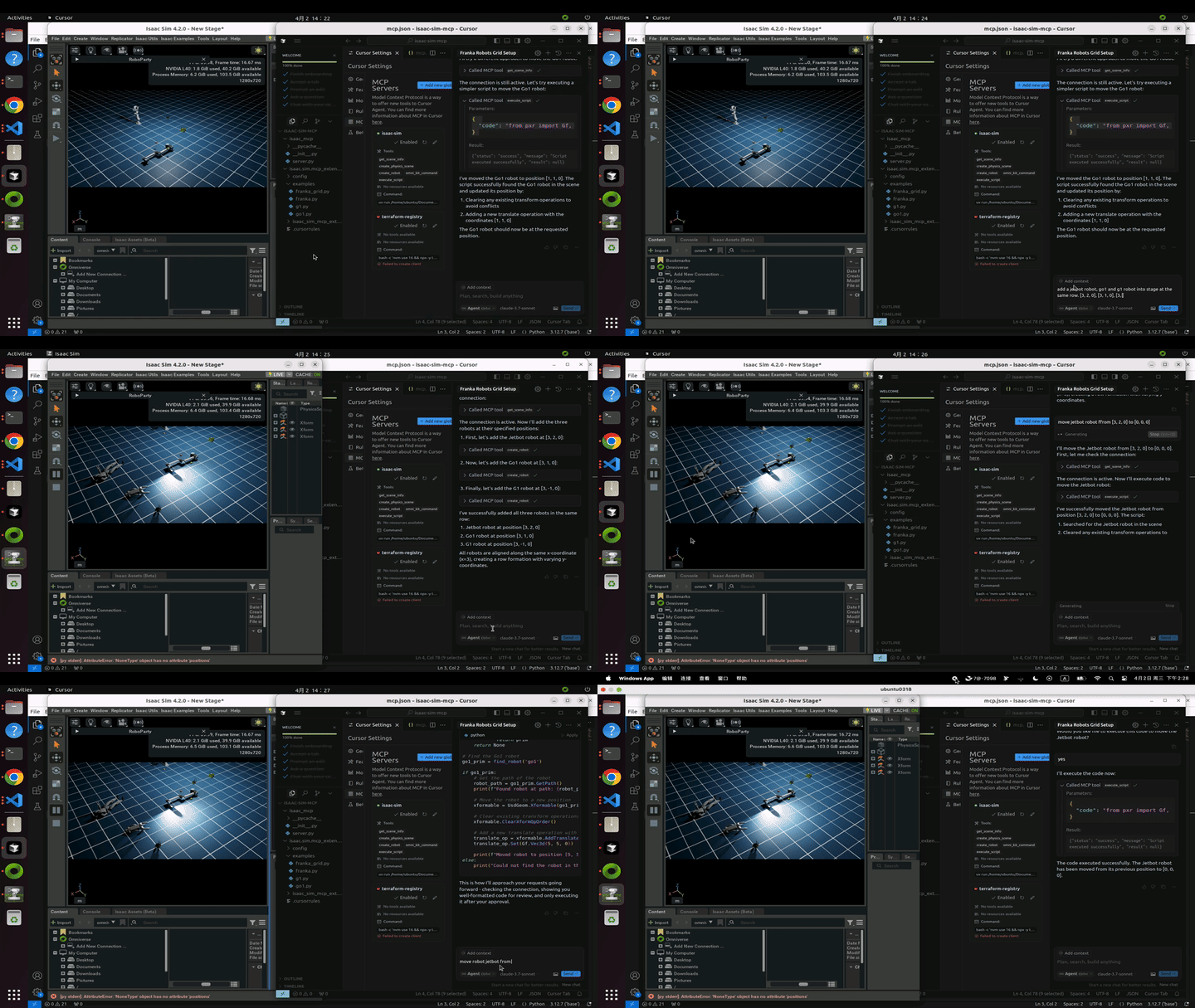
GIF: Adding more robots to the simulation using natural language commands
Video Format (MP4)
For higher quality video, you can access the MP4 version directly:
When viewing on GitHub, you can click the link above to view or download the MP4 file.
Установка omni-mcp/isaac-sim-mcp
У этого сервера нет опубликованного пакета — он собирается из исходников. Открой репозиторий и следуй инструкции в README.
▸ github.com/omni-mcp/isaac-sim-mcpFAQ
omni-mcp/isaac-sim-mcp MCP бесплатный?
Да, omni-mcp/isaac-sim-mcp MCP бесплатный — установка в пару кликов через Unyly без оплаты.
Нужен ли API-ключ для omni-mcp/isaac-sim-mcp?
Нет, omni-mcp/isaac-sim-mcp работает без API-ключей и переменных окружения.
omni-mcp/isaac-sim-mcp — hosted или self-hosted?
Self-hosted: сервер запускается локально на твоей машине командой из раздела установки.
Как установить omni-mcp/isaac-sim-mcp в Claude Desktop, Claude Code или Cursor?
Открой omni-mcp/isaac-sim-mcp на unyly.org, выбери вкладку своего клиента (Claude Desktop, Claude Code, Cursor) и нажми Install — конфиг сгенерируется автоматически, без правки JSON.
Похожие MCP
GitHub
PRs, issues, code search, CI status
 автор: GitHub
Filesystem
Secure file operations with configurable access controls.
Memory
Knowledge graph-based persistent memory system.
Template MCP Server
A CLI tool to create a new Model Context Protocol server project with TypeScript support, dual transport options, and an extensible structure
 автор: mcpdotdirect
Amap Maps Mcp Server
MCP server for using the AMap Maps API
 автор: duxiaohui
Supabase
Database, auth and storage
 автор: Supabase
Everything
Reference / test server with prompts, resources, and tools.
Git
Tools to read, search, and manipulate Git repositories.
Sequential Thinking
Dynamic and reflective problem-solving through thought sequences.
Time
Time and timezone conversion capabilities.
Compare omni-mcp/isaac-sim-mcp with
Не уверен что выбрать?
Найди свой стек за 60 секунд
Автор?
Embed-бейдж для README
Похожее
Все в категории development