
OmniMemory Server
БесплатноНе проверенA production-friendly memory platform with an MCP server interface, combining structured memory, semantic retrieval, knowledge graph operations, cross-session c

Описание
A production-friendly memory platform with an MCP server interface, combining structured memory, semantic retrieval, knowledge graph operations, cross-session context, and safety controls.
README
Quality Python 3.11+ License: MIT MCP
A production-friendly memory platform with an MCP server interface.
memory-mcp combines structured memory, semantic retrieval, knowledge graph operations,
cross-session context, and safety controls in a self-hosted package.
Project overview
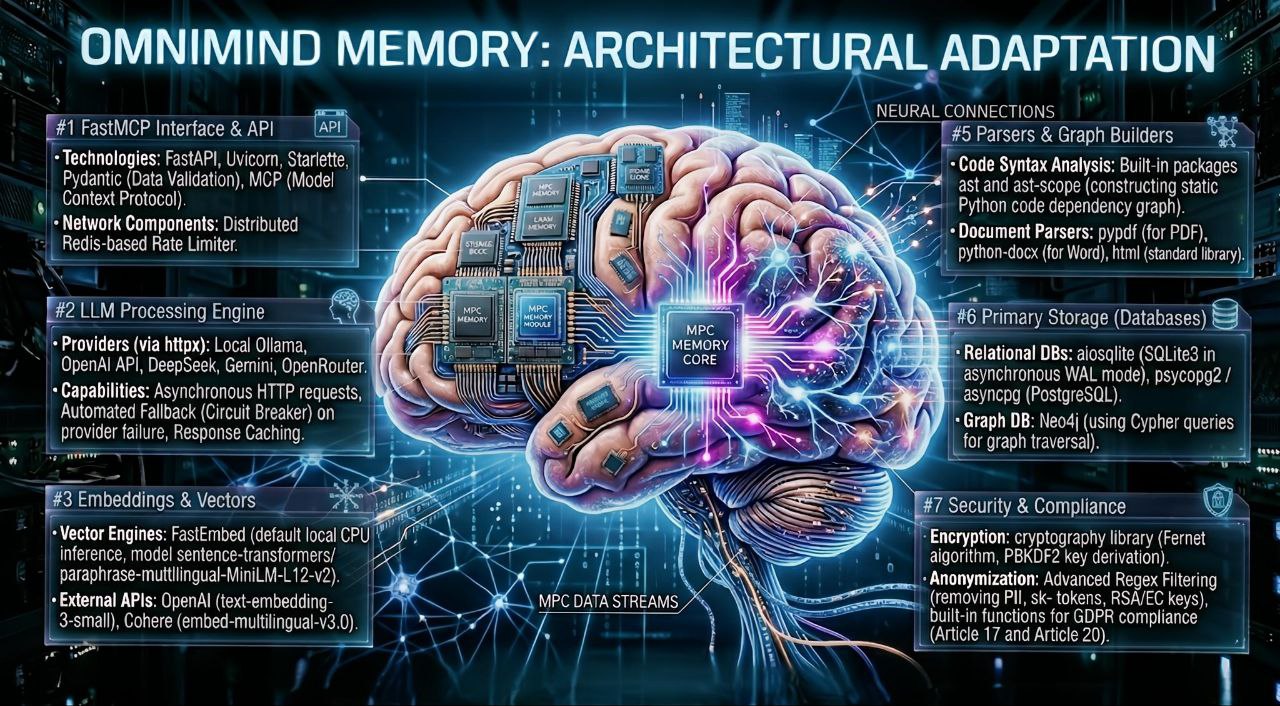
Why this project
- Works as an MCP backend for coding agents and assistants.
- Supports durable memory primitives (lessons, preferences, procedures, entities, relations).
- Includes search, extraction, consolidation, and quality/safety checks out of the box.
- Can run fully local (SQLite + local embeddings) or with PostgreSQL/Redis.
Built for OpenCode
This platform was actively developed and validated for OpenCode agent workflows.
- OpenCode website: https://opencode.ai
- OpenCode GitHub: https://github.com/anomalyco/opencode
- Typical usage: run Memory-MCP as MCP backend for OpenCode sessions and reusable memory.
Recommended agent prompt (memory policy)
For reliable model behavior and correct memory usage, configure your agent with this prompt:
Key capabilities
- Hybrid memory search: keyword + semantic retrieval.
- Cross-session memory and automatic context injection.
- Knowledge graph with triples, neighbor traversal, and path discovery.
- Auto-extraction pipeline for facts/events/preferences/relations/rules/skills.
- Document knowledge base (file/url/text ingestion + content search).
- Conversation history storage and retrieval.
- Procedural memory (how-to steps) and semantic entity graph.
- Memory lifecycle controls: TTL cleanup, decay/merge/prune consolidation.
- Reliability controls: circuit breaker, fallback mode, rate limiting, health endpoint.
- Multilingual heuristics for
ru/uk/enwith universal Unicode-safe token handling.
Technology stack
- Runtime:
Python 3.11+,FastMCP,Pydantic Settings, asyncio-first service design. - Primary storage:
SQLite(default) with optionalPostgreSQLbackend parity. - Optional infra:
Redis(cache/rate limiting),Neo4j(graph backend). - Retrieval: BM25/token search + vector semantic search + hybrid ranking.
- Embeddings providers:
fastembed(local),OpenAI,Cohere. - LLM providers: local and cloud providers via unified client (
core/llm/client.py). - Quality gates:
Ruff,Pytest, focusedmypychecks in CI.
What is stored in memory
Core memory domains
| Domain | Purpose | Typical tools | Storage shape |
|---|---|---|---|
| Lessons | Durable technical takeaways and runbooks | memory_upsert, memory_search_lessons |
key/value + metadata + timestamps |
| Preferences | User/agent stable preferences | memory_upsert, memory_search_preferences |
key/value + source/lock/scope fields |
| Episodes | Session-level event log for consolidation | memory_consolidate |
timestamped events and payloads |
| Working/session memory | Short-lived context per session | memory_search_all, cross_session_* |
session-scoped records |
| Conversations | Ordered chat transcript storage | conversation_* |
append-only messages with role/model/tokens |
| Knowledge base | Parsed documents from text/files/URLs | kb_* |
docs + source metadata + search index |
| Knowledge graph | Facts as triples + graph traversal | kg_* |
entities/predicates/triples (+ temporal events) |
| Procedural memory | How-to procedures and steps | memory_add_procedure |
key/title/steps/metadata |
| Semantic graph | Generic entities and typed relations | memory_add_entity, memory_add_relation |
entity nodes + relation edges |
Retention defaults (configurable)
- Lessons: 90 days (
OMNIMIND_MEMORY_LESSONS_TTL_DAYS) - Episodes: 60 days (
OMNIMIND_MEMORY_EPISODES_TTL_DAYS) - Preferences: 180 days (
OMNIMIND_MEMORY_PREFERENCES_TTL_DAYS)
How components are connected
End-to-end flow
- MCP clients call tools/resources in
mcp_server/memory_tools.pyandmcp_server/memory_resources.py. - Wrappers ensure DB readiness and apply safety controls (rate limits, health checks, metrics).
core/memory.pyorchestrates memory, retrieval, KB, KG, extraction, and cross-session workflows.- Subsystems persist through
core/db.pyusing SQLite/Postgres, optional Redis, optional Neo4j. - Retrieval and graph operations feed back into agent context injection and downstream reasoning.
Relationship map (high-level)
conversation_messages-> feedepisodes-> promoted intolessons/preferencesby consolidation.memory_docs+ vector chunks -> hybrid search (keyword + semantic) for context recall.kg_triplesrepresent current graph fact state;kg_triple_eventspreserve change history.- Temporal KG tools (
as_of,history,path_as_of) reason over event history, not only current state. - Cross-session layer merges durable memory + recent session traces into token-bounded context bundles.
Architecture diagram
Diagram source notes: docs/architecture.md
Detailed data model and relationship map: docs/memory-data-model.md
Architecture overview
Core components:
core/memory.py: high-level memory orchestration.core/memory_sqlite.py: storage layer and memory operations.core/search/*: BM25/hybrid retrieval, expansion, reranking.core/knowledge_graph.py+core/graph_db/neo4j_backend.py: graph operations.core/knowledge_base.py: KB documents and search.core/cross_session.py: cross-session lifecycle and context bundles.mcp_server/memory_tools.py: MCP tool surface.mcp_server/memory_resources.py: MCP resources.
Installation
Requirements:
- Python
>=3.11
Install:
pip install -e .
For development:
pip install -e .[dev]
Quick start
Option 1: Local mode (SQLite, default)
cp .env.local .env
python -m mcp_server.server
Option 2: Docker infra (PostgreSQL + Redis)
./docker-compose.sh start
cp .env.docker .env
python -m mcp_server.server
Docker details: docker/README.md
Environment presets: ENV_CONFIGS.md
Search indexing (Google)
- Landing page:
index.html - Crawl rules:
robots.txt - Sitemap:
sitemap.xml - Full indexing guide:
SEO_INDEXING.md - Regenerate SEO assets:
python3 scripts/generate_seo_assets.py
Configuration highlights
Common environment values:
# Database
OMNIMIND_DB_TYPE=sqlite
OMNIMIND_POSTGRES_ENABLED=false
OMNIMIND_SQLITE_ENABLED=true
OMNIMIND_DB_STRICT_BACKEND=false
OMNIMIND_DB_PATH=./memory.db

# Optional postgres/redis mode
OMNIMIND_DB_TYPE=postgres
OMNIMIND_POSTGRES_ENABLED=true
OMNIMIND_SQLITE_ENABLED=false
OMNIMIND_DB_STRICT_BACKEND=true
OMNIMIND_POSTGRES_HOST=localhost
OMNIMIND_POSTGRES_PORT=5442
OMNIMIND_POSTGRES_DB=memory
OMNIMIND_POSTGRES_USER=memory_user
OMNIMIND_POSTGRES_PASSWORD=***
OMNIMIND_REDIS_ENABLED=true

# Embeddings
OMNIMIND_EMBEDDINGS_PROVIDER=fastembed
OMNIMIND_EMBEDDINGS_FASTEMBED_MODEL=sentence-transformers/paraphrase-multilingual-MiniLM-L12-v2

# Optional Neo4j backend for knowledge graph
OMNIMIND_NEO4J_ENABLED=true
OMNIMIND_NEO4J_URI=bolt://localhost:7687
OMNIMIND_NEO4J_USER=neo4j
OMNIMIND_NEO4J_PASSWORD=***
OMNIMIND_NEO4J_DATABASE=neo4j
Notes:
OMNIMIND_POSTGRES_ENABLED+OMNIMIND_SQLITE_ENABLEDare the preferred toggles.- If both are omitted,
OMNIMIND_DB_TYPEis used for backward compatibility. - If both toggles are set to the same value (
true/trueorfalse/false), runtime falls back toOMNIMIND_DB_TYPE. OMNIMIND_DB_STRICT_BACKEND=trueturns backend mismatch into startup error (no silent fallback).- PostgreSQL backend is used when a PostgreSQL driver is installed (
psycopg2/psycopg) and postgres mode is requested. - Check active backend at runtime via
memory_health->db_backend.
MCP tools
The server exposes the following MCP tools.
Memory search and storage
memory_searchmemory_search_lessonsmemory_search_preferencesmemory_search_allmemory_upsertmemory_getmemory_listmemory_deletememory_index_workspacememory_healthmemory_ttl_cleanupmemory_metrics
Memory consolidation and correction
memory_consolidatememory_consolidate_decaymemory_consolidation_statusmemory_correctmemory_feedback
Procedural and semantic memory
memory_add_procedurememory_get_procedurememory_search_proceduresmemory_add_entitymemory_search_entitiesmemory_add_relationmemory_get_relations
Cross-session memory
cross_session_startcross_session_messagecross_session_tool_usecross_session_stopcross_session_endcross_session_contextcross_session_searchcross_session_statscross_session_check_timeout
Conversation memory
conversation_add_messageconversation_get_messagesconversation_get_messages_ascconversation_searchconversation_stats
Knowledge base
kb_add_documentkb_add_document_from_filekb_add_document_from_urlkb_get_documentkb_list_documentskb_search_documentskb_delete_documentkb_stats
Knowledge graph
kg_add_triplekg_upsert_factkg_get_tripleskg_get_triples_as_ofkg_get_fact_historykg_get_entity_timeline_summarykg_get_neighborskg_find_pathkg_find_path_as_ofkg_search_entitieskg_get_entity_factskg_stats
Extraction pipeline
extract_memoriesget_extracted_memoriessearch_extracted_memoriesextraction_stats
MCP resources
memory://lessonsmemory://preferencesmemory://health
MCP client examples
OpenCode
Example ~/.config/opencode/opencode.json snippet:
{
  "mcpServers": {
    "memory-mcp": {
      "command": "python",
      "args": ["-m", "mcp_server.server"],
      "cwd": "/path/to/memory"
    }
  }
}
Claude Desktop
Example claude_desktop_config.json snippet:
{
  "mcpServers": {
    "memory-mcp": {
      "command": "python",
      "args": ["-m", "mcp_server.server"],
      "cwd": "/path/to/memory"
    }
  }
}
Cursor
If your Cursor build supports MCP server config, use the same command pattern:
{
  "mcpServers": {
    "memory-mcp": {
      "command": "python",
      "args": ["-m", "mcp_server.server"],
      "cwd": "/path/to/memory"
    }
  }
}
Note: file locations and schema details may vary by client version.
Usage examples
Example: procedural + semantic memory
import asyncio
from mcp_server.memory_tools import (
    memory_add_procedure,
    memory_get_procedure,
    memory_add_entity,
    memory_add_relation,
    memory_get_relations,
)


async def demo() -> None:
    await memory_add_procedure(
        key="deploy.web",
        title="Deploy web service",
        steps=["Build image", "Run migrations", "Restart service"],
        metadata={"owner": "devops"},
    )

    procedure = await memory_get_procedure("deploy.web")
    print(procedure)

    service = await memory_add_entity("web-api", "service", {"lang": "python"})
    database = await memory_add_entity("postgres", "database", {"engine": "postgres"})
    await memory_add_relation(service["id"], "uses", database["id"], {"critical": True})

    relations = await memory_get_relations(service["id"])
    print(relations)


asyncio.run(demo())
Example: knowledge graph operations
import asyncio
from mcp_server.memory_tools import kg_add_triple, kg_get_neighbors, kg_find_path


async def demo_kg() -> None:
    await kg_add_triple("Alice", "works_for", "Acme", confidence=0.95, source_type="text")
    await kg_add_triple("Acme", "located_in", "Kyiv", confidence=0.9, source_type="text")

    neighbors = await kg_get_neighbors("Alice", direction="both", limit=20)
    print("neighbors:", neighbors)

    path = await kg_find_path("Alice", "Kyiv", max_depth=3)
    print("path:", path)


asyncio.run(demo_kg())
Example: temporal knowledge graph (evolving relationships)
import asyncio
from mcp_server.memory_tools import (
    kg_upsert_fact,
    kg_get_triples_as_of,
    kg_get_fact_history,
    kg_find_path_as_of,
)


async def demo_temporal() -> None:
    await kg_upsert_fact(
        "Alice",
        "works_for",
        "Acme",
        action="assert",
        observed_at="2026-01-01T10:00:00+00:00",
    )
    await kg_upsert_fact(
        "Alice",
        "works_for",
        "Contoso",
        action="assert",
        observed_at="2026-01-02T10:00:00+00:00",
    )

    old_state = await kg_get_triples_as_of(
        as_of="2026-01-01T12:00:00+00:00", subject="Alice", predicate="works_for"
    )
    print("as_of_old:", old_state)

    history = await kg_get_fact_history(subject="Alice", predicate="works_for", limit=20)
    print("history:", history)

    path = await kg_find_path_as_of(
        "Alice", "Kyiv", as_of="2026-01-03T00:00:00+00:00", max_depth=3
    )
    print("path_as_of:", path)


asyncio.run(demo_temporal())
Temporal predicate policy (default):
single_active:works_for,belongs_to,prefers(new assert closes previous active object for same subject+predicate)multi_active: all other predicates (multiple active facts can coexist)
Configure single-active predicates via env:
OMNIMIND_KG_TEMPORAL_SINGLE_ACTIVE_PREDICATES=works_for,belongs_to,prefers
Reliability and safety
- Per-tool rate limiting.
- LLM circuit breaker with fallback behavior.
- Health snapshots with dependency status.
- Security/audit helpers in
core/security. - CI quality gates for lint, focused typing checks, and tests.
CI quality gates
Workflow: .github/workflows/quality.yml
- Ruff checks for critical modules.
- Focused mypy gate on runtime-critical paths.
- Full test suite with coverage threshold.
- Postgres fallback behavior check.
Development workflow
# Lint
ruff check .

# Tests
python -m pytest tests -q

# Focused mypy gate (same as CI)
python -m mypy core/security/audit.py core/security/gdpr.py core/search/bm25.py core/search/hybrid.py core/llm/client.py core/health/monitor.py core/knowledge_graph.py core/graph_db/neo4j_backend.py mcp_server/memory_tools.py --ignore-missing-imports --follow-imports=skip
Related docs
- Environment presets:
ENV_CONFIGS.md - Docker deployment:
docker/README.md - Install notes:
INSTALL.md - Memory data model and relationships:
docs/memory-data-model.md - Contributing guide:
CONTRIBUTING.md - Code of conduct:
CODE_OF_CONDUCT.md - Release process:
RELEASE_CHECKLIST.md - Security policy:
SECURITY.md - Google indexing guide:
SEO_INDEXING.md
License
MIT. See LICENSE.
Установка OmniMemory Server
У этого сервера нет опубликованного пакета — он собирается из исходников. Открой репозиторий и следуй инструкции в README.
▸ github.com/nwxio/mcp-memoryFAQ
OmniMemory Server MCP бесплатный?
Да, OmniMemory Server MCP бесплатный — установка в пару кликов через Unyly без оплаты.
Нужен ли API-ключ для OmniMemory Server?
Нет, OmniMemory Server работает без API-ключей и переменных окружения.
OmniMemory Server — hosted или self-hosted?
Self-hosted: сервер запускается локально на твоей машине командой из раздела установки.
Как установить OmniMemory Server в Claude Desktop, Claude Code или Cursor?
Открой OmniMemory Server на unyly.org, выбери вкладку своего клиента (Claude Desktop, Claude Code, Cursor) и нажми Install — конфиг сгенерируется автоматически, без правки JSON.
Похожие MCP
GitHub
PRs, issues, code search, CI status
 автор: GitHub
Filesystem
Secure file operations with configurable access controls.
Memory
Knowledge graph-based persistent memory system.
Template MCP Server
A CLI tool to create a new Model Context Protocol server project with TypeScript support, dual transport options, and an extensible structure
 автор: mcpdotdirect
Compare OmniMemory Server with
Не уверен что выбрать?
Найди свой стек за 60 секунд
Автор?
Embed-бейдж для README
Похожее
Все в категории development