loading…
/ru
Весь каталог1.
2.
Error: "404 Not Found" on
Error: "405 Method Not Allowed" on
OnceHub
БесплатноНе проверенThe OnceHub MCP Server provides a standardized way for AI models and agents to interact directly with the OnceHub scheduling API

Описание
The OnceHub MCP Server provides a standardized way for AI models and agents to interact directly with the OnceHub scheduling API
README
Python 3.13+ License: MIT Code Coverage MCP Compatible
The OnceHub MCP Server provides a standardized way for AI models and agents to interact directly with your OnceHub scheduling API. Rather than sending users a booking link and asking them to schedule manually, an AI Agent can retrieve availability and schedule meetings on the user’s behalf using MCP tools, through a natural language flow.
This solution enables external AI Agents to access OnceHub scheduling APIs within AI-driven workflows using the standardized Model Context Protocol (MCP) remote server.
Compatible with: VS Code Copilot, OpenAI, and any MCP-compatible AI client.
Table of Contents
- Features
- Quick Start
- Architecture
- Tools
- Client Configuration
- Installation
- Testing
- Production Deployment
- Contributing
- License
Features
- 🔌 MCP Protocol Support - Works with any MCP-compatible AI client
- 📅 Time Slot Retrieval - Fetch available booking slots from OnceHub booking calendars
- 🗓️ Meeting Scheduling - Automatically schedule meetings with guest information
- 🔐 Secure Authentication - API key-based authentication via headers
- 🧪 Well Tested - 92% code coverage with comprehensive unit tests
- 🐳 Docker Ready - Containerized for easy deployment
- 📝 AI-Friendly Prompts - Built-in workflow guidance for AI assistants
Quick Start
Get started with the OnceHub MCP Server in your AI client:
1. Get Your API Key
Obtain your OnceHub API key from the Authentication documentation.
2. Configure Your Client
Create .vscode/mcp.json in your workspace:
{
  "servers": {
    "oncehub": {
      "url": "https://mcp.oncehub.com/sse",
      "type": "http",
      "headers": {
        "authorization": "Bearer YOUR_ONCEHUB_API_KEY"
      }
    }
  }
}
Replace YOUR_ONCEHUB_API_KEY with your actual API key.
3. Start Using
Ask your AI assistant to:
- "Show me available time slots for calendar BKC-XXXXXXXXXX"
- "Schedule a meeting for tomorrow at 2 PM with John Doe"
⚠️ Running your own MCP server? See Installation & Running Locally for setup instructions.
✅ Production Server: Our hosted MCP server is available at https://mcp.oncehub.com/sse.
Architecture
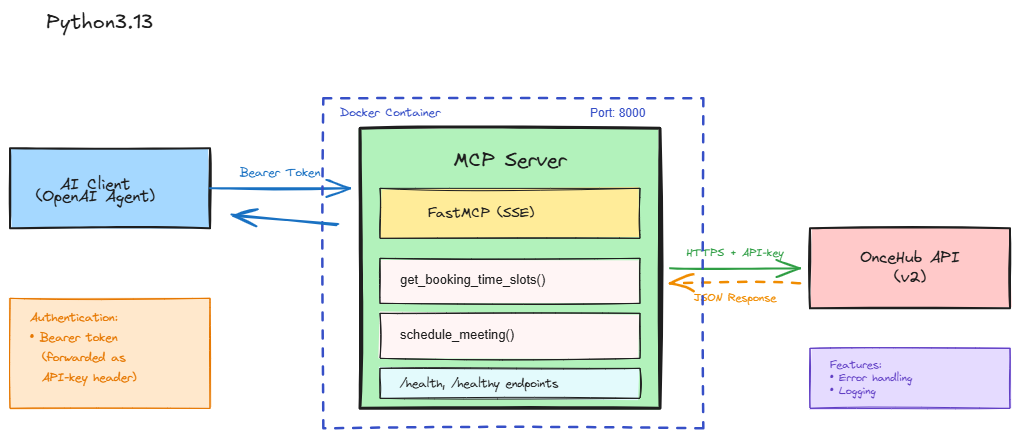
Project Structure
mcp-server/
├── main.py              # MCP server with tool definitions
├── models.py            # Pydantic data schemas for BookingForm and Location
├── pyproject.toml       # Project dependencies and configuration
├── Dockerfile           # Docker image configuration
├── .dockerignore        # Files to exclude from Docker build
└── README.md            # This file
Tools
1. get_booking_time_slots
Retrieves available time slots from a booking calendar.
Parameters:
calendar_id(str, required): The booking calendar ID (e.g., 'BKC-XXXXXXXXXX')start_time(str, optional): Filter slots from this datetime in ISO 8601 format (e.g., '2026-02-15T09:00:00Z')end_time(str, optional): Filter slots until this datetime in ISO 8601 format (e.g., '2026-02-28T17:00:00Z')timeout(int, default: 30): Request timeout in seconds
Example Response:
{
  "success": true,
  "status_code": 200,
  "calendar_id": "BKC-XXXXXXXXXX",
  "total_slots": 5,
  "data": [
    {"start_time": "2026-02-10T10:00:00Z", "end_time": "2026-02-10T11:00:00Z"},
    {"start_time": "2026-02-10T14:00:00Z", "end_time": "2026-02-10T15:00:00Z"}
  ]
}
2. schedule_meeting
Schedules a meeting in a specified time slot. Always call get_booking_time_slots first to ensure the time slot is available.
Parameters:
calendar_id(str, required): ID of the booking calendar (e.g., 'BKC-XXXXXXXXXX')start_time(str, required): The exact start time from an available slot in ISO 8601 formatguest_time_zone(str, required): Guest's timezone in IANA format (e.g., 'America/New_York', 'Europe/London')guest_name(str, required): Guest's full nameguest_email(str, required): Guest's email address for confirmationguest_phone(str, optional): Guest's phone number in E.164 format (e.g., '+15551234567')location_type(str, optional): Meeting mode - 'virtual', 'virtual_static', 'physical', or 'guest_phone'location_value(str, optional): Location details based on type:virtual: Provider name (e.g., 'zoom', 'google_meet', 'microsoft_teams')virtual_static: Use nullphysical: Address ID (e.g., 'ADD-XXXXXXXXXX')guest_phone: Phone number in E.164 format
custom_fields(dict, optional): Custom form fields as key-value pairs (e.g.,{"company": "Acme", "interests": ["Demo"]})timeout(int, default: 30): Request timeout in seconds
Example Response:
{
  "success": true,
  "status_code": 200,
  "booking_id": "BKG-123456789",
  "confirmation": {
    "guest_name": "John Doe",
    "guest_email": "[email protected]",
    "scheduled_time": "2026-02-10T10:00:00Z",
    "timezone": "America/New_York"
  }
}
Prerequisites
- Python 3.13 or higher
- uv package manager (recommended)
- OnceHub API key - See Authentication documentation to obtain your API key
- OnceHub API endpoint URL (usually
https://api.oncehub.com)
Environment Variables
Create a .env file or set these environment variables:
# Required: Your OnceHub API endpoint
ONCEHUB_API_URL=https://api.oncehub.com

# Note: API key is passed via Authorization header from MCP clients
# Do NOT commit API keys to version control
Client Configuration
This MCP server is compatible with VS Code Copilot, Claude Desktop, OpenAI, and other MCP-compatible clients.
VS Code / GitHub Copilot
Step 1: Create Configuration Directory
Windows (PowerShell):
New-Item -Path ".vscode" -ItemType Directory -Force
New-Item -Path ".vscode\mcp.json" -ItemType File -Force
macOS/Linux:
mkdir -p .vscode
touch .vscode/mcp.json
Step 2: Configure the Server
Edit .vscode/mcp.json:
{
  "servers": {
    "oncehub": {
      "url": "http://0.0.0.0:8000/sse",
      "type": "http",
      "headers": {
        "authorization": "Bearer YOUR_ONCEHUB_API_KEY"
      }
    }
  }
}
Configuration Options:
url: The MCP server endpoint (change to your server URL if self-hosting)authorization: Your OnceHub API key withBearerprefix- Server name (
oncehub): Can be customized to any identifier
Step 3: Reload VS Code
After saving the configuration, reload VS Code to activate the MCP server connection.
Claude Desktop
Edit your Claude Desktop configuration file:
macOS: ~/Library/Application Support/Claude/claude_desktop_config.json
Windows: %APPDATA%\Claude\claude_desktop_config.json
{
  "mcpServers": {
    "oncehub": {
      "url": "http://0.0.0.0:8000/sse",
      "headers": {
        "authorization": "Bearer YOUR_ONCEHUB_API_KEY"
      }
    }
  }
}
Restart Claude Desktop after saving.
Other MCP Clients
For other MCP-compatible clients, configure them to connect to:
- Endpoint:
http://0.0.0.0:8000/sse - Protocol: HTTP with Server-Sent Events (SSE)
- Authentication: Bearer token in
Authorizationheader
Security Note: Never commit API keys to version control. Use environment variables or secure secret management for production deployments.
Installation & Running Locally with uv
1. Install uv (if not already installed)
Windows (PowerShell):
powershell -c "irm https://astral.sh/uv/install.ps1 | iex"
macOS/Linux:
curl -LsSf https://astral.sh/uv/install.sh | sh
2. Clone the repository
git clone https://github.com/scheduleonce/mcp-server.git
cd mcp-server
3. Set environment variables
Windows (PowerShell):
$env:ONCEHUB_API_URL="https://api.oncehub.com"
macOS/Linux:
export ONCEHUB_API_URL="https://api.oncehub.com"
Or create a .env file:
echo "ONCEHUB_API_URL=https://api.oncehub.com" > .env
Note: The API key is passed via the
Authorizationheader from MCP clients (not as an environment variable).
4. Run the server using uv
Option 1: Direct execution
uv run main.py
Option 2: Using the script entry point
uv run mcp-server
The server will start on http://0.0.0.0:8000
5. Verify the server is running
Health check:
curl http://localhost:8000/health
Connect to SSE endpoint:
curl http://localhost:8000/sse
Running with Docker
Build the Docker image
docker build -t mcp-server .
Run the container
docker run -p 8000:8000 mcp-server
With environment variables
docker run -p 8000:8000 \
  -e ONCEHUB_API_URL="https://api.oncehub.com" \
  mcp-server
Using Docker Compose (recommended)
Create docker-compose.yml:
version: '3.8'
services:
  mcp-server:
    build: .
    ports:
      - "8000:8000"
    environment:
      - ONCEHUB_API_URL=https://api.oncehub.com
    restart: unless-stopped
Then run:
docker-compose up -d
Data Schemas
Location
Represents meeting location details.
Fields:
type(str): Location type ("physical", "virtual", "phone")value(str): Location details (address, URL, phone number)
Logging
The server includes comprehensive logging for HTTP requests to OnceHub:
- Outgoing requests (→)
- Response status codes (←)
- Request/response bodies
Logs are output to the console with timestamps and log levels.
API Endpoints
GET /health- Health check endpointGET /healthy- Alternate health check endpointGET /sse- Server-Sent Events endpoint for MCP protocol communicationGET /tools- Returns the registered MCP tools with their descriptions, required parameters, and input field details
Development
Install dependencies manually
uv pip install fastmcp pydantic httpx
Install test dependencies
uv pip install -e ".[test]"
Run with different log levels
Edit main.py and change log_level parameter:
asyncio.run(mcp.run_sse_async(host="0.0.0.0", port=8000, log_level="debug"))
Available log levels: "debug", "info", "warning", "error", "critical"
Testing
The project includes comprehensive unit tests for all tools and functions.
Install Test Dependencies
# Install test dependencies
uv pip install pytest pytest-asyncio pytest-cov pytest-mock
Run Tests
Run all tests:
uv run pytest
Run tests with coverage report:
uv run pytest --cov=. --cov-report=html --cov-report=term
Run specific test file:
uv run pytest test_tools.py
Run specific test class:
uv run pytest test_tools.py::TestGetBookingTimeSlots
Run specific test:
uv run pytest test_tools.py::TestGetBookingTimeSlots::test_get_time_slots_success
Run with verbose output:
uv run pytest -v
Run and stop on first failure:
uv run pytest -x
Test Coverage
After running tests with coverage, open the HTML report:
# Windows
start htmlcov/index.html

# macOS
open htmlcov/index.html

# Linux
xdg-open htmlcov/index.html
Test Structure
test_tools.py- Unit tests for all tool functionsTestGetApiKeyFromContext- Tests for API key extractionTestGetBookingTimeSlots- Tests for time slot retrievalTestScheduleMeeting- Tests for meeting scheduling
All tests use mocking to avoid actual API calls and ensure fast, reliable test execution.
Production Deployment
Security Best Practices
API Key Management
- Never commit API keys to version control
- Use environment variables or secret management systems
- Rotate API keys regularly
Network Security
- Use HTTPS in production (add reverse proxy like nginx)
- Implement rate limiting to prevent abuse
- Use firewall rules to restrict access
Monitoring
- Monitor the
/healthendpoint for availability - Set up logging aggregation (e.g., ELK stack, CloudWatch)
- Track API response times and error rates
- Monitor the
Deployment Options
Docker Deployment
# Build and tag the image
docker build -t oncehub-mcp-server:1.0.0 .

# Run with restart policy
docker run -d \
  --name oncehub-mcp \
  --restart unless-stopped \
  -p 8000:8000 \
  -e ONCEHUB_API_URL="https://api.oncehub.com" \
  oncehub-mcp-server:1.0.0
Cloud Deployment
- AWS: Use ECS, Fargate, or EC2 with Application Load Balancer
- Azure: Deploy to Azure Container Instances or App Service
- GCP: Use Cloud Run or Google Kubernetes Engine
Performance Considerations
- Default timeout is 30 seconds - adjust based on your needs
- The server uses asyncio for concurrent request handling
- Consider horizontal scaling for high-traffic scenarios
- Use connection pooling for database/cache if added
Health Monitoring
# Simple health check script
curl -f http://localhost:8000/health || exit 1

# Docker healthcheck (add to Dockerfile)
HEALTHCHECK --interval=30s --timeout=3s --start-period=5s --retries=3 \
  CMD curl -f http://localhost:8000/health || exit 1
Troubleshooting
Error: "API key is required"
Ensure you're passing the api_key parameter when calling the tools.
Error: "404 Not Found" on /health
Make sure the server is running and accessible on port 8000.
Error: "405 Method Not Allowed" on /sse
The SSE endpoint requires a GET request, not POST. Use proper MCP client libraries or curl with GET.
No logs showing for OnceHub requests
Check that logging is properly configured in main.py and the server is running with log_level="info" or "debug".
License
This project is licensed under the terms of the MIT open source license. Please refer to MIT for the full terms.
Support
- Documentation: OnceHub API Docs
- Issues: GitHub Issues
- MCP Protocol: Model Context Protocol
Acknowledgments
- Built with FastMCP
- Compatible with the Model Context Protocol
- Powered by OnceHub API
Made by the Oncehub team
Как установить
Выполни в терминале:
claude mcp add oncehub -- npx 
