
One Shot Ui
БесплатноНе проверенDeterministic screenshot diffing for AI coding agents. Extract design tokens, diff implementations vs reference, get CSS fix suggestions.

Описание
Deterministic screenshot diffing for AI coding agents. Extract design tokens, diff implementations vs reference, get CSS fix suggestions.
README
one-shot-ui
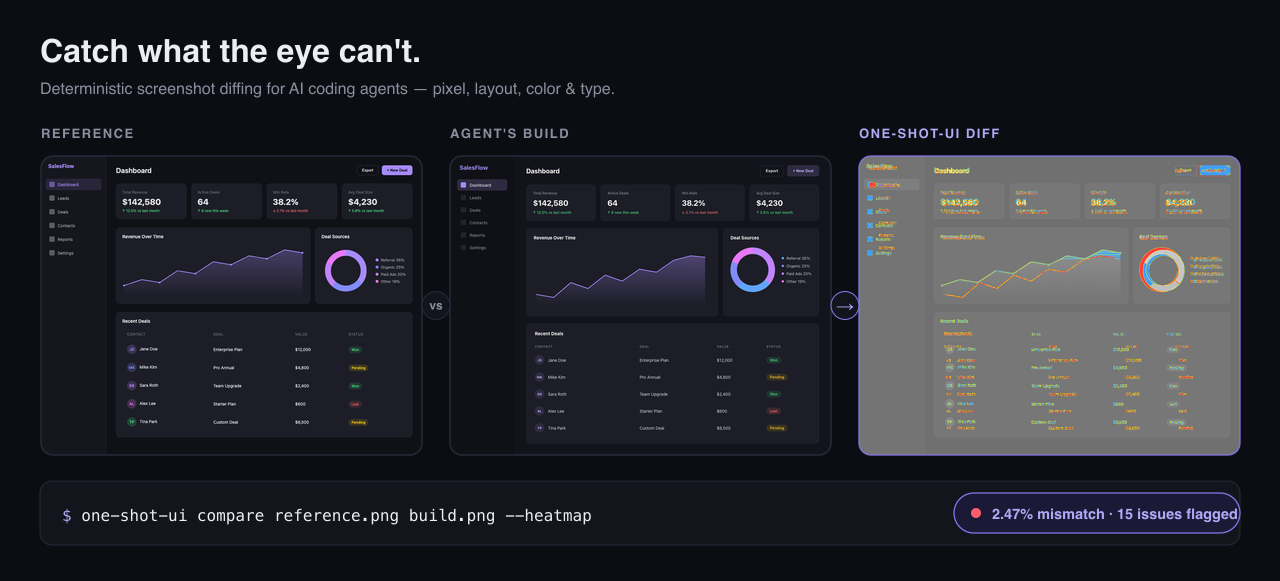
Catch what the eye can't.
Deterministic screenshot diffing for AI coding agents. Turn a reference screenshot into structured data, diff any build against it — pixel, layout, color, and type — then get the exact CSS to fix. Or copy a UI's design language onto a brand-new screen.
The problem
AI agents get UI ~90% of the way there — then stall. The layout looks right, but a card is 8px too tall, a panel is the wrong shade of gray, a shadow is flat, a gap is off by 24px. Asking the model to "look at the screenshot again and fix it" is slow, and you get a different answer every time.
one-shot-ui closes that last 10% deterministically. It extracts structured data from a reference screenshot — layout regions, colors, typography, spacing, design tokens — diffs your implementation against it, and returns specific, ranked fixes, not "make it look more like this."
Set width to 616px (currently 640px)
Change the fill color to #303040.
Set box-shadow to -3px 0px 24px 0px rgba(28, 29, 38, 0.32).
gap: 176px; /* currently ~152px */
Copy-paste CSS, ranked by visual impact — every example above is real output from the run below.
Watch it converge
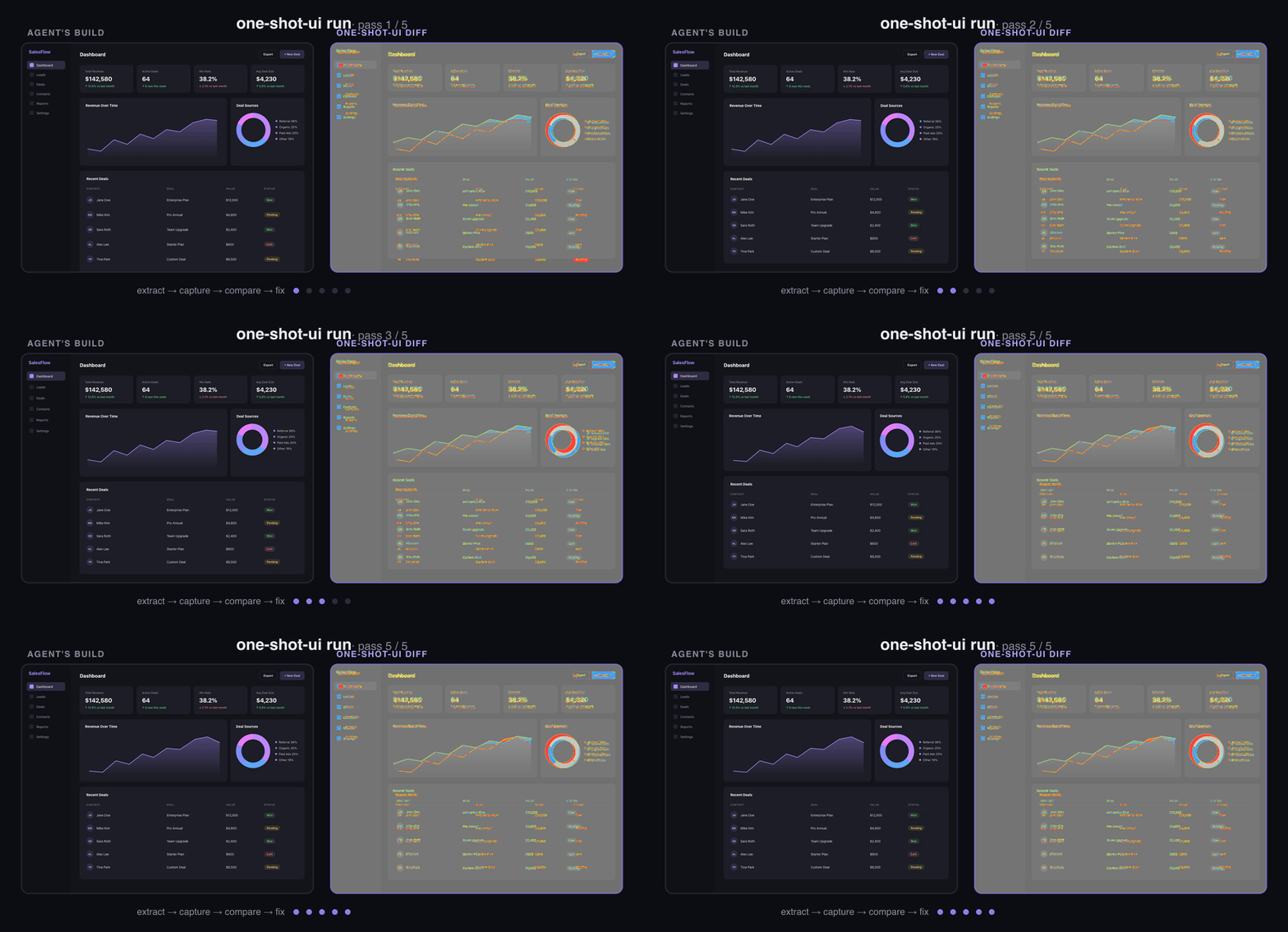
The run command loops extract → capture → compare → fix until the heatmap goes quiet. In the run above, the agent's first build looked identical to the eye — one-shot-ui flagged 15 concrete deltas (position, size, color, shadow, spacing) and the loop drove the build to ~2.5% pixel mismatch, within ~0.5% of the tool's own estimated irreducible floor (≈2%, sub-pixel font rendering) for this design.
Why one-shot-ui
- Deterministic, not vibes. Stable pixel + structural diff scores — same input, same numbers — so you can gate CI on "is this pixel-close enough?"
- Exact fixes, not nudges. It returns concrete CSS (
width: 616px,#303040,gap: 176px), grouped by component and ranked by visual impact. - Structural, not just pixels. Detects missing/extra elements, position & size shifts, color, shadow, spacing, and typography — and labels which differences are irreducible (anti-aliasing, photographic content) so agents don't chase ghosts.
- Agent-native. Ships an
AGENTS.md(auto-discovered by Claude Code, Cursor, Codex, …) plus a Claude Code skill, so your agent drives it without hand-holding. - Local & private. Pixel diffing, OCR, and layout extraction all run on your machine. No images leave your box, no API keys.
Copy a UI's style, not just match it
Matching a screenshot pixel-for-pixel is one job. The other: building a different screen that feels like it belongs to the same design system. one-shot-ui extracts the design language from a reference and verifies a new UI conforms to it — deterministically, with no pixel oracle to lean on.
# Extract a reusable style system — palette, spacing scale, type ratio, radii, elevation
one-shot-ui tokens reference.png --emit shadcn      # or: tailwind | json

# Build a different screen in that style, then check it conforms
one-shot-ui style-check reference.png ./pricing.html
It reports measured facts and leaves the taste to the agent: it won't name your "primary" color or classify the mood — you decide those from the image (you're the vision model; the tool is your exact, hallucination-free eyes). Conformance is judged on what a screenshot grounds reliably — palette, spacing rhythm, type scale — while roundedness and elevation are flagged as advisories, since a raster can't pin them down.
Install
npm install -g one-shot-ui
For commands that need a browser (capture, run):
npx playwright install chromium
Quick start
# Diff your implementation against a reference and see exactly what's off
one-shot-ui compare reference.png build.png --json --heatmap heatmap.png

# Get copy-paste CSS fixes, ranked by impact
one-shot-ui suggest-fixes reference.png build.png --json

# The step that gets you pixel-perfect: trial fixes in a live browser and keep
# only the ones that provably reduce pixel mismatch — outputs a verified patch
one-shot-ui converge reference.png --impl ./index.html

# Or run the full automated loop until it converges
one-shot-ui run reference.png --impl ./index.html --max-passes 5 --threshold 0.02
Every command supports --json for structured, agent-friendly output.
Use it with your coding agent
one-shot-ui ships an AGENTS.md (auto-discovered by Claude Code, Cursor, Codex, and other agent tools) plus a skill/SKILL.md for Claude Code.
Install the skill in one line:
mkdir -p .claude/skills/one-shot-ui && cp "$(npm root -g)/one-shot-ui/skill/SKILL.md" .claude/skills/one-shot-ui/
Use it as an MCP server
one-shot-ui also runs as a local MCP server, so any
MCP-capable agent (Claude Code, Cursor, Cline, Windsurf, VS Code) can call compare,
converge, suggest_fixes, extract, tokens, plan, and style_check as tools — no shell
glue. It runs over stdio, makes no network calls, and needs no API keys.
claude mcp add one-shot-ui -- npx -y one-shot-ui mcp
Or add to any client's MCP config:
{
  "mcpServers": {
    "one-shot-ui": {
      "command": "npx",
      "args": ["-y", "one-shot-ui", "mcp"]
    }
  }
}
See docs/MCP.md for per-client setup and registry publishing.
Commands
| Command | Purpose | Key Flags |
|---|---|---|
extract |
Analyze a screenshot into layout, color, and text data | --json, --no-ocr, --overlay, --fine |
compare |
Pixel + structural diff between two screenshots | --json, --heatmap, --dom-diff |
tokens |
Design tokens + a reusable style system (palette, spacing, type, radii) | --json, --emit shadcn|tailwind|json |
style-check |
Check a new UI conforms to a reference's design language | --json (new UI = URL / HTML / screenshot) |
plan |
Generate an implementation strategy | --json |
capture |
Screenshot a URL or local HTML file | --url, --file, --output |
suggest-fixes |
Tailwind/CSS fix suggestions from a diff | --json, --top, --dom-diff, --framework |
converge |
Closed-loop optimizer: pixel-verified CSS patch | --impl, --out, --json, --budget-seconds |
run |
Multi-pass extract→capture→compare→fix loop | --impl, --max-passes, --threshold |
benchmark |
Run benchmark suites | --json, --output |
How it works
- extract — segments the reference into layout regions, samples colors/tokens, and OCRs text.
- capture — screenshots your implementation (URL or local HTML) at a matched viewport.
- compare — aligns the two, computes a pixel heatmap and a structural diff, and classifies each issue (layout / color / typography / spacing) plus whether it's actionable.
- suggest-fixes — turns issues into concrete, ranked CSS edits.
run chains all four in a loop until the diff drops below --threshold.
Development
Requires Bun.
bun install
bun run install:browsers   # Playwright Chromium
bun run typecheck
Dev scripts run directly from source:
bun run dev:extract -- ./reference.png --json
bun run dev:compare -- ./reference.png ./build.png --json
Build for npm:
bun run build
License
MIT
Установка One Shot Ui
У этого сервера нет опубликованного пакета — он собирается из исходников. Открой репозиторий и следуй инструкции в README.
▸ github.com/TN0123/one-shot-uiFAQ
One Shot Ui MCP бесплатный?
Да, One Shot Ui MCP бесплатный — установка в пару кликов через Unyly без оплаты.
Нужен ли API-ключ для One Shot Ui?
Нет, One Shot Ui работает без API-ключей и переменных окружения.
One Shot Ui — hosted или self-hosted?
Self-hosted: сервер запускается локально на твоей машине командой из раздела установки.
Как установить One Shot Ui в Claude Desktop, Claude Code или Cursor?
Открой One Shot Ui на unyly.org, выбери вкладку своего клиента (Claude Desktop, Claude Code, Cursor) и нажми Install — конфиг сгенерируется автоматически, без правки JSON.
Похожие MCP
LibreOffice Tools
Enables AI agents to read, write, and edit Office documents via LibreOffice with token-efficient design. Supports multiple formats including DOCX, XLSX, PPTX, a
 автор: passerbyflutter
dannote/figma-use
Full Figma control: create shapes, text, components, set styles, auto-layout, variables, export. 80+ tools.
 автор: dannote
Logo.dev
Search and retrieve company logos by brand or domain. Customize size, format, and theme to match your design needs. Accelerate design, prototyping, and content
 автор: NOVA-3951
PIX4Dmatic
Enables GUI automation for controlling PIX4Dmatic on Windows through MCP. Supports launching, focusing, capturing screenshots, sending hotkeys, clicking UI elem
 автор: jangjo123
Compare One Shot Ui with
Не уверен что выбрать?
Найди свой стек за 60 секунд
Автор?
Embed-бейдж для README
Похожее
Все в категории design