
ooples/token-optimizer-mcp
БесплатноНе проверенIntelligent token optimization achieving 95%+ reduction through caching, compression, and 80+ smart tools for API optimization, code analysis, and real-time mon

Описание
Intelligent token optimization achieving 95%+ reduction through caching, compression, and 80+ smart tools for API optimization, code analysis, and real-time monitoring.
README
Give Codex, Claude, Cursor, and other MCP clients more room to think with cached context, compact diffs, smart tools, and visible token-savings reports.
npm version CI Node.js 18+ MIT license
Token Optimizer is a local Model Context Protocol server. It reduces the text sent back into an agent's context by caching large payloads, returning diffs on repeated reads, filtering noisy command output, and recording the result of every measurable optimization.
- 74 MCP tools in the current release
- No hosted service required for core caching and compression
- SQLite-backed persistence across conversations
- Brotli compression with token-aware keep-or-skip decisions
- Built-in savings reports by tool, hook phase, and MCP server
Installation
Every client launches the same stdio server—npx -y @ooples/token-optimizer-mcp@latest—but each client has its own instruction and lifecycle APIs. The ready-made integrations below use those native APIs; they do not pretend Claude Code's seven-phase PowerShell hook system is portable unchanged.
| Client | Fastest MCP setup | Best-experience integration |
|---|---|---|
| Codex | codex mcp add token-optimizer -- npx -y @ooples/token-optimizer-mcp@latest |
Codex plugin: MCP + skill + lifecycle hooks |
| Claude Code | claude mcp add --transport stdio --scope user token-optimizer -- npx -y @ooples/token-optimizer-mcp@latest |
Claude plugin: MCP + skill + large-read hook |
| GitHub Copilot CLI | copilot mcp add token-optimizer -- npx -y @ooples/token-optimizer-mcp@latest |
AGENTS.md + repository lifecycle hooks |
| Gemini CLI | gemini mcp add --scope user token-optimizer npx -y @ooples/token-optimizer-mcp@latest |
Gemini extension: MCP + context + lifecycle hooks |
| OpenCode | Add the mcp block below to opencode.json |
AGENTS.md + local plugin + compaction preservation |
Codex
1. Add the MCP server or native plugin
For the best experience, install the Codex plugin. It bundles the MCP server, the token-optimization skill, session guidance, and a large-read hook:
codex plugin marketplace add ooples/token-optimizer-mcp
codex plugin add token-optimizer@token-optimizer
Review and trust the bundled hooks with /hooks, then start a new conversation. If you prefer an MCP-only installation, use:
codex mcp add token-optimizer -- npx -y @ooples/token-optimizer-mcp@latest
On Windows, if PowerShell blocks the codex.ps1 shim, use the command launcher directly:
codex.cmd mcp add token-optimizer -- npx -y @ooples/token-optimizer-mcp@latest
This writes the server to ~/.codex/config.toml. Codex CLI, the Codex IDE extension, and the Codex app on the same host share that configuration.
2. Verify the installation
codex mcp get token-optimizer
codex mcp list
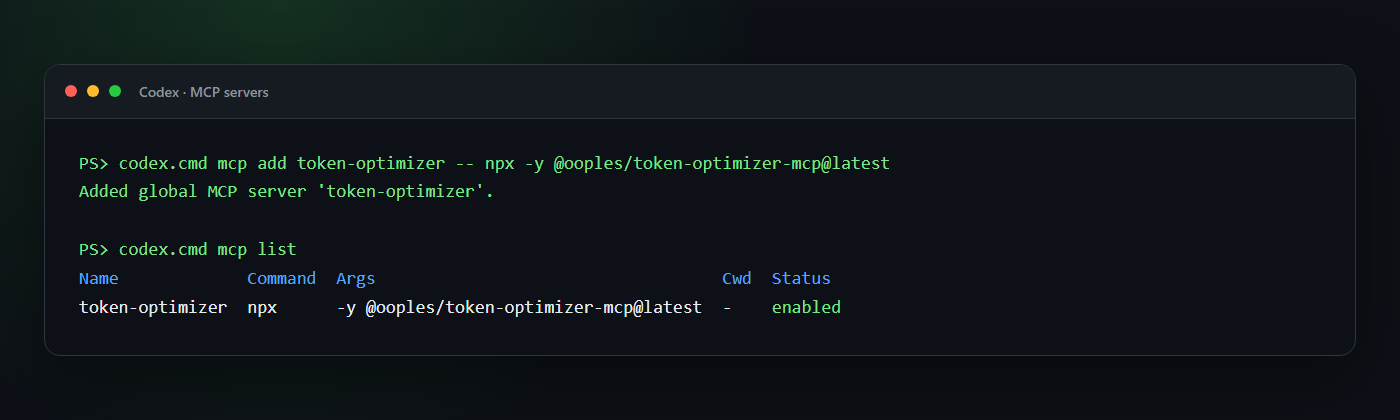
Start a new Codex conversation after installation so the new tools are discovered. In an interactive CLI session, /mcp shows the tools available to the conversation.
3. Add optimization guidance and hooks
The plugin supplies both automatically. For an MCP-only installation, add the guidance from integrations/AGENTS.md to a project or global AGENTS.md. A ready-made standalone hook is also available under integrations/codex/hooks; merge its hooks.json into ~/.codex/hooks.json, copy the script to ~/.codex/hooks/, and review it once with /hooks.
The Codex hook injects guidance at SessionStart, advises on large first-class read calls, and can block those reads when TOKEN_OPTIMIZER_REDIRECT_LARGE_READS=true. Shell commands such as cat or Get-Content are exposed to hooks as Bash, so the hook does not try to parse and rewrite arbitrary shell syntax. The AGENTS.md/skill guidance remains important.
If you prefer a smaller instruction block:
## Token optimization

Use the token-optimizer MCP for large or repeated reads:

- `smart_read` for files over roughly 400 lines and for files already read once.
- `smart_glob`/`smart_grep` for large search results.
- `optimize_text` to store bulky text outside the model context.
- `get_optimization_report` when the user asks for token or compression stats.

Use normal tools for small, one-off operations.
See the current Codex hooks documentation for hook trust, matching, and tool-coverage details.
Equivalent manual Codex configuration
If you prefer to edit ~/.codex/config.toml yourself:
[mcp_servers.token-optimizer]
command = "npx"
args = ["-y", "@ooples/token-optimizer-mcp@latest"]

# Optional: keep the cache in a custom location.
# env = { TOKEN_OPTIMIZER_CACHE_DIR = "/absolute/path/to/cache" }
Claude Code
1. Add the MCP server
Add Token Optimizer at user scope so it is available in every project:
claude mcp add --transport stdio --scope user token-optimizer -- \
  npx -y @ooples/token-optimizer-mcp@latest
2. Verify the installation
claude mcp get token-optimizer
claude mcp list
Inside Claude Code, /mcp shows the live connection, tool count, and server status.
3. Add optimization guidance or hooks
For MCP-only setup, add the recommendations from integrations/AGENTS.md to your project's CLAUDE.md.
For the richest integration, install the repository's Claude Code plugin. It bundles the MCP server, optimization skill, and large-read hook. Run these commands inside Claude Code:
/plugin marketplace add ooples/token-optimizer-mcp
/plugin install token-optimizer@token-optimizer
/reload-plugins
The standalone global installer can also configure the Claude Code hooks and supported desktop clients:
npm install -g @ooples/token-optimizer-mcp@latest
On Windows, a restrictive PowerShell policy may need this user-scoped adjustment first:
Set-ExecutionPolicy -ExecutionPolicy RemoteSigned -Scope CurrentUser
npm install -g @ooples/token-optimizer-mcp@latest
Interactive global installs run the hook installer; CI and local dependency installs skip it. If automatic setup is skipped, use install-hooks.ps1 on Windows or install-hooks.sh on macOS/Linux. See the Claude Code MCP guide and this project's hook installation guide.
GitHub Copilot CLI
1. Add the MCP server
On current Copilot CLI releases:
copilot mcp add token-optimizer -- npx -y @ooples/token-optimizer-mcp@latest
If your Copilot CLI does not expose copilot mcp yet, save this as ~/.copilot/mcp-config.json:
{
  "mcpServers": {
    "token-optimizer": {
      "type": "local",
      "command": "npx",
      "args": ["-y", "@ooples/token-optimizer-mcp@latest"],
      "tools": ["*"]
    }
  }
}
A ready-made copy is available at integrations/copilot/mcp-config.json.
2. Verify the installation
copilot mcp get token-optimizer
copilot mcp list
Inside an interactive Copilot session, /mcp show token-optimizer displays the connection status and available tools.
3. Add optimization guidance and hooks
Keep integrations/AGENTS.md as the repository's AGENTS.md, or adapt the same guidance into .github/copilot-instructions.md.
For native lifecycle integration, copy the ready-made repository hooks into your project:
mkdir -p .github/hooks
cp integrations/copilot/.github/hooks/token-optimizer* .github/hooks/
New-Item -ItemType Directory -Force .github/hooks | Out-Null
Copy-Item integrations/copilot/.github/hooks/token-optimizer* .github/hooks/
The hooks inject optimization guidance at sessionStart, add a model-visible suggestion after a large view, and—when TOKEN_OPTIMIZER_REDIRECT_LARGE_READS=true—deny a large built-in read so Copilot retries with smart_read. Partial reads and files below 25 KB pass through unchanged. Repository hooks work without overwriting user-level files; global hooks can instead be placed in ~/.copilot/hooks/ with their script paths adjusted for that directory.
Restart Copilot CLI after changing hook files. See GitHub's official MCP setup guide and hooks reference.
Gemini CLI
1. Add the MCP server
Add Token Optimizer directly at user scope:
gemini mcp add --scope user token-optimizer npx -y @ooples/token-optimizer-mcp@latest
Alternatively, install this repository as a Gemini extension so the MCP configuration and GEMINI.md guidance are packaged together:
gemini extensions install https://github.com/ooples/token-optimizer-mcp --auto-update
2. Verify the installation
gemini mcp list
gemini extensions list
Run /mcp inside Gemini CLI to inspect the connection. Restart Gemini CLI after installing or updating the extension.
3. Add optimization guidance and hooks
Direct MCP users should copy GEMINI.md into the project or merge its rules into an existing GEMINI.md. Extension users receive that context file plus native hooks automatically.
The extension's SessionStart hook injects optimization guidance. Its AfterTool hook notices full-file read_file results over 25 KB and suggests smart_read. To make Gemini automatically replace those large results with a token-optimizer tail call, configure the extension setting Automatic large-read routing as true:
gemini extensions config token-optimizer
Automatic routing uses Gemini's native tailToolCallRequest: the smart_read result replaces the built-in read result before it reaches the model. Partial reads remain unchanged. Restart Gemini CLI after installing, updating, or reconfiguring the extension. See the official Gemini MCP guide, extension guide, and hooks reference.
OpenCode
1. Add the MCP server
Create or update opencode.json in your project:
{
  "$schema": "https://opencode.ai/config.json",
  "mcp": {
    "token-optimizer": {
      "type": "local",
      "command": ["npx", "-y", "@ooples/token-optimizer-mcp@latest"],
      "enabled": true
    }
  },
  "instructions": ["./AGENTS.md"]
}
For a global installation, merge the same mcp entry into ~/.config/opencode/opencode.json.
2. Verify the installation
opencode mcp list
The output shows configured servers and their connection status.
3. Add optimization guidance and the local plugin
Copy integrations/AGENTS.md to the project as AGENTS.md; the instructions entry above loads it. Then copy the ready-made local plugin:
mkdir -p .opencode/plugins
cp integrations/opencode/.opencode/plugins/token-optimizer.js .opencode/plugins/
New-Item -ItemType Directory -Force .opencode/plugins | Out-Null
Copy-Item integrations/opencode/.opencode/plugins/token-optimizer.js .opencode/plugins/
The plugin preserves Token Optimizer usage state in OpenCode's compaction prompt. Set TOKEN_OPTIMIZER_REDIRECT_LARGE_READS=true to make its tool.execute.before hook reject full-file reads over 25 KB and steer the agent to smart_read; small and partial reads pass normally. Restart OpenCode after adding the plugin. See the official OpenCode MCP guide and plugin hook guide.
Generic MCP configuration
Any stdio-capable MCP client can launch Token Optimizer with:
{
  "mcpServers": {
    "token-optimizer": {
      "command": "npx",
      "args": ["-y", "@ooples/token-optimizer-mcp@latest"]
    }
  }
}
Additional ready-made integration files are available for Claude Desktop, Codex, Gemini CLI, OpenCode, and GitHub Copilot.
See it in action
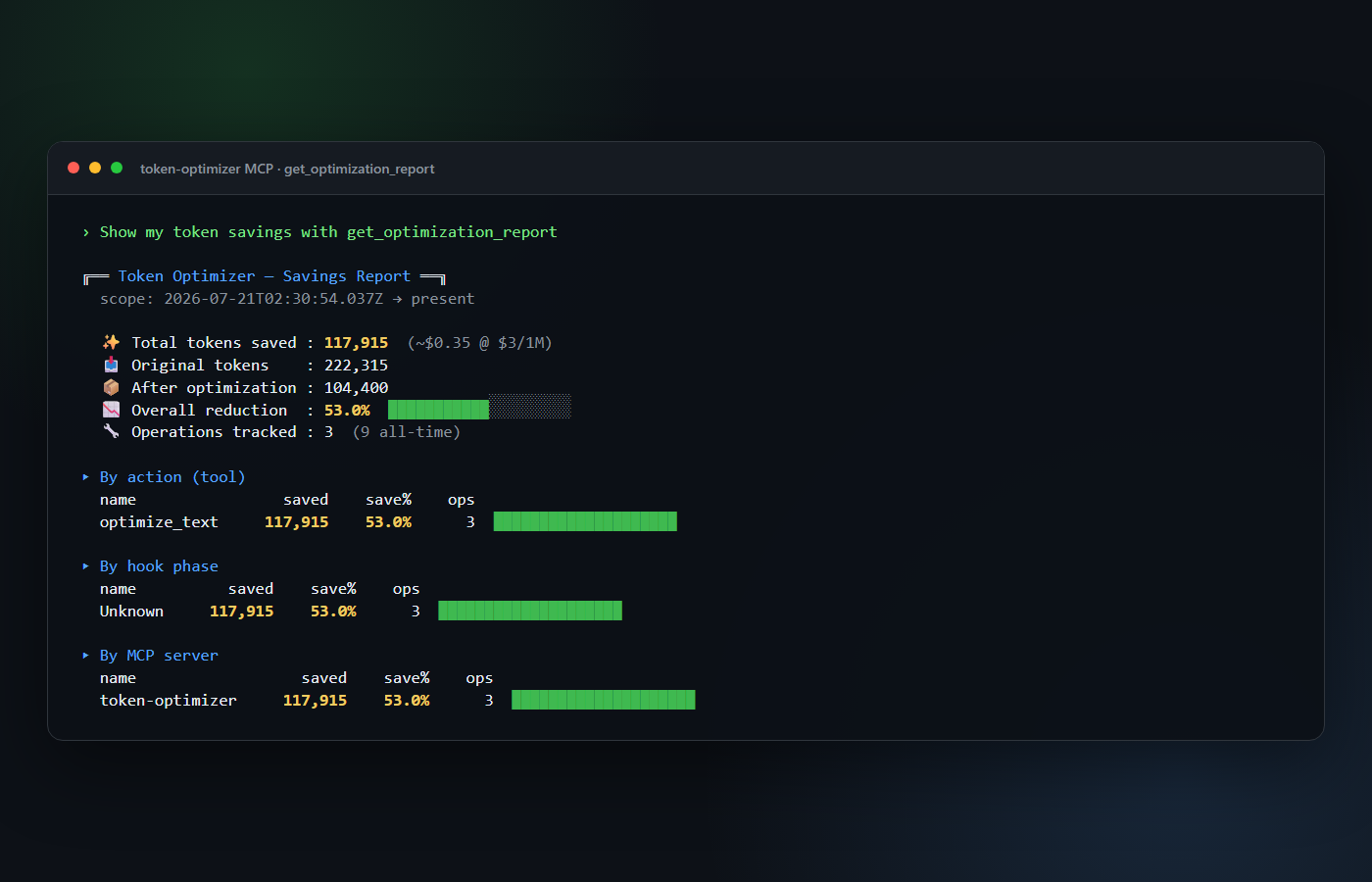
Real get_optimization_report output from an MCP smoke run over this repository's tool reference, server source, and dependency lockfile. Savings vary with content and workflow.
Use it
You normally use Token Optimizer by asking your agent in plain language:
Use token-optimizer smart_read for the large server file, then use it again
after the edit so only the diff comes back.
Cache this API response with optimize_text under the key customer-schema,
then retrieve it only if we need the full payload again.
Show my token savings with get_optimization_report.
For clients that expose direct MCP tool calls, the core inputs are small JSON objects:
{
  "tool": "smart_read",
  "arguments": {
    "path": "/absolute/path/to/large-file.ts"
  }
}
{
  "tool": "optimize_text",
  "arguments": {
    "text": "A large response, log, document, or generated artifact...",
    "key": "stable-reference-key",
    "quality": 11
  }
}
{
  "tool": "get_optimization_report",
  "arguments": {
    "topN": 10
  }
}
Understand the compression stats
optimize_text returns measurements with every call. This example uses a deliberately repetitive payload to make every field easy to see; it is not a benchmark:
{
  "success": true,
  "key": "customer-schema",
  "originalTokens": 4180,
  "compressedTokens": 72,
  "tokensSaved": 4108,
  "percentSaved": 99.55,
  "cached": true,
  "compressionUsed": true
}
get_optimization_report aggregates recorded operations into:
- original, optimized, and saved token totals;
- overall reduction percentage;
- operations tracked;
- breakdowns by action/tool, hook phase, and MCP server;
- optional date-range and session filters.
Two tools sound similar but serve different purposes:
| Tool | Use it for | Context-window effect |
|---|---|---|
optimize_text |
Store bulky text under a key and return a compact reference | Reduces text kept in the active context |
compress_text |
Produce Brotli/base64 data for storage or transport | May use more model tokens if pasted back into context |
If your goal is a smaller prompt, prefer optimize_text. Use compress_text only when you specifically need byte compression.
What is included
| Capability | Representative tools | What gets smaller or faster |
|---|---|---|
| Context and compression | optimize_text, get_cached, count_tokens, analyze_optimization, context_delta |
Large payloads and repeated context |
| File and Git operations | smart_read, smart_write, smart_edit, smart_grep, smart_glob, smart_diff, smart_status |
File contents, search results, and diffs |
| Caching | smart_cache, cache_warmup, cache_invalidation, cache_compression, predictive_cache |
Repeated computation and retrieval |
| APIs and databases | smart_api_fetch, smart_sql, smart_graphql, smart_rest, smart_schema |
Responses, schemas, and query analysis |
| Build and system tasks | smart_build, smart_test, smart_lint, smart_logs, smart_processes |
Build logs and diagnostic output |
| Intelligence | smart-summarization, pattern-recognition, natural-language-query, recommendation-engine |
Analysis and summaries |
| Analytics | get_optimization_report, get_action_analytics, get_hook_analytics, export_analytics |
Token-savings visibility |
See docs/TOOLS.md for detailed tool inputs and examples.
Requirements and data
- Node.js 18 or newer
- npm 9 or newer
- An MCP client with stdio transport support
Default local data locations include:
- cache:
~/.token-optimizer-cache/ - analytics:
~/.token-optimizer-mcp/analytics.db - sessions and configuration:
~/.token-optimizer/
Set TOKEN_OPTIMIZER_CACHE_DIR to override the cache location.
Technical reference
The detailed operational material below is intentionally retained for users who want to understand the complete tool surface, hooks pipeline, performance controls, analytics, and troubleshooting behavior.
Complete Tool Reference (74 Total)
Core Caching & Optimization (8 tools)
Click to expand
- optimize_text - Compress and cache text (primary tool for token reduction)
- get_cached - Retrieve previously cached text
- compress_text - Compress text using Brotli
- decompress_text - Decompress Brotli-compressed text
- count_tokens - Count tokens using tiktoken (GPT-4 tokenizer)
- analyze_optimization - Analyze text and get optimization recommendations
- get_cache_stats - View cache hit rates and compression ratios
- clear_cache - Clear all cached data
Usage Example:
// Cache large content to remove it from context window
optimize_text({
  text: 'Large API response or file content...',
  key: 'api-response-key',
  quality: 11,
});
// Result: 60-90% token reduction
Smart File Operations (10 tools)
Click to expand
Optimized replacements for standard file tools with intelligent caching and diff-based updates:
- smart_read - Read files with 80% token reduction through caching and diffs
- smart_write - Write files with verification and change tracking
- smart_edit - Line-based file editing with diff-only output (90% reduction)
- smart_grep - Search file contents with match-only output (80% reduction)
- smart_glob - File pattern matching with path-only results (75% reduction)
- smart_diff - Git diffs with diff-only output (85% reduction)
- smart_branch - Git branch listing with structured JSON (60% reduction)
- smart_log - Git commit history with smart filtering (75% reduction)
- smart_merge - Git merge management with conflict analysis (80% reduction)
- smart_status - Git status with status-only output (70% reduction)
Usage Example:
// Read a file with automatic caching
smart_read({ path: '/path/to/file.ts' });
// First read: full content
// Subsequent reads: only diff (80% reduction)
API & Database Operations (10 tools)
Click to expand
Intelligent caching and optimization for external data sources:
- smart_api_fetch - HTTP requests with caching and retry logic (83% reduction on cache hits)
- smart-cache-api - API response caching with TTL/ETag/event-based strategies
- smart_database - Database queries with connection pooling and caching (83% reduction)
- smart_sql - SQL query analysis with optimization suggestions (83% reduction)
- smart_schema - Database schema analysis with intelligent caching
- smart_graphql - GraphQL query optimization with complexity analysis (83% reduction)
- smart_rest - REST API analysis with endpoint discovery (83% reduction)
- smart_orm - ORM query optimization with N+1 detection (83% reduction)
- smart_migration - Database migration tracking (83% reduction)
- smart_websocket - WebSocket connection management with message tracking
Usage Example:
// Fetch API with automatic caching
smart_api_fetch({
  method: 'GET',
  url: 'https://api.example.com/data',
  ttl: 300,
});
// Cached responses: 95% token reduction
Build & Test Operations (10 tools)
Click to expand
Development workflow optimization with intelligent caching:
- smart_build - TypeScript builds with diff-based change detection
- smart_test - Test execution with incremental test selection
- smart_lint - ESLint with incremental analysis and auto-fix
- smart_typecheck - TypeScript type checking with caching
- smart_install - Package installation with dependency analysis
- smart_docker - Docker operations with layer analysis
- smart_logs - Log aggregation with pattern filtering
- smart_network - Network diagnostics with anomaly detection
- smart_processes - Process monitoring with resource tracking
- smart_system_metrics - System resource monitoring with performance recommendations
Usage Example:
// Run tests with caching
smart_test({
  onlyChanged: true, // Only test changed files
  coverage: true,
});
Advanced Caching (10 tools)
Click to expand
Enterprise-grade caching strategies with 87-92% token reduction:
- smart_cache - Multi-tier cache (L1/L2/L3) with 6 eviction strategies (90% reduction)
- cache_warmup - Intelligent cache pre-warming with schedule support (87% reduction)
- cache_analytics - Real-time dashboards and trend analysis (88% reduction)
- cache-benchmark - Performance testing and strategy comparison (89% reduction)
- cache_compression - 6 compression algorithms with adaptive selection (89% reduction)
- cache_invalidation - Dependency tracking and pattern-based invalidation (88% reduction)
- cache_optimizer - ML-based recommendations and bottleneck detection (89% reduction)
- cache_partition - Sharding and consistent hashing (87% reduction)
- cache_replication - Distributed replication with conflict resolution (88% reduction)
- predictive_cache - ML-based predictive caching with ARIMA/LSTM (91% reduction)
Usage Example:
// Configure multi-tier cache
smart_cache({
  operation: 'configure',
  evictionStrategy: 'LRU',
  l1MaxSize: 1000,
  l2MaxSize: 10000,
});
Monitoring & Dashboards (7 tools)
Click to expand
Comprehensive monitoring with 88-92% token reduction through intelligent caching:
- alert_manager - Multi-channel alerting (email, Slack, webhook) with routing (89% reduction)
- metric_collector - Time-series metrics with multi-source support (88% reduction)
- monitoring_integration - External platform integration (Prometheus, Grafana, Datadog) (87% reduction)
- custom_widget - Dashboard widgets with template caching (88% reduction)
- data_visualizer - Interactive visualizations with SVG optimization (92% reduction)
- health_monitor - System health checks with state compression (91% reduction)
- log_dashboard - Log analysis with pattern detection (90% reduction)
Usage Example:
// Create an alert
alert_manager({
  operation: 'create-alert',
  alertName: 'high-cpu-usage',
  channels: ['slack', 'email'],
  threshold: { type: 'above', value: 80 },
});
System Operations (6 tools)
Click to expand
System-level operations with smart caching:
- smart_cron - Scheduled task management (cron/Windows Task Scheduler) (85% reduction)
- smart_user - User and permission management across platforms (86% reduction)
- smart_ast_grep - Structural code search with AST indexing (83% reduction)
- get_session_stats - Session-level token usage statistics
- analyze_project_tokens - Project-wide token analysis and cost estimation
- optimize_session - Compress large file operations from current session
Usage Example:
// View session token usage
get_session_stats({});
// Result: Detailed breakdown of token usage by tool
Intelligence & Summarization (6 tools)
Click to expand
- intelligent-assistant - Context-aware assistance with compact recommendations
- natural-language-query - Natural-language querying over structured data
- pattern-recognition - Pattern discovery with summarized findings
- predictive-analytics - Predictive analysis with concise results
- recommendation-engine - Ranked, context-aware recommendations
- smart-summarization - Token-aware summarization for large content
Token Analytics (5 tools)
Click to expand
- get_optimization_report - Complete savings report with totals and breakdowns
- get_action_analytics - Savings aggregated by action or tool
- get_hook_analytics - Savings aggregated by hook phase
- get_mcp_server_analytics - Savings aggregated by MCP server
- export_analytics - Export recorded analytics for external analysis
Context State & Storage (2 tools)
Click to expand
- optimization_storage - Persist and retrieve optimized content
- context_delta - Track compact context changes between states
Architecture and Global Hooks
Native client lifecycle coverage
The MCP server is identical in every client, but lifecycle APIs are not. The repository ships client-native adapters instead of copying Claude event names into tools that would silently ignore them.
| Client | Native integration events | Default behavior | Optional strict behavior |
|---|---|---|---|
| Codex | SessionStart, PreToolUse |
Inject guidance; advise on large first-class reads | Deny large reads and steer to smart_read |
| Claude Code | PreToolUse plus optional global pipeline |
Advise on large reads | Deny and steer; global install adds the seven phases below |
| GitHub Copilot CLI | sessionStart, preToolUse, postToolUse |
Inject guidance; advise after large view calls |
Deny large view calls and steer to smart_read |
| Gemini CLI | SessionStart, AfterTool |
Inject guidance; advise after large read_file |
Tail-call smart_read and replace the built-in result |
| OpenCode | tool.execute.before, compaction hook |
Preserve optimization guidance during compaction | Reject large full-file reads and steer to smart_read |
Strict behavior is enabled with TOKEN_OPTIMIZER_REDIRECT_LARGE_READS=true and uses a 25,600-byte threshold by default. Override the threshold with TOKEN_OPTIMIZER_LARGE_READ_BYTES. Partial reads pass through because they may already be more efficient than a full cached read.
Analytics workflow and storage
Click to expand
Granular token usage analytics for pinpointing optimization opportunities:
- get_hook_analytics - Token usage breakdown by hook phase (PreToolUse, PostToolUse, etc.)
- get_action_analytics - Token usage breakdown by tool/action (Read, Write, Grep, etc.)
- get_mcp_server_analytics - Token usage breakdown by MCP server (token-optimizer, filesystem, etc.)
- export_analytics - Export analytics data in JSON or CSV format with filtering
Usage Example:
// Get per-hook analytics
get_hook_analytics({
  startDate: '2025-01-01T00:00:00Z',
  endDate: '2025-12-31T23:59:59Z',
});
// Result: Shows which hooks consume the most tokens

// Get per-action analytics
get_action_analytics({});
// Result: Shows which tools use the most tokens

// Export analytics as CSV
export_analytics({
  format: 'csv',
  hookPhase: 'PreToolUse',
});
// Result: CSV export filtered by PreToolUse hook
Key Features:
- Per-hook phase tracking (PreToolUse, PostToolUse, SessionStart, etc.)
- Per-action tracking (Read, Write, count_tokens, etc.)
- Per-MCP-server tracking (token-optimizer, filesystem, GitHub, etc.)
- Date range filtering
- JSON and CSV export
- Persistent storage with SQLite
- Zero performance impact (async batched writes)
Global Hooks System (7-Phase Optimization)
This complete seven-phase pipeline applies to the optional Claude Code global-hook installation. Codex, Copilot, Gemini, and OpenCode use the smaller native adapters above because their event names, payloads, and result-replacement capabilities differ.
When global hooks are installed, token-optimizer-mcp runs automatically on every tool call:
┌─────────────────────────────────────────────────────────────┐
│ Phase 1: PreToolUse - Tool Replacement                      │
│ ├─ Read   → smart_read   (80% token reduction)             │
│ ├─ Grep   → smart_grep   (80% token reduction)             │
│ └─ Glob   → smart_glob   (75% token reduction)             │
└─────────────────────────────────────────────────────────────┘
                          ↓
┌─────────────────────────────────────────────────────────────┐
│ Phase 2: Input Validation - Cache Lookups                   │
│ └─ get_cached checks if operation was already done          │
└─────────────────────────────────────────────────────────────┘
                          ↓
┌─────────────────────────────────────────────────────────────┐
│ Phase 3: PostToolUse - Output Optimization                  │
│ ├─ optimize_text for large outputs                          │
│ └─ compress_text for repeated content                       │
└─────────────────────────────────────────────────────────────┘
                          ↓
┌─────────────────────────────────────────────────────────────┐
│ Phase 4: Session Tracking                                   │
│ └─ Log all operations to operations-{sessionId}.csv         │
└─────────────────────────────────────────────────────────────┘
                          ↓
┌─────────────────────────────────────────────────────────────┐
│ Phase 5: UserPromptSubmit - Prompt Optimization             │
│ └─ Optimize user prompts before sending to API              │
└─────────────────────────────────────────────────────────────┘
                          ↓
┌─────────────────────────────────────────────────────────────┐
│ Phase 6: PreCompact - Pre-Compaction Optimization           │
│ └─ Optimize before Claude Code compacts the conversation    │
└─────────────────────────────────────────────────────────────┘
                          ↓
┌─────────────────────────────────────────────────────────────┐
│ Phase 7: Metrics & Reporting                                │
│ └─ Track token reduction metrics and generate reports       │
└─────────────────────────────────────────────────────────────┘
Production Performance
Based on 38,000+ operations in real-world usage:
| Tool Category | Avg Token Reduction | Cache Hit Rate |
|---|---|---|
| File Operations | 60-90% | >80% |
| API Responses | 83-95% | >75% |
| Database Queries | 83-90% | >70% |
| Build/Test Output | 70-85% | >65% |
Per-Session Savings: 300K-700K tokens (worth $0.90-$2.10 at $3/M tokens)
Usage Examples
Basic Caching
// Cache large content to remove from context window
const result = await optimize_text({
  text: 'Large API response or file content...',
  key: 'cache-key',
  quality: 11,
});
// Result: Original tokens removed, only cache key remains (~50 tokens)

// Retrieve later
const cached = await get_cached({ key: 'cache-key' });
// Result: Full original content restored
Smart File Reading
// First read: full content
await smart_read({ path: '/src/app.ts' });

// Subsequent reads: only changes (80% reduction)
await smart_read({ path: '/src/app.ts' });
API Caching
// First request: fetch and cache
await smart_api_fetch({
  method: 'GET',
  url: 'https://api.example.com/data',
  ttl: 300,
});

// Subsequent requests: cached (95% reduction)
await smart_api_fetch({
  method: 'GET',
  url: 'https://api.example.com/data',
});
Session Analysis
// View token usage for current session
await get_session_stats({});
// Result: Breakdown by tool, operation, and savings

// Analyze entire project
await analyze_project_tokens({
  projectPath: '/path/to/project',
});
// Result: Cost estimation and optimization opportunities
Technology Stack
- Runtime: Node.js 18+
- Language: TypeScript
- Database: SQLite (better-sqlite3)
- Token Counting: tiktoken (GPT-4 tokenizer)
- Compression: Brotli (built-in Node.js)
- Caching: Multi-tier LRU/LFU/FIFO caching
- Protocol: MCP SDK (@modelcontextprotocol/sdk)
Supported AI Tools
Token Optimizer works with stdio-capable MCP clients and includes first-party setup guidance for:
- OpenAI Codex - Direct MCP setup or the bundled plugin, skill, and hooks
- Claude Code - Direct MCP setup or the bundled plugin, skill, and hooks
- GitHub Copilot CLI - MCP configuration, AGENTS.md guidance, and repository hooks
- Google Gemini CLI - Direct MCP setup or the bundled context-and-hooks extension
- OpenCode - Local MCP configuration, AGENTS.md instructions, and compaction plugin
- Claude Desktop, Cursor, Cline, and Windsurf - Standard MCP JSON configuration
See Installation for the supported commands and configuration files.
Performance Characteristics
- Compression Ratio: 2-4x typical (up to 82x for repetitive content)
- Context Window Savings: 60-90% average across all operations
- Cache Hit Rate: >80% in typical usage
- Operation Overhead: <10ms for cache operations (optimized from 50-70ms)
- Compression Speed: ~1ms per KB of text
- Hook Overhead: <10ms per operation (7x improvement from in-memory optimizations)
Performance Optimizations
The PowerShell hooks have been optimized to reduce overhead from 50-70ms to <10ms through:
- In-Memory Session State: Session data kept in memory instead of disk I/O on every operation
- Batched Log Writes: Operation logs buffered and flushed every 5 seconds or 100 operations
- Lazy Persistence: Disk writes only occur when necessary (session end, optimization, reports)
Environment Variables
Control hook behavior with these environment variables:
Performance Controls
TOKEN_OPTIMIZER_USE_FILE_SESSION(default:false)- Set to
trueto revert to file-based session tracking (legacy mode) - Use if you encounter issues with in-memory session state
- Example:
$env:TOKEN_OPTIMIZER_USE_FILE_SESSION = "true"
- Set to
TOKEN_OPTIMIZER_SYNC_LOG_WRITES(default:false)- Set to
trueto disable batched log writes - Forces immediate writes to disk (slower but more resilient)
- Use for debugging or if logs are being lost
- Example:
$env:TOKEN_OPTIMIZER_SYNC_LOG_WRITES = "true"
- Set to
TOKEN_OPTIMIZER_DEBUG_LOGGING(default:true)- Set to
falseto disable DEBUG-level logging - Reduces log file size and improves performance
- INFO/WARN/ERROR logs still written
- Example:
$env:TOKEN_OPTIMIZER_DEBUG_LOGGING = "false"
- Set to
Development Path
TOKEN_OPTIMIZER_DEV_PATH- Path to local development installation
- Automatically set to
~/source/repos/token-optimizer-mcpif not specified - Override for custom development paths
- Example:
$env:TOKEN_OPTIMIZER_DEV_PATH = "C:\dev\token-optimizer-mcp"
Performance Impact: Using in-memory mode (default) provides a 7x improvement in hook overhead:
- Before: 50-70ms per hook operation
- After: <10ms per hook operation
- 85% reduction in hook latency
Monitoring Token Savings
Real-Time Session Monitoring
To view your actual token SAVINGS, use the get_session_stats tool:
// View current session statistics with token savings breakdown
await get_session_stats({});
Output includes:
- Total tokens saved (this is the actual savings amount!)
- Token reduction percentage (e.g., "60% reduction")
- Cache hit rate and compression ratios
- Breakdown by tool (Read, Grep, Glob, etc.)
- Top 10 most optimized operations with before/after comparison
Example Output:
{
  "sessionId": "abc-123",
  "totalTokensSaved": 125430, // ← THIS is your savings!
  "tokenReductionPercent": 68.2,
  "originalTokens": 184000,
  "optimizedTokens": 58570,
  "cacheHitRate": 72.0,
  "byTool": {
    "smart_read": { "saved": 45000, "percent": 80 },
    "smart_grep": { "saved": 32000, "percent": 75 }
  }
}
Session Tracking Files
All operations are automatically tracked in session data files:
Location: ~/.claude-global/hooks/data/current-session.txt
Format:
{
  "sessionId": "abc-123",
  "sessionStart": "20251031-082211",
  "totalOperations": 1250, // ← Number of operations
  "totalTokens": 184000, // ← Cumulative token COUNT
  "lastOptimized": 1698765432,
  "savings": {
    // ← Auto-updated every 10 operations (Issue #113)
    "totalTokensSaved": 125430, // Tokens saved by compression
    "tokenReductionPercent": 68.2, // Percentage of tokens saved
    "originalTokens": 184000, // Original token count before optimization
    "optimizedTokens": 58570, // Token count after optimization
    "cacheHitRate": 42.5, // Cache hit rate percentage
    "compressionRatio": 0.32, // Compression efficiency (lower is better)
    "lastUpdated": "20251031-092500" // Last savings update timestamp
  }
}
New in v1.x: The savings object is now automatically updated every 10 operations, eliminating the need to manually call get_session_stats() for real-time monitoring. This provides instant visibility into token optimization performance.
How it works:
- Every 10 operations, the PowerShell hooks automatically call
get_cache_stats()MCP tool - Savings metrics are calculated from cache performance data (compression ratio, original vs compressed sizes)
- The session file is atomically updated with the latest savings data
- If the MCP call fails, the update is skipped gracefully without blocking operations
Note: For detailed per-operation analysis, use get_session_stats(). The session file provides high-level aggregate metrics.
Project-Wide Analysis
Analyze token usage across your entire project:
// Analyze project token costs
await analyze_project_tokens({
  projectPath: '/path/to/project',
});
Provides:
- Total token cost estimation
- Largest files by token count
- Optimization opportunities
- Cost projections at current API rates
Cache Performance
Monitor cache hit rates and storage efficiency:
// View cache statistics
await get_cache_stats({});
Metrics:
- Total entries
- Cache hit rate (%)
- Average compression ratio
- Total storage saved
- Most frequently accessed keys
Troubleshooting
CLI connection and discovery
The tools do not appear in Codex
- Run
codex mcp get token-optimizer. - Confirm the entry is enabled with
codex mcp list. - Start a new Codex conversation.
- Run
/mcpin the interactive CLI and inspect the server status.
codex is blocked on Windows
PowerShell may reject the codex.ps1 shim under a restrictive execution policy. Use codex.cmd for the installation and verification commands, or review your user-scoped PowerShell execution policy.
Remove Token Optimizer from Codex
codex mcp remove token-optimizer
This removes the Codex registration; it does not delete your local cache or analytics database.
Common Issues and Solutions
Issue: "Invalid or malformed JSON" in Claude Code Settings
Symptom: Claude Code shows "Invalid Settings" error after running install-hooks
Cause: UTF-8 BOM (Byte Order Mark) was added to settings.json files
Solution: Upgrade to v3.0.2+ which fixes the BOM issue:
npm install -g @ooples/token-optimizer-mcp@latest
If you're already on v3.0.2+, manually remove the BOM:
# Windows: Remove BOM from settings.json
$content = Get-Content "~/.claude/settings.json" -Raw
$content = $content -replace '^\xEF\xBB\xBF', ''
$content | Set-Content "~/.claude/settings.json" -Encoding utf8NoBOM
# Linux: Remove BOM from settings.json
sed -i '1s/^\xEF\xBB\xBF//' ~/.claude/settings.json

# macOS: Remove BOM from settings.json (BSD sed requires empty string after -i)
sed -i '' '1s/^\xef\xbb\xbf//' ~/.claude/settings.json
Issue: Hooks Not Working After Installation
Symptom: Token optimization not occurring automatically
Diagnosis:
Check if hooks are installed:
# Windows
Get-Content ~/.claude/settings.json | ConvertFrom-Json | Select-Object -ExpandProperty hooks
# macOS/Linux cat ~/.claude/settings.json | jq .hooksVerify dispatcher.ps1 exists:
# Windows
Test-Path ~/.claude-global/hooks/dispatcher.ps1
# macOS/Linux [ -f ~/.claude-global/hooks/dispatcher.sh ] && echo "Exists" || echo "Missing"
Solution: Re-run the installer:
# Windows
powershell -ExecutionPolicy Bypass -File install-hooks.ps1
# macOS/Linux
bash install-hooks.sh
Issue: Low Cache Hit Rate (<50%)
Symptom: Session stats show cache hit rate below 50%
Causes:
- Working with many new files (expected)
- Cache was recently cleared
- TTL (time-to-live) is too short
Solutions:
Warm up the cache before starting work:
await cache_warmup({
  paths: ['/path/to/frequently/used/files'],
  recursive: true,
});
Increase TTL for stable APIs:
await smart_api_fetch({
  url: 'https://api.example.com/data',
  ttl: 3600, // 1 hour instead of default 5 minutes
});
Check cache size limits:
await smart_cache({
  operation: 'configure',
  l1MaxSize: 2000, // Increase from default 1000
  l2MaxSize: 20000, // Increase from default 10000
});
Issue: High Memory Usage
Symptom: Node.js process using excessive memory
Cause: Large cache in memory (L1/L2 tiers)
Solution: Configure cache limits:
await smart_cache({
  operation: 'configure',
  evictionStrategy: 'LRU', // Least Recently Used
  l1MaxSize: 500, // Reduce L1 cache
  l2MaxSize: 5000, // Reduce L2 cache
});
Or clear the cache:
await clear_cache({});
Issue: Slow First-Time Operations
Symptom: Initial Read/Grep/Glob operations are slow
Cause: Cache is empty, building indexes
Solution: This is expected behavior. Subsequent operations will be 80-90% faster.
To pre-warm the cache:
await cache_warmup({
  paths: ['/src', '/tests', '/docs'],
  recursive: true,
  schedule: 'startup', // Auto-warm on every session start
});
Issue: "Permission denied" Errors on Windows
Symptom: Cannot write to cache or log files
Cause: PowerShell execution policy or file permissions
Solution:
Set execution policy:
Set-ExecutionPolicy -ExecutionPolicy RemoteSigned -Scope CurrentUserCheck file permissions:
icacls "$env:USERPROFILE\.token-optimizer"Re-run installer as Administrator if needed
Issue: Cache Files Growing Too Large
Symptom: ~/.token-optimizer/cache.db is >1GB
Cause: Caching very large files or many API responses
Solution:
Clear old entries:
await clear_cache({ olderThan: 7 }); // Clear entries older than 7 daysReduce cache retention:
await smart_cache({
  operation: 'configure',
  defaultTTL: 3600, // 1 hour instead of 7 days
});
Manually delete cache (nuclear option):
rm -rf ~/.token-optimizer/cache.db
Getting Help
If you encounter issues not covered here:
- Check the hook logs:
~/.claude-global/hooks/logs/dispatcher.log - Check session data:
~/.claude-global/hooks/data/current-session.txt - File an issue: GitHub Issues
- Include debug logs
- Include your OS and Node.js version
- Include the output of
get_session_stats
Limitations
- Small Text: Best for content >500 characters (cache overhead on small snippets)
- One-Time Content: No benefit for content that won't be referenced again
- Cache Storage: Automatic cleanup after 7 days to prevent disk usage issues
- Token Counting: Uses GPT-4 tokenizer (approximation for Claude, but close enough)
Development
git clone https://github.com/ooples/token-optimizer-mcp.git
cd token-optimizer-mcp
npm ci
npm run build
npm test
node scripts/mcp-smoke.mjs
To make Codex use your local build while developing:
codex mcp add token-optimizer-local -- node /absolute/path/to/token-optimizer-mcp/dist/server/index.js
Documentation
- Quick start
- Tool reference
- Codex and agent guidance
- Hook installation
- Testing
- Contributing
- Security policy
- Changelog
License
MIT License - see LICENSE for details
Author
Built for optimal Claude Code token efficiency by the ooples team.
Установка ooples/token-optimizer-mcp
У этого сервера нет опубликованного пакета — он собирается из исходников. Открой репозиторий и следуй инструкции в README.
▸ github.com/ooples/token-optimizer-mcpFAQ
ooples/token-optimizer-mcp MCP бесплатный?
Да, ooples/token-optimizer-mcp MCP бесплатный — установка в пару кликов через Unyly без оплаты.
Нужен ли API-ключ для ooples/token-optimizer-mcp?
Нет, ooples/token-optimizer-mcp работает без API-ключей и переменных окружения.
ooples/token-optimizer-mcp — hosted или self-hosted?
Self-hosted: сервер запускается локально на твоей машине командой из раздела установки.
Как установить ooples/token-optimizer-mcp в Claude Desktop, Claude Code или Cursor?
Открой ooples/token-optimizer-mcp на unyly.org, выбери вкладку своего клиента (Claude Desktop, Claude Code, Cursor) и нажми Install — конфиг сгенерируется автоматически, без правки JSON.
Похожие MCP
GitHub
PRs, issues, code search, CI status
 автор: GitHub
Filesystem
Secure file operations with configurable access controls.
Memory
Knowledge graph-based persistent memory system.
Template MCP Server
A CLI tool to create a new Model Context Protocol server project with TypeScript support, dual transport options, and an extensible structure
 автор: mcpdotdirect
Compare ooples/token-optimizer-mcp with
Не уверен что выбрать?
Найди свой стек за 60 секунд
Автор?
Embed-бейдж для README
Похожее
Все в категории development