
OOSDK Server
БесплатноНе проверенOntology-driven multi-agent platform that encodes business policy as code, enabling deterministic decision-making and multi-domain agent collaboration without c

Описание
Ontology-driven multi-agent platform that encodes business policy as code, enabling deterministic decision-making and multi-domain agent collaboration without code redeploy.
README
Business strategy as code. OOSDK drives a multi-agent system from a single ontology (ontology.yaml) that encodes a company's policies and decision rules. Change one line of policy and the agents' collaboration and branching change — no code redeploy. The ontology defines WHAT (policy/intent); the agents handle HOW (execution) — so routine decisions can be made deterministically by policy rather than by an LLM call.
The flagship of the SunnyLab build series. This is a sanitized public showcase — credentials, tokens, and infrastructure identifiers (GCP project, VM IP, Odoo tenant) were removed before publishing. Some modules require your own Odoo/Salesforce/GCP configuration to run end to end.
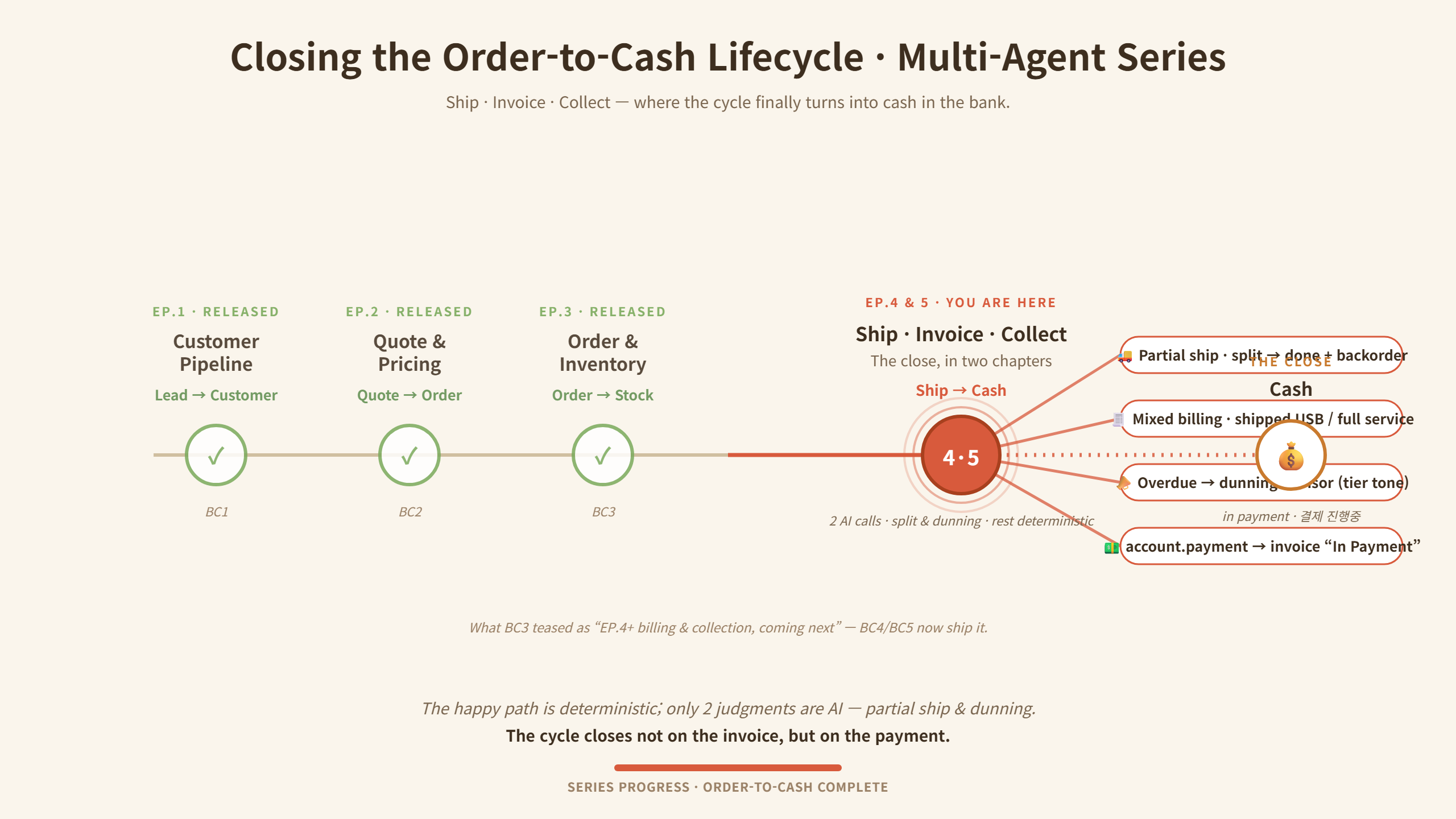
Order-to-cash now closes end-to-end — from Lead all the way to a real
account.payment("In Payment") in Odoo. Across the whole cycle the LLM speaks in exactly two seats (how to ship a short order, and who to chase first and in what tone); everything else — allocation, dispatch, invoicing, payment — is deterministic policy. That boundary is a single yaml toggle.
Core idea
ontology.yaml  (policy / strategy, human-editable)
        │   "WHAT to do, under which policy"
        ▼
Ontology Engine ── deterministic policy decisions ──►  Agents ("HOW", execution)
        │                                                 ├─ crm / erp / inventory / collections
        │                                                 ├─ cs / helpdesk / email / calendar
        └─ when needed: LLM reasoning + RAG               └─ analytics / report   (10 domain agents)
- Policy-driven dispatch — many decisions need zero LLM calls (cost + determinism)
- LLM only where the answer depends on context — caged as an advisor: whitelisted input, forced JSON, human approval, deterministic fallback if the model is off or fails
- Extensible by design — add a new domain agent on the same base; the ontology wires it in (the
collections_agentwas added this way to close the cycle)
Business Case (BC) series — order-to-cash, end-to-end
A B2B sales-to-cash cycle automated across stages, integrating Salesforce (SFDC) and Odoo ERP. Design thesis: the LLM speaks only in the few seats where the answer depends on context; the rest is deterministic policy.
- BC1 Customer pipeline — inbound email → sender lookup → tier routing, zero LLM (first-match ontology rules), idempotent lead creation:
- VIP → qualified lead + priority meeting booked within 24h + premium-tone invite
- Standard → qualified lead + RAG-drafted reply on an 8h SLA
- New prospect (unregistered) → lead (enrichment pending) + 24h welcome
- BC2 Sales — opportunity with tier-differentiated pricing & process, then ERP handoff on close:
- VIP → 5-stage process, negotiable pricing (discount up to a cap, approval beyond)
- Standard → 4-stage process, list price fixed (no discount authority)
- Closed Won → Odoo Sales Order auto-created & confirmed (idempotent) + thank-you (+ VIP kickoff meeting); Closed Lost → LLM lost-reason analysis + 180-day re-engage task (no ERP push)
- contract = Opportunity → Sales Order; pricing is deterministic, the only LLM call is Lost-reason analysis
- BC3 Order & inventory — confirmed SO → line split → deterministic allocation, with AI only where stock truly runs out:
- Line split — storable → delivery, service → license activation
- Allocation (deterministic) — VIP soft-preempt / Standard FIFO / partial-fill (Waiting) / re-allocate on stock receipt / batch pre-allocation, over a 4-state model (on-hand / reserved / available / incoming)
- Autonomous replenishment (AI) — when no rule can fill the shortage: an LLM qty advisor sizes the purchase, creates the incoming picking, and writes an LLM manager briefing — both AI points fall back to rules
- BC4 Ship · Invoice · Collect — closing the cycle in cash:
- Ship — partial-shipment advisor (split / wait) → human approve → one approval chains ship + invoice + notify
- Invoice — deterministic mixed billing (per-line invoice policy: shipped qty vs. full); no rule, no agent — by design
- Collect — dunning advisor (recovery priority + tier tone: VIP gentle / repeat-late firm) → approve → send + chatter →
account.payment→ invoice "In Payment"
Two AI advisor seats (partial-shipment, dunning); everything between is deterministic, and both execute only after a human approves.
Key capabilities
- Ontology engine that encodes business policy and drives multi-agent collaboration
- 10 multi-domain agents (CRM, ERP, inventory, collections, CS, helpdesk, email, calendar, analytics, report) over MCP / FastMCP
- Caged LLM advisors — two-step
trigger → confirm: the model only recommends, a human approves, and execution is deterministic (with a rule fallback if the model fails) - Order-to-cash close — partial shipping, mixed-billing invoicing, and AR collections → real Odoo
account.payment - Enterprise integration — SFDC + Odoo ERP adapters; RAG (ChromaDB); 3-tier memory (hot/warm/cold)
- Bilingual Streamlit dashboard (KR/EN) — decisions, inventory, ontology stats
- Cloud-native — Docker, Cloud Build, GitHub Actions (project/VM values are placeholders)
Tech stack
Python · MCP / FastMCP · Ontology-driven orchestration · Salesforce & Odoo ERP · ChromaDB (RAG) · Streamlit · Docker · Google Cloud · GitHub Actions
Project structure
ontology/            # ontology.yaml — business policy as code
mcp_server/          # ontology engine, domain agents, tools, adapters (SFDC/Odoo)
dashboard_modules/   # dashboard components
dashboard.py / dashboard_en.py   # Streamlit dashboards (KR/EN)
scripts/             # BC1-BC4 business-case demos & setup
assets/              # order-to-cash lifecycle diagram
tests/               # unit tests
.env.example         # required env vars (no real keys)
Setup
cp .env.example .env      # configure OpenAI/Google, Salesforce, Odoo (your own)
pip install -r requirements.txt

# 1) start the MCP server in HTTP (SSE) mode — serves the API on port 9101
MCP_MODE=sse python -m mcp_server.server

# 2) then launch a dashboard (KR / EN) in a separate shell:
streamlit run dashboard.py
The dashboard talks to the server API on port 9101, so start the MCP server first and keep it running; the dashboard shows no data until the server is up. External integrations (Odoo, Salesforce, GCP) need your own configuration to run end to end.
Tests & demos
# run the test suite
pytest              # or: pytest tests/

# BC demos — run in order (BC2 → BC3 → BC4 → BC5); each may need its own Odoo/SFDC setup
python scripts/bc2_to_odoo_handoff.py         # BC2  Closed Won → Odoo Sales Order
python scripts/bc3_inventory_demo.py          # BC3  order split + deterministic allocation
python scripts/bc4_demo_partial_shipment.py   # BC4  partial-shipment advisor → ship · invoice
python scripts/bc5_demo_replenishment.py      # BC5  autonomous replenishment + dunning
The demos drive live Odoo/Salesforce data, so each script may require its own tenant setup (the
bc*_setup_*.py/bc*_create_*.pyhelpers inscripts/seed the needed records). Additional scenarios live alongside these, e.g.bc4_demo_scenario_ABC.pyandbc5_demo_scenario12.py.
Note
Public portfolio showcase of an actively evolving project. For safety, all secrets/credentials and infra identifiers were stripped; external integrations (Odoo, Salesforce, GCP) require your own configuration. Architecture write-ups and demos: SunnyLab below.
SunnyLab — building agentic AI in public · Medium @sunnylabtv · YouTube @sunnylabtv
from github.com/sunnylabtv-crypto/ai_mcp_multi_agent_oosdk-public
Установка OOSDK Server
У этого сервера нет опубликованного пакета — он собирается из исходников. Открой репозиторий и следуй инструкции в README.
▸ github.com/sunnylabtv-crypto/ai_mcp_multi_agent_oosdk-publicFAQ
OOSDK Server MCP бесплатный?
Да, OOSDK Server MCP бесплатный — установка в пару кликов через Unyly без оплаты.
Нужен ли API-ключ для OOSDK Server?
Нет, OOSDK Server работает без API-ключей и переменных окружения.
OOSDK Server — hosted или self-hosted?
Доступен hosted-вариант: Unyly запускает сервер в облаке, локальная установка не обязательна.
Как установить OOSDK Server в Claude Desktop, Claude Code или Cursor?
Открой OOSDK Server на unyly.org, выбери вкладку своего клиента (Claude Desktop, Claude Code, Cursor) и нажми Install — конфиг сгенерируется автоматически, без правки JSON.
Похожие MCP
GitHub
PRs, issues, code search, CI status
 автор: GitHub
Filesystem
Secure file operations with configurable access controls.
Memory
Knowledge graph-based persistent memory system.
Template MCP Server
A CLI tool to create a new Model Context Protocol server project with TypeScript support, dual transport options, and an extensible structure
 автор: mcpdotdirect
Compare OOSDK Server with
Не уверен что выбрать?
Найди свой стек за 60 секунд
Автор?
Embed-бейдж для README
Похожее
Все в категории development