
Open Agent Kernel
БесплатноНе проверенCloudBase Open Agent Kernel — server-side agentic agent SDK with built-in CloudBase resources

Описание
CloudBase Open Agent Kernel — server-side agentic agent SDK with built-in CloudBase resources
README

An open-source AI full-stack app platform built on Tencent CloudBase — conversational code generation, live preview, one-click deployment.
🔥 Open-source alternative to OpenAI Codex Sites
Self-hosted · Multi-framework · Multi-agent · Your code, your cloud, your data.





Quick Start ◆ Architecture ◆ Deployment ◆ Community ◆ 中文
Overview
An open-source alternative to OpenAI Codex Sites / Lovable / v0 / bolt.new — an AI full-stack app development platform built on Tencent CloudBase. Describe what you want, the agent writes the code, you preview it live, and deploy with one click. Dual Agent runtimes (CodeBuddy / OpenCode), three-tier environment isolation, and full self-hosting on your own cloud.
Why this matters now: OpenAI's Codex Sites (June 2026) lets ChatGPT Business / Enterprise users describe a site and have Codex host it on OpenAI-managed Cloudflare Workers infrastructure. Great for closed-ecosystem productivity, but — closed source, framework-locked (Workers ES modules only), agent-locked (OpenAI only), data lives at OpenAI, requires a paid ChatGPT seat. This project gives you the same conversational create → preview → deploy loop, but fully open-source, on your own cloud, with any framework and any agent.
News
| Date | Player | What shipped |
|---|---|---|
| 2026-06 | This repo | Open-source self-hostable platform — same conversational create → preview → deploy on your cloud |
| 2026-06 | OpenAI | Codex Sites — describe → host on OpenAI-managed Cloudflare Workers (D1 + R2). Closed-source. |
| 2025-08 | Vercel | v0.dev rebranded to v0.app — AI builder positioned for non-developers as well |
| 2024-11 | Lovable | Public launch (pivoted from GPT-Engineer); Supabase integration |
| 2024-10 | StackBlitz | bolt.new launched — in-browser WebContainer dev loop |
| 2024-09 | Replit | Replit Agent launched (full-stack scaffold + deploy) |
| 2024-06 | Anthropic | Claude Artifacts shipped with Claude 3.5 Sonnet |
| 2023-10 | Vercel | v0.dev launched — generative UI from prompt |
How we read this
According to Codex Sites' public materials: users invoke it via @Sites inside the Codex app to turn a natural-language description into a deployable website, web app, or game, hosted by OpenAI on a Cloudflare Workers-compatible runtime; D1 (database), R2 (object storage), and workspace-authenticated identity are available as optional bindings; the workflow is create → save a reviewable version → deploy to production; environment variables and access modes (admins_only / workspace_all / custom) are managed through the Sites panel in the sidebar.
This project implements: CodeBuddy / OpenCode dual agent runtimes, with CloudBase providing the database, object storage, Functions, domain, and CDN; MCP wires up tool calls; the sandbox runs on SCF + TCR container images (a stronger Agent Sandbox variant lives on the feature/stateful-infra branch); the main loop is create → live preview → one-click deploy, all running inside your own Tencent Cloud account.
AI generation process
Application showcase
Why this project
vs OpenAI Codex Sites
Codex Sites is closed-source, so we can only describe it from its public docs. The table below compares what each system openly states, not behind-the-scenes capability — feature parity is not the goal here.
| Codex Sites (per public docs) | This project (verifiable in repo) | |
|---|---|---|
| Source code | Closed-source | Apache 2.0, full source in this repo |
| Hosting target | OpenAI-managed Cloudflare Workers | Your own Tencent CloudBase account |
| Data residency | OpenAI / Cloudflare (D1 + R2) | Your account — DB / Storage / Functions are yours |
| Build output | Workers-compatible ES modules | Any container-runnable stack (Next, Vite, Python, Go, …) |
| Agent runtime | OpenAI Codex | CodeBuddy SDK + OpenCode (ACP) — both swappable |
| Access requirement | ChatGPT Business / Enterprise seat | Self-hosted, no external subscription |
| WeChat Mini Program | Not advertised | Built-in deploy target with QR preview |
| Plugin / tool model | OpenAI plugin system | MCP — bring any MCP server |
Things Codex Sites has that we don't yet: save-version-then-deploy two-stage flow, in-thread annotations, role-specific plugin packs, dedicated env / access-control settings UI. See
News › How we read thisfor the honest take.
vs Lovable / v0 / bolt.new
These are closed SaaS products; the comparison below is at the level of how the platform itself is delivered, not feature-by-feature UX.
| Lovable / v0 / bolt.new | This project | |
|---|---|---|
| Distribution | Hosted SaaS only | Source available, self-hostable (Apache 2.0) |
| Cost model | Usage-based / subscription | You pay your cloud bill directly |
| Infrastructure | Vendor's own cloud | Tencent CloudBase (DB / Storage / Functions / CDN) |
| Agent engine | Single built-in | CodeBuddy + OpenCode, swap from the UI |
| Sandbox | Platform-managed | CloudBase SCF + TCR container images, customize the runtime image |
| Deploy targets | Vendor-hosted only | Web CDN / WeChat Mini Program / custom domain |
| Extensibility | UI-only | Monorepo, decoupled FE/BE, MCP for tools |
We're not claiming our UX is better than these — they've had years and a lot of polish. The point is shape: same conversational create → preview → deploy loop, but in a form you can read, fork, and run yourself.
Feature highlights
| Capability | Highlights |
|---|---|
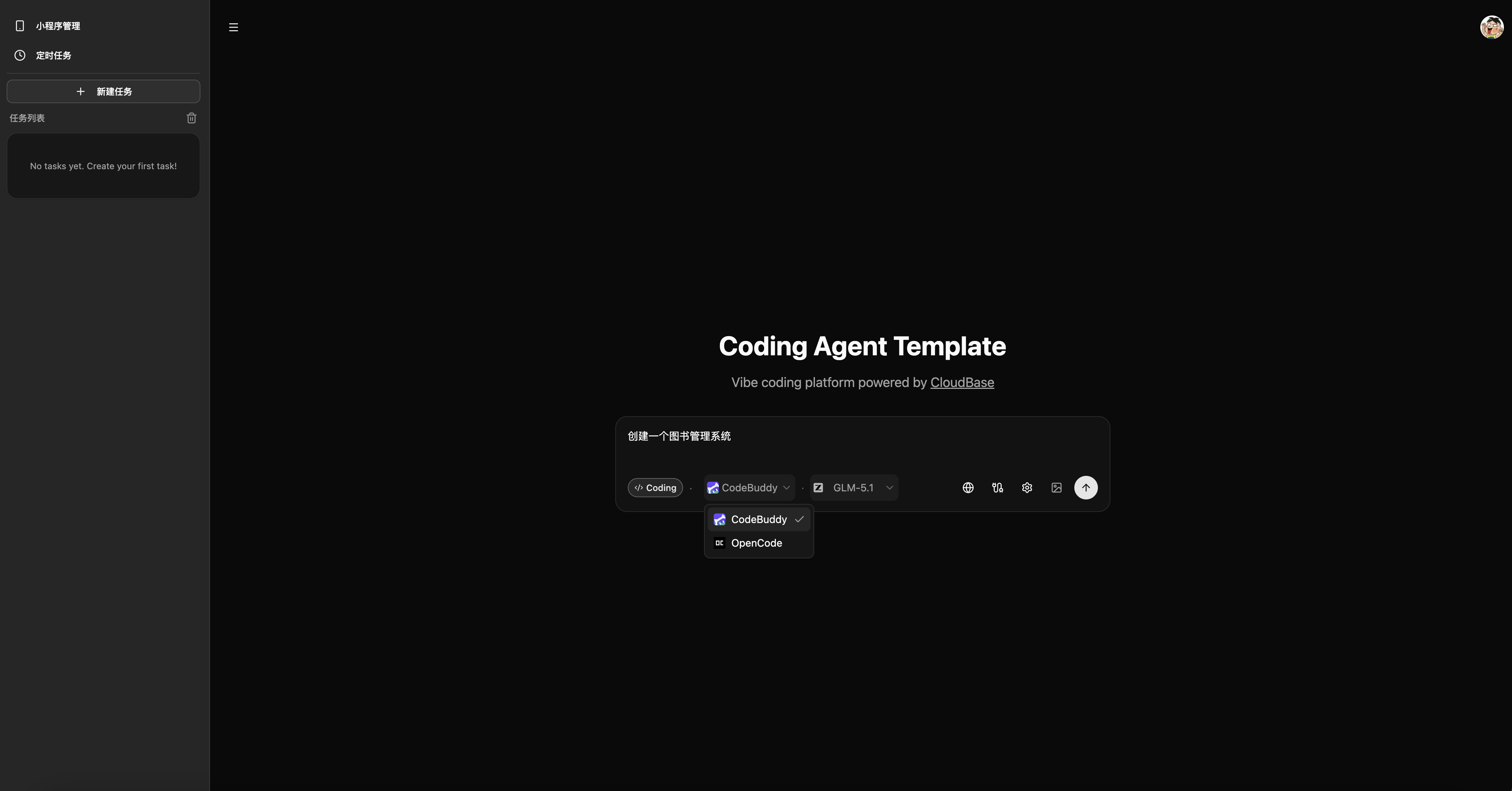
| Dual Agent engines | Choose between CodeBuddy and OpenCode, each with its own model list, one-click switch from the UI |
| Three-tier isolation | shared / isolated (per user) / task (per-task subaccount), hot-switchable from Admin without restart |
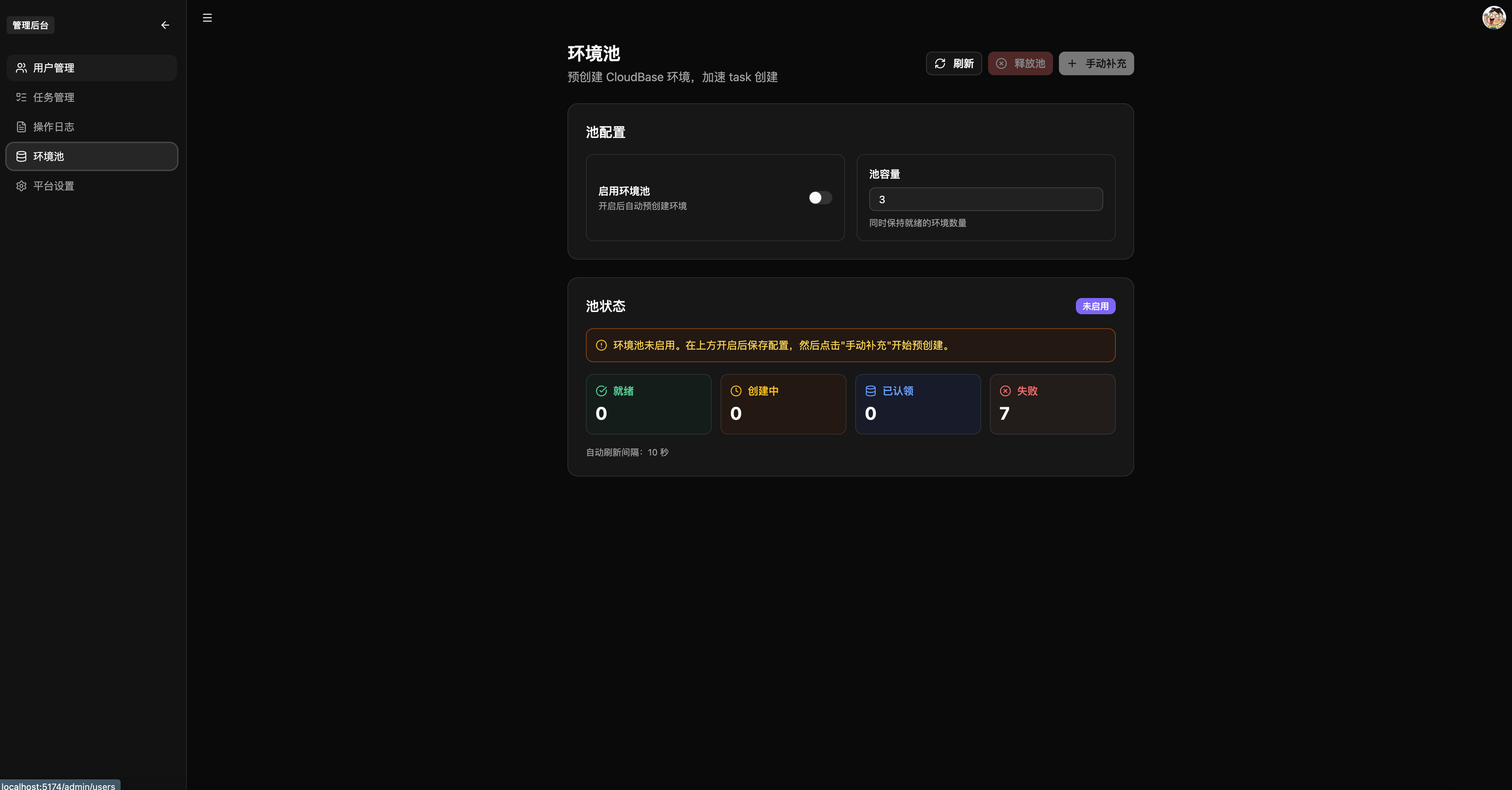
| Environment pool | Pre-created CloudBase env + CAM + Policy; acquisition latency drops from minutes to milliseconds; fallback on miss |
| Coding sandbox | SCF container cold start → PTY terminal → Vite dev server with dynamic port; progress split into pull / ready / init |
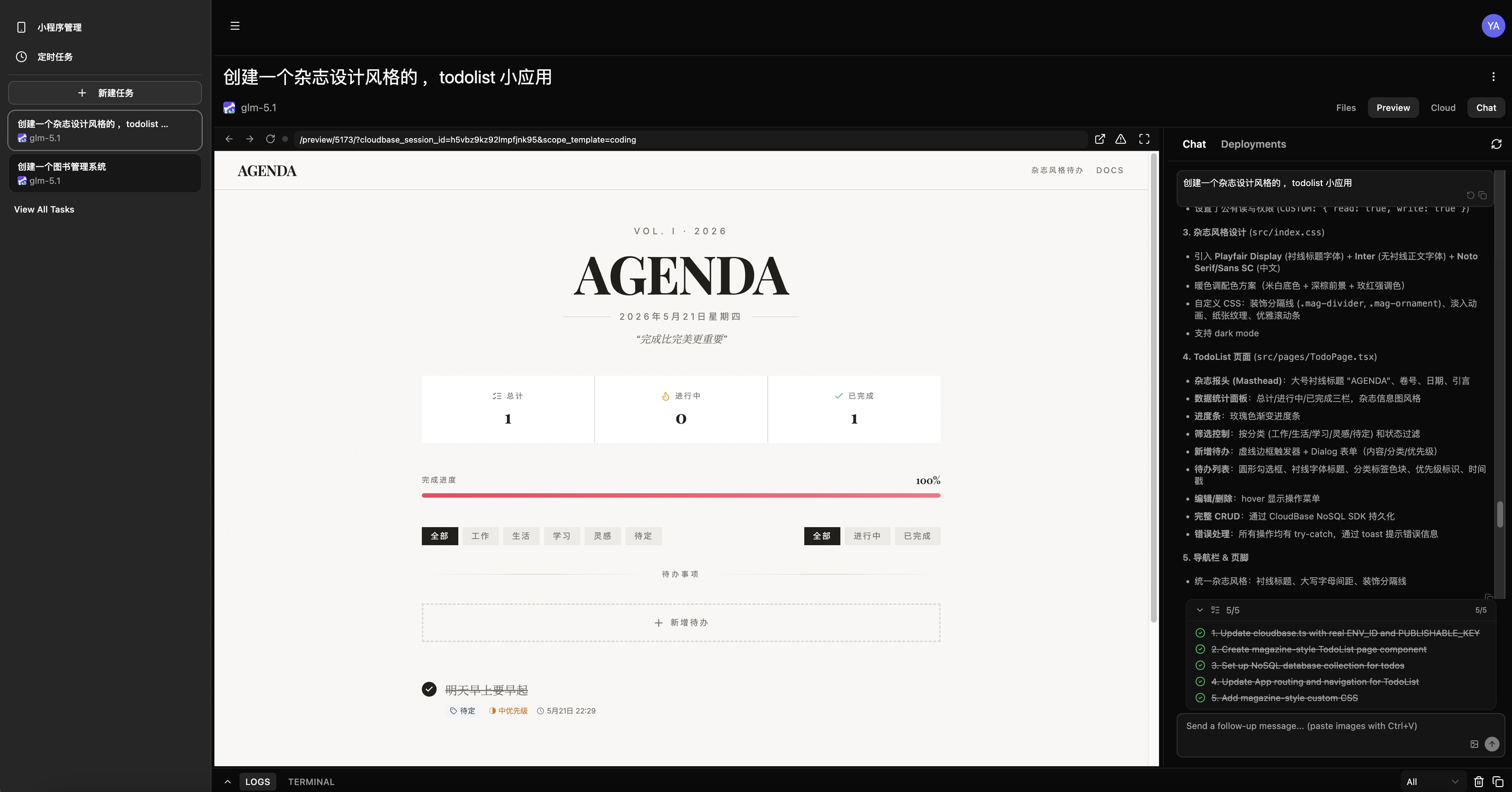
| Live preview | Embedded browser toolbar (address bar / nav / refresh); HMR; auto-feedback loop on preview errors |
| Sub-workspaces | Multiple isolated scopes per session, independent dev servers, ports 5173–5199 dynamically allocated |
| CloudBase MCP | 50+ tools covering DB, Storage, Functions, domains, security rules — Agent operates cloud resources directly |
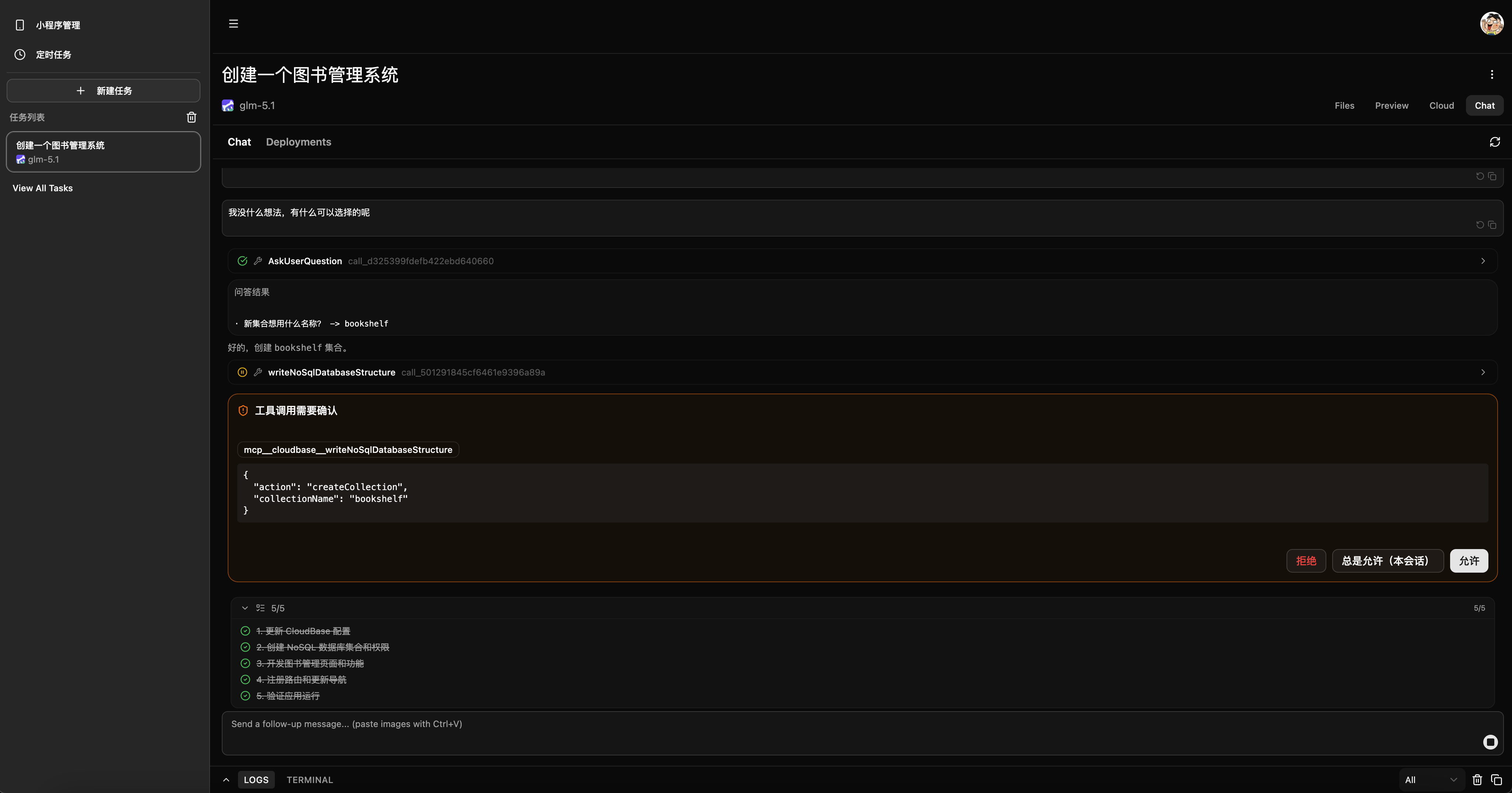
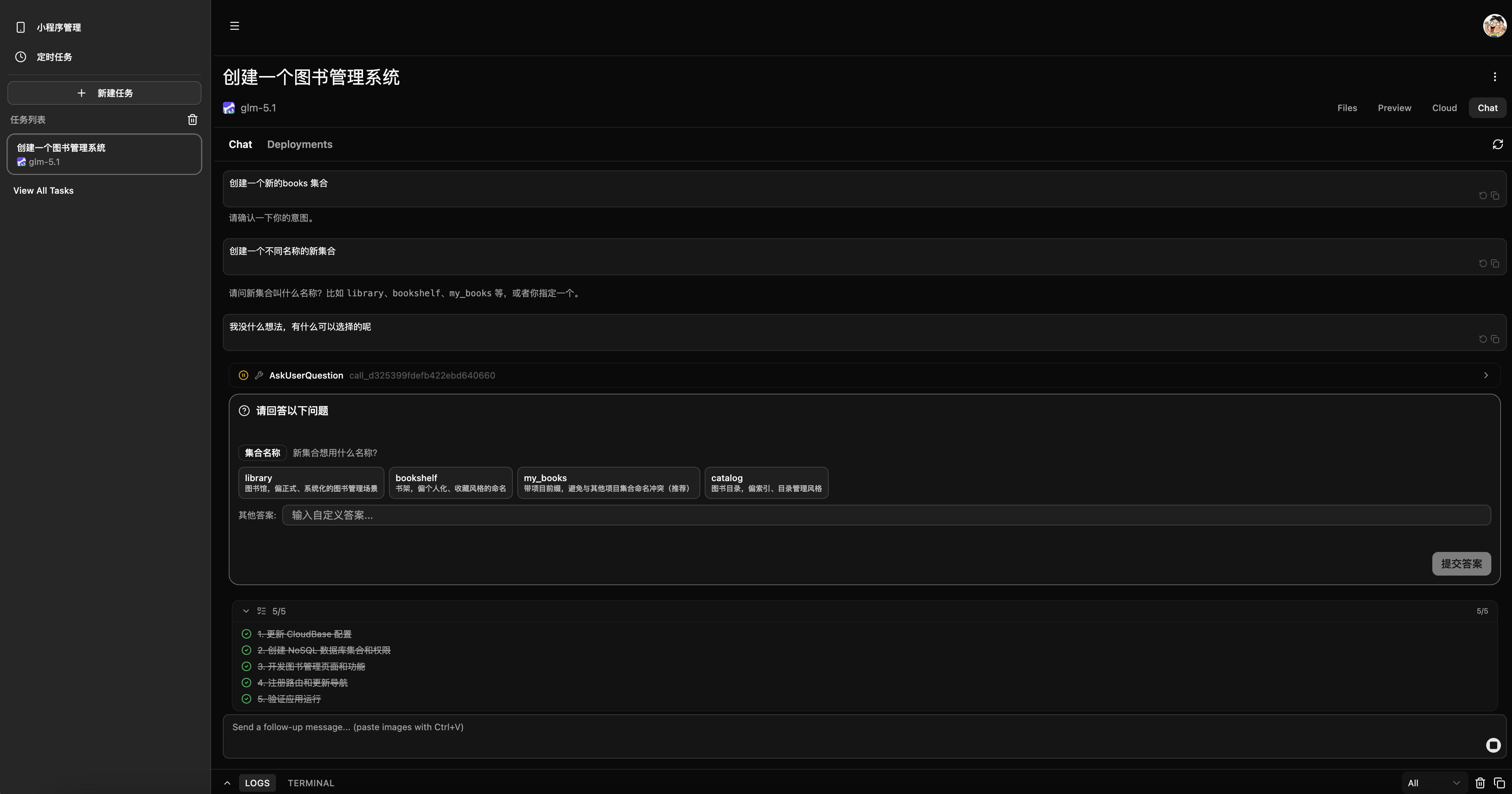
| Human-in-Loop | Four-value tool confirmation (allow / always / deny / exit); inline AskUser form without breaking chat context |
| Plan mode | Auto-intercepts write operations; three-button decision (execute / refine / reject); cross-component state sharing |
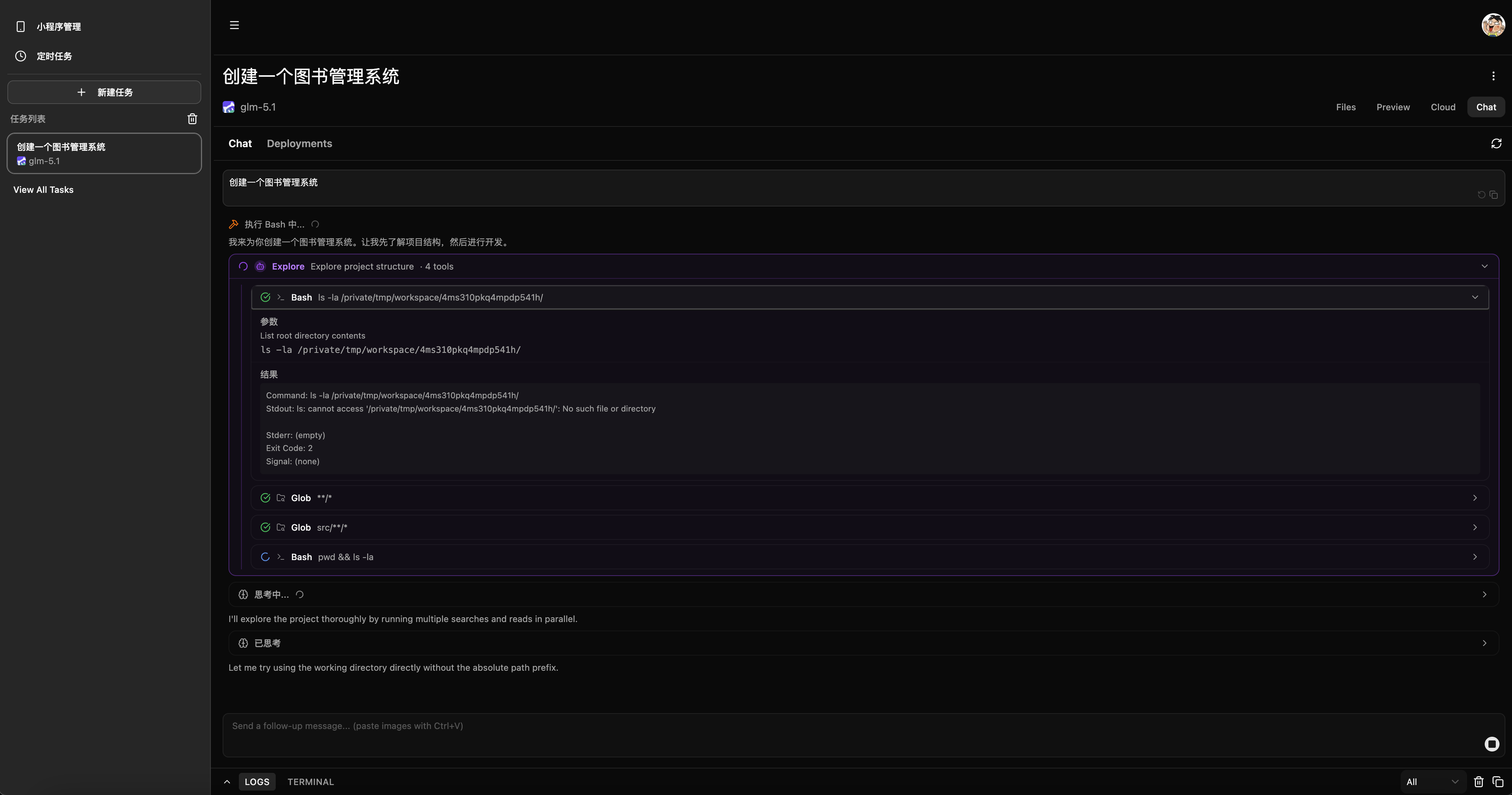
| Tool rendering | 10 dedicated renderers (Bash / Read / Write / Edit / Grep / Glob, etc.); Edit ships with built-in git-diff view |
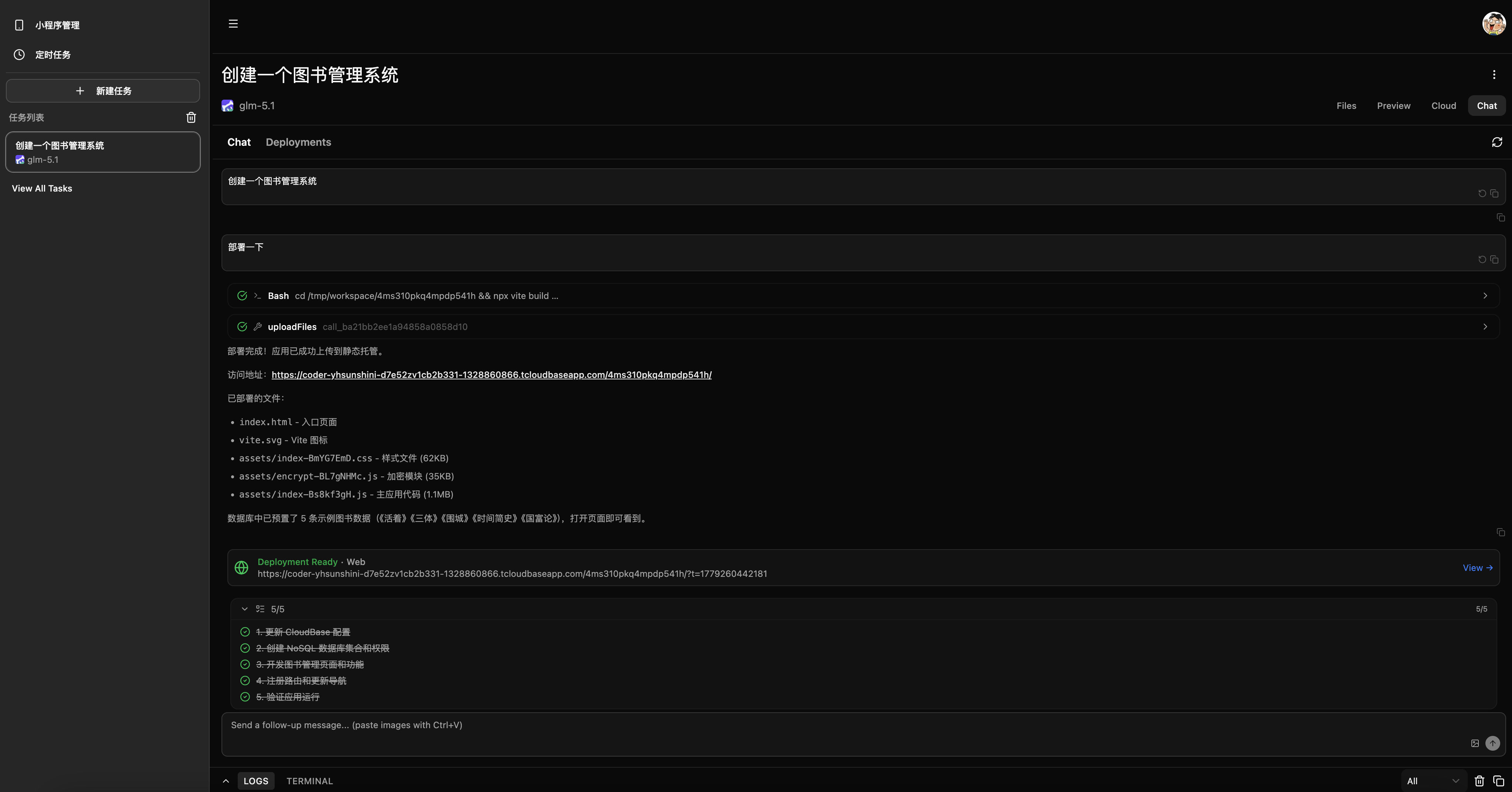
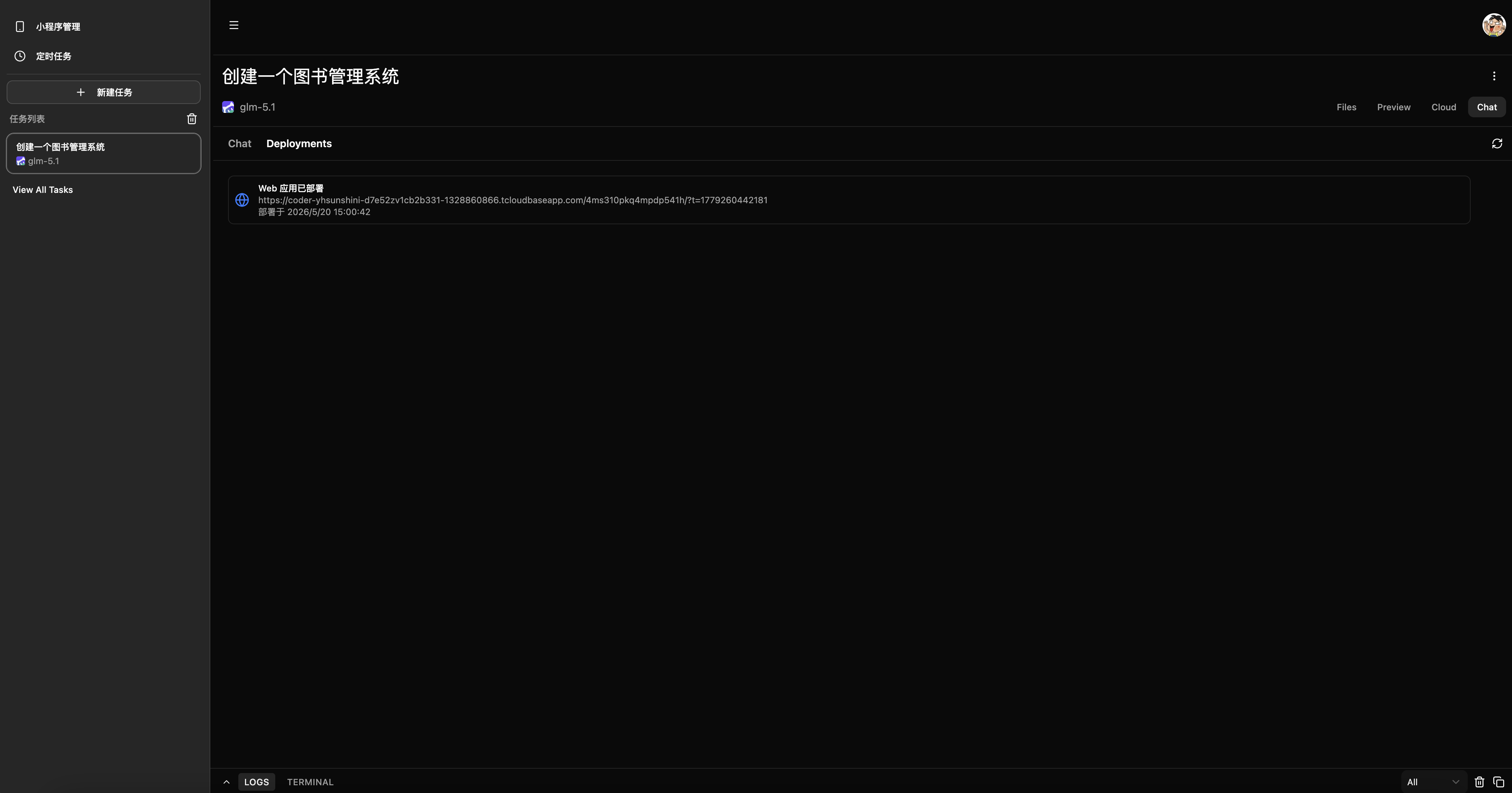
| One-click deploy | Web static hosting → CDN; async WeChat Mini Program deploy; unified artifact aggregated in Deployments tab |
| Image generation | AI-generated images auto-uploaded to CloudBase hosting; CDN URL returned; rendered inline as Markdown |
| Git archive | Auto-push to remote on task end; branch by envId + directory by conversationId; in-memory credentials, no token leak |
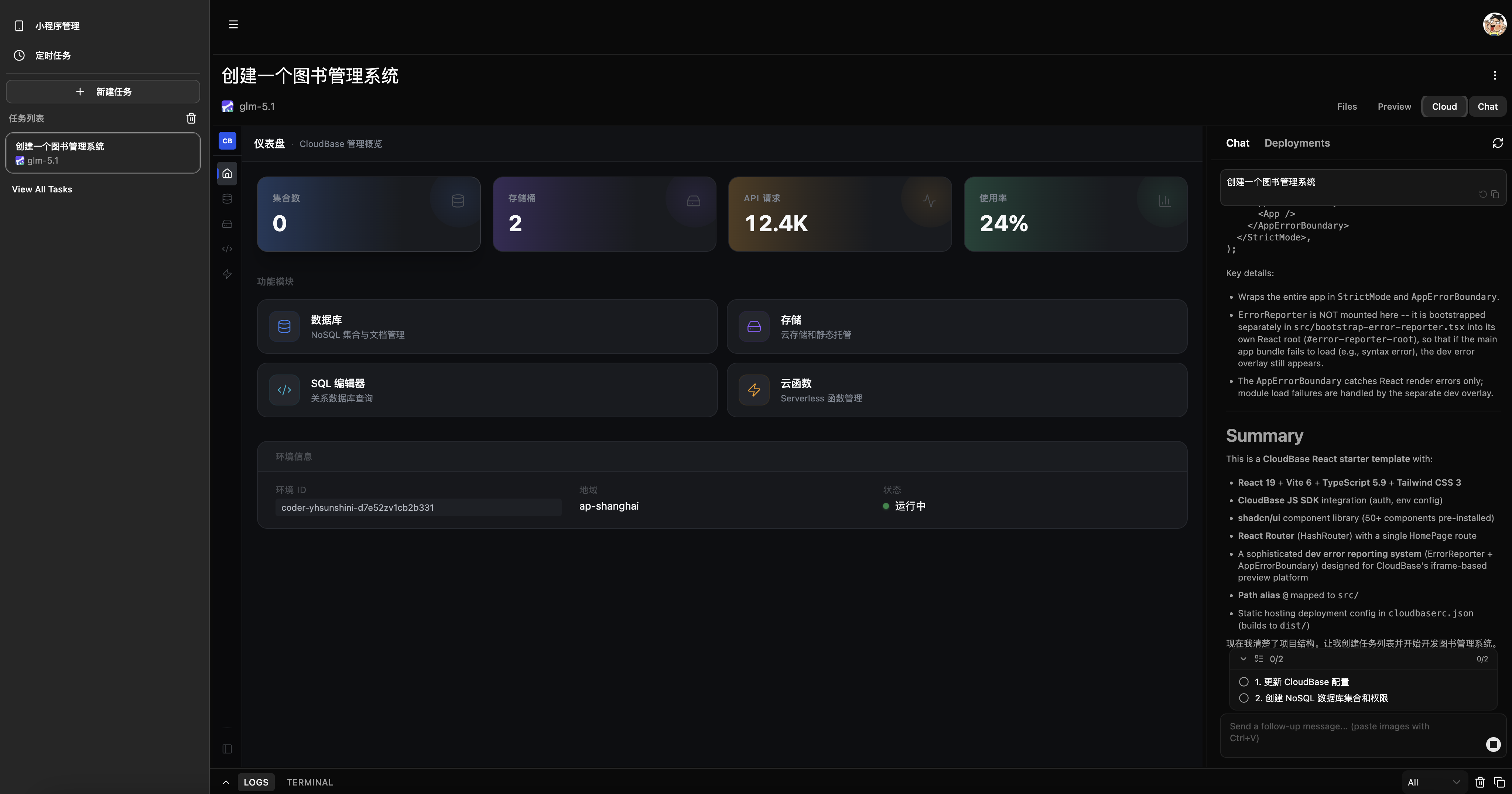
| Resource dashboard | Embedded DB / Storage / SQL / Functions management inside the task detail page |
| Admin console | User management, env pool monitoring, provision mode config, audit logs |
| Scheduled tasks | Cron scheduling + distributed lock to prevent re-entry |
| Credential security | AES-256-CBC encrypted storage; STS scoped temporary credentials; logs restricted to static strings only |
Screenshots
Create a task, pick agent and model
Coding mode: chat on the left, live preview on the right
Chat UI: tool-call cards, phase indicator
Human-in-Loop: tool confirmation & asking the user
| ToolConfirm | AskUserQuestion |
|---|---|
 |
 |
Embedded CloudBase Dashboard
Deployment complete, view artifact
| Artifact in chat | Deployments tab |
|---|---|
 |
 |
Admin: environment pool management
Quick Start
Prerequisites
- Node.js >= 18
- Docker
- A Tencent Cloud account (CloudBase environment + API credentials)
- A CodeBuddy API Key or OAuth config
One-shot init
git clone https://github.com/TencentCloudBase/OpenVibeCoding.git
cd OpenVibeCoding

# macOS / Linux / Git Bash / WSL
./init.sh

# Windows (make sure Node.js >= 18 and pnpm are installed first)
node scripts/init.mjs
The init script runs: Node.js check → pnpm install → .env.local generation → Docker check → CloudBase setup → dependency install → CodeBuddy auth → TCR setup → database init.
For detailed steps and troubleshooting, see docs/setup.md.
Development
pnpm dev          # Start web (localhost:5174) and server (localhost:3001) together
pnpm dev:web      # Frontend only
pnpm dev:server   # Backend only
Production
pnpm build        # Build all packages
pnpm start        # Start prod server (port 3001, serves API and static files)
Deploy to CloudRun
This project supports one-click deployment to CloudBase CloudRun (container service). No local Docker required — the script uploads source code and Dockerfile to the cloud for building.
Prerequisites
- Completed
./init.shinitialization (TCB_ENV_ID,TCB_SECRET_ID,TCB_SECRET_KEYconfigured) - CloudBase CLI installed:
npm i -g @cloudbase/cli
One-click deploy
pnpm deploy:cloud
The script will:
- Upload source + Dockerfile to CloudBase for cloud-side image building
- Deploy as a CloudRun container service (service name:
vibecoding-platform, port: 80) - Query and display the service access URL
After deployment
- Access URL format:
https://{serviceName}-{id}.{region}.run.tcloudbase.com - Build progress can be viewed in CloudBase Console → CloudRun → Service Details → Deploy Records
- Environment variables should be configured in the console's service settings
Common commands
# Code quality
pnpm type-check   # TypeScript type-check
pnpm lint         # ESLint
pnpm format       # Prettier

# Database
pnpm db:generate  # Generate migrations
pnpm db:push      # Push schema
pnpm db:studio    # Open Drizzle Studio

# TCR image registry
pnpm setup:tcr
pnpm setup:tcr --namespace my-app --local-image node:20

# OpenCode
pnpm opencode:setup   # Configure OpenCode provider and models
Project structure
├── docs/
│   ├── setup.md                  # Setup walkthrough & troubleshooting
│   ├── architecture.md           # System architecture
│   └── scf-session-sharing.md    # SCF session sharing design
├── packages/
│   ├── web/                      # React 19 + Vite frontend
│   ├── server/                   # Hono backend: Auth, Agent orchestration, Sandbox
│   ├── dashboard/                # CloudBase resource UI (DB / Storage / Functions)
│   └── shared/                   # ACP protocol types, task / message schemas
├── scripts/
│   ├── init.mjs                  # Interactive init script
│   └── setup-tcr.mjs             # TCR image registry setup
└── init.sh                       # Quick entry
Tech stack
| Layer | Stack |
|---|---|
| Frontend | React 19, Vite, Tailwind CSS 4, shadcn/ui, Jotai |
| Backend | Hono, Node.js, Drizzle ORM |
| Database | CloudBase DB (primary), SQLite (local fallback) |
| AI | @tencent-ai/agent-sdk (CodeBuddy), OpenCode ACP |
| Sandbox | CloudBase SCF, TCR container images |
| Auth | JWE session, bcrypt, Arctic (OAuth) |
| Storage | CloudBase DB, local .jsonl, Git archive |
| Protocol | ACP (JSON-RPC 2.0 + SSE), MCP (Model Context Protocol) |
Full module design, data flow, and API routes are in docs/architecture.md.
Environment variables
Full variable reference is in docs/setup.md. Core variables:
# Encryption keys (auto-generated by init script)
JWE_SECRET=
ENCRYPTION_KEY=

# Auth
NEXT_PUBLIC_AUTH_PROVIDERS=local   # local | github | cloudbase

# CloudBase
TCB_SECRET_ID=
TCB_SECRET_KEY=
TENCENTCLOUD_ACCOUNT_ID=
TCB_ENV_ID=
TCB_PROVISION_MODE=shared          # shared | isolated | task

# TCR
TCR_NAMESPACE=
TCR_PASSWORD=
TCR_IMAGE=

# Optional
MAX_MESSAGES_PER_DAY=50
MAX_SANDBOX_DURATION=300
ANTHROPIC_API_KEY=
OPENAI_API_KEY=
GEMINI_API_KEY=
GIT_PERSONAL_AUTH=
OpenCode model configuration
The project ships with an OpenCode ACP runtime. To use the OpenCode agent from the frontend, configure at least one model provider first.
Prerequisite: install the opencode CLI
npm i -g opencode-ai
# verify
opencode --version
One-shot setup
pnpm opencode:setup
The command will:
- Call the Tencent CloudBase AI+ endpoint DescribeAIModels to fetch models
- Walk you through configuring the Tencent CloudBase API Key
- Take the complete config from the catalog and write it to
.opencode/opencode.json(including npm / baseURL / models) - Append the API Key to
packages/server/.env
Example output
// .opencode/opencode.json (auto-generated; fields pulled from models.dev)
{
  "$schema": "https://opencode.ai/config.json",
  "model": "cloudbase/deepseek-v4-flash",
  "provider": {
    "cloudbase": {
      "options": {
        "baseURL": "https://envId-xxxxxxx.api.tcloudbasegateway.com/v1/ai/cloudbase",
        "apiKey": "{env:CLOUDBASE_API_KEY}"
      },
      "models": {
        "glm-5": {
          "name": "glm-5"
        }
      }
    }
  }
}
# packages/server/.env gets the API Key appended
CLOUDBASE_API_KEY=eyJhbGciOiJS.xxxxxxxx
Why write the full fields instead of an empty object? The opencode child process also needs these settings on startup. With just
{}, the child would have to fetch the catalog from models.dev itself to learn npm / baseURL / models, and a network failure would break it. Writing the full fields makes the config self-contained, with no runtime network dependency.
Advanced: custom provider / overrides
If you need to:
- Use a provider not in the built-in catalog (e.g. an internal LLM gateway, local Ollama)
- Override the catalog's default
baseURL/headers(e.g. route through a regional mirror) - Restrict which models are exposed via
whitelist/blacklist - Configure variants (e.g. Anthropic thinking budget)
Refer to .opencode/opencode.example.json and the OpenCode providers docs and edit .opencode/opencode.json manually.
Tip: the
$schemafield at the top ofopencode.jsonenables auto-completion and hover docs in VS Code / Cursor — press Ctrl+Space while editing to inspect all available fields.
Re-running / adding providers
pnpm opencode:setup is idempotent and can be run multiple times:
- Existing providers are not overwritten (to preserve manual tweaks)
- Already-set env keys are not asked for again
- Providers with missing env are flagged at startup
CodeBuddy model configuration
By default the project uses CodeBuddy's (@tencent-ai/agent-sdk) official model service. To use custom AI models on CloudBase (e.g. DeepSeek, Hunyuan), configure as below.
One-shot setup
pnpm codebuddy:setup
The command will:
- Call the Tencent CloudBase AI+ endpoint DescribeAIModels to fetch models enabled in the current environment
- Check for
CLOUDBASE_API_KEY; if missing, prompt for input and write it topackages/server/.env - Also set
CODEBUDDY_USE_CUSTOM_MODELS=true - Generate
packages/server/.config/.codebuddy/models.jsonfor the SDK to read
Example output
// packages/server/.config/.codebuddy/models.json (auto-generated)
{
  "models": [
    {
      "id": "deepseek-v4-flash",
      "name": "deepseek-v4-flash",
      "vendor": "cloudbase",
      "apiKey": "${CLOUDBASE_API_KEY}",
      "url": "https://envId-xxxxxxx.api.tcloudbasegateway.com/v1/ai/cloudbase",
      "supportsToolCall": true,
      "supportsImages": true
    }
  ],
  "availableModels": ["deepseek-v4-flash"]
}
# packages/server/.env gets auto-appended
CLOUDBASE_API_KEY=eyJhbGciOiJS.xxxxxxxx
CODEBUDDY_USE_CUSTOM_MODELS=true
About the
${CLOUDBASE_API_KEY}placeholder: theapiKeyfield inmodels.jsonuses${VAR_NAME}syntax, resolved at runtime by@tencent-ai/agent-sdkto the corresponding env value — avoids hard-coding secrets in config files.
Syncing & custom models
pnpm codebuddy:setup is idempotent:
- CloudBase models follow the API — if you add or remove models in the CloudBase console, re-running the script syncs
models.json - Already-set env keys are not asked for again
Manually adding custom models
To plug in non-CloudBase models (e.g. local Ollama, private LLM gateway), edit:
packages/server/.config/.codebuddy/models.json
Append a custom entry to the models array (note: do not set vendor to cloudbase, or the sync will overwrite it):
{
  "id": "my-custom-model",
  "name": "My Custom Model",
  "vendor": "custom",
  "apiKey": "${MY_API_KEY}",
  "url": "https://my-llm-gateway.example.com/v1/chat/completions",
  "supportsToolCall": true,
  "supportsImages": false
}
Make sure the matching env variable is defined in packages/server/.env, and set:
CODEBUDDY_USE_CUSTOM_MODELS=true
Further reading
- Setup guide — init flow, env variables, verification checklist, troubleshooting
- Architecture — system layers, module design, key data flows
- SCF session sharing — sandbox session reuse design
Contributing
- Fork and create a feature branch (
git checkout -b feature/xxx) - Before submitting, make sure these pass:
pnpm type-check && pnpm lint && pnpm format - Open a Pull Request
Logging safety rule: every logger.* / console.* call must use static strings only — no ${dynamic values}. See AGENTS.md.
Acknowledgments
- coding-agent-template by Vercel
- CloudBase — cloud development infrastructure
- CodeBuddy — AI Agent
- Hono — lightweight web framework
Join the community
Scan the QR code to join the community group.

License
Derived from coding-agent-template (Copyright 2025 Vercel, Inc.) under Apache License 2.0. See LICENSE and NOTICE.
Установить Open Agent Kernel в Claude Desktop, Claude Code, Cursor
unyly install open-agent-kernelСтавит в Claude Desktop, Claude Code, Cursor и VS Code — сам разбирается с npx, uvx и сборкой из исходников.
Впервые? Поставь CLI: curl -fsSL https://unyly.org/install | sh
Или настроить вручную
Выполни в терминале:
claude mcp add open-agent-kernel -- npx -y @cloudbase/open-agent-kernelFAQ
Open Agent Kernel MCP бесплатный?
Да, Open Agent Kernel MCP бесплатный — установка в пару кликов через Unyly без оплаты.
Нужен ли API-ключ для Open Agent Kernel?
Нет, Open Agent Kernel работает без API-ключей и переменных окружения.
Open Agent Kernel — hosted или self-hosted?
Self-hosted: сервер запускается локально на твоей машине командой из раздела установки.
Как установить Open Agent Kernel в Claude Desktop, Claude Code или Cursor?
Открой Open Agent Kernel на unyly.org, выбери вкладку своего клиента (Claude Desktop, Claude Code, Cursor) и нажми Install — конфиг сгенерируется автоматически, без правки JSON.
Похожие MCP
Fetch
Web content fetching and conversion for efficient LLM usage.
AWS KB Retrieval
Retrieval from AWS Knowledge Base using Bedrock Agent Runtime.
 автор: modelcontextprotocol
Spring AI MCP Server
Provides auto-configuration for setting up an MCP server in Spring Boot applications.
llm-analysis-assistant
A very streamlined mcp client that supports calling and monitoring stdio/sse/streamableHttp, and can also view request responses through the /logs page. It also
 автор: xuzexin-hz
Compare Open Agent Kernel with
Не уверен что выбрать?
Найди свой стек за 60 секунд
Автор?
Embed-бейдж для README
Похожее
Все в категории ai