
Openmarkets
БесплатноНе проверенA Model Context Protocol (MCP) server for agentic retrieval of financial data from Yahoo Finance, enabling stock information, historical data, analyst data, and

Описание
A Model Context Protocol (MCP) server for agentic retrieval of financial data from Yahoo Finance, enabling stock information, historical data, analyst data, and more.
README

Open Markets
A Model Context Protocol (MCP) server for agentic retrieval of financial data from Yahoo Finance. This server leverages YFinance to provide a simple and efficient way to access historical stock prices, dividends, stock splits, company information, and other financial metrics.
This MCP server is designed to be used with various LLM applications that support the Model Context Protocol, such as Claude Desktop, n8n, and Cursor. It allows users to retrieve financial data in a structured way, making it easy to integrate into AI applications.
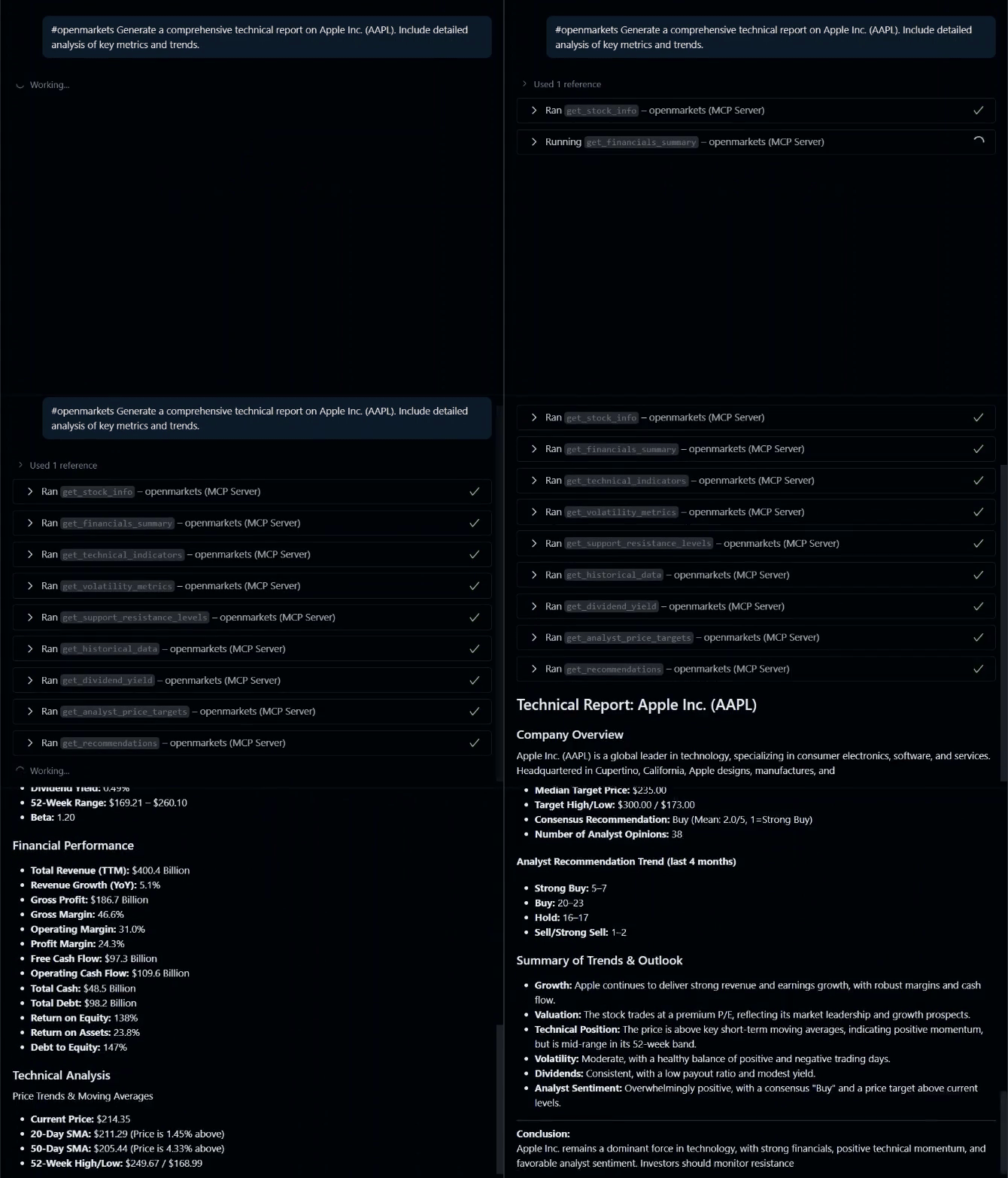
Features
- Get basic stock information (price, market cap, sector, etc.)
- Fetch historical price data with customizable periods
- Retrieve analyst recommendations
- Download data for multiple stocks simultaneously
- Access dividend history
Usage
This MCP server can be used with various LLM applications that support the Model Context Protocol:
- Claude Desktop: Anthropic's desktop application for Claude
- Cursor: AI-powered code editor with MCP support
- Custom MCP clients: Any application implementing the MCP client specification
Installation
Usage with Claude Desktop
Install Claude Desktop from https://claude.ai/download
Open your Claude Desktop configuration:
- macOS:
~/Library/Application Support/Claude/claude_desktop_config.json - Windows:
%APPDATA%\Claude\claude_desktop_config.json
- macOS:
Add the following configuration:
{
  "mcpServers": {
    "openmarkets": {
      "command": "uvx",
      "args": [
        "openmarkets@latest"
      ]
    }
  }
}
- Restart Claude Desktop
Usage with VS Code
For quick installation, use one of the one-click installation buttons below:
Install with UVX in VS Code Install with UVX in VS Code Insiders
For manual installation, add the following JSON block to your User Settings (JSON) file in VS Code. You can do this by pressing Ctrl + Shift + P and typing Preferences: Open Settings (JSON).
Optionally, you can add it to a file called .vscode/mcp.json in your workspace. This will allow you to share the configuration with others.
Note that the
mcpkey is not needed in the.vscode/mcp.jsonfile.
UVX
{
  "mcp": {
    "servers": {
      "openmarkets": {
        "command": "uvx",
        "args": [
          "openmarkets@latest"
        ]
      }
    }
  }
}
Available Tools
This MCP server provides a variety of tools for retrieving financial data. Below is a list of available tools and their main arguments:
Stock Information
- get_stock_info(ticker: str)
Get basic information about a stock.
Historical Data
- get_historical_data(ticker: str, period: str = "1mo", interval: str = "1d")
Get historical price data for a stock. - get_multiple_tickers(tickers: list[str], period: str = "1d")
Get data for multiple stocks at once. - download_bulk_data(tickers: list[str], period: str = "1mo", interval: str = "1d", ...)
Download bulk historical data for multiple tickers. - get_ticker_history_metadata(ticker: str)
Get available periods, intervals, and metadata for a ticker.
Analyst Data
- get_recommendations(ticker: str)
Get analyst recommendations for a stock. - get_analyst_price_targets(ticker: str)
Get analyst price targets. - get_upgrades_downgrades(ticker: str)
Get recent upgrades and downgrades. - get_recommendations_summary(ticker: str)
Get recommendations summary.
Corporate Actions
- get_dividends(symbol: str, period: str = "5y")
Get dividend history for a stock. - get_splits_history(symbol: str, period: str = "5y")
Get stock split history.
Market Data
- get_market_status()
Get current US market status. - get_trending_tickers(region: str = "US", count: int = 10)
Get trending/popular tickers. - get_sector_performance()
Get sector performance using ETFs. - get_index_data(indices: list[str] = None)
Get data for major market indices.
Calendar & Market Hours
- get_market_calendar_info(ticker: str)
Get market calendar and session info. - get_market_hours(ticker: str)
Get market hours and session information. - get_exchange_info(ticker: str)
Get detailed exchange and trading information.
Screener & Search
- screen_stocks_by_criteria(...)
Screen stocks by market cap, P/E, dividend yield, sector, etc. - get_similar_stocks(ticker: str, count: int = 5)
Find similar stocks by sector and market cap. - get_top_performers(period: str = "1mo", sector: str = None, count: int = 10)
Get top performing stocks.
Technical Analysis
- get_technical_indicators(ticker: str, period: str = "6mo")
Get technical indicators (SMA, price position, etc.). - get_volatility_metrics(ticker: str, period: str = "1y")
Get volatility and risk metrics. - get_support_resistance_levels(ticker: str, period: str = "6mo")
Get support and resistance levels.
Options
- get_options_expiration_dates(ticker: str)
Get available options expiration dates. - get_option_chain(ticker: str, expiration_date: str = None)
Get option chain for a ticker. - get_options_volume_analysis(ticker: str, expiration_date: str = None)
Analyze options volume and open interest. - get_options_by_moneyness(ticker: str, expiration_date: str = None, moneyness_range: float = 0.1)
Filter options by proximity to current price.
Financial Statements
- get_financials_summary(ticker: str)
Get key financial metrics summary.
Funds & ETFs
- get_fund_profile(ticker: str)
Get fund/ETF profile. - get_fund_holdings(ticker: str, count: int = 20)
Get top holdings of a fund/ETF. - get_fund_sector_allocation(ticker: str)
Get sector allocation of a fund/ETF. - get_fund_performance(ticker: str)
Get fund/ETF performance metrics. - compare_funds(tickers: list[str])
Compare multiple funds/ETFs.
Crypto
- get_crypto_info(crypto_symbol: str)
Get cryptocurrency info. - get_crypto_historical_data(crypto_symbol: str, period: str = "1mo", interval: str = "1d")
Get historical data for a cryptocurrency. - get_top_cryptocurrencies(count: int = 10)
Get data for top cryptocurrencies. - get_crypto_fear_greed_proxy(crypto_symbols: list[str] = None)
Get a proxy for crypto fear/greed index.
Currency & Validation
- get_currency_data(base_currency: str = "USD", target_currencies: list[str] = None)
Get currency exchange rates. - validate_tickers(tickers: list[str])
Validate if tickers are valid and available.
This list reflects the tools registered in the codebase and their main arguments. For more details, see the respective files in tools.
Development
To test the MCP server locally, install the uvx and npx and run the following command:
npx @modelcontextprotocol/inspector uvx openmarkets@latest
This command will start the MCP server and open the MCP Inspector in your default web browser. You can then interact with the server and test its functionality.
License
AGPLv3+ License - see LICENSE for details.
Contributing
- Fork the repository
- Create a feature branch
- Commit your changes
- Push to the branch
- Create a pull request
Установить Openmarkets в Claude Desktop, Claude Code, Cursor
unyly install openmarketsСтавит в Claude Desktop, Claude Code, Cursor и VS Code — сам разбирается с npx, uvx и сборкой из исходников.
Впервые? Поставь CLI: curl -fsSL https://unyly.org/install | sh
Или настроить вручную
Выполни в терминале:
claude mcp add openmarkets -- uvx openmarketsFAQ
Openmarkets MCP бесплатный?
Да, Openmarkets MCP бесплатный — установка в пару кликов через Unyly без оплаты.
Нужен ли API-ключ для Openmarkets?
Нет, Openmarkets работает без API-ключей и переменных окружения.
Openmarkets — hosted или self-hosted?
Доступен hosted-вариант: Unyly запускает сервер в облаке, локальная установка не обязательна.
Как установить Openmarkets в Claude Desktop, Claude Code или Cursor?
Открой Openmarkets на unyly.org, выбери вкладку своего клиента (Claude Desktop, Claude Code, Cursor) и нажми Install — конфиг сгенерируется автоматически, без правки JSON.
Похожие MCP
Stripe
Payments, customers, subscriptions
 автор: Stripe
malamutemayhem/unclick-agent-native-endpoints
110+ tools for AI agents spanning social media, finance, gaming, music, AU-specific services, and utilities. Zero-config local tools plus platform connectors. n
 автор: malamutemayhem
whiteknightonhorse/APIbase
Unified API hub for AI agents with 56+ tools across travel (Amadeus, Sabre), prediction markets (Polymarket), crypto, and weather. Pay-per-call via x402 micropa
 автор: whiteknightonhorse
trackerfitness729-jpg/sitelauncher-mcp-server
Deploy live HTTPS websites in seconds. Instant subdomains ($1 USDC) or custom .xyz domains ($10 USDC) on Base chain. Templates for crypto tokens and AI agent pr
 автор: trackerfitness729-jpg
Compare Openmarkets with
Не уверен что выбрать?
Найди свой стек за 60 секунд
Автор?
Embed-бейдж для README
Похожее
Все в категории finance