
Openrouter Imgen
БесплатноНе проверенGives AI assistants image generation and editing capabilities through OpenRouter, supporting multiple models, style presets, variations, and batch operations.

Описание
Gives AI assistants image generation and editing capabilities through OpenRouter, supporting multiple models, style presets, variations, and batch operations.
README
Give your AI assistant the ability to generate and edit images. One install, multiple models, no vendor lock-in.
Screenshots
| Before | After |
|---|---|
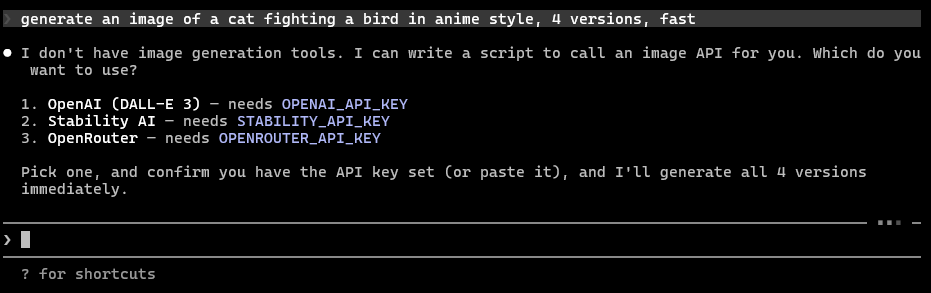 |
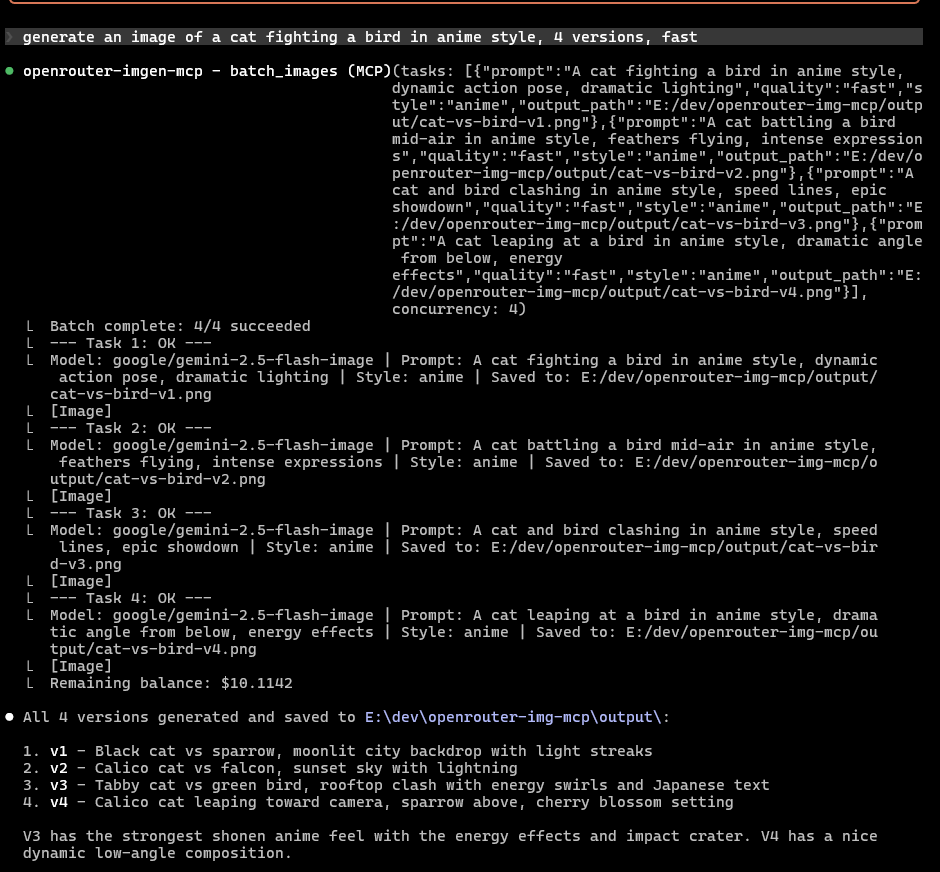 |
Works with Claude Code, Claude Desktop, Cursor, VS Code, Windsurf, and any MCP client.
Why This
- One API key, every image model. Gemini, GPT-5, and more through OpenRouter. Switch models with a word, not a code change.
- Generate, edit, and batch. Text-to-image, image editing with references, and batch operations (up to 20 parallel tasks).
- Style presets. Say "in watercolor style" or "as pixel art" and get consistent results. 8 built-in styles.
- Variations. Generate up to 4 takes from one prompt. Pick the best one.
- Smart file output. Save to a path or a directory. Files get descriptive names automatically.
- Pay for what you use. OpenRouter's per-token and per-image pricing means no subscriptions.
How to Install
Get an OpenRouter API key, then add the server to your client.
Claude Code
# macOS / Linux
claude mcp add openrouter-imgen-mcp -s user -e OPENROUTER_API_KEY=YOURAPIKEY -- npx -y openrouter-imgen-mcp@latest

# Windows
claude mcp add openrouter-imgen-mcp -s user -e OPENROUTER_API_KEY=YOURAPIKEY -- cmd /c npx -y openrouter-imgen-mcp@latest
Claude Desktop / Cursor / VS Code / Windsurf
Add to your MCP config JSON:
{
  "mcpServers": {
    "openrouter-imgen-mcp": {
      "command": "npx",
      "args": ["-y", "openrouter-imgen-mcp@latest"],
      "env": {
        "OPENROUTER_API_KEY": "YOURAPIKEY"
      }
    }
  }
}
What You Can Do
Simply chat with your assistant:
Generate a product photo of a ceramic mug on a wooden table, warm lighting
Generate 3 variations of a logo concept for a coffee brand, pixel-art style
Edit /path/to/headshot.png: make the background a gradient, keep the subject
Batch generate 5 social media banners: summer sale, back to school, holiday promo,
new arrivals, free shipping. All in illustration style, 16:9, save to ./banners/
List image models. What's cheapest for quick drafts?
Quality Presets
Skip the model IDs. Just say "fast", "balanced", or "quality":
| Preset | Model | When to use |
|---|---|---|
fast |
Gemini 2.5 Flash | Drafts, iteration, keeping costs low |
balanced |
Gemini 3 Pro | Day-to-day use (default) |
quality |
GPT-5 Image | Final deliverables, max fidelity |
Or pass any OpenRouter model ID directly:
Generate a cat using model google/gemini-2.5-flash-image
Style Presets
Keywords modifies the style:
| Style | What you get |
|---|---|
photo |
Photorealistic, DSLR, natural lighting |
illustration |
Clean digital art, vibrant colors |
watercolor |
Soft washes, paper texture |
pixel-art |
Retro 16-bit, limited palette |
3d-render |
Studio-lit, physically based rendering |
anime |
Cel-shaded, Japanese animation |
sketch |
Pencil on paper, monochrome |
oil-painting |
Brushstrokes, impasto, classical |
Tools Reference
Convenient tools:
| Tool | What it does |
|---|---|
generate_image |
Text-to-image with quality/style presets, variations (1-4), aspect ratio, file output |
edit_image |
Transform images with a prompt + up to 12 reference images (files, URLs, data URIs) |
batch_images |
Run up to 20 generate/edit tasks in parallel with concurrency control |
list_image_models |
Browse available models with pricing |
check_balance |
Check your OpenRouter credit balance |
Supported output: 1:1, 2:3, 3:2, 16:9, 9:16, 4:3, 3:4 aspect ratios. 0.5K, 1K, 2K, 4K sizes. PNG, JPEG, WebP, GIF inputs.
Headless Configuration
| Flag | Env Var | Default |
|---|---|---|
--api-key |
OPENROUTER_API_KEY |
(required) |
--default-model |
OPENROUTER_IMG_DEFAULT_MODEL |
google/gemini-3-pro-image-preview |
--batch-concurrency |
OPENROUTER_IMG_BATCH_CONCURRENCY |
3 |
--cache-ttl |
OPENROUTER_IMG_CACHE_TTL |
300000 (5 min) |
--log-level |
OPENROUTER_IMG_LOG_LEVEL |
warn |
Security
API keys never appear in logs or error messages. File paths block directory traversal. Image URLs are validated against SSRF patterns. Batch operations are memory-capped at 200MB. All inputs are schema-validated.
For Developers
To build for devs:
pnpm install && pnpm build && pnpm test # 57 tests
License
MIT
Made with <3 at Bitcoin.com
Установка Openrouter Imgen
У этого сервера нет опубликованного пакета — он собирается из исходников. Открой репозиторий и следуй инструкции в README.
▸ github.com/jtxmp/openrouter-imgen-mcpFAQ
Openrouter Imgen MCP бесплатный?
Да, Openrouter Imgen MCP бесплатный — установка в пару кликов через Unyly без оплаты.
Нужен ли API-ключ для Openrouter Imgen?
Нет, Openrouter Imgen работает без API-ключей и переменных окружения.
Openrouter Imgen — hosted или self-hosted?
Доступен hosted-вариант: Unyly запускает сервер в облаке, локальная установка не обязательна.
Как установить Openrouter Imgen в Claude Desktop, Claude Code или Cursor?
Открой Openrouter Imgen на unyly.org, выбери вкладку своего клиента (Claude Desktop, Claude Code, Cursor) и нажми Install — конфиг сгенерируется автоматически, без правки JSON.
Похожие MCP
Omni Video
An MCP server that transforms LLM-enabled IDEs into professional video editors by pre-processing footage into text proxies, generating motion graphics via HTML/
 автор: buildwithtaza
ARA
Generate images, video and audio from any AI agent — one connector.
 автор: ARA
YouTube
Transcripts, channel stats, search
 автор: YouTube
EverArt
AI image generation using various models.
 автор: modelcontextprotocol
Compare Openrouter Imgen with
Не уверен что выбрать?
Найди свой стек за 60 секунд
Автор?
Embed-бейдж для README
Похожее
Все в категории media