
Paragonos Misc Tools
БесплатноНе проверенA collection of miscellaneous tools for Claude, Cursor, and MCP-compatible clients. Includes OCR (Optical Character Recognition) capabilities leveraging the Goo

Описание
A collection of miscellaneous tools for Claude, Cursor, and MCP-compatible clients. Includes OCR (Optical Character Recognition) capabilities leveraging the Google Gemini API.
README
Part of ParagonOS by Metarune Labs Pvt Ltd
A collection of miscellaneous tools for Claude, Cursor, and MCP-compatible clients. Includes OCR (Optical Character Recognition) capabilities leveraging the Google Gemini API. Extract text from images using file paths or base64 encoded strings through the Model Context Protocol.
Overview
This MCP server provides enterprise-grade OCR capabilities, enabling AI assistants to extract text from images with high accuracy using Google's advanced Gemini models.
Example Use Case:
Extract text from the following image:
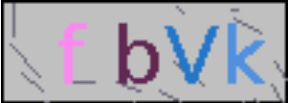
Convert it to plain text, e.g., fbVk
Key Features
- File-based OCR: Extract text directly from image files on your local system
- Base64 OCR: Extract text from base64 encoded image strings
- High Accuracy: Utilizes Google's advanced Gemini models for superior text recognition
- Easy Integration: Simple MCP tools for seamless AI assistant integration
- Multi-format Support: Works with various image formats (PNG, JPG, JPEG, etc.)
Requirements
- Python 3.8+
- Google Gemini API Key
- FastMCP
- Claude Desktop or Cursor (or any MCP client)
Installation
1. Clone Repository
git clone https://github.com/Paragon-OS/paragonos-misc-tools-mcp.git
cd paragonos-misc-tools-mcp
2. Install UV (if needed)
macOS/Linux:
curl -LsSf https://astral.sh/uv/install.sh | sh
Windows:
powershell -ExecutionPolicy ByPass -c "irm https://astral.sh/uv/install.ps1 | iex"
3. Install Dependencies
uv sync
4. Install Playwright Browser (for Notion tools)
After installing dependencies, you need to install the Chromium browser for Playwright:
playwright install chromium
MCP Configuration
Edit your Claude config (~/Library/Application Support/Claude/claude_desktop_config.json) or Cursor config (~/.cursor/mcp.json):
{
  "mcpServers": {
    "paragonos-misc-tools": {
      "command": "uv",
      "args": [
        "--directory",
        "/full/path/to/paragonos-misc-tools-mcp",
        "run",
        "misc-tools-mcp"
      ],
      "env": {
        "GEMINI_MODEL": "gemini-2.5-flash-preview-05-20",
        "GEMINI_API_KEY": "YOUR_GEMINI_API_KEY"
      }
    }
  }
}
Windows:
{
  "mcpServers": {
    "paragonos-misc-tools": {
      "command": "uv",
      "args": [
        "--directory",
        "C:\\full\\path\\to\\paragonos-misc-tools-mcp",
        "run",
        "misc-tools-mcp"
      ],
      "env": {
        "GEMINI_MODEL": "gemini-2.5-flash-preview-05-20",
        "GEMINI_API_KEY": "YOUR_GEMINI_API_KEY"
      }
    }
  }
}
Available Tools
ocr_image_file
Performs OCR on a local image file.
- Parameter:
image_file(string) - Absolute or relative path to the image file - Returns: Extracted text from the image
ocr_image_base64
Performs OCR on a base64 encoded image.
- Parameter:
base64_image(string) - Base64 encoded string of the image - Returns: Extracted text from the image
read_notion_markdown
Extracts markdown content from a Notion published site URL.
- Parameter:
notion_url(string) - The full URL of the Notion published site (must benotion.site, notnotion.so) - Returns: The extracted markdown content as a string
Usage Examples
- "Extract text from image at /path/to/screenshot.png"
- "Read the text from this image: [base64 string]"
- "What does the text say in captcha.jpg?"
- "OCR this receipt image and extract the total amount"
- "Read the markdown from this Notion page: https://example.notion.site/..."
About ParagonOS
ParagonOS is a comprehensive AI integration infrastructure platform developed by Metarune Labs Pvt Ltd, providing secure, reliable, and extensible bridges between AI assistants and modern services.
License
Licensed under the Apache 2.0 License. See LICENSE file for details.
Developed by Metarune Labs Pvt Ltd Part of the ParagonOS ecosystem
Установка Paragonos Misc Tools
У этого сервера нет опубликованного пакета — он собирается из исходников. Открой репозиторий и следуй инструкции в README.
▸ github.com/Paragon-OS/paragonos-misc-tools-mcpFAQ
Paragonos Misc Tools MCP бесплатный?
Да, Paragonos Misc Tools MCP бесплатный — установка в пару кликов через Unyly без оплаты.
Нужен ли API-ключ для Paragonos Misc Tools?
Нет, Paragonos Misc Tools работает без API-ключей и переменных окружения.
Paragonos Misc Tools — hosted или self-hosted?
Self-hosted: сервер запускается локально на твоей машине командой из раздела установки.
Как установить Paragonos Misc Tools в Claude Desktop, Claude Code или Cursor?
Открой Paragonos Misc Tools на unyly.org, выбери вкладку своего клиента (Claude Desktop, Claude Code, Cursor) и нажми Install — конфиг сгенерируется автоматически, без правки JSON.
Похожие MCP
Fetch
Web content fetching and conversion for efficient LLM usage.
AWS KB Retrieval
Retrieval from AWS Knowledge Base using Bedrock Agent Runtime.
 автор: modelcontextprotocol
Spring AI MCP Server
Provides auto-configuration for setting up an MCP server in Spring Boot applications.
llm-analysis-assistant
A very streamlined mcp client that supports calling and monitoring stdio/sse/streamableHttp, and can also view request responses through the /logs page. It also
 автор: xuzexin-hz
Compare Paragonos Misc Tools with
Не уверен что выбрать?
Найди свой стек за 60 секунд
Автор?
Embed-бейдж для README
Похожее
Все в категории ai