
Parlay
БесплатноНе проверенRemote MCP server for prediction markets — search and compare live odds across Polymarket, Kalshi, and Limitless from Claude, ChatGPT, or Gemini. Six read-only

Описание
Remote MCP server for prediction markets — search and compare live odds across Polymarket, Kalshi, and Limitless from Claude, ChatGPT, or Gemini. Six read-only tools, free tier available.
README
The AI-native intelligence layer for prediction markets.
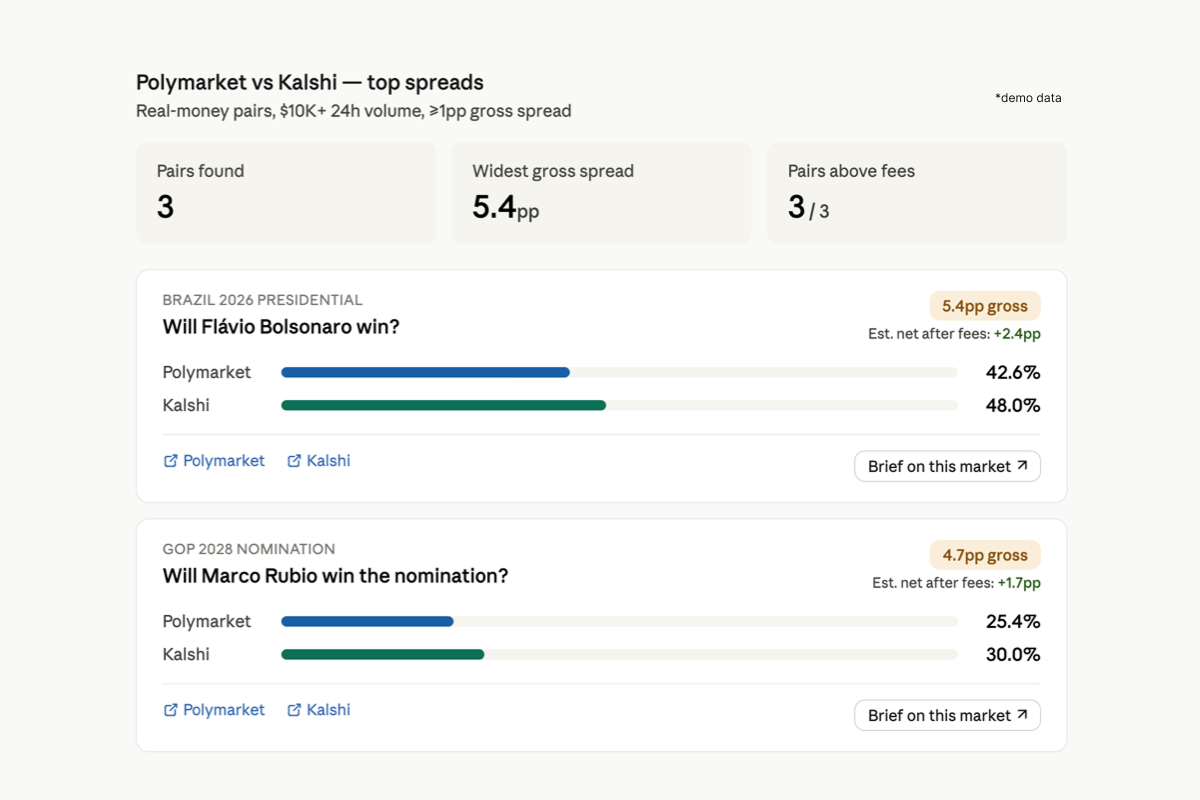
Parlay is a hosted MCP server for searching, comparing, and briefing prediction markets from AI assistants. It is a PMXT-backed aggregator over Polymarket, Kalshi, and Limitless, with Manifold treated separately as a sentiment-only signal. This repository is the public bundle and connection reference for the hosted Parlay service at https://mcp.parlay.run/mcp; it does not contain the MCP server implementation.
What it does
| Tool | What it does |
|---|---|
search_markets |
Cross-venue keyword search for live prediction markets and event contracts |
market_brief |
Synthesized brief on a topic, combining real-money signals with community sentiment |
discover_markets |
Browse trending, high-volume, fast-moving, or high-disagreement markets |
compare_markets |
Compare the same event contract across venues side-by-side — probability, liquidity, settlement |
scan_discrepancies |
Surface cross-venue price discrepancies as a discovery feed (informational, not trade recommendations) |
inspect_platform |
Drill into a single named venue |
Every tool response carries unified metadata: data freshness, venues queried, venues failed, market type (real_money / sentiment / mixed), match confidence (high / medium / low / not_applicable), liquidity status, risk flags, and a standard non-trade-recommendation disclaimer.
Connect
Parlay supports two connection paths depending on your client.
Path A — Claude.ai (Desktop, web, mobile, Cowork)
Parlay connects through Claude's Custom Connectors interface. The same flow works across all Claude surfaces.
- Open Claude settings (profile icon → Settings).
- In the sidebar, select Connectors.
- Scroll to the bottom and click Add custom connector.
- Enter URL:
https://mcp.parlay.run/mcp - Click Add, then Connect to complete OAuth authorization.
Parlay's tools will appear in your tool list on the next message.
Note: Custom Connectors are available on Free, Pro, Max, Team, and Enterprise plans. Free Claude users are limited to one custom connector at a time. Do not configure Parlay through
claude_desktop_config.json— that file is for local stdio MCP servers only; Parlay is a remote MCP server.
Path B — OpenClaw, Cursor, Cline, Claude Code, LobeHub, and other JSON-config clients
These clients read MCP server configuration from a JSON file and don't run an OAuth dance themselves. Use a personal access token instead.
- Generate a token at https://parlay.run/settings/tokens
- Export it:
export PARLAY_TOKEN=parlay_pat_xxxxxxxxxxxx
Security: Treat your token as a secret. Do not share, log, or commit it. Store it only in your local MCP client configuration.
Cline
Recommended: Use Cline's Remote Servers tab → "Add Server", entering https://mcp.parlay.run/mcp as the URL, selecting Streamable HTTP as the Transport Type, and adding Authorization: Bearer <your token> as a header.
For manual JSON editing or detailed troubleshooting, see llms-install.md. Do not copy .mcp.json verbatim into Cline — Cline uses a slightly different schema (covered in the install guide).
OpenClaw
git clone https://github.com/parlay-run/parlay-mcp.git
openclaw plugins install ./parlay-mcp
openclaw gateway restart
Cursor / Claude Code
Drop the parlay entry from .mcp.json (at the root of this repo) into your client's MCP server config.
{
  "mcpServers": {
    "parlay": {
      "url": "https://mcp.parlay.run/mcp",
      "transport": "streamable-http",
      "headers": {
        "Authorization": "Bearer ${PARLAY_TOKEN}"
      }
    }
  }
}
Coverage
- Real-money: Polymarket, Kalshi, Limitless
- Sentiment (architecturally separated): Manifold
- Catalog-only: Smarkets, Myriad, Metaculus, Probable, Baozi
Compliance posture
- Read-only. No order placement, no position management, no fund custody.
- No private credentials handled. Users never share venue API keys with Parlay.
- Sentiment isolation. Manifold is mechanically excluded from real-money tools (
compare_markets,scan_discrepancies). Thesentiment_market_excludedrisk flag is emitted whenever it is filtered out. - Settlement and liquidity risk flags. Markets with weak settlement criteria, missing volume data, or stale signals carry explicit risk flags in their metadata.
- Standard disclaimers. Every tool response carries a non-trade-recommendation disclaimer in its metadata block.
                  Claude / ChatGPT / Gemini / OpenClaw
                              ↕  (MCP over HTTPS)
                    ┌────────────────────┐
                    │  mcp.parlay.run    │
                    │   (this server)    │
                    └────────┬───────────┘
                             │
                ┌────────────┴────────────┐
                ↓                         ↓
       Real-money data layer    Sentiment data layer
       Polymarket, Kalshi       Manifold
       + secondary venues       (isolated)
Pricing
- Free: 15 tool calls / month (search_markets, market_brief)
- Pro: $29/mo, 150 calls / month
- Team: coming soon, 1,500 calls / month
Built on
Parlay's real-money venue access is built on PMXT, an open-source unified SDK for prediction market venues. Parlay adds the AI intelligence layer on top: event comparability, settlement-risk metadata, sentiment isolation, and tool orchestration for MCP. PMXT trading methods are explicitly not exposed by Parlay — the hosted product is read-only by design.
Resources
- parlay.run
- Server endpoint: https://mcp.parlay.run/mcp
License
This repository — including connection examples, metadata, and client configuration files for the hosted Parlay MCP service — is licensed under the MIT License. See LICENSE. The repository/service licensing split is also described in TERMS.md.
The hosted Parlay service at mcp.parlay.run, Parlay brand assets, APIs, data products, pricing, accounts, and service outputs are proprietary and governed by the Parlay Terms of Service: https://www.parlay.run/terms-of-service.
Установка Parlay
У этого сервера нет опубликованного пакета — он собирается из исходников. Открой репозиторий и следуй инструкции в README.
▸ github.com/parlay-run/parlay-mcpFAQ
Parlay MCP бесплатный?
Да, Parlay MCP бесплатный — установка в пару кликов через Unyly без оплаты.
Нужен ли API-ключ для Parlay?
Нет, Parlay работает без API-ключей и переменных окружения.
Parlay — hosted или self-hosted?
Доступен hosted-вариант: Unyly запускает сервер в облаке, локальная установка не обязательна.
Как установить Parlay в Claude Desktop, Claude Code или Cursor?
Открой Parlay на unyly.org, выбери вкладку своего клиента (Claude Desktop, Claude Code, Cursor) и нажми Install — конфиг сгенерируется автоматически, без правки JSON.
Похожие MCP
Fetch
Web content fetching and conversion for efficient LLM usage.
AWS KB Retrieval
Retrieval from AWS Knowledge Base using Bedrock Agent Runtime.
 автор: modelcontextprotocol
Spring AI MCP Server
Provides auto-configuration for setting up an MCP server in Spring Boot applications.
llm-analysis-assistant
A very streamlined mcp client that supports calling and monitoring stdio/sse/streamableHttp, and can also view request responses through the /logs page. It also
 автор: xuzexin-hz
Compare Parlay with
Не уверен что выбрать?
Найди свой стек за 60 секунд
Автор?
Embed-бейдж для README
Похожее
Все в категории ai