
Participant
БесплатноНе проверенEnables CTF players to list challenges, retrieve challenge details, view the scoreboard, and submit flags.

Описание
Enables CTF players to list challenges, retrieve challenge details, view the scoreboard, and submit flags.
README
This repository starts from CTFd 3.8.7 and adds three public components:
- A transactional solve outbox for CTFd.
- A Rust event ledger service.
- A participant-only MCP service exposing
ctf_list_challenges,ctf_get_challenge,ctf_get_scoreboard, andctf_submit_flag.
Staff and administrative operations are outside the participant MCP. The original CTFd README follows.


 MajorLeagueCyber Discourse
Documentation Status
MajorLeagueCyber Discourse
Documentation Status
What is CTFd?
CTFd is a Capture The Flag framework focusing on ease of use and customizability. It comes with everything you need to run a CTF and it's easy to customize with plugins and themes.
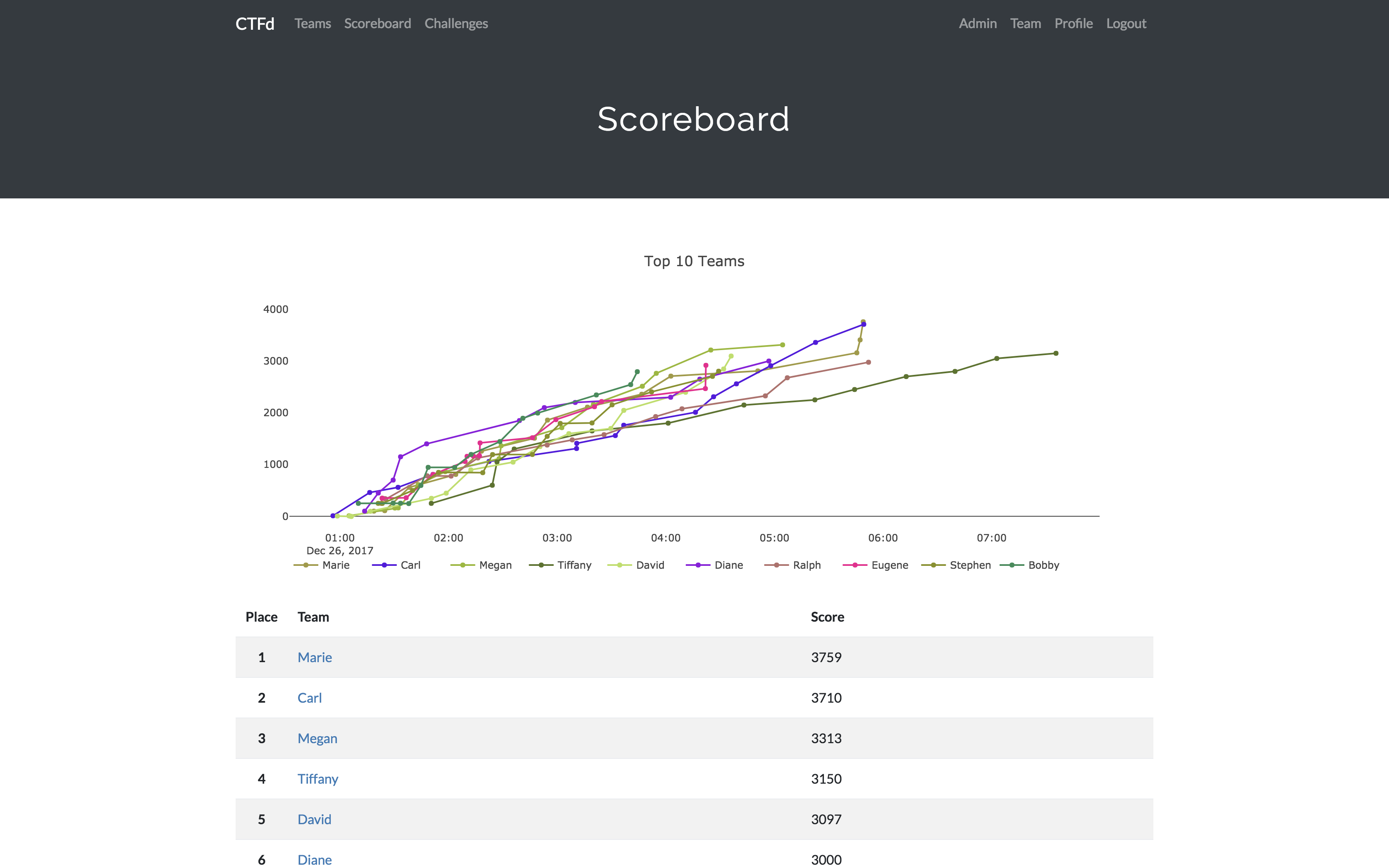
Features
- Create your own challenges, categories, hints, and flags from the Admin Interface
- Dynamic Scoring Challenges
- Unlockable challenge support
- Challenge plugin architecture to create your own custom challenges
- Static & Regex based flags
- Custom flag plugins
- Unlockable hints
- File uploads to the server or an Amazon S3-compatible backend
- Limit challenge attempts & hide challenges
- Automatic bruteforce protection
- Individual and Team based competitions
- Have users play on their own or form teams to play together
- Scoreboard with automatic tie resolution
- Hide Scores from the public
- Freeze Scores at a specific time
- Scoregraphs comparing the top 10 teams and team progress graphs
- Markdown content management system
- SMTP + Mailgun email support
- Email confirmation support
- Forgot password support
- Automatic competition starting and ending
- Team management, hiding, and banning
- Customize everything using the plugin and theme interfaces
- Importing and Exporting of CTF data for archival
- And a lot more...
Install
- Install dependencies:
pip install -r requirements.txt- You can also use the
prepare.shscript to install system dependencies using apt.
- You can also use the
- Modify CTFd/config.ini to your liking.
- Use
python serve.pyorflask runin a terminal to drop into debug mode.
You can use the auto-generated Docker images with the following command:
docker run -p 8000:8000 -it ctfd/ctfd
Or you can use Docker Compose with the following command from the source repository:
docker compose up
Check out the CTFd docs for deployment options and the Getting Started guide
Live Demo
Support
To get basic support, you can join the MajorLeagueCyber Community: MajorLeagueCyber Discourse
If you prefer commercial support or have a special project, feel free to contact us.
Managed Hosting
Looking to use CTFd but don't want to deal with managing infrastructure? Check out the CTFd website for managed CTFd deployments.
MajorLeagueCyber
CTFd is heavily integrated with MajorLeagueCyber. MajorLeagueCyber (MLC) is a CTF stats tracker that provides event scheduling, team tracking, and single sign on for events.
By registering your CTF event with MajorLeagueCyber users can automatically login, track their individual and team scores, submit writeups, and get notifications of important events.
To integrate with MajorLeagueCyber, simply register an account, create an event, and install the client ID and client secret in the relevant portion in CTFd/config.py or in the admin panel:
OAUTH_CLIENT_ID = None
OAUTH_CLIENT_SECRET = None
Credits
- Logo by Laura Barbera
- Theme by Christopher Thompson
- Notification Sound by Terrence Martin
Установка Participant
У этого сервера нет опубликованного пакета — он собирается из исходников. Открой репозиторий и следуй инструкции в README.
▸ github.com/KernelKittens/ctf-event-kitFAQ
Participant MCP бесплатный?
Да, Participant MCP бесплатный — установка в пару кликов через Unyly без оплаты.
Нужен ли API-ключ для Participant?
Нет, Participant работает без API-ключей и переменных окружения.
Participant — hosted или self-hosted?
Доступен hosted-вариант: Unyly запускает сервер в облаке, локальная установка не обязательна.
Как установить Participant в Claude Desktop, Claude Code или Cursor?
Открой Participant на unyly.org, выбери вкладку своего клиента (Claude Desktop, Claude Code, Cursor) и нажми Install — конфиг сгенерируется автоматически, без правки JSON.
Похожие MCP
GitHub
PRs, issues, code search, CI status
 автор: GitHub
Filesystem
Secure file operations with configurable access controls.
Memory
Knowledge graph-based persistent memory system.
Template MCP Server
A CLI tool to create a new Model Context Protocol server project with TypeScript support, dual transport options, and an extensible structure
 автор: mcpdotdirect
Amap Maps Mcp Server
MCP server for using the AMap Maps API
 автор: duxiaohui
Supabase
Database, auth and storage
 автор: Supabase
Everything
Reference / test server with prompts, resources, and tools.
Git
Tools to read, search, and manipulate Git repositories.
Sequential Thinking
Dynamic and reflective problem-solving through thought sequences.
Time
Time and timezone conversion capabilities.
Compare Participant with
Не уверен что выбрать?
Найди свой стек за 60 секунд
Автор?
Embed-бейдж для README
Похожее
Все в категории development