
Password Generator Server
БесплатноНе проверенEnables generating secure passwords, exposing password policies, and providing reusable prompt templates for secure password creation through MCP primitives.

Описание
Enables generating secure passwords, exposing password policies, and providing reusable prompt templates for secure password creation through MCP primitives.
README
A simple Model Context Protocol (MCP) server built using the Python MCP SDK to demonstrate the three core MCP Primitives:
- 🛠️ Tools – Generate a secure password.
- 📄 Resources – Expose a password policy.
- 💡 Prompts – Provide a reusable prompt template for generating secure passwords.
This project accompanies my Medium article on MCP Inspector and MCP Primitives, providing a hands-on example to help you understand how these concepts work together.
Project Structure
MCP-INSPECTOR/
│
├── prompts/
│   ├── __init__.py
│   └── password_prompt.py
│
├── resources/
│   ├── __init__.py
│   └── password_resource.py
│
├── tools/
│   ├── __init__.py
│   └── password_tool.py
│
├── .gitignore
├── .python-version
├── app.py
├── pyproject.toml
├── README.md
├── server.py
└── uv.lock
Project Overview
- app.py – Creates the FastMCP server instance.
- server.py – Entry point that registers all MCP primitives and starts the server.
- tools/password_tool.py – Implements the Password Generator Tool.
- resources/password_resource.py – Exposes the Password Policy Resource.
- prompts/password_prompt.py – Defines the reusable Prompt template.
- pyproject.toml – Project configuration and project dependencies.
- uv.lock – Lock file generated by UV.
- README.md – Project documentation.
Clone the Repository
Clone the repository to your local machine.
git clone <YOUR_GITHUB_REPOSITORY_LINK>
Navigate to the project directory.
cd MCP-INSPECTOR
Synchronize and install all project dependencies.
uv sync
Activate the virtual environment.
Windows
.venv\Scripts\activate
Running the MCP Server with MCP Inspector
Start the MCP server using:
mcp dev server.py
This command starts the MCP server and automatically launches MCP Inspector in your browser.
Using MCP Inspector you can:
- View all registered MCP primitives.
- Execute Tools.
- Read Resources.
- Test Prompt templates.
- Validate your MCP server before integrating it with an MCP client.
Screenshot: MCP Inspector Home Page
Testing the Tool
Open the Tools section inside MCP Inspector.
Select generate_password and provide the required inputs such as:
- Password Length
- Include Special Characters
Execute the Tool to generate a secure password.
Screenshot: Password Generator Tool
Screenshot: Generated Password Output
Testing the Resource
Open the Resources section.
Select the password://policy resource.
The server returns the password policy and security recommendations exposed by the MCP server.
Screenshot: Password Policy Resource
Testing the Prompt
Navigate to the Prompts section.
Select create_secure_password_prompt.
Provide an account type such as:
- Banking
- Social Media
The Prompt generates a reusable instruction template for creating a secure password.
Screenshot: Prompt Execution
Installing the MCP Server in Claude Desktop
Open a new terminal and run:
mcp install server.py
Once the installation is complete, restart Claude Desktop if it is already running.
Claude Desktop will automatically discover the MCP server and its registered primitives.
You can now interact with the server using natural language.
For example:
Generate a strong password for my email.
or
Show me the password policy.
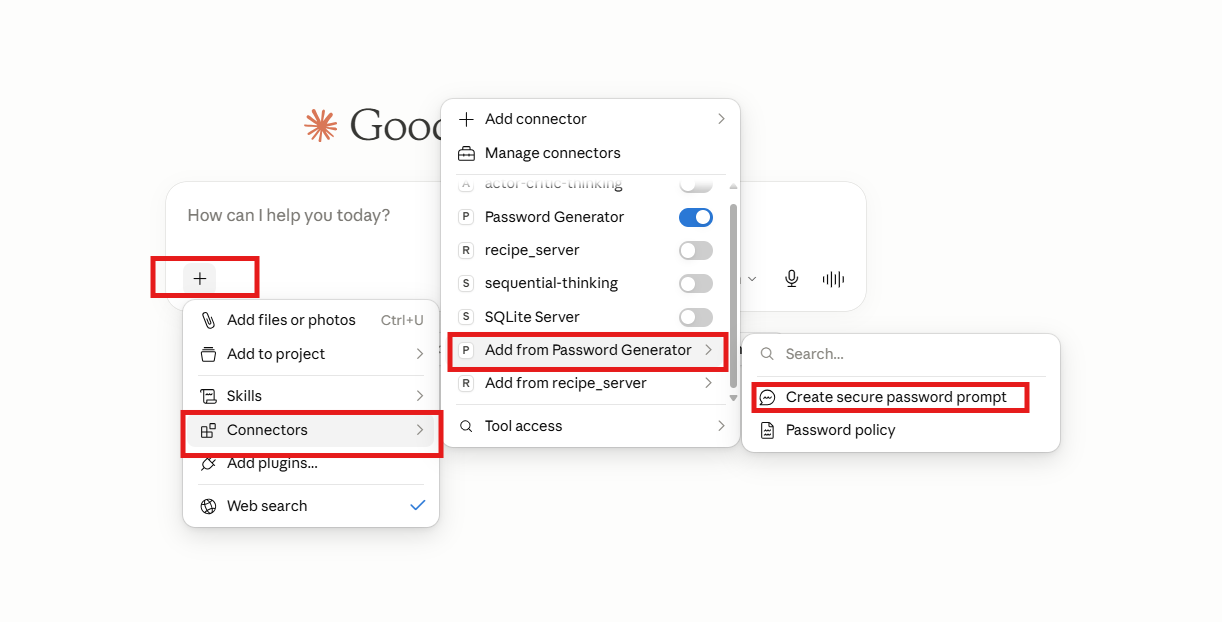 Claude Desktop Detecting the MCP Server
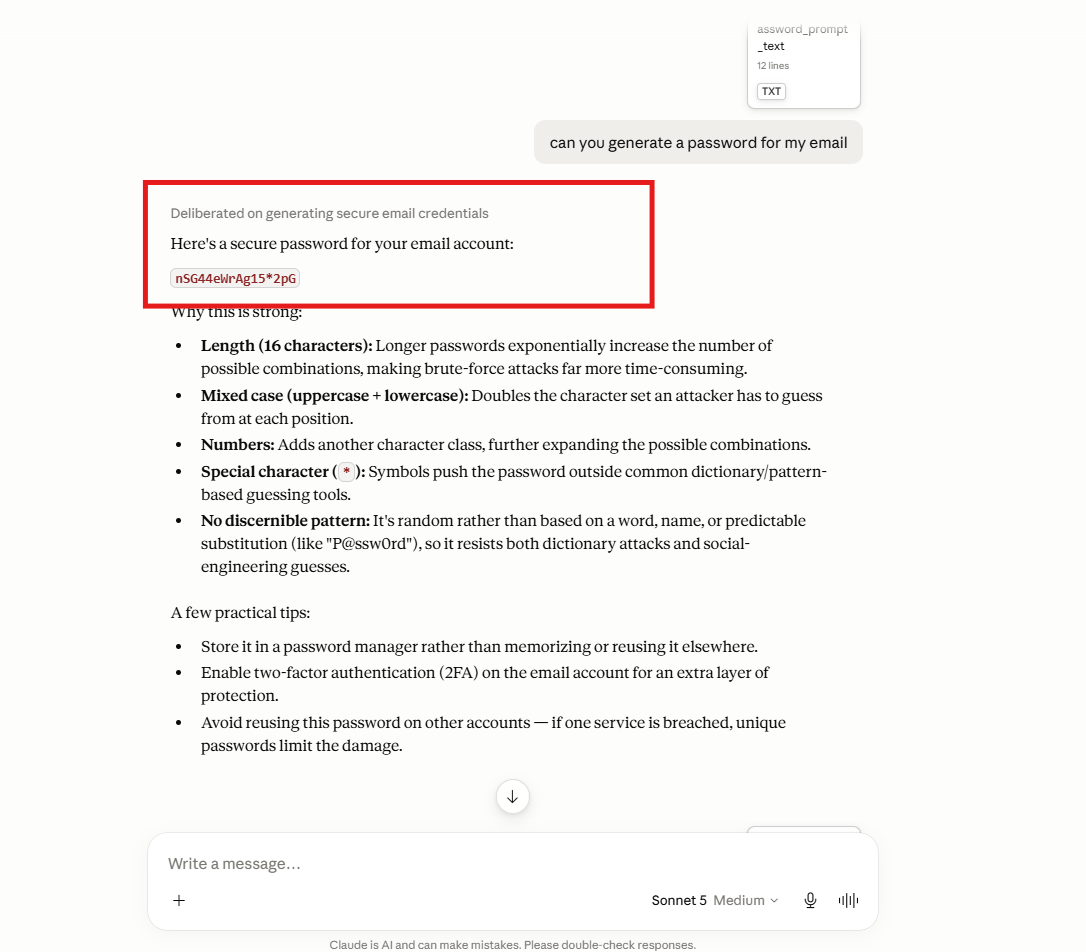 Claude Desktop Invoking the Password Generator Tool
Creating an MCP Project from Scratch
If you'd like to build your own MCP server from scratch, follow these steps.
1. Initialize a UV Project
uv init
2. Create a Virtual Environment
uv venv
3. Activate the Virtual Environment
Windows
.venv\Scripts\activate
4. Install the MCP SDK
uv add "mcp[cli]"
5. Start MCP Inspector
mcp dev server.py
6. Install the MCP Server in Claude Desktop
Open a new terminal and run:
mcp install server.py
MCP Primitives Included
🛠️ Tool
generate_password()
Generates a secure password with configurable length and optional special characters.
📄 Resource
password://policy
Returns the password generation policy and recommended password security practices.
💡 Prompt
create_secure_password_prompt()
Creates a reusable prompt template for generating a secure password for a specified account type.
Medium Article
If you're new to MCP and would like a detailed explanation of MCP Inspector and MCP Primitives, check out my accompanying Medium article.
Установка Password Generator Server
У этого сервера нет опубликованного пакета — он собирается из исходников. Открой репозиторий и следуй инструкции в README.
▸ github.com/raki0230/mcp-inspector-and-primitivesFAQ
Password Generator Server MCP бесплатный?
Да, Password Generator Server MCP бесплатный — установка в пару кликов через Unyly без оплаты.
Нужен ли API-ключ для Password Generator Server?
Нет, Password Generator Server работает без API-ключей и переменных окружения.
Password Generator Server — hosted или self-hosted?
Self-hosted: сервер запускается локально на твоей машине командой из раздела установки.
Как установить Password Generator Server в Claude Desktop, Claude Code или Cursor?
Открой Password Generator Server на unyly.org, выбери вкладку своего клиента (Claude Desktop, Claude Code, Cursor) и нажми Install — конфиг сгенерируется автоматически, без правки JSON.
Похожие MCP
GitHub
PRs, issues, code search, CI status
 автор: GitHub
Filesystem
Secure file operations with configurable access controls.
Memory
Knowledge graph-based persistent memory system.
Template MCP Server
A CLI tool to create a new Model Context Protocol server project with TypeScript support, dual transport options, and an extensible structure
 автор: mcpdotdirect
Compare Password Generator Server with
Не уверен что выбрать?
Найди свой стек за 60 секунд
Автор?
Embed-бейдж для README
Похожее
Все в категории development